
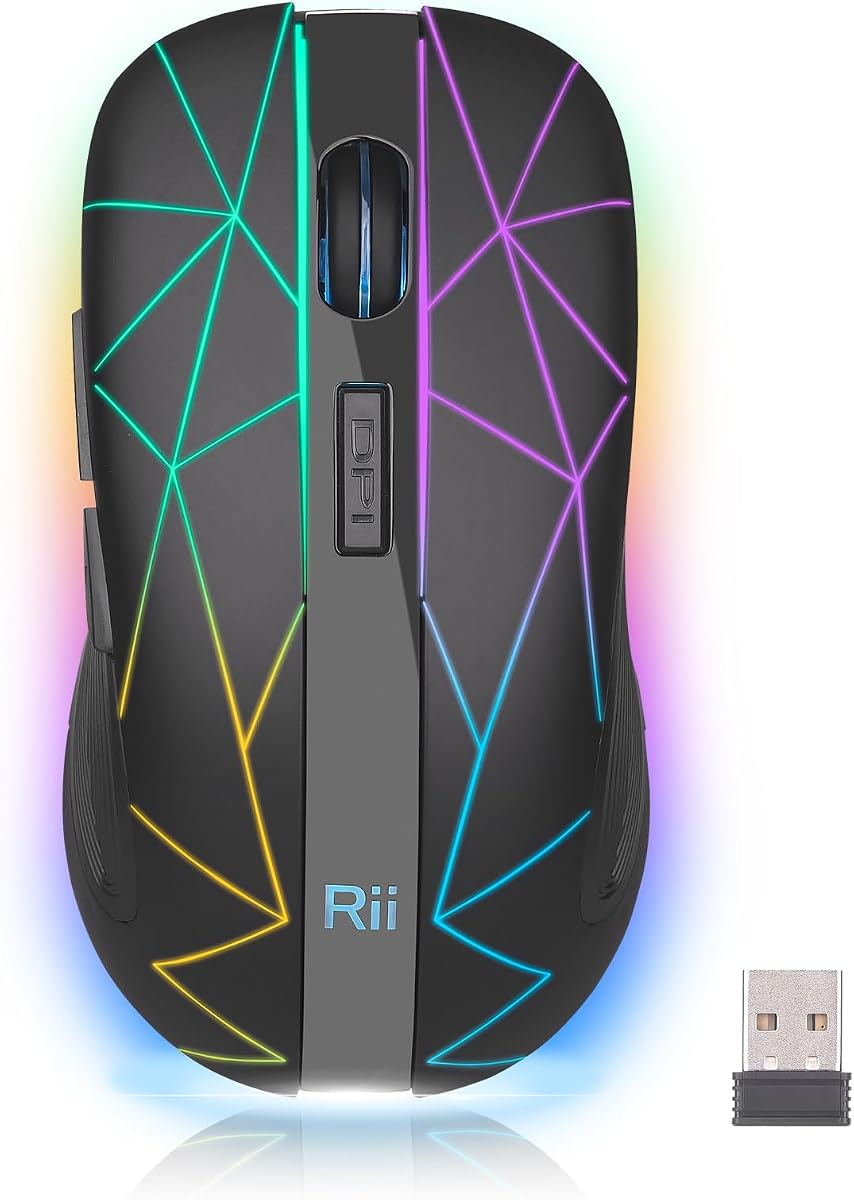
Wireless Gaming Mouse Rechargeable
4.3Editor score
Silent click buttons
Rechargeable battery life
7-color LED backlight
Discover the top 10 light up LED mouse models for gaming and work. We compare features, lighting effects, and performance to help you choose.
Finding the right light up LED mouse can transform your computing experience. Whether you need precise tracking for gaming or silent clicks for office work, illuminated mice offer style and functionality. This guide explores the best options available today to meet diverse user needs effectively.
We evaluated ten top-rated models based on connectivity, build quality, and lighting customization. Each product was assessed for ergonomic design, DPI adjustability, and battery life where applicable. Our goal is to provide a clear overview of features that matter most to buyers seeking reliable illuminated peripherals.
Each pick below highlights key strengths and ideal use cases for different scenarios. Please note that availability and specific features may vary by region or retailer. We recommend checking the latest product details before making a final purchase decision for your setup.
4.3Editor score

4.6Editor score

4.5Editor score
This side-by-side comparison highlights key specifications across all ten selected models. Review each feature set to find the device that aligns with your workflow and aesthetic preferences.




The BENGOO Gaming Mouse Wired stands out as a top choice for users seeking both style and performance. With a high user rating and robust build quality, it delivers a comfortable experience for long sessions. Its RGB backlit design adds a vibrant touch to any desk setup.
We may earn a commission when you buy through this link, at no additional cost to you.
This model features four adjustable DPI speeds ranging from 1200 to 3600 allowing you to switch between gaming and work tasks instantly. The six buttons including dedicated forward and back keys enhance productivity. The ergonomic shape fits naturally under your palm reducing strain over time.
While it requires a wired connection which may limit mobility for some users the stability it provides is excellent for competitive play. The lack of driver software simplifies installation but may limit advanced customization. Overall the trade-off is minimal for most casual and serious gamers.
We recommend this mouse for anyone prioritizing comfort and lighting aesthetics without needing wireless freedom. It works well with PCs and laptops running most common operating systems. Its reliable performance makes it a solid investment for daily use.
The skin-friendly material and contoured shape ensure you stay comfortable even during extended periods of use.
Multi-color lights provide a fancy gaming environment that highlights your game atmosphere effectively.
We may earn a commission when you buy through this link, at no additional cost to you.
This rechargeable wireless mouse offers exceptional value for users who want modern features without breaking the bank. Its silent click buttons make it ideal for shared spaces like offices or libraries. The vibrant rainbow backlight creates a visually stunning environment at night.
We may earn a commission when you buy through this link, at no additional cost to you.
You can adjust DPI levels between 2400 1600 and 1200 to control cursor speed effortlessly. The 2.4G wireless connection ensures stable data transmission with up to 10 meters of range. Additionally you can use it in wired mode while charging if you prefer a tethered setup.
The battery life is impressive lasting up to 25 days with lights off but lights on will reduce this time. Some users may find the light switch slightly small but it allows easy toggling when needed. The ergonomic design reduces hand fatigue making it suitable for all day use.
We suggest this mouse for budget-conscious buyers needing reliable wireless performance and silent operation. It supports multiple operating systems including Windows and Mac making it versatile. For its price point it delivers solid performance and aesthetic appeal.
The USB receiver stores inside the mouse keeping your workspace clutter-free and organized easily.
Noiseless clicking ensures you never disturb others around you in quiet environments.
We may earn a commission when you buy through this link, at no additional cost to you.
This wired gaming mouse distinguishes itself with unique laser carving technology and a metal flanking chassis. These premium features ensure the device is anti-drop and shockproof making it highly durable. The 7-color breathing light adds a sophisticated touch to your gaming setup.
We may earn a commission when you buy through this link, at no additional cost to you.
It offers four DPI options up to 3200 giving you precise control for different tasks. The ergonomic design fits your palm perfectly ensuring comfort during long sessions. The six buttons include essential controls for rapid switching between games or applications seamlessly.
While it is priced higher than some alternatives the build quality justifies the investment for durability seekers. The one-year warranty provides peace of mind regarding manufacturing defects. Some users might prefer wireless but the stability of wired is unmatched for competitive scenarios.
We recommend this for users who value robust construction and detailed aesthetics in their peripherals. It works with a wide range of systems from Windows to PS4. Its stable performance makes it a reliable choice for critical tasks.
Metal chassis and shockproof design protect against accidental drops and impacts effectively.
Adjustable DPI levels allow instant speed matching for various game types and work tasks.
We may earn a commission when you buy through this link, at no additional cost to you.
The HOTLIFE Wireless Mouse offers unique dual connectivity supporting both Bluetooth and 2.4G wireless modes. This flexibility lets you switch between devices easily which is great for multi-device workflows. Its slim profile makes it highly portable for travelers or those with limited desk space.
We may earn a commission when you buy through this link, at no additional cost to you.
With noiseless clicks it maintains a quiet environment perfect for offices or study areas. The built-in rechargeable battery lasts 8-10 days on a single charge lasting reducing waste from disposable batteries. The Desktop return button adds a handy productivity feature for quick navigation.
Some users with larger hands might find the compact design less comfortable but it suits average sizes well. The Bluetooth mode requires initial pairing but offers seamless connection once set up. The LED lights add fun without overwhelming the sleek look.
This model is best suited for professionals needing portability and versatile connection options. It supports various systems including Mac and Windows making it broadly compatible. The convenience of dual modes makes it a strong contender for mobile users.
Lightweight and slim size fits easily into laptop bags for on the go work.
Switch between Bluetooth and wireless receiver to match your current device needs quickly.
We may earn a commission when you buy through this link, at no additional cost to you.
This wired mouse delivers solid performance with a unique design combining 7-color glaring LED light. The circular and breathing modes highlight the atmosphere of gaming making it visually appealing. It offers precise optical tracking technology for accurate movements on various surfaces.
We may earn a commission when you buy through this link, at no additional cost to you.
Four adjustable DPI resolutions allow you to match mouse speed to game play demands instantly. The ergonomic shape plus scroll wheel provide comfortable handling for long periods. It supports USB 2.0 and 3.0 ports ensuring broad connectivity with most desktop systems.
While it lacks advanced software customization the plug and play nature simplifies setup for most users. The buttons are well-placed for efficient work tasks too. Users seeking deep customization might need a more feature-heavy model.
We suggest this for anyone needing a reliable and affordable option for games and office. It is compatible with a wide range of operating systems and devices. Its balance of features and price makes it a strong value pick.
Multiple colors glow at once creating a lively atmosphere for gaming sessions.
Optical tracking ensures sensitive and precise movement across different desk materials.
We may earn a commission when you buy through this link, at no additional cost to you.
This wireless gaming mouse offers stable 2.4G connection within 10 meters for smooth signal transmit. The silent click design ensures you do not bother others during quiet work or study. Its colorful LED lights change automatically to highlight the gaming atmosphere effectively.
We may earn a commission when you buy through this link, at no additional cost to you.
Built-in rechargeable battery means no need to swap batteries saving money and resources. The smart power-saving technology puts the mouse to sleep after eight minutes of inactivity. Three DPI levels meet needs for both work and most gaming scenarios efficiently.
Note that USB-C devices require an adapter which is not included in the package. The light mode may speed up battery consumption so consider turning it off when idle. The ergonomic design ensures comfortable use over time without fatigue.
We recommend this mouse for office users and gamers who prioritize silence and convenience. It supports multiple operating systems and gaming consoles. The rechargeable aspect makes it a practical choice for modern setups.
2.4G technology ensures smooth data transfer without lag or signal dropouts.
Quiet clicks keep the focus on tasks without distracting clicks in quiet spaces.
We may earn a commission when you buy through this link, at no additional cost to you.
This wireless mouse is designed for portability with a compact size that fits easily into laptop bags. The ergonomic contoured shape provides a better user experience even in a smaller form factor. Colorful RGB LED backlit effects create a cool atmosphere for work and play.
We may earn a commission when you buy through this link, at no additional cost to you.
Its built-in rechargeable battery extends life with intelligent sleep mode activation after five minutes. The 2.4GHz wireless transmission provides a powerful and reliable connection up to typical desktop ranges. Three-level adjustable DPI allows free control over cursor speed based on tasks.
Because of its small size it may be less comfortable for users with larger hands. However for travel or small desks it is an excellent choice. The plug and play design simplifies setup without needing drivers.
We suggest this for travelers or those with limited desk space needing reliable wireless functionality. It supports multiple systems including Windows and Mac. Its compact nature makes it a great travel companion for professionals.
Compact size and smooth control make it ideal for taking on the go.
Auto sleep mode saves power ensuring longer usage between charges.
We may earn a commission when you buy through this link, at no additional cost to you.
The TENMOS M2 Wireless Gaming Mouse features a built-in rechargeable battery eliminating the need for disposable ones. It provides stable wireless transmission using advanced 2.4G technology with up to 10m range. The silent click buttons allow you to focus on work without distraction.
We may earn a commission when you buy through this link, at no additional cost to you.
It offers cool and soft LED lighting that changes randomly to create a fancy atmosphere. The ergonomic shape ensures maximum comfort with smooth skin-friendly materials for long-term use. You can use the mouse while it is charging for uninterrupted workflow.
First time users should charge the mouse for about two hours before initial use. The light can be turned off by a bottom switch if ambient lighting is not needed. The tracking accuracy is high ensuring precise movements for games or office tasks.
We recommend this for users seeking a balanced wireless solution with rechargeable convenience. Its silent nature makes it great for shared environments. The combination of comfort and performance makes it a strong contender.
Skin-friendly materials and ergonomic shape prevent fatigue during long sessions.
Accurate CPI switching allows meeting different precision needs easily.
We may earn a commission when you buy through this link, at no additional cost to you.
This wireless mouse stands out for its super comfortable design and colorful breathing light that changes randomly. It will fall asleep after ten minutes of no-operation to save power ensuring long-term usage. Silent clicks keep you focused while working or studying without noise interruptions.
We may earn a commission when you buy through this link, at no additional cost to you.
Advanced 2.4G wireless lag-free technology allows working distance of up to 10m with stable transmission. The rechargeable battery comes with a charging cable reducing waste from disposable cells. Three CPI levels meet various needs for high precision control.
The LED switch allows easy manual control of lights if needed. Some users might prefer auto-off features but manual control offers flexibility. The universal compatibility ensures it works with most laptops and desktop computers.
We suggest this for users prioritizing comfort and battery efficiency in a wireless format. It supports Windows and Mac systems broadly. Its reliable performance makes it suitable for daily professional or gaming use.
Auto sleep mode extends usage by powering down when idle for periods.
Ergonomic design ensures a comfortable feel for extended daily usage.
We may earn a commission when you buy through this link, at no additional cost to you.
The Guiheng Dual Mode Mouse supports Bluetooth and 2.4G wireless connection for maximum flexibility. This allows you to plug in the USB receiver for easy setup or use Bluetooth for a cleaner look. Built-in rechargeable battery ensures you do not need to change batteries regularly.
We may earn a commission when you buy through this link, at no additional cost to you.
Unique lightning crackle design combines with 7-color breathing LED light for a striking visual effect. Six buttons including adjustable DPI provide efficient work and gaming capability. Silent buttons ensure no disturbance while using in shared spaces.
Be aware that light mode will speed up battery consumption so turn it off when not needed. The mouse enters auto sleep mode after eight minutes of inactivity. Comfortable skin-friendly materials offer maximum comfort for long sessions.
We recommend this for users who need versatile connectivity options for multiple devices. It works well with Windows Mac and iOS systems. The combination of dual modes and lighting makes it a versatile choice for modern setups.
Switch between Bluetooth and wireless receiver for different device types easily.
Lightning crackle design adds unique style to your desk setup.
We may earn a commission when you buy through this link, at no additional cost to you.
Selecting the right light up LED mouse involves evaluating several key factors to ensure it meets your specific needs.
Determine if you prefer a wired connection for zero latency or wireless for freedom. Wireless options use 2.4G or Bluetooth which offer convenience but rely on batteries or charging.
Choose wired for competitive gaming and wireless for a clean desk setup.
Light up LED mice come with various effects such as breathing color cycling or static modes. Some allow software customization while others have fixed physical switches for toggling.
Consider if lighting affects battery life significantly and if you need it off for quiet environments.
Comfort is critical for long use. Look for shapes that fit your palm size and offer supportive materials. Ergonomic designs reduce strain on your wrist and hand during extended periods.
Test the grip and shape virtually or check dimensions before buying to ensure comfort.
DPI stands for dots per inch and determines cursor sensitivity. Adjustable DPI lets you switch speeds for gaming and precise office work. Levels range from 800 to 3600 or more.
Higher DPI is useful for large screens while lower DPI aids in precise tasks.
For wireless models check the rechargeable battery capacity and estimated hours of use. Some features like lighting can drain power faster so look for smart sleep modes.
Longer battery life ensures you can use the device for days without constant charging.
Silent click technology reduces noise significantly which is vital for offices or libraries. It prevents distractions while you are working or studying in shared spaces.
Opt for silent models if you need to maintain a quiet environment around others.
Durability ensures your device lasts. Look for sturdy materials such as metal chassis or reinforced plastic. Good build quality prevents wear and tear from daily use.
Check warranty terms and customer reviews regarding longevity to make a sound choice.
Ensure the mouse works with your operating system whether Windows Mac or Linux. Some advanced features may require specific drivers that might not be available on all systems.
Verify compatibility lists before purchasing to avoid functionality issues on your device.
Start by charging your wireless mouse fully before first use. For wired models simply plug into an available USB port and wait for the OS to recognize it. If your device uses Bluetooth ensure you pair it via settings before switching to 2.4G mode.
Adjust the DPI settings according to your current task. Lower DPI is better for precision work while higher DPI helps with fast movements in gaming. Use the dedicated button to switch modes instantly without needing software.
Clean your mouse regularly with a soft cloth to remove dust and oils. Store it in a cool dry place to protect battery health. For wireless models avoid leaving it in sleep mode for weeks without charging.
Most models use a physical button to cycle through lighting modes or toggle them off. Check the user manual for specific button locations as they vary. Some require software for color changes but many offer quick hardware toggles.
Most options listed support Mac OS for basic clicking and scrolling. Advanced features like RGB customization may have limited support. Always verify system requirements on the product page before purchasing.
Battery life varies by model and usage but typical ranges are 10 to 25 days. Using LED lights continuously will reduce this time. Smart sleep modes help extend usage between charges.
Yes most rechargeable models allow usage while plugged in. This ensures you never lose productivity due to a depleted battery. Just ensure the cable is connected securely during operation.
2.4G uses a USB receiver for stable connection while Bluetooth connects directly to device ports. Bluetooth is often more universal but 2.4G may offer slightly lower latency. Choose based on your device's ports and needs.
Cursor jumping often results from low battery or surface issues. Try recharging the device or using a mousepad with a solid texture. Clean the sensor on the bottom if dust is present.
Many models reset by disconnecting the receiver or turning off the device for a few minutes. Check the manual for specific reset combinations if available. Some require re-pairing for Bluetooth connections.
Most basic models do not have software programming for macros. Some higher-end options may offer software for remapping keys. Check the product description for software support if this feature is important to you.
The ten models reviewed provide a wide range of options for various needs from wireless to wired. The BENGOO and rechargeable wireless models stand out for their balance of features and performance. Each product offers unique strengths suitable for gamers or office workers.
When making your choice prioritize factors like connectivity comfort and battery life. Decide if lighting effects are essential or just a bonus feature. Ensure the DPI range matches your specific workflow requirements for efficiency.
Always verify current product details and availability before buying. Prices and stock levels change regularly. We hope this guide helps you select the perfect light up LED mouse for your setup.