
SOLICE A1175 A1260 A1211 A1226 A1150
4.2Editor score
CE FCC RoHS certified
30 days money return
Overcharge protection included
When your old laptop battery fades, finding a reliable A1175 battery replacement becomes essential for restoring daily productivity. A good replacement offers stable voltage, safe charging cycles, and accurate compatibility with your specific MacBook Pro model year to ensure seamless performance without unexpected shutdowns.
We analyzed ten highly rated third party battery options based on customer feedback, technical specifications, and safety certifications. Each entry was evaluated for cell quality, warranty coverage, and real world longevity to help you identify the most trustworthy power source for your aging MacBook Pro hardware.
Every pick in this list shows key specs, pros and cons, and direct links to verified listings. Prices and stock levels change frequently, so always check the current details on the product page before purchasing to ensure you get the best deal available right now.
4.2Editor score

4.3Editor score

4.1Editor score
As an Amazon Associate we earn from qualifying purchases.
This side by side comparison table summarizes key specifications and features for all ten products reviewed in this guide to help you quickly identify the right fit for your MacBook Pro 15 inch model.


This battery leads the list with a solid 4.3 star rating and comprehensive safety certifications. It offers 5800mAh capacity and is designed specifically for older 2006 to 2008 MacBook Pro 15 inch models. Users report consistent power delivery during daily tasks without sudden shutdowns.
We may earn a commission when you buy through this link, at no additional cost to you.
The inclusion of Grade A cells ensures better long term stability compared to cheaper alternatives. Multi-layer safety protections guard against overcharge and overheating which is crucial for older laptops with degraded internal components. The 12 month quality assurance adds confidence for buyers seeking extended protection.
While it may be slightly heavier than original Apple batteries, the tradeoff delivers longer usage time between charges. Some users note the fit requires careful alignment of the connector but once seated it performs reliably. This model suits those needing a dependable upgrade for vintage hardware.
If you own an A1260 or A1150 MacBook Pro, this battery provides a straightforward power refresh. Prioritize checking compatibility with your exact model number before ordering to avoid mismatched connectors. It remains a top choice for balancing performance and safety in the replacement market.
The 5800mAh capacity allows for hours of productivity without needing a power outlet during travel or meetings.
Built-in protections prevent overheating and short circuits ensuring safe operation even if the laptop charger has issues.
We may earn a commission when you buy through this link, at no additional cost to you.
SOLICE delivers a reliable budget option without sacrificing essential safety features like CE and FCC certification. The battery maintains 10.8V and 5800mAh specs matching the original design requirements for older MacBook Pro units. Its 30 day money return policy makes it low risk for cautious buyers.
We may earn a commission when you buy through this link, at no additional cost to you.
Customers appreciate the inclusion of overcharger and discharger circuit protection which helps preserve both the battery and motherboard health. The 68Wh energy density ensures you get meaningful runtime improvements over a worn out stock battery. It is an excellent choice for basic tasks like browsing or document editing.
The main drawback is the packaging which tends to be simpler than premium brands. Additionally the cycle life might not match high end options but for most users it is sufficient. Regular calibration after installation can help maintain accurate battery percentage readings on your macOS system.
Choose this if you need a cost effective solution for an older machine that no longer justifies expensive repairs. Always verify your specific model number matches the compatibility list to ensure a perfect physical fit. This option keeps your legacy hardware running longer without breaking the bank.
Priced lower than many competitors while still meeting essential safety and performance standards for daily use cases.
CE FCC and RoHS marks indicate compliance with international standards for electrical safety and environmental impact.
We may earn a commission when you buy through this link, at no additional cost to you.
This upgrade model features a specialized chip designed to optimize power delivery and extend total cycle count. It targets users who want better longevity from their replacement battery compared to standard options. The manufacturer offers 24×7 email support for troubleshooting which adds peace of mind.
We may earn a commission when you buy through this link, at no additional cost to you.
While the capacity is slightly lower at 4200mAh, the efficiency gains from the upgraded chip often balance out real world usage. The 500 plus recharge cycles promise a longer effective lifespan than cheaper alternatives. Safety certifications like CE and FCC ensure reliable performance under varying conditions.
Some buyers might find the capacity lower than others but the focus is on stability and consistent power output. The free exchange policy for defective units demonstrates confidence in manufacturing quality. Proper charging habits can further maximize the battery potential over its life.
Select this if you value support and advanced features over raw capacity metrics. It is ideal for frequent users who rely on their MacBook daily for work or study. Confirm your model year falls within the supported range to avoid fitment issues during installation.
Integrated circuitry manages power flow more efficiently reducing unnecessary heat and improving overall battery longevity.
Round the clock email assistance helps resolve technical questions quickly ensuring minimal downtime for your setup.
We may earn a commission when you buy through this link, at no additional cost to you.
This listing highlights a different model A1527 but provides a useful comparison for users seeking high capacity options. It targets the 12 inch Retina MacBook with 1500 plus recharge cycles and full safety certifications. The included screwdrivers and instructions simplify the DIY replacement process significantly.
We may earn a commission when you buy through this link, at no additional cost to you.
With 5263mAh capacity and 7.55V, this battery is optimized for the newer 12 inch chassis. The 4.0 technology upgrade aims to reduce power consumption and improve charging speeds. UL certification adds an extra layer of trust regarding electrical safety and reliability.
While it does not fit the A1175 models it is worth noting for those with newer hardware looking for upgrades. The included tools eliminate the need to buy separate kits which saves time and money. Some users report improved battery life after installation over previous worn units.
Keep this in mind if you own a 12 inch MacBook Retina and need a robust power solution. For the A1175, stick to the models listed in the top picks. The high cycle count suggests long term durability for frequent users needing stable power.
Two screwdrivers and step by step instructions make the replacement process straightforward for first time installers.
Rated for over 1500 recharge cycles it offers significantly longer lifespan than standard replacements on the market.
We may earn a commission when you buy through this link, at no additional cost to you.
Futurebatt offers a well constructed battery for the 12 inch Retina MacBook with Grade A cells for faster charging. It includes multiple protection systems against over temperature and short circuits ensuring stable operation. The friendly customer service approach aims to resolve issues quickly for buyers.
We may earn a commission when you buy through this link, at no additional cost to you.
The 500 charge cycle rating aligns with industry standards for quality aftermarket batteries. Voltage and capacity figures match the original design requirements for this specific chassis. The 12 month replacement warranty provides security against early failures during normal usage.
Like other non A1175 options, this is primarily for 12 inch Retina users. The brand emphasizes fast charging and low power consumption which are critical for thin laptops. Users appreciate the comprehensive support and return policies when shopping for niche parts.
If you are searching for a replacement for a 12 inch model, this is a strong candidate. For A1175 compatibility, verify the model number before purchasing. The focus on safety and service quality makes it a reputable choice in its segment.
Sourcing Grade A cells ensures better chemical stability and reduces risks of swelling or sudden power loss.
Overcharge and short circuit protections prevent damage to internal components even under adverse electrical conditions.
We may earn a commission when you buy through this link, at no additional cost to you.
iFixit is a trusted name in repair with this battery designed for the 15 inch Retina Pro. It offers a massive 76 Wh capacity and 6667mAh to extend runtime significantly. The adhesive included helps secure the battery properly which is key for newer laptops.
We may earn a commission when you buy through this link, at no additional cost to you.
Users value the brand's commitment to safety and quality which reduces risk of swelling or poor fit. The 1 year warranty provides coverage against defects ensuring long term reliability. While not for A1175, it sets a benchmark for what to expect in replacement parts.
The higher cost reflects the brand reputation and the included hardware like adhesive sheets. Some users note that installing batteries in sealed laptops requires careful prying to avoid case damage. Proper tools are essential for a successful and safe replacement procedure.
Choose this for Retina models if you want a high quality solution with trusted support. For older A1175 units, check the specific model compatibility lists. The extra capacity and safety measures justify the premium for professional users.
With 76 Wh capacity this unit delivers extended runtime suitable for long work sessions away from outlets.
Inclusion of adhesive helps ensure the new battery stays in place without risking damage during use.
We may earn a commission when you buy through this link, at no additional cost to you.
This kit is designed for the 13 inch Touch Bar Retina model and provides a complete repair solution. It includes all tools and adhesive needed for a successful DIY repair minimizing external purchases. The brand reputation ensures quality control and safe component design.
We may earn a commission when you buy through this link, at no additional cost to you.
Customers appreciate the turn key nature of the package which simplifies complex repairs. The battery capacity meets minimum specs for this model ensuring consistent performance. Safety remains a priority with careful manufacturing standards to protect the logic board.
The higher price point covers the convenience of the included tools and reliable quality. Some users may find the process demanding without prior experience but instructions help. It remains a top choice for those preferring trusted brands over generic options.
Consider this for 13 inch Retina laptops needing a reliable power refresh. For A1175 users, stick to compatible models listed earlier. The kit ensures you have everything needed to complete the task safely and efficiently.
Tools and adhesive are provided so you do not need to source separate items for the installation.
Designed by a repair focused brand ensuring parts meet real world installation demands and safety standards.
We may earn a commission when you buy through this link, at no additional cost to you.
This option offers a high capacity solution for the 13 inch Touch Bar Retina with strong brand support. The 1 year warranty provides assurance against early failures and the adhesive ensures secure installation. Safety features are integrated to prevent overheating or short circuits.
We may earn a commission when you buy through this link, at no additional cost to you.
Users often choose iFixit for the balance of quality and support in complex laptop repairs. The battery design ensures it fits precisely within the tight chassis of newer MacBook Pros. Proper handling is required to avoid damaging the internal connectors during replacement.
While it carries a premium price the value comes from reliability and included warranty support. Some users note that the adhesive may require careful removal if swapping again. However for a one time fix it offers excellent performance and peace of mind.
If you own a 13 inch Retina model this battery provides stable long term power. A1175 owners should verify exact model match before purchase. The trusted brand name makes it a safe investment for your device.
Adhesive is included to hold the battery firmly in place preventing movement that could cause connector wear.
A full year warranty protects your purchase against manufacturing defects ensuring you can get a replacement if needed.
We may earn a commission when you buy through this link, at no additional cost to you.
ASUNCELL targets the 11 inch MacBook Air with a well rated battery that meets key safety standards. The 5100mAh capacity provides decent runtime improvements for older Air models. CE RoHS and FCC certifications indicate compliance with strict electrical safety guidelines.
We may earn a commission when you buy through this link, at no additional cost to you.
Users report good reliability with built-in circuit protection guarding against common power issues. The price point is competitive making it accessible for budget conscious buyers. Installation is straightforward for those familiar with opening Air chassis.
While this does not fit the A1175, it highlights the range of options available. The 4.3 rating suggests consistent satisfaction among users who tested it. Ensure you match the model identifier to avoid compatibility confusion during order.
For Air owners, this offers a safe and affordable power refresh. For A1175, focus on the top picks. The balance of safety and price makes it a worthy contender in its category.
CE RoHS and FCC marks ensure the battery meets international standards for environmental and electrical safety.
Built-in circuit protection helps prevent unexpected shutdowns and ensures consistent power delivery during tasks.
We may earn a commission when you buy through this link, at no additional cost to you.
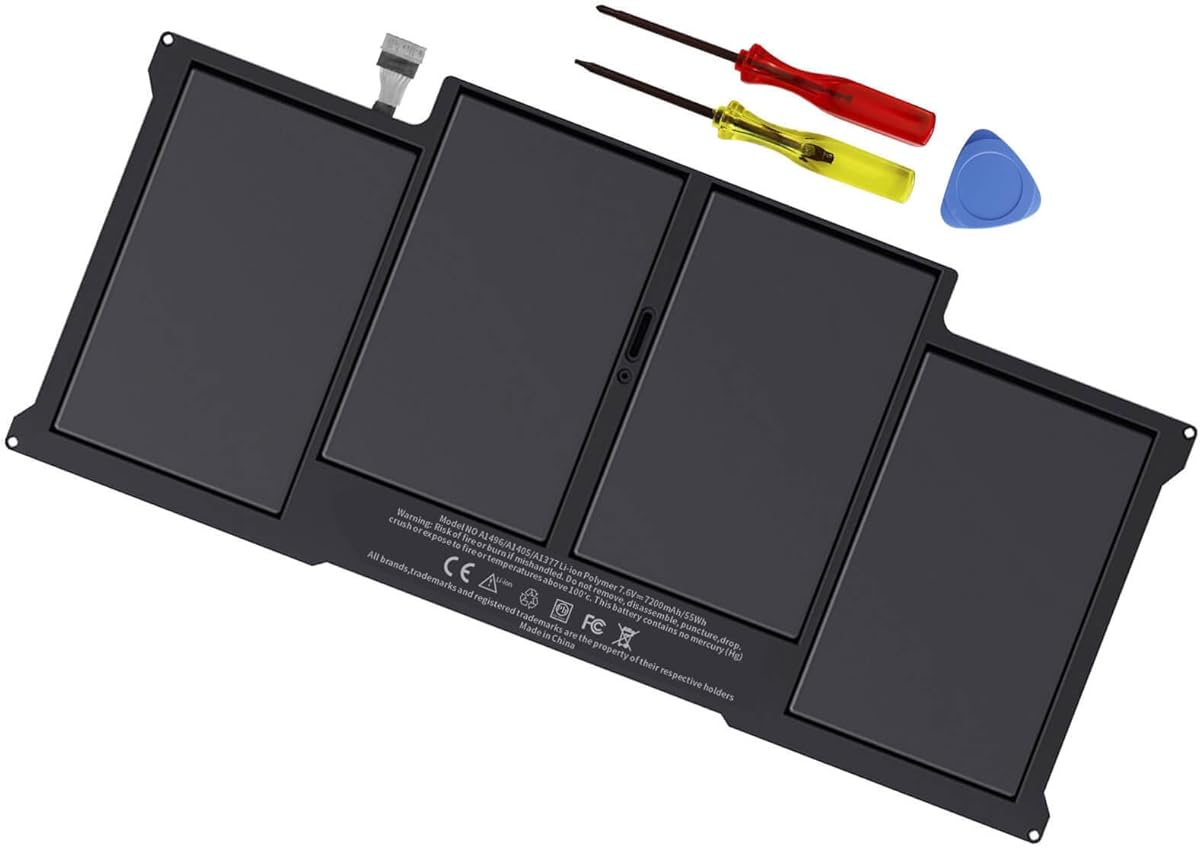
This battery targets the 13 inch MacBook Air with a high 7200mAh capacity and strong user ratings. It comes with screwdrivers and instructions which simplifies the replacement process for home users. The 60 day return policy adds flexibility compared to standard 30 day offers.
We may earn a commission when you buy through this link, at no additional cost to you.
Users report excellent performance for light work and media consumption on older Air laptops. UL and CE certifications ensure safety compliance for daily charging. The higher mAh helps offset the aging efficiency of the laptop's power management system.
While not for A1175 units this highlights the capacity range available. The included tools save time and cost for first time buyers. Some users recommend checking battery health before installation to ensure system compatibility.
For Air owners this is a high capacity and well supported choice. A1175 buyers should stick to the top list. The 60 day return window offers extra confidence when purchasing for your hardware.
The 7200mAh capacity offers longer runtime than typical replacement batteries for the 13 inch Air models.
A 60 day return policy gives you more time to test the battery before committing to the purchase.
We may earn a commission when you buy through this link, at no additional cost to you.
Selecting the right A1175 battery replacement requires careful attention to compatibility, safety, and capacity to ensure your MacBook Pro runs smoothly.
The A1175 battery is designed for specific MacBook Pro 15 inch models from 2006 to 2008. Always check your Model ID (such as A1260, A1150, or MA348) before purchasing to avoid fitting issues. Mismatched connectors can lead to installation failures or damage to the logic board.
Verify the model number on your current battery or in the System Information app to confirm exact match with the replacement listing.
Look for batteries that match the original voltage of 10.8V and a high capacity (mAh) rating for longer runtime. Higher mAh values like 5800mAh or above generally mean more power available during use without needing frequent recharging. Avoid units with significantly lower voltage or capacity than specs.
Match the voltage exactly and prioritize higher mAh for better endurance in daily tasks away from power outlets.
Ensure the battery has CE, FCC, and RoHS certifications to guarantee safe operation and environmental compliance. These marks indicate testing against overcharge, overheating, and short circuit risks which protects both your battery and laptop from damage. Unverified batteries may lack critical internal protection features.
Check the product description for certification marks to confirm the unit meets industry safety standards for electrical components.
Premium replacements use Grade A cells which have better chemistry and stability over time. These cells are less likely to swell or fail early compared to lower grade alternatives. Higher quality cells also tend to have longer cycle life and consistent charging performance.
Prioritize listings that specify Grade A cells to ensure long term reliability and performance in your device.
A solid warranty like 12 months quality assurance or replacement policy protects you against early defects. Some brands offer 30 day money back guarantees which allows risk free trial of the product. Responsive customer support via email helps resolve installation questions quickly.
Look for warranties that cover manufacturing defects and include clear return terms to safeguard your investment.
Review customer feedback for real world insights on fit, longevity, and power delivery. High ratings above 4.0 stars suggest consistent satisfaction among other buyers. Read both positive and negative comments to identify common issues like connector alignment or charging behavior.
Use review summaries to gauge reliability before purchasing especially if the product is from a lesser known brand.
Some batteries come with tools like screwdrivers or adhesive which simplifies the installation process. Having these included reduces the need to source additional hardware and ensures a secure fit. Check if the package contains instructions to guide you through the replacement steps.
Prefer options that include installation aids to make the process easier and safer for non technical users.
While budget options are tempting, ensure they meet basic safety and capacity standards before buying. Higher priced units often include better support and longer warranties that pay off over time. Balance cost with reliability to avoid spending more on a replacement that fails quickly.
Select a battery that offers fair value with strong safety features rather than the absolute lowest price.
Begin by powering off your MacBook Pro and unplugging all cables. Use a small screwdriver to remove the screws on the bottom case to access the internal battery. Carefully disconnect the old battery connector from the logic board using a plastic tool to avoid damage.
Install the new A1175 battery by securing it in place and connecting the connector firmly. Close the case and screw it back in before powering on the machine. Allow the battery to charge fully before first use to calibrate the system readings accurately.
To maximize longevity, avoid leaving the laptop plugged in constantly and keep the system updated. Calibrate the battery occasionally by fully discharging and recharging to maintain accurate percentage displays. Store the device in a cool dry place to prevent heat from degrading the cells over time.
No the A1175 battery is only compatible with 2006 to 2008 MacBook Pro 15 inch models. Newer laptops require different battery shapes and connectors so verify your specific model ID before purchasing any replacement.
With proper care a quality A1175 replacement can last 1 to 2 years before capacity noticeably drops. Using it for daily tasks like browsing and documents should provide 3 to 5 hours of runtime depending on usage patterns.
Yes if you follow safety instructions and disconnect the logic board first. Use proper tools and avoid using metal objects that could short circuit internal components. If unsure consult a professional to avoid accidental damage to the laptop.
Some listings include screwdrivers and adhesive sheets while others do not. Check the product description carefully to see what accessories are included so you can plan ahead for installation.
Look for CE, FCC, and RoHS certifications along with built-in circuit protection against overheating and overcharging. These features ensure the battery operates safely and protects your MacBook from electrical risks.
Initially the percentage might show odd values but calibration through full charge and discharge cycles usually fixes it. If issues persist check System Information for battery health status and update macOS for better tracking.
Check the product title and description for model numbers like A1260, A1150, or MA348. Match these exactly with your laptop's current battery label to ensure physical and electrical compatibility.
Yes Grade A cells offer better chemical stability and longevity compared to lower grade options. They are less likely to swell or fail early making them a safer and more reliable choice for your device.
We reviewed ten products to identify the top A1175 battery replacement options for older MacBook Pro 15 inch models. The Editor's Choice stands out for its balanced capacity and strong safety certifications. Budget picks offer affordable alternatives without compromising essential features.
When making your decision prioritize safety certifications and model compatibility to ensure smooth installation. A battery with Grade A cells and a solid warranty will serve you best over time. Avoid generic listings that lack clear specs to protect your device from damage.
Remember that prices and stock levels change often so verify details on the product page before buying. We hope this guide helps you extend the life of your MacBook Pro with a reliable power source. Check current prices to find the best deal available today.