
NETGEAR GS348
4.8Editor score
Simple Plug-and-Play
Energy Efficient
Fanless Operation
This guide compares the top 48 Port Gigabit Managed Switch options for enterprise and SMB networks, evaluating features, performance, and management tools.
Choosing a reliable 48 Port Gigabit Managed Switch is crucial for businesses needing robust network infrastructure. These devices provide high-speed connectivity, advanced security, and flexible management options to support growing organizations efficiently.
We evaluated ten leading models based on port density, PoE capabilities, management interfaces, and security features. Our analysis focuses on real-world performance, scalability, and ease of use for IT administrators and network engineers.
Each pick highlights specific strengths like cloud management or fanless design. Note that prices fluctuate frequently, so verify current costs before purchasing. Always check compatibility with your existing network gear.
4.8Editor score

4.7Editor score

5.0Editor score
The following table provides a side-by-side comparison of all ten products. It highlights key specifications like port types, PoE budget, management style, and warranty coverage to help you decide quickly.
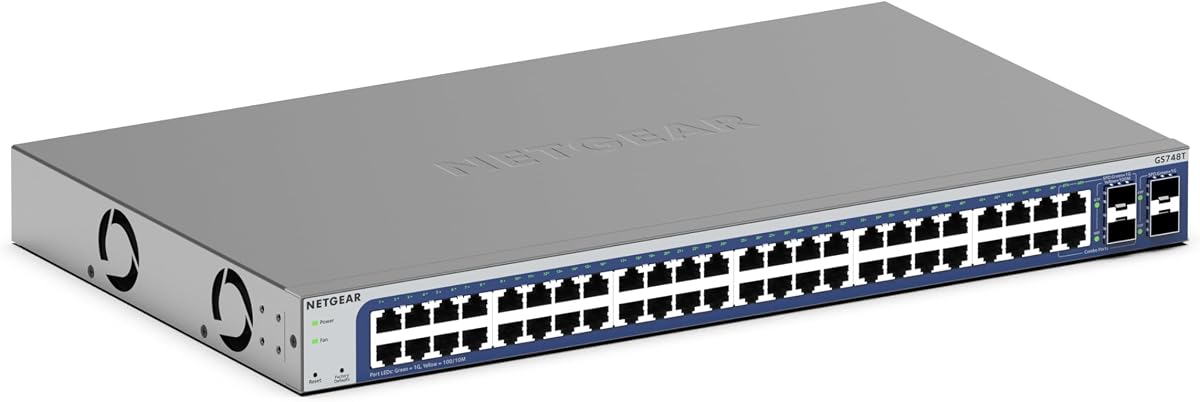


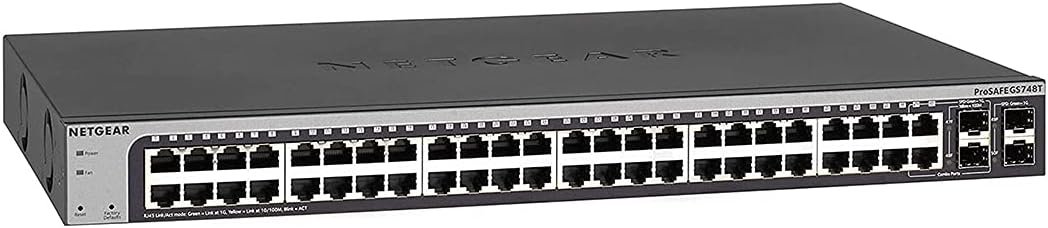


The TP-Link SG2452LP is a fully managed switch designed for businesses needing centralized control. It offers 48 gigabit ports and integrates seamlessly with the Omada Cloud Management Platform for advanced network monitoring and configuration.
We may earn a commission when you buy through this link, at no additional cost to you.
Key strengths include its fanless design, ensuring quiet operation in offices, and comprehensive security features like 802.1X and DHCP snooping. The switch supports static routing and VLAN segmentation, making it scalable for growing networks with multiple sites.
Trade-offs involve dependency on the Omada controller for cloud features, which adds setup complexity. The fanless design works well for moderate loads but may require careful airflow planning in hot environments.
Businesses seeking a balance of performance and manageability should choose this model. It is ideal for SMEs and enterprises prioritizing security and centralized administration across multiple locations.
The Omada platform allows remote access and configuration from anywhere, simplifying multi-site IT management without needing on-premise hardware controllers.
Built-in features like IP-MAC-Port binding and DoS defense protect networks from unauthorized access and common cyber threats effectively.
We may earn a commission when you buy through this link, at no additional cost to you.
The NETGEAR GS748T is a smart managed switch offering 48 gigabit ports and four 1G SFP ports for fiber expansion. It includes NETGEAR Insight for remote management, making it accessible for IT teams needing off-site oversight.
We may earn a commission when you buy through this link, at no additional cost to you.
Strengths include auto-negotiating ports for flexible device support and energy-efficient operation compliant with IEEE 802.3az. The compact metal design allows desktop or rack mounting, fitting various installation environments without compromising performance.
Trade-offs involve limited Layer 3 capabilities compared to fully managed switches. The cloud-based remote access requires stable internet connectivity, which might be a constraint in isolated networks without external access.
This switch is ideal for small to medium businesses needing basic managed features and fiber uplinks. It suits environments requiring quiet operation and energy savings while maintaining high-speed connectivity options.
The four SFP ports enable flexible network expansion with fiber optic cables, supporting distances beyond copper limits for reliable connectivity.
Compliance with IEEE 802.3az reduces power consumption during low traffic periods, lowering operational costs without affecting network performance.
We may earn a commission when you buy through this link, at no additional cost to you.
The Omada SG3452 is a Layer 2+ managed switch with 48 gigabit ports and four SFP slots for fiber connectivity. It integrates with Omada SDN platforms for unified network management across devices like APs and gateways.
We may earn a commission when you buy through this link, at no additional cost to you.
Strengths include static routing for efficient internal traffic handling and flexible standalone management via web CLI or SNMP. The switch supports comprehensive security features like ACL and storm control, safeguarding against common network threats effectively.
Trade-offs involve needing specific SDN firmware for full compatibility with controllers, which may require updates. Without a controller, some advanced features are limited, though basic management remains functional out of the box.
Ideal for organizations using Omada ecosystems, this switch offers scalability and advanced routing features. It fits SMEs needing reliable managed switching with the option to expand into a software-defined network environment.
Static routing enables efficient traffic management without external routers, optimizing network performance for internal communications and resource usage.
Seamless integration with Omada controllers allows centralized control of switches, APs, and gateways, streamlining multi-site network administration.
We may earn a commission when you buy through this link, at no additional cost to you.
The NETGEAR GS748T is a smart managed switch with 48 gigabit ports and four SFP ports, two shared. It emphasizes reliability with a lifetime limited hardware warranty and next business day replacement service for peace of mind.
We may earn a commission when you buy through this link, at no additional cost to you.
Strengths include a simple interface for secure setup and access control, along with quiet fanless operation ideal for office environments. Energy-efficient compliance ensures reduced power consumption without impacting high-speed performance for connected devices.
Trade-offs involve reliance on external NMS tools for full SNMP capabilities, which adds complexity. The switch lacks advanced routing features found in higher-tier models, making it best for basic managed connectivity needs.
This model suits businesses prioritizing long-term support and reliability over advanced features. It is ideal for offices needing straightforward management and robust hardware protection with minimal maintenance requirements.
Lifetime coverage ensures long-term investment protection with next business day replacement services, reducing downtime risks for critical business operations.
Fanless design provides silent performance, making it suitable for noise-sensitive environments like conference rooms and healthcare facilities without disrupting workflow.
We may earn a commission when you buy through this link, at no additional cost to you.
The TP-Link TL-SG3452P is a PoE+ managed switch delivering 384W of total power budget across 48 ports, ideal for powering IP cameras and access points. It supports Omada SDN for centralized network management and includes static routing for efficient traffic handling.
We may earn a commission when you buy through this link, at no additional cost to you.
Strengths include PoE auto recovery to restore connectivity after power loss and robust security features like 802.1X authentication. The switch supports IPv6, ensuring future-ready compatibility for evolving network protocols and infrastructure requirements.
Trade-offs involve a higher price point due to PoE capabilities, which may not suit non-PoE needs. Optimizing this switch requires planning for PoE devices, as unused ports do not contribute to power efficiency or cost savings.
Ideal for environments needing power delivery and management, this switch simplifies infrastructure by combining data and power. It fits businesses deploying PoE devices like cameras or phones while maintaining advanced routing and security features.
384W budget supports up to 48 PoE+ devices simultaneously, enabling large-scale deployment of IP phones, cameras, and APs without additional injectors.
Automatic recovery feature restores power to connected devices after outages, minimizing downtime and ensuring continuous operation for critical systems.
We may earn a commission when you buy through this link, at no additional cost to you.
The NETGEAR GS348 is an unmanaged switch providing 48 gigabit ports for immediate connectivity without software installation. It features a compact metal design supporting desktop or rack mounting, making it versatile for various physical setups.
We may earn a commission when you buy through this link, at no additional cost to you.
Strengths include auto-negotiating ports for optimal speed detection and fanless operation ensuring silent performance. Energy-efficient compliance reduces power consumption without compromising network speed, ideal for environments prioritizing simplicity and reliability over control.
Trade-offs involve lack of management features like VLAN or security settings, limiting customization. It suits networks needing basic connectivity but cannot offer segmentation or monitoring capabilities found in managed switches.
Best for simple deployments, this switch is ideal for offices or home labs requiring straightforward expansion. It suits users prioritizing ease of use and cost-effectiveness without needing advanced configuration options.
Plug-and-play design eliminates configuration needs, allowing immediate network expansion with minimal technical knowledge or setup time.
IEEE 802.3az compliance reduces power usage during low activity, lowering operational costs while maintaining high-speed connectivity for connected devices.
We may earn a commission when you buy through this link, at no additional cost to you.
The NETGEAR GS748T Renewed is a smart managed Pro switch offering 48 gigabit ports and four SFP ports for fiber expansion. Certified refurbished, it provides full smart managed features with ProSAFE lifetime protection for reliable long-term use.
We may earn a commission when you buy through this link, at no additional cost to you.
Strengths include desktop or rack mounting flexibility and smart software for secure setup. Accessing it delivers cost savings while maintaining enterprise-grade features like VLAN and security settings. It fits budgets needing reliability without new hardware expenses.
Trade-offs involve absence of customer ratings and potential limited warranty support compared to new units. Ensure inspection upon delivery to verify condition, as refurbished items may show cosmetic wear or minor packaging differences.
Ideal for cost-conscious businesses, this option suits deployments needing managed features at lower prices. It fits environments prioritizing value while requiring robust networking capabilities and upgradable firmware support.
Professional refurbishment ensures functionality meets original standards, providing reliable performance with significant cost savings compared to new purchases.
Lifetime warranty coverage extends hardware protection, ensuring long-term investment security even for renewed units with proper registration and documentation.
We may earn a commission when you buy through this link, at no additional cost to you.
The UBIQUITI EdgeSwitch Lite is a managed gigabit switch with 48 ports and high-speed switching capacity of 140Gbps. It includes two SFP+ ports for enhanced uplinks and supports DC input options for flexible power configurations in diverse environments.
We may earn a commission when you buy through this link, at no additional cost to you.
Strengths include non-blocking throughput ensuring minimal latency and rack or wall mounting options for versatile installation. The 104.16 Mpps forwarding rate supports demanding workloads, making it ideal for edge networks requiring consistent performance under load.
Trade-offs involve higher costs due to performance capabilities and lack of native cloud management tools. Users may need third-party controllers or local management interfaces, which can add complexity to administrative tasks and remote access.
Ideal for performance-critical environments, this switch suits networks needing high throughput and robust uplinks. It fits businesses prioritizing speed and reliability over cloud-centric management features for edge or access layer deployments.
Switching capacity of 140Gbps ensures data flows without bottlenecks, supporting high-demand scenarios like video streaming and large file transfers effectively.
DC input allows redundant or standalone power setups, enhancing reliability in environments with unstable AC sources or backup power requirements.
We may earn a commission when you buy through this link, at no additional cost to you.
The YuanLey managed switch offers 48 PoE+ ports and six 10G SFP+ slots for high-speed connectivity and power delivery. It supports L3 management features like VLAN and static routing, providing advanced control for growing network infrastructures and deployments.
We may earn a commission when you buy through this link, at no additional cost to you.
Strengths include a 460W power budget supporting multiple PoE devices and voice VLAN optimization for IP phone systems. The fanless design ensures quiet operation while maintaining energy efficiency and reliable performance under moderate to high load conditions.
Trade-offs involve complex L3 configuration needing technical expertise and limited brand recognition compared to major vendors. Support may be less accessible, so users should review warranty terms and community resources for troubleshooting and updates.
Ideal for tech-savvy SMEs, this switch suits environments needing high-speed uplinks and robust PoE capabilities. It fits deployments prioritizing cost-effective advanced features without requiring enterprise-level brand support or extensive documentation.
Static routing and advanced VLAN options enable efficient internal traffic management, reducing reliance on external routers for network segmentation and optimization.
Six 10G SFP+ slots provide extensive fiber uplink capacity, ensuring bandwidth scalability for growing networks needing high-speed connections to core infrastructure.
We may earn a commission when you buy through this link, at no additional cost to you.
The NETGEAR GS348TPv2 is a smart managed PoE switch with 48 gigabit ports and 380W total power budget for power-hungry devices. It includes four 1G SFP ports for fiber optic connections and network expansion, fitting versatile installation needs.
We may earn a commission when you buy through this link, at no additional cost to you.
Strengths include an easy-to-use smart interface for secure setup and access, plus flexible desktop or rack mounting options. Energy efficiency ensures reduced power consumption, and auto-negotiating ports support various device speeds seamlessly.
Trade-offs involve premium pricing and limited Layer 3 capabilities compared to fully managed models. While excellent for PoE distribution, advanced routing features require external solutions, which may limit large-scale network segmentation strategies.
Ideal for businesses needing PoE management with premium features, this switch simplifies device power delivery. It suits environments prioritizing ease of use and robust PoE capabilities without requiring complex router integration.
User-friendly interface simplifies secure setup and monitoring, reducing administrative overhead while maintaining enterprise-grade security and configuration options.
380W budget supports power-heavy devices efficiently, ensuring reliable delivery without overloading the switch or compromising network performance and connectivity.
We may earn a commission when you buy through this link, at no additional cost to you.
Selecting the right switch requires evaluating specific needs like power delivery, management depth, and scalability. These factors ensure the device supports your network growth and performance requirements effectively.
Managed switches offer control over VLANs, security, and traffic prioritization, essential for multi-user environments needing segmentation. Unmanaged models simplify connectivity but lack configuration options, limiting network optimization and security management.
Choose managed for businesses needing control and security. Unmanaged suits simple setups where plug-and-play ease and cost savings outweigh customization needs.
Power over Ethernet allows devices like cameras and access points to draw power from the switch. Evaluate total PoE budget and per-port wattage to ensure adequate power for your connected devices without overloading the switch.
Verify PoE budget matches device power requirements. Higher budgets support more or heavier PoE devices, ensuring reliable operation without extra injectors.
SFP or SFP+ ports enable fiber optic connections for high-speed uplinks to core networks or internet gateways. These options extend distance and bandwidth beyond copper limits, critical for scalable network architectures.
Select SFP+ for future-proofing gigabit+ needs. Basic SFP suffices for current gigabit setups requiring fiber expansion without high-speed demands.
Interfaces range from web GUIs to CLI and cloud platforms. Cloud management offers remote access, while CLI suits technical admins. Choose based on your team's expertise and need for centralized control.
Prioritize intuitive interfaces for quick setup. Cloud platforms help multi-site teams but require internet; local interfaces suit isolated networks better.
Layer 2 switches handle MAC-based forwarding, while Layer 3 models add routing capabilities. Static routing on L3 reduces external router needs, improving performance for internal traffic segmentation and control.
Choose Layer 3 if routing is needed internally. Layer 2 is sufficient for basic switching where external routers manage traffic paths.
Key features include 802.1X authentication, port security, and DoS protection. These safeguard against unauthorized access and common threats, critical for environments handling sensitive data or public access points.
Ensure switches support required security protocols. Robust features prevent breaches and maintain compliance with organizational or regulatory security standards.
Desktop or rack-mount options fit different spaces. Fanless designs reduce noise but may limit thermal performance under high loads. Ensure adequate airflow for stable operation.
Fanless suits quiet offices. Active fans benefit high-power deployments but may require careful installation to manage noise levels effectively.
Warranty lengths vary, from limited to lifetime. Support access like phone or chat availability matters for troubleshooting. Check terms before purchasing to ensure long-term protection.
Prioritize lifetime warranties for long-term value. Verify support channels match your team's needs for quick issue resolution and assistance.
Initial setup involves connecting the switch to your network and accessing its web interface or CLI. Follow manufacturer instructions to configure IP settings, VLANs, and security features based on your deployment needs.
Regular maintenance includes updating firmware to patch vulnerabilities and ensure compatibility. Monitor port usage and PoE budgets to prevent overloads, and inspect cables for damage that may affect performance or connectivity.
Physical care involves placing the switch in a well-ventilated area to maintain safe temperatures. Avoid stacking devices that could restrict airflow and clean dust from vents regularly to prevent overheating issues.
Managed switches allow configuration of VLANs, security, and traffic priorities, offering control for complex networks. Unmanaged switches plug-and-play with no settings, ideal for simple connectivity without segmentation needs.
PoE is necessary if powering devices like cameras or access points directly from the switch. Evaluate your device count and power needs to determine if a PoE model fits your budget and setup.
Most models include SFP or SFP+ ports for fiber optic uplinks, enabling high-speed connections beyond copper cable limits. Verify port types match your existing fiber infrastructure requirements.
Enable features like 802.1X authentication, disable unused ports, and set strong admin passwords. Regular firmware updates and VLAN segmentation also prevent unauthorized access and protect network traffic effectively.
Managed switches often last 5-7 years with proper care. Firmware support duration and warranty coverage impact usability, so choose models with long-term manufacturer support for reliability.
Yes, platforms like Omada or NETGEAR Insight allow centralized management across multiple devices and sites. This simplifies configuration and monitoring without needing individual access to each switch.
The top picks like the TP-Link SG2452LP and NETGEAR GS348TPv2 offer strong balances of performance and management features. Each model supports diverse needs from basic plug-and-play setups to advanced PoE and security applications.
Prioritize your requirements for power delivery, fiber uplinks, and management tools before choosing. Security features and scalability options ensure your switch grows with your network without needing premature replacement.
Always verify current pricing and availability since deals fluctuate frequently. Check compatibility with your existing devices and confirm warranty terms to ensure you get the best value and long-term support.