
Large Aluminum Heat Sink 150x93x15 mm
4.7Editor score
Passive aluminum cooling fin
Pre-applied thermal adhesive
Suitable for PCB and GPU
This guide compares the top 10 GPU backplates for cooling, protection, and aesthetics to help you choose the best option for your graphics card setup.
GPU backplates have become essential components for modern graphics cards, offering structural support and enhanced cooling performance. They protect the delicate PCB from bending and dust while improving overall thermal efficiency during demanding tasks like gaming or rendering.
We have evaluated ten distinct products ranging from passive aluminum plates to active cooling solutions with fans. Each option was assessed based on material quality, compatibility, ease of installation, and overall value to provide a comprehensive comparison for builders.
Every pick in this list highlights specific strengths and ideal use cases for different build types. Please note that product availability and pricing can change frequently, so verify current details before making your final purchasing decision online.
4.7Editor score

4.0Editor score

4.2Editor score
The following table provides a side-by-side look at all ten selected GPU backplate solutions. It highlights key specifications and design features to help you quickly identify the model that fits your specific graphics card and case requirements.

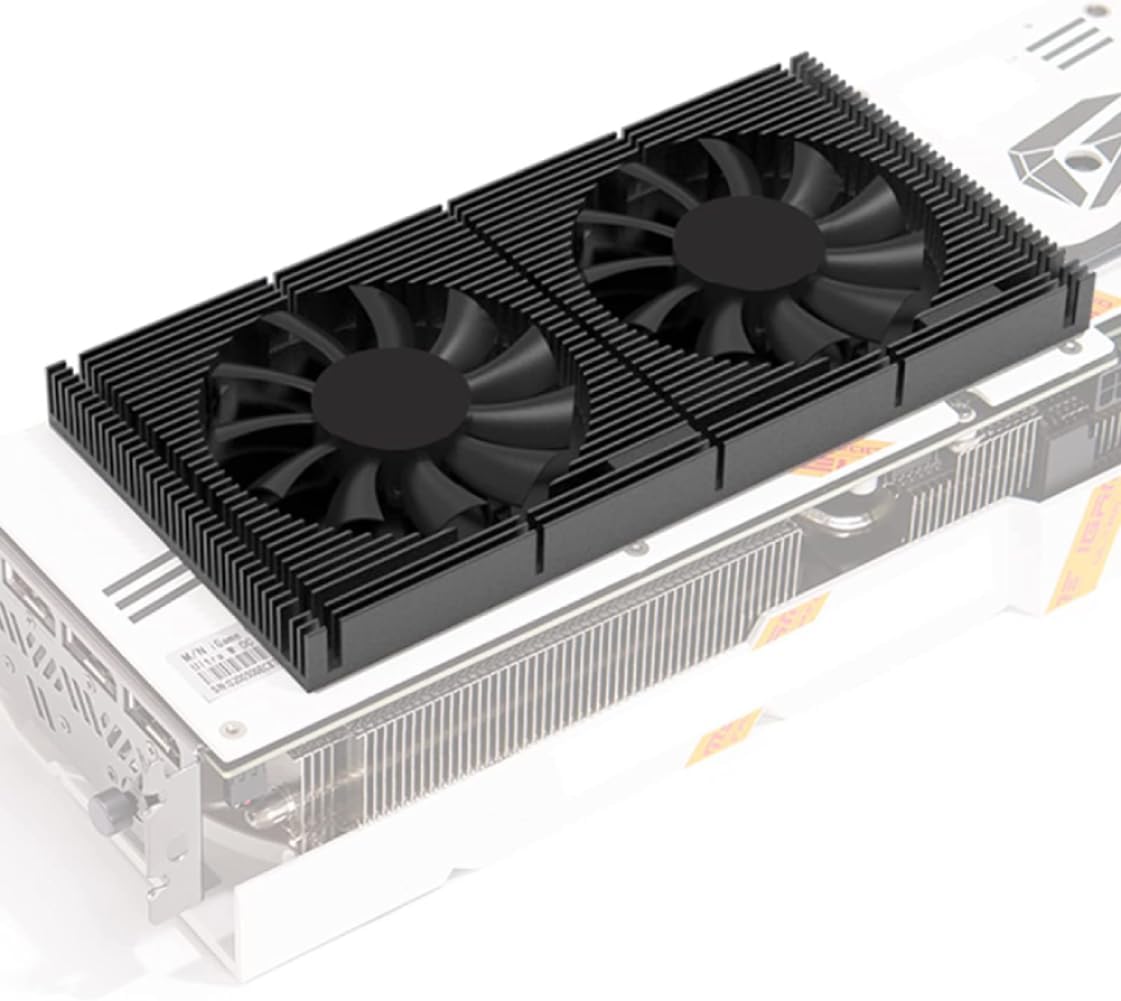


This product offers a versatile aluminum heatsink that serves well as a custom GPU backplate alternative. It holds a high rating of 4.7 due to its quality construction and effective passive cooling design for various electronic components.
We may earn a commission when you buy through this link, at no additional cost to you.
The standout feature is the inclusion of 294 fins which significantly increase the surface area for heat transfer. It comes with pre-applied thermal conductive adhesive tape which simplifies the installation process for users who want to upgrade their thermal management.
One trade-off is the lack of an active fan which means it relies solely on case airflow to dissipate heat. This is acceptable for budget builds where active cooling on the backplate might be too complex or expensive to implement.
This backplate is ideal for builders who need a simple cost-effective way to protect their PCB and improve heat dissipation. It works well for GPU 3090 and other high-power components where extra passive cooling is beneficial.
The high fin count increases surface area allowing heat to dissipate more efficiently without power consumption.
Pre-applied adhesive tape removes the need for additional thermal paste or complex mounting hardware during setup.
We may earn a commission when you buy through this link, at no additional cost to you.
The GOWENIC Backplate combines structural support with active cooling to address heat concerns directly. It is recognized as an Editor's Choice because it balances performance and ease of use for common high-end graphics cards.
We may earn a commission when you buy through this link, at no additional cost to you.
Key strengths include the aluminum alloy construction which ensures durability and the included 4-pin fan that connects to your motherboard for automatic speed control. This setup allows for quick heat dissipation without manual intervention.
However users must ensure their case has enough space for the fan thickness and that the mounting does not obstruct essential ports. This is a fair trade-off given the active cooling benefits it provides over passive models.
Buy this if you need a reliable solution for RTX 3090 3080 or 3070 cards that includes built-in cooling features. It is particularly useful for setups where GPU temperatures run high during extended sessions.
The standard fan design connects via a 4-pin interface to your motherboard for automatic temperature regulation.
Made from aluminum alloy this radiator offers a long service life and is not easy to damage during transport.
We may earn a commission when you buy through this link, at no additional cost to you.
This backplate is specifically engineered for the GIGABYTE RTX 5060 and 5050 Low Profile models. While it has a moderate rating it offers precision fitment that ensures no interference with ports or brackets in compact builds.
We may earn a commission when you buy through this link, at no additional cost to you.
Its reinforced aluminum structure helps prevent PCB flex which is critical for protecting sensitive rear components from dust or accidental damage. The CNC-cut design matches the mounting points perfectly allowing for a quick and easy installation.
One potential drawback is its limited compatibility which means it cannot be used with other GPU models easily. Users should verify their card model before purchasing to ensure it matches this specific design intent.
Select this product if you own a compatible Low Profile card and need a reliable anti-sag solution for a Small Form Factor build. It provides essential structural support without requiring any modifications to your existing hardware.
CNC-cut to match the PCB layout perfectly ensuring ports remain accessible and brackets function correctly.
Adds rigidity to the card which prevents bending over time especially important for compact case setups.
We may earn a commission when you buy through this link, at no additional cost to you.
The Hilitand GPU Backplate Radiator is designed to provide active cooling support for high-end graphics cards like the RTX 3090 series. It shares similar features with other models in this category focusing on durability and thermal performance.
We may earn a commission when you buy through this link, at no additional cost to you.
It features an aluminum alloy material that ensures a sturdy build life and includes a 4-pin fan interface for quiet operation when connected to the motherboard. The thermal pad ensures good contact for efficient heat transfer to the fins.
Potential trade-offs include the need for additional fan clearance inside your case which might be tight in smaller chassis. Also fan noise levels can vary depending on your motherboard settings and airflow requirements.
This radiator is suitable for users looking for a straightforward upgrade to improve back temperatures on supported cards. It works well for vertical mounting setups where extra cooling is needed to maintain stable performance.
The backplane memory cooler dissipates heat quickly thanks to its compatible design and included thermal pad.
Constructed from aluminum alloy the unit is sturdy and not easy to damage ensuring a long service life.
We may earn a commission when you buy through this link, at no additional cost to you.
This radiator is highlighted for its fast heat dissipation capabilities which are crucial for maintaining GPU longevity. It supports cards like the RTX 3090 and comes with a 4-pin fan interface to integrate easily with existing cooling systems.
We may earn a commission when you buy through this link, at no additional cost to you.
The aluminum alloy material provides a sturdy construction that resists damage and ensures the backplate remains effective over time. Users report a high rating due to the reliable performance and ease of connecting the included fan to the motherboard.
One consideration is that it requires a fan to be installed to achieve its full cooling potential. This is a standard requirement for active coolers but means you must have a free fan header on your motherboard.
Choose this if you want a reliable aluminum backplate that supports vertical mounting and includes thermal accessories. It is well-suited for gaming builds where heat management is a priority for stable frame rates.
The standard fan design with 4-pin interface connects to the motherboard for low noise operation and auto control.
Made from aluminum alloy the radiator is designed to last long and resist damage during daily use.
We may earn a commission when you buy through this link, at no additional cost to you.
While technically a support bracket this item serves a vital role in GPU protection by preventing sag that can stress the motherboard. It is rated highly for its all-aluminum construction and adjustable height feature which suits many case types.
We may earn a commission when you buy through this link, at no additional cost to you.
Its strong support mechanism keeps the graphics card stable and protects both the GPU and motherboard from long-term damage caused by weight. The adjustable nature allows it to fit ATX M-ATX and ITX cases without requiring custom solutions.
The trade-off is that it does not provide cooling itself so it must be paired with other thermal solutions for full protection. However its simplicity and durability make it a valuable accessory for heavy graphics cards.
Buy this bracket if your GPU is heavy and you want to ensure the system remains stable over years of use. It offers a reliable way to maintain alignment and prevent physical stress on your components.
Provides strong support to prevent graphics card sagging which protects your GPU and motherboard from wear.
Height adjustable to accommodate different GPU sizes and case configurations for a custom secure fit.
We may earn a commission when you buy through this link, at no additional cost to you.
This plate is another robust option for passive cooling that emphasizes safety and heat transfer efficiency. It holds a 4.6 rating and features 294 fins designed to increase the surface area for better thermal management on GPUs.
We may earn a commission when you buy through this link, at no additional cost to you.
Its large aluminum construction ensures that heat is moved away from critical components effectively. The passive design reduces the risk of hardware failure due to overheating and does not require electrical connections to function.
Users may need to source their own mounting hardware or rely on tape to secure it which adds a small step to installation. This is acceptable given the low cost and high efficiency of the passive cooling design.
This heatsink is best for DIY enthusiasts who want a custom cooling solution for their GPU backplate area. It works well for RTX 3090 and 3080 models where extra surface area helps lower overall operating temperatures.
The fins increase the area of the board providing greater heat transfer capability without power usage.
Passive cooling reduces risk of hardware failure and power loss due to overheating ensuring safety for components.
We may earn a commission when you buy through this link, at no additional cost to you.
This external bracket is designed specifically for EVGA RTX models to provide protection at the slot interface. It is made from black zinc alloy which ensures durability and offers a precise fit for the card's external edge.
We may earn a commission when you buy through this link, at no additional cost to you.
Installation is straightforward requiring only screws to secure the bracket in place. It helps safeguard your graphics card slot from dust and damage while maintaining a clean aesthetic for the rear of the case.
The limitation is that it serves more as a slot cover than a full backplate for thermal management or PCB protection. Users should buy this only if they need a replacement slot shield for compatible EVGA cards.
Select this bracket if you are building with an EVGA RTX card and want to ensure the slot area is protected. It offers a durable solution for keeping your card's connection point secure and visually clean.
Safeguards your graphics card slot from dust and physical damage with a precise fitting external bracket.
Installation is quick and hassle-free as it only needs to be secured with screws to the card slot.
We may earn a commission when you buy through this link, at no additional cost to you.
This backplate stands out with a perfect 5.0 rating and is engineered specifically for ZOTAC RTX Solo models. It offers a seamless factory-like fit that aligns with the PCB layout and mounting points without interfering with ports.
We may earn a commission when you buy through this link, at no additional cost to you.
The CNC-machined aluminum construction provides superior strength and rigidity to prevent long-term PCB bending due to gravity. Ventilation cutouts ensure that airflow is not blocked allowing the cooling system to perform effectively during heavy workloads.
A trade-off is its specificity to a single brand and model which limits its use for other graphics cards. Users must confirm their exact card model to ensure compatibility before purchase to avoid fitment issues.
Choose this if you own a ZOTAC Solo card and want a high-quality backplate that enhances stability. It is ideal for builders who value precision fitment and want to extend the lifespan of their graphics hardware.
Ensures perfect alignment with the PCB layout and ports for a seamless factory-like fit without interference.
CNC Aluminum Construction provides superior strength and rigidity to prevent bending during extended use.
We may earn a commission when you buy through this link, at no additional cost to you.
This is a premium solution featuring dual 70mm PWM fans for aggressive cooling performance on your GPU backplate. It is built from aviation aluminum 6061 which balances lightweight properties with sturdy durability for long-term reliability.
We may earn a commission when you buy through this link, at no additional cost to you.
The dual fans adjust speed automatically from 1500 RPM to 2800 RPM based on working temperature ensuring efficient cooling with minimal noise. It also includes a 1.2mm 7W thermal pad to ensure optimal heat transfer from the memory to the fins.
One consideration is the cost and the need for two fan headers on your motherboard to utilize all features fully. This is acceptable for premium builds where thermal management is the highest priority for stable overclocking.
Buy this if you need the best active cooling for high-end cards and want automatic speed control. It is excellent for users who prioritize maximum heat dissipation and build quality in their PC components.
Fan speed adjusts automatically from 1500 RPM to 2800 RPM according to inner working temperature.
Made from aviation aluminum 6061 this backplate offers a choice between lightweight sturdy and antioxidation.
We may earn a commission when you buy through this link, at no additional cost to you.
Selecting the right GPU backplate involves considering material quality cooling type and compatibility with your specific hardware.
Aluminum and aluminum alloy are common materials that offer a good balance of weight and heat conductivity. High-quality CNC-machined plates ensure precise fitment and structural rigidity which is vital for preventing PCB flex.
Look for durable materials like aviation aluminum or reinforced structures that resist wear over time.
Passive backplates rely on airflow inside your case to dissipate heat which is silent and simple to install. Active backplates include fans that connect to your motherboard for more aggressive cooling performance when needed.
Choose active cooling if your GPU runs hot frequently or passive for a quieter simpler setup.
Ensure the backplate matches your graphics card model to avoid blocking ports or mounting holes. Universal plates may require modification or custom mounting while specific plates like for ZOTAC ensure a perfect fit.
Check product listings carefully to confirm it supports your exact card model.
Some products come with pre-applied adhesive tape or all necessary hardware for easy installation without modding. Others may require additional screws or thermal paste which adds to the setup complexity.
Select options with included hardware to make the process quick and beginner-friendly.
A good backplate should add structural rigidity to prevent the GPU from bending under its own weight over time. This is critical for heavy cards and cases where the back is not fully supported.
Prioritize models that reinforce the PCB and hold mounting points firmly.
Features like thermal pads and high fin counts improve heat transfer from the components to the cooler. Better thermal management ensures your GPU maintains stable temperatures during long gaming or rendering sessions.
Look for backplates that mention thermal pads or high fin counts for efficiency.
Backplates often feature anodized black finishes or cutouts to match your build theme. Ventilation designs can improve airflow without compromising protection or visual appeal for your case.
Choose designs that complement your PC case style and color scheme.
Prices range from simple aluminum sheets to premium active solutions with PWM fans. Determine how much you are willing to spend based on your cooling needs and build priorities.
Balance cost with features to find the best value for your specific requirements.
To install your GPU backplate start by removing the existing GPU or preparing the case area where it will attach. Follow the manufacturer instructions carefully aligning mounting holes and securing the plate with screws or adhesive as provided.
If your backplate includes fans connect the cables to your motherboard headers ensuring they are secured properly to avoid interference with case fans. Verify that all connections are tight and that the fans spin freely before closing the case.
Regularly inspect the backplate for dust buildup or loose screws to maintain optimal performance. Clean any accumulated dust from fan blades and fins using compressed air to ensure heat dissipation remains efficient over time.
Yes they can improve thermal performance by distributing heat away from sensitive components and increasing surface area. While the impact varies they often help maintain lower temps during heavy workloads.
Most models are designed for DIY installation with pre-drilled holes and included hardware. They usually require basic tools and minimal technical knowledge to attach securely.
No universal compatibility is limited as dimensions and mounting points vary by model. Always verify the product listing supports your exact card model before buying.
Passive coolers rely on case airflow to dissipate heat so they work without fans but less aggressively than active ones.
Aluminum and aluminum alloys are ideal because they offer good thermal conductivity without adding excessive weight to the GPU.
Yes many backplates provide structural reinforcement that helps prevent the card from bending under its own weight over time.
The top picks in this guide offer a range of solutions from budget-friendly passive coolers to premium active fans. Each model brings unique benefits depending on your build needs and card model.
When choosing prioritize structural support and thermal efficiency to ensure your GPU runs safely and stays cool. Consider how easy installation is if you are not a seasoned PC builder.
Remember that prices and availability can change so double check current details before purchasing. This ensures you get the best value for your specific graphics card setup.