
4K Vlogging Camera
4.4Editor score
4K video recording
330 degree rotating lens
Built-in WiFi transfer
This guide compares the top cameras for social media content creation, evaluating features like video quality, stabilization, and portability to help you
Creating engaging social media content requires reliable equipment that delivers high quality visuals without overwhelming complexity. Whether you are a beginner vlogger or a seasoned influencer, selecting the right camera can significantly impact your production value and audience engagement levels.
We have analyzed a diverse range of devices ranging from compact pocket cams to advanced gimbal systems. Our evaluation focuses on critical aspects such as resolution, stabilization technology, ease of use, and connectivity options to ensure you find a device that matches your specific workflow needs.
Each pick in this list highlights unique strengths tailored to different content styles and budgets. Please note that availability and specifications may vary over time, so verifying current details before purchase is always recommended for the best experience.
4.4Editor score

4.5Editor score
5.0Editor score
The following table provides a side-by-side overview of the leading options available for content creators today. Each entry includes essential specifications to help you quickly identify the device that aligns with your specific recording requirements.


This device stands out as a premier choice for creators who demand professional quality in a portable form factor. With a 1-inch sensor and 4K resolution, it captures footage that rivals much larger cameras. The built-in stabilization ensures your videos remain smooth even during movement.
We may earn a commission when you buy through this link, at no additional cost to you.
The 2-inch rotating touchscreen is a game changer for social media platforms that prioritize vertical formats. ActiveTrack 6.0 keeps you centered in the frame, which is ideal for solo vlogging. Additionally, support for external microphones enhances audio quality significantly.
While the cost is higher than entry-level options, the performance justifies the investment for serious creators. The included accessories like the tripod and mic transmitter provide a complete kit. However, users should be aware of potential limitations with third-party accessories.
If you are looking to elevate your content quality without carrying heavy gear, this is the top recommendation. It balances ease of use with advanced features effectively. We highly suggest considering this for anyone focused on high-resolution social media production.
The 1-inch CMOS sensor allows for better low light performance and depth of field control compared to smaller sensors.
Quick transfer options and compatibility with DJI ecosystem devices streamline your workflow for faster publishing.
We may earn a commission when you buy through this link, at no additional cost to you.
For beginners or those on a strict budget, this camera offers essential features without breaking the bank. The 4K resolution allows for clear video suitable for most platforms. Its pocketable design makes it easy to carry everywhere you go.
We may earn a commission when you buy through this link, at no additional cost to you.
The unique 330-degree rotating lens allows you to frame shots creatively without moving the entire camera. It includes accessories like a tripod and card so you can start filming immediately. WiFi transfer makes sharing content to your phone quick and convenient.
While it lacks advanced stabilization found in pricier models, it is sufficient for static or slow movements. The build is functional but not rugged. Users should manage expectations regarding low light capabilities which are typical for this tier.
This is an excellent starting point for anyone wanting to try vlogging without a large investment. The included kit provides everything needed to begin. We recommend it for casual creators focusing on daytime outdoor content.
Simple controls and a straightforward menu system make it easy for beginners to start recording quickly.
Included accessories like a carrying bag and mini tripod ensure you are ready to shoot anywhere.
We may earn a commission when you buy through this link, at no additional cost to you.
This camera introduces a unique feature that sets it apart in the market by allowing you to record yourself and the scene simultaneously. This dual view capability creates engaging content for tutorials or reaction videos. It captures moments in high resolution with sharp details.
We may earn a commission when you buy through this link, at no additional cost to you.
The Picture-in-Picture mode ensures you are part of the narrative rather than just behind the lens. This is particularly useful for family events or travel vlogs where your reaction adds value. The flip screen helps in framing self shots accurately.
While the focus is slightly specific to interactive content, the quality is high. Users should consider if this dual recording feature fits their workflow. The pricing reflects the unique technology offered within the device.
If you want to create more personal and engaging content, this device offers a distinct advantage. It is perfect for creators who value viewer connection. We recommend it for those looking to stand out with fresh content formats.
Showing your reaction alongside the main subject creates a deeper emotional connection with your audience.
The ability to toggle between views gives flexibility for different types of videos and platforms.
We may earn a commission when you buy through this link, at no additional cost to you.
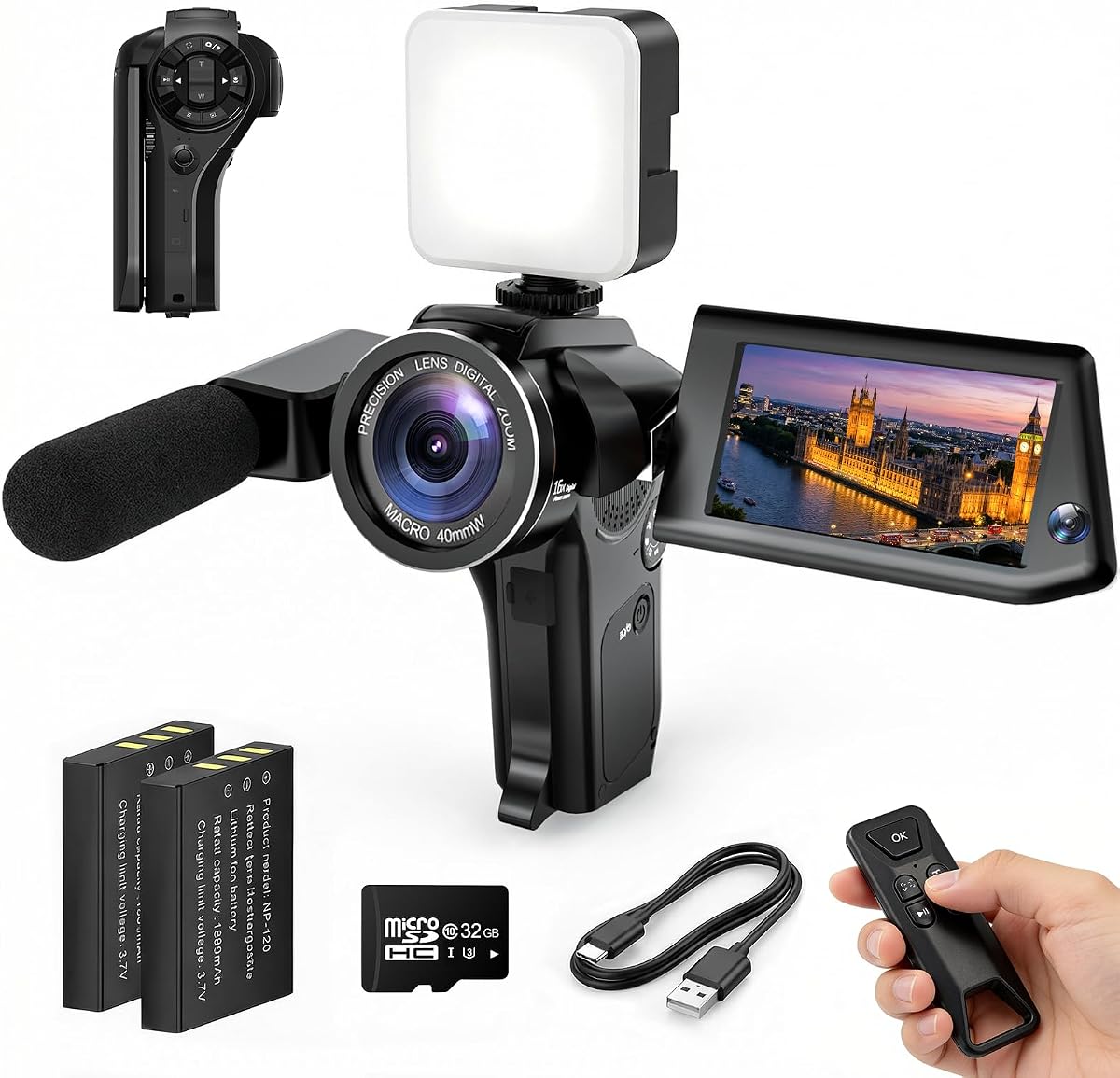
This camcorder is built for users who need extended features like night vision and high zoom. The IR capability allows you to capture footage in low light conditions where other cameras fail. It comes with a remote and stabilizer to help with handling.
We may earn a commission when you buy through this link, at no additional cost to you.
Connecting to a computer as a webcam expands its utility beyond just recording. The external microphone helps reduce background noise for clearer audio. You can control the camera from a distance using the wireless remote provided.
The reliance on specific apps for some functions may be a hurdle for some users. The size is larger than a pocket camera which affects portability. However the feature set is robust for the price point.
Ideal for home monitoring or specialized recording needs where night vision is a priority. It offers good value for the included hardware. We suggest it for users who need versatility over pure portability.
The built-in IR night vision captures clear black and white images in darkness without extra lights.
Functioning as a webcam expands its utility for video calls and live streaming sessions.
We may earn a commission when you buy through this link, at no additional cost to you.
This camera emphasizes still photography capabilities alongside video with a high MP count. The HDR imaging helps balance exposure in high contrast scenes. It features a large screen that makes viewing shots and framing easier.
We may earn a commission when you buy through this link, at no additional cost to you.
Anti-shake technology ensures your handheld shots are stable. The flip screen is useful for vlogging angles. It supports a high capacity SD card for extended recording sessions. You get two batteries to ensure you do not run out of power.
The digital zoom does not match optical quality but offers reach. The body is sturdy but slightly heavier than average. Users should be mindful of file sizes due to high resolution settings.
A solid choice for those who want to focus on photos as well as video. The HDR feature is a distinct advantage for landscapes. We recommend it for photography enthusiasts transitioning to content creation.
With 96MP capture you can crop and print photos with high detail for social posts.
HDR imaging ensures shadows and highlights are captured clearly in complex lighting.
We may earn a commission when you buy through this link, at no additional cost to you.
Designed for ultimate portability, this tiny camera fits in any bag or pocket. You can start recording instantly with a single button press. It is perfect for capturing spontaneous moments without drawing attention.
We may earn a commission when you buy through this link, at no additional cost to you.
The rotating lens allows for hands-free recording styles. With a 7-hour battery life, it can last a full day of travel. The simple interface means there are no complicated settings to navigate.
It does not offer professional image quality but is great for casual documentation. The lens rotation is manual which requires attention. Users should expect standard definition clarity compared to 4K.
Best for travelers who want to document their journey without bulk. It is simple and fun to use. We suggest it as a secondary camera for travel memories.
The pocket size design ensures you always have a camera available when moments happen.
A full day of recording is possible with the built-in high capacity rechargeable battery.
We may earn a commission when you buy through this link, at no additional cost to you.
This device is tailored for travelers who need a reliable tool for daily vlogs. The 4K video ensures good quality for social platforms. The rotating lens helps frame shots in tight spaces easily.
We may earn a commission when you buy through this link, at no additional cost to you.
WiFi connectivity allows you to send clips to your phone for quick edits. It comes with a bag and tripod for immediate use. The design is rugged enough for outdoor trips.
Controls are straightforward which helps when you are on the move. However advanced manual settings are not available. Users should rely on automatic modes for best results.
An excellent companion for travel vlogs where weight is a concern. It balances size and functionality well. We recommend it for tourists and casual creators.
Fitting in a pocket means you can take it everywhere without extra weight.
The wide rotation range allows for unique angles in crowded or small spaces.
We may earn a commission when you buy through this link, at no additional cost to you.
This kit provides all the tools you need to upgrade your phone into a studio setup. The wireless microphone ensures your voice is clear over background noise. The RGB light allows you to adjust color temperature easily.
We may earn a commission when you buy through this link, at no additional cost to you.
Having both a standard and flexible tripod adds versatility to your shots. The remote allows you to start recording from a distance. Everything fits in a storage bag for organized travel.
Since it relies on a phone camera quality depends on your device. The light is a nice addition but not professional grade. It simplifies the process of setting up a shoot.
Ideal for mobile content creators who want a professional workflow. It reduces the hassle of buying parts separately. We recommend it for TikTok and Instagram video creators.
The combination of a mic and light fixes common smartphone recording issues.
Multiple tripod options ensure you can place your device on any surface safely.
We may earn a commission when you buy through this link, at no additional cost to you.
This kit focuses on hands-free recording with a tall tripod that keeps your phone in view. The face tracking adjusts as you move which is great for active videos. Dual microphones provide backup and better range.
We may earn a commission when you buy through this link, at no additional cost to you.
Gesture controls make starting and stopping tracking intuitive without touching the screen. The lights help illuminate your face evenly. It is designed to work with most phone models directly.
The tracking can be a bit sensitive to light changes. Setup takes a few minutes to get right. Users should test the tracking range before shooting.
Perfect for solo creators who need to keep moving while recording. It simplifies the setup process significantly. We recommend it for lifestyle and tutorial videos.
Automatic tracking keeps you in frame while you move freely during a video.
Dual lights ensure your face is well lit in any environment.
We may earn a commission when you buy through this link, at no additional cost to you.
Designed for video calls and live streaming, this webcam is easy to set up. The auto light balance adjusts brightness so you look good in any room. It includes a privacy cover to protect your security.
We may earn a commission when you buy through this link, at no additional cost to you.
Plug and play functionality means it works with most software instantly. The built-in mic handles audio for simple setups. It is a solid option for those streaming from a desk.
It lacks the flexibility of a standalone camera for movement. Manual focus options are limited. Users should position it correctly for the best angle.
Ideal for streamers who need a reliable fixed camera setup. It is simple and trustworthy. We recommend it for daily broadcasting and meetings.
A physical cover gives you peace of mind when the camera is not in use.
Auto light balance ensures your face is visible without manual adjustments.
We may earn a commission when you buy through this link, at no additional cost to you.
Selecting the right tool involves understanding your specific needs and the type of content you plan to create. Below are the key factors to consider when making your decision.
Resolution determines the clarity of your footage. For social media, 4K is becoming the standard as it allows for cropping and better detail on high definition screens. While 8K is available on some models, it requires more storage and processing power.
Aim for at least 4K to ensure your content looks sharp on modern devices.
Shaky footage can be distracting for viewers. Cameras with optical or mechanical stabilization are essential for handheld vlogs. This feature helps smooth out movements so your video remains professional.
Prioritize models with 3-axis stabilization for the smoothest handheld results.
If you travel often or walk around a lot, a pocket-sized camera is crucial. Larger cameras offer better quality but add weight to your bag. Consider how much gear you are willing to carry daily.
Choose a compact device if you value ease of movement over bulkier features.
Poor audio can ruin good video. Look for cameras with external microphone inputs or good built-in mics. Wireless lavalier mics are often a great add-on for creators who need clear voiceovers.
Ensure the device supports external audio to maintain high sound quality.
Being able to see yourself while recording is vital for vlogging. Flip screens or rotating lenses allow you to frame shots accurately. Some models also offer touch screens for easier operation.
Opt for a camera with a flip or rotating screen to help with self-shot framing.
You need to get your footage onto your phone or computer quickly. WiFi and Bluetooth allow for wireless transfer of photos and clips. This speeds up your editing and posting workflow significantly.
Check for built-in WiFi to simplify transferring files to your editing device.
Recording is a power-intensive process. Look for batteries that last several hours of continuous use. Having spare batteries or hot-swapping options ensures you do not miss a moment during a shoot.
Always carry spare batteries to avoid interruptions during long recording sessions.
Indoor content often lacks natural light. Cameras with larger sensors handle low light better than small ones. This prevents grainy images and maintains clarity in dim environments.
Select a camera with a larger sensor for better performance indoors.
Start by familiarizing yourself with the menu system and settings. Adjust your resolution and frame rate based on your platform requirements. Keep your lens clean using a microfiber cloth to ensure clear images.
Charge your batteries fully before heading out for a shoot. If possible, record in a well-lit environment to get the best image quality. Use a tripod or stabilization to avoid shaky footage during recording.
Store your camera in a protective case to prevent damage from drops or dust. Regularly transfer files to a computer or external drive to avoid filling up the memory. Update firmware when available to maintain performance.
While built-in mics are convenient, an external microphone significantly improves audio quality. Wireless options are ideal for vloggers who move around. It is a worthwhile upgrade for professional sounding videos.
4K offers higher detail and allows you to crop videos without losing quality. Even if platforms compress footage, starting with 4K ensures a better final image. It is recommended for future-proofing your content.
Most modern cameras have WiFi apps that let you send photos and videos to your phone. Alternatively, use a card reader connected to your laptop. Wireless transfer is usually the fastest for quick edits.
Yes many models support clean HDMI output or webcam modes. You will likely need a capture card for some to work with streaming software. Check compatibility with your preferred streaming platform.
A wide-angle lens is best for capturing yourself and your surroundings. This ensures you do not cut off parts of the frame. Cameras with rotating lenses offer extra flexibility for framing.
Battery life varies by model but expect between two to six hours of active recording. Always bring extra batteries for long days. Some models allow recording while charging which is very useful.
We have explored a range of options that cater to different needs and budgets. The DJI Osmo Pocket 3 stands out for its professional quality and stabilization. For budget conscious creators, the 4K Vlogging Camera is a solid choice.
Ultimately the best camera is the one that fits your workflow and encourages you to create more. Consider what features like audio or stabilization mean most to your specific style. Prioritize ease of use to keep producing consistently.
Prices and availability can change so always check the latest details before buying. Investing in the right gear today can help you grow your audience tomorrow. We hope this guide helps you find your perfect tool.