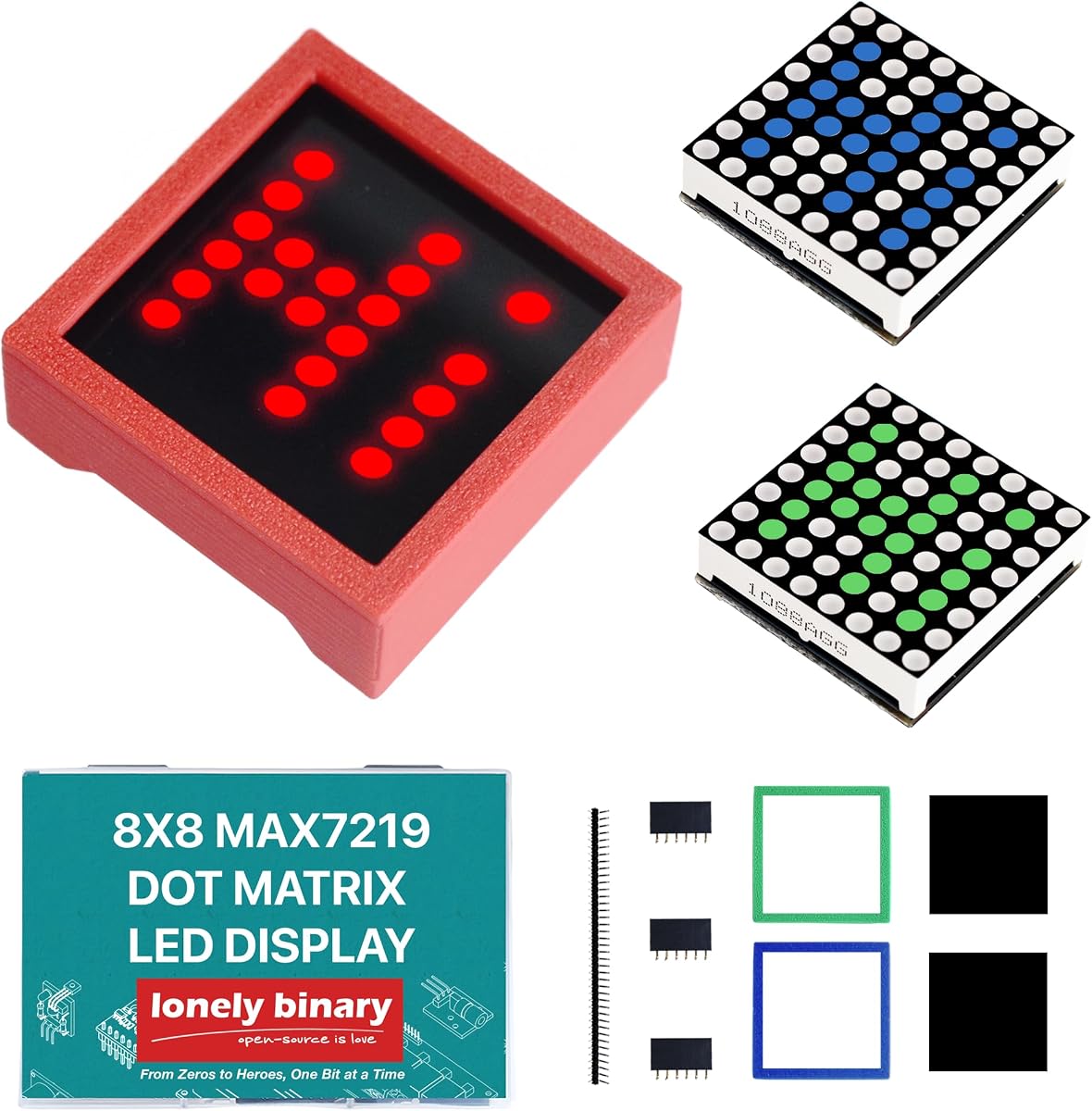
Lonely Binary 3-Pack 8×8 LED Matrix MAX7219 3-Color for C++ & ESP32
4.7Editor score
Includes three color variants
Onboard MAX7219 driver
Daisy-chainable design
This guide compares the top 10 LCD Dot Matrix Modules for engineers and hobbyists based on resolution, backlight quality, driver compatibility, and ease of
LCD Dot Matrix Modules provide essential visual feedback for embedded projects ranging from simple status indicators to complex graphical interfaces. These displays allow developers to render text, numbers, and custom graphics with clarity and precision across various electronic platforms.
We evaluated ten leading products available on the market focusing on resolution, backlight quality, driver compatibility, and overall build robustness. Our analysis considers ease of integration with popular microcontrollers and the reliability of the underlying hardware components for long-term use.
Each pick highlights specific strengths such as cost efficiency, advanced graphical capabilities, or compatibility with modern development ecosystems. Please note that product specifications and availability may change over time so always verify current details before purchasing.
4.7Editor score

4.5Editor score

4.1Editor score
The following table provides a side by side comparison of the key specifications and features for all ten products reviewed in this guide to help you quickly identify the best fit for your project requirements.




This three-pack of 8×8 LED matrices stands out as a top choice for hobbyists looking for cost effective visual feedback components. With a strong rating of 4.7 stars it delivers reliable performance for a wide range of embedded projects.
We may earn a commission when you buy through this link, at no additional cost to you.
Each module features an onboard MAX7219 driver which simplifies control significantly. You can manage brightness and content via a simple five pin SPI interface making it easy to integrate with boards like the ESP32 or Arduino.
While the need for basic soldering might be a hurdle for absolute beginners the inclusion of 3D printed enclosures adds significant value by protecting the circuits and improving aesthetics. The modules are chainable so you can expand your display area easily.
Anyone building custom indicators or retro games will find this kit excellent for its balance of price and functionality. We recommend it for creators who want to prototype quickly without breaking their budget on display components.
The onboard MAX7219 driver IC handles the heavy lifting for you allowing you to focus on content rather than complex multiplexing logic. This saves both code space and time during development.
From scrolling text and weather widgets to simple arcade games the flexibility of these matrices supports endless creative possibilities for makers and students alike.
We may earn a commission when you buy through this link, at no additional cost to you.
This 128×64 graphic LCD module offers a versatile display option for projects requiring more space than a standard character screen. It is designed to provide clear visibility and reliable performance across various microcontroller platforms.
We may earn a commission when you buy through this link, at no additional cost to you.
The module features a wide viewing angle and high contrast which ensures readability from different positions. Its compatibility with popular boards like the Mega 2560 and Nano makes it a convenient choice for many hobbyists.
While it provides a good visual experience the lack of specific controller chip information in the description requires users to verify pinouts and libraries before purchase. This might add a small step to the setup process.
We suggest this module for users who need a graphic display without the complexity of touch interfaces or color screens. It remains a solid option for industrial panels or data readouts where clarity is key.
The high contrast ratio ensures that characters and graphics remain sharp even in varying lighting conditions making it suitable for both indoor and outdoor applications.
Compatibility with a range of Arduino boards means you can use this display in almost any standard prototyping environment without needing specialized adapters.
We may earn a commission when you buy through this link, at no additional cost to you.
This two-pack of 1602 LCD modules offers a reliable and straightforward display solution for text based applications. It is a classic choice for engineers who need to show numerical data or status messages clearly.
We may earn a commission when you buy through this link, at no additional cost to you.
Each module supports 16 characters across two lines which is ideal for small messages or system outputs. The parallel interface makes it easy to connect to microcontrollers without needing complex configuration steps.
The blue backlight ensures good visibility in most environments and the 5V operation aligns with standard logic levels. However the graphical capabilities are limited to predefined characters which restricts custom visual designs.
If you need a cost effective way to monitor sensors or control panels these modules are a practical choice. We recommend them for beginners or projects where simple text output is the primary requirement.
Buying a two-pack allows you to prototype with one unit and have a spare ready for replacement or dual panel setups without extra shipping costs.
The parallel port interface is straightforward to wire up making it a forgiving option for those learning how to connect displays to microcontrollers.
We may earn a commission when you buy through this link, at no additional cost to you.
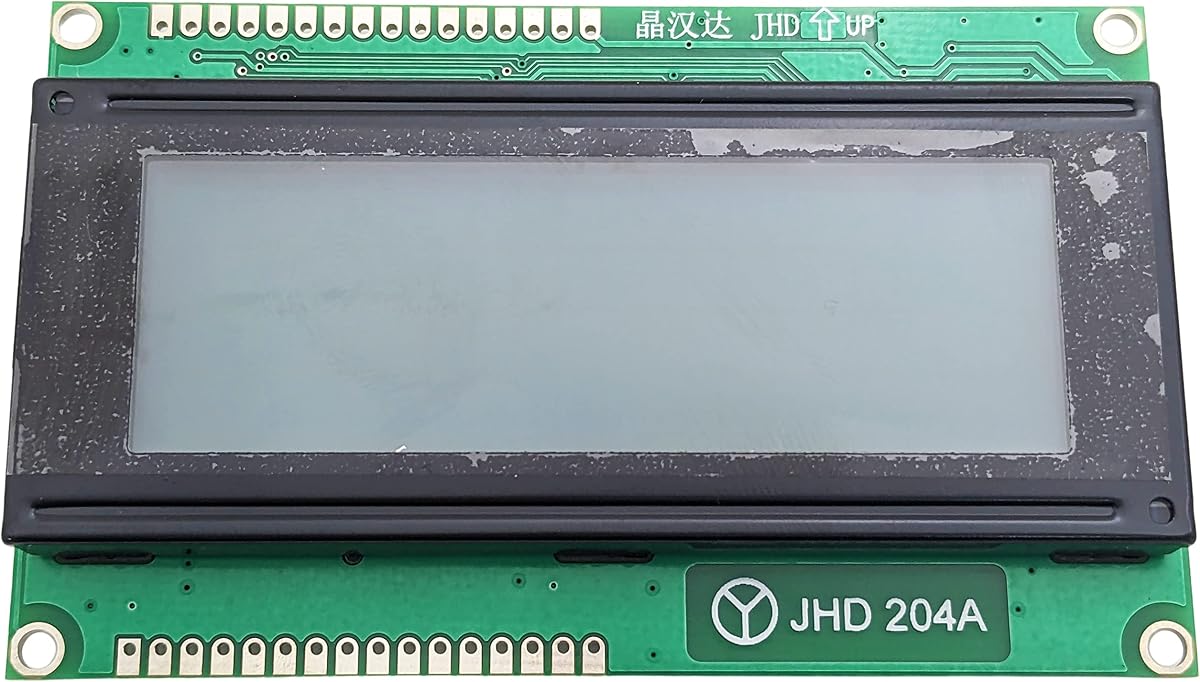
The 20×4 backlit LCD module provides ample space for displaying detailed text or multiple data streams simultaneously. It is designed to handle complex interfaces without the need for scrolling content.
We may earn a commission when you buy through this link, at no additional cost to you.
With 20 characters per line across four lines you can present significantly more information than on a standard 1602 display. The driver and controller are integrated into the module reducing external component needs.
The reflective gray display works well in well lit environments but may be harder to read in low light without an external light source. The dimensions fit neatly into standard enclosures making it versatile for panels.
We recommend this module for industrial applications where large text visibility is required and power consumption is a concern. Its ability to present more data at once makes it efficient for monitoring systems.
The 20×4 format allows for richer text layouts which is beneficial for displaying logs or status codes that would otherwise require scrolling on smaller screens.
Having the driver and controller built in simplifies the wiring process and reduces the risk of connection errors during setup for the end user.
We may earn a commission when you buy through this link, at no additional cost to you.
This LCD module offers a substantial display area for text based applications requiring more room than standard character screens provide. It is engineered for reliability and consistent performance across a range of operating conditions.
We may earn a commission when you buy through this link, at no additional cost to you.
The 20×4 layout allows you to display multiple lines of data which is useful for control panels or dashboard views. The duty cycle of 1/16 helps ensure efficient power usage during operation.
While the reflective display works well in natural light it may struggle in darker environments without additional illumination. The physical size is compact enough for most standard project cases and panels.
We suggest this product for users who need to maximize text output on a standard LCD without moving to more complex graphical interfaces. It is a robust choice for industrial or educational use cases.
The duty cycle design ensures that the display consumes power efficiently making it suitable for battery powered or energy conscious applications.
The module fits within standard mounting hole patterns allowing for easy integration into custom enclosures or existing system panels.
We may earn a commission when you buy through this link, at no additional cost to you.
This kit provides three distinct color options for 8×8 LED matrix displays making it a versatile tool for various visual projects. It is designed to support creative coding and interactive displays on modern platforms.
We may earn a commission when you buy through this link, at no additional cost to you.
Each module features an onboard MAX7219 driver which simplifies control significantly. You can manage brightness and content via a simple five pin SPI interface making it easy to integrate with boards like the ESP32 or Arduino.
The inclusion of 3D printed enclosures protects the electronics and gives the project a professional look right out of the box. This extra attention to detail adds value compared to bare PCB modules from other manufacturers.
If you are working on a multi-color status indicator system or a retro game display this pack offers the flexibility you need at a reasonable price. We recommend it for makers looking for durability and style.
The custom PLA cases protect the fragile LEDs and circuitry from dust and physical damage extending the life of your display setup.
With three colors available you can create layered pixel art or use different modules to indicate different states or alarms clearly.
We may earn a commission when you buy through this link, at no additional cost to you.
This module combines four 8×8 LED matrices into a single unit providing a compact and high density display solution. It is ideal for projects that need a larger visual area without the complexity of wiring multiple boards.
We may earn a commission when you buy through this link, at no additional cost to you.
Powered by the MAX7219 driver it accepts a simple five pin connection making it easy to interface with Arduino and other microcontrollers. The brightness levels are sufficient for most indoor and outdoor applications.
The footprint is compact which saves space on your breadboard or enclosure. However you may need to provide your own mounting hardware as it uses standard holes for screws.
We recommend this product for data visualization or scrolling text banners where space efficiency is important. Its high integration level makes it a strong candidate for custom control panels.
By integrating four matrices into one board you save on wiring and connectors which is crucial for compact project enclosures.
The LEDs provide high brightness ensuring that your content is visible even in bright environments without needing excessive current.
We may earn a commission when you buy through this link, at no additional cost to you.
This display is optimized for numerical readouts making it perfect for clocks or counters or sensor outputs. It uses a standard MAX7219 driver to simplify the connection process significantly.
We may earn a commission when you buy through this link, at no additional cost to you.
The 8-digit format allows for a wide range of numerical values without needing complex scrolling logic. You can adjust the brightness via software which helps save power when full brightness is not needed.
While it is not suitable for graphical elements it excels at showing data clearly and concisely. The SPI interface means you need very few pins on your microcontroller to operate it.
We recommend this for any project that requires displaying a number or sensor reading reliably. It is a cost effective solution for numeric dashboards or temperature displays.
The dedicated 7-segment digits ensure that numbers are always clear and readable which is essential for scientific or industrial data.
The low power shutdown mode and adjustable brightness help extend battery life in portable devices or portable setups.
We may earn a commission when you buy through this link, at no additional cost to you.
This LCD module stands out for its clarity and ease of use in embedded projects. With a rating of 4.5 stars it provides a robust and user friendly display solution for a variety of applications.
We may earn a commission when you buy through this link, at no additional cost to you.
The 20×4 format offers significantly more space than a standard 1602 screen allowing for more detailed text output. The white on blue contrast is excellent for readability in various lighting conditions.
It works seamlessly with Arduino and other microcontrollers using standard libraries. The adjustable contrast potentiometer allows you to fine tune the display for your specific environment easily.
We consider this the editor's choice for users who want a reliable text display with strong community support and documentation. It is an ideal pick for student projects or professional prototypes.
The high contrast white characters on blue background make even small text easy to read which reduces eye strain during debugging sessions.
Because it is compatible with standard Arduino libraries you can find plenty of example code and tutorials online to get started quickly.
We may earn a commission when you buy through this link, at no additional cost to you.
This three-pack offers a large 32×8 matrix size which is perfect for scrolling text or expansive animations. It is a premium option for creators who need a larger visual area for their projects.
We may earn a commission when you buy through this link, at no additional cost to you.
Each module is driven by a MAX7219 IC ensuring smooth updates and brightness control. The variety of colors and included enclosures make it a complete package for desktop or wall mounted displays.
While it requires more code to manage the larger pixel count the visual impact is worth the effort. The cases protect the electronics and give the setup a finished professional look.
We recommend this for advanced users building scoreboards or digital signs where a standard 8×8 matrix would be too small. It is the best pick for high impact visual feedback.
The 32×8 layout allows for longer messages to scroll smoothly without needing complex paging logic in your code.
The inclusion of 3D printed enclosures ensures that the modules look great and stay protected which justifies the higher price point.
We may earn a commission when you buy through this link, at no additional cost to you.
Selecting the right display module depends on several key factors including resolution power requirements and driver compatibility. This guide outlines the most important aspects to consider before making a purchase.
Resolution determines how much content you can display at once. For text only tasks a 1602 or 20×4 character module is sufficient. For graphics or scrolling messages consider a 128×64 or larger LED matrix.
Always choose a resolution that matches your content needs to avoid unnecessary scrolling or wasted space.
Check if the module uses an integrated driver like MAX7219 or HD44780. Integrated drivers simplify wiring and reduce the number of pins needed on your microcontroller.
Verify that your microcontroller supports the required interface such as SPI or parallel to ensure smooth integration.
Backlight type affects visibility. White on blue or blue on black provides high contrast for text. LED matrices offer adjustable brightness which is useful for varying light conditions.
Prioritize high contrast options if your project will be viewed in bright environments.
Most modules operate at 5V which is standard for Arduino. Ensure your power source can supply enough current especially for LED matrices with many pixels.
Check the voltage tolerance and current draw to avoid damaging your power supply or microcontroller.
Some kits include 3D printed cases or mounting holes which save assembly time. Others require you to provide your own enclosure or standoffs.
Consider the physical dimensions to ensure the module fits into your project box or panel.
Character displays are typically monochrome while LED matrices come in red green blue or RGB. Choose a color that suits your aesthetic or functional needs.
If you need multiple colors consider a kit that includes varied modules rather than a single color.
Look for modules with libraries available for your platform. Good documentation and community support make development much faster and easier.
Test sample code before buying if possible to confirm software compatibility.
Balance cost with features. Basic character displays are affordable while larger LED matrices cost more. Consider bulk packs for better value if you need multiple units.
Don't overpay for features you won't use but avoid extremely cheap units with poor build quality.
Begin by connecting the power and data pins according to the module's pinout. Most modules use a standard 5V supply and GND. For SPI modules connect DIN CS and CLK pins to your microcontroller.
Install the necessary libraries for your microcontroller to communicate with the display. Test the module with sample code to ensure all pixels or characters are working correctly.
Protect the display from direct sunlight or excessive moisture. Use cases or covers if the module will be in a high traffic area to prevent physical damage or dust buildup.
LCD modules use liquid crystals to display text with a backlight while LED modules use individual light emitting diodes for pixels. LEDs are often brighter and more durable whereas LCDs are better for long text blocks.
Yes many LED matrix modules support daisy chaining. You can connect the output of one module to the input of another to create larger displays using a single controller.
Most modules require specific GPIO wiring. While they work with Pi you may need level shifters or libraries to manage the display effectively compared to Arduino.
Character LCDs typically have a potentiometer on the back. Rotate it to tune the contrast. LED matrices use software commands to adjust brightness levels.
Standard modules are not waterproof. If you need outdoor use you must enclose them in a waterproof case or choose an IP rated display.
Most operate at 5V logic. Always check the datasheet. Some may support 3.3V but you must verify compatibility with your controller to avoid damage.
Our top picks highlight the best options for budget and performance across different display types. The Lonely Binary packs offer great value for LED graphics while SunFounder and Electronix provide solid character displays.
Prioritize compatibility and resolution to ensure your module meets the project requirements. If you need scrolling text or icons choose LED matrices. For simple data readouts character LCDs remain the standard.
Remember that availability and pricing can change so verify current specs before finalizing your order. This guide serves as a reliable reference to help you make an informed decision for your next project.