
Logitech G203 Wired Gaming Mouse
4.6Editor score
8000 DPI optical sensor
RGB lighting customization
Six-button design layout
Discover the top analog gaming mice for precision and control. This guide compares ten leading models featuring advanced sensors, customizable weights, and
Finding the right analog gaming mouse can transform your gameplay experience significantly. These devices offer precise tracking and customizable features that cater to different gaming styles. Whether you prefer lightweight agility or heavy stability, there is an option tailored to your needs.
We evaluated ten top-rated models based on sensor accuracy, build quality, and user feedback. Our analysis focuses on performance metrics like DPI range, polling rates, and switch durability. Each product brings unique strengths suitable for FPS, MMO, or general gaming tasks.
Each pick highlights key features and real-world performance insights from verified user experiences. We include detailed breakdowns of specifications and usability factors to help you decide. Please note that pricing and availability may change frequently on retailer platforms.
4.6Editor score

4.6Editor score

4.5Editor score
This side-by-side comparison highlights the key specifications of each model to help you identify the best fit for your gaming setup. We focus on sensor capabilities, button counts, and ergonomic features that define modern analog performance.




The Logitech G502 Hero stands out as a top performer in the analog gaming mouse category with its high rating. It offers exceptional tracking precision and a versatile button layout that suits various gaming styles effectively.
We may earn a commission when you buy through this link, at no additional cost to you.
Its HERO sensor delivers zero smoothing or acceleration ensuring smooth cursor movement. The adjustable weights allow users to tailor balance while the mechanical tensioning system provides crisp clicks for reliable input.
While it is heavier than some competitors the weight system adds stability for precise aiming. The cable feels sturdy but may require a mousepad with smooth movement for optimal results.
This mouse is ideal for gamers who value customization and performance over minimal weight. It remains a strong choice for FPS and general gaming due to its robust build and advanced features.
The HERO sensor tracks movement at sub-micron levels for unparalleled accuracy during intense gaming sessions.
Eleven programmable buttons give you extensive macro and command options directly under your fingertips.
We may earn a commission when you buy through this link, at no additional cost to you.
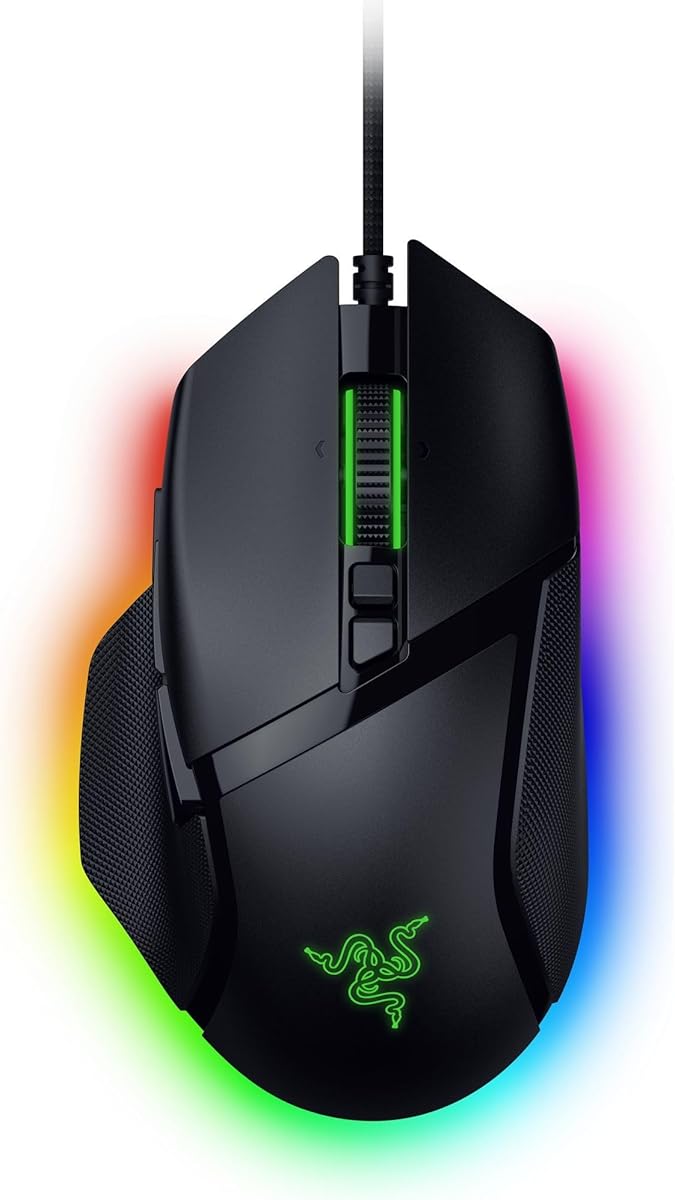
The Razer Basilisk V3 combines ergonomic comfort with high-speed optical switches for responsive gaming. Its design supports long sessions while the scroll wheel offers versatile modes for navigation.
We may earn a commission when you buy through this link, at no additional cost to you.
Users benefit from zero accidental clicks due to the optical switch technology. The thumb rest adds stability and the lighting zones provide immersive visual feedback during gameplay.
Although it needs software for full customization the Synapse app is powerful. The cable is braided but fixed which limits portability compared to detachable options.
This mouse is great for gamers seeking speed and comfort in one package. It performs well in fast-paced titles where rapid response times are critical.
Gen-2 optical switches deliver 0.2ms actuation speed with minimal risk of double-click issues over time.
The HyperScroll wheel switches between free-spin for browsing and tactile mode for precise weapon cycling.
We may earn a commission when you buy through this link, at no additional cost to you.
The Logitech G403 Hero offers a balanced approach with a lightweight build and strong sensor performance. It features six programmable buttons and on-board memory for easy profile switching.
We may earn a commission when you buy through this link, at no additional cost to you.
Its shape provides a comfortable grip with rubberized sides for better control. The sensor tracks accurately without smoothing and supports a wide DPI range for various game types.
Some users might find the button count lower than MMO mice but it suits FPS well. The shape is ergonomic but might feel large for smaller hands or palm grippers.
This mouse is suitable for gamers needing portability and precision without extra bulk. It is a reliable choice for those who prefer a lighter feel and consistent tracking.
At 87 grams the G403 delivers speed and comfort with rubber grips for secure handling.
Save settings directly to the mouse so you can use your config on any PC instantly.
We may earn a commission when you buy through this link, at no additional cost to you.
The Logitech G203 is a budget-friendly option that delivers core gaming performance without extra cost. It features a reliable 8000 DPI sensor and comfortable six-button layout for most users.
We may earn a commission when you buy through this link, at no additional cost to you.
Mechanical switches provide crisp clicks and the RGB lighting adds visual flair. The classic shape fits many hand sizes and feels natural during extended use.
While it lacks advanced features like weights or high-end sensors it is solid for general use. The cable is non-detachable but durable enough for everyday gaming needs.
This mouse is perfect for beginners or those needing a reliable spare unit. It offers great performance at an affordable price point for casual and competitive play.
Get solid sensor accuracy and comfortable ergonomics without paying for premium features.
The simple design fits naturally in most hands reducing fatigue during long sessions.
We may earn a commission when you buy through this link, at no additional cost to you.
The Logitech G MX518 brings a modern sensor to a trusted classic ergonomic shape. It features eight programmable buttons and on-board memory for versatile use across devices.
We may earn a commission when you buy through this link, at no additional cost to you.
Its HERO sensor ensures precise tracking and the report rate feels instant during fast movements. The buttons are well-placed and the shape supports palm grips well.
At a heavier weight it may not suit players seeking ultra-light options. The design is timeless but might not appeal to those who prefer asymmetrical forms.
This mouse suits gamers who want nostalgia combined with modern tech. It is reliable for competitive play and offers enough customization for varied setups.
A proven ergonomic form factor that supports palm grip and reduces hand fatigue.
Equipped with HERO 25K sensor for zero-smoothing tracking at any DPI setting.
We may earn a commission when you buy through this link, at no additional cost to you.
The Corsair Scimitar RGB Elite is designed specifically for MMO and MOBA players with unique controls. Its patented slider lets you position side buttons for a custom fit.
We may earn a commission when you buy through this link, at no additional cost to you.
Seventeen buttons support complex macros and the sensor tracks accurately on most surfaces. The shape fits well with larger hands and provides stability during use.
Setup requires software and the design may feel bulky for FPS games. The durability is strong and the switches are rated for millions of clicks.
This mouse is best for genre-specific gamers needing maximum button access. It transforms command execution with its adjustable layout and solid build quality.
Reposition side buttons to match your hand size for faster and more accurate inputs.
Built for executing complex ability chains without reaching for the keyboard during fights.
We may earn a commission when you buy through this link, at no additional cost to you.
The Razer Basilisk V3 35K improves on the V3 with a superior sensor and faster switches. It offers thirteen customizable controls and a smarter scroll wheel for diverse use.
We may earn a commission when you buy through this link, at no additional cost to you.
The Focus PRO sensor tracks on glass and the Gen-3 switches reduce debounce delay. The Speedflex cable minimizes drag for smoother hand movements on any desk.
The price is higher than the standard model and software is needed to unlock features. However the performance gains justify the cost for serious gamers.
This mouse suits users seeking top-tier tracking and responsiveness. It balances comfort and precision well for competitive gaming and daily use.
Focus PRO 35K sensor delivers intelligent functions and 1-DPI step adjustments for fine control.
Gen-3 optical switches offer 90 million clicks with zero double-clicking issues.
We may earn a commission when you buy through this link, at no additional cost to you.
The Corsair NIGHTSWORD stands out with its Smart Tunable Weight system that adjusts balance in real time. It supports ten programmable buttons and a high-precision optical sensor.
We may earn a commission when you buy through this link, at no additional cost to you.
Users can fine-tune balance to match their grip style which improves comfort and control. The rubber grips are inspired by pro equipment and offer a firm hold.
The weight system adds complexity and the mouse is on the heavier side overall. It might not appeal to those who strictly prefer lightweight setups.
This mouse is perfect for gamers who value personalized balance and stability. It delivers professional comfort and precision for long gaming sessions.
Software detects center of gravity to optimize weight placement dynamically for your hand.
Contoured shape and rubber grips designed to reduce fatigue and improve precision.
We may earn a commission when you buy through this link, at no additional cost to you.
The Corsair M65 RGB Ultra targets FPS players with its high polling rate and sensor specs. It features an aluminum frame for durability and optical switches for quick responses.
We may earn a commission when you buy through this link, at no additional cost to you.
AXON technology makes input 8x faster than conventional mice and the sensor tracks accurately. The adjustable weights allow for better balance during aiming tasks.
The build quality is robust but the weight might be an issue for some users. The price is higher and the shape suits palm grip users best.
This mouse suits competitive FPS gamers needing speed and precision. It offers premium features that support high-level play and accuracy.
AXON technology registers clicks and movements 8x faster than standard gaming mice.
Anodized aluminum frame ensures lasting durability without compromising on aesthetics.
We may earn a commission when you buy through this link, at no additional cost to you.
The Razer Basilisk V3 Customizable offers ergonomic design and strong sensor performance for gamers. It includes eleven programmable buttons and optical switches for quick execution.
We may earn a commission when you buy through this link, at no additional cost to you.
The Focus Plus sensor tracks accurately and the thumb rest supports natural hand positioning. RGB lighting reacts to games and creates an immersive gaming atmosphere.
It needs Razer Synapse for full customization and the cable is not detachable. However the performance remains strong for both casual and competitive users.
This mouse is great for those seeking comfort and customization at a reasonable price. It provides excellent value for gamers needing responsive controls.
Thumb rest and button placement support comfort and speed for all hand types.
Gen-2 optical switches offer fast actuation with zero unintended misclicks during play.
We may earn a commission when you buy through this link, at no additional cost to you.
Choosing the right analog gaming mouse depends on several key factors that impact your performance and comfort during gameplay. Consider these aspects before making your decision.
The sensor is the core of any gaming mouse and determines tracking precision. Look for high DPI ranges and zero-smoothing features to ensure accurate cursor movement during fast actions.
Prioritize optical sensors with proven track records for consistency across different surfaces and speeds.
A comfortable shape reduces strain during long sessions and improves control. Consider your hand size and grip style to choose between symmetrical or ergonomic designs.
Try models with thumb rests or contoured bodies if you use palm grip for better support.
The number and placement of buttons affect how quickly you can execute commands. MMO players may prefer multiple side buttons while FPS gamers often need fewer essential ones.
Ensure programmable buttons are easily reachable without compromising your core grip comfort.
Weight influences how easily you can maneuver the mouse across your mousepad. Adjustable weight systems allow customization to match your preference for speed or stability.
Lighter mice generally favor speed while heavier ones provide better stability for precision shots.
Switches determine the click feel and lifespan of the mouse. Optical switches offer faster actuation and longer life than traditional mechanical options.
Look for switches rated for tens of millions of clicks to ensure longevity.
Software lets you remap buttons and adjust lighting to suit your workflow. Ensure the software supports macros and DPI switching for a tailored experience.
Check compatibility with your operating system and whether profiles can be saved on-board.
Wired mice typically offer lower latency than wireless ones. A braided cable reduces tangling and drag compared to standard rubber cables.
Consider detachable cables for easier transport if you often change setups.
Lighting can enhance immersion and help you locate the mouse quickly in dark rooms. Some models allow synchronization with other peripherals for a unified look.
Prioritize performance over lighting if you are focused purely on competitive play.
Install the manufacturer software to map buttons and adjust DPI settings. Configure lighting profiles to match your room or game for optimal immersion.
Clean the mouse sensors and buttons regularly using a soft cloth and compressed air. Dust accumulation can interfere with tracking accuracy and switch responsiveness over time.
Store the mouse in a dry place away from direct sunlight to avoid cable or material degradation. Use a mousepad designed for gaming to reduce wear and improve control.
Most competitive players prefer between 400 and 1600 DPI for better control and aim consistency. Higher DPI can be useful for high-resolution screens but requires practice to avoid overshooting targets.
Optical switches are generally faster and more durable because they use light to register clicks. They eliminate double-click issues and provide consistent actuation points throughout their lifespan.
Basic functions work without software but full customization requires the manufacturer's app. Use it to save profiles and remap buttons for specific games or applications.
High-quality mice often last years but switch wear varies based on usage intensity. Replace when clicks feel inconsistent or tracking becomes unreliable despite cleaning.
Palm grippers need larger ergonomic shapes while claw and fingertip users prefer smaller lightweight mice. Match the mouse size to your hand shape for comfort and precision.
Most wired gaming mice work with Mac but software support may vary. Check system requirements before purchasing to ensure full feature access on your device.
The ten models reviewed here represent the top options available for gamers seeking precision and customization. Each has unique strengths suited for different playstyles and budget ranges.
Prioritize ergonomics and sensor quality when selecting your next mouse for best results. Consider how much customization you need versus simplicity for your typical gaming sessions.
Always check current prices and availability as they may fluctuate on retailer platforms. Invest in a mouse that fits your hand and playstyle to maximize your potential.