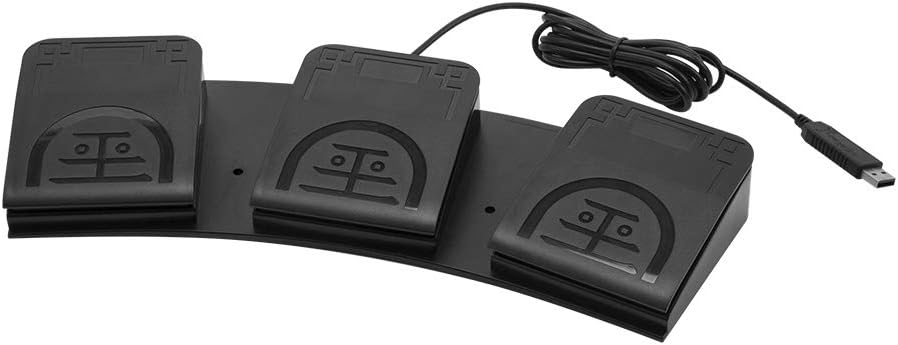
iKKEGOL Upgraded USB Triple Foot Pedal
4.4Editor score
Optical silent switches
HID programmable device
Wide ergonomic design
This guide compares ten top foot pedals for transcriptionists focusing on durability comfort and software compatibility to help professionals choose the right
Finding the right foot pedal can transform your transcription workflow. A good pedal lets you control audio playback hands free so you can focus on typing accurately and efficiently without constant interruptions.
We evaluated ten highly rated foot pedals based on build quality ergonomic design software compatibility and user feedback. Our selection includes options for different budgets and software needs to ensure a reliable match for your setup.
Each pick highlights key strengths and potential limitations to help you decide. Note that prices and availability change often so check the current listings before purchasing your ideal transcription tool today.
4.4Editor score

4.5Editor score

4.1Editor score
This side-by-side comparison highlights key specifications and features across all ten models to help you quickly identify which pedal best fits your transcription needs and software environment.


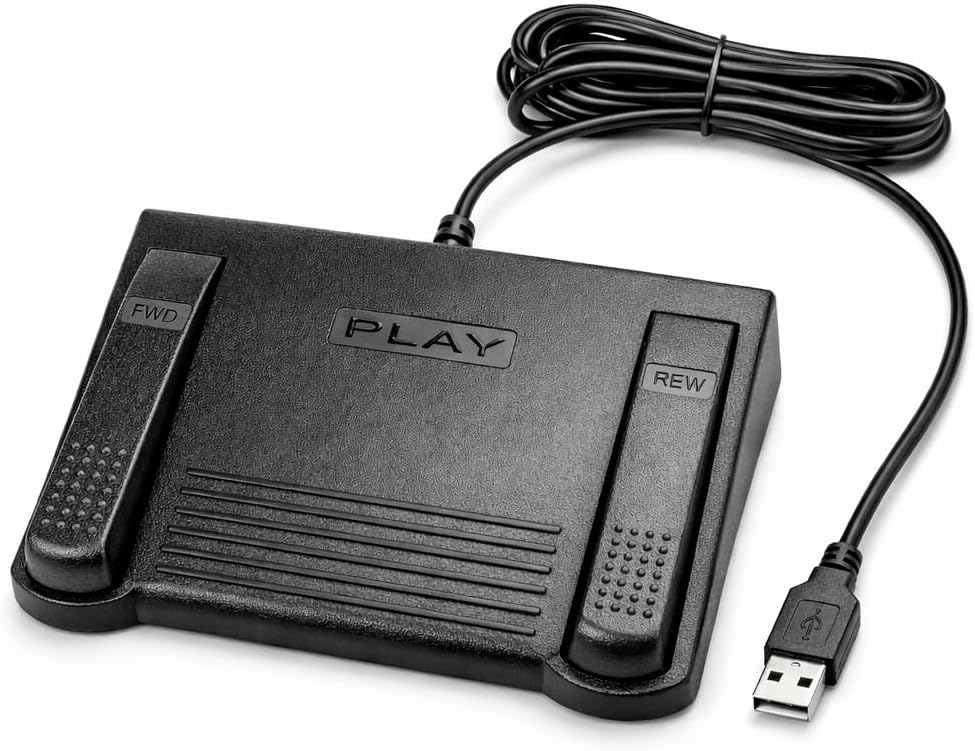


The Infinity 3 USB Foot Pedal Control stands out as a top choice for transcriptionists needing reliable hands-free audio control. It has a rating of 4.5 and is known for its sturdy build quality and consistent performance over time.
We may earn a commission when you buy through this link, at no additional cost to you.
Its ultra-heavy-duty micro switches ensure countless hours of trouble-free use. The ergonomic design includes a wide sloping Play pedal that makes it easy to shift between play and fast forward or rewind keys quickly.
While it lacks advanced programmable features found in higher-end models, this simplicity reduces potential software conflicts and makes it a plug-and-play solution for most basic transcription workflows without extra setup steps.
Anyone looking for a solid dependable foot pedal that withstands daily use without breaking the bank should consider this model. It remains a strong recommendation for professionals prioritizing durability and ease of use.
The ultra-heavy-duty switches ensure the pedal withstands thousands of presses without failure.
The wide central sloping pedal makes it easy to transition between commands quickly.
We may earn a commission when you buy through this link, at no additional cost to you.
The VEC in-USB-2 Infinity Digital Foot Control offers a rechargeable battery that provides up to 1000 hours of use making it ideal for mobile transcriptionists. It features an ergonomic design with a sloping Play pedal for comfortable rest during dictation.
We may earn a commission when you buy through this link, at no additional cost to you.
Built with heavy-duty components designed for 2000000 depressions it ensures long-lasting performance. A mechanical stop prevents accidental triggering of the center pedal which maintains control when stepping on side pedals.
While users must remember to charge the battery occasionally this model supports most leading dictation brands and works with any PC or laptop with a USB port. The wide surface area also aids in easy foot movement.
This unit is a great fit for professionals who value mobility and a robust build. It balances advanced features like the stop mechanism with essential comfort traits for efficient transcription work.
The rechargeable battery provides up to 1000 hours of digital recording time for extended use.
A mechanical stop prevents accidental triggering of the center pedal while using side pedals.
We may earn a commission when you buy through this link, at no additional cost to you.
The Philips ACC2330 4-Pedal Foot Control is designed for professional dictation systems offering toe touch control and an easy swing motion using the heel. Its increased center pedal width helps avoid unintended presses of other pedals.
We may earn a commission when you buy through this link, at no additional cost to you.
Users can easily relax their feet during pause time thanks to the ergonomic design. The unique toe touch control lets you feel changes in the control area which improves responsiveness during fast transcription work.
While the price is higher than basic options the professional-grade features justify the cost for those already using Philips digital dictation systems. The wide center pedal significantly reduces accidental key presses.
This model is best for professionals invested in high-end digital dictation setups needing precise control and comfort. It offers features not found in standard consumer transcription pedals.
Feel it with your toe when you change the control area for faster responses.
Increased width of the center pedal avoids unintended presses of other pedals.
We may earn a commission when you buy through this link, at no additional cost to you.
The DAC 3 Function Foot Pedal holds a perfect 5.0 user rating making it a standout choice for specific transcription needs. It features large buttons labeled Next Job Rew Play and Record which simplify workflow navigation.
We may earn a commission when you buy through this link, at no additional cost to you.
This unit connects via USB and works with certain computer software designed for foot control. The clear labeling of buttons helps users quickly identify functions without looking down at the pedal.
However compatibility is limited to certain software packages so check your transcription program before buying. The lack of extensive driver support means it works best for targeted use cases rather than universal ones.
Anyone needing a high-performance pedal with specific button labels should look into this model. The perfect user rating suggests high satisfaction among those whose setups support it.
Buttons are labeled Next Job Rew Play and Record for quick identification.
Includes record capability which is rare in standard transcription pedals.
We may earn a commission when you buy through this link, at no additional cost to you.
The Infinity USB Digital Foot Control offers a low profile design with a greater non slip surface area which helps keep the unit stable on your desk. It maintains the reliability of the Infinity brand.
We may earn a commission when you buy through this link, at no additional cost to you.
This unit connects via USB and provides standard 3 function control for transcription work. The design focuses on stability and ease of use without unnecessary features that might complicate setup.
While it lacks advanced customization the simple layout ensures consistent performance. The larger non slip surface area prevents the pedal from sliding during heavy use.
Users seeking a no-frills stable solution for basic transcription should consider this model. It prioritizes reliability and stability over advanced features.
Greater non slip surface area keeps the pedal right where you want it.
Slim build takes up less space under your desk.
We may earn a commission when you buy through this link, at no additional cost to you.
The Express Scribe Transcription Foot Pedal is designed exclusively for Express Scribe software which ensures seamless operation. It comes pre-programmed so no wizard or manual configuration is needed to start transcribing.
We may earn a commission when you buy through this link, at no additional cost to you.
Built with a custom internal control board this unit ensures reliable playback control for Windows and Mac users. The oversized pedal design supports comfortable low-fatigue operation during long sessions.
Since it only works with Express Scribe it is not suitable for other programs like Case Catalyst. This specificity can be a drawback if you switch software later or work across platforms.
If you rely on Express Scribe this pedal offers true plug-and-play convenience. It is the logical choice for dedicated users of that software.
Built with an exclusive control board specifically engineered for Express Scribe software.
Pre-programmed and ready to use right out of the box without configuration.
We may earn a commission when you buy through this link, at no additional cost to you.
The ECS-IN-USB-1 Foot Pedal delivers reliable hands-free audio playback control designed to minimize strain. It features an ergonomic design that supports natural foot positioning to help reduce fatigue during long transcription sessions.
We may earn a commission when you buy through this link, at no additional cost to you.
It works with most major dictation platforms making it a dependable choice for professional environments. The pedal is built for daily workloads in fields like medical and legal transcription.
Although user ratings are lower than other models the ergonomic focus makes it a strong candidate for those prone to foot strain. It includes a 1 year warranty for added confidence.
Anyone prioritizing comfort and broad software compatibility should consider this unit. It focuses on reducing physical strain without requiring complex setup.
Thoughtfully contoured layout supports natural foot positioning to minimize strain.
Designed to work with most major dictation and transcription software platforms.
We may earn a commission when you buy through this link, at no additional cost to you.
The iKKEGOL Upgraded USB Triple Foot Pedal uses optical switches which are quiet and designed to be programmed as a keyboard or mouse. It supports HID functionality for custom tasks like transcription key settings.
We may earn a commission when you buy through this link, at no additional cost to you.
The ergonomic wide pedal design allows long lasting comfort for feet and can bear weights over 100kg. TPU rubber pads ensure it stays put on hard floors during use.
While setup requires installing configuration software this flexibility lets you tailor functions to your workflow. It supports Windows and Mac and is ideal for users who want to map keys manually.
This model offers great value for those who need custom key mapping. The build quality and quiet switches make it a versatile option for transcriptionists.
Optical switches are quiet and provide an easy touch response with minimal resistance.
The design can bear weight of more than 100kg for maximum durability.
We may earn a commission when you buy through this link, at no additional cost to you.
The Philips LFH-2330 Configurable USB Foot Control features a slim design to minimize foot movement and physical strain during transcription. It offers 4 pedals that can be fully configured to suit your workflow using a wizard.
We may earn a commission when you buy through this link, at no additional cost to you.
Anti-slip bottom surfaces keep it in the right place while the user-friendly wizard simplifies setup. The slim profile helps reduce the need for large foot movements which can cause fatigue over time.
Although it carries a higher price point the configurability makes it a top pick for advanced users. It is designed to adapt to various transcription environments including legal and medical.
Users needing a highly adjustable unit with minimal strain should choose this model. The slim ergonomic form factor supports long hours of comfortable use.
Slim design minimizes foot movement during transcription to minimize physical strain.
4 pedal design which can be completely configured using a user-friendly wizard.
We may earn a commission when you buy through this link, at no additional cost to you.
The iKKEGOL Mechanical Triple Pedal uses mechanical switches that provide physical feedback when pressed. It comes with powerful ElfKey software for programming complex macros and key combinations for transcription work.
We may earn a commission when you buy through this link, at no additional cost to you.
The pedal can bear weight over 100kg and includes anti-slip rubber for stability. It works on Windows Mac and Linux after initial setup on a PC or Mac.
While the mechanical switch feels different from optical ones it offers durability and clear tactile feedback. The software supports custom macros which can speed up workflows significantly.
Users who prefer mechanical switches and need deep customization will find this unit valuable. The build quality and wide platform support make it a flexible choice for diverse environments.
When pressed the pedal actuates a spring-loaded lever which physically closes an electrical circuit.
Powerful ElfKey configuration software allows complex macros and key combinations setup.
We may earn a commission when you buy through this link, at no additional cost to you.
Selecting the right foot pedal depends on your software, workflow, and comfort needs. This guide breaks down key factors to help you find a model that enhances your transcription efficiency.
Most pedals work with popular programs like Express Scribe and Word. Some are tied to specific software so verify your program supports the pedal before buying. Universal compatibility ensures you can switch tools later without new hardware.
Check if the pedal requires specific drivers or is plug-and-play for your operating system.
Look for wide pedals that allow easy transitions between play rewind and fast forward. Ergonomic sloping designs reduce strain on your foot and ankle during long sessions. The number of pedals matters if you need extra functions like recording.
A wide center pedal helps prevent accidental presses of adjacent keys during fast transcription.
Choose models with heavy-duty switches rated for millions of presses. Micro switches and mechanical switches offer longer life than cheap rubber buttons. Durability ensures consistent performance over years of daily use.
Higher switch counts and solid construction reduce the need for frequent replacements.
Most pedals use USB for simple plug-and-play connectivity. Ensure your computer has a free USB port and that the pedal supports your OS like Windows or Mac. Avoid wireless models unless you need mobility since wired connections are more stable.
USB connections typically require no drivers and work immediately after plugging in.
An ergonomic shape reduces fatigue by keeping your foot in a natural position. Slim designs minimize movement which helps reduce strain. Look for anti-slip surfaces to keep the pedal stable on your desk or floor.
Comfort features like wide pedals and anti-slip bottoms help maintain productivity during long hours.
Some pedals let you assign custom macros or key combinations via software. This can speed up workflows by automating complex commands. If you need custom functions choose a model with configuration software like ElfKey.
Programmable pedals add flexibility but may require initial setup to work correctly.
Wired pedals provide reliable power without charging breaks. Battery-powered units offer mobility but need recharging. Consider your environment if you move between desks or travel often for transcription work.
Rechargeable units offer convenience but plan for charging downtime if you work long shifts.
A warranty like 1 year parts and labor gives peace of mind for long-term use. Brands with strong support ensure you can get help if issues arise. Check return policies before buying especially for higher priced models.
Reliable warranty coverage protects your investment against premature hardware failures.
Connect the pedal via USB to your computer and launch your transcription software. Most models are plug-and-play but check the manual for any driver installation if required for your OS.
Use your heel to swing between the three main pedals while keeping your foot relaxed. This reduces fatigue compared to lifting your foot for every command. Keep the pedal on a stable surface to avoid accidental slipping during use.
Clean the pedals regularly with a soft cloth to remove dust and debris. Avoid harsh chemicals that might damage plastic or switches. Store it in a dry place when not in use to maintain long-term performance.
Most universal pedals work with standard programs like Express Scribe or Microsoft Word. However some models are built for specific software. Check your software's compatibility list before buying to ensure seamless integration.
Plastic pedals with wide surfaces and anti-slip coatings are most comfortable for long use. Look for ergonomic designs that support natural foot positioning. Heavy-duty micro switches inside also ensure lasting performance without fatigue.
Most modern USB pedals are plug-and-play and do not require drivers. Some programmable models may need optional software for macros. Always check the product details to confirm driver requirements for your operating system.
Legal transcription often requires precise control so models with mechanical switches and wide pedals are ideal. Look for units with high durability ratings and anti-slip bottoms. Configurable options can also speed up complex workflows.
Many pedals are compatible with both Windows and Mac via USB. However some older models may require additional drivers on macOS. Check the product specifications or contact the manufacturer before buying.
Use a soft dry cloth to wipe the pedal surfaces. Avoid liquids or harsh cleaners. Unplug the unit before cleaning to prevent damage. Dust can accumulate in switch gaps so use compressed air if needed.
We reviewed ten foot pedals tailored for transcriptionists with top picks like the Infinity 3 USB and the iKKEGOL Triple. Each model offers different benefits from durability to custom programmability.
Prioritize compatibility with your software and ergonomic comfort when selecting a unit. A reliable pedal can significantly boost your productivity and reduce physical strain over time.
Prices and stock change often so check current listings before purchasing. Investing in the right tool ensures a smoother and more efficient transcription workflow for your daily tasks.