
Nettbe 60 PCS Reusable Cable Ties
4.8Editor score
Adjustable hook and loop straps
Sixty pieces in one pack
Environmentally friendly reusable design
Organizing your gaming setup can transform a messy desk into a clean professional workspace. The right cable management for gaming PC tools help hide wires and improve safety while maintaining your aesthetic. Whether you use a simple setup or a multi monitor rig, keeping cords tidy is essential for longevity and peace of mind.
We compared ten popular products based on durability, ease of installation, capacity, and value. Our list includes full kits, under desk trays, sleeves, and clips. Each option offers unique strengths for different setups. We focused on real user feedback and verified specifications to ensure accurate recommendations for your specific needs.
Each pick highlights key features and ideal use cases to help you decide quickly. Some bundles provide complete solutions while others specialize in specific areas like trays or clips. Prices fluctuate over time so check current listings before purchasing to secure the best deal available for your budget and requirements.
4.8Editor score
4.5Editor score
4.5Editor score
As an Amazon Associate we earn from qualifying purchases.
This side by side comparison highlights key specs for each product so you can quickly identify the right solution for your gaming desk. We focused on dimensions, materials, installation methods, and unique features to simplify your decision-making process.




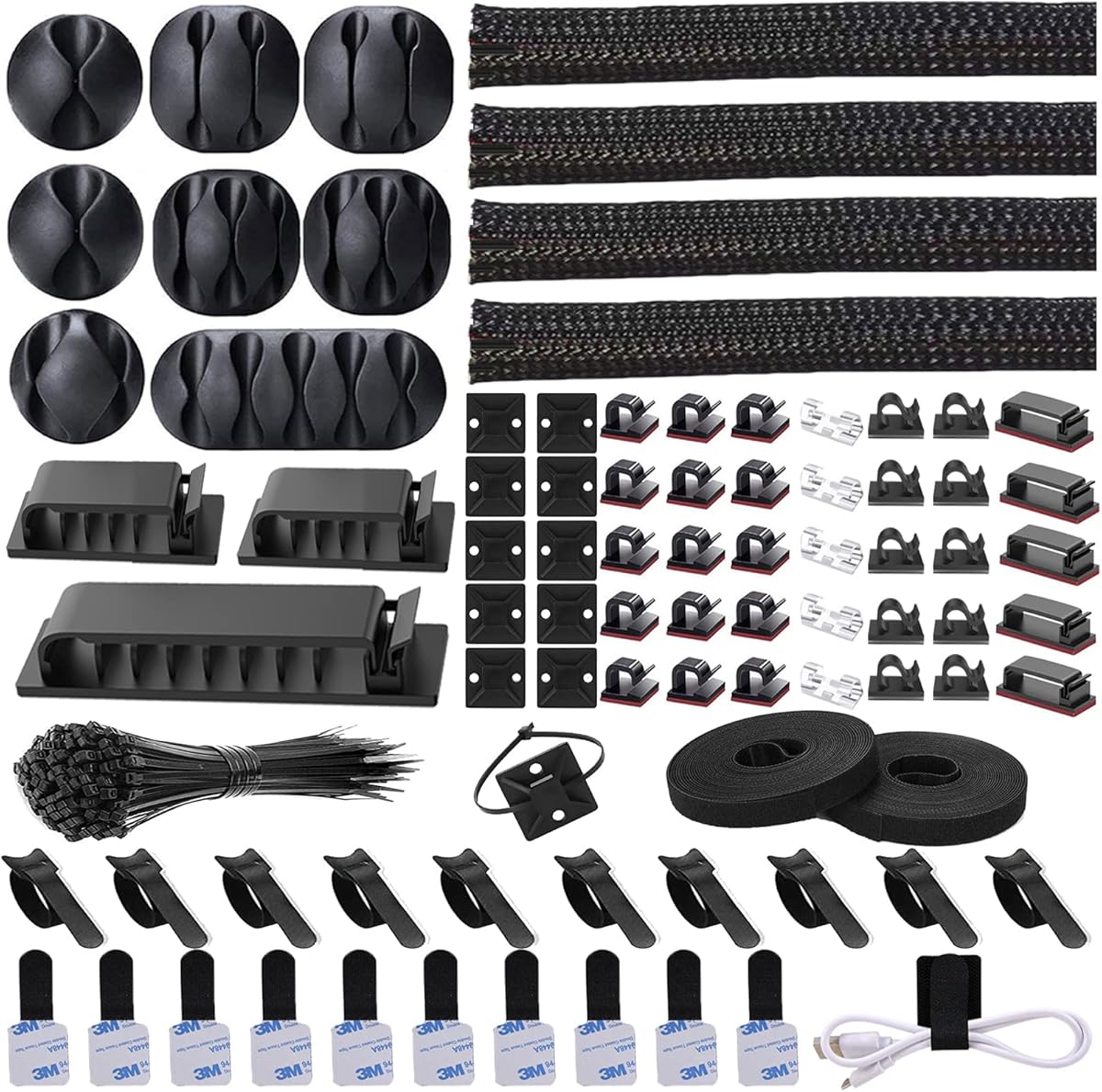
The N NOROCME 192 PCS Cable Management Kit offers a complete solution for gamers needing to organize their setup. With a 4.5 star rating, users praise its versatility and ease of use. It includes sleeves, clips, ties, and holders for a full range of cable management tasks.
We may earn a commission when you buy through this link, at no additional cost to you.
Its split cable sleeves make threading wires easy without disconnecting devices. The variety of clips ensures you can secure cables on desks, walls, or baseboards. Strong adhesive pads keep items firmly in place, reducing the risk of cables becoming loose over time.
While the adhesive works well on smooth surfaces, rough textures may require extra prep for a secure bond. Sleeves need careful alignment to stay closed around wires. These trade-offs are minor compared to the comprehensive coverage this kit provides for complex gaming setups.
This kit is ideal for gamers wanting an all-in-one solution to tackle cable clutter. Whether you manage a single PC or multiple monitors, this bundle simplifies organization. Its value and flexibility make it a top recommendation for anyone seeking a complete cable management system.
With 192 pieces including sleeves, ties, and clips, this kit handles every aspect of cable organization in one box.
Split sleeves allow you to insert or remove wires without unplugging devices, saving time and reducing connection issues.
We may earn a commission when you buy through this link, at no additional cost to you.
The Cord Management Organizer Kit provides a robust set of tools for organizing gaming cables. Rated 4.5 stars, it includes 192 pieces covering sleeves, ties, and clips. Users appreciate its flexibility in handling various cable types and sizes.
We may earn a commission when you buy through this link, at no additional cost to you.
Its split sleeves allow easy wire insertion without disconnection. The Polyamide66 clips are strong and non-toxic, suitable for any clean surface. Strong adhesive pads ensure items stay in place, helping maintain a clutter-free workspace.
Adhesive pads require clean surfaces for best results, and sleeves may stretch with heavy use. These limitations are acceptable given the kit's versatility and low cost. It remains a strong option for gamers needing a full suite of management tools.
Ideal for budget-conscious gamers seeking comprehensive organization, this kit handles most cable types. Its durability and flexibility make it a reliable choice for maintaining a tidy desk. The value offered makes it a top pick for multi-cable setups.
Split sleeves and durable clips allow easy rearrangement of cables as your setup evolves over time.
Made from Polyamide66, these clips are strong and non-toxic, ensuring safety and longevity in any environment.
We may earn a commission when you buy through this link, at no additional cost to you.
Alex Tech 10ft Cord Protector offers excellent protection for cables exposed to pets or wear. With a 4.7 star rating, it features a split loom design for easy installation. Its insulated construction adds safety, making it ideal for audio or power cords.
We may earn a commission when you buy through this link, at no additional cost to you.
The tubing prevents cats from chewing cables, reducing damage risks. Its UL recognition ensures safety, while the split design simplifies adding wires. At ten feet, it covers essential lengths without bulk, maintaining a clean setup.
Limited to half-inch cables and shorter length may restrict use in complex setups. However, its protective qualities make it a strong choice for vulnerable cables. This product is a reliable supplement to broader management systems.
Best for gamers with pets or exposed cables, this protector adds essential safety. Its durability and ease of use make it a valuable addition to any desk. The focused design ensures reliable protection where needed most.
The tubing barrier prevents cats from chewing cables, reducing damage and ensuring safety around your gaming setup.
UL recognized design ensures safe operation with insulated construction, reducing risks for audio or power cords.
We may earn a commission when you buy through this link, at no additional cost to you.
YECAYE Cable Management 6 Pack provides robust desk channel organization for gaming setups. Rated 4.5 stars, its J channel design holds multiple cables neatly. The flame retardant PVC ensures safety, while adhesive installation simplifies placement.
We may earn a commission when you buy through this link, at no additional cost to you.
Channels hold up to ten cables each, reducing clutter. Outward-facing openings allow easy cable access, and adhesive tape secures items firmly. Users value the flexible layout adjustments for customized setups.
Adhesive removal may leave residue if not handled carefully with heat. Channels work best on smooth edges, limiting placement options. Despite these minor issues, the capacity and safety features make it a top desk solution.
Ideal for organizing desk edges and power strips, this pack offers ample space. Its safety and ease of use make it a reliable choice for tidying wires. The flexible design accommodates various setup needs effectively.
Each J channel accommodates up to ten cables, making it ideal for organizing power strips and multiple peripherals.
Premium PVC material resists flames, adding an extra layer of protection for your electrical equipment and cables.
We may earn a commission when you buy through this link, at no additional cost to you.
Nettbe 60 PCS Reusable Cable Ties offer a cost-effective solution for bundling cables. With a 4.8 star rating, these hook-and-loop straps are durable and reusable. Users appreciate their versatility in wrapping cords across home or office setups.
We may earn a commission when you buy through this link, at no additional cost to you.
The adjustable design allows custom sizing for various cable types. Made from eco-friendly materials, they reduce waste from single-use ties. Their strength and affordability make them ideal for organizing loose cords around gaming desks.
Repeated use may wear the Velcro, and they are less suited for heavy loads. Despite this, their reusability and low cost outweigh drawbacks. They complement other management tools well for flexible cable bundling.
Best for budget-conscious gamers seeking reusable ties, these straps handle loose cords easily. Their durability and eco-friendly design make them a smart addition to any setup. The adjustable fit ensures a secure hold on various cable types.
Hook and loop straps can be reused multiple times, reducing waste and offering long-term value for cable organization.
Made from environmentally friendly nylon, these ties are sustainable and durable for repeated use in any setting.
We may earn a commission when you buy through this link, at no additional cost to you.
Scanfield Under Desk Cable Management Tray simplifies installation with its no-screw design. Rated 4.5 stars, users love how it organizes cables and power strips discreetly. The adhesive backing ensures strong mounting without drilling, making it ideal for renters.
We may earn a commission when you buy through this link, at no additional cost to you.
The 17-inch length provides ample space for multiple cables and accessories. Its sturdy construction holds weight without bending, maintaining a clean look. Users report improved desk aesthetics and reduced visible clutter.
Adhesive may struggle on textured surfaces, and the length may not suit larger desks. These limitations are minor compared to the ease of use. For most standard setups, it offers a reliable and tidy solution.
Ideal for renters or those avoiding tools, this tray organizes under-desk clutter effectively. Its spacious design and durable build make it a top choice. The adhesive installation ensures a secure fit without permanent changes.
Strong adhesive backing allows secure mounting without drilling, ideal for renters and damage-free setup solutions.
The 17-inch tray holds multiple cables and power strips, keeping them hidden and neatly organized under the desk.
We may earn a commission when you buy through this link, at no additional cost to you.
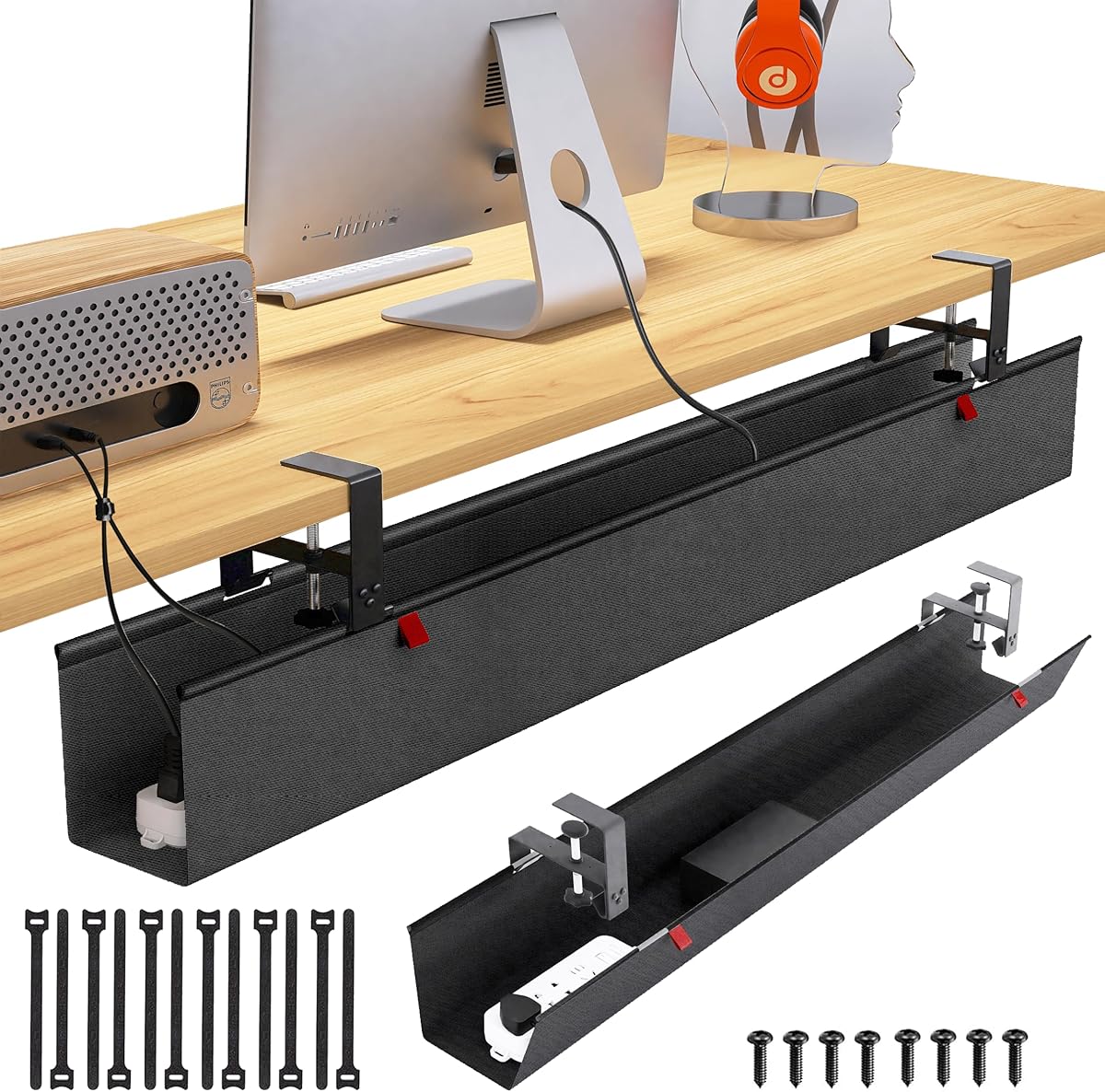
Univivi No Drill Under Desk Cable Management Tray offers extensive 36-inch coverage for complex setups. Rated 4.5 stars, its dual installation options suit various table types. The flame retardant fabric adds safety, while anti-sag design supports heavy items.
We may earn a commission when you buy through this link, at no additional cost to you.
Its large capacity holds adapters and transformers securely. The fabric tray is both sturdy and flame retardant, reducing fire risks. Users appreciate the flexibility to clamp or screw based on their desk.
Clamp placement requires space along edges, and fabric may accumulate dust. These issues are manageable with regular cleaning. For heavy-duty needs, this tray provides reliable support and safety.
Best for large setups needing maximum capacity, this tray balances durability and flexibility. Its flame retardant properties and sturdy build make it a safe investment. The flexible installation ensures compatibility with most desk types.
Choose between clamp-on or screw-fixed installation to suit your desk type, offering versatility for different setups.
Made from 600D oxford fabric, this tray resists flames, adding essential protection for your cables and power adapters.
We may earn a commission when you buy through this link, at no additional cost to you.
Cable Management 25'' Under Desk Tray offers reliable metal construction with ventilated mesh design. Rated 4.8 stars, users praise its sturdy build and airflow benefits. The non-slip pads protect surfaces, ensuring secure installation without scratching.
We may earn a commission when you buy through this link, at no additional cost to you.
The mesh design reduces dust and prevents power strips from overheating. Its 25-inch length fits most desks, and assembly takes minutes. The metal structure ensures durability, making it ideal for long-term use.
Assembly requires basic screws, and mesh may show cable colors. These trade-offs are minor given the ventilation and durability. For gamers needing airflow, this tray provides practical and sturdy support.
Ideal for setups requiring cooling, this tray combines durability with ventilation. Its metal build and non-slip design make it a reliable choice. The assembly effort is minimal, ensuring a secure fit quickly.
The mesh structure improves airflow around power strips, reducing overheating risks and maintaining device longevity.
High-quality metal construction ensures the tray remains durable and stable under heavy loads over time.
We may earn a commission when you buy through this link, at no additional cost to you.
Made in the UK 10-Pack Adjustable Elastic Adhesive Cable Clips offer versatile cable management for various setups. Rated 4.5 stars, users appreciate their elastic design and multiple mounting options. The silicone loops provide durability and flexibility for frequent cable changes.
We may earn a commission when you buy through this link, at no additional cost to you.
Clips hold up to one inch diameter cables securely. Choose adhesive, screws, or zip ties for installation, ensuring adaptability. The British engineering ensures quality, and reusable loops reduce waste from single-use ties.
Adhesive may weaken on uneven surfaces, and clips suit single cable groups. Despite this, their versatility and durability make them a strong choice. Ideal for organizing multiple loose wires around desks.
Best for flexible cable routing, these clips handle frequent adjustments easily. The quality construction and multiple mount options make them a reliable pick. Their design ensures a secure grip while allowing easy cable swaps.
Choose from adhesive, screws, or zip ties to fit any surface, ensuring secure placement wherever needed.
Silicone loops allow easy one-handed cable changes without damaging wires, ensuring reusable durability.
We may earn a commission when you buy through this link, at no additional cost to you.
48 Gaming Gaming Under Desk Cable Management Tray delivers a premium stealth look for serious gamers. Rated 4.5 stars, its all-black fabric conceals wires while supporting heavy gear. Users love how it enhances RGB aesthetics without cable distractions.
We may earn a commission when you buy through this link, at no additional cost to you.
The 47.8-inch length accommodates power bricks and adapters securely. Anti-sag support prevents deformation under heavy loads. Dust-blocking fabric keeps power strips clean while allowing airflow for safety. Side openings simplify cable routing.
It comes at a higher price and needs clearance under desks. These factors are minor for users prioritizing aesthetics. The design ensures a tidy, professional setup ideal for streaming or high-end rigs.
Best for gamers wanting a polished look, this tray combines capacity with stealth. Its heavy-duty support and premium fabric make it a standout choice. The design ensures cables remain hidden, focusing attention on your setup.
All-black fabric conceals cables, ensuring RGB lights stand out without distracting wires, perfect for streaming setups.
Anti-sag base handles power bricks and adapters, ensuring stability even under heavy loads.
We may earn a commission when you buy through this link, at no additional cost to you.
Choosing the right cable management for gaming PC involves considering your setup's size, cable types, and aesthetic goals. This guide breaks down key factors to help you make an informed decision for your specific needs.
Consider how many cables you need to manage and the available space. Larger trays suit multi-monitor setups, while sleeves work for bundled wires. Measure your desk area before purchasing to ensure a proper fit.
Choose a solution that accommodates all cables without overcrowding. Proper sizing prevents clutter and ensures effective organization.
Decide between adhesive, screw, or clamp-based installation. Adhesive options are renter-friendly but may fail on textured surfaces. Clamp or screw mounts offer durability but require tools and surface clearance.
Pick an installation method that matches your desk type and permanence needs. Easy setup reduces frustration during installation.
Look for materials like PVC, nylon, or oxford fabric that resist wear and tear. Flame-retardant features add safety for power cables. Ensure clips or ties can handle the weight of your cables without stretching.
Choose durable materials that withstand frequent adjustments. Strong construction ensures long-lasting performance in your setup.
Select colors and styles that match your gaming setup. Black trays or clips blend with most desks, while colorful options suit themed setups. Consider blackout materials to hide cables completely.
Pick designs that enhance your gaming aesthetic. Matching colors ensure a cohesive and professional appearance.
Compare prices against included pieces and features. Kits may cost more but offer comprehensive solutions. Single-purpose items like clips or sleeves are cheaper but may require multiple purchases for full coverage.
Choose a balance between cost and functionality. High-value options reduce the need for additional purchases.
Prioritize products that simplify cable routing. Split sleeves and adjustable clips allow easy changes without tools. Consider user reviews to gauge real-world usability and satisfaction.
Select user-friendly designs that save time. Easy adjustments ensure your setup remains organized as it evolves.
Check for UL recognition or flame-retardant materials to protect against electrical hazards. Insulated sleeves prevent overheating, and anti-sag designs support heavy power supplies securely.
Choose safety-certified products to prevent risks. Proper protection ensures your equipment remains secure and functional.
Look for reusable ties or adjustable clips that adapt to changes. Kits often include multiple types of organizers, offering flexibility. Single-use items may need replacement over time.
Pick reusable options to reduce waste and cost. Flexible designs accommodate your evolving gaming setup easily.
Start by unplugging and organizing your cables before installing any management solutions. Group similar cables together and decide which routes will be most efficient for your setup. This prep ensures a smooth installation process.
Install sleeves or clips carefully, ensuring they are aligned properly for cables to remain secure. For adhesive-backed products, clean the surface thoroughly to ensure strong bonding. Follow manufacturer instructions for optimal placement.
Regularly check your cable management tools for signs of wear or looseness. Clean trays or clips to remove dust and debris that may affect performance. Adjust cables as needed to maintain a tidy and functional setup.
The best cable management depends on your setup needs. Kits like the N NOROCME 192 PCS Bundle offer complete solutions, while trays like the 48 Gaming Tray suit large desks. Consider size, budget, and installation method when choosing.
Use under desk trays or clips to route cables out of sight. Install trays securely using adhesive or clamps for stability. Group cables and secure them with ties to keep them organized and hidden.
Adhesive organizers work well on smooth surfaces but may fail on textured desks. Ensure the surface is clean and dry before application. For heavier cables, consider clamp or screw-based mounts.
Yes, sleeves like the Alex Tech Protector provide a physical barrier against chewing. Choose insulated or sturdy materials to prevent damage. Ensure cables are secured to prevent pets from reaching them.
Yes, trays like the Univivi or 48 Gaming models feature anti-sag designs to hold heavy gear. Look for sturdy materials and adequate weight capacity to ensure support. Secure installation is essential for stability.
Adjust cables when adding or removing peripherals. Regular checks every few months ensure everything stays secure and organized. Use reusable ties or adjustable clips for easy updates.
Yes, organized cables prevent airflow blockage, reducing overheating risks. Mesh trays or breathable sleeves improve ventilation. Keep cables away from vents and fans for optimal performance.
Reusable ties offer cost savings and reduced waste. They allow easy adjustments without replacing ties. Choose durable materials like nylon for long-lasting performance.
This guide reviewed ten top cable management for gaming PC solutions, from comprehensive kits to specialized trays. Each option offers unique benefits depending on your setup size and needs. Whether you prioritize budget or aesthetics, there is a solution for your desk.
Consider capacity, installation ease, and safety features when choosing. Reusable or adjustable items ensure flexibility as your setup evolves. For best results, combine tools like clips and trays for complete organization.
Prices may change so check current listings before purchasing. Verify your desk dimensions and cable needs to pick the ideal product. With the right management tools, you can enjoy a clean and functional gaming setup.