
GLOTRENDS 2-Pack M.2 SSD Heatsink
4.5Editor score
Wide 2280 Compatibility
Tool-Less Installation Kit
5 to 20 Degree Cooling
This guide compares the top low profile SSD heatsink options for PS5 and laptops to prevent overheating and ensure reliable storage performance.
Modern storage drives generate significant heat during operation which can lead to performance throttling and reduced lifespan. Protecting your investment requires effective cooling solutions designed for compact spaces like laptops and gaming consoles.
We analyzed ten leading low profile SSD heatsink models based on thermal conductivity material quality installation ease and user feedback. Our goal is to help you find the right balance between performance and physical constraints.
Each pick highlights specific strengths for different use cases from budget-friendly options to premium graphene solutions. Please note that availability and pricing may fluctuate so verify details before purchasing your next cooling upgrade.
4.5Editor score

4.7Editor score
4.4Editor score
The following table provides a side-by-side comparison of all ten selected low profile SSD heatsink models. Review the key specifications and unique features to determine which unit best suits your specific storage cooling needs.


The be quiet! MC1 M.2 SSD Cooler stands out as a top rated solution for users seeking reliable passive cooling. With a strong 4.7 user rating it demonstrates consistent performance across various use cases including gaming consoles and desktop PCs.
We may earn a commission when you buy through this link, at no additional cost to you.
Its ability to fit both single and double sided 2280 modules makes it exceptionally versatile for modern high capacity drives. The dimensions are specifically optimized for PlayStation 5 expansion slots ensuring the system fits within the console's tight internal space without obstruction.
While it carries a higher price than some aluminum alternatives the build quality and brand reputation justify the investment. Users appreciate the simplicity of installation and the peace of mind that comes from a known manufacturer focused on acoustic and thermal solutions.
This heatsink is ideal for PS5 owners and desktop builders who prioritize reliability over the absolute lowest price. It offers a balanced solution that keeps drives cool during long gaming sessions or heavy file transfers without noise or power consumption.
Unlike many budget options this cooler accommodates both single and double sided PCB designs ensuring you can cool high capacity drives without compatibility issues.
The MC1 is tailored for the PS5 storage expansion slot providing the necessary cooling power to maintain full SSD performance without obstructing the console cover.
We may earn a commission when you buy through this link, at no additional cost to you.
The GLOTRENDS 2-Pack offers outstanding value by providing two full heatsink kits at a budget friendly price point. With a solid 4.5 rating users report effective temperature reduction for Gen3 through Gen5 NVMe drives in desktop and console environments.
We may earn a commission when you buy through this link, at no additional cost to you.
It features a tool-less design that uses metal clasps and rubber bands to secure the aluminum fins without voiding your drive warranty. This makes it accessible for non technical users who want to protect their storage investment from thermal throttling during sustained workloads.
The trade off is that it is designed primarily for desktop builds and PS5 consoles rather than laptops due to height constraints. However for those setups the included thermal pads and secure clasps provide a reliable cooling solution that maintains drive speeds.
This option is perfect for users with multiple drives or those building a PC and a PS5 simultaneously. It delivers reliable passive cooling without complex tools making it the top recommendation for budget conscious consumers.
Getting two units for a low price allows you to upgrade multiple drives or keep a spare ensuring long term flexibility for your storage needs.
The no screw no adhesive approach ensures you can install the cooler without risking your manufacturer warranty on expensive Gen5 SSDs.
We may earn a commission when you buy through this link, at no additional cost to you.
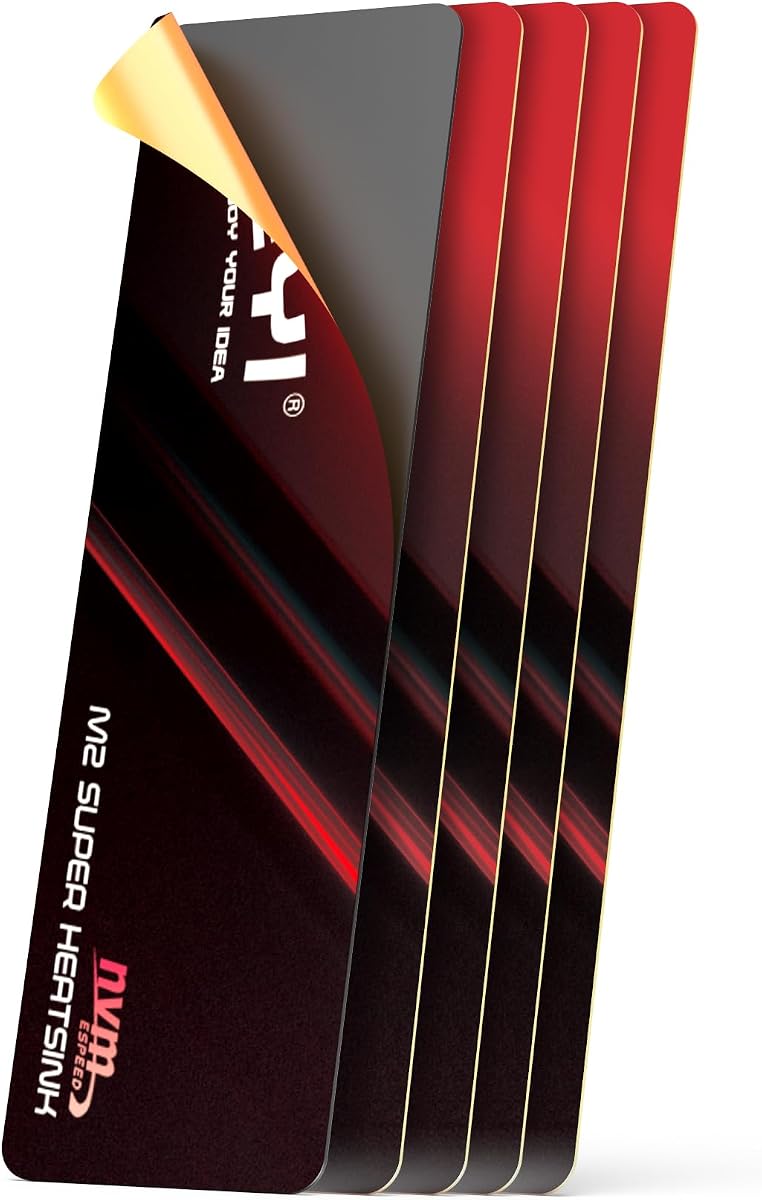
The JEYI M.2 heatsink uses advanced graphene copper film to deliver premium cooling performance in an extremely thin profile. With a 4.4 rating it is designed for situations where space is tight such as ultra thin laptops or constrained expansion slots.
We may earn a commission when you buy through this link, at no additional cost to you.
Its 0.5mm thickness is a major advantage for devices with minimal clearance allowing you to add cooling without adding bulk. The graphene material offers significantly higher thermal conductivity than standard aluminum enabling it to cut peak temperatures by up to 25C under load.
Users should handle the film with care during installation to avoid bending it as proper contact is essential for performance. While it fits only 2280 drives the dual sided application capability helps dissipate heat from both the controller and memory chips.
This is the ideal choice for mobile professionals or console owners facing strict height limitations. If maximum thermal efficiency in a minimal footprint is your priority this graphene solution offers a premium upgrade over standard metal fins.
Graphene provides superior heat transfer compared to traditional metals allowing for more effective cooling in a much thinner physical package.
At just 0.5mm thick this film fits into slots where bulkier aluminum heatsinks would not work such as in slim laptops or compact adapters.
We may earn a commission when you buy through this link, at no additional cost to you.
This graphene copper heatsink combines efficient thermal conduction with a stylish striped finish that enhances the look of your internal components. It is designed for 2280 drives and offers excellent compatibility with laptops PCs and the PlayStation 5 console.
We may earn a commission when you buy through this link, at no additional cost to you.
The professional air duct design increases surface contact with the surrounding air improving heat exchange rates. The slanted slot pattern not only looks good but also helps channel airflow around the drive area reducing stagnation in tight enclosures.
Installation is simplified by the included silicone thermal pad which holds the radiator in place without requiring tools or screws. This ensures a secure fit that protects the SSD components while maintaining a clean appearance in your build.
Users looking for a balance between high performance and visual appeal will find this model compelling. While it is thicker than ultra thin films it provides robust cooling for heavy duty tasks where aesthetics and efficiency matter.
The stripe pattern design provides a modern look while the air duct features ensure that the visual appeal does not come at the cost of cooling performance.
Using graphene coating on copper provides a thermal conductivity advantage over standard aluminum making it effective for high speed NVMe drives.
We may earn a commission when you buy through this link, at no additional cost to you.
This copper heatsink is specifically optimized for laptops where space is at a premium and thermal management is critical. It boasts a high 4.6 rating indicating strong satisfaction among users who need to keep thin devices cool.
We may earn a commission when you buy through this link, at no additional cost to you.
Made from 100 percent copper it offers superior heat conduction compared to aluminum alloys which is essential for compact environments. The design requires a minimum height of 1.5mm ensuring it clears most laptop cases while still providing substantial thermal mass.
It supports two mounting methods using rubber rings or high temperature insulation stickers giving you flexibility based on your laptop chassis limitations. The nano thermal pads included ensure a consistent gap for heat transfer without damaging sensitive components.
Ideal for gamers or professionals using thin laptops this cooler helps prevent thermal throttling during video editing or gaming. If your chassis allows the extra height this copper solution provides reliable performance in a portable package.
The compact dimensions and flexible mounting options make this cooler uniquely suited for the tight thermal constraints of modern laptops.
Copper conducts heat significantly better than aluminum which is crucial for keeping high performance drives cool in confined spaces.
We may earn a commission when you buy through this link, at no additional cost to you.
The JEYI film provides a universal fit for handheld consoles like the ROG Ally and various laptop adapters where standard heatsinks cannot fit. It is designed to handle the high thermal output of Gen3 to Gen5 drives effectively.
We may earn a commission when you buy through this link, at no additional cost to you.
The adhesive used can withstand temperatures from negative 40C to 120C ensuring a permanent bond that does not fail over time. Users should be careful to peel the film correctly to avoid bending the delicate material which might compromise contact.
This heatsink is particularly useful for devices like the PS5 where space is limited but cooling is mandatory for sustained performance. Its thin profile allows it to slide into tight spots without obstructing other components or the console cover.
If you are upgrading a handheld or using a specialized adapter this film is a practical solution. It offers high thermal performance in a minimal package that solves difficult clearance issues.
Compatible with devices like the ROG Ally this heatsink ensures that mobile gaming performance remains stable without overheating.
The strong adhesive ensures the film stays securely in place even under high heat conditions without needing mechanical screws.
We may earn a commission when you buy through this link, at no additional cost to you.
This aluminum alloy heatsink is designed specifically for single sided 2280 drives making it a precise fit for many modern consumer SSDs. It features an anodic oxidation finish and silver plating which helps eliminate static electricity during operation.
We may earn a commission when you buy through this link, at no additional cost to you.
The double sided clip design ensures a stable installation that protects the drive from movement while allowing for good airflow. It is suitable for both PS5 and standard PC M.2 slots providing reliable cooling for gaming and storage applications.
The included silicone thermal pads are low viscosity to avoid damage to the components while ensuring a strong connection. This makes it an easy choice for users who want a straightforward installation without complex mounting hardware.
Ideal for those using single sided drives this cooler provides solid protection against overheating. Its design prioritizes stability and ease of use ensuring your drives remain cool during extended workloads.
The silver plating and anodic oxidation help protect sensitive electronics from static discharge during the installation process.
Designed for single sided modules this heatsink ensures a perfect fit without the bulk of double sided support structures.
We may earn a commission when you buy through this link, at no additional cost to you.
This pure copper heatsink is optimized for devices with tight width constraints offering a narrow profile that still delivers high efficiency. The groove design significantly increases the surface area available for heat dissipation to the air.
We may earn a commission when you buy through this link, at no additional cost to you.
Copper is used here because it transfers heat much faster than aluminum which is critical for maintaining data transfer speeds in small laptops. It is suitable for notebook PCs desktops and other precision equipment where space is a challenge.
The included silicone thermal pad ensures maximum contact between the drive and the heatsink for effective transfer. With a cooling effect of 5 to 20C it helps maintain reliable performance in various environments.
Users should verify the 18mm width fits their chassis before purchasing. If space allows this copper solution offers excellent thermal performance for compact systems that need robust cooling.
The grooves increase surface area allowing heat to be released faster than with a flat copper plate.
Pure copper conducts heat more efficiently than alloys making it the top choice for cooling in tight spots.
We may earn a commission when you buy through this link, at no additional cost to you.
This radiator stands out with a high 4.7 rating reflecting its high performance cooling capabilities for 2280 NVMe drives. The graphene coating on copper provides superior thermal conductivity compared to standard metal finishes.
We may earn a commission when you buy through this link, at no additional cost to you.
The slanted slot design adds an aesthetic touch that enhances the look of your internal components while the air duct features improve airflow efficiency. This makes it a strong candidate for builders who value both performance and visual appeal.
Installation is straightforward using the included silicone pad which secures the radiator without tools. This protects the drive from physical damage while ensuring consistent thermal contact to prevent throttling.
Ideal for PS5 or desktop builds with adequate height this radiator offers reliable heat dissipation. It combines style with function making it a premium choice for visible internal storage upgrades.
The slanted slots provide a stylish look that is visible through clear PC cases or console internals.
The air duct design increases contact area with air allowing heat to escape more quickly.
We may earn a commission when you buy through this link, at no additional cost to you.
Micro Connectors offers a solid low profile solution with a 5mm height that works well around tight spaces in desktops and consoles. It features cross-cut aluminum alloy fins designed to optimize heat dissipation in constrained environments.
We may earn a commission when you buy through this link, at no additional cost to you.
The inclusion of heat resistant silicone rings allows for secure installation without damaging the SSD. This makes it a robust choice for users who want to upgrade their storage with minimal risk of overheating.
Compatible with both PS5 and standard PC M.2 slots it provides flexibility for different build types. The aluminum material is durable and effective for typical consumer workloads keeping drives within safe thermal ranges.
This heatsink is a reliable option for those prioritizing a low profile that fits standard clearance. It offers good value and performance for general use cases where extreme cooling is not required.
The silicone rings help secure the heatsink firmly preventing it from shifting during transport or use.
The design of the fins helps direct airflow and increase surface area for better cooling efficiency.
We may earn a commission when you buy through this link, at no additional cost to you.
Selecting the right low profile SSD heatsink requires evaluating several technical factors to ensure compatibility and performance. We have outlined the key aspects to consider before making your purchase.
Measure the available space inside your chassis or console carefully before buying. Low profile options range from 0.5mm films to 5mm aluminum blocks and choosing the wrong height can prevent proper assembly or damage components.
Always verify that the heatsink height and width will not interfere with other cards or the case cover.
Copper and graphene offer higher thermal conductivity than aluminum which is crucial for high speed drives. If you need maximum cooling in a small space prioritize materials that transfer heat away from the controller efficiently.
Copper and graphene provide the best cooling performance but often come at a higher price point.
Look for tool-less designs that use clasps or adhesive to avoid voiding your warranty. Some options require screws or specific mounting hardware which can complicate installation on modern slim devices.
Select a method that secures the heatsink firmly without risking damage to your drive warranty.
High capacity drives often have components on both sides of the PCB which may require a double sided compatible cooler. Single sided options are thinner and cheaper but may not provide adequate coverage for high performance modules.
Ensure the heatsink fits your drive type to prevent uneven cooling and thermal hot spots.
A high quality thermal pad is essential for bridging the gap between the SSD and the heatsink effectively. Poor pads can dry out or fail to make contact leading to reduced cooling efficiency over time.
Premium kits include low viscosity pads that ensure consistent heat transfer.
If you are upgrading a PS5 or handheld console verify that the heatsink meets the official clearance requirements. Some drives have specific dimensions that must be adhered to for safe operation and system integrity.
Always check manufacturer guidelines for expansion slots to ensure your upgrade is fully supported.
Consider the finish and material strength to ensure the heatsink does not degrade under heat. Aluminum alloys with oxidation treatments resist corrosion and provide long term reliability compared to basic untreated metals.
Choose a unit with a sturdy build to maintain performance over years of use.
Compare what is included in the box such as extra clasps or pads to determine the true value. Multi-pack options can save money if you need cooling for multiple drives in different systems.
Opt for bundles that include all necessary parts to avoid purchasing accessories separately.
Start by measuring the space available inside your console or PC to confirm the heatsink will fit. Remove the drive from the slot carefully and place it on a static free surface to begin installation.
Apply the included thermal pad to the controller and memory chips ensuring full coverage for efficient heat transfer. Position the heatsink over the drive and secure it with the provided clasps or adhesive firmly.
Periodically check the connection to ensure the heatsink has not shifted or loosened over time. Keep the area around the drive clean to maintain airflow and prevent dust from reducing cooling efficiency.
Yes low profile SSD heatsinks help maintain steady data transfer speeds by preventing thermal throttling. By keeping the drive within its safe operating range the heatsink ensures it does not slow down during extended file transfers or gaming sessions.
Using a tool-less heatsink design typically does not void the warranty as it avoids the use of screws or aggressive adhesive. Always check your specific drive manufacturer policy and use kits that do not leave permanent marks.
Copper conducts heat significantly better than aluminum making it more effective in tight spaces where airflow is limited. Aluminum is lighter and cheaper but requires more volume to achieve the same cooling results.
For the PS5 expansion slot the heatsink total height must stay within the specific clearance limits. Most low profile models designed for the console range from 1.5mm to 5mm to fit safely under the cover.
Yes but you must ensure the total height including the heatsink fits inside the laptop chassis. Look for ultra thin models that are specifically designed for notebook compatibility to avoid casing issues.
High quality thermal pads usually last for many years but if you notice rising temperatures they may need replacement. Replacing them every few years can restore original cooling efficiency if the pad has dried out.
Graphene coatings offer higher thermal conductivity than pure copper allowing for ultra thin cooling solutions. They are particularly useful for handheld consoles or laptops where space is extremely limited.
Ensure the heatsink is designed to accommodate components on both sides of the PCB. Double sided models often use a bridge design or thicker profile to cover all heat sources evenly.
Choosing the right low profile SSD heatsink depends on your specific device constraints and performance needs. The be quiet! MC1 offers the best balance for PS5 users while GLOTRENDS provides excellent value for desktop builds.
Prioritize materials and dimensions that fit your chassis without compromising cooling effectiveness. Graphene and copper options are ideal for tight spaces where standard aluminum blocks would not fit.
Remember that prices and availability can change frequently so verify the latest details before purchasing. Investing in a quality cooler ensures your storage remains fast and reliable for years to come.