
MEKO Stylus Pen for Touchscreen
4.6Editor score
Three in one tip design
No battery required
Wide device compatibility
This guide compares the top ten fine point stylus options for touchscreens. We evaluate precision, compatibility, battery life, and build quality to help you
Finding the right fine point stylus can transform how you interact with your touchscreen devices. Whether you are an artist, student, or professional, a precise tool helps you write and draw with accuracy. A good stylus offers comfort, durability, and seamless compatibility across your favorite gadgets.
We have carefully selected and reviewed ten leading fine point stylus models available in the market today. Our evaluation focuses on tip precision, build quality, battery performance for active models, and overall user experience. This list ensures you find a tool that meets your specific daily needs.
Each pick in this guide highlights unique strengths and ideal use cases for different users. You will see detailed specifications and honest assessments of performance in real world scenarios. Keep in mind that availability and pricing can change frequently, so always check the latest details before purchasing.
4.6Editor score

4.5Editor score

4.2Editor score
This side by side comparison breaks down the key features of all ten selected fine point stylus models. We look at tip types, compatibility, battery life, and special features to highlight the differences between passive and active pens.




This stylus pen stands out as a versatile tool for anyone needing precision on capacitive screens. It offers a high rating of four point five stars and combines three different tip types into one pen. The transparent disc tip allows you to see exactly where your mark is being made, which is crucial for detailed work.
We may earn a commission when you buy through this link, at no additional cost to you.
The main strength lies in its flexibility. You can switch between rubber tips for general scrolling and a disc tip for accurate writing or drawing. The design supports a one hundred eighty degree flexible angle, ensuring smooth movement without interruption. This adaptability makes it suitable for students, artists, and casual users alike.
While it lacks active features like palm rejection, the passive design ensures simplicity and long battery life since no power is required. The replaceable tips extend the product life significantly. Users should note that resting their hand on the screen may cause accidental inputs due to the capacitive nature of the pen.
This pen is ideal for users who want a reliable, low maintenance tool for writing and navigating tablets or phones. It delivers consistent performance across different brands without complex pairing. For those seeking a balance of precision and ease of use, this model is a top recommendation.
The disc tip provides a fine point experience similar to a real pen. This clarity helps in signing documents or annotating PDFs. The rubber tips are soft enough to protect screens from scratches while maintaining sensitivity.
The transparent disc tip lets you see the contact point clearly for better accuracy.
Switching between rubber and disc tips allows one pen to handle multiple daily tasks.
We may earn a commission when you buy through this link, at no additional cost to you.
The MEKO stylus offers an affordable entry point into precision digital writing. With a rating of four point six stars, it impresses with its three in one design that covers various needs. It requires no batteries or Bluetooth connections, making it ready to use immediately upon purchase.
We may earn a commission when you buy through this link, at no additional cost to you.
Key features include a transparent disc tip for precise input and two sizes of rubber tips for general navigation. The package includes numerous replacements, ensuring longevity without extra cost. The tips are made from high quality silicone that resists wear and protects your screen from damage during use.
Users should be aware that this is a passive stylus, meaning it does not support advanced features like palm rejection. However, for basic writing and browsing, it performs reliably. The simple design makes it easy to unscrew caps and swap tips as needed for different tasks.
This model is best suited for budget conscious buyers who need a reliable tool for daily tasks. It works well with iPads, phones, and various tablets. If you need a simple pen that gets the job done without breaking the bank, this is a strong choice.
The disc tip provides clear visibility of the contact point. This helps in tasks like digital signatures or fine drawing. The rubber tips offer a smooth glide across glass surfaces without scratching.
High performance features at a low price point make this accessible to everyone.
Multiple replacements included extend the life of the pen for months of use.
We may earn a commission when you buy through this link, at no additional cost to you.
This fine point stylus brings modern features to a passive tool. It stands out with magnetic adsorption, allowing it to stick to the side of compatible iPads. This ensures it is always within reach and prevents it from getting lost during work sessions.
We may earn a commission when you buy through this link, at no additional cost to you.
The battery life is impressive, offering nine to ten hours of continuous use on a single charge. It supports quick charging, reaching full capacity in just forty minutes. This reduces downtime significantly compared to older models that take hours to recharge.
While the magnetic feature is convenient, it only works with specific iPad Pro models. Users with other tablets might not get this benefit. Additionally, it does not prevent accidental touches, so hand placement matters when writing. However, the smooth writing experience makes up for these limitations.
This pen is a great pick for iPad owners who want a rechargeable option that feels like a pencil. The included nibs provide flexibility for different writing styles. If you value convenience and long usage time, this model fits the bill well.
The one touch switch allows easy on and off control. This saves time and prevents accidental activation when the pen is not in use. It keeps your creative flow uninterrupted.
Secure attachment keeps the stylus close to your device at all times.
Hours of continuous use ensure you can work through a full day without recharging.
We may earn a commission when you buy through this link, at no additional cost to you.
This active digital pen offers a more advanced experience than standard capacitive tools. It uses a one point five millimeter tip for precise control suitable for drawing and handwriting. The active technology allows it to work on screens that might not react to passive tips.
We may earn a commission when you buy through this link, at no additional cost to you.
The pen powers on within one second without needing a Bluetooth connection. This instant readiness makes it easy to use for quick notes. It also features an automatic power off function after thirty minutes of inactivity to save battery. The battery lasts ten to twelve hours on a single charge.
Despite being active, it does not offer pressure sensitivity, so all lines have the same thickness. Users should keep this in mind if they need variable line weights for art. However, for general drawing and sketching, it provides a reliable and smooth experience.
This model is ideal for users who need an active stylus for a wide range of devices. It works with many popular tablets and smartphones. If you want a pen that feels more natural and works reliably across platforms, this is a solid choice.
The USB micro charge port allows for convenient charging using standard cables. The internal lithium battery ensures consistent performance throughout the day without needing frequent recharges.
Works on screens that passive styluses might struggle with for better reliability.
Quick power on means you can start writing immediately without waiting.
We may earn a commission when you buy through this link, at no additional cost to you.
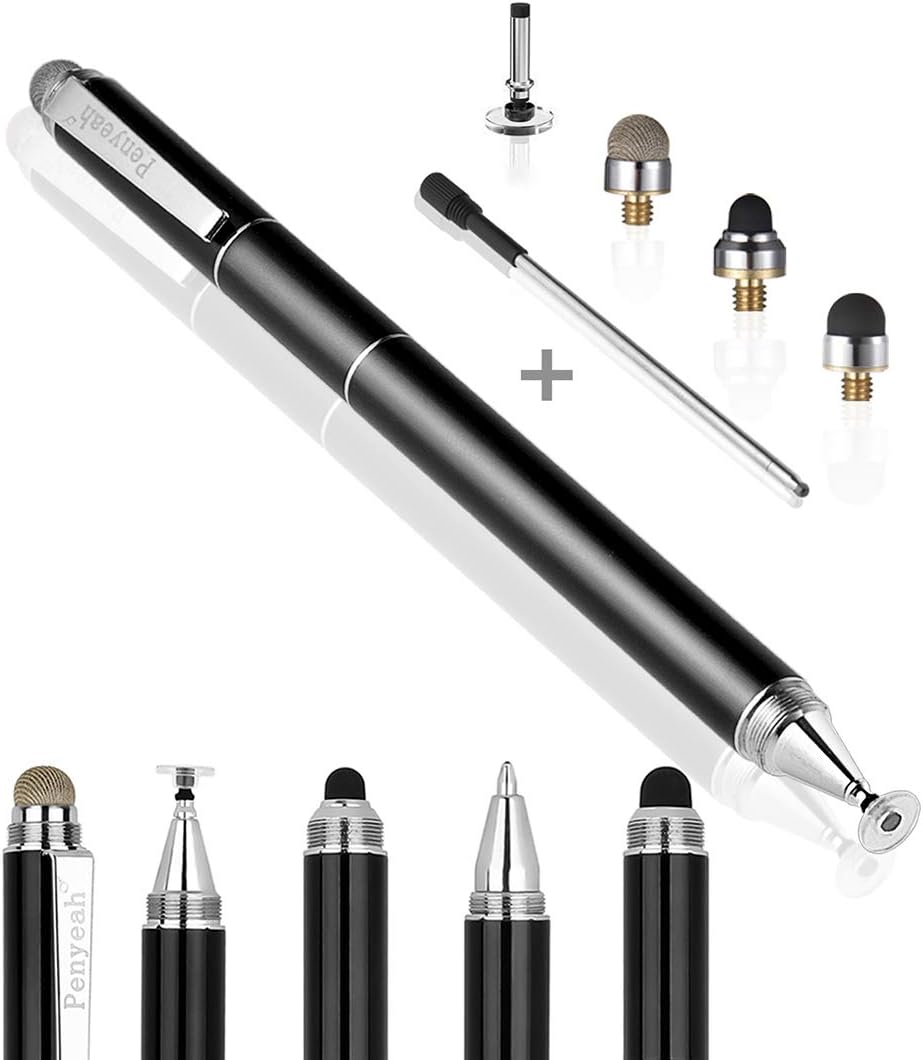
The Penyeah stylus takes versatility to the next level with a four in one design. It includes a ball point pen alongside multiple stylus tips, making it a true everyday carry tool. The metal body construction gives it a solid and durable feel that resists wear over time.
We may earn a commission when you buy through this link, at no additional cost to you.
The disc tip offers high accuracy for digital writing and drawing. It allows you to see exactly where the mark is being made. The mesh fiber tip and rubber tips provide alternative options for different textures and tasks. This variety ensures you always have the right tip for the job.
While it lacks palm rejection, the sturdy clip makes it easy to carry in a pocket or notebook. The metal material ensures it is robust enough for daily use. However, it might feel slightly heavier than lighter plastic alternatives, which some users might prefer.
This pen is best for users who want a single tool for both digital and physical writing needs. It is great for professionals who switch between screens and paper frequently. The build quality and variety of tips make it a standout option in its category.
The ball point refill adds practical value for signing documents or taking notes on paper. It integrates seamlessly into the pen body for a unified design experience.
Combines a physical pen with multiple digital stylus options for complete versatility.
High grade metal material ensures the pen lasts through years of daily use.
We may earn a commission when you buy through this link, at no additional cost to you.
This active stylus stands out with a lightweight and stylish design that is comfortable for long sessions. It features an ultra fine one point five millimeter tip for smooth writing and drawing. The built-in buffer unit at the tip enhances accuracy against screen surfaces for a natural feel.
We may earn a commission when you buy through this link, at no additional cost to you.
It offers eight hours of active use on a full charge, which is sufficient for most daily needs. The smart saver feature shuts it down automatically after thirty minutes of inactivity to conserve power. It is designed to work seamlessly with many iPad models and other touch devices.
Users must be careful with charging as fast chargers can damage the internal chip. Using a standard five volt charger ensures safety and longevity. While it requires a charging cable, the performance benefits of an active pen outweigh this minor inconvenience for most users.
This pen is ideal for artists and professionals who need precision and reliability. It is a great alternative to more expensive branded options while offering similar functions. If you want a premium active pen experience without a high price tag, this is a top choice.
The tip design provides control against tablets and phone screens. It allows for natural resistance similar to a real pen on paper. This improves the overall writing and drawing experience significantly.
Buffer unit at tip gives better accuracy and control for digital art and notes.
Smart shutdown features help extend battery life between charges for daily use.
We may earn a commission when you buy through this link, at no additional cost to you.
This bundle offers exceptional value with six vibrant stylus pens in one package. Each pen features a high-sensitivity rubber tip that glides smoothly without lag. It is designed for a wide range of touch screens including smartphones, tablets, and even gaming consoles like the Nintendo Switch.
We may earn a commission when you buy through this link, at no additional cost to you.
The built-in clip on each pen makes it easy to attach to pockets or bags. This ensures the stylus is always within reach when needed. Since there are no batteries or apps required, you can use them immediately on any capacitive device without setup.
While they do not offer the precision of a disc tip, they are excellent for general navigation and selection. The rubber tips help prevent scratches and reduce fingerprints on your screen. This makes them ideal for home use or sharing among multiple family members.
This set is perfect for families or teams who need multiple styluses for different devices. It ensures everyone has a pen at hand for writing or browsing. If you prioritize quantity and reliability over advanced precision, this bundle is a smart buy.
The vibrant colors help you distinguish pens for different users easily. It keeps the pens organized and accessible wherever you go.
Multiple pens ensure you never have to worry about losing a single stylus.
Rubber tips protect your screens while providing smooth responsive input.
We may earn a commission when you buy through this link, at no additional cost to you.
This pack includes four stylus pens with twelve replacement tips, providing excellent long term value. Each pen features a two in one design with a transparent disc tip and a soft rubber tip. The aluminum barrel adds a comfortable grip for extended use without fatigue.
We may earn a commission when you buy through this link, at no additional cost to you.
The disc tip improves accuracy by allowing visibility of the contact point. It flexibly fits on screens without leaving disconnected lines. The rubber tips deliver a smoother digital touch experience for writing and drawing. This combination makes the pens versatile for various tasks.
With extra tips included, you can keep spare parts on hand. It reduces the need to buy replacements separately over time. The sleek design makes these pens a great gift for students or artists who need precise tools.
This set is ideal for users who want multiple pens for different devices or people. It works with almost all capacitive touch screens. If you want quality and value in a single package, this set is a strong option.
The upgraded quality ensures consistent performance across all pens. Each unit is tested to work flawlessly with your favorite devices.
Large number of replacement tips ensures your pens stay functional for longer.
Aluminum barrel gives a solid and comfortable feel in your hand during use.
We may earn a commission when you buy through this link, at no additional cost to you.
This stylus set offers high value with ten dual-tip pens in one package. Each pen has two rubber tips of different diameters for varied tasks. The alloy body is solid and comfortable, ensuring durability for daily use in classrooms or offices.
We may earn a commission when you buy through this link, at no additional cost to you.
The fine tip allows accurate control for handwriting and sketching. The wider tip is ideal for scrolling and navigation. The rubber material prevents scratches and reduces fingerprint smudges on your screens. This protection helps keep your devices pristine over time.
The vibrant colors make it easy to distinguish pens for different users or scenarios. Since there is no charging required, they are ready to use straight out of the box. This makes them perfect for shared spaces where convenience is key.
This pack is best for schools or offices needing multiple pens for staff or students. It ensures everyone has a reliable tool for touch screens. If you need a bulk solution with quality construction, this is an excellent choice.
The alloy metal body provides balance and comfort in the hand. It is built to withstand regular daily handling and wear.
Solid alloy body and premium rubber nibs ensure long lasting performance.
Ten pens and twenty nibs provide enough supply for long term use.
We may earn a commission when you buy through this link, at no additional cost to you.
This set provides ten high precision styluses designed for smooth and responsive performance. Each pen features two premium silicone rubber tips for writing and navigation. The aluminum body blends functionality with elegance for a stylish digital experience.
We may earn a commission when you buy through this link, at no additional cost to you.
The highly sensitive tips deliver pixel-perfect precision for seamless writing and drawing. It protects your device from fingerprints and scratches to keep screens pristine. The tips are replaceable to ensure continued functionality over time. The sleek design is comfortable for daily use.
There is no setup required. You can pick it up and start writing immediately. It works with all capacitive touch screens across multiple platforms. This makes it a reliable choice for anyone needing a consistent tool for various devices.
This bundle is ideal for users who want quality pens with style and durability. It works perfectly for families sharing multiple devices. If you want a reliable set with a professional look, this is a great recommendation.
The responsive customer support team ensures satisfaction every step of the way. It adds peace of mind when purchasing in bulk for personal or shared use.
Sleek aluminum body combines style and function for a professional look.
Works seamlessly across all capacitive touchscreens for easy switching.
We may earn a commission when you buy through this link, at no additional cost to you.
Selecting the right fine point stylus depends on your specific needs and devices. We break down the key factors to help you make an informed choice.
Fine point styluses generally come with rubber or disc tips. Rubber tips are versatile for scrolling, while disc tips offer high precision for writing. Look for transparent disc tips if you need to see exactly where you are drawing.
Choose a tip that matches your primary task. Disc tips are best for writing, and rubber tips are better for navigation.
Ensure the stylus works with your device. Most capacitive styluses work with phones and tablets. Active styluses may have specific model requirements. Check the product description to confirm support for your tablet or phone model.
Verify compatibility before purchasing to ensure seamless operation on your specific device.
Passive styluses do not require batteries, offering infinite use. Active styluses have rechargeable batteries that last between eight to twelve hours. Check the charging method and time if you choose an active pen.
Decide between passive convenience and active features based on your daily usage patterns.
Styluses made of metal or alloy are generally more durable than plastic ones. A solid body ensures a comfortable grip and longevity. Check reviews for feedback on durability and tip wear.
Invest in a sturdy build if you plan to use the stylus daily.
A comfortable grip reduces hand fatigue during long writing sessions. Look for pens with balanced weight and texture. A pocket clip can also help keep the pen accessible and safe.
Prioritize ergonomics to maintain comfort during extended creative work.
Tips wear out over time, so check if replacements are included or easy to buy. Some packs come with multiple tips and pens for better value. Ensure spare parts are readily available.
Choose a model with easy access to replacement tips for long term cost savings.
Prices vary significantly between basic passive models and advanced active ones. Determine how much you are willing to spend for the features you need. High performance does not always require a high price tag.
Balance your budget with your specific needs to get the best value.
Some styluses include features like magnetic attachment or multi-function tips. These can add convenience and utility to your digital experience. Consider if these extras justify the cost.
Look for extra features that genuinely enhance your workflow or daily use.
To ensure the best performance, always clean the screen and the stylus tip before use. Dust or oil can affect sensitivity and drawing accuracy. Wipe the screen with a soft cloth to remove smudges.
For active styluses, charge the pen regularly to prevent unexpected shutdowns. Use the recommended charger to avoid damaging the battery. Keep the stylus away from extreme temperatures.
Store your stylus in a protective case or with the cap on when not in use. This protects the tip from damage and extends the life of the pen. If using a multi-tip stylus, keep the extra tips organized.
A passive stylus works by simulating a finger touch using conductive materials. It does not need batteries and is generally simpler. An active stylus uses internal electronics to connect with specific screens for better pressure sensitivity and features. It requires a battery but offers more precision.
Most fine point styluses work on any capacitive screen found on phones and tablets. However, active models may have limited compatibility with specific tablet brands. Always check the product description to confirm it supports your device model before buying.
Most styluses have screw-on or snap-on tips that can be replaced easily. Simply twist or pop off the old tip and attach a new one. Some packages come with extra tips to ensure you have spares for extended use.
Quality styluses are designed with soft tips that do not scratch the screen. However, damaged or worn tips might cause issues. Regularly check your tips for wear and replace them to keep your device safe.
This could be due to compatibility issues or screen protectors blocking the signal. Try removing a screen protector to see if it helps. Also check if your stylus needs charging if it is an active model. Ensure your device software is updated too.
Yes, passive styluses work entirely without batteries. They rely on conductivity to register input on capacitive screens. These are ideal for users who do not want to worry about charging or pairing issues.
In conclusion, choosing the right fine point stylus depends on balancing precision, budget, and features. The models we reviewed offer options for everyone from students to professionals.
Focus on what matters most to your workflow whether it is battery life, tip accuracy, or durability. Prioritizing these factors will help you find a tool that enhances your digital experience.
Always check current availability and details before purchasing as products may change over time. Select the stylus that best fits your daily tasks and device needs.