
MINISFORUM MS-S1 MAX Mini AI Workstation PC
4.5Editor score
128GB Unified LPDDR5x Memory
AMD Ryzen AI Max+ 395 APU
Dual M.2 PCIe 4.0 Expansion
This guide compares the top ten dual GPU AI setups for local inference, training, and workstation workloads across enterprise and consumer platforms.
Building a powerful local AI environment requires careful hardware selection. Dual GPU setups offer the scalability and memory capacity needed for large language models and complex generative tasks.
We evaluated ten distinct systems ranging from compact desktop units to high-density rack servers. Our analysis focused on memory bandwidth, thermal management, software compatibility, and real-world inference throughput.
Each entry highlights unique strengths for specific workflows. Please note that pricing fluctuates based on component availability and enterprise demand. Always verify current specs before purchasing critical infrastructure.
4.5Editor score

5.0Editor score

The following table provides a side-by-side overview of the ten selected systems. It highlights core specifications including processor types, GPU configurations, memory capacity, and storage options to help you identify the right fit for your workload.


The WEELIAO MAXSUN Arc Pro B60 48G represents a unique approach to local AI inference. It consolidates two GPUs onto a single PCB to achieve 48GB of unified memory. This design allows users to run quantized 70B-class models without complex multi-card bridging.
We may earn a commission when you buy through this link, at no additional cost to you.
Its dual-GPU architecture delivers a combined 394 TOPS of INT8 compute performance. Each GPU operates independently at 2400 MHz with 20 Xe cores. The system recognizes each chip separately for flexible task assignment across concurrent workloads.
While powerful, this card relies on consumer PCIe 5.0 x8 bifurcation for full bandwidth. Not all motherboards support this lane configuration. Additionally, software support focuses on PyTorch and vLLM which may require manual optimization for proprietary stacks.
This card suits researchers needing high VRAM density on a budget. It is ideal for those deploying DeepSeek-R1 or Qwen3 models locally. If your motherboard supports bifurcation, this offers exceptional value for dedicated inference.
By combining two GPUs, the card presents 48GB VRAM allowing large models to fit entirely on-device without offloading to system RAM.
The Turbo Edition features a blower fan and vapor chamber ensuring stable temperatures during long inference sessions in server-like airflow.
We may earn a commission when you buy through this link, at no additional cost to you.
The APC MES2X combines enterprise-grade GPUs with a workstation-class chassis. It features two NVIDIA RTX PRO 6000 Blackwell GPUs delivering 192GB of total VRAM. This capacity is critical for training or fine-tuning large models without external memory dependencies.
We may earn a commission when you buy through this link, at no additional cost to you.
Powered by the Ryzen 9 9950X processor, the system ensures the CPU does not bottleneck GPU compute. The 360mm liquid cooler maintains thermal stability under sustained loads. Windows 11 Pro preloading ensures immediate software readiness.
However, this workstation draws significant power requiring a robust 1600W supply. The physical footprint is substantial. It is designed for labs rather than small offices where power and space constraints are tighter.
Choose the MES2X if you need maximum local memory capacity. It is built for heavy lifting in generative AI and high-performance computing tasks that cannot rely on cloud resources.
With 192GB of combined VRAM this system can host massive models like Llama 3 70B or larger without quantization compromise.
Custom liquid cooling prevents thermal throttling during long training epochs ensuring consistent clock speeds for reliable job completion.
We may earn a commission when you buy through this link, at no additional cost to you.
The APC ES620 leverages two GeForce RTX 5090 GPUs for unmatched consumer AI performance. Each GPU offers 64GB of GDDR7 memory providing extreme bandwidth for complex neural networks. This setup is tailored for users who need desktop convenience with server-level throughput.
We may earn a commission when you buy through this link, at no additional cost to you.
The Ryzen 9-9950X processor handles parallel data prep tasks efficiently. Windows 11 Pro for Workstations offers enterprise features like expanded remote management. The system is custom built with cable management to ensure airflow efficiency.
Operating two 5090s requires careful thermal management. The 360mm liquid cooler is essential for the CPU while the GPUs likely rely on case airflow. Power requirements are high necessitating dedicated circuits in some locations.
This workstation is perfect for developers and content creators. It handles local LLMs and 3D rendering simultaneously. If you need raw power without rackmount restrictions this is a top choice.
The GDDR7 memory delivers significantly higher bandwidth than previous generations reducing latency during token generation and matrix operations.
Windows 11 Pro for Workstations enables multi-user remote sessions and enhanced memory handling for large dataset processing.
We may earn a commission when you buy through this link, at no additional cost to you.
The NVIDIA DGX Spark brings enterprise-grade capabilities to a compact desktop footprint. It features the GB10 Grace Blackwell chip combining CPU and GPU into one cohesive unit. This allows 128GB of unified memory accessible by both compute units without latency.
We may earn a commission when you buy through this link, at no additional cost to you.
Performance reaches up to 1 petaFLOP of AI compute power. This is designed for local model fine-tuning and analytics. The system integrates seamlessly with the NVIDIA AI software stack reducing deployment friction for researchers.
While powerful, DGX systems often require specific infrastructure compatibility. The price reflects enterprise-level build quality and support. It is best for teams needing secure local prototyping before cloud migration.
Choose DGX Spark if you need a standalone supercomputer. It eliminates cloud dependency for sensitive data. It is a premium investment for serious AI development.
Unified memory allows seamless data sharing between CPU and GPU eliminating traditional bottlenecks in large model training.
Pre-installed NVIDIA software ensures compatibility with popular frameworks and accelerates deployment cycles.
We may earn a commission when you buy through this link, at no additional cost to you.
The ASUS Dual EPYC server is designed for high-density AI clusters. It features two AMD EPYC 9965 processors offering 192 cores total. This massive parallelism supports simultaneous multi-user inference and training tasks efficiently.
We may earn a commission when you buy through this link, at no additional cost to you.
Equipped with eight RTX PRO 6000 GPUs it delivers 768GB of VRAM. This capacity handles massive concurrent workloads. The 2.3TB ECC DDR5 RAM ensures data integrity and bandwidth for high-throughput tasks.
Maintaining this server is streamlined via toolless chassis design. Hot-swap U.2 bays allow storage expansion without downtime. However, it requires a 4U rack and specific cooling environments.
This system is ideal for enterprise data centers. It supports large-scale LLM deployments and HPC clusters. If you have rack space this offers unmatched density and compute power.
With 192 cores the server can handle multiple training pipelines simultaneously without contention.
Hot-swap U.2 bays allow rapid expansion of storage capacity for large datasets without system interruption.
We may earn a commission when you buy through this link, at no additional cost to you.
The Cloud Ninjas Iron Bull focuses on professional workstation tasks. It uses a Ryzen Threadripper 9970X providing 32 cores for heavy computation. While it features one RTX 5090 it is optimized for multi-threaded workflows like photogrammetry.
We may earn a commission when you buy through this link, at no additional cost to you.
Support for ECC memory ensures reliability during long calculations. The 4TB NVMe SSD offers fast local storage for large datasets. Networking is robust with 10GbE support for rapid data transfer.
Though it does not have dual GPUs it balances CPU and GPU power well. The 360mm cooler ensures sustained performance. It is a strong choice for single-node professional work.
Choose this if you need reliability and speed for specific verticals. It fits well in architectural firms or engineering studios where stability is paramount.
Error correcting code memory prevents data corruption during intensive long-running computational tasks ensuring accurate results.
Integrated 10GbE networking allows rapid file transfers to central storage reducing workflow bottlenecks.
We may earn a commission when you buy through this link, at no additional cost to you.
This workstation combines desktop form with server capabilities. The AMD EPYC 9965 processor provides 192 cores for parallel processing. It supports three RTX PRO 6000 GPUs totaling 288GB VRAM for complex model training.
We may earn a commission when you buy through this link, at no additional cost to you.
The 768GB system RAM prevents bottlenecks in data pipelines. Gen5 NVMe SSDs provide blistering storage speeds for dataset ingestion. Windows 11 Pro pre-installed ensures immediate deployment for AI tasks.
Note that maximum power requires a 240V outlet. The chassis is spacious to manage thermal loads. This unit is designed for mission-critical local AI without relying on cloud infrastructure.
Invest in this system if you train large models regularly. It offers enterprise-grade security and performance in a single unit. Ideal for research labs or engineering teams.
Triple GPU support allows distributed training across multiple cards significantly reducing training time for large networks.
Gen5 NVMe drives eliminate storage latency ensuring the GPU always has data ready for processing.
We may earn a commission when you buy through this link, at no additional cost to you.
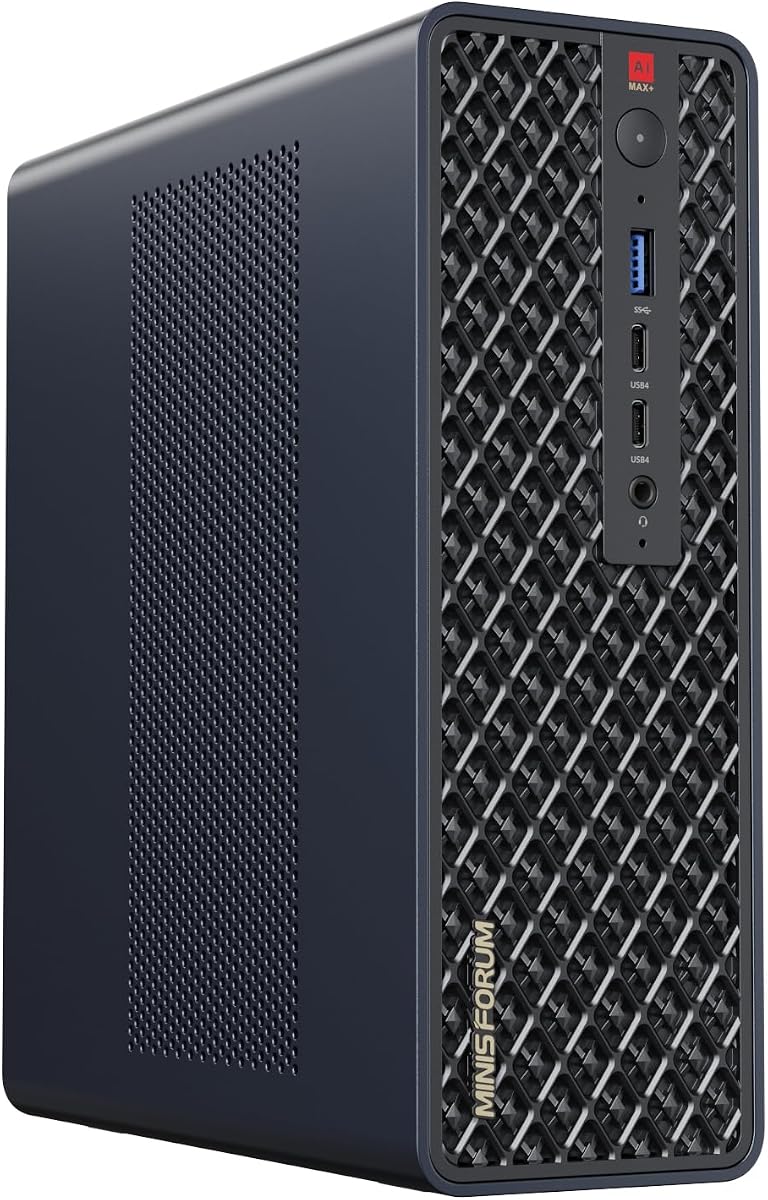
The MINISFORUM MS-S1 MAX offers AI capabilities in a tiny chassis. It integrates an AMD Ryzen AI Max+ 395 with 128GB of LPDDR5x memory. This unified memory allows CPU and GPU to access large models without VRAM bottlenecks.
We may earn a commission when you buy through this link, at no additional cost to you.
Performance reaches 126 TOPS total. The system supports clustering via USB4 V2 allowing multiple units to run larger models like 235B. Wi-Fi 7 ensures fast wireless connectivity.
Physical expansion is limited compared to desktops. Thermal design is tight but optimized for silent operation. It suits users needing portability and decent AI throughput.
Choose this for edge AI or home lab setups. It balances size and power effectively. For larger models cluster units for better performance.
Unified memory architecture allows seamless access to large datasets by both compute units eliminating traditional memory separation.
Multiple units can be linked to form a distributed cluster supporting models that exceed single unit memory limits.
We may earn a commission when you buy through this link, at no additional cost to you.
This GPU is designed for high-density local inference. It features 96GB of GDDR7 ECC memory to eliminate bottlenecks. The Max-Q profile ensures it fits in standard desktops while delivering enterprise reliability.
We may earn a commission when you buy through this link, at no additional cost to you.
Compute power reaches 3,511 TOPS. It uses Blackwell architecture for efficient matrix operations. This allows heavy open-source LLMs to run locally without cloud latency.
Installation requires a workstation motherboard capable of supporting its power draw. The dual-slot design maintains compatibility with standard cases. Thermal management is optimized for sustained loads.
Pick this if you need a discrete GPU upgrade. It bridges the gap between consumer and server hardware. Ideal for research labs requiring secure local data.
Max-Q architecture delivers high performance while capping power consumption reducing thermal load on workstation chassis.
Next-gen GDDR7 memory provides higher bandwidth allowing faster data movement for complex neural network operations.
We may earn a commission when you buy through this link, at no additional cost to you.
The MINISFORUM MS-S1 Max Mini Workstation is a compact desktop with solid AI specs. It features the Ryzen AI Max+ 395 processor with 128GB RAM. Radeon 8060S graphics handle standard AI inference efficiently.
We may earn a commission when you buy through this link, at no additional cost to you.
Five 8K video outputs allow multi-monitor setups for trading or design. 10G LAN ensures network speed for data transfer. Wi-Fi 7 provides stable wireless connectivity.
Thermal management is efficient allowing silent operation. It is ideal for daily tasks and light AI workloads. Physical expansion is limited but adequate for fixed deployments.
Choose this for general use or specific workflows. It fits well in trading floors or design studios. For heavy training use a dedicated desktop server.
Five video outputs enable complex multi-monitor setups without needing external graphics expanders.
Multiple USB4 and 10G LAN ports ensure fast data transfer for peripheral-heavy workflows.
We may earn a commission when you buy through this link, at no additional cost to you.
Selecting the right system requires balancing memory capacity, compute throughput, and power constraints. Below are the essential factors to consider before purchasing.
VRAM is the most critical resource for running large language models locally. Each model has a minimum memory requirement. Without sufficient VRAM the system must offload parts to system RAM which drastically slows inference.
Ensure your setup has enough VRAM to load the models you intend to use.
Unified memory allows both CPU and GPU to share a large pool of RAM. This is beneficial for models exceeding GPU VRAM limits. It eliminates bottlenecks caused by traditional memory separation.
Look for systems that explicitly support unified memory for large scale inference.
Different GPUs support different software stacks. NVIDIA GPUs typically have the widest compatibility with frameworks like PyTorch. AMD and Intel cards may require specific drivers or optimization.
Verify your preferred AI framework is supported by your chosen hardware before buying.
Dual GPU setups consume significant electricity. Workstations often require 1000W to 1600W power supplies. Ensure your electrical outlets can handle the load safely.
Check the power rating of your PSU to avoid instability during high loads.
Sustained inference generates heat. Liquid cooling or efficient airflow is essential to prevent thermal throttling. Rack servers often have dedicated cooling systems.
Prioritize systems with robust cooling solutions for long term stability.
AI systems often need to transfer large datasets. High-speed Ethernet like 10GbE reduces data movement time. Wi-Fi 7 is useful for wireless deployments.
Ensure your network interface supports high throughput for efficient data pipelines.
Future proofing is important. Check if the motherboard supports additional PCIe slots or NVMe bays. Some units allow clustering for scale.
Select systems that offer room for hardware upgrades or expansion.
Begin by installing the latest drivers for your GPU and motherboard. Ensure your operating system supports the hardware features like NVMe RAID or bifurcation.
Monitor temperatures during initial stress tests. Use software to visualize GPU utilization. Adjust cooling fans or liquid pump speeds if necessary to maintain optimal ranges.
Keep firmware updated to patch security vulnerabilities and improve performance. Regularly back up your model weights and datasets to external storage.
For most 7B to 13B models you need at least 16GB VRAM. Larger 70B models require 48GB or more to run quantized. Dual GPU setups are ideal for hitting these targets.
Yes consumer GPUs like the RTX 5090 support standard AI frameworks. However professional cards offer more VRAM and better ECC memory for enterprise workloads.
Not for everyone. Desktop workstations are sufficient for individual developers. Rack servers are only needed for high-density clusters or 24/7 uptime requirements.
Unified memory lets the CPU and GPU share RAM. This prevents bottlenecks when models are larger than GPU VRAM allowing faster data exchange without external storage.
Intel Arc cards work well with PyTorch and IPEX-LLM. You may need to install specific drivers. They are optimized for inference tasks like DeepSeek or Qwen.
Yes high-performance GPUs require robust cooling. Liquid cooling is recommended for workstations. Server environments need dedicated airflow to maintain performance.
We reviewed ten systems ranging from compact mini-PCs to enterprise rack servers. The NVIDIA DGX Spark offers integrated power while the APC ES620 provides consumer-level speed.
Prioritize VRAM capacity and software compatibility for your specific tasks. A system is only useful if it runs your desired models efficiently.
Prices fluctuate often so verify current availability before purchasing. The right setup can transform your local AI development capabilities.