
Redragon K512 RGB Membrane Gaming Keyboard, 6 Macro Keys & Easy Media Wheel
4.5Editor score
Six onboard macro keys no software
Dedicated media controls and wheel
Detachable wrist rest for comfort
This guide compares the top keyboards with macro keys for gaming and productivity, highlighting features like onboard recording, software support, and build
Finding the right input device can transform your workflow and gaming sessions. Keyboards with macro keys offer powerful shortcuts that streamline complex tasks. Whether you are a gamer or a professional, the right board saves time and reduces effort.
We evaluated ten standout models based on build quality, customization options, and ease of use. Our comparison looks at mechanical and membrane options with dedicated macro zones or software-driven profiles. Each pick balances performance, comfort, and value for different needs.
Every selection includes detailed specs, pros, cons, and usage tips to help you decide. Prices and availability change frequently, so verify current details before purchasing. This guide ensures you find a keyboard that fits your specific setup and workflow requirements.
4.5Editor score

4.1Editor score
4.3Editor score
Below is a side-by-side comparison of all ten keyboards. Each entry highlights core specifications like switch type, macro capabilities, and special features to help you narrow down your choice quickly.


The VSD K1 Pro stands out as a versatile input device with macro and streaming capabilities. It holds a solid rating for users seeking both gaming performance and productivity tools. Its integrated TFT display and macro controls make it unique in this lineup.
We may earn a commission when you buy through this link, at no additional cost to you.
This keyboard supports extensive macro recording via software or onboard functions. The hot-swappable PCB allows you to customize switches without soldering. Gasket mounting and sound dampening ensure a satisfying typing feel. RGB effects are fully adjustable to match any desk setup.
Trade-offs include reliance on software for LCD and display features. You may need to install drivers for advanced customization. The package does not include a USB-C to USB-C cable, which some users might expect for modern connectivity.
Ideal for streamers and gamers needing quick access to macros and apps. It balances affordability with premium features like LCD customization. If you want one board for work and play, this model delivers excellent value and flexibility.
The built-in LCD keys function as a secondary controller for apps and games. You can assign individual actions or complex sequences to streamline workflows instantly.
Hot-swap sockets and gasket mounting let you tailor the keyboard to your preferences. Sound-dampening layers ensure keystrokes remain clean and quiet during intense sessions.
We may earn a commission when you buy through this link, at no additional cost to you.
The Redragon K512 offers excellent value with immediate macro access. It receives high marks for ease of use and reliability. Gamers and casual users appreciate the ability to record combos without installing drivers.
We may earn a commission when you buy through this link, at no additional cost to you.
Its six macro keys function directly on the board. A media wheel and dedicated buttons simplify playback control. The detachable wrist rest improves comfort during long sessions. RGB lighting provides visual customization without complexity.
Membrane switches lack the tactile snap of mechanical options. Software exists for power users but is not required for basic use. This may limit advanced customization if you need deeper control over effects.
Perfect for budget-conscious buyers needing quick macro functionality. It works well for gaming and general use. If you prefer simplicity and affordability, this keyboard delivers strong performance without unnecessary overhead.
Onboard macro recording allows immediate use without drivers. The media wheel gives precise control over volume and track selection during gameplay.
Fade-resistant keycaps and magnetic wrist rest ensure long-term comfort. The design focuses on practical features that enhance daily usage without extra cost.
We may earn a commission when you buy through this link, at no additional cost to you.
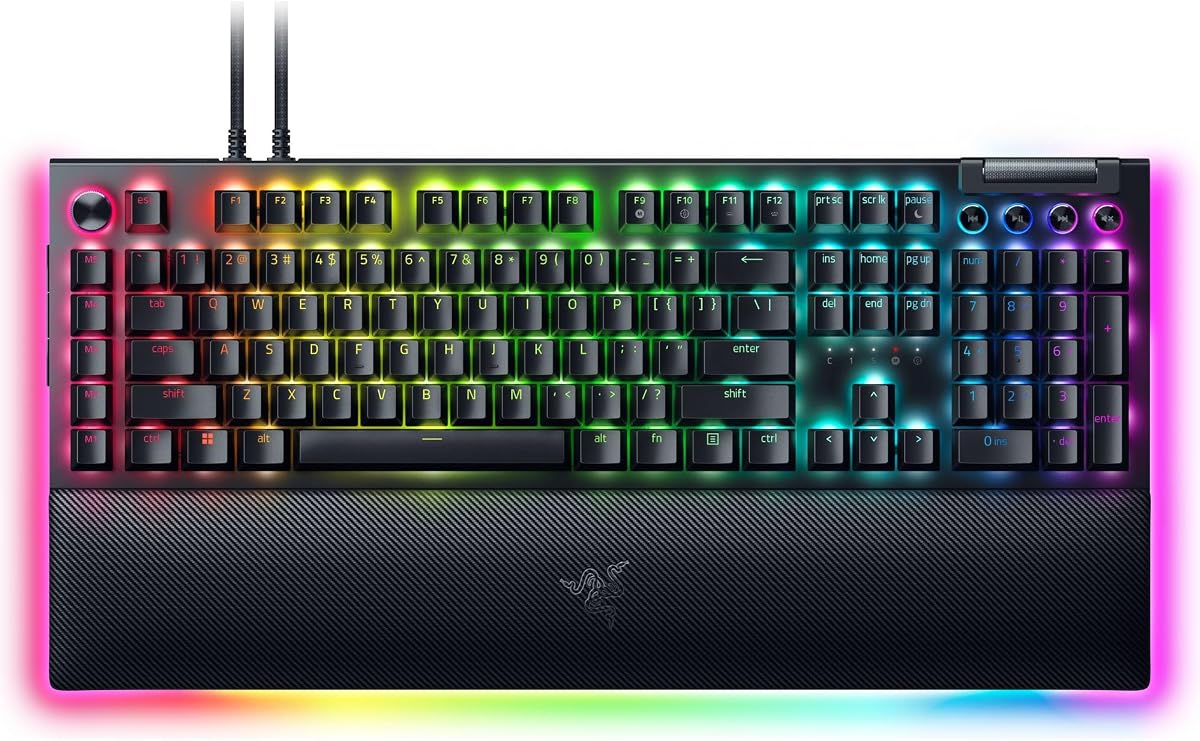
The Razer BlackWidow V4 Pro delivers high-end features for enthusiasts. It holds a strong rating among premium mechanical keyboards. The command dial and macro set offer advanced control for complex setups.
We may earn a commission when you buy through this link, at no additional cost to you.
Its green switches provide tactile feedback preferred by many gamers. The command dial can be assigned to custom actions or media controls. Underglow lighting syncs with other devices for a cohesive desktop look.
The price reflects premium materials and features like plush rests. You may rely on Chroma software for full customization options. This might be a drawback if you prefer standalone functionality without drivers.
Ideal for users seeking top-tier aesthetics and performance. The rest adds significant comfort during marathon sessions. If you value premium build quality and advanced customization, this keyboard justifies the investment.
The command dial offers unique control over volume and macros. This feature complements the eight macro keys for extensive workflow optimization.
Plush leatherette rests and underglow lighting enhance both comfort and visuals. These premium touches ensure the keyboard remains comfortable during prolonged use.
We may earn a commission when you buy through this link, at no additional cost to you.
The Corsair K55 RGB PRO balances durability with practical features. It is recognized for its protective design and solid macro functionality. Gamers needing spill protection find this model particularly reliable for daily use.
We may earn a commission when you buy through this link, at no additional cost to you.
Its six macro keys integrate with Elgato or iCUE software. The RGB zones allow colorful customization without complexity. The palm rest and spill resistance extend the keyboard's lifespan in active environments.
Using iCUE software is necessary for advanced macro setup. This dependency may deter users who prefer plug-and-play simplicity. Membrane switches are softer than mechanical options but lack tactile precision.
Great for users prioritizing durability and spill protection. It works well in busy setups where accidents happen. If you want a reliable keyboard with solid macro support, this model fits well.
The IP42 rating guards against spills and dust. This ensures the keyboard remains functional even after minor accidents on the desk.
Macro keys work with streaming or gaming software for dynamic control. RGB zones add visual flair without requiring complex configuration.
We may earn a commission when you buy through this link, at no additional cost to you.
The Redragon K580 combines mechanical quality with practical macro tools. It receives high praise for its flexibility and quiet operation. Users who value customization without soldering find this model appealing.
We may earn a commission when you buy through this link, at no additional cost to you.
Five macro keys store combos directly on the keyboard. Hot-swap sockets allow you to change switches easily. Double-shot keycaps ensure legends remain visible over years of heavy use.
Software is optional but recommended for deeper profile control. Five macro keys may be fewer than some enthusiasts desire. Brown switches offer a quiet tactile feel but may not suit everyone.
Perfect for gamers wanting mechanical reliability on a budget. It offers flexibility and quiet performance. If you want a customizable board without excessive cost, this keyboard is a strong contender.
The socket accepts various switches without soldering. This lets you experiment with different tactile feels to match your preference.
Media controls and anti-ghosting keep performance consistent during use. Keycaps resist fading while maintaining clear visibility for years.
We may earn a commission when you buy through this link, at no additional cost to you.
The Redragon K550 offers extensive macro functionality for heavy users. It holds a solid rating for those needing dedicated shortcuts. The aluminum top and extra USB port add utility to daily workflows.
We may earn a commission when you buy through this link, at no additional cost to you.
Twelve macro keys cover complex needs without software. The metal plate ensures stability during fast-paced gaming. Pass-through ports reduce cable clutter while media controls simplify playback.
Clicky switches may disturb others in shared spaces. The full-size layout may limit desk space for those needing compact setups. Ensure your environment suits the size before purchasing.
Ideal for users needing maximum macro flexibility. It provides solid build quality and connectivity. If you prioritize shortcut availability and durability, this keyboard is a reliable choice.
Twelve keys allow detailed macro programming for work or games. The USB pass-through simplifies device management on a crowded desk.
Aluminum construction ensures stability during long sessions. Custom switches offer clear feedback for those who enjoy audible confirmation.
We may earn a commission when you buy through this link, at no additional cost to you.
The Razer BlackWidow V4 X delivers speed and macro precision. It earns a high rating for its responsive switches and lighting. Gamers needing quick inputs and macro support appreciate this model.
We may earn a commission when you buy through this link, at no additional cost to you.
Six macro keys enable streamlined commands via software. Linear switches reduce actuation distance for faster gameplay. Sound dampeners ensure smooth keystrokes without noise distraction.
Chroma software is required for full lighting customization. No wrist rest is included compared to higher-tier models. This may require additional purchase for extended comfort during use.
Best for competitive gamers seeking fast and quiet input. The macro keys and lighting enhance both utility and aesthetics. If you value speed and smooth typing, this keyboard delivers strong results.
Linear switches with short travel distance enable rapid-fire inputs. This design ensures precise control during high-stakes gaming matches.
Per-key RGB allows detailed lighting customization. Sound dampening keeps keystrokes smooth and satisfying during intense sessions.
We may earn a commission when you buy through this link, at no additional cost to you.
The Razer BlackWidow V4 offers premium aesthetics and macro control. It stands out for its underglow and magnetic rest. Gamers seeking immersive setups find this keyboard adds visual depth.
We may earn a commission when you buy through this link, at no additional cost to you.
Six macro keys integrate with Chroma for flexible commands. Underglow lighting highlights the desk and adds ambiance. The magnetic wrist rest provides comfort without slipping.
Software is needed for detailed RGB customization. The price is higher than basic options but justified by premium features. Ensure your setup matches the lighting and rest requirements.
Perfect for those prioritizing immersion and build quality. It combines style and performance well. If you want a polished look with solid macro support, this keyboard fits the bill.
Underglow lighting enhances the desktop environment visually. This feature syncs with games and apps for dynamic effects.
The magnetic plush rest ensures stability during play. Media rollers allow quick adjustments without interrupting gameplay.
We may earn a commission when you buy through this link, at no additional cost to you.
The Redragon K618 PRO brings wireless freedom to macro users. It holds a solid rating for versatility and portability. Users needing flexibility between devices appreciate its tri-mode support.
We may earn a commission when you buy through this link, at no additional cost to you.
Twenty macro keys allow extensive customization via software. The slim design reduces travel distance for quick typing. Switching between Bluetooth and wireless is seamless without re-pairing.
Software is needed for lighting profiles. Low-profile switches offer different tactile feel than standard options. Ensure your preference matches thin switches before purchasing.
Ideal for mobile users or those seeking a clean desk. It offers macro control without cables. If you value versatility and modern design, this keyboard is a strong option.
Tri-mode connectivity allows switching between devices easily. This ensures uninterrupted workflow whether using PC or tablet.
Low-profile design reduces bulk and travel. Keys register quickly with less effort for comfortable typing over long periods.
We may earn a commission when you buy through this link, at no additional cost to you.
The Logitech G213 Prodigy provides balanced performance for most users. It holds a solid rating for daily use and gaming. Its durable build and spill resistance make it reliable for office or home setups.
We may earn a commission when you buy through this link, at no additional cost to you.
Macro programming is handled via G Hub software. Anti-ghosting ensures accurate inputs during complex commands. The integrated palm rest adds comfort for extended periods.
There is no dedicated macro key area. Software is necessary for full customization options. This may limit instant access if you prefer physical shortcuts.
Great for users needing reliable daily performance. It balances comfort and utility well. If you want a practical keyboard with macro software support, this model fits the bill.
Integrated palm rest and spill resistance ensure long-term use. The keyboard withstands daily wear and minor accidents.
Gaming matrix ensures responsiveness during gameplay. Media controls allow quick adjustments without leaving the game.
We may earn a commission when you buy through this link, at no additional cost to you.
Choosing the right keyboard involves balancing features with your specific needs. This guide outlines the most important factors to consider before making a purchase.
Dedicated hardware macro keys allow quick access without software, while software-based macros offer deeper customization. Onboard recording lets you store combos directly, whereas cloud profiles enable syncing across devices.
Choose hardware macros for speed and simplicity or software for detailed control and syncing capabilities.
Mechanical switches offer tactile feedback and durability, while membrane switches provide a quieter experience at lower cost. Linear, tactile, and clicky switches each suit different typing preferences.
Match switch type to your need for feedback versus noise and budget.
Keycaps made from double-shot ABS or PBT resist fading over time. Frames made from metal or reinforced plastic ensure stability during intense use.
Prioritize materials that match your expected usage duration and environment.
Per-key lighting allows dynamic effects, while zone-based lighting simplifies setup. Compatibility with ecosystems like Chroma or iCUE adds value if you own other branded devices.
Consider if lighting sync with other peripherals is important to your setup.
Wireless options provide a clean desk but require battery management. Wired connections offer consistent latency and no charging needs. USB pass-through ports help manage cable clutter.
Decide based on your workspace layout and need for cable management.
Integrated or detachable wrist rests reduce strain during long sessions. Adjustable feet allow angle customization to suit your typing posture.
Comfort features should align with daily usage hours.
Software enables deep profile customization but may not be required for basic macros. Check OS compatibility to ensure full functionality on your system.
Verify software requirements match your preference for setup complexity.
Budget models provide essential features while premium boards include advanced controls and durability. Weigh long-term benefits against initial costs to find the best value.
Focus on features that directly improve your workflow rather than extras.
Install the manufacturer's software to configure macros and lighting profiles. Follow the instructions to assign keys and test sequences before use.
Keep the keyboard clean by gently brushing dust from keycaps. Avoid liquid spills and ensure dry conditions to maintain internal circuitry.
Update firmware regularly for bug fixes and new features. Store spare keycaps and switches if your keyboard supports hot-swap customization.
Not all require software as many models have onboard memory for storing macros. Hardware-only keys offer instant access, while software enables deeper customization. Check the product details for standalone functionality.
Most keyboards support Windows and macOS via compatible software. Some features may vary by platform. Verify system requirements before purchase to ensure cross-platform functionality.
Onboard memory stores macros directly on the keyboard for use without software. This ensures instant access when switching devices or using systems without driver installation.
Mechanical switches offer faster response and durability. Membrane keyboards are quieter and more affordable. Choose based on budget and personal feedback preferences.
Press the macro record key and input the sequence on your keyboard. Save it by pressing the save key or combo. Test the macro by pressing the assigned shortcut.
Yes, software profiles can often be exported and shared. Hardware macros are device-specific. Always ensure the receiving system supports the keyboard's software.
Wireless connections may introduce minimal latency. Wired connections offer consistent performance. Always prioritize direct connectivity for competitive gaming needs.
Yes, macros can automate repetitive tasks and shortcuts. This improves efficiency for coding, editing, or daily tasks. Many users find them equally useful for work as gaming.
Our top picks highlight the VSD K1 Pro for versatility, the Redragon K512 for budget needs, and the Razer BlackWidow V4 Pro for premium features. Each offers distinct advantages depending on your workflow.
Prioritize macro type and switch feel based on your preferences. Build quality and software support should align with your usage patterns to ensure long-term satisfaction.
Prices and availability change frequently. Always check current listings to confirm specs and deals before finalizing your purchase for the best value.