
Lenovo 16 Numeric Keypad Laptop
4.2Editor score
Intel i5-13420H CPU
24GB DDR5 RAM memory
16 inch WUXGA display
Finding a laptop with a dedicated numpad is essential for accountants, data entry professionals, and anyone who works heavily with spreadsheets. These machines combine full-size typing comfort with numerical efficiency to streamline daily workflows effectively.
We evaluated ten business-grade laptops based on performance, display quality, connectivity options, and build durability. Each model was selected to ensure it includes a physical numeric keypad for rapid data entry without external peripherals.
Every review highlights key specs, pros, cons, and ideal use cases for different user needs. Please note that pricing and availability can change frequently so verify details before making your final purchase decision.
4.2Editor score

4.8Editor score

As an Amazon Associate we earn from qualifying purchases.
The following table provides a side-by-side comparison of all ten laptops reviewed in this guide. You can quickly see screen sizes, processor types, memory capacities, and storage options to make an informed choice for your specific workflow needs.




This HP 255 G10 Business Laptop stands out with an impressive 4.8 rating from users who need reliable performance for daily tasks. It features a dedicated numeric keypad essential for efficient data entry and financial calculations without needing external devices.
We may earn a commission when you buy through this link, at no additional cost to you.
The AMD Ryzen 3 7330U processor paired with 16GB RAM ensures smooth multitasking across multiple browser tabs and office applications. The 15.6 inch Full HD IPS display offers wide viewing angles and vibrant colors making it suitable for both work and entertainment.
While the 512GB SSD provides ample space for most users, heavy media editors might need external storage solutions. Additionally, the battery life is decent but may require frequent charging during long unplugged work sessions outside the office.
Overall this laptop is an excellent choice for professionals seeking a balance of portability and performance with essential business features. It supports hybrid work styles effectively and includes Microsoft Copilot for enhanced productivity assistance.
The integrated numeric keypad allows for quick calculations in Excel or accounting software without interrupting your workflow. AI Copilot and Windows 11 Pro streamline tasks and optimize workflows for better efficiency.
The Full HD IPS display with narrow bezels provides a large screen-to-body ratio enhancing visual clarity. Multiple ports including USB Type-C and HDMI ensure easy connection to monitors and peripherals.
We may earn a commission when you buy through this link, at no additional cost to you.
The Lenovo V-Series V15 offers exceptional power for demanding business tasks with 40GB of RAM and a Ryzen 7 processor. This configuration allows professionals to run virtual machines or complex data analysis tools without slowdowns.
We may earn a commission when you buy through this link, at no additional cost to you.
Its 1TB SSD ensures fast boot times and plenty of storage for large files and archives. The inclusion of an RJ45 Ethernet port is valuable for secure and stable wired network connections in office environments.
However the added memory and performance can result in a slightly heavier chassis compared to thinner ultrabooks. Users prioritizing extreme portability may find this model less convenient for daily commuting.
This laptop is ideal for power users who need robust multitasking capabilities and reliable performance for enterprise-level applications. The numeric keypad ensures that data entry remains quick and error-free.
With 40GB of high-bandwidth RAM you can effortlessly switch between dozens of browser tabs and heavy applications. The Ryzen 7 5825U processor supports sustained performance under heavy workloads.
The 1TB PCIe NVMe SSD provides rapid data transfer speeds crucial for large file handling. USB Type-C and HDMI ports along with RJ45 give you versatile options for connecting various devices.
We may earn a commission when you buy through this link, at no additional cost to you.
This variant of the HP 255 G10 upgrades the processor to the AMD Ryzen 7 7730U delivering better performance for multitasking and content creation. It retains the essential business features like the numeric keypad and Windows 11 Pro.
We may earn a commission when you buy through this link, at no additional cost to you.
The 16GB RAM and 512GB SSD offer a solid balance for general business use and light creative work. The display is anti-glare which helps reduce eye strain during long hours of spreadsheet work or document editing.
Users should note that the screen brightness is modest which might limit outdoor visibility. Also battery life can vary based on workload intensity so carrying a charger is recommended for travel.
For those who need more processing power than the base Ryzen 3 model this version is a smart upgrade. It delivers reliable speed for virtual meetings and heavy spreadsheets with a full-size keyboard layout.
The Ryzen 7 7730U with 8 cores and 16 threads handles demanding applications more efficiently. This makes the laptop suitable for heavier multitasking scenarios without lag.
The IPS panel offers consistent colors and wide viewing angles ideal for presentations. Anti-glare coating ensures comfort during extended periods of screen time.
We may earn a commission when you buy through this link, at no additional cost to you.
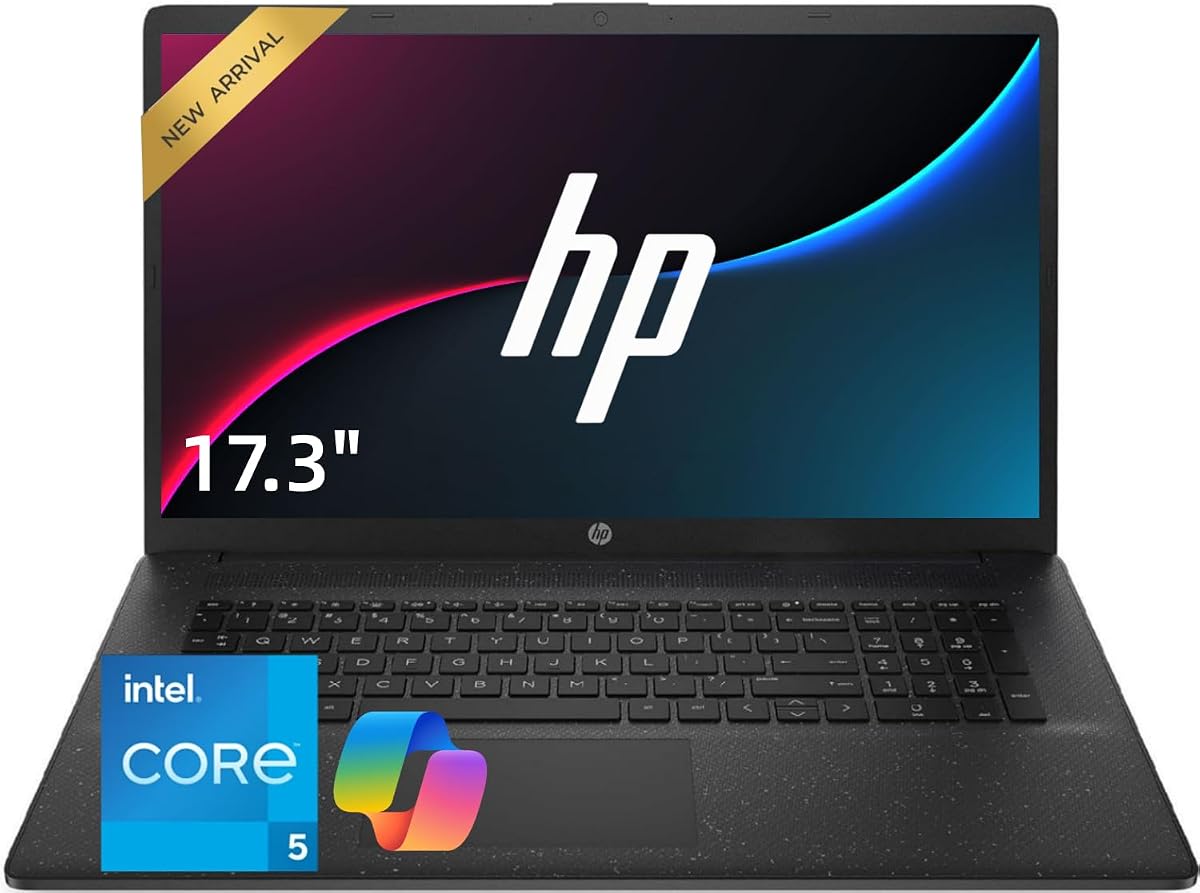
This HP model distinguishes itself with a large 17.3 inch display providing extra workspace for side-by-side multitasking. The full-size keyboard and dedicated numeric keypad make it exceptionally comfortable for data entry tasks.
We may earn a commission when you buy through this link, at no additional cost to you.
Equipped with 32GB RAM and a 1TB SSD it can handle extensive browser sessions and large file storage without compromise. The Intel Core 5 120U processor ensures smooth operation for daily office applications and virtual meetings.
The larger screen inevitably makes the device bulkier which might not suit frequent travelers. However for desk-bound professionals this extra screen real estate significantly boosts productivity and reduces the need for external monitors.
If your work involves detailed spreadsheets or accounting software this laptop is tailored for your needs. The combination of screen size and keyboard layout supports efficient and ergonomic workflows throughout the day.
The 17.3 inch display offers more room for spreadsheets and documents improving workflow efficiency. This layout reduces scrolling and allows more content to be visible at once.
A full-size keyboard with a numeric keypad ensures comfortable typing during long sessions. Multiple USB ports and HDMI facilitate easy connection to external devices.
We may earn a commission when you buy through this link, at no additional cost to you.
This Lenovo laptop offers impressive specs like 24GB DDR5 RAM at an affordable price making it a great value for budget-conscious professionals. The 16 inch display with a 16:10 aspect ratio provides more vertical space useful for documents.
We may earn a commission when you buy through this link, at no additional cost to you.
The Intel i5-13420H processor supports seamless multitasking and light content creation. A built-in privacy shutter on the webcam adds a layer of security for virtual meetings and online classes without extra cost.
While it lacks some premium finishes found on higher-end models it delivers reliable performance for everyday tasks. Battery life is decent but may require mid-day charging during heavy use without an outlet.
For students and small business owners needing modern features without a high cost this is an excellent choice. The numeric keypad helps maintain productivity for accounting and inventory management tasks.
The DDR5 RAM provides faster data access improving overall system responsiveness. The WUXGA display offers 11% more vertical space than standard 1080p screens.
A privacy shutter protects your security during virtual calls by physically disabling the camera. USB-C and SD card readers offer versatile connectivity for peripherals and storage.
We may earn a commission when you buy through this link, at no additional cost to you.
Another HP model with a 17.3 inch screen this laptop provides a professional workspace suitable for complex business applications and cloud-based platforms. The 32GB DDR4 RAM supports multiple applications running concurrently.
We may earn a commission when you buy through this link, at no additional cost to you.
A privacy shutter on the camera ensures your security during meetings which is critical for remote workers. The dedicated numeric keypad is perfect for accounting and inventory management tasks needing fast data entry.
Its size makes it less portable compared to 15 inch alternatives so it is best suited for home office or desk use. The storage and memory are sufficient for long-term professional use and extensive file storage.
If you need a large screen and robust performance for business applications this model fits well. It balances powerful hardware with security features to support efficient and secure workflows.
The 17.3 inch display provides room for business software and multitasking throughout the day. Enhanced configurations support large files and accounting software.
Multiple USB ports including Type-C and HDMI enable seamless wireless networking and device connections. Bluetooth 5.4 offers stable connectivity for wireless peripherals.
We may earn a commission when you buy through this link, at no additional cost to you.
The HP 17 inch Business Laptop Computer features a large 17.3 inch FHD display ideal for entertainment and multitasking. It includes a full-size keyboard with a numeric keypad which supports efficient data entry.
We may earn a commission when you buy through this link, at no additional cost to you.
Preloaded with Windows 11 and Office 365 for Web it provides a secure and easy-to-manage work experience. The AMD Ryzen 5 CPU and long battery life allow you to work non-stop without constant recharging.
Users should be aware that the larger chassis might not fit into smaller backpacks easily. Additionally the processor is suitable for everyday tasks but not designed for heavy gaming or rendering.
This model is great for students and professionals who value a large screen and all-day battery life. It balances performance and portability for daily tasks and web-based productivity.
The large slim bezel screen delivers stunning visuals for work and play. AI Copilot helps organize tasks and summarize information quickly.
HP Fast Charge and long battery life ensure you stay productive on the go. The silver finish makes it stylish and portable.
We may earn a commission when you buy through this link, at no additional cost to you.
This slim laptop is an affordable choice for those needing a numpad and portable form factor. The AMD processor and 8GB RAM handle everyday tasks efficiently but may struggle with heavy multitasking.
We may earn a commission when you buy through this link, at no additional cost to you.
The 10000mAh battery and lightweight chassis make it suitable for travel and commuting. A privacy switch on the camera protects your privacy at the hardware level without software configuration.
Storage can be expanded up to 1TB which is useful for storing more files. However the Wi-Fi 5 support is older than newer models so connection speeds might be lower in congested areas.
If you prioritize portability and low cost this model meets basic needs. The numeric keypad ensures that spreadsheet work remains efficient despite the entry-level specs.
Weighing only 3.3 pounds this laptop slips into backpacks easily. The privacy switch allows secure disabling of the webcam.
The independent cooling fan maintains performance under load. Storage can be expanded to accommodate more documents and media.
We may earn a commission when you buy through this link, at no additional cost to you.
This laptop is designed for students and professionals needing a portable device for school assignments and daily tasks. It comes with a genuine Windows 11 system pre-loaded for broad software compatibility.
We may earn a commission when you buy through this link, at no additional cost to you.
The Intel i5-5205U processor provides reliable performance for streaming and basic work. With 6GB RAM and 128GB internal storage you might need to manage files carefully or use cloud storage solutions.
Connectivity options like Type-C and HDMI allow flexible connections to peripherals. The expansion slot offers room to upgrade storage as your needs grow over time.
While performance is limited for heavy multitasking it serves well for writing and web browsing. Check if a numpad is integrated as this entry model may require an external one for some users.
Weighing 3.6 lbs this laptop balances size and portability for everyday use. The slim profile makes it easy to carry between classes.
Dual-band WiFi and Bluetooth ensure fast internet access. SD card readers provide additional flexibility for media transfer.
We may earn a commission when you buy through this link, at no additional cost to you.
This HP laptop offers a high 4.7 rating and generous 32GB RAM and 1TB NVMe SSD for data access. The i3 processor handles everyday tasks well but may struggle with intensive rendering.
We may earn a commission when you buy through this link, at no additional cost to you.
The numpad allows efficient data entry which is essential for business workflows. Fast Charge technology ensures you can quickly regain battery life between meetings.
While storage is ample the processor limits the laptop to lighter multitasking compared to i5 or i7 models. It is better suited for users who prioritize storage over raw processing power.
If you need reliable storage and memory for document management this model is a strong contender. The included accessory adds value and ensures the device is ready to use out of the box.
The i3-1215U beats some i5s in specific benchmarks. However sustained performance is better on higher-end chips.
Fast NVMe SSD ensures instant file access. Fast Charge support helps keep you powered up for travel.
We may earn a commission when you buy through this link, at no additional cost to you.
When shopping for a laptop with a numpad there are several critical factors to consider to ensure the device meets your professional needs.
Look for at least an Intel Core i5 or AMD Ryzen 5 processor for smooth multitasking. Higher core counts help with heavy spreadsheets and video calls.
Choose higher specs if you run virtual machines or data analysis tools.
16GB RAM is a comfortable baseline for most business tasks. Consider 32GB or more if you keep many applications open.
Insufficient RAM leads to slowdowns when running multiple browser tabs.
A solid state drive is essential for fast boot times and file access. NVMe SSDs are faster than standard SATA drives.
Ensure you have enough space for documents and media files.
Larger screens like 17 inches provide more workspace for spreadsheets. Smaller 15 inch screens are more portable.
Higher resolution displays reduce eye strain and improve clarity.
Verify that the numeric keypad is integrated into the keyboard for efficient entry. Full-size keys ensure comfort during long typing sessions.
Some compact laptops may require an external keypad.
Check for USB Type-C HDMI and Ethernet ports to connect your peripherals. Wi-Fi 6 ensures fast network speeds.
Multiple ports reduce the need for dongles during presentations.
Aim for a laptop that supports at least 8 hours of use. Fast charging is beneficial for quick top-ups between meetings.
Consider a larger battery if you travel frequently.
Windows 11 Pro offers security features useful for business environments. Ensure the laptop comes with a genuine license.
Some models include Office 365 or trial subscriptions.
Place the laptop on a stable surface to prevent strain on the numeric keypad. Use a wrist rest to maintain comfortable posture during data entry.
Clean the numeric keys regularly with a soft brush to prevent dust buildup. Use a microfiber cloth to wipe the screen without scratching it.
Keep your system updated to ensure security patches and driver improvements are installed. Adjust your brightness settings to reduce eye strain during long work sessions.
Not all business laptops include a dedicated numeric keypad especially smaller 13 or 14 inch models. Many 15 and 17 inch models integrate it into the main keyboard for convenience. Always verify the product specifications before purchasing to ensure it is included.
The processor helps manage multiple applications smoothly during data entry. A mid-range processor like an i5 or Ryzen 5 handles spreadsheets and web browsers well. Heavy data analysis may benefit from higher-end processors for faster results.
Many laptops allow RAM upgrades if they have accessible slots. Check the product manual to confirm if the RAM is soldered or removable. Upgrading can extend the life of your laptop for heavier multitasking needs.
Windows 11 Home is often sufficient for basic home office use. Pro adds features like encryption and remote desktop which are useful for security. Consider Pro if you handle sensitive business data or require enterprise management.
A 17-inch display provides ample space for side-by-side spreadsheet work. However 15-inch models are portable and sufficient for single document views. Consider your workspace and portability needs when choosing size.
Reduce screen brightness and close unused browser tabs to conserve power. Enable battery saver modes in Windows to limit background activity. Avoid using resource-intensive applications on battery power when possible.
Our top picks highlight the balance of performance and efficiency needed for professional work. The HP 255 G10 offers a great all-around experience while the Lenovo V-Series provides robust specs.
Prioritize screen size and keyboard layout if data entry is your primary task. Ensure you have enough RAM and storage for your specific workflow requirements.
Prices and availability change frequently so verify current listings before buying. Always check warranty details to ensure long-term support for your device.