
64GB exFAT32 USB 3.0 Flash Drive with USB3.0 C Adapter and Keychain (Grey)
4.5Editor score
Includes USB C adapter
Metal textured design
Wide OS compatibility
This guide compares the top exfat USB flash drives for speed, durability, and compatibility across Windows, Mac, and Linux systems in October 2026.
Finding the right exfat USB flash drive is essential for seamless data sharing across multiple operating systems. This format ensures compatibility with Windows, Mac, and Linux without needing reformatting. Modern drives offer high speeds and rugged designs to keep your files safe during travel or daily use.
We evaluated ten top-rated models based on transfer speeds, build quality, and real-world performance. Each product was selected for its reliability and ability to handle large media files efficiently. Our analysis focuses on user experiences and technical specifications to help you make an informed decision.
Each pick highlights key features, pros, and cons to suit different needs and budgets. Whether you need a budget option or a high-performance dual drive, this list covers it all. Please note that prices and availability may change frequently on retailer websites.
4.5Editor score

4.7Editor score

4.6Editor score
This side-by-side comparison highlights the key specifications and unique features of each selected drive. Review the table to quickly identify the model that best fits your storage requirements and device ecosystem.



This 64GB exFAT USB flash drive offers exceptional value for users needing reliable cross-platform storage. With a 4.5 star rating, it stands out for its robust quality control and included accessories. The metal design ensures better heat dissipation during transfers.
We may earn a commission when you buy through this link, at no additional cost to you.
The drive features USB 3.0 speeds reaching up to 120MB/s read, which is significantly faster than older models. It comes with a tiny USB C adapter making it versatile for modern laptops and smartphones. The textured metal casing provides an anti-slip grip for easier handling.
While the write speeds are moderate compared to premium models, they remain sufficient for everyday file backups. The default exFAT format means you can plug it into Windows or Mac without reformatting. However, users should format the drive on their specific device to avoid errors.
Ideal for students or professionals needing a budget-friendly option for documents and media, this drive delivers reliability. The inclusion of a keychain prevents loss, and the lifetime support adds peace of mind. It is a strong contender for those prioritizing value over raw speed.
The included USB C adapter allows seamless connection to modern devices without needing extra dongles.
Textured metal material not only looks premium but also helps dissipate heat during heavy usage.
We may earn a commission when you buy through this link, at no additional cost to you.
The SanDisk Ultra Flair is a popular choice for those seeking a balance of speed and durability. Its 150MB/s read speed makes transferring large files significantly quicker than standard drives. The metal casing protects internal components and looks professional on a keychain.
We may earn a commission when you buy through this link, at no additional cost to you.
Security is a key feature here with included password protection using AES encryption. This ensures your private files remain safe if the drive is lost. However, setting this up requires downloading the SecureAccess software which adds a small step to setup.
While it lacks a USB C port limiting modern device connectivity, it remains highly reliable for PCs and Macs. The durable build withstands daily wear and tear better than plastic alternatives. Write speeds vary but are generally adequate for typical user needs.
This drive is perfect for professionals who need secure storage for confidential documents. The brand's reputation ensures consistent performance across batches. If you prioritize security and brand reliability over universal connectivity, this model is a solid choice.
Built-in password protection adds an essential layer of security for sensitive personal or business data.
The sleek metal casing provides physical protection and helps dissipate heat during active file transfers.
We may earn a commission when you buy through this link, at no additional cost to you.
Samsung's BAR Plus delivers standout performance with read speeds reaching up to 400MB/s. This makes it one of the fastest USB drives available for transferring large 4K video files. The metal body is designed to withstand rigorous handling and environmental hazards.
We may earn a commission when you buy through this link, at no additional cost to you.
Its durability is unmatched with waterproof, shockproof, and temperature-proof features. The integrated keyring prevents accidental misplacement which is a common issue with smaller drives. Backed by a five-year limited warranty it offers long-term peace of mind for critical data storage.
While the price is higher than budget options the speed and reliability justify the investment for power users. The lack of a retractable cap means the connector is always exposed though the rugged design protects it. It performs consistently across different host devices and operating systems.
This drive is ideal for creatives and professionals who need rapid data access and maximum durability. The high rating reflects consistent user satisfaction with its performance and build quality. If you need a drive that can handle tough conditions without slowing down this is the top pick.
With speeds up to 400MB/s you can move hours of video content in mere seconds easily.
Built to survive water shocks and extreme temperatures it protects your data in any environment.
We may earn a commission when you buy through this link, at no additional cost to you.
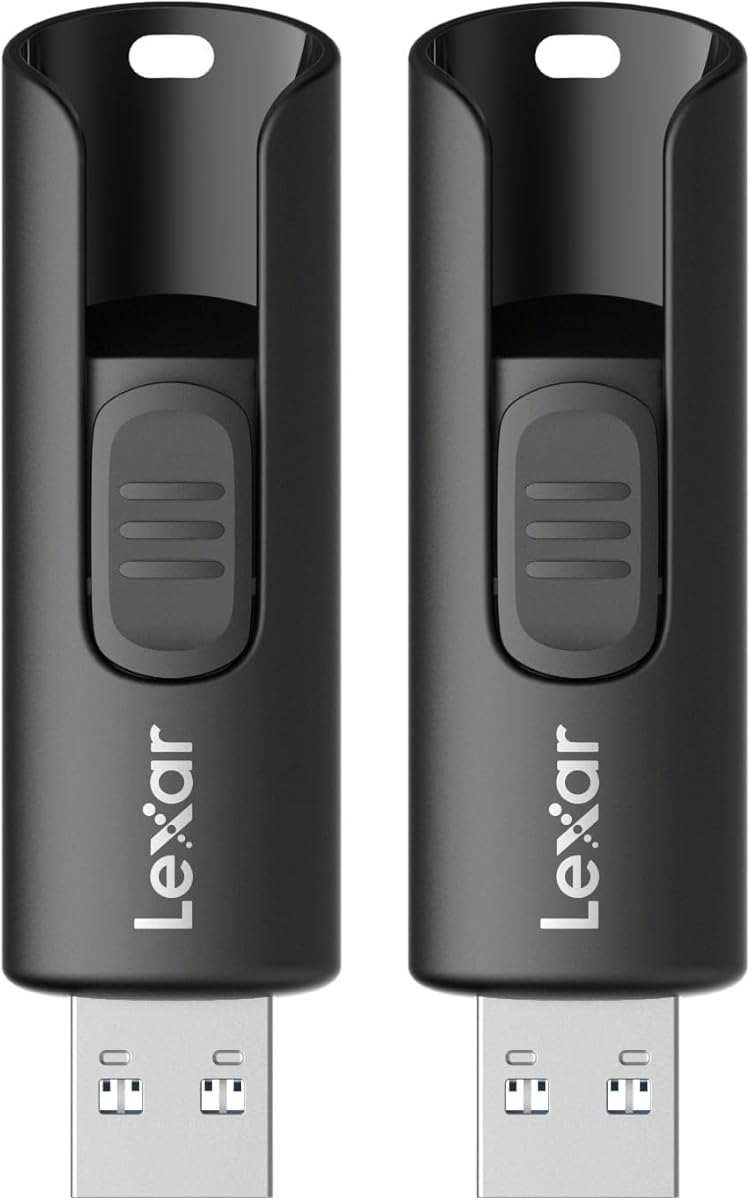
Getting two drives in one package offers incredible value for families or teams sharing data needs. Each drive features a push-button retractor eliminating the need for a removable cap. The lightweight design makes them easy to carry on a lanyard loop.
We may earn a commission when you buy through this link, at no additional cost to you.
Lexar DataShield adds a layer of security allowing you to create password-protected files. This feature is useful for keeping sensitive information private without needing extra software installation. The drives work plug-and-play across most modern operating systems and devices.
Speeds are average compared to high-end models but sufficient for documents and standard media. The retractable design protects the connector from damage and dirt effectively. However the plastic body might not offer the same level of physical protection as metal drives.
This pack is excellent for students or office environments where multiple reliable drives are needed. The included lanyards prevent loss which is common with small USB devices. If you need quantity and decent security features this multipack is a smart economical choice.
The push-button mechanism keeps the USB connector protected from damage and dirt always.
Lexar DataShield lets you easily protect sensitive files with a password without complex software.
We may earn a commission when you buy through this link, at no additional cost to you.
This solid state dual drive features both USB-A and USB-C connectors for maximum versatility. It delivers impressive read and write speeds making it suitable for large file transfers. The durable metal housing protects the connectors and ensures a premium feel.
We may earn a commission when you buy through this link, at no additional cost to you.
The included Lexar App allows easy photo backup from iOS and Android devices. This is useful for mobile users wanting to free up phone storage quickly. The cable-free design means you can plug it directly into modern laptops and phones.
While the speed is competitive with high-end drives the price reflects the advanced technology inside. The dual connectors eliminate the need for adapters which simplifies the workflow. However the size is larger than standard flash drives which might affect portability slightly.
Ideal for users with mixed device ecosystems this drive bridges the gap between old and new ports. The solid state performance ensures consistency over time compared to standard flash memory. If you need high speed and universal connectivity this model is highly recommended.
With both USB-A and USB-C ports you can transfer files between any device without adapters.
The dedicated app simplifies backing up and managing photos directly from your smartphone.
We may earn a commission when you buy through this link, at no additional cost to you.
These affordable USB 2.0 drives provide a basic and reliable solution for everyday storage needs. The LED indicator lights up during data transfer so you know exactly when it is safe to remove. Each pack includes a lanyard to help prevent losing the drive.
We may earn a commission when you buy through this link, at no additional cost to you.
The default exFAT format ensures compatibility with modern operating systems without reformatting. They work well for storing music videos and documents that do not require high-speed access. The price point makes them ideal for bulk purchasing or backup purposes.
While speeds are limited compared to USB 3.0 models they are sufficient for non-urgent tasks. The plastic build is durable enough for casual use but lacks the ruggedness of metal drives. The two-pack ensures you have a backup ready if one fails.
Perfect for users who need simple storage without advanced features this drive meets the basics. The included lanyards add a practical touch for on-the-go usage. If your priority is affordability and basic compatibility this option is a safe choice.
The LED light provides a clear visual cue when data is being written or read safely.
Included lanyards allow you to attach the drive to your keychain or bag securely.
We may earn a commission when you buy through this link, at no additional cost to you.
This Extreme Pro drive sets the standard for high-performance USB storage with read speeds reaching 1000MB/s. The massive 512GB capacity allows you to carry entire project libraries or media collections easily. Its premium metal build withstands daily stress and looks sophisticated.
We may earn a commission when you buy through this link, at no additional cost to you.
Built-in encryption technology ensures your valuable data remains secure even if the drive is stolen. The Memory Zone app helps manage files and backups efficiently on Android devices. Dual ports make it versatile for connecting to both older PCs and modern laptops.
The speed is unmatched by most consumer drives making it ideal for editing video directly off the stick. However the price is significantly higher than standard options. It is overkill for simple document transfers but perfect for creative professionals.
If you need professional-grade speed and capacity this drive is the ultimate choice. The robust build quality ensures it lasts through tough conditions and frequent use. For those who demand the best performance available this model delivers on every front.
With up to 1000MB/s read speeds you can work with large files directly from the drive.
Advanced encryption keeps your confidential files protected from unauthorized access easily.
We may earn a commission when you buy through this link, at no additional cost to you.
The TEWENE thumb drive features a unique sturdy clip design that makes it easy to attach to bags. This design prevents loss and keeps the drive accessible whenever you need it. It includes a USB C adapter expanding its utility to modern smartphones and laptops.
We may earn a commission when you buy through this link, at no additional cost to you.
With USB 3.1 Gen 1 technology transfer speeds are decent for documents and standard media files. The drive is lightweight and portable fitting easily into a pocket or backpack. It supports Windows Mac and Linux systems out of the box.
While the build is plastic it offers a practical solution for everyday storage tasks. The clip design is more secure than retractable caps which can break easily. However the capacity is limited to 64GB which might not suffice for large media collections.
Ideal for students and office workers needing a portable drive for presentations this model fits well. The included adapter ensures you never face connection issues on newer devices. If you value portability and convenience this drive is a reliable option.
The sturdy clip allows you to attach the drive securely to your backpack or belt loop.
A separate USB C adapter ensures compatibility with newer devices without extra purchases.
We may earn a commission when you buy through this link, at no additional cost to you.
This dual drive supports both USB-C and USB-A ports making it highly versatile for different devices. Read speeds reach up to 550MB/s which is excellent for transferring photos and videos quickly. The zinc alloy shell provides durability against falls and abrasions.
We may earn a commission when you buy through this link, at no additional cost to you.
It supports plug and play functionality across Windows Android and Mac systems without software. The protective covers for both ends ensure the connectors remain safe when not in use. This design protects the drive from physical damage during travel or storage.
While the drive lacks hardware encryption its solid build and speed make up for it. The size is slightly larger than standard thumb drives but offers better utility with dual ports. It is a great choice for general users who need reliable high-speed storage.
Perfect for those who work with multiple device types this drive bridges compatibility gaps effectively. The zinc alloy construction ensures longevity even with heavy use. If you need a durable dual-port drive at a reasonable price this model is a strong contender.
Work seamlessly with both older USB-A devices and modern USB-C laptops without adapters.
High-grade zinc alloy construction protects the drive from physical drops and daily wear.
We may earn a commission when you buy through this link, at no additional cost to you.
The FIT Plus is exceptionally compact allowing it to stay plugged into laptops and TVs discreetly. Its seamless fit design prevents accidental removal while maintaining low profile connectivity. With 256GB capacity it offers ample space for media and documents.
We may earn a commission when you buy through this link, at no additional cost to you.
Samsung backs this drive with waterproof shockproof and x-ray proof features ensuring data safety. The fixed design eliminates the risk of losing a cap which is a common pain point. Transfer speeds are solid at 300MB/s making it efficient for daily use.
While it lacks a removable cap the integrated design means no parts to lose or break. The compact size ensures it does not block adjacent ports on your computer. It is a reliable long-term storage solution backed by a five-year limited warranty.
Ideal for users wanting a set-and-forget drive for TVs or consoles this model works great. The durability features protect data during travel or in harsh environments. If you prioritize simplicity and reliability this drive is an excellent long-term investment.
The low profile design lets you leave the drive plugged in without blocking other ports.
Waterproof and shockproof features ensure your files survive accidental drops or spills easily.
We may earn a commission when you buy through this link, at no additional cost to you.
Selecting the right exfat USB flash drive involves considering several key factors to match your specific needs and budget.
Storage capacity determines how much data you can keep on the drive. For documents and small files 64GB is often sufficient. However for high-resolution photos and videos 128GB or more is recommended to avoid frequent transfers.
Choose a capacity that allows room for growth so you do not outgrow the drive quickly.
Transfer speeds impact how long it takes to move files. USB 3.0 drives offer much faster speeds than USB 2.0 models. Look for read speeds above 100MB/s for smooth performance with large media files.
Prioritize higher speeds if you frequently transfer large files like video projects or backups.
Modern drives often include dual connectors for USB-A and USB-C. This versatility allows you to use the drive with laptops and smartphones. Without a dual port you might need extra adapters which can be bulky.
Check your devices for the right ports and choose a drive that matches your ecosystem needs.
Durability is crucial for drives used in travel or outdoor settings. Metal casings offer better protection against impacts and heat. Waterproof and shockproof features add extra security for valuable data.
Invest in a rugged model if you need the drive to survive harsh conditions or daily wear.
Security features like password protection keep your data safe from unauthorized access. Some drives offer hardware encryption which is more secure than software solutions. This is vital for sensitive business or personal files.
Ensure the drive includes security tools if you store confidential information regularly.
A warranty indicates the manufacturer's confidence in the product's quality. Longer warranties such as five years offer peace of mind against defects. Reliable customer support helps resolve issues quickly.
Always check the warranty terms to ensure you are covered in case of hardware failure.
Most drives work with Windows Mac and Linux but verify support for your specific OS. The exFAT format ensures seamless compatibility without needing reformatting. Some drives may require specific software for advanced features.
Confirm compatibility with your systems to avoid issues when first using the drive.
Prices vary widely based on speed capacity and brand. Budget options offer basic functionality while premium models deliver speed and durability. Determine your needs before spending on features you might not use.
Balance cost with performance to get the best value for your specific usage scenario.
To use your drive plug it into an available USB port on your computer. Most drives will appear automatically in File Explorer or Finder. You can then drag and drop files to transfer them quickly.
Always eject the drive safely before unplugging it to avoid data corruption. Use the 'Safely Remove Hardware' option in your operating system. This ensures all background transfers are complete before physical removal.
Store the drive in a dry cool place away from direct sunlight. Avoid exposing it to extreme temperatures or moisture. Regularly backing up important files adds an extra layer of security against hardware failure.
exFAT is a file system designed for flash drives that works well with both Windows and Mac. It supports large files over 4GB which FAT32 cannot handle. This makes it ideal for sharing large videos between different operating systems without reformatting.
Yes USB 3.0 drives offer significantly faster transfer speeds than USB 2.0. They use more lanes for data transfer which increases read and write speeds. This difference is noticeable when moving large files regularly.
Many modern drives include USB-C ports compatible with smartphones. Android devices usually support plug and play usage directly. iPhones may require specific adapters but many drives work with USB-C iPhones.
Use the built-in encryption tools provided by the drive manufacturer. You can set a password to restrict access to the files. Always remember your password since losing it may lock you out of your data.
No most USB drives are plug and play and do not need drivers. They work automatically with modern Windows Mac and Linux systems. Only specific advanced features might require software installation.
Store it in a cool dry place away from moisture and dust. Use a protective case to prevent physical damage. Keep it away from strong magnetic fields which can sometimes affect storage integrity.
This guide has reviewed ten top exfat USB flash drives to help you find the right storage solution. From budget options to premium dual drives there is a model for every need and preference. Speed durability and compatibility were the main criteria in our selection.
Prioritize speed and build quality if you work with large media files daily. For general users basic USB 3.0 drives offer excellent value and reliability. Consider security features if you handle sensitive business or personal data.
Always check the latest prices and availability before making a final decision. Deals change often so timing can impact your purchase price. With the right drive you can manage your digital files efficiently across all devices.