As an Amazon Associate we earn from qualifying purchases. We may earn a commission when you buy through links on this page, at no additional cost to you. Read our affiliate disclosure.As an Amazon Associate we earn from qualifying purchases.Purchases through our links may earn us a commission, at no extra cost to you. Read our affiliate disclosure.
Finding the right Htpc Keyboard transforms your living room into a true entertainment hub. A good model combines typing comfort with media controls and a built-in touchpad for seamless navigation on your big screen.
We evaluated ten leading Htpc Keyboard options based on connectivity, battery life, build quality, and OS support. Our analysis focuses on real-world usability for streaming, gaming, and general computing from the couch.
Each pick highlights specific strengths like backlighting, multi-device switching, or compact design. Prices and availability change frequently so check current listings before making your final decision for your setup.
Top 3 Picks for Best Htpc Keyboard
Best Budget
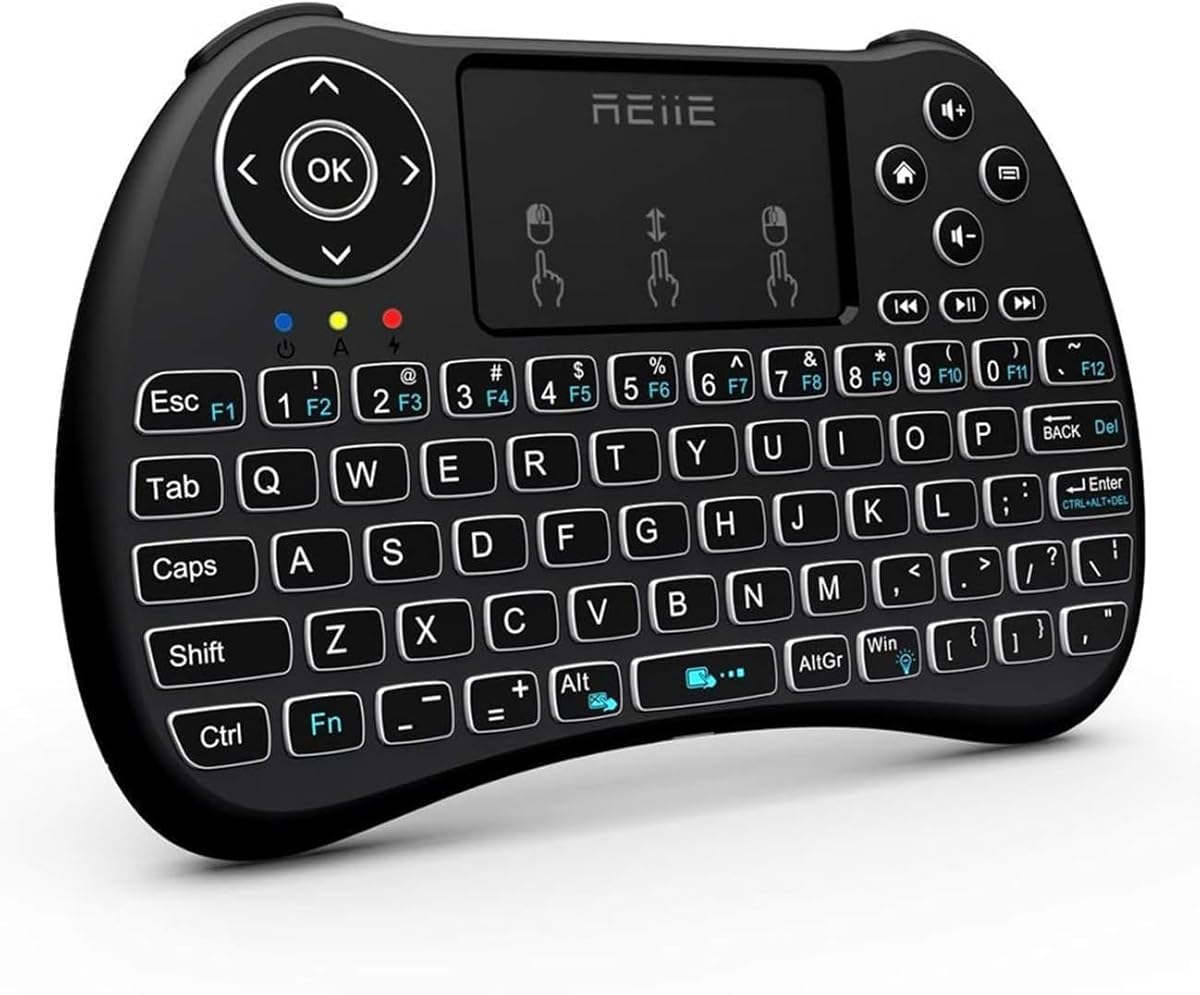
(Backlit Version)REIIE H9+ Mini Keyboard,2.4GHz Wireless Mini Handheld Smart TV Remote Keyboard with Touchpad for PC,Raspberry Pi 2, Pad, Smart TV, Android TV Box, Windows 7 8 10(Not Suport Bluetooth)
This side-by-side comparison outlines key specifications for every model reviewed. Use this table to quickly identify connectivity types, battery options, and compatibility details that matter most for your home theater PC setup.
The Logitech K400 Plus stands as the most reliable Htpc Keyboard for typical living room use. With a 4.4 star rating it delivers consistent performance for streaming and web browsing.
Pros
Long 18 month battery life
Plug-and-play setup ease
Durable spill resistant build
Reliable wireless connectivity
Comfortable media control keys
Cons
No backlight for dark rooms
No Bluetooth connectivity option
We may earn a commission when you buy through this link, at no additional cost to you.
Its standout feature is the massive 18 month battery life powered by two standard AAA cells. The Unifying receiver ensures a stable connection without Bluetooth pairing hassles.
While it lacks backlighting it compensates with quiet keys and a large touchpad for precise cursor control. The spill resistant design adds durability against accidental drinks.
This keyboard is ideal for users prioritizing reliability and battery life over advanced features. It remains a top choice for Windows and Android setups.
Unifying Receiver Simplicity
The included Unifying receiver connects via USB and requires no drivers. It ensures a stable link up to 33 feet so you control from the couch.
Battery Performance
Powered by two AAA batteries the K400 Plus lasts up to 18 months. An on off switch further extends usage during long inactive periods.
The REIIE H9+ Mini offers exceptional value as an affordable Htpc Keyboard with backlighting. It features a compact design perfect for handheld use or small desks.
Pros
Low price point value
Backlight for dark use
Compact handheld design
Multi-finger gestures
Plug and play ease
Cons
No Bluetooth connectivity support
Requires recharge before first use
We may earn a commission when you buy through this link, at no additional cost to you.
Its white backlight allows navigation in dark rooms without external light. The 2.4G connection via USB dongle provides stable performance for most media tasks.
Users should note the lack of Bluetooth and the need to charge before first use. These trade-offs are acceptable given the competitive price and functional layout.
This model suits budget conscious buyers who want a backlit keyboard for streaming. It works well with Android boxes and Windows PCs.
Compact Handheld Shape
The H9+ features a mini handheld design fitting easily in one hand. This shape allows comfortable typing from the sofa without a desk.
Touchpad Gestures
The multi-finger touchpad supports click and drag actions for cursor control. Two-finger click acts as a right mouse button for context menus.
The K809 Mini distinguishes itself with a high-end aluminum alloy frame and sleek design. It appeals to users wanting a premium feel and versatile connectivity options.
Pros
High-end metal build quality
Dual mode connectivity
Rechargeable battery included
Ultra-slim portable profile
Fingerprint proof finish
Cons
Higher price than plastic models
No dedicated backlight keys
We may earn a commission when you buy through this link, at no additional cost to you.
Its dual mode support allows switching between Bluetooth and 2.4G via a single click. The 1000mAh rechargeable battery eliminates the need for disposable cells.
While pricier than plastic alternatives the metal construction ensures durability and a polished look. It lacks backlighting but offers robust performance for media centers.
This keyboard is best for those seeking build quality and modern design. It pairs well with Mac and Windows devices needing stable wireless input.
Dual Mode Flexibility
You can connect via Bluetooth to tablets or 2.4G dongle to TVs. A single key click switches between devices effortlessly for seamless workflow.
Rechargeable Power
The built-in 1000mAh battery provides long usage between charges via USB. This design reduces waste and cost compared to battery powered rivals.
The Arteck Universal Backlit brings visual flair with seven unique LED colors for the keys. It supports Bluetooth connection making it ideal for devices without USB ports.
Pros
Vibrant multi-color backlight
Bluetooth connectivity support
USB-C charging port
Auto sleep feature
Wide device compatibility
Cons
Shorter battery life than AAA
No 2.4G dongle option
We may earn a commission when you buy through this link, at no additional cost to you.
Its USB-C charging and auto sleep features help manage power usage efficiently. The touchpad and media hotkeys streamline navigation on smart TVs and desktops.
Battery life is shorter than models using AAA cells but acceptable for regular users. The lack of a 2.4G option may limit use on older TVs.
This keyboard fits users wanting customization and modern charging. It works well with Windows and macOS laptops and tablets.
Color Customization
Seven distinct backlight colors allow personalization of your typing environment. Two brightness levels let you adjust for ambient light conditions.
Bluetooth Connectivity
Bluetooth pairing avoids USB dongles freeing up ports on your device. It works smoothly with iPads and laptops requiring wireless input.
The Arteck 2.4G Wireless features a solid stainless steel frame for durability and style. It offers a full size layout for comfortable typing from a distance.
Pros
Durable stainless construction
Plug and play setup
Full size key spacing
Media hotkeys included
Touchpad included
Cons
No backlighting feature
Standard battery replacement
We may earn a commission when you buy through this link, at no additional cost to you.
Its nano USB receiver connects instantly without driver installation. The media hotkeys allow quick control of playback and volume on your PC.
Without backlighting it is best suited for well lit living rooms. The touchpad functions reliably for basic navigation and selection tasks.
This keyboard suits users preferring robust materials and standard key sizes. It is a practical choice for home office or media PC setups.
Stainless Steel Durability
The stainless frame resists scratches and feels premium compared to plastic. It maintains a sleek appearance over time with minimal maintenance.
Full Size Layout
Keys are spaced comfortably for accurate typing without cramping fingers. This layout helps prevent typos during text input on your HTPC.
The Arteck Universal Multi-Device allows switching between three devices with one click. This feature is useful for controlling multiple PCs or media boxes from one keyboard.
Pros
Switch between 3 devices
Dual connectivity support
Rechargeable battery
Wide OS compatibility
Touchpad included
Cons
Complex setup for multiple devices
No dedicated backlight
We may earn a commission when you buy through this link, at no additional cost to you.
It supports both Bluetooth and 2.4G connections via USB-C charging. The touchpad and media keys simplify navigation on TV-connected computers.
While versatile the multi-device switching can confuse new users during setup. The lack of backlighting may be a downside for dark room use.
This keyboard is ideal for power users managing several systems. It provides reliable input for Mac and Android setups.
Multi-Device Switching
A single key click toggles between connected devices instantly. This capability reduces the need for multiple peripherals on your desk.
Dual Connectivity
Use Bluetooth for portables and 2.4G for desktops without Bluetooth. The USB-C charging ensures long usage without disposable batteries.
The Rii Mini provides dual mode connectivity with 2.4G and Bluetooth for versatile use. It includes a white LED backlight for comfortable night typing.
Pros
Dual mode connectivity
USB-C charging included
White LED backlight
Compact iPhone-sized design
Long standby
Cons
No multi-device switching
Small touchpad area
We may earn a commission when you buy through this link, at no additional cost to you.
Its iPhone-sized design makes it highly portable for travel or daily carry. The USB-C charging ensures you power up with modern cables.
While the touchpad is compact it handles basic cursor movements effectively. It lacks device switching but remains reliable for single system use.
This keyboard is ideal for smart TVs needing backlight and rechargeable power. It works across Windows Android and Linux platforms easily.
Dual Mode Utility
Switch between Bluetooth for tablets and 2.4G for TVs instantly. This flexibility helps adapt to different device port availability.
Portable Design
At roughly iPhone size it slips into bags and pockets. This design ensures you can carry it for mobile tasks.
We may earn a commission when you buy through this link, at no additional cost to you.
Buying Guide – How to Choose the Best Htpc Keyboard
Selecting the right Htpc Keyboard involves assessing connectivity, build, and layout for your specific media setup. This section outlines critical factors to consider.
Wireless Connectivity Type
Most Htpc Keyboards use 2.4G dongles or Bluetooth. 2.4G offers stable links without pairing while Bluetooth saves USB ports. Choose based on your PC or TV available input.
Built-in Touchpad
A touchpad is essential for cursor control on big screens. Ensure it supports multi-touch gestures for smooth navigation. Some models include physical buttons for easier clicking.
Backlighting
Backlighting helps type in dark rooms without extra lamps. Look for adjustable brightness or color options. It adds comfort during night-time streaming.
Battery Life and Power
Models use rechargeable batteries or standard AAA cells. Rechargeables save money but need charging. AAA cells last months but require replacement. Select based on your maintenance preference.
OS Compatibility
Ensure the keyboard supports your system like Windows Android or macOS. Some offer dual-mode keys for easy switching. Compatibility avoids driver issues and layout confusion.
Build Quality and Size
Aluminum frames offer durability while plastic keeps costs low. Compact sizes fit handheld use while full sizes suit desks. Consider where you will primarily use the device.
Media Hotkeys
Dedicated keys for volume and playback simplify control. Look for models with clear labels. They streamline interaction with streaming apps without complex navigation.
Device Switching
Multi-device keyboards let you switch between PCs and TVs. This reduces clutter on your desk. Check how many devices you can pair simultaneously.
How to Use and Care for Your Htpc Keyboard
Connect the receiver or pair via Bluetooth then test all keys. Adjust settings like brightness through on-device combos.
Clean regularly with a soft cloth to remove dust from the touchpad. Avoid liquids to protect internal electronics.
Store in a cool dry place when not in use. If rechargeable, maintain charge levels for optimal battery health.
Frequently Asked Questions
Do all Htpc Keyboards work with Smart TVs?
Most models require a USB port for the 2.4G receiver or Bluetooth support. Check your TV specs before buying. Some older TVs may need adapters for connectivity.
Can I use a Htpc Keyboard with gaming consoles?
Yes many support Xbox or PlayStation for text entry. Check device lists for compatibility. Some require adapters for console USB ports.
Why does my touchpad not work smoothly?
Ensure the surface is clean and drivers are installed. Check battery levels for stable connection. Try updating firmware if available for better response.
How do I switch between Bluetooth and 2.4G?
Most models use a key combination like Fn plus a number. Refer to the manual for specific combos. This allows quick switching between device types.
Do Htpc Keyboards work with Linux systems?
Most standard models work with Linux as they are plug-and-play. Check compatibility lists for specific drivers. Some advanced keys may need mapping.
Is backlighting worth the extra cost?
Yes for dark room use it improves visibility and usability. It adds minimal cost compared to non-backlit models. Choose if you often use at night.
Final Thoughts on Choosing the Best Htpc Keyboard
The Logitech K400 Plus remains a top pick for reliability and battery life. Budget buyers find value in the REIIE H9+ with backlighting.
Consider connectivity and build quality to match your entertainment setup. Prioritize touchpad quality and OS support for smooth control.
Prices and stock change often so verify listings before purchase. Check current features to ensure compatibility with your devices.
This guide compares the top dual laptop vertical stand options to help you organize your workspace efficiently while protecting your devices from scratches and