
HDMI Media Player Black Mini 1080p Full-HD
4.1Editor score
Compact aluminum alloy design fits easily in palm
Supports 1080p HDMI output at 60Hz refresh rate
Includes composite AV output and remote control
This guide compares the top external hard drive media players for 2026, evaluating 4K playback, storage compatibility, format support, and ease of use to help
Finding the right external hard drive media player can transform your television into a versatile entertainment hub. These devices allow you to play high-resolution video, music, and photos directly from local storage without needing internet access or streaming subscriptions.
We have analyzed ten leading models to determine which ones offer the best performance for home and commercial use. Our comparison focuses on decoding capabilities, storage flexibility, connectivity options, and overall user experience based on verified user feedback.
Each pick highlights specific strengths such as 4K support, compact design, or digital signage features. Please note that prices and availability can change frequently, so always verify the latest details before making your final purchase decision.
4.1Editor score

4.1Editor score

5.0Editor score
The following table provides a side-by-side comparison of all ten products evaluated in this guide. You can quickly see key specifications like resolution support, storage limits, and unique features to find the best match for your needs.


The Micca 4K Ultra-HD Media Player is a top contender for users wanting to unlock local media playback on their television. With a solid rating and widespread positive feedback, it stands out for its ability to handle high-resolution video files directly from USB storage.
We may earn a commission when you buy through this link, at no additional cost to you.
Its standout feature is the robust support for 4K Ultra-HD videos up to 4096×2304 resolution. This makes it ideal for modern setups where clarity is key. Additionally, the dual USB and MicroSD reader allows you to plug in drives up to 8TB, ensuring you have plenty of space for your library.
While it performs well, there are minor trade-offs. The remote control needs a clear line of sight which can be tricky if you hide the player behind a TV. Also, extremely high bitrate files might not play as smoothly as lower resolutions.
If you need a reliable device for both home entertainment and business digital signage, this is the model to consider. It balances performance and simplicity effectively, making it our top recommendation for most users.
This device handles 4K content smoothly which enhances visual clarity significantly.
You can connect massive drives up to 8TB for unlimited movie storage.
We may earn a commission when you buy through this link, at no additional cost to you.
For users seeking affordability without sacrificing basic functionality, the HDMI Media Player Black Mini offers excellent value. It is designed to be compact and portable making it a great choice for travelers or those with limited desk space.
We may earn a commission when you buy through this link, at no additional cost to you.
This unit supports Full HD 1080p output at 60Hz ensuring smooth video playback. The aluminum alloy housing adds durability while keeping the weight low. It also includes an AV cable for connecting to older analog televisions which adds to its versatility.
The main limitation is the lack of 4K support which might matter if you have high-resolution content. However, for standard HD videos and photos it performs reliably. The remote requires batteries which are not included in the box.
This is the best choice for budget-conscious buyers who want a simple plug-and-play experience. It gets the job done for standard media needs without breaking the bank or requiring technical expertise.
Fits in your palm making it easy to carry on trips.
AV output allows you to use older CRT televisions.
We may earn a commission when you buy through this link, at no additional cost to you.
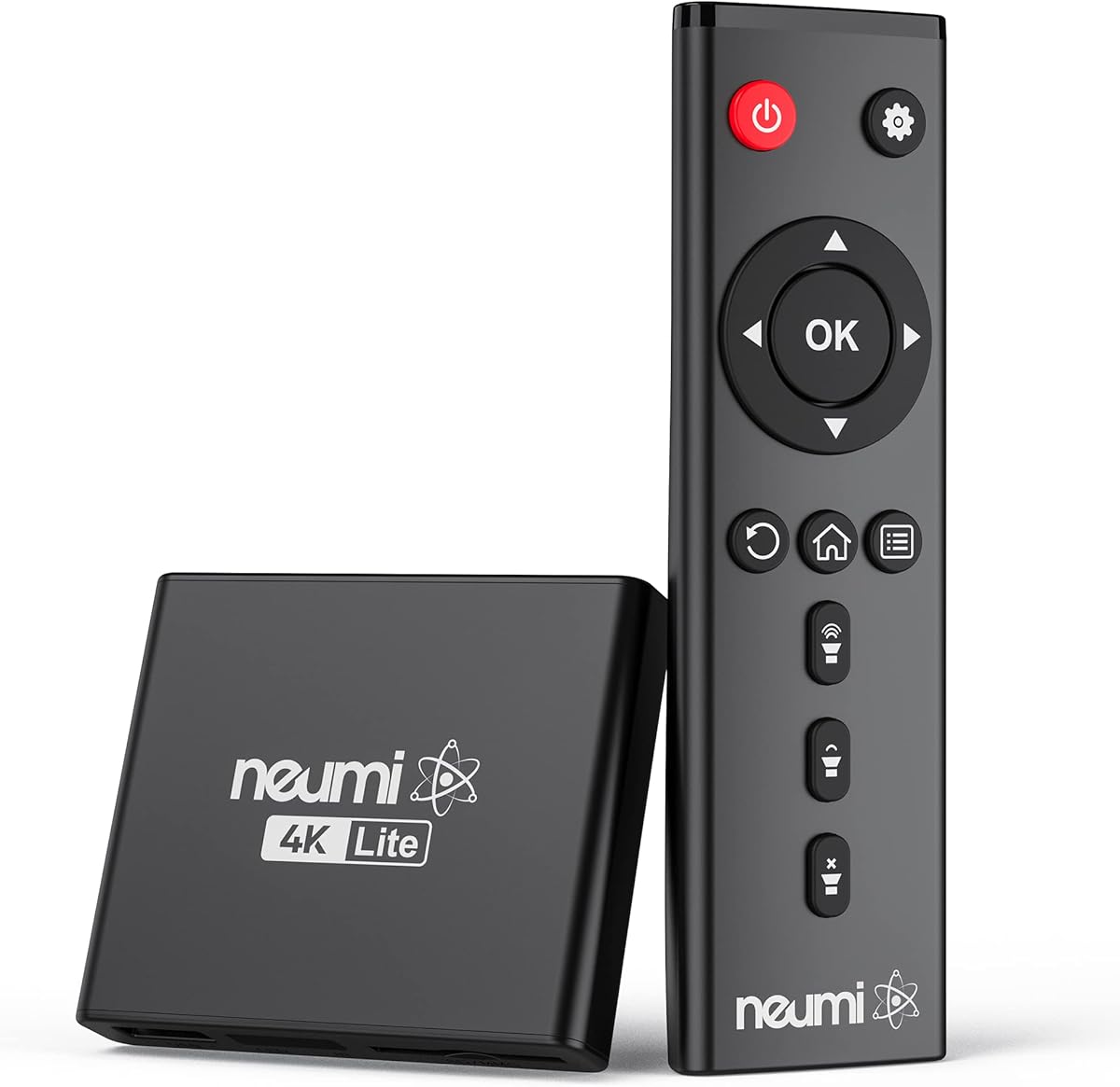
The NEUMI Atom 4K Lite distinguishes itself with a unique trigger sensor input that enables interactive displays. This makes it particularly suitable for museums galleries or art installations where user interaction is desired.
We may earn a commission when you buy through this link, at no additional cost to you.
It delivers stunning HDMI video quality up to 2160p at 60Hz which ensures fluid motion in high-resolution content. The device is incredibly compact smaller than a deck of cards so it blends seamlessly into any setup.
While it supports a wide range of formats including H.265 the price is slightly higher than standard players. The trigger sensors are also sold separately adding to the total cost if you need that specific functionality.
If you need a media player that goes beyond simple playback to offer interactive capabilities this is the top pick. It combines high performance with a form factor that is nearly invisible once installed.
Connect push buttons to start video when activated.
Delivers 60Hz refresh rate for smoother motion than 30Hz.
We may earn a commission when you buy through this link, at no additional cost to you.
The ACEMAX 4K@60Hz player is unique because it doubles as a 2.5-inch SATA enclosure. This design allows you to install a hard drive directly into the unit saving space and simplifying connections for permanent installations.
We may earn a commission when you buy through this link, at no additional cost to you.
Its metal housing helps dissipate heat which is crucial for continuous playback in digital signage scenarios. The device supports H.265 10-bit decoding and offers features like auto play and loop which are essential for unattended displays.
Users have noted occasional recognition issues with drives requiring careful formatting. This can be a hurdle for non-technical users who want a quick setup. However the included instructions provide guidance on compatible file systems.
For businesses needing a robust solution for continuous display this unit offers a practical all-in-one approach. Just ensure you follow formatting guidelines to avoid potential connectivity hiccups during operation.
Install a 2.5 inch drive inside the player body.
Auto loop and resume features work well for ads.
We may earn a commission when you buy through this link, at no additional cost to you.
This 4K media player offers a distinct advantage with its ability to display content vertically. This feature is rare and highly useful for digital signage or creative installations where screens are mounted sideways.
We may earn a commission when you buy through this link, at no additional cost to you.
It supports 4K at 30Hz and includes dual USB ports for connecting multiple drives though only one reads at a time. The audio options are extensive including optical and HDMI for up to 7.1 surround sound setups.
A technical limitation exists for FAT32 drives where single files are capped at 4GB. You can avoid this by using NTFS which supports larger files. Otherwise it handles H.265 decoding efficiently to minimize buffering.
If you need vertical display support or rich audio connectivity this model is worth considering. It strikes a good balance between features and ease of use for home theater setups.
Rotate the screen 90 degrees for portrait content.
Connect speakers via optical AV or HDMI cable.
We may earn a commission when you buy through this link, at no additional cost to you.
Designed with commercial use in mind this HDMI Media Player excels at advertising and multimedia playback. It supports ISO files from Blu ray discs allowing for high quality movie loops without physical discs.
We may earn a commission when you buy through this link, at no additional cost to you.
The device offers extensive connectivity including HDMI AV and fiber optic outputs for flexible audio setups. It handles H.265 decoding efficiently which helps maintain quality while reducing bandwidth usage for high resolution streams.
While the SD card slot supports up to 128GB the USB port can handle larger drives. This is sufficient for most advertising needs but might limit users with massive libraries. The included AV cable adds convenience for older displays.
If you are setting up digital signage or promotional displays this model provides the necessary features for robust playback. It handles a wide range of formats and offers flexible audio options.
Play disc images directly from USB without burning.
Use fiber optic for high quality sound systems.
We may earn a commission when you buy through this link, at no additional cost to you.
The WD Elements drive is not a player itself but an essential partner for any media player setup. Its reliability and high capacity make it the ideal storage companion for streaming video to your television.
We may earn a commission when you buy through this link, at no additional cost to you.
With SuperSpeed USB 3.2 Gen 1 support it ensures fast data transfer when loading your library. The drive is plug and play ready for Windows Mac and Linux reducing setup time to zero for most users.
While it lacks a media interface its simplicity is a strength. You format it once and use it across devices without reformatting. Just ensure your media player supports NTFS for larger capacity drives.
This drive is the top recommendation for storage needs due to its durability and performance. Pair it with a dedicated media player for a seamless high capacity home entertainment solution.
Up to 6TB allows thousands of movies.
Works seamlessly with Windows Mac and Linux.
We may earn a commission when you buy through this link, at no additional cost to you.
Achieving a perfect rating this model stands out as a premium option for those wanting maximum flexibility. It combines a media player and a 2.5 inch SATA enclosure into a single compact unit.
We may earn a commission when you buy through this link, at no additional cost to you.
The inclusion of a Type-C cable allows you to easily transfer data from the drive to a laptop before connecting it to your TV. It supports up to 200Mbps bitrate ensuring even high quality video streams play without stuttering.
While the drive itself is not included this allows you to choose your preferred capacity. It also supports Mac formatted drives which is a distinct advantage for Apple users compared to standard players.
For anyone needing a professional grade device with high user satisfaction this is the best choice. The versatile connectivity and playback modes make it suitable for both home and business use.
Move files to your computer via Type-C cable.
Supports formatted drives used on Apple systems.
We may earn a commission when you buy through this link, at no additional cost to you.
This player offers a practical solution for businesses needing continuous media displays. The built-in hard drive enclosure allows you to install a drive internally for a clean setup without external boxes.
We may earn a commission when you buy through this link, at no additional cost to you.
It supports 4K video at 60Hz ensuring smooth playback for high definition content. The device automatically resumes playback from where it stopped which is useful for multi-part presentations or long loops.
Some users report mixed experiences which results in a lower rating. This may be due to formatting requirements or setup complexity. Always check the manual for specific drive formatting instructions before installation.
If you need a cost-effective signage solution this unit provides the necessary tools. It is best suited for professional environments where continuous operation is required over long periods.
Install 2.5 inch drive inside for neat setup.
Resume slides or videos from exact stop point.
We may earn a commission when you buy through this link, at no additional cost to you.
This media player offers a wide range of features suitable for diverse environments from museums to fitness centers. It supports configurable video rotation allowing flexible installation orientations on different wall mounts.
We may earn a commission when you buy through this link, at no additional cost to you.
It handles media from multiple sources including internal HDD USB and MicroSD cards. The auto-play and resume functions make it reliable for long term unattended display needs without manual intervention.
The user rating is lower than some competitors suggesting possible inconsistencies in performance or durability. However for budget installations where rotation flexibility is required it remains a viable option.
For those needing a basic signage solution with specific orientation capabilities this model fits the bill. Ensure you have the necessary power and format settings ready before first use.
Rotate display 90 180 or 270 degrees.
Read files from HDD USB and SD card.
We may earn a commission when you buy through this link, at no additional cost to you.
Choosing the right external hard drive media player depends on your specific needs for resolution, storage, and usage context. Below are the key factors to consider to ensure you pick a device that performs reliably for your setup.
One of the most critical features is the supported video resolution. If you have 4K TVs you should look for a player that supports at least 4K at 30Hz or ideally 60Hz for smooth playback. Standard HD players only go up to 1080p which may not maximize your display potential.
Always check the maximum resolution spec to ensure it matches your display capabilities for the best visual experience.
Consider the maximum storage size the player can read. Most modern players support drives up to 8TB which is sufficient for large media libraries. Also check if the device reads both USB drives and SD cards for flexible storage options.
Confirm the maximum capacity limit to avoid issues with your existing large hard drives.
Different file systems like FAT32, NTFS, and exFAT support different file sizes. FAT32 has a 4GB limit which can be restrictive for modern movies. Ensure the player supports NTFS or exFAT for large files.
Look for NTFS and exFAT support to ensure your large media files play correctly.
While HDMI is standard, some setups may require analog connections. Players with AV or optical outputs offer more versatility for older TVs or high-quality audio systems. Check if the device includes the necessary cables for your display.
Verify HDMI and AV outputs match your TV connections to avoid buying extra adapters.
If you plan to use the player for business displays look for features like auto-loop and resume. These functions ensure content plays continuously without manual control. Some units also support trigger sensors for interactive displays.
Prioritize loop and resume features for automated commercial or home displays.
Efficient video decoding reduces buffering and improves performance. H.265 or HEVC support allows for higher quality video at lower bitrates. A powerful chip ensures even high bitrate files play smoothly without stuttering.
Choose a player with H.265 decoding for better performance with modern video files.
The physical design of the player matters for placement. Compact units are easier to hide behind TVs while metal housings help dissipate heat during long sessions. Consider how the device fits into your physical setup.
Select a compact or metal unit to ensure durability and unobtrusive placement.
A simple remote and intuitive interface save time. Some players allow navigation via mouse or keyboard which can be helpful for complex menus. Check if the device includes all necessary remotes for easy control.
Look for simple navigation controls to reduce the learning curve for all users.
To begin use, connect the media player to your TV using the HDMI cable and power it via the adapter. Insert your formatted hard drive or USB into the USB port. Once the device boots up use the remote to navigate to the file browser and select your media files.
For continuous display scenarios enable auto-play and loop settings in the menu. This ensures your content restarts automatically without manual intervention. If your player has a resume function it can return to your last stop point after a power cycle.
To maintain performance keep the device in a well-ventilated area to prevent overheating. Dust can block ventilation slots so clean it occasionally with a soft cloth. Ensure your drives are safely ejected from the system if you remove them to prevent data corruption.
No these devices are designed to play local media from storage drives so Wi-Fi is not required. You can play movies music and photos directly from your USB or hard drive without any internet connection. This makes them ideal for offline playback or areas with limited network access.
Most players support common formats like MP4 MKV AVI MOV for video and MP3 FLAC for audio. They also handle image formats such as JPG and PNG. Always check the specific model specs for advanced codec support like H.265 to ensure compatibility with your files.
Yes most external hard drives formatted with NTFS or exFAT work with these players. You may need to reformat the drive if it was originally set to FAT32 which has a file size limit. Ensure the drive is recognized by your computer before connecting it to the player.
High bitrate files require a powerful decoding chip to play smoothly. If your player only supports H.264 you may experience lag with H.265 files. Check the player's specs to ensure it supports high bitrate decoding up to 200Mbps for 4K content.
Set up digital signage by connecting the player to a display and enabling auto-loop mode in the settings. Format your drive with the correct file system like NTFS and ensure files are in the root folder for easy detection. The resume feature helps continue shows after power outages.
Yes many media players include composite AV output which connects to older CRT TVs. This allows you to enjoy media even if your TV lacks HDMI. You may need a specific AV cable to connect the player to the red white and yellow ports on your TV.
The media player itself requires a power adapter not batteries. However the remote control typically uses AA batteries which are often sold separately. Make sure to check the package contents and buy batteries if needed for remote operation.
Yes FAT32 drives have a file size limit of 4GB which can restrict modern movie files. To avoid this use a drive formatted to NTFS or exFAT if your player supports these systems. This allows single files to exceed 4GB without issues.
We have reviewed ten top models ranging from the Micca 4K to the ACEMAX enclosure options. Each device offers unique strengths whether you need 4K resolution interactive triggers or digital signage loops.
When deciding prioritize the features that matter most to your setup such as resolution support storage capacity or build quality. For most users a player with NTFS support and H.265 decoding provides the best balance of performance and ease of use.
Please remember that product prices and availability can fluctuate over time. Always verify the current details and offers before finalizing your purchase to ensure you get the best value for your investment.