
TP-Link ER605
4.4Editor score
Five gigabit ports for flexibility
Supports USB WAN backup
Advanced firewall protection included
This guide compares the top ten dual WAN routers for reliability and speed, helping you choose the best model for your home or business internet needs.
Finding a reliable internet connection is crucial for modern life. A dual WAN router ensures you stay online even if one provider fails, offering essential redundancy for homes and offices.
We evaluated ten top models based on port flexibility, security features, and performance. Our list covers budget picks and enterprise solutions to help you find the right fit.
Each pick highlights key strengths and ideal use cases. Note that prices fluctuate regularly, so check current listings before making your final decision today.
4.4Editor score

4.2Editor score

4.3Editor score
Here is a side-by-side look at all ten routers to help you compare specs and features quickly before purchasing.



The TP-Link ER605 is a powerful wired router designed for small businesses needing reliable connectivity. It earns a high rating for its versatility and robust security features.
We may earn a commission when you buy through this link, at no additional cost to you.
This unit offers five gigabit ports allowing flexible WAN configurations. You can connect multiple ISPs for load balancing or failover to ensure business continuity during outages.
While it lacks wireless capabilities, it excels as a dedicated gateway. Users appreciate the extensive VPN support and detailed firewall logs for network monitoring and control.
Ideal for offices needing a stable backbone, this router delivers professional features at an accessible cost. It remains a top recommendation for budget-conscious network administrators.
The ER605 supports up to three WAN ports simultaneously, enabling flexible setups for load balancing or redundancy without extra hardware.
Support for multiple VPN types ensures secure remote access for employees, protecting sensitive data over public networks effectively.
We may earn a commission when you buy through this link, at no additional cost to you.
The Peplink B-One stands out for enterprise branch offices needing resilient connectivity. Its high throughput and specialized features justify the premium investment for critical operations.
We may earn a commission when you buy through this link, at no additional cost to you.
SpeedFusion technology allows seamless video calls even if primary internet drops. This router adapts to various setups including Starlink or fiber connections effectively.
Reliability is a key focus with automatic updates keeping performance high. The dual-band Wi-Fi ensures local devices connect wirelessly without extra access points.
Best for businesses requiring maximum uptime, this model delivers consistent performance. It is worth the cost for organizations where connectivity loss equals revenue loss.
This feature creates a robust network by combining connections, ensuring smooth calls even when one link fails unexpectedly.
Easy connectivity with Starlink allows diverse backup options, making it ideal for remote sites with limited infrastructure.
We may earn a commission when you buy through this link, at no additional cost to you.
The NETGEAR PR60X delivers enterprise-grade performance with its 10G capabilities. It serves as a powerful gateway for high-speed internet access in modern offices.
We may earn a commission when you buy through this link, at no additional cost to you.
Management is simplified through the Insight cloud platform, allowing remote control anywhere. The router also supports up to thirty-two VLANs for secure network segmentation.
While the price is steep, the hardware performance and security tools are unmatched. Users benefit from fast failover and seamless connectivity for demanding applications.
Perfect for businesses needing speed and oversight, this router excels. It is a top choice for those prioritizing future-proofing and cloud management.
With a configurable 10G port, you can handle high-speed backhaul or local transfers without bottlenecks.
NETGEAR Insight provides easy access to network stats and settings from anywhere, simplifying IT maintenance.
We may earn a commission when you buy through this link, at no additional cost to you.
The Cudy R700 appeals to advanced users who want custom control via OpenWRT. It offers a robust feature set for its low price point.
We may earn a commission when you buy through this link, at no additional cost to you.
Connectivity is excellent with five gigabit ports supporting multi-WAN setups. The router ensures business continuity with automatic failover to backup connections.
Security features like SPI firewall and domain filtering protect your perimeter effectively. Cloud management adds convenience without sacrificing local control options.
Ideal for tech-savvy home labs or small offices, this unit delivers value. It is a great entry point for multi-WAN routing without high costs.
Full OpenWRT support unlocks VLANs and custom packages, allowing deep customization for specific needs.
Automatic failover keeps traffic flowing even if one ISP fails, minimizing disruption to daily operations.
We may earn a commission when you buy through this link, at no additional cost to you.
The Omada ER707-M2 is a strong choice for businesses investing in the Omada ecosystem. Its multi-gigabit ports support modern high-speed internet needs.
We may earn a commission when you buy through this link, at no additional cost to you.
Remote access via cloud ensures you can manage your network from anywhere. The device supports over five hundred thousand sessions, making it suitable for busy environments.
Performance is stable with a focus on high-bandwidth aggregation. The five-year warranty provides long-term peace of mind for critical deployments.
Best for existing Omada users, this router integrates seamlessly. It offers professional performance and support without excessive complexity.
Centralized management from a single interface allows control over multiple sites, simplifying IT management.
The 2.5Gigabit WAN port supports faster internet connections, ensuring your router handles modern speeds.
We may earn a commission when you buy through this link, at no additional cost to you.
The ASUS RT-BE88U brings cutting-edge WiFi 7 technology to home and office networks. It combines high-speed wireless with robust wired capabilities.
We may earn a commission when you buy through this link, at no additional cost to you.
AI WAN detection ensures stable internet by automatically adjusting connections. Dual 10G ports support heavy local traffic and future ISP upgrades.
Security is handled by AiProtection Pro powered by Trend Micro. The router also supports guest networks and parental controls for safe usage.
Best for those needing top-tier performance and mesh compatibility, this router delivers. It is ideal for large homes or offices with high device counts.
With 7.2 Gbps throughput, this router handles demanding applications like VR and 8K streaming effortlessly.
AiMesh compatibility lets you expand coverage with other ASUS routers, ensuring no dead zones in your space.
We may earn a commission when you buy through this link, at no additional cost to you.
The ASUS ExpertWiFi EBG15 focuses on security for commercial environments. Its intrusion prevention system offers robust protection against modern threats.
We may earn a commission when you buy through this link, at no additional cost to you.
Three WAN ports allow flexible internet connections for reliability. Management is accessible via web browser or mobile app, simplifying daily tasks.
While setup requires attention, the features like VLAN support justify the effort. It is a solid choice for businesses needing deep packet inspection.
Best for security-conscious small businesses, this router offers advanced tools. It provides peace of mind through layered protection features.
This firewall inspects traffic at the application layer, providing granular control over network access.
Built-in intrusion prevention and VPN features secure public networks effectively for safe browsing and data transfer.
We may earn a commission when you buy through this link, at no additional cost to you.
The D-Link DSR-250V2 is designed for remote teams needing compliance features. It meets strict government standards, making it suitable for regulated industries.
We may earn a commission when you buy through this link, at no additional cost to you.
Dual WAN failover ensures continuous connectivity if a line fails. SNMP tools simplify monitoring for IT staff managing multiple devices.
While ratings vary, the warranty and compliance features offer value. It provides a secure link between home offices and corporate networks easily.
Best for agencies needing compliance, this router fits the bill. It offers reliable security and support for strict regulatory requirements.
Meets TAA and NDAA requirements, making it safe for government and regulated business deployments.
Automatic switching to backup internet ensures minimal disruption during primary connection outages.
We may earn a commission when you buy through this link, at no additional cost to you.
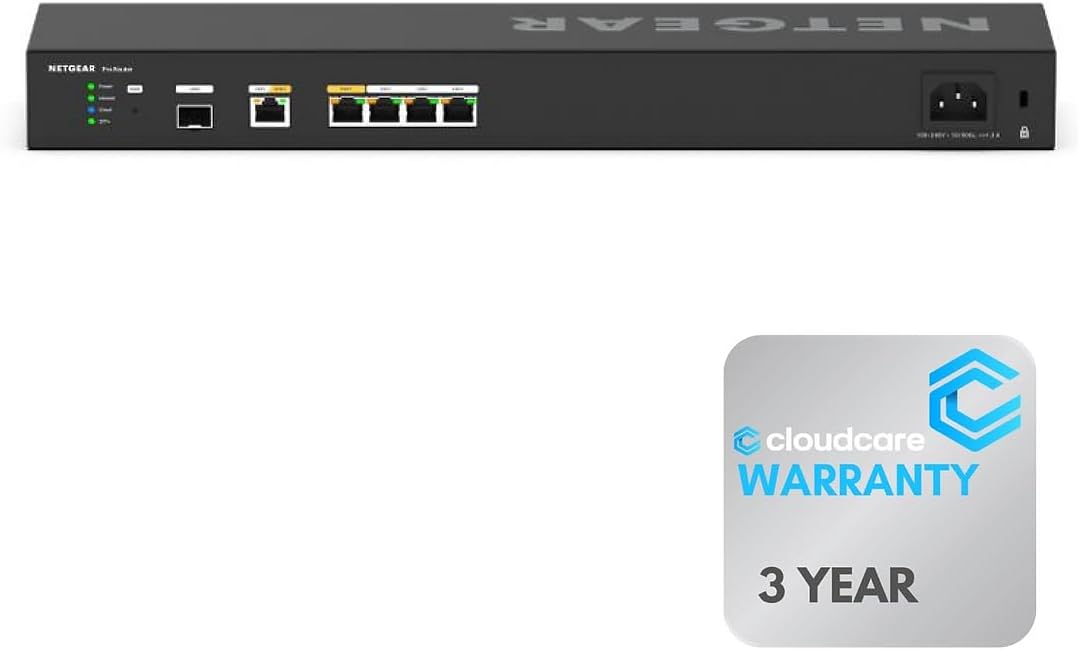
This PR60X variant from Cloud Care offers enhanced support and rack-mountable options. It is ideal for professional environments needing organized cabling.
We may earn a commission when you buy through this link, at no additional cost to you.
Six 10G ports provide extensive wired connectivity for high-speed devices. The Insight cloud platform offers remote control and monitoring capabilities.
Cloud Care warranty adds an extra layer of protection for hardware issues. Performance remains top-tier with enterprise-grade failover capabilities.
Best for data centers or offices needing rack solutions, this router delivers. It combines high speed with practical deployment features.
Save space with a design that fits standard rack units, ideal for organized server rooms.
Exclusive warranty support simplifies claims and ensures products remain protected without hassle.
We may earn a commission when you buy through this link, at no additional cost to you.
The Linksys LRT224 is a cost-effective router for small business VPN needs. It provides reliable failover and load balancing without a high price.
We may earn a commission when you buy through this link, at no additional cost to you.
Security features include IPsec tunnels for site-to-site connections. Firewall throughput ensures traffic is inspected without significant speed loss.
While the interface feels dated, it gets the job done. Users appreciate the straightforward setup for remote access requirements.
Best for startups needing a cheap WAN backup, this unit works well. It offers essential business features for tight budgets.
Support for multiple IPsec tunnels helps connect branch offices securely to a central network.
Traffic is distributed across connections to optimize speed and reduce load on single lines.
We may earn a commission when you buy through this link, at no additional cost to you.
Selecting the right dual WAN router requires understanding your specific needs for bandwidth, security, and management.
Ensure the router has enough physical ports for your ISPs and local devices. Look for multiple WAN slots or flexible LAN/WAN ports to support failover or load balancing effectively.
Check for at least two WAN ports and sufficient LAN ports for wired devices.
Look for built-in firewalls and intrusion prevention systems. A good router should offer deep packet inspection and support for modern encryption standards.
Prioritize models with robust firewall tools to protect your network from external threats.
Remote workers need secure access to corporate networks. Ensure the router supports site-to-site and client-to-site VPN tunnels with adequate capacity.
Verify the number of concurrent tunnels your team will require.
A user-friendly web interface or mobile app simplifies setup and maintenance. Cloud management can offer remote access for IT professionals managing multiple locations.
Choose a system that matches your technical comfort level.
Decide if you need simple redundancy or bandwidth aggregation. Failover switches to backup when primary fails, while load balancing distributes traffic for speed.
Most small businesses benefit from both options included in the router.
Consider future growth when selecting hardware. A router with extra capacity will serve longer as your team and device count expand.
Opt for models with room to add more connections later.
Reliable technical support prevents downtime. Look for warranties that cover hardware defects and offer accessible customer service.
Check if extended warranty options are available for your region.
If you need wireless access, ensure the router supports modern Wi-Fi standards. Some models are purely wired, which may require separate access points.
Decide if built-in Wi-Fi is essential for your setup.
Begin by connecting your modem to the primary WAN port and backup ISP to the secondary. Ensure all cables are secure before powering on the device for initial setup.
Access the web interface using the default IP address provided in the manual. Log in and configure your failover rules to prioritize one connection over the other automatically.
Keep firmware updated to maintain security and performance. Regularly check system logs to monitor connection health and troubleshoot any issues that arise.
A dual WAN router is a network device that connects to two internet service providers. It manages traffic between them to ensure continuous connectivity if one connection fails.
Failover automatically switches your internet traffic to the backup line when the primary connection drops. This process happens quickly to minimize downtime for users.
Yes, you typically need two distinct ISP subscriptions for the router to function as a true backup solution. However, some setups allow multiple connections to one provider.
Many modern routers support USB WAN interfaces, allowing you to connect a 5G mobile hotspot. This provides flexible wireless redundancy for remote offices.
It increases reliability primarily. Some models offer load balancing which can aggregate bandwidth, but this depends on the router's configuration capabilities.
Most routers offer guided wizards for basic setup. Advanced features like VLANs or custom VPN tunnels may require technical knowledge to configure properly.
Yes, but low latency is key. High-performance models ensure stable connections which are crucial for online gaming and voice calls.
If both primary and backup fail, connectivity stops. The router can only switch between existing inputs, so it relies on having at least one active link.
Whether you choose the budget-friendly TP-Link or the high-end ASUS model, reliability should be your top priority. Each option offers unique strengths for different network environments.
Focus on the features that matter most to your daily operations. Security and ease of management are often more critical than raw speed alone.
Remember to verify current availability and prices before purchasing. Network needs evolve, so ensuring your router grows with your business is essential.