
Anker Prime Charging Station
4.6Editor score
250W high capacity
6-port desktop design
Smart control dial
This guide compares the top 10 Gan Charger with Display models for 2026, evaluating power output, port counts, smart displays, and safety features for modern
Modern electronics demand faster, smarter charging solutions that keep pace with our daily routines. A Gan Charger with Display offers precisely this by combining high-wattage output with real-time power monitoring on a built-in screen.
We evaluated ten leading models based on total wattage, port flexibility, display clarity, and safety certifications. Each product was assessed for its ability to handle laptops, phones, and accessories simultaneously without overheating or slowing down.
Every selection includes detailed specs, pros, cons, and use cases to help you match a charger to your specific needs. Note that availability and pricing may shift frequently, so check current listings before purchasing.
4.6Editor score

4.7Editor score
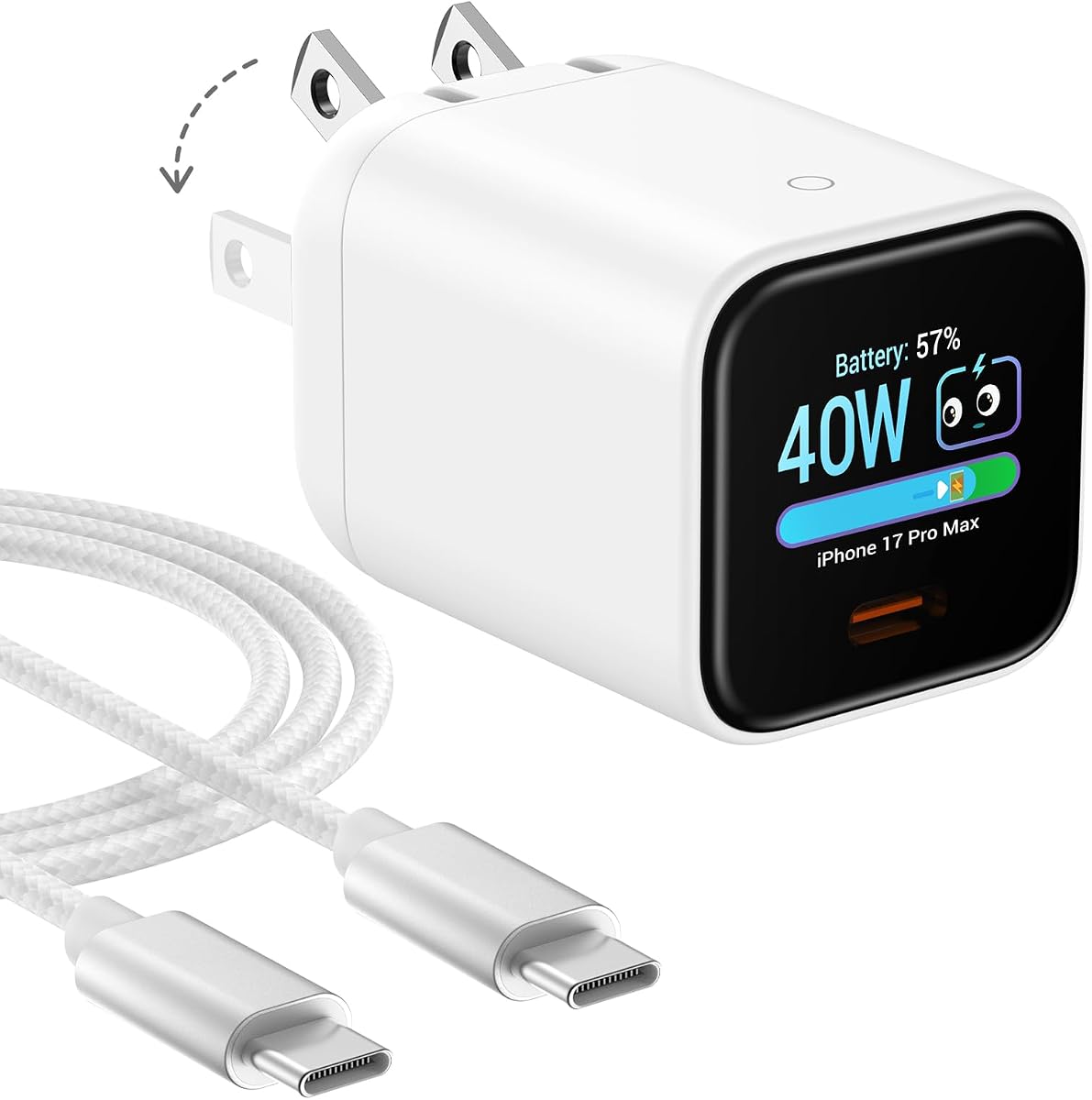
4.5Editor score
This table provides a side-by-side overview of all ten selected models, highlighting their core specifications, display capabilities, and primary use cases to help you make an informed decision quickly.




The UGREEN Nexode Pro Charger stands out as the top pick for users needing maximum power with visual feedback. Its 160W output ensures even high-performance laptops charge fully while the display shows exact wattage per port.
We may earn a commission when you buy through this link, at no additional cost to you.
Key strengths include the rotatable touch panel that makes viewing data easy from any angle and intelligent power allocation that prevents bottlenecks. This model replaces multiple chargers, saving space and simplifying your desk setup.
Trade-offs involve its larger physical footprint compared to lower-wattage options and a premium price point. However, these are acceptable for users who prioritize speed and multi-device efficiency over ultra-portability.
Buy this if you own a MacBook Pro or gaming laptop alongside phones and tablets. It is the most capable all-in-one solution for professional workflows demanding reliable fast charging.
The animated emoticon and wattage readout keep you informed about charging progress without needing to check your device.
Foldable prongs and a compact chassis ensure it fits easily into luggage for business trips or outdoor use.
We may earn a commission when you buy through this link, at no additional cost to you.
The Anker Prime Charging Station delivers unmatched power with 250W total output designed for heavy-duty desktop setups. Its LCD display and control dial offer precise management of energy distribution across six ports.
We may earn a commission when you buy through this link, at no additional cost to you.
Strengths include the ability to charge multiple high-wattage devices simultaneously without throttling. The IoT capabilities allow app-based customization for users who want deep control over their charging ecosystem.
Trade-offs are significant regarding portability; it is too large and heavy for frequent travel. This limits its appeal to home office or studio environments where it remains permanently plugged in.
This model is ideal for creators and professionals with multiple monitors and laptops needing constant power. It excels as a permanent desk anchor rather than a portable solution.
The smart dial lets you adjust energy output instantly without navigating menus or using an app.
Four USB-C and two USB-A ports ensure every device on your desk stays powered without adapters.
We may earn a commission when you buy through this link, at no additional cost to you.
The Smart Charging Butler offers an accessible entry into smart charging with its 45W output and unique AI battery care features. It focuses on longevity and health rather than raw speed.
We may earn a commission when you buy through this link, at no additional cost to you.
Key advantages include TÜV-certified cooling that keeps devices cooler and a braided cable that adds value. The display rotates and shows device recognition for supported phones and tablets.
Trade-offs are clear since it cannot power high-end laptops quickly. This makes it less versatile for power users but perfect for phones and tablets needing gentle overnight charging.
Choose this for everyday phone charging or as a secondary travel brick. It balances cost and features effectively for casual users prioritizing device health.
Care Mode reduces heat during overnight sessions to extend battery lifespan over time.
The 6.6ft braided cable saves you from buying a separate accessory immediately.
We may earn a commission when you buy through this link, at no additional cost to you.
This model proves Anker can deliver high power in a tiny package, maintaining 140W single port output consistently. The integration with an app provides detailed monitoring for tech enthusiasts.
We may earn a commission when you buy through this link, at no additional cost to you.
Strengths lie in its ability to power a 16-inch MacBook Pro efficiently while remaining small enough for travel. The PowerIQ 5.0 system manages power distribution intelligently.
Trade-offs include needing to pair via Bluetooth for full features and having fewer ports than multi-device solutions. This suits users prioritizing laptop speed over multiple simultaneous charges.
Select this for MacBook owners who want speed without bulk. It is a premium option for those valuing portability and app ecosystem integration.
Unlock custom charging modes and real-time stats directly through the companion app.
Achieves 160W in an AirPods-sized frame through advanced GaN engineering.
We may earn a commission when you buy through this link, at no additional cost to you.
This unit balances high power with a vivid HD color display that makes status checks easy. It includes a cable and focuses on safety with ActiveShield 4.0.
We may earn a commission when you buy through this link, at no additional cost to you.
Strengths include dual high-speed ports that can charge laptops quickly and broad compatibility. The display provides clear temperature and wattage details for total transparency.
Trade-offs are its weight and slightly higher price compared to basic models. This remains a strong contender for users prioritizing visibility and cable convenience.
Pick this if you want a reliable charger with clear feedback and minimal setup. It fits well in homes or offices needing flexible power.
The high-definition screen shows detailed port data and temperature at a glance.
A 5ft USB-C cable is included, ready for immediate use with laptops.
We may earn a commission when you buy through this link, at no additional cost to you.
This model simplifies your kit with a reliable 100W output and a compact frame that fits in pockets. It features a foldable plug and smart low-current mode for accessories.
We may earn a commission when you buy through this link, at no additional cost to you.
Strengths include sustained performance over long periods and an HD display for instant visibility. It avoids bulk while handling most daily charging needs efficiently.
Trade-offs involve the display adding weight and complexity for minimal use. However, most users find the visual feedback useful and the size manageable.
Ideal for professionals carrying laptops and phones daily. It is a balanced pick for those who value speed and portability.
Automatically switches to 5W mode to safely charge earbuds without damaging batteries.
Maintains peak output longer than average chargers for consistent speeds.
We may earn a commission when you buy through this link, at no additional cost to you.
This model prioritizes minimalism, offering a 3-port block that is significantly smaller than traditional laptop chargers. Its touch screen adds a modern layer of control.
We may earn a commission when you buy through this link, at no additional cost to you.
Strengths include the ability to charge laptops and phones together and a price point that fits most budgets. It uses GaN to reduce heat effectively.
Trade-offs include needing to buy a cable separately and limited power for high-end workstations. It remains a great option for travelers with moderate needs.
Buy this for weekend trips or light daily use where space is tight. It delivers excellent value for compact, interactive charging.
Tap to switch views or long-press to rotate the screen for better viewing angles.
90% smaller than traditional chargers while supporting fast PD protocols.
We may earn a commission when you buy through this link, at no additional cost to you.
This charger delivers 140W power across four ports, making it a strong value proposition for multi-device users. It includes a high-wattage cable and offers live visual feedback.
We may earn a commission when you buy through this link, at no additional cost to you.
Strengths include fast MacBook charging and intelligent power allocation for phones. The display tracks temperature and status continuously.
Trade-offs are minor but include a slightly bulkier size than premium rivals. Still, it offers robust features at a competitive price.
Select this for home offices needing flexibility without breaking the bank. It provides strong performance for diverse device needs.
View real-time status, power output per port, and temperature instantly.
Comes with a dedicated 140W cable, ready for laptop charging.
We may earn a commission when you buy through this link, at no additional cost to you.
This unit stands out with a digital display cable that shows real-time power directly on the connector. It is optimized for DJI devices and laptops.
We may earn a commission when you buy through this link, at no additional cost to you.
Strengths include high current capacity and specific dynamic power allocation. The LED indicator ensures connection safety and stability.
Trade-offs are that it is specialized for certain ecosystems. General users may prefer a universal model, but it is unmatched for creators.
Choose this if you fly drones or use compatible equipment. It bridges the gap between chargers and specialized power tools.
The cable shows charging status and current for instant visual feedback.
Dynamic allocation ensures priority power to high-demand devices like laptops.
We may earn a commission when you buy through this link, at no additional cost to you.
This Nano charger is built for Apple users, offering 45W optimized for phones and tablets. It uses smart recognition to adjust power safely.
We may earn a commission when you buy through this link, at no additional cost to you.
Strengths include TÜV-certified cooling and ultra-compact design that slips in pockets. It offers foldable prongs for storage convenience.
Trade-offs are its inability to handle high-wattage laptops. This is a targeted tool for mobile users rather than a universal power station.
Buy this for iPhone owners wanting a dedicated, high-quality travel brick. It delivers speed and safety in the smallest package.
Reduces temperature during charging to protect long-term battery health.
Tiny size ensures it is always ready for travel without bulk.
We may earn a commission when you buy through this link, at no additional cost to you.
Selecting the right charger involves balancing power, portability, and display features to match your daily needs and device ecosystem.
Determine the power your devices require. Laptops need at least 100W while phones work fine with 45W. Ensure the total output covers simultaneous use.
Choose a wattage that meets your highest-demand device plus a buffer for accessories.
More ports allow simultaneous charging without splitters. USB-C ports deliver higher speeds while USB-A is needed for older accessories. Check the distribution logic.
Opt for at least two USB-C ports if you use multiple modern devices daily.
Displays vary from simple readouts to interactive touch panels. Consider if you need rotation or color data versus basic numbers. This impacts usability.
A clear, easy-to-read screen adds value if you check charging status often.
Size and weight matter for travel. Foldable prongs and compact designs fit easier in bags. Desktop units offer power but lack portability.
Prioritize compact builds if you move your charger frequently.
Certified protection against overheating and overvoltage is critical. Active monitoring systems adjust power dynamically. Look for official safety marks.
Ensure the charger includes multiple layers of protection for safety.
Check support for specific protocols like PD 3.1. Some models favor certain brands or phone generations. Verify your specific devices work well.
Choose a universal model that supports your existing gear fully.
Some chargers come with cables or adapters saving extra costs. Verify what is included before purchasing. This affects the total value.
Look for bundles that include quality cables for immediate setup.
Prices vary widely based on power and features. Set a realistic budget that matches your usage intensity. Higher wattage usually means higher cost.
Balance cost against the frequency of use and number of devices.
Plug the charger into a wall outlet ensuring the plug is fully seated. Connect your devices using supported cables to enable smart charging features immediately.
Check the display to confirm the correct power output is active. For touch screens, tap or rotate to view specific data like temperature per port.
Avoid bending cables sharply or exposing the unit to liquids. Clean the display with a dry cloth and store it in a safe pouch when not in use.
The display typically shows real-time wattage output, port status, and internal temperature. Some models also indicate the charging protocol and battery health data.
Yes, most multi-port models distribute power to charge a laptop and phones simultaneously. The total wattage is shared based on demand to ensure optimal speeds.
Most modern Gan chargers include overheat and surge protection making them safe for overnight use. However, unplugging when not in use is a good habit for safety.
Yes, you generally need a high-quality USB-C to USB-C cable rated for the wattage. Using a standard cable may limit speeds even with a high-power charger.
No, the display is powered by the charger itself and does not draw energy from your connected devices. It operates independently to show power and status data.
These units are usually allowed in carry-on luggage as they contain no batteries. Check airline regulations for high-wattage chargers and ensure they are protected from short circuits.
Most models work with any USB-C device using standard protocols. Compatibility for fast charging depends on whether the device supports the same power delivery standards.
Use a soft, dry microfiber cloth to wipe the display. Avoid water or chemical cleaners to prevent damage to the sensitive electronic components on the screen.
The top picks cover diverse needs from ultra-compact iPhone bricks to powerful desktop hubs. Each offers unique display features and wattage suited to specific workflows.
Prioritize total wattage and port count to match your device ecosystem. Balance this with portability needs depending on how often you travel with the charger.
Always check current listings and compatibility details before buying. Prices and availability shift so confirm the model fits your devices perfectly today.