
USB Fast Charger Block 50% Smaller 100W Max
4.3Editor score
Compact travel-friendly design
100W total output
6 charging ports included
Discover the top charging stations for multiple devices. Compare features, power output, and port types to find the perfect organizer for your tech setup today.
Managing the power needs of modern gadgets can quickly become chaotic. A reliable charging station for multiple devices keeps your desk tidy and ensures all your electronics stay powered up when you need them most.
We compared ten leading models based on port variety, total wattage, build quality, and safety features. Our analysis helps you identify the right solution for your specific mix of smartphones, tablets, and laptops.
Each selection highlights key strengths and ideal use cases. Prices and availability change frequently, so verify current details on the product pages before making your final purchase decision.
4.3Editor score

4.5Editor score

4.6Editor score
This side-by-side comparison highlights the key specifications and capabilities of each top-rated charging station to help you make an informed decision quickly.




The Zobirez 420W station earns top marks for its versatility and power. With ten ports and GaN technology, it supports laptops and phones alike while keeping your desk organized.
We may earn a commission when you buy through this link, at no additional cost to you.
Its two wider middle slots securely hold laptops or tablets even with cases. The included cable kit eliminates the need to hunt for extra cords immediately.
While it is larger than compact units, the stability is worth it for a permanent desk setup. The flame-retardant material adds peace of mind for safety.
This station is ideal for home offices or family areas needing reliable power for many devices at once. It balances power and organization perfectly.
The total 420W output ensures that multiple high-demand devices can charge simultaneously without significant speed reductions.
The one-piece slot design prevents wobble and breakage, offering a robust solution for daily heavy use.
We may earn a commission when you buy through this link, at no additional cost to you.
This station pushes the limits with a 750W total output. It is designed for users who need to charge multiple laptops or high-performance devices simultaneously.
We may earn a commission when you buy through this link, at no additional cost to you.
Every USB-C port can deliver up to 120W. This ensures that even power-hungry laptops charge at full speed without sharing energy with other devices.
The included cable kit covers most modern needs. However, the size and price make it better for dedicated desks than shared spaces.
Choose this if you need maximum power for heavy-duty devices. It is a powerhouse for creative professionals or tech enthusiasts.
Dedicated 120W ports allow for rapid charging of demanding machines like MacBook Pro models without throttling.
Wide center bays fit laptops and tablets with cases while keeping everything upright and accessible on your desk.
We may earn a commission when you buy through this link, at no additional cost to you.
Anker Prime delivers 200W in a compact design. It is perfect for power users who want premium charging speed without taking up too much desk space.
We may earn a commission when you buy through this link, at no additional cost to you.
Each USB-C port supports up to 100W. This capability allows you to charge two laptops simultaneously at high speeds effectively.
The proprietary safety system monitors temperature continuously. This protects your devices from overheating during extended charging sessions.
If you value reliability and speed over port quantity, this is the best choice. It handles high-demand devices effortlessly and quietly.
When two USB-C ports are used, each maintains 100W. This means dual MacBook Pro models charge at full speed together.
Continuous temperature monitoring ensures that heat is managed effectively to protect battery health and device safety.
We may earn a commission when you buy through this link, at no additional cost to you.
This charger is ideal for mobile users on a budget. Its small size makes it easy to pack in a bag without adding bulk to your travel gear.
We may earn a commission when you buy through this link, at no additional cost to you.
With 100W total output, it handles smartphones and tablets well. It is a great option for family trips or small nightstand setups.
Note that it is not intended for laptops. If you only need power for phones and accessories, it performs reliably without issues.
Pick this for its price and portability. It is a smart entry-level solution for basic charging needs.
The compact dimensions allow it to slip easily into a carry-on bag or backpack for convenient charging on the go.
Intelligent circuit management guards against over-current and overheating to protect your mobile device batteries.
We may earn a commission when you buy through this link, at no additional cost to you.
This station simplifies your bedside setup with wireless charging. It supports fast 15W charging for phones and includes a certified dock for Apple Watch.
We may earn a commission when you buy through this link, at no additional cost to you.
You can adjust the viewing angle up to 45 degrees. This allows you to use StandBy mode in landscape orientation for notifications.
While it does not have USB ports, it excels at wireless convenience. It is best for users deeply invested in the Apple ecosystem.
Select this if you prefer cable-free charging. It keeps your nightstand clean and devices ready for morning use.
Harnessing full 15W power ensures your phone charges quickly without needing to plug in a cable manually.
Certified fast charging ensures your Watch battery replenishes efficiently without risking damage to the sensor or case.
We may earn a commission when you buy through this link, at no additional cost to you.
This unit bridges the gap between a power strip and a charger. It offers three AC outlets alongside USB ports for a complete desktop power solution.
We may earn a commission when you buy through this link, at no additional cost to you.
With 100W on USB-C, you can charge a laptop while powering other devices. It replaces multiple chargers and a surge protector.
The 8-point safety system protects against surges. However, it is heavier than standard stations so placement matters on your desk.
Choose this if you need AC outlets too. It is a robust solution for a central hub on your desk.
Three AC outlets allow you to plug in lamps or other non-USB devices alongside your electronics simultaneously.
Built-in 300J protection safeguards your expensive electronics from sudden voltage spikes or power fluctuations.
We may earn a commission when you buy through this link, at no additional cost to you.
This charger is a practical choice for older devices. It offers five USB-A ports and includes cables for common connections like Micro USB and Lightning.
We may earn a commission when you buy through this link, at no additional cost to you.
The removable dividers help you fit larger tablets. An on-off switch gives a clear visual indication of power status.
It does not support USB-C fast charging. It is best suited for basic charging needs like charging phones or speakers slowly.
Pick this for simplicity. It works well for guest rooms or basic home setups.
The package includes multiple cable types, so you do not need to buy extras for older devices immediately.
A visible power switch ensures you know when the station is on without guessing or checking a light indicator.
We may earn a commission when you buy through this link, at no additional cost to you.
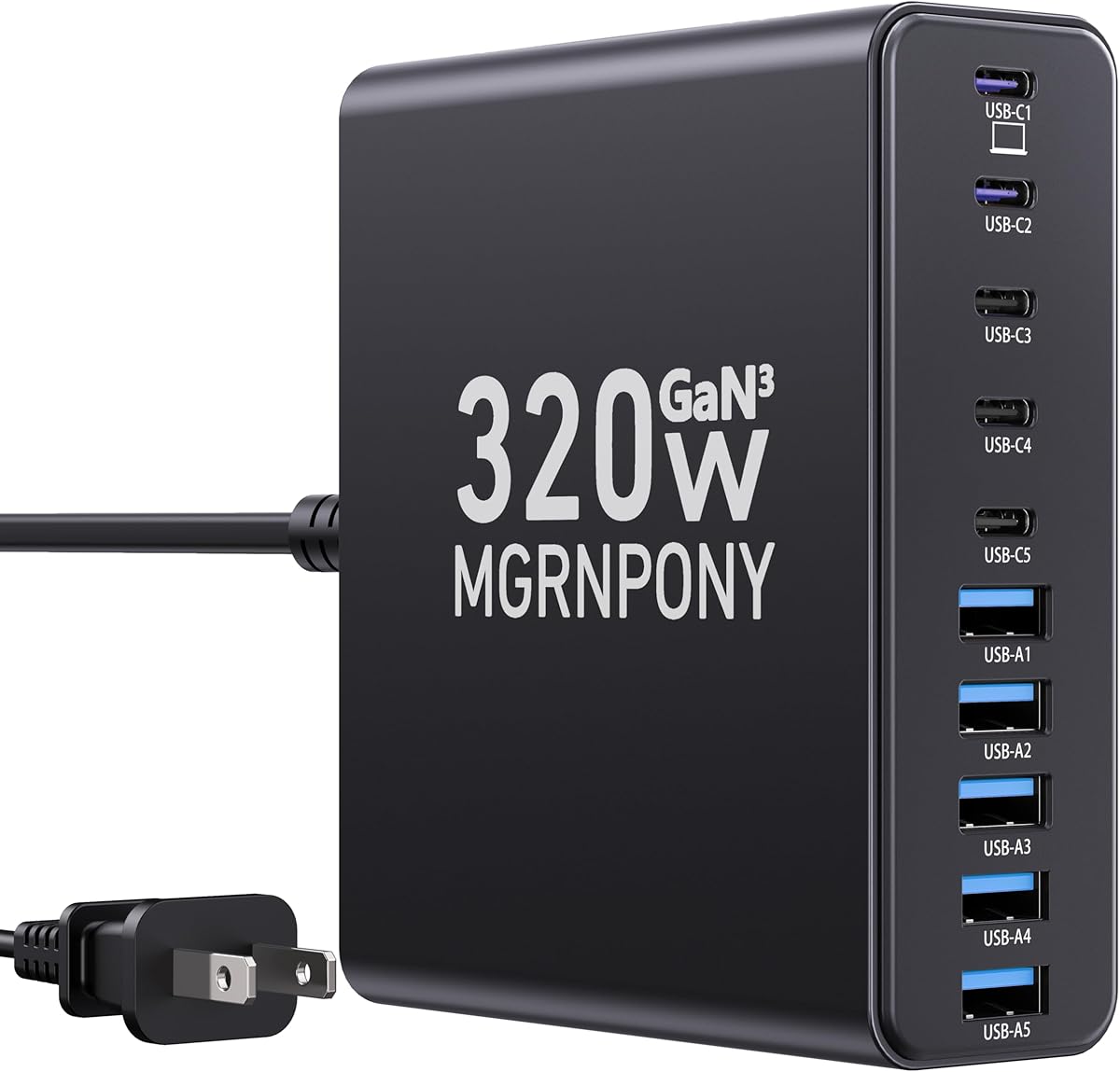
The MGRNPONY offers 320W output across ten ports. It balances power and size well for a travel or desk unit.
We may earn a commission when you buy through this link, at no additional cost to you.
IceShield technology monitors temperature actively. This helps prevent overheating during long periods of multiple device charging.
While it is compact, the build feels average compared to premium brands. It lacks included cables so you must provide your own.
Use this for a budget-friendly high-power option. It handles daily needs well enough for most households.
Temperature monitoring checks happen millions of times daily to ensure safe power delivery to your connected devices.
The compact design allows you to set it vertically or horizontally to save space on crowded desks or shelves.
We may earn a commission when you buy through this link, at no additional cost to you.
This charger uses retractable cables to save space. It is ideal for small nightstands or desks where cord management is a priority.
We may earn a commission when you buy through this link, at no additional cost to you.
With 105W output and GaN tech, it charges multiple devices reasonably fast. The cables extend up to 80cm for flexibility.
Retractable mechanisms can wear out over time. However, the convenience factor makes it a great choice for travel or limited spaces.
Choose this if you hate tangles. It keeps your area clean while providing enough power for phones and small gear.
Built-in retractable cables eliminate the need for separate ties or organizers to manage loose wires on your desk.
The 80cm extension allows devices to rest naturally while charging without pulling or strain on the connection points.
We may earn a commission when you buy through this link, at no additional cost to you.
Lcssio provides a solid build with 300W power. It uses sturdy slots to hold devices securely without flimsy removable parts.
We may earn a commission when you buy through this link, at no additional cost to you.
Two 65W ports handle laptops efficiently. Additional 20W and 30W ports support phones and smaller electronics.
The anti-slip rubber pads protect your desk surface. It is designed for stability and long-term use in busy households.
Select this for a sturdy desk organizer. It balances power and durability for everyday family use.
Wider and higher slots in the middle accommodate thicker devices like iPads with cases securely while charging.
Dual 65W ports ensure that laptops can charge at reasonable speeds even when other devices are plugged in.
We may earn a commission when you buy through this link, at no additional cost to you.
Choosing the right station requires balancing power needs, port types, and physical constraints for your space.
Total power output determines how many devices can charge at full speed simultaneously. Look for stations with at least 200W if you plan to charge laptops along with phones. Higher wattage ensures that power is not shared unevenly, keeping all your devices running efficiently without slowing down.
Prioritize stations that match your device types. If you only charge phones, a 100W unit may suffice. For mixed setups with laptops, aim for higher total wattage to avoid bottlenecks during peak charging times.
Modern devices rely heavily on USB-C for faster charging. Ensure the station offers enough USB-C ports for your laptops and newer phones. Legacy USB-A ports are still useful for older accessories, but prioritize USB-C capacity for optimal performance.
Count your devices to decide the right port number. A six-port unit is often enough for families, but power users might need ten ports to avoid unplug and replugging frequently.
Gallium Nitride (GaN) technology allows chargers to be smaller and cooler while delivering more power. It improves efficiency and reduces heat generation during high-load charging sessions. This is critical for safety and longevity of both the charger and connected devices.
Look for GaN in the product description to ensure better performance. Traditional silicon chargers may get too hot when multiple high-wattage devices are connected together.
Consider the footprint of the charger relative to your desk space. Larger units often have better stability and heat dissipation. Compact models are great for travel but might lack the necessary slots for larger tablets or laptops.
Check if the station has non-slip pads to keep it secure on surfaces. A stable base prevents accidental knocks that could disconnect cables or damage devices during charging.
Some stations come with a full cable kit including USB-C, Lightning, and Micro USB. This adds immediate value and ensures compatibility right out of the box. Others require you to supply your own cables which can increase total cost.
Check the length and type of included cables. Short cables keep things tidy on the desk but may limit placement options. Ensure the adapter provided matches the voltage and power requirements of the main unit.
Protection against over-current, over-voltage, and overheating is essential. Quality stations have intelligent monitoring systems that adjust power flow based on device needs. Flame-retardant materials prevent damage in case of electrical faults.
Verify certifications like UL or FCC compliance before buying. Proper safety mechanisms protect your expensive electronics from potential electrical surges or heat damage during long charging cycles.
Fixed slots help keep devices upright and organized without needing to plug and unplug cables manually. Removable dividers offer flexibility but can break or become loose over time. Wider slots are better for devices with cases.
Consider how your devices sit while charging. Some users prefer vertical slots for visibility while others prefer flat layouts. The design should match your workflow to avoid tangling cables.
Build quality impacts how long the station lasts under daily use. Sturdy plastics and robust internal components resist wear and tear better than cheaper alternatives. Check user reviews for long-term reliability reports.
Invest in a well-built station if it will be a permanent fixture. It reduces the risk of port failure or broken dividers that could force you to replace the unit sooner.
Start by plugging the station into a reliable wall outlet. Ensure the power cord is securely seated to prevent connection interruptions during charging. Arrange your devices in the designated slots to maintain organization.
Connect devices using the included or compatible cables. Check that the power indicator light is on to confirm the station is receiving electricity. This step ensures your devices start charging immediately upon connection.
Regularly inspect the ports and cables for dust or damage. Use a soft, dry cloth to wipe the exterior of the unit to maintain good ventilation. Avoid blocking the vents with papers or cloth during use to prevent overheating.
Many modern stations feature USB-C ports with high wattage like 65W or 100W. These specific ports can charge laptops like MacBook Air and Pro models effectively. Always verify the wattage matches your laptop requirements.
Yes, most modern stations include overcharge protection. They stop delivering power once devices are full to prevent overheating. However, always use stations with proper safety certifications for added peace of mind.
Most stations support standard USB-C, USB-A, or Lightning cables. Some include a kit but you can use your own if the connector matches. Always ensure cables are rated for the power output needed.
GaN technology makes chargers smaller and cooler while handling higher power loads. It improves energy efficiency and reduces heat during use. This results in a more compact design that fits better on desks.
Capacity depends on the total wattage and port count. Stations with ten ports can physically charge ten devices but speed varies. Higher wattage stations maintain better speeds across all ports simultaneously.
Compact models with lower wattage are ideal for travel bags. Check if the unit is small enough to fit and meets airline safety rules. Some include international plug adapters which help for global use.
The right station simplifies your daily routine by organizing and powering all your tech. Top picks like the Zobirez 420W and Anker Prime offer reliable performance for different needs.
Prioritize total power output and safety features when deciding. A station that matches your specific device mix will serve you better over time.
Remember to check the latest prices and availability before buying. Technology and offers change frequently so verifying details on the product page helps secure the best deal.