
8-Port 10G SFP+ Switch, Layer 3 Managed, Enterprise Network Fiber Switch
4.7Editor score
8x10Gbps SFP+ Ports
Fanless Silent Operation
Static Routing Support
This guide compares the top ten Layer 3 Network Switch options for performance, routing features, and reliability in enterprise and advanced home network
Layer 3 Network Switch devices provide intelligent routing and switching capabilities essential for modern networks. They manage traffic between subnets efficiently while supporting advanced protocols like VLANs and static routes for better control.
We evaluated ten leading models based on port configurations, management interfaces, routing features, and build quality. Our analysis focuses on performance metrics, ease of use, and suitability for diverse network environments ranging from offices to home labs.
Each selection highlights specific strengths such as high speed ports, power delivery options, or silent operation. Note that product availability and pricing fluctuate regularly so verify current details before making your final purchasing decision for your infrastructure needs.
4.7Editor score

4.7Editor score

4.7Editor score
The following table provides a side-by-side comparison of all ten selected Layer 3 Network Switch models highlighting their key specifications and primary use cases for informed decision making.

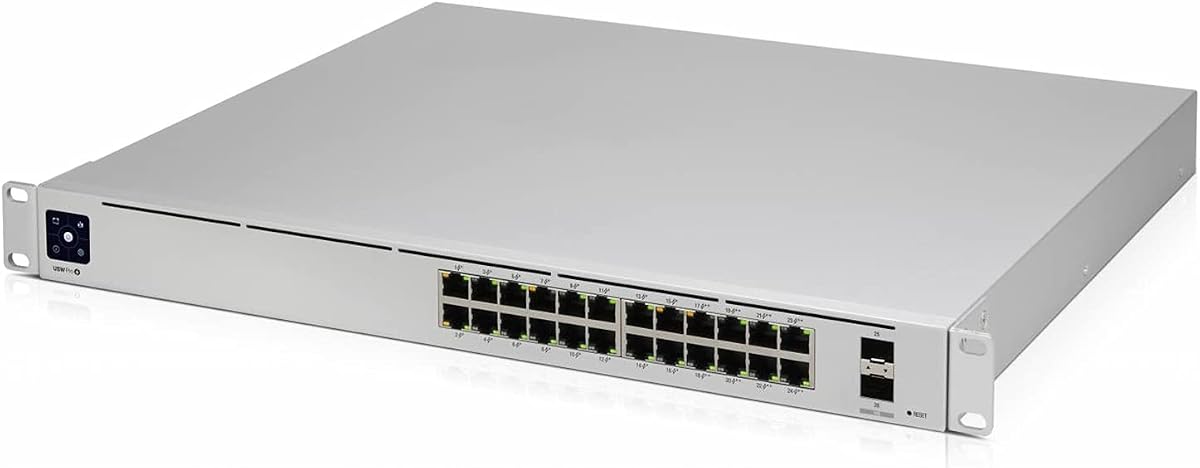




This Layer 3 Network Switch stands out as a top performer with excellent routing capabilities and deep ecosystem integration. It delivers reliable connectivity for networks needing advanced traffic management and VLAN support across multiple segments effectively.
We may earn a commission when you buy through this link, at no additional cost to you.
Users appreciate the robust Layer 3 routing features that allow internal traffic to move efficiently without burdening the main router. The UniFi interface simplifies configuration while providing detailed statistics and monitoring tools for professional network administrators.
While powerful it requires a UniFi controller setup which adds complexity for some standalone deployments. The price is higher than basic switches but the performance and feature set justify the investment for serious users.
Ideal for offices or advanced home labs needing robust PoE and routing. It provides a scalable foundation that supports growth while maintaining consistent performance and ease of management through the UniFi platform.
Layer 3 switching accelerates inter VLAN communication by handling routing internally for reduced latency and better network efficiency.
Seamless integration with UniFi access points and cameras simplifies network management through a unified interface and centralized control.
We may earn a commission when you buy through this link, at no additional cost to you.
This MokerLink switch offers impressive flexibility with eight 10Gbps ports that auto-adapt to various speeds from 100M to 10G. It brings enterprise grade routing features to a compact metal chassis suitable for desktop or rack environments.
We may earn a commission when you buy through this link, at no additional cost to you.
The Layer 3 management capabilities include comprehensive support for IPv4 and IPv6 routing along with security protocols like 802.1X authentication. This ensures data integrity and proper traffic segmentation for professional network environments.
Active cooling via an industrial fan helps maintain performance under load but may introduce noise in quiet home offices. The CLI interface is powerful yet requires networking knowledge to fully leverage its advanced configuration options.
Best suited for tech enthusiasts or small businesses needing high bandwidth and advanced routing without breaking the bank. Its durable build and extensive feature set make it a strong contender for demanding network tasks.
Auto-adaptive ports ensure compatibility with a wide range of legacy and modern devices without manual speed configuration.
Advanced protections like DoS anti-attack and Dynamic ARP inspection safeguard your network against common threats and intrusions.
We may earn a commission when you buy through this link, at no additional cost to you.
This model provides reliable Layer 3 switching capabilities for devices that do not require Power over Ethernet. It features twenty four Gigabit ports allowing extensive connectivity for PCs printers and servers with enhanced routing performance.
We may earn a commission when you buy through this link, at no additional cost to you.
Integration with the UniFi ecosystem ensures consistent management across your network infrastructure. Users benefit from improved performance through optimized inter VLAN routing and high performance uplinks that support faster data transfer speeds.
The absence of PoE means external injectors are needed for powered devices adding some cable management complexity. However for data centers or offices with separate power needs this offers a cost effective high performance alternative to PoE models.
Recommended for environments where data traffic prioritization is key but power delivery is handled separately. Its solid construction and UniFi compatibility make it a dependable choice for professional networking setups.
Layer 3 switching reduces congestion on your main router by handling internal traffic routing locally within the network.
Compatibility with optical fiber media ensures efficient and reliable long distance connectivity for robust network expansions.
We may earn a commission when you buy through this link, at no additional cost to you.
This enterprise switch combines multi gigabit Ethernet with high wattage PoE++ delivery for powering demanding devices like Wi-Fi 7 access points. It includes robust Layer 3 management tools accessible via a physical console port for precise control.
We may earn a commission when you buy through this link, at no additional cost to you.
The 10G SFP+ uplinks provide ample bandwidth to prevent bottlenecks when connecting to high speed NAS or servers. With a total PoE budget of 275 watts it supports a wide range of powered devices including PTZ cameras and smart lighting.
Management requires some networking expertise to fully utilize static routing and VLAN segmentation features. The cooling fan ensures stability under heavy loads but may be audible in quiet residential environments.
Perfect for tech enthusiasts or small offices needing future proof speeds and powerful device support. Its rugged build and advanced features offer excellent value for users requiring enterprise grade reliability at home or in small businesses.
PoE++ standards enable powering high consumption devices directly through Ethernet cables simplifying installation and reducing cabling needs.
CLI and console access allow IT professionals to configure detailed traffic rules and security settings for optimal network performance.
We may earn a commission when you buy through this link, at no additional cost to you.
This MikroTik switch offers a dense array of 10G SFP+ ports making it ideal for high bandwidth environments. It supports Layer 3 switching to manage traffic between networks efficiently ensuring high throughput with minimal latency.
We may earn a commission when you buy through this link, at no additional cost to you.
The hardware is built for rackmount deployment in 1U spaces providing professional installation in server rooms or wiring closets. Users can access powerful routing capabilities through Webfig or Winbox interfaces though mastery takes time.
MikroTik devices are known for flexibility but their configuration complexity can be daunting for casual users. The white chassis blends well in modern setups but the primary value lies in its robust performance and port density.
Recommended for network engineers or businesses needing high speed interconnects. It delivers excellent value for 10G environments where advanced routing and capacity are prioritized over plug and play simplicity.
All ports support 10G speeds allowing for direct high bandwidth connections between servers and storage without bottlenecks.
The 1U form factor saves space in server racks while maintaining durability for enterprise grade network operations.
We may earn a commission when you buy through this link, at no additional cost to you.
This model excels with sixteen SFP+ ports providing extensive fiber connectivity for demanding networks. It is a managed Layer 3 switch designed for environments requiring precise traffic control and robust routing capabilities.
We may earn a commission when you buy through this link, at no additional cost to you.
The unit includes a Gigabit Ethernet port for management and connects via an RJ-45 console for direct access. Its gray chassis and 1U height fit neatly into standard racks while supporting various mounting grids for flexibility.
Advanced users will appreciate the depth of configuration possible but beginners may find the interface technical. Without PoE it focuses purely on data throughput and routing efficiency making it ideal for backbone or aggregation roles.
Best for data centers or ISPs needing high fiber port density and routing power. It delivers stable performance for critical network infrastructure where reliability and throughput are paramount concerns.
Sixteen SFP+ ports allow seamless integration of fiber optic links for high speed long distance network connections.
Layer 3 management tools enable VLANs and routing protocols to segment and optimize traffic flow across the network.
We may earn a commission when you buy through this link, at no additional cost to you.
This forty eight port switch offers massive connectivity for large networks needing robust Layer 3 features. The integrated touchscreen allows quick status checks and configuration without needing an external device for basic tasks.
We may earn a commission when you buy through this link, at no additional cost to you.
With four 10G SFP+ uplinks it provides ample bandwidth to connect to core routers or storage arrays efficiently. UniFi SmartPower RPS compatibility enhances reliability ensuring continuous operation during power fluctuations or supply failures.
User reviews vary regarding reliability and firmware stability which might concern enterprise users seeking absolute consistency. The need for a UniFi controller adds a layer of dependency but simplifies management for existing UniFi users.
Suited for larger offices or campuses needing high port counts and integrated management. It balances capacity with smart features though careful planning is advised based on specific stability requirements for your environment.
A built-in touchscreen provides instant visual feedback on port status and traffic allowing quick diagnostics and management.
Multiple 10G uplinks prevent bottlenecks ensuring smooth data flow between access switches and core network infrastructure.
We may earn a commission when you buy through this link, at no additional cost to you.
This compact switch delivers impressive value with eight 10G ports and a fanless design for silent operation. It supports Layer 3 static routing allowing internal traffic to bypass the main router for improved performance and efficiency.
We may earn a commission when you buy through this link, at no additional cost to you.
The fanless chassis makes it ideal for noise sensitive environments like home studios or quiet offices where acoustic performance matters. Its rugged metal housing ensures durability while dissipating heat passively without moving parts.
Configuration is straightforward via web UI or console but lacks some advanced dynamic routing protocols like OSPF for complex networks. The rate mode switch applies globally which requires planning if mixing different module speeds.
Highly recommended for home labs or small businesses needing affordable 10G connectivity. It balances silent operation with solid performance making it a top pick for budget conscious users requiring high speed reliability.
The fanless design ensures completely silent operation perfect for bedrooms or offices where noise would be distracting.
Inter VLAN routing occurs internally reducing load on your primary router and speeding up local data transfers.
We may earn a commission when you buy through this link, at no additional cost to you.
This switch brings modern multi gigabit speeds to UniFi networks with sixteen ports capable of 2.5G connections. It supports Layer 3 features to optimize traffic flow and integrates seamlessly with the UniFi controller ecosystem.
We may earn a commission when you buy through this link, at no additional cost to you.
The design prioritizes performance with high capacity switching that supports advanced workloads without bottlenecks. Users benefit from the familiar UniFi interface which simplifies management while offering advanced statistics and network insights.
Lack of PoE limits direct device power but suits environments with separate power supplies or PoE injectors. It is a clean upgrade for those wanting faster connectivity without the complexity of 10G infrastructure yet.
Recommended for users upgrading from Gigabit to multi gigabit speeds within a UniFi setup. It delivers future proof connectivity while maintaining the ease of use that UniFi customers value.
Support for 2.5G connections bridges the gap between Gigabit and 10G offering significant bandwidth upgrades for modern devices.
Unified control via UniFi software allows easy configuration and monitoring alongside other network devices for cohesive management.
We may earn a commission when you buy through this link, at no additional cost to you.
This premium switch combines high wattage PoE++ with intelligent port lighting for easy identification and troubleshooting. It features sixteen ports with a mix of speeds and supports Layer 3 switching for optimized network performance.
We may earn a commission when you buy through this link, at no additional cost to you.
The Etherlighting feature uses color coded LEDs to show status speed and VLAN without needing a controller. This innovative design simplifies physical management especially in complex setups where cable tracking is challenging.
While the price is higher than standard options the quality of construction and silent fanless operation justify the cost for noise sensitive spaces. It remains dependent on the UniFi ecosystem which may limit standalone use.
Ideal for professional environments needing reliable high power delivery and sleek management features. Its robust build and advanced indicators make it a top choice for premium network setups requiring attention to detail.
Etherlighting LEDs provide instant visual feedback on link status and VLAN assignment without logging into the controller.
With 180W budget and PoE++ support it powers demanding devices like high end access points directly from the switch.
We may earn a commission when you buy through this link, at no additional cost to you.
Selecting the right Layer 3 Network Switch requires understanding your specific needs regarding port count, routing features, and power requirements. This guide outlines key factors to help you make an informed decision.
Evaluate the number and speed of ports needed to support your devices. Look for models with at least 1G or higher speeds like 2.5G or 10G if you require faster throughput for large file transfers or high density networks.
Ensure the switch has enough physical ports for all current devices plus future expansion to avoid buying additional hardware soon.
Check if the switch supports static routing or dynamic protocols like OSPF depending on network complexity. Layer 3 routing allows direct traffic between subnets reducing load on your main router.
Advanced routing features are crucial for larger networks needing segmented traffic management and optimized data paths between different departments or zones.
Determine if your devices like cameras or access points need power delivered over Ethernet cables. PoE models provide this convenience but consume more power and may generate more heat.
If power is not needed standard non PoE switches are often more cost effective and cooler running for pure data networking tasks.
Consider whether you prefer a web interface CLI console or proprietary software like UniFi for configuration. Web UIs offer ease of use while CLIs provide granular control for advanced users.
Choose a management style that matches your technical comfort level and the scale of network administration you plan to perform regularly.
Decide between desktop, wall mount, or rackmount designs based on where the switch will be installed. Rackmount units fit in server rooms while desktop models suit workspaces.
Ensure the physical dimensions and mounting options align with your available space to maintain a clean and organized installation.
Look for metal housings that dissipate heat efficiently and ensure long term reliability. Fanless designs offer silent operation but may limit thermal headroom under heavy loads.
Active fans provide better cooling for high performance tasks but add noise which may be undesirable in residential or quiet office environments.
Verify security protocols like 802.1X authentication or port security to protect your network from unauthorized access. Advanced switches offer tools to prevent spoofing and malicious traffic.
Robust security features are essential for business networks where data integrity and controlled access are top priorities for protection.
Research the manufacturer reputation and availability of technical support or documentation for troubleshooting. Established brands often provide better firmware updates and community resources.
Strong community support ensures you can find solutions quickly if issues arise during setup or daily operation of your network.
Connect the switch to your main router via an uplink port using high quality Ethernet or fiber cables. Power on the device and access the management interface using a web browser or console connection.
Configure VLANs and static routes to optimize traffic flow between different network segments. Monitor performance through the dashboard and adjust settings as new devices are added to the network.
Keep the switch in a well ventilated area to prevent overheating and check firmware updates regularly for security patches. Dust the exterior periodically to ensure cooling fans or vents remain clear for optimal performance.
A Layer 3 Network Switch allows internal routing between subnets reducing load on the main router and improving speed. It enhances network efficiency by handling inter VLAN communication directly within the switch hardware.
Some models like UniFi require a controller for full features while others have standalone web or CLI interfaces. Check the product specs to ensure compatibility with your existing management tools or setup preferences.
Yes these switches support low latency traffic which is beneficial for gaming setups needing fast connections. Ensure the switch handles the necessary speeds and supports QoS for prioritizing gaming traffic over other data.
PoE++ delivers higher power over Ethernet cables supporting devices like advanced access points or PTZ cameras. It simplifies installations by combining data and power in a single cable without extra adapters or injectors.
Access the web interface or CLI to navigate to the system update section and upload the new firmware file. Always back up your current configuration before upgrading to prevent data loss during the process.
Layer 3 switches offer routing capabilities that Layer 2 switches lack making them better for complex networks with multiple subnets. If you only need basic switching for a small network Layer 2 may suffice and cost less.
The top picks highlight excellent options across different price points and capabilities ensuring there is a suitable model for every need. From silent home lab switches to high power enterprise models the selection offers versatility.
Prioritize features like port speed and PoE budget based on your current and future device requirements. Matching the switch to your specific usage scenario ensures you get the performance and reliability you expect.
Verify current availability and compatibility before purchasing as models may update or stock levels change frequently. A careful selection process leads to a stable and efficient network infrastructure that supports your digital needs.