
Kingwin 80mm Silent Fan
4.5Editor score
Optimized for silent operation
High airflow cooling design
Universal 80mm fit
Explore our expert guide comparing the top 80mm case fans for quiet cooling, static pressure, and performance in compact builds and servers this October.
Choosing the right cooling solution for your compact computer system is essential for maintaining performance and longevity. Eighty millimeter fans are the standard for small form factor cases and specialized hardware like NAS units or mining rigs. They must balance airflow, noise levels, and static pressure to function effectively in tight spaces without overheating critical components.
We have evaluated a wide range of high performance cooling fans available on the market to find the best options for various needs. Our selection focuses on reliability, acoustic performance, and the ability to push air through restrictive filters or radiators. We considered factors like bearing type, PWM control, and overall build quality to ensure these picks stand the test of time.
Each product listed below highlights specific strengths such as silent operation, high pressure output, or value for money. You will see detailed breakdowns of specifications and real-world performance characteristics to help you make an informed decision. Please note that availability and pricing can fluctuate frequently so always check the latest listings before purchasing.
4.5Editor score

4.9Editor score

4.8Editor score
This table provides a side-by-side look at the specifications and key features of each fan model to help you quickly compare performance metrics.



The Noctua NF-A8 PWM stands out as the premier choice for anyone seeking silence and reliability in a small fan. It holds a near perfect rating from users who value performance and quiet operation in equal measure. The A-series design ensures that air is moved efficiently without generating excessive noise.
We may earn a commission when you buy through this link, at no additional cost to you.
This model features Flow Acceleration Channels which boost airflow and static pressure while lowering noise levels. The Advanced Acoustic Optimisation frame reduces turbulence so you get smooth performance. The bearing is rated for over 150,000 hours which suggests exceptional longevity for daily use.
While it costs more than generic options the included accessories like the Low-Noise Adaptor and extension cables add value. Some users might find the brown aesthetic limiting but you can always swap the frame for a different look. The PWM control ensures the fan only spins as fast as needed.
You should buy this fan if you need a silent cooling solution for an HTPC or a small form factor PC. It is ideal for cases where acoustic comfort is a priority over raw cost savings. The build quality justifies the price for long term use.
The advanced frame design reduces air resistance and turbulence to keep noise levels extremely low during operation.
Every box includes anti vibration mounts screws and adapters to make replacing old fans a straightforward process.
We may earn a commission when you buy through this link, at no additional cost to you.
The ARCTIC P8 5 pack offers an incredible value for those who need multiple fans for a server or mining rig build. With a speed of 3000 RPM it provides ample airflow for cooling high heat components in tight spaces. Users appreciate the focus on static pressure which helps push air through dense filters.
We may earn a commission when you buy through this link, at no additional cost to you.
The motor uses a Fluid Dynamic Bearing that is designed to be quiet while offering a long service life. The blades are specifically shaped to optimize air movement even against resistance. This makes it suitable for mounting on radiators where air needs to be forced through fins.
One limitation is the lack of PWM control meaning you cannot vary the speed via your motherboard. It runs at a fixed speed which might be loud at max load unless you modify the voltage manually. However for static applications this is often acceptable given the low cost per unit.
Consider this pack if you are building a multi fan system and need reliable units without breaking the bank. It is perfect for mining rigs or old cases where simple robust cooling is more important than smart control features.
The fan blades are redesigned to push air effectively against high resistance found in radiators and heatsinks.
A special oil capsule reduces friction to ensure the fan runs quietly and lasts for years without failure.
We may earn a commission when you buy through this link, at no additional cost to you.
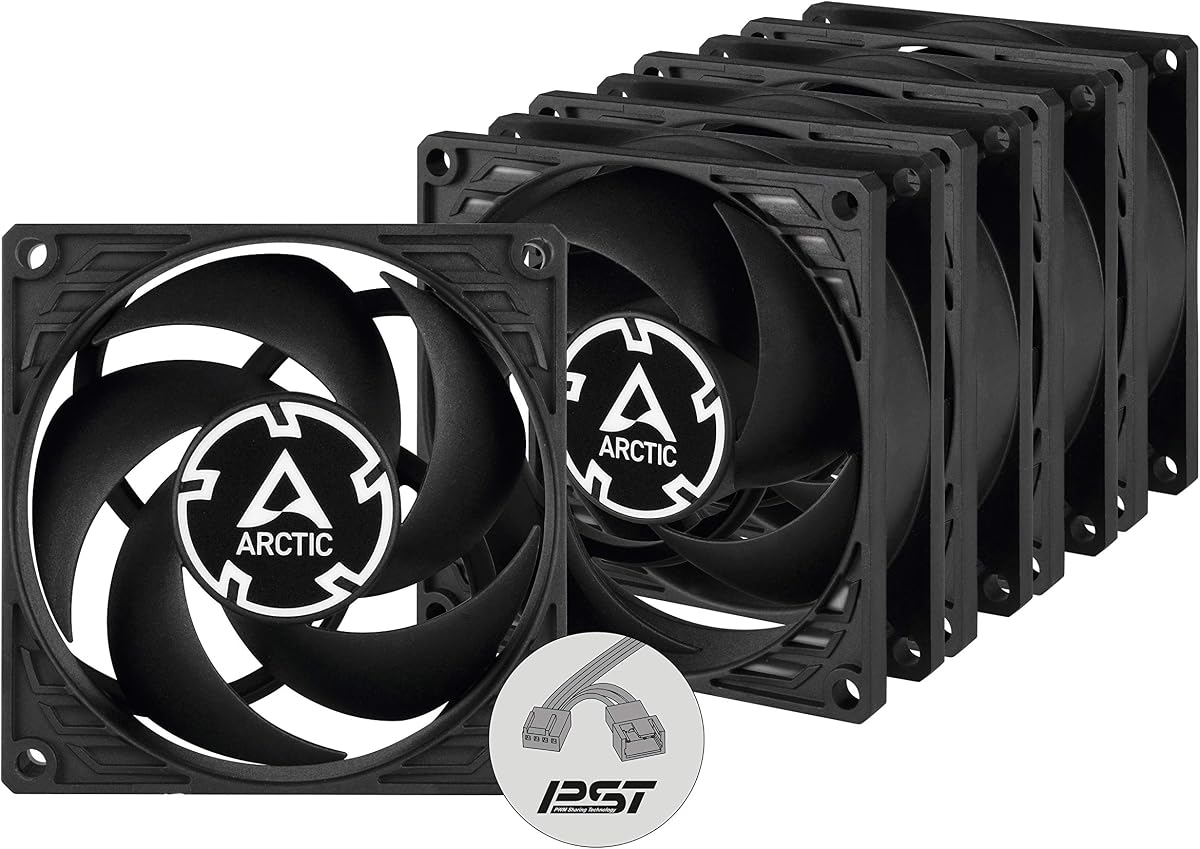
This pack upgrades the standard P8 with PWM Sharing Technology allowing you to control all five fans from a single header. This is a huge benefit for complex builds where cable clutter is a concern. The speed range is very wide starting from 200 RPM for very quiet operation up to 3000 for full cooling.
We may earn a commission when you buy through this link, at no additional cost to you.
The motor efficiency is improved with a newer magnet ring which allows it to run cooler and more efficiently than older models. You get the same static pressure benefits as the standard P8 so it works well on radiators. The noise level is rated at 0.3 Sone which is quite low for a fan that can spin that fast.
The only downside is that it comes only in a five pack which might be overkill for small cases. If you need just one fan you may prefer buying a single unit elsewhere. However for multi fan setups the PST feature makes it worth the investment.
Choose this set if you are building a server or a small PC with multiple fans needed and want easy control. It balances price and smart features better than most other bulk options on the market today.
PST allows synchronous control of multiple fans via a single 4-pin PWM connector to simplify wiring.
Regulated from 200 to 3000 RPM so you can balance noise and cooling dynamically with your system load.
We may earn a commission when you buy through this link, at no additional cost to you.
The NF-R8 redux is a cost effective version of the proven R8 fan retaining the core performance at a lower price. It runs at 1800 RPM which provides a great balance between cooling and noise for general use. Noctua users trust this brand for longevity so the 150,000 hour rating is reassuring.
We may earn a commission when you buy through this link, at no additional cost to you.
It includes many of the same accessories as the premium models such as vibration mounts and adapters. The noise level is rated at 17.1 dB(A) which is barely noticeable in most environments. This fan is ideal for cases where you want reliability without paying for the top tier A-series.
Because it is capped at 1800 RPM it will not move as much air as faster fans but it is quieter as a result. This is a deliberate trade off for users who prioritize silence over maximum cooling power. It is perfect for replacement needs in older hardware.
Buy this fan if you want a trusted brand and a solid quiet option for under fifteen dollars. It is a smart choice for budget builds that still demand quality and long term stability from their cooling hardware.
The redux edition offers proven Noctua quality and accessories at a much more attractive price point.
4 pin PWM supports automatic motherboard speed control for silent idle and powerful airflow when required.
We may earn a commission when you buy through this link, at no additional cost to you.
The Kingwin 80mm Silent Fan is one of the most affordable options available for general cooling tasks. It is designed with a focus on low noise levels making it a great choice for office desktops or home servers. The blade design is optimized to move a good amount of air despite the budget price.
We may earn a commission when you buy through this link, at no additional cost to you.
It fits standard 80mm mounts so it can be used in various cases or as a replacement for CPU coolers. The bearing is rated for long life which helps prevent early failure even in demanding environments like mining rigs. Users have noted it handles heat buildup well without being too loud.
One trade off is that it does not offer PWM control so it runs at a set speed. For some this is fine as it keeps things simple but for others it may be a limitation. The build is rugged but basic compared to premium brands like Noctua.
You should consider this fan if you need to cool a space on a very tight budget. It delivers reliable performance for the price and is a great starter fan for small projects or replacement needs.
Designed specifically to reduce noise levels making it suitable for quiet builds and office environments.
Optimized blade design delivers excellent ventilation to reduce system heat buildup for better performance.
We may earn a commission when you buy through this link, at no additional cost to you.
The P8 Silent model is tuned specifically for quiet operation while still maintaining high static pressure. It runs at 1600 RPM which is lower than the standard P8 but this reduces noise significantly. The motor is developed in Germany with enhanced bearing features to minimize unwanted sounds.
We may earn a commission when you buy through this link, at no additional cost to you.
Even at low speeds this fan remains barely noticeable to the human ear. It is effective at pushing air through radiators or dense filters because of the pressure optimized blades. This makes it a strong contender for small cooling needs where silence is key.
The lower speed means it may not cool a high heat GPU as effectively as faster models but it is great for case ventilation. It is a simple 3-pin fan so it does not support PWM speed control out of the box. Still it offers excellent value for those who want a silent unit.
Choose this fan if your priority is a quiet environment and you need reliable pressure cooling. It is perfect for media centers or bedrooms where noise from a PC would be distracting.
At low fan speed the motor noise is reduced to barely noticeable levels for quiet operation.
Efficient cooling even with increased air resistance making it suitable for radiators and heatsinks.
We may earn a commission when you buy through this link, at no additional cost to you.
This chromax.black.swap edition takes the award-winning A8 design and gives it a sleek all-black look. It is designed for users who want performance without the traditional brown branding of Noctua. The quality is identical to the standard A8 with Flow Acceleration Channels and high durability.
We may earn a commission when you buy through this link, at no additional cost to you.
The unique feature is the set of swappable anti-vibration pads that come in multiple colors like red or blue. This allows you to customize the look of your build to match your theme. It runs at 2200 RPM and stays very quiet thanks to the acoustic optimization.
It stops at 0% PWM so you can use it in semi-passive systems where fans only spin when needed. The price is higher than other options but you get a premium product with unique customization. It is a great choice for visible builds.
Buy this if you need a quiet fan that fits a black theme and offers top tier cooling. It is ideal for HTPCs or gaming PCs where style and silence are equally important.
Includes swappable pads in different colors so you can personalize the fan to match your build.
Advanced Acoustic Optimisation frame ensures superior quiet cooling performance even at full speed.
We may earn a commission when you buy through this link, at no additional cost to you.
This five pack offers the same silent benefits as the single P8 Silent unit but at a bulk price. It is ideal for multi fan builds where you want consistent quiet cooling across the case. The motor is virtually silent at low speeds which helps maintain a peaceful environment.
We may earn a commission when you buy through this link, at no additional cost to you.
Like the single unit it is optimized for static pressure so it works well on heatsinks. The 1600 RPM speed keeps noise low while still moving enough air for general needs. It is a great way to upgrade an old case with modern silent fans.
The trade-off is that it runs at a fixed speed and does not support PWM control. This makes it a bit less flexible than PWM fans but sufficient for static use cases. It is reliable and built to last with a quality motor.
Choose this pack if you need multiple silent fans and want to save money buying in bulk. It is perfect for quiet server builds or home theaters where consistent noise levels matter.
The motor is developed to be virtually silent ensuring quiet operation at all speed levels.
Five fans in one pack provide great value for multi-fan cooling setups and upgrades.
We may earn a commission when you buy through this link, at no additional cost to you.
The P8 Max is a powerhouse capable of spinning up to 5000 RPM which makes it incredibly powerful for an 80mm fan. It is designed for high pressure environments like server racks where heat density is high. This makes it a top choice for industrial or dense computer builds.
We may earn a commission when you buy through this link, at no additional cost to you.
The PWM control allows you to lower the speed when full power is not needed to save on noise. However at max speed it can be quite loud and may vibrate more than standard fans. It is built with a Fluid Dynamic Bearing to handle the high stress of fast rotation.
It is not suitable for a standard home office if you care about noise but for cooling dense components it is excellent. The static pressure is high enough to push air through dense filters efficiently. It is a performance tool for specific demanding tasks.
Buy this if you need maximum cooling power for a server or mining rig. It is the best choice for scenarios where heat removal is more important than acoustic comfort.
Most powerful 80mm fan with high static pressure to effectively dissipate heat in dense cases.
Infinately variable between 500 and 5000 RPM for flexible control over cooling and noise.
We may earn a commission when you buy through this link, at no additional cost to you.
This fan is unique because it is only 15mm thick which allows it to fit in tight spots where 25mm fans cannot go. It is perfect for low profile coolers or compact cases that require slim fans. The airflow is high at 28.4 CFM which is impressive for such a thin unit.
We may earn a commission when you buy through this link, at no additional cost to you.
It runs at 2200 RPM and is designed to work efficiently with motherboard PWM control for temperature based speed. The bearing is developed to reduce shaking and noise even at high speeds. Thermalright has a strong reputation for cooling accessories which adds to the trust in this product.
The only real limitation is the thickness which may reduce total air volume compared to deeper fans. However for specific clearance issues this is a valuable solution. The gray color fits most builds well and it includes all necessary adapters.
Select this fan if you have a tight clearance issue and need a slim cooling unit. It is ideal for thin radiators or low profile CPU coolers where standard fans simply will not fit.
The 15mm thickness allows for fitting in tight spots where standard 25mm fans are too thick.
Delivers high airflow for improved cooling performance despite the slim frame design.
We may earn a commission when you buy through this link, at no additional cost to you.
Selecting the right 80mm fan requires understanding several technical factors that affect cooling and noise levels.
Airflow is measured in CFM and indicates how much air the fan can move. Static pressure measures the force used to push air through obstacles like filters or radiators. High static pressure fans are best for restrictive environments while high airflow fans are better for open cases.
Look for static pressure specifications if you plan to mount the fan on a heatsink or radiator. If your case has open vents a fan focused on airflow will serve you better.
Noise is often measured in dB(A) or Sones. A lower number means a quieter operation. The speed in RPM affects both cooling and noise. Fans with higher RPM tend to move more air but generate more noise.
If you prioritize silence look for a fan with low dB(A) ratings and consider using PWM to lower speed when not needed. A silent fan is essential for home theaters or quiet offices.
PWM fans use a 4-pin connector to allow the motherboard to control speed dynamically. DC fans use 3 pins and vary speed by changing voltage. PWM provides more precise control and is preferred for modern motherboards.
Choose a 4-pin PWM fan if your motherboard supports it. This allows the fan to stop completely or run slower when the system is idle which saves noise.
The bearing type determines how long the fan lasts and how quiet it is. Fluid Dynamic Bearings (FDB) and Sleeve bearings are common. FDB are more durable and quieter but cost more.
Check the bearing type to ensure longevity. A good bearing will prevent the fan from becoming noisy over time and extend the lifespan of the unit.
Most 80mm fans are 25mm thick but some are 15mm or 38mm. Ensure you know the space available in your case. Some cases have clearance issues that require slim fans.
Always check the thickness before buying. An incorrect fit may prevent installation or cause vibration issues inside the chassis.
Some manufacturers sell fans in packs of five or more. This is common for server and mining rigs. Buying in bulk can save money but may limit your options for specific single unit needs.
Consider how many fans you need. If you are filling a server case a pack offers value. If you need just one for a replacement buying a single unit might be better.
While performance is key the look of the fan matters for visible builds. Some fans come in brown or black. Others offer swappable parts for customization.
If you care about looks choose a fan that matches your build theme. Some premium options allow you to change accents to fit your style.
MTTF stands for Mean Time To Failure. A higher number means the fan is expected to last longer. Warranty terms also vary by brand.
Look for high MTTF ratings and a solid warranty. This ensures that the fan will work reliably for years and protects you against defects.
To install an 80mm fan you must first ensure the case supports the 80x80mm mount size. Align the screw holes and use the provided screws to secure the fan firmly to the chassis. Ensure the airflow direction matches your intake or exhaust setup.
Dust accumulation can reduce airflow and increase noise over time. Clean the fan blades and frame regularly with compressed air to maintain performance. Keep the area around the fan clear of cables or debris.
Check your BIOS settings to control PWM speeds. You can set fan curves to increase speed during high load and decrease it during idle. This helps keep the PC quiet while ensuring cooling when needed.
The Noctua NF-A8 PWM is widely considered the best for noise due to its acoustic optimization and high MTTF. It offers excellent cooling at very low decibel levels. If you need a budget alternative the P8 Silent by ARCTIC is also very quiet for its price.
Yes you can use 80mm fans on radiators but static pressure is critical for this application. Fans like the ARCTIC P8 are designed for high static pressure to push air through the fins. Low static pressure fans might not be effective for radiator cooling.
If your motherboard has a 4-pin PWM header and you want to control speed automatically you should choose a PWM fan. If your system only supports 3-pin you can still use a 4-pin fan but you may not get full speed control.
MTTF stands for Mean Time To Failure and it indicates the expected lifespan of a component. A higher MTTF rating means the fan is built to last longer. This is a good metric for judging reliability.
Packs of fans are often better value if you need multiple units for a server or large case. Buying in bulk reduces the cost per fan. However if you only need one fan buying a single unit may be more practical.
You can clean your case fan by removing dust with compressed air. Make sure the fan is powered off before cleaning. Regular cleaning prevents dust buildup which can reduce airflow and cause noise.
Minor vibration is normal but excessive vibration usually means the fan is unbalanced or not mounted correctly. Use anti-vibration mounts if provided to reduce this. Ensure the screws are tightened evenly.
Yes you can mix different brands in one case as long as they fit the 80mm mounts. Ensure they are all controlled properly by your motherboard. Different airflow directions can be used for intake and exhaust.
We have reviewed ten distinct options to help you find the ideal cooling solution for your build. The Noctua NF-A8 PWM stands out for its balance of noise and performance while budget packs like the ARCTIC P8 offer great value for multiple needs.
Prioritize static pressure if you plan to mount the fan on a radiator and focus on noise levels for quiet builds. Always check the connection type to ensure compatibility with your motherboard headers.
Prices and availability change regularly so please check the current listings before making a purchase decision. We hope this guide helps you keep your system cool and quiet for years to come.