
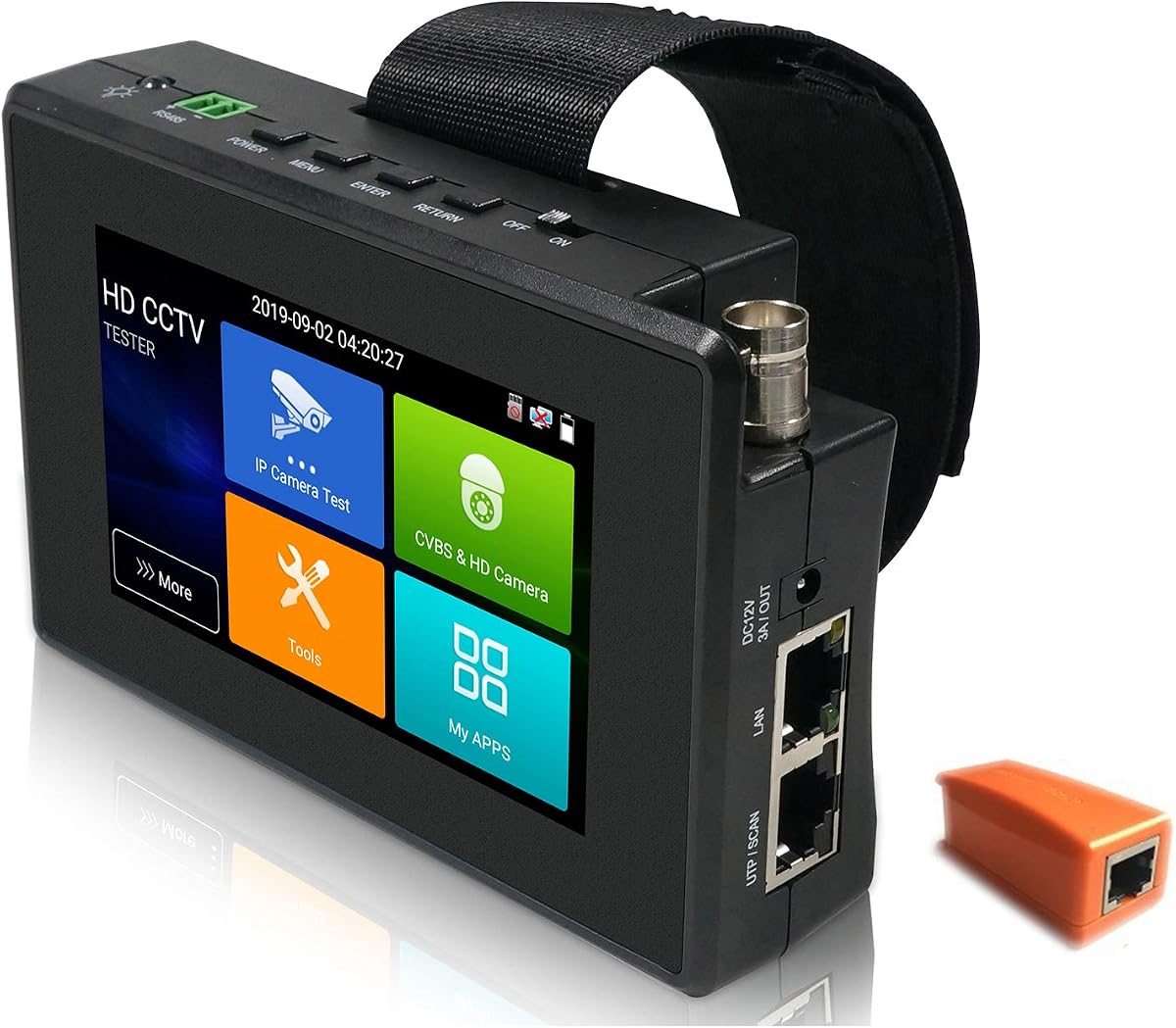
CCTV Camera Tester 7" IPS Touch Screen
4.1Editor score
7-inch IPS touchscreen display
Supports 6K 32MP IP cameras
Built-in WiFi and network tools
This guide compares the top IP and CCTV camera testers for 2026, evaluating features like PoE output, screen size, and network tools to help you choose the
Selecting the right IP and CCTV camera tester is essential for security system installers and network technicians today. A good tester simplifies configuration, verifies video feeds, and troubleshoots network issues efficiently without needing multiple devices.
We evaluated ten leading models based on their compatibility with modern camera standards, display quality, power output capabilities, and built-in diagnostic tools. Each product was reviewed for ease of use, reliability, and value in real-world installation scenarios.
Each pick below highlights key specifications, pros, cons, and ideal use cases to help you match a device to your specific workflow. Keep in mind that pricing and availability can fluctuate, so verify current details before purchasing.
4.1Editor score

4.9Editor score

4.5Editor score
The following table provides a side-by-side comparison of all ten tested models. It highlights core specifications such as screen size, maximum camera resolution support, power output limits, and unique features like optical testing or fiber ports to help you differentiate them quickly.




The WANLUTECH 4K 12MP IP Camera Tester stands out as a robust solution for modern security installations. It combines high power output with a large display, making it a versatile tool for installers working on complex networks.
We may earn a commission when you buy through this link, at no additional cost to you.
Its 90W PoE capability allows you to power high-demand PTZ cameras directly from the unit. The built-in SFP port enables testing of fiber optic networks, which is a rare feature in this price range. The Android OS supports app customization for specific workflows.
While it is heavier than some 4-inch competitors, the added power and screen real estate justify the weight for most on-site jobs. The battery can drain faster if you run multiple network tests simultaneously.
This model is ideal for professional installers who need one device to handle power, video, and fiber testing. If you require high wattage and a big screen, this is a top recommendation.
Supports up to 90W output, allowing direct powering of high-demand dome cameras without extra injectors.
The SFP port lets you test fiber modules directly, bridging copper and optical network testing seamlessly.
We may earn a commission when you buy through this link, at no additional cost to you.
This tester offers a fantastic balance of features for the price. It supports impressive IP resolutions and includes a large screen, making it easy to verify video feeds without straining your eyes.
We may earn a commission when you buy through this link, at no additional cost to you.
The device handles CVBS analog testing well and includes essential network tools like IP discovery and TDR. The built-in WiFi allows you to test wireless cameras easily, which is convenient for remote setups.
You lose some power headroom compared to 90W models, which might limit testing of high-power PTZ units. It also lacks fiber optic ports, so it is best suited for copper-based networks.
If you need a reliable, affordable tool for standard IP and analog installs, this is a great choice. It covers most daily tasks without breaking the budget.
Supports up to 6K 32MP resolution, ensuring clear viewing of modern high-megapixel IP cameras.
Built-in WiFi hotspot allows easy testing of wireless cameras without needing a separate router.
We may earn a commission when you buy through this link, at no additional cost to you.
The Triplett 8150 is designed for simplicity and portability. It is a strong choice for technicians who prioritize weight and ease of use over advanced optical features.
We may earn a commission when you buy through this link, at no additional cost to you.
It supports a wide range of analog formats like TVI, CVI, and AHD, automatically recognizing the camera type. The integrated Ookla speed test helps verify internet connectivity quickly on-site.
The screen resolution is lower than modern 8-inch IPS panels, and the 24W PoE output limits high-power camera testing. However, for standard jobs, this is rarely an issue.
Choose this if you want a lightweight, no-fuss tool for quick checks and basic configurations. It is reliable for maintaining older systems alongside new IP installs.
Auto-recognizes HD coax camera types like TVI and AHD to streamline setup without manual switching.
Built-in Ookla speed test lets you check internet bandwidth directly from the unit.
We may earn a commission when you buy through this link, at no additional cost to you.
This model pushes the envelope with 8K resolution support and full PoE++ capability. It is built for users who need to test future-proof camera systems and fiber optic networks in one device.
We may earn a commission when you buy through this link, at no additional cost to you.
The 90W output handles any standard PTZ camera, and the SFP slot allows for advanced fiber testing. Android 11 ensures you can install custom tools or apps as needed.
It is heavier than simpler models and comes at a premium price. However, the feature set justifies the cost for high-end commercial projects.
For advanced integrators requiring maximum resolution and power, this is an excellent investment. It eliminates the need for separate fiber testers in most cases.
Supports up to 8K 32MP resolution, ensuring compatibility with next-generation high-megapixel IP cameras.
Integrated SFP module interface allows direct testing of fiber optic cables for network integrity.
We may earn a commission when you buy through this link, at no additional cost to you.
The NOYAFA tester distinguishes itself with integrated optical testing tools. It includes a power meter and visual fault locator, which are essential for fiber optic network maintenance.
We may earn a commission when you buy through this link, at no additional cost to you.
Beyond fiber, it handles IP and analog cameras with high resolution and an 8-inch screen. The 90W PoE output ensures it can power heavy PTZ devices effectively.
The optical features add complexity and cost, which might be overkill for simple CCTV jobs. But for networks using fiber backbones, it saves carrying a separate OTDR or power meter.
This is the ideal choice for technicians managing mixed copper and fiber networks. If you deal with fiber regularly, this all-in-one solution is highly valuable.
Measures fiber optic power across 7 wavelengths, ensuring strong signal strength for fiber networks.
VFL function helps quickly identify breaks or bends in fiber cables during installation or repair.
We may earn a commission when you buy through this link, at no additional cost to you.
This compact unit fits easily in a toolbox and still delivers key IP and analog testing features. It is designed for technicians who move frequently and need a quick, portable verification tool.
We may earn a commission when you buy through this link, at no additional cost to you.
It supports IP discovery and PTZ control, which simplifies camera setup. The 30W PoE output is sufficient for most standard dome cameras but not for high-power PTZ units.
The 4-inch screen is small for viewing fine detail, but it works well for basic connectivity checks. You might want a larger display for color accuracy work.
For quick residential or small commercial jobs, this unit is a solid choice. It covers the essentials without the bulk of larger models.
The 4-inch design makes it easy to carry in a pocket or small bag for quick site visits.
Includes IP discovery and PTZ control to manage cameras without needing a separate laptop.
We may earn a commission when you buy through this link, at no additional cost to you.
This tester offers a unique ergonomic feature with 180-degree screen rotation. It allows you to position the screen comfortably when cabling from the bottom of the unit.
We may earn a commission when you buy through this link, at no additional cost to you.
You can customize the interface colors, which helps reduce glare or match personal preferences. It handles a wide range of analog and IP formats effectively for most daily tasks.
The screen resolution is modest compared to 7 or 8-inch panels, and it lacks optical features. However, the usability tweaks make it friendly for daily carry.
Select this if ergonomics and ease of use are priorities. It simplifies the interface to make testing faster and more comfortable for technicians.
180-degree rotation allows comfortable viewing even when cables are plugged into the bottom of the unit.
Allows users to adjust interface colors and icons to reduce glare or improve visibility.
We may earn a commission when you buy through this link, at no additional cost to you.
This unit stands out with video recording and snapshot features. You can capture footage directly to the device, which is useful for documentation and client sign-offs.
We may earn a commission when you buy through this link, at no additional cost to you.
It supports high IP resolutions and includes a robust network toolset. The 5400mAh battery provides solid endurance for a full day of work without recharging.
It lacks fiber optic capabilities, so it is limited to copper and wireless networks. The price is mid-range, offering good value for the recording functionality.
Ideal for technicians who need to document installations on the fly. The recording feature reduces the need for a separate phone or camera during checks.
Capture and save video clips directly to the unit for easy proof of installation and testing.
5400mAh battery supports extended use on site, reducing downtime for charging during long projects.
We may earn a commission when you buy through this link, at no additional cost to you.
This tester combines high power with a high-resolution display. It is a strong competitor for professional users who need reliability and versatility in a single handheld unit.
We may earn a commission when you buy through this link, at no additional cost to you.
It includes SFP fiber testing and full PoE++ support. The Android OS allows for app updates and custom tools, keeping the device relevant as standards evolve.
The device is heavier than compact options, which can be tiring during long shifts. Android OS is flexible but may occasionally lag compared to simpler proprietary systems.
Choose this if you need a high-end tool that grows with your business. The app support ensures you can adapt to new protocols without replacing hardware.
The 8-inch 1920×1200 IPS screen provides clear visuals for detailed image adjustments.
Android system allows installing new apps and receiving updates to support evolving camera protocols.
We may earn a commission when you buy through this link, at no additional cost to you.
This is a professional-grade device designed for large-scale projects. Its main selling point is the ability to generate detailed reports with screenshots, which helps reduce callbacks.
We may earn a commission when you buy through this link, at no additional cost to you.
It supports all major power standards and includes tools like QuickIP to configure cameras quickly. The build quality is rugged, suitable for demanding commercial environments.
The cost is significantly higher than consumer models, and the interface is more complex. It is overkill for small residential jobs but excellent for corporate contracts.
Invest in this if documentation is critical for your work. The reporting features save time on paperwork and provide proof of installation for clients.
Create professional reports with screenshots and save them via email to prove installation work.
The QuickIP feature simplifies camera setup, allowing quick IP configuration without complex networking steps.
We may earn a commission when you buy through this link, at no additional cost to you.
Selecting the right tester depends on your specific workflow, the types of cameras you install, and the networking infrastructure involved. This guide outlines the key factors to consider before making a purchase decision.
A larger screen like 7 or 8 inches makes it easier to verify video quality and adjust camera angles remotely. Higher resolution ensures you can see fine details, which is crucial for identifying image defects.
Prioritize a screen size that is comfortable for on-site viewing and offers enough pixel density to resolve small text or image issues.
Different cameras require different power levels. Standard cameras work with 24W, while PTZ or heating-equipped units need up to 90W. Ensure the tester matches the highest power requirement in your inventory.
Choose a model with sufficient wattage to avoid needing external power injectors for heavy-duty cameras during testing.
Built-in TDR and network diagnostics help identify cable faults and IP conflicts quickly. Tools like ping, IP scan, and trace route reduce the time spent troubleshooting connectivity issues.
Look for a tester with comprehensive network tools to minimize downtime and avoid separate diagnostic hardware.
If your projects involve fiber backbones, a tester with SFP slots and optical power meters is essential. Without this, you would need to carry separate OTDR or power measurement devices.
Opt for a model with integrated fiber support if you frequently work on hybrid copper and fiber networks.
Android-based testers allow for custom apps and easier updates. This flexibility ensures the device remains compatible with new camera firmware and protocols without buying new hardware.
Check if the device supports app installations or updates to future-proof your investment against evolving technology standards.
You may need to work for long hours without access to power outlets. Battery life should be sufficient to last a full day, and the unit should be light enough to carry comfortably in a tool belt.
Balance the need for a large screen with the weight of the device to ensure it is practical for field use.
Ensure the tester supports both IP and analog standards like AHD, CVI, and TVI. Multi-format compatibility allows you to service older installations and new IP networks without swapping devices.
Verify the supported resolutions and protocols before buying to guarantee it works with your specific camera brands.
Prices vary widely based on features. Basic models offer core testing, while premium units add optical tools and reporting features. Assess which advanced features justify the extra cost for your business model.
Invest in features you actually use regularly to ensure you get the best return on your purchase.
Connect the camera to the appropriate port, such as RJ45 for IP or BNC for analog. Enable PoE on the tester if the camera is powered over the network to simplify the setup process.
Use the built-in IP discovery tool to locate cameras on the network. Once connected, check the video feed to verify resolution, color, and stability before finalizing the installation.
Store the unit in a protective case to prevent screen damage. Keep the software updated via Android or the manufacturer's portal to ensure continued compatibility with new camera protocols.
Yes, many modern testers have built-in Wi-Fi support. You can connect directly to the camera or create a hotspot to verify wireless signal strength and connectivity during installation.
Most models support standard analog formats like CVBS, TVI, CVI, and AHD. Always check the specs to confirm compatibility with your specific analog camera model before purchasing.
PoE output allows you to power cameras directly from the tester. This is especially useful for PTZ cameras that require high wattage, eliminating the need for separate power injectors.
Some high-end models offer recording, screenshots, or email reporting features. These tools help you create proof of installation and reduce the need for external documentation methods.
If your tester has an SFP module and optical power meter, you can test fiber directly. Otherwise, you will need a separate fiber testing kit for backbone verification.
Android-based devices allow app updates and OS upgrades. Manufacturers often release firmware updates to improve compatibility with new camera models and fix bugs.
Choosing the right tester depends on your specific needs for screen size, power output, and network support. The top picks cover a range of options from budget-friendly 4-inch units to high-end 8-inch models.
Prioritize features like PoE wattage and fiber support if you work on complex networks. Simpler installations may only need a compact device with basic network tools to get the job done.
Prices and availability can change frequently so verify the latest details before buying. Ensure the model you select aligns with the cameras you most commonly service to maximize efficiency.