
Microsoft Surface Thunderbolt 4 Docking Station
4.4Editor score
Thunderbolt 4 Connectivity
Up to two 4K monitors
Rapid charging support
Discover the top docking stations for Surface Pro devices in October 2026. This guide compares connectivity, display support, charging power, and port variety.
Choosing the right docking station for your Surface Pro can transform your mobile device into a powerful desktop workstation. A good dock offers essential ports, reliable charging, and seamless connectivity for your peripherals. It ensures your workflow remains uninterrupted whether you are working from home or traveling for business.
We have evaluated ten top-rated docking stations specifically designed for the Surface ecosystem. Our comparison focuses on compatibility, port selection, video output capabilities, and build quality. Each product was selected based on user feedback, technical specifications, and overall value for professional and personal use cases.
Each pick in this guide highlights key features and potential limitations to help you make an informed decision. Prices and availability can change frequently, so please verify current details before purchasing. We aim to provide clear insights into which dock best matches your specific productivity needs and setup requirements.
4.4Editor score

4.5Editor score

4.8Editor score
The following table provides a side-by-side comparison of all ten docking stations featured in this guide. Review the key specifications and features to identify which model aligns best with your connectivity and display requirements for your Surface device.




This docking station is designed for high-performance Surface devices that support Thunderbolt 4 connectivity. It boasts a strong rating and offers users the ability to transfer data quickly while maintaining a clean desktop setup. The build quality is robust and reflects Microsoft's commitment to sustainability with recycled materials.
We may earn a commission when you buy through this link, at no additional cost to you.
The standout feature is the Thunderbolt 4 port which allows for fast data transfer and the connection of multiple high-resolution displays. Users can connect up to two 4K monitors to expand their workspace significantly. The inclusion of a 2.5G Ethernet port ensures stable and fast network connections for demanding workloads.
While this dock provides excellent performance, it comes at a higher price compared to other options. It is also best suited for devices that can take advantage of Thunderbolt speeds. Users with older Surface models might find that they cannot utilize all the advanced features available on this dock.
This dock is ideal for professionals who need maximum speed and reliability in their daily workflow. It is a strong investment for those who value premium build quality and advanced connectivity options. If you require a workstation setup that supports multiple 4K displays and fast data transfer this is a top choice.
The Thunderbolt 4 connectivity ensures that data transfer speeds are maximized for large file movements.
Made with 20% recycled ocean-bound plastic this dock aligns with modern sustainability standards.
We may earn a commission when you buy through this link, at no additional cost to you.
The classic Surface Dock remains a reliable option for many users in the ecosystem. It offers a straightforward way to connect multiple peripherals without needing complex setups. Its high rating reflects consistent performance and durability over time for daily office tasks.
We may earn a commission when you buy through this link, at no additional cost to you.
Key strengths include its broad compatibility with various Surface models including Pro and Laptop series. The four USB 3.0 ports allow for connecting legacy devices easily while the Ethernet port ensures stable internet access. The magnetic Surface Connect cable provides a secure and easy-to-use connection method for your tablet.
However the lack of modern USB-C ports means it may not be suitable for newer devices that rely on this interface. The Mini DisplayPort outputs are also older technology compared to HDMI or direct USB-C video. Users looking for the latest video standards might prefer a newer model.
This dock is best for those who have existing DisplayPort monitors and want a simple reliable desktop solution. It is perfect for users who prioritize stability and ease of use over having the newest port types. If you need a dependable connection for your older Surface devices this is a great pick.
Features traditional USB 3.0 and Mini DisplayPort connections for wide compatibility with older accessories.
The magnetic cable makes attaching and detaching the dock quick and reduces wear on the port.
We may earn a commission when you buy through this link, at no additional cost to you.
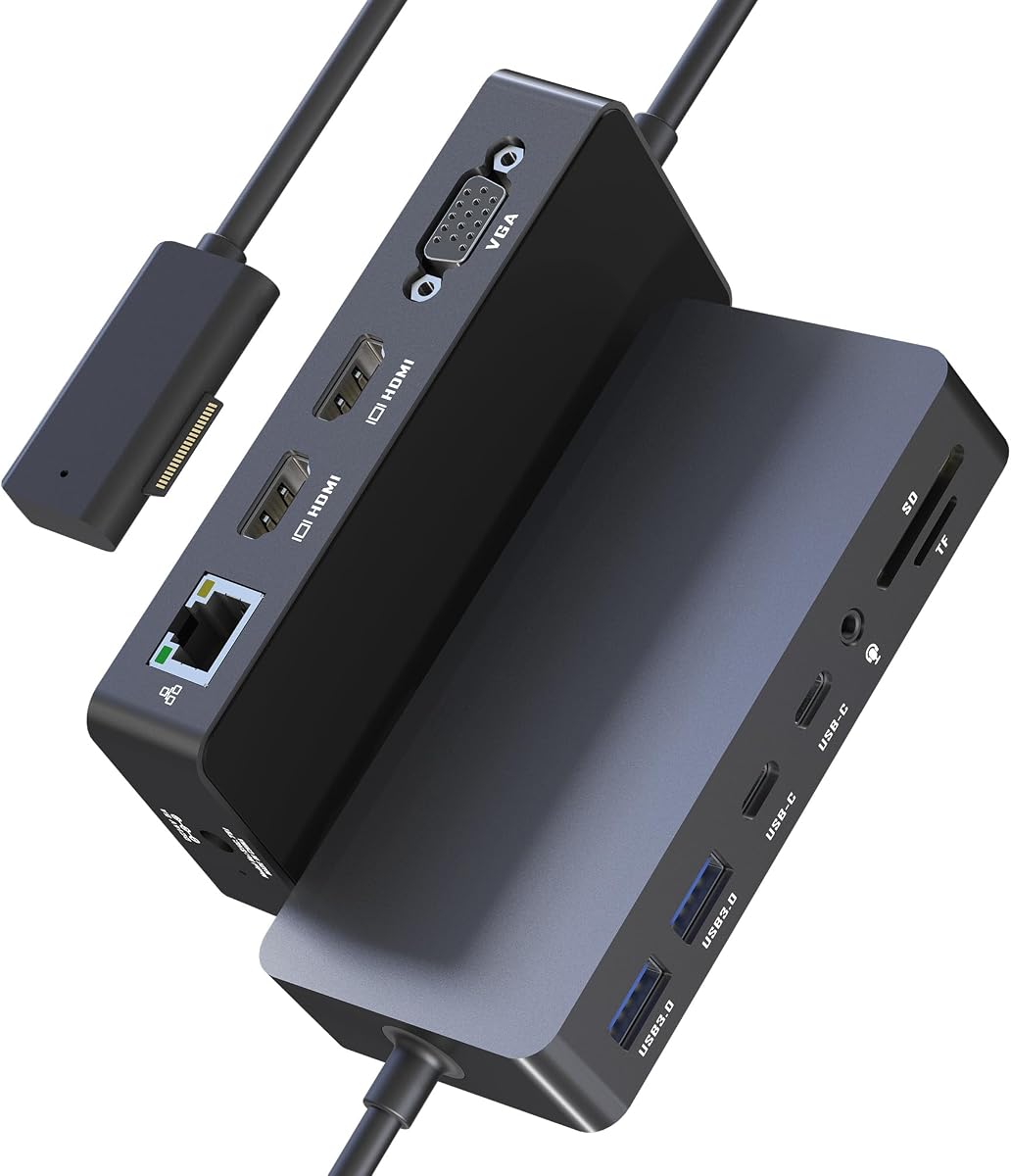
This docking station focuses on expanding display options for users who need multiple screens. It supports triple display output using a mix of HDMI and VGA ports. The 12-in-1 design ensures that you have a range of ports for various peripherals including card slots and audio.
We may earn a commission when you buy through this link, at no additional cost to you.
The ability to connect three external displays makes it great for multitasking or monitoring multiple applications simultaneously. It includes a range of USB ports and SD card slots which are useful for photographers and content creators. The setup is designed to be simple with plug and play functionality.
One limitation is the Ethernet speed which is capped at 100Mbps compared to gigabit options found elsewhere. Also the VGA port supports lower resolutions which might not be ideal for high-definition content on all screens. Users should be aware of these constraints when planning their setup.
This dock is a solid choice for users who need extensive display options without breaking the bank. It is particularly useful for those who need to read card cards or use legacy VGA monitors. If you need to connect multiple screens and a variety of peripherals this offers good value.
Supports three external screens for extended workspaces and better multitasking efficiency.
Includes dedicated SD and TF slots for quick access to camera and storage cards.
We may earn a commission when you buy through this link, at no additional cost to you.
This model stands out for its high customer rating and extensive feature set at a competitive price point. It offers triple display support which is rare at this price level. The 72W power supply ensures that your device stays charged while connected to the dock.
We may earn a commission when you buy through this link, at no additional cost to you.
The key strengths include the dual 4K HDMI ports which allow for high-resolution external viewing. It also supports up to three external displays when used with the Surface screen turned off. The inclusion of card slots and USB ports makes it a versatile hub for various accessories.
Despite its high rating some users may find the VGA port limiting for modern high-resolution needs. The Ethernet port is also standard speed which may not suit high-speed network requirements. These trade-offs are generally acceptable given the overall feature set and affordability of the device.
This dock is an excellent budget choice for users who need multiple displays and broad connectivity. It is ideal for students or professionals who want a comprehensive solution without a high cost. If you value port variety and display flexibility this is a top contender in its category.
Provides triple display capability and high ratings at a very competitive price point.
Comes with a dedicated 72W power adapter to keep your device charged during use.
We may earn a commission when you buy through this link, at no additional cost to you.
This docking station is designed to transform your Surface device into a full workstation with triple display support. It features dual 4K HDMI outputs and a VGA port to accommodate various monitor types. The 72W charging capability ensures your device remains powered up during heavy use.
We may earn a commission when you buy through this link, at no additional cost to you.
Key strengths include the wide range of ports which cover USB A and C as well as card slots. The Ethernet port provides a stable wired connection and the audio jack allows for direct headphone connectivity. The design is compact yet functional for desk setups.
Users should note that there are some restrictions on resolution when connecting multiple displays at once. The Ethernet port is also limited to standard speeds which might be slower than gigabit options. These limitations are minor for most general users but could impact heavy network tasks.
This dock is suitable for users who need a comprehensive hub for both displays and peripherals. It is a good fit for those who value having many connection options in one device. If you want a versatile dock that supports multiple screens and card reading this is a strong option.
The included 72W adapter provides ample power to run your device and peripherals simultaneously.
Offers a wide mix of USB and card slots to connect almost any peripheral you own.
We may earn a commission when you buy through this link, at no additional cost to you.
The Surface Dock 2 is a next-gen hub that transforms your Surface into a powerful desktop PC. It supports dual 4K displays at 60Hz which provides smooth and clear visuals for work or entertainment. The 199W power supply ensures that your device can handle demanding tasks without power issues.
We may earn a commission when you buy through this link, at no additional cost to you.
Key strengths include the presence of multiple USB-C ports which are modern and versatile for various devices. The gigabit Ethernet port ensures fast and stable network connections for streaming or large file transfers. The design is sleek and fits well in modern office environments.
The higher price point may be a consideration for budget-conscious buyers. It also requires a power cable which adds to the cable management on your desk. However the performance and connectivity options justify the investment for many professional users.
This dock is best for users who want a premium and modern experience with their Surface devices. It is ideal for those who need high refresh rate video and fast network speeds. If you prioritize performance and connectivity the Surface Dock 2 is a reliable choice.
Supports dual 4K displays at 60Hz for smooth motion and crisp image quality.
Includes a gigabit Ethernet port for fast internet speeds and stable connectivity.
We may earn a commission when you buy through this link, at no additional cost to you.
This listing for the Surface Dock 2 offers a highly rated option with the same core features as the standard model. It supports dual 4K monitors at 60Hz for high-resolution visual experiences. The 199W power supply is included to ensure your device runs at peak performance.
We may earn a commission when you buy through this link, at no additional cost to you.
The key strengths lie in its seamless connectivity and wide device compatibility across various Surface models. The multiple USB-C ports allow for connecting modern peripherals easily while the Ethernet port provides stability. The design is minimalist and professional for any workspace.
There are few differences from the standard Dock 2 but the price may vary depending on the seller. Some users might prefer this option if it is available at a lower cost or better bundle. It remains a powerful choice for those needing high-performance docking.
This dock is an excellent choice for users who want a reliable high-end solution for their Surface. It is particularly good for those who need fast charging and multiple display options. If you value high ratings and performance this listing is worth considering.
Delivers crisp dual 4K visuals at 60Hz for an immersive and professional viewing experience.
Includes a robust 199W power supply to handle demanding workloads effortlessly.
We may earn a commission when you buy through this link, at no additional cost to you.
This docking station is an elite expansion hub designed to support triple display setups with high resolution. It features dual 4K HDMI ports that support 60Hz for smooth visuals and a VGA port for legacy monitors. The 12-in-1 design covers almost every port you might need for your peripherals.
We may earn a commission when you buy through this link, at no additional cost to you.
The key strengths include the ability to connect three monitors simultaneously which boosts productivity significantly. It also supports fast data transfer via USB 3.0 and includes card slots for photographers. The 100W DC input ensures that your device receives ample power for heavy tasks.
Users should be aware that setup may require careful configuration to support three external displays. The power requirements are also specific which might mean using the included adapter. These are minor considerations for a dock that offers such extensive connectivity options.
This dock is ideal for users who need a powerful workstation setup with multiple screens. It is a great choice for traders designers and anyone needing large screen real estate. If you want to maximize your desktop space this is a compelling option to explore.
Allows you to extend your workspace across three monitors for efficient multitasking.
Supports fast data transfer speeds for moving large files quickly to external drives.
We may earn a commission when you buy through this link, at no additional cost to you.
This renewed version of the Surface Dock 2 offers a high-quality alternative for budget-conscious buyers. It provides the same dual 4K display support and robust power capabilities as the new model. The high rating suggests that the refurbishment process maintains a high standard of quality.
We may earn a commission when you buy through this link, at no additional cost to you.
Key strengths include the inclusion of a USB-C cable and the full 199W power supply. This ensures that you have everything needed to start using the dock right out of the box. It is compatible with a wide range of Surface devices making it a flexible choice.
Since it is a renewed item users should check the condition and warranty details before purchasing. It might have minor cosmetic imperfections but generally functions like new. This makes it a great way to access premium features without the full price tag.
This dock is perfect for those who want a premium experience at a lower cost. It is ideal for users who value reliability and don't mind a renewed product. If you want the best performance for less this renewed option is worth considering.
Provides premium features and high user ratings at a more affordable price point.
Includes all necessary cables and power adapters for immediate setup and use.
We may earn a commission when you buy through this link, at no additional cost to you.
This docking station offers a minimalist design that keeps your desktop tidy while providing essential connectivity. It features Mini DP ports for dual monitor setups and four USB 3.0 ports for your peripherals. The gigabit Ethernet port ensures you have a stable wired internet connection.
We may earn a commission when you buy through this link, at no additional cost to you.
Key strengths include its easy-to-use design which requires no complex drivers to function. It is compatible with a wide range of Surface models from Pro to Laptop and Book series. The compact form factor saves space on your desk while maintaining functionality.
The power output is lower than some premium models which might limit performance under heavy load. Also the Mini DP ports might require adapters for modern HDMI or DisplayPort monitors. Users should ensure their monitors match these connection types before buying.
This dock is a solid choice for users who need basic connectivity without a cluttered setup. It is ideal for home office users who want reliable USB and Ethernet connections. If you prioritize simplicity and a clean workspace this is a good option.
Features a compact form factor that minimizes desk clutter while providing essential ports.
Includes four USB 3.0 ports for connecting multiple devices like drives and keyboards.
We may earn a commission when you buy through this link, at no additional cost to you.
Selecting the right docking station involves considering several key factors that impact performance and usability. This guide breaks down the most important elements to help you find the perfect match for your needs.
The most critical factor is the variety and type of ports available on the dock. Ensure it has enough USB-C or USB-A ports for your peripherals and external drives. Look for docks that support HDMI or DisplayPort if you need external monitors.
A good dock should have all the essential ports you need to avoid buying additional adapters.
If you plan to use multiple monitors check the resolution and refresh rate supported by the dock. Some docks support dual 4K displays while others may be limited to 1080P. Verify compatibility with your specific Surface model for video output.
Choose a dock that supports your desired number of external screens and resolution needs.
Power delivery is important for keeping your Surface device charged while using the dock. Look for docks that provide sufficient wattage to support your device and connected accessories. Higher wattage ensures stable performance during demanding tasks.
Ensure the dock can provide enough power to keep your device running without draining the battery.
A built-in Ethernet port provides a stable and fast internet connection which is crucial for remote work. Check if the dock supports Gigabit Ethernet for faster data transfer speeds. This is especially useful if your Wi-Fi connection is unreliable.
Prioritize docks with Ethernet ports if you need consistent and high-speed internet access.
A durable dock will withstand daily use and protect your investment over time. Look for robust materials and a design that prevents overheating during prolonged use. Read reviews to assess reliability and longevity of the product.
Invest in a dock with solid construction to ensure it lasts through years of daily use.
Ensure the dock is explicitly compatible with your specific Surface model to avoid connection issues. Some docks work with a wide range of devices while others are more limited. Verify the supported models before making a purchase.
Check the compatibility list carefully to confirm it works with your specific Surface device.
Determine your budget and find a dock that offers the best value within that range. Higher-priced models may offer more features but a budget option might suffice for basic needs. Balance cost with the features you actually need.
Set a price range and look for a dock that meets your requirements without overspending.
A plug-and-play dock saves time and avoids the need for complex drivers or software. Look for docks that are easy to set up right out of the box. User-friendly design enhances the overall experience.
Choose a dock that is easy to connect and configure without technical hurdles.
Start by connecting the power adapter to the dock and plugging it into a wall outlet. Then connect your Surface device to the dock using the appropriate cable provided. Ensure the connection is secure before turning on your device.
Once connected turn on your monitor and peripheral devices to check if they are recognized. Configure your display settings if needed to extend or mirror your screen correctly. Test the USB ports and network connection to ensure everything works as expected.
To maintain the dock keep it in a cool and dry place to prevent overheating. Avoid pulling on the cables directly but disconnect them by holding the connector. Regularly clean the ports with compressed air to remove dust and debris.
The best dock depends on your specific needs but models with Thunderbolt 4 support like the Microsoft Surface Thunderbolt 4 Docking Station offer top performance. For general use the Surface Dock 2 provides excellent versatility. Check compatibility lists to ensure it works with your specific Pro model.
Most docks come with the necessary cables but you should verify if your device requires a specific connector like USB-C or Surface Connect. If you are using a third-party dock ensure you have the correct cable for your Surface model. Using the right cable ensures optimal power and data transfer.
Yes some docks support triple display setups using a combination of HDMI and VGA ports. However you may need to turn off the internal screen to achieve this. Check the specific capabilities of the dock you choose to ensure it supports three screens simultaneously.
Most docks designed for Surface devices provide power delivery to keep your device charged. Ensure the dock has sufficient wattage to handle both charging and running your peripherals. The Microsoft Surface Dock 2 and similar models support charging effectively.
Many docks are compatible with a wide range of Surface models including older ones like Pro 7 or 8. However newer docks may require specific connectors like USB-C. Always check the compatibility list in the product details before purchasing.
The Thunderbolt 4 dock offers faster data transfer speeds and more advanced connectivity options. The Dock 2 is more versatile with multiple USB-C ports and supports high-resolution displays. Choose based on whether you need maximum speed or broader compatibility.
Flickering can be caused by a loose connection or incompatible settings. Check that the video cable is securely plugged in and try adjusting the refresh rate in your display settings. Ensure your graphics drivers are updated to the latest version.
Renewed docks can be a great value if they come with a warranty and positive reviews. They are often tested to ensure functionality but may have minor cosmetic flaws. If you are comfortable with this refurbished option can save you money.
We have reviewed ten top docking stations that cater to a variety of needs from budget to premium. The Microsoft Surface Thunderbolt 4 Docking Station leads with high-speed connectivity while the Dock 2 offers great all-around performance. Third-party options provide affordable alternatives with triple display support.
When choosing a dock prioritize the features that matter most to your workflow. If you need multiple 4K displays look for models with strong video support. For budget buyers the triple display options offer excellent value without sacrificing essential ports.
Remember to check current pricing and availability as these details can change. Your perfect dock will depend on your specific device model and usage needs. We hope this guide helps you find the right solution to enhance your Surface setup.