
Redragon K617 HE
4.3Editor score
Hall Effect magnetic switches
8000Hz hyper-polling
Compact 60% layout
Discover the top keyboards for CS2 in October 2026. This guide compares Hall Effect, magnetic, and optical switches for precision aiming and rapid fire
Choosing the right keyboard for CS2 can dramatically improve your aiming precision and movement speed. Competitive players need responsive switches that reset instantly to support rapid strafing and counter-strafing techniques effectively.
We evaluated ten top-rated gaming keyboards based on switch technology, polling rates, and build quality. Our analysis focuses on models that offer Hall Effect or optical switches tailored for fast-paced FPS gameplay scenarios.
Each pick highlights unique features like adjustable actuation and rapid trigger modes to enhance your setup. Prices and availability may change over time, so verify current details before making your final purchase decision today.
4.3Editor score
4.4Editor score
4.5Editor score
This side-by-side comparison highlights the key specifications and features of the top ten keyboards optimized for Counter-Strike 2 gameplay. Each model offers distinct advantages in switch technology and layout design.



The Redragon K617 HE delivers high-performance magnetic switches at an accessible entry price. It scores 4.3 stars for offering rapid trigger technology essential for CS2 movement and aiming mechanics.
We may earn a commission when you buy through this link, at no additional cost to you.
Its Hall Effect switches eliminate physical contact wear while providing adjustable actuation from 0.1mm to 3.4mm. This allows players to customize sensitivity for precise headshots or stable typing comfort.
Build quality is utilitarian compared to premium rivals, and software options are somewhat basic. However these trade-offs are acceptable given the sub-forty-dollar price point for budget-conscious competitive gamers.
Buy this if you want fast magnetic response without spending premium rates. It remains a top choice for players entering the competitive CS2 scene on a strict budget.
The 8000Hz polling rate ensures inputs register instantly during rapid strafing.
The 60% layout frees up desk area for wide mouse sweeps essential for low sensitivity aiming.
We may earn a commission when you buy through this link, at no additional cost to you.
The Redragon K686 HE bridges the gap between budget and premium with superior tactile feedback. It earns 4.4 stars for combining magnetic switches with effective noise dampening technology.
We may earn a commission when you buy through this link, at no additional cost to you.
Features include a dedicated media knob for controlling lighting and playback without interrupting gameplay. The dual-module floating structure provides a soft bounce that reduces finger fatigue during long sessions.
While more expensive than the K617, the improved build quality and media controls justify the cost. Users should note that software is required for full actuation profile customization.
Choose this keyboard if you want a balanced typing and gaming experience. It suits CS2 players who also type frequently and need quick access to media controls.
Dampening layers transform harsh clacks into a smooth Hi-Fi bounce suitable for quiet environments.
A single knob manages backlight brightness and media playback simplifying desk ergonomics.
We may earn a commission when you buy through this link, at no additional cost to you.
The Redragon K673 HE offers a refined typing experience alongside competitive gaming features. It receives 4.1 stars for its unique dual-module floating structure that enhances key feel.
We may earn a commission when you buy through this link, at no additional cost to you.
Like the K686 it includes a media knob and dampening layers for a silky bounce. The rapid trigger feature ensures that CS2 directional changes are registered instantly during fast matches.
At a slightly higher price point, it appeals to users prioritizing comfort over pure cost savings. The floating structure helps reduce wobble making it stable for intense gaming and typing work.
Select this model if you value a premium typing feel at a mid-range price. It works well for gamers who also work from home and need keyboard versatility.
Independent switch plates prevent key wobble ensuring consistent typing and gaming performance.
Save multiple actuation profiles to switch between gaming and office modes easily.
We may earn a commission when you buy through this link, at no additional cost to you.
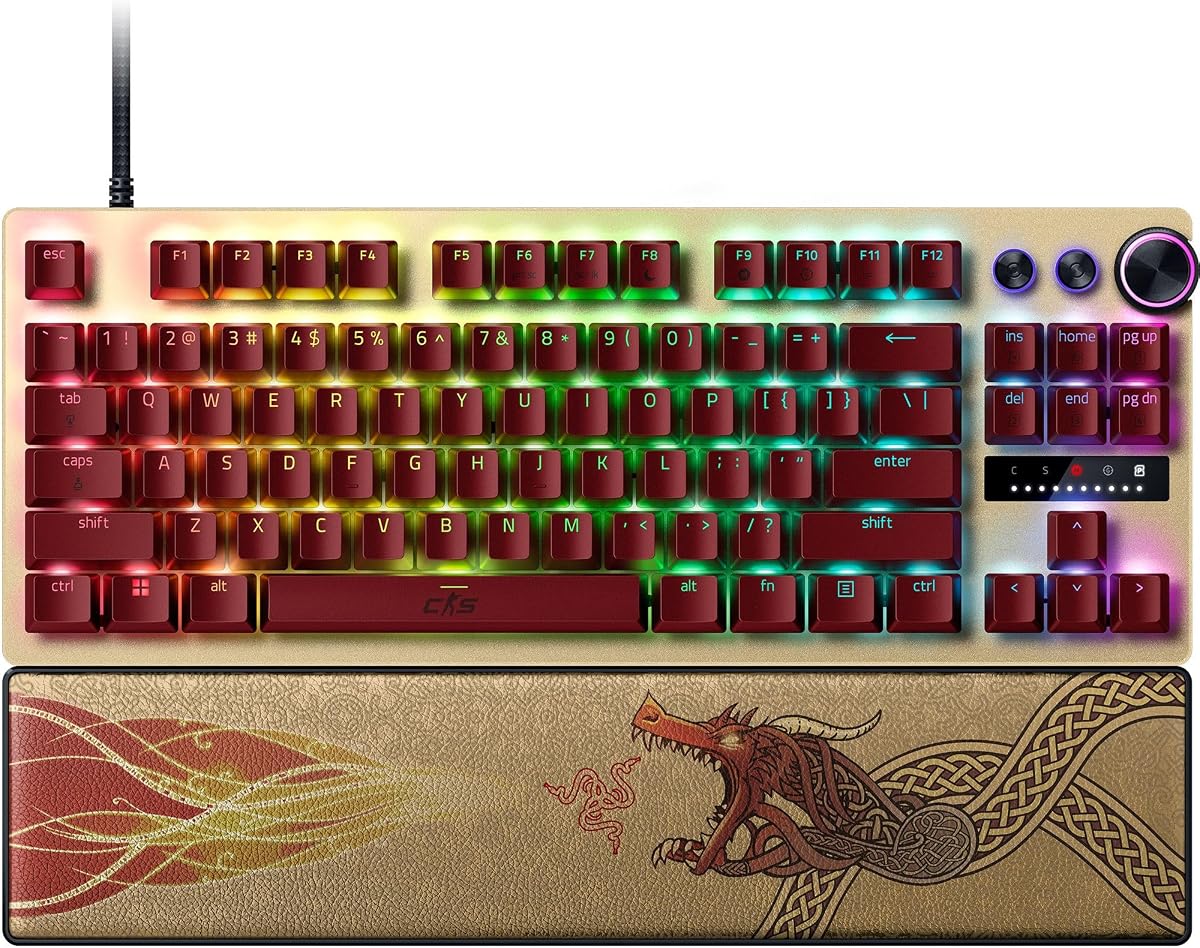
The Razer Huntsman V3 Pro TKL CS2 Edition is engineered specifically for elite competitive play. It garners 4.4 stars for offering advanced features like Snap Tap and Rapid Trigger out of the box.
We may earn a commission when you buy through this link, at no additional cost to you.
Optical analog switches provide lightning fast inputs with a 0.1mm to 4.0mm adjustable actuation range. The textured PBT keycaps ensure durability during intense sessions while resisting shine and wear over time.
The high price reflects its premium status and esports focused design. Onboard LED adjustments allow quick changes without software which is vital during tournament setups or competitive matches.
Invest in this keyboard if you seek top tier performance and brand prestige. It is ideal for serious CS2 competitors needing reliable hardware for critical ranked matches.
Prioritize the latest input between two keys for instant directional changes without releasing the previous key.
Maximize precision with 100 million keystroke lifespan switches that reset at the slightest finger lift.
We may earn a commission when you buy through this link, at no additional cost to you.
The Corsair Clipper PRO MINI stands out with exceptional IP57-rated durability for competitive environments. It achieves 4.4 stars for combining rugged build quality with precise Hall Effect switch technology.
We may earn a commission when you buy through this link, at no additional cost to you.
MGX Hyperdrive core switches offer zero drift and consistent performance under pressure. Features like Multi-Action and Smart Tap help reduce finger fatigue during repetitive CS2 movement patterns and aiming.
The compact 60% design maximizes mouse space for low-sensitivity aiming setups. However the high price and reduced key count may limit utility for general use beyond specific gaming needs.
Choose this if durability and compactness are your primary concerns. It suits players needing a reliable keyboard that can withstand spills and heavy usage without compromising performance.
IP57 rating protects against water and dust ensuring gameplay continues even after accidents.
Smart Tap enables consistent execution and reduced fatigue by managing complex input sequences efficiently.
We may earn a commission when you buy through this link, at no additional cost to you.
The Redragon K745 HE offers strong value with five-layer noise dampening and rapid trigger tech. It holds a 3.9 star rating reflecting mixed user feedback on long-term software reliability and feel.
We may earn a commission when you buy through this link, at no additional cost to you.
It delivers essential competitive features like 8000Hz polling and adjustable actuation profiles. This ensures that input latency remains low enough for high-level CS2 gameplay and precise counter-strafing moves.
While the build feels robust the software driver may require updates for full stability. Users seeking raw performance over brand name often find this model fits their needs effectively.
Opt for this keyboard if you want advanced specs without paying premium rates. It is suitable for players willing to tweak settings for optimal performance in ranked matches.
Multiple dampening layers reduce noise and vibration for a smoother more silent typing experience.
Calibrate magnetic switches via web drivers to fine-tune actuation for your specific playstyle.
We may earn a commission when you buy through this link, at no additional cost to you.
The Keychron C0 HE provides a specialized one-handed keypad for streamers and power users. It rates 4.2 stars for its magnetic switches and web-based configurator that eliminates software installation needs.
We may earn a commission when you buy through this link, at no additional cost to you.
Ideal for MMO or MOBA players it offers 35 keys within reach for quick commands and macros. In CS2 it can serve as a secondary device for binding utility or communication keys.
Its magnetic switch technology ensures precise inputs and consistent performance over time. While not a main keyboard it adds significant control options for advanced workflows and gaming setups.
Use this as a supplement to your main setup if you need extra commands. It helps streamline gameplay by keeping essential skills easily accessible during intense matches.
Customize key mapping and lighting through a browser-based tool for instant cross-platform compatibility.
Keep essential commands reachable with minimal hand movement during long gaming sessions.
We may earn a commission when you buy through this link, at no additional cost to you.
The Razer Huntsman V3 Pro Renewed brings premium features at a reduced price for budget buyers. It scores 3.5 stars reflecting the variability inherent in certified refurbished products.
We may earn a commission when you buy through this link, at no additional cost to you.
You get the same analog optical switches and Snap Tap mode as the new version. The tenkeyless design and aluminum plate provide durability while the wrist rest supports comfort during long games.
Renewed items carry risks of minor cosmetic imperfections compared to brand new units. However for players comfortable with refurbished gear this is a practical way to access high-end specs.
Choose this if you want high-end Razer features without the full cost. It suits gamers willing to accept minor risks for significant savings on competitive gear.
Manage volume and analog switch settings quickly with a dedicated digital dial at your fingertips.
Adjust actuation height on-the-fly using onboard LED visual aids without needing software.
We may earn a commission when you buy through this link, at no additional cost to you.
The Corsair K55 RGB PRO offers an accessible entry point for players new to mechanical features. It earns 4.4 stars for delivering durable membrane performance and essential gaming features at a low cost.
We may earn a commission when you buy through this link, at no additional cost to you.
Six dedicated macro keys allow for quick function access which can help in utility management. IP42 rating protects against dust and spills while dynamic RGB backlighting zones customize your desk aesthetics.
Lacking magnetic switches it cannot match the speed of rapid trigger models for movement. However for budget constrained players it provides a comfortable and functional alternative for casual play.
Start with this keyboard if you are new to gaming peripherals. It offers reliability and features sufficient for practice matches without requiring a heavy financial investment.
Assign shortcuts and commands to six dedicated keys for streamlined gameplay actions.
Soft rubber rest reduces hand stress during long sessions and keeps hands from slipping.
We may earn a commission when you buy through this link, at no additional cost to you.
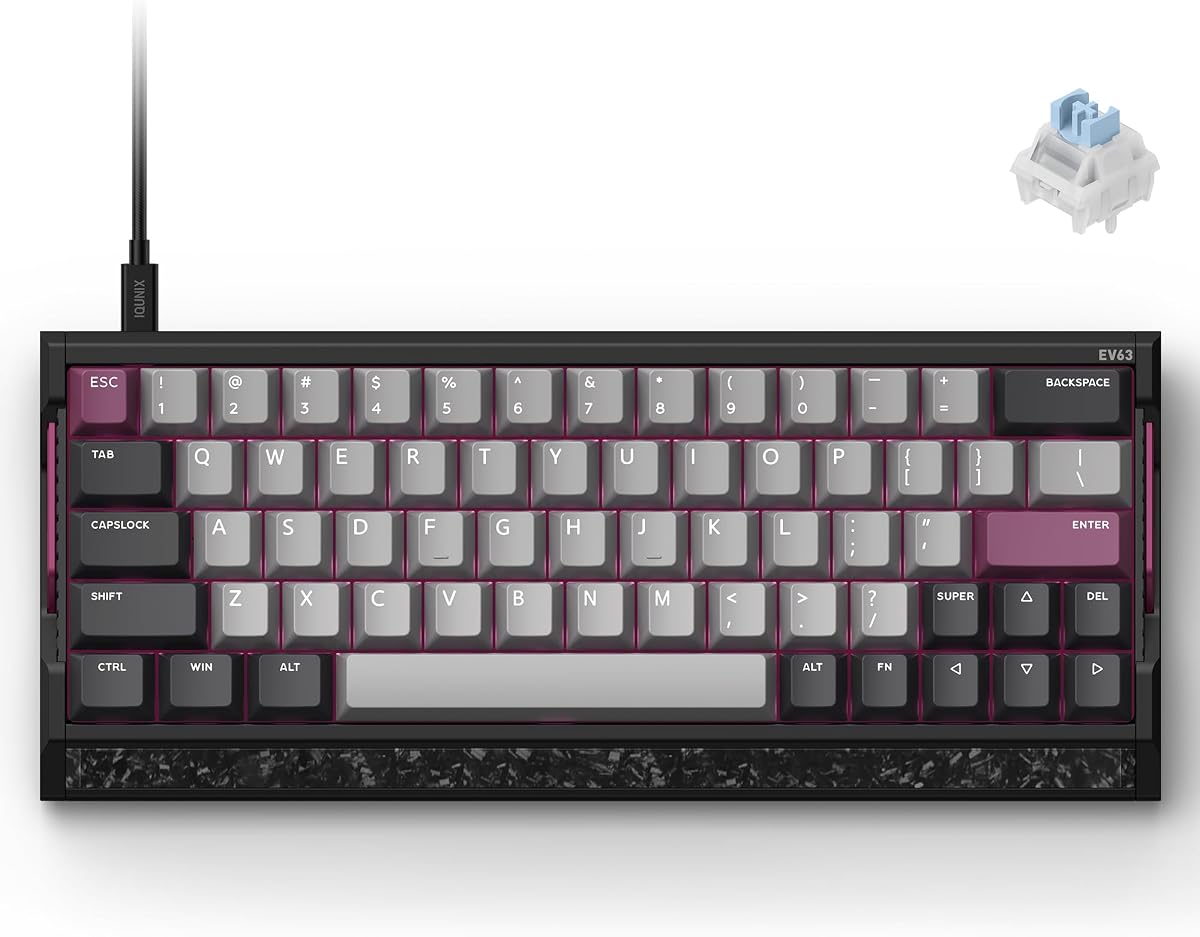
The IQUNIX EV63 Hall Effect represents a top-tier choice with premium materials and advanced tuning. It achieves 4.5 stars for its aircraft-grade aluminum case and M.A.T. algorithm that stabilizes inputs.
We may earn a commission when you buy through this link, at no additional cost to you.
Magnetic X Ultra switches feature 0.01mm rapid trigger for precise control during complex movements. The dual Hall power circuit reduces voltage fluctuation ensuring that your settings remain consistent across sessions.
The solid weight and forged carbon plate prevent unwanted desk movement during aggressive play. However these premium materials increase the cost making it an investment for dedicated enthusiasts only.
Buy this if you want a custom keyboard feel with reliable competitive performance. It is perfect for players seeking the highest build quality and precision available in the market.
Auto-tune algorithm checks keys in real time to reduce missed inputs and ensure stable performance.
Real forged carbon front plate reduces vibration and provides a solid custom-like feel.
We may earn a commission when you buy through this link, at no additional cost to you.
Selecting the right keyboard requires understanding how specific features impact your movement and aiming in Counter-Strike 2.
Hall Effect and optical switches use magnetic fields to detect keystrokes without physical contact. This allows for adjustable actuation points and rapid reset capabilities that significantly improve reaction time in competitive FPS games like CS2.
Look for magnetic switches with rapid trigger support to ensure your character stops instantly when you release keys.
Polling rate determines how often the keyboard sends data to the computer. Higher rates like 8000Hz provide near-instant input registration which is crucial for low-latency movement and quick counter-strafing.
Prioritize models with high polling rates to minimize input lag during high-speed gameplay.
Adjustable actuation allows you to change the depth at which a key registers. This feature lets you set shallow triggers for fast movement and deeper ones for precise typing or shooting.
Customize actuation points to match your specific playstyle and finger sensitivity.
Compact layouts like 60% or TKL free up desk space for larger mouse movements. Low sensitivity players often prefer smaller keyboards to maximize swiping room without needing to lift the mouse.
Choose a layout that fits your mouse pad size and wrist positioning needs.
Durable construction ensures the keyboard withstands intense gaming sessions. Materials like aluminum or carbon fiber reduce vibration and maintain stability during rapid key presses.
Select sturdy chassis materials to prevent unwanted movement during competitive play.
Robust software allows for macro programming and profile switching between games. Ensure the keyboard supports easy customization for quick adjustments during matches without leaving the game.
Opt for keyboards with user-friendly drivers for efficient profile management.
Start by installing the manufacturer software to customize actuation points and key bindings. Set rapid trigger to the lowest possible latency for faster movement responses in CS2.
Keep your keyboard clean by regularly brushing away dust and debris. If the model is water resistant, you may wipe it with a slightly damp cloth to remove oils and grime.
Store your profiles in the onboard memory if available. This ensures your settings remain intact even when switching between different computers or gaming setups.
Yes, Hall Effect switches offer faster reset times and adjustable actuation which enhance movement precision. This technology allows for rapid strafing without the mechanical limitations of traditional switches.
Rapid Trigger allows a key to reset as soon as it is released, regardless of actuation depth. This is vital for CS2 movement techniques like counter-strafing where immediate stops are necessary for accuracy.
A 60% keyboard provides more desk space for mouse movement which benefits low sensitivity players. However it may take time to adjust to the lack of arrow keys or number pad.
Install the driver software and access the actuation settings. Adjust the slider to set the trigger depth to your preference for aiming or movement keys and save the profile to the keyboard.
Both offer fast response times but magnetic switches typically allow for adjustable actuation and rapid trigger. Optical switches are durable and fast but may lack fine-tuning options found in Hall Effect models.
Membrane keyboards work but lack the speed and customization of magnetic or optical switches. They may limit your ability to perform rapid movement techniques effectively in competitive matches.
The Redragon K617 HE and Razer Huntsman V3 Pro TKL offer excellent options for budget and premium players respectively. Each provides the rapid response needed for competitive Counter-Strike 2 performance.
Prioritize features like rapid trigger and adjustable actuation over flashy RGB lighting when making your decision. These functional elements directly impact your movement control and reaction speed in matches.
Always verify current stock and pricing before purchasing since availability changes frequently. Choosing the right tool can significantly elevate your gameplay experience and competitive results.