
Thames & Kosmos My Robotic Pet
4.1Editor score
Screen-free color sensing coding
15-inch articulated robotic reptile
Three unique play modes included
This guide compares the top coding toys for kids, evaluating screen-free options, robotics kits, and educational apps to help parents choose the best STEM
Coding toys have revolutionized how children learn technology by turning abstract programming concepts into tangible, hands-on play experiences. These educational tools introduce logic, sequencing, and problem-solving skills in ways that are engaging and accessible for young minds.
We compared ten leading coding toys based on build quality, educational value, ease of use, and age appropriateness. Our analysis focuses on screen-free options, robotics kits, and interactive apps that foster creativity and technical literacy across different developmental stages.
Each pick highlights specific strengths like robotic assembly, color sensing, or voice interaction. Note that availability and pricing change frequently, so check current listings before purchasing to ensure you get the best value for your child's learning journey.
4.1Editor score

4.6Editor score

4.6Editor score
This side-by-side comparison evaluates all ten coding toys on key features like screen-free operation, assembly complexity, and educational depth to help you find the perfect match for your child's interests and skill level.




The Thames & Kosmos My Robotic Pet offers an engaging introduction to robotics for children aged eight and up. With a rating of 4.1 stars, it stands out as a budget-friendly option that combines physical assembly with coding concepts without needing a screen.
We may earn a commission when you buy through this link, at no additional cost to you.
This robotic chameleon features a 15-inch-long model with articulated eyes, torso, and leg joints to simulate realistic movements. Kids can use physical colored action cards to program the robot to move and react in different ways, utilizing a color sensor and infrared sensor.
While the build process takes time and may need adult assistance for younger users, the result is a highly interactive pet that changes colors and fires its tongue. The trade-off is the complexity of assembly, but it teaches patience and engineering principles.
This toy is ideal for children who enjoy hands-on building and want to learn coding basics without staring at a tablet. It provides authentic learning with a 48-page manual that guides assembly and explains how nature inspires engineering solutions.
Using physical action cards eliminates screen time while teaching programming logic effectively.
Articulated joints and sensors make the robot feel like a real living creature.
We may earn a commission when you buy through this link, at no additional cost to you.
The Makeblock mBot is a top-rated robotics kit designed for kids aged eight to twelve. With a 4.6 rating, it serves as an excellent entry point for learning electronics and programming step by step via interactive software and learning resources.
We may earn a commission when you buy through this link, at no additional cost to you.
Building this kit takes only 15 minutes, allowing kids to quickly learn about machinery and robotics components. It is well packaged and made of metal, ensuring durability. The open-source system allows connection to over 100 electronic modules and 500 parts.
The main consideration is that batteries are not included, requiring you to have CR2025 and AA batteries ready before play. However, the extensive tutorial resources and free Makeblock apps make it a powerful tool for discovery.
This robot is perfect for children who want to customize their projects and grow their skills over time. The ability to play as a remote control car or code complex actions makes it a versatile educational gift for birthdays or school.
Connect with hundreds of parts to create endless new robot configurations.
Start with simple controls and advance to complex coding logic easily.
We may earn a commission when you buy through this link, at no additional cost to you.
The Wonder Workshop Dash Robot offers a premium, hassle-free coding experience for children aged six and older. With a 4.6 rating, it is designed to provide a STEM advantage right out of the box without any assembly required.
We may earn a commission when you buy through this link, at no additional cost to you.
Dash can sing, dance, navigate obstacles, and respond to voice commands using five different apps for iOS, Android, and Fire OS. It includes 5 hours of active play time and is used in over 40,000 schools globally for teaching STEM skills.
The higher cost reflects its professional grade features and extensive educational resources. While it lacks a camera, its focus on movement and interaction ensures safety. The included USB charging cable keeps play continuous without battery anxiety.
This robot is ideal for families and schools seeking a robust tool that supports long-term coding education. Its ability to teach sequencing, loops, and algorithms through playful challenges makes it a standout investment in a child's future skills.
Trusted by thousands of educators to deliver consistent STEM learning outcomes.
Responds to voice commands to create engaging and dynamic play scenarios.
We may earn a commission when you buy through this link, at no additional cost to you.
The Sphero Mini packs a ton of fun into a tiny programmable robot the size of a ping pong ball. Rated 4.6 stars, it serves as a perfect entry into robotics for beginners who want to learn coding via app control and physical play.
We may earn a commission when you buy through this link, at no additional cost to you.
Powered by the free Sphero Edu app, you can create games and code the robot by drawing on screen or using drag and drop coding blocks. It includes 3 traffic cones and 6 bowling pins for obstacle course fun right out of the box.
While it offers a unique experience as a game controller for arcade-style games, the battery life is limited to about 1 hour. This requires planning sessions to ensure continuous fun. However, the portability makes it great for on-the-go learning.
This ball is best for kids who already enjoy using tablets and want a physical companion. It inspires the creators of tomorrow through hands-on applied learning of coding, science, and music, making it a fun STEM tool for teens.
Small enough to fit in a pocket but powerful enough to roll around rooms.
Switch between driving, coding, and gaming modes for diverse learning.
We may earn a commission when you buy through this link, at no additional cost to you.
The Learning Resources Code & Go Robot Mouse is designed with early learners in mind, supporting coding for kids ages four and up. With a 4.5 rating, it teaches programming basics through simple buttons and matching coding cards without any screen time.
We may earn a commission when you buy through this link, at no additional cost to you.
This set includes Colby the robot mouse, 16 maze grids, and various activity cards. Teachers can set up repeatable coding activities using maze grids, walls, and tunnels for classroom rotations, making it a strong introduction to robotics coding for young children.
Children strengthen sequencing and logic by programming the mouse to navigate mazes. The main constraint is the need for AAA batteries, which are not included, but the physical simplicity makes it accessible for emerging programmers building confidence.
Ideal for classroom STEM centers or home fun time, this toy helps kids learn directional understanding and problem-solving. The tactile feedback from Colby moving makes abstract coding concepts concrete and engaging for very young learners.
Button-based commands allow toddlers to code without needing complex touch interfaces.
Durable pieces and repeatable activities support group learning environments.
We may earn a commission when you buy through this link, at no additional cost to you.
The TEACH TECH Mech-5 is a one-of-a-kind Mechanical Coding Robot designed to inspire young engineers aged ten and up. With a 4.5 rating, this STEM robot can throw, lift, kick, draw, and more by snapping Coding buttons onto the Coding wheel.
We may earn a commission when you buy through this link, at no additional cost to you.
This is an in-depth STEM building project, not a pre-assembled toy. Following the detailed step-by-step assembly instructions ensures a true STEM experience. It may take multiple hours to build, teaching patience and proper assembly techniques.
The trade-off for the deep learning experience is the time required to build. However, once assembled, the robot is highly interactive. It uses a mission-based approach that teaches mechanical engineering principles alongside coding basics.
This kit is best for children who want to understand how machines work under the hood. Its ability to perform complex physical actions like kicking and lifting makes it a fascinating tool for future engineers to learn coding in a practical way.
Physical assembly teaches mechanics before introducing digital programming concepts.
Unique functions like kicking and lifting offer fun ways to test code.
We may earn a commission when you buy through this link, at no additional cost to you.
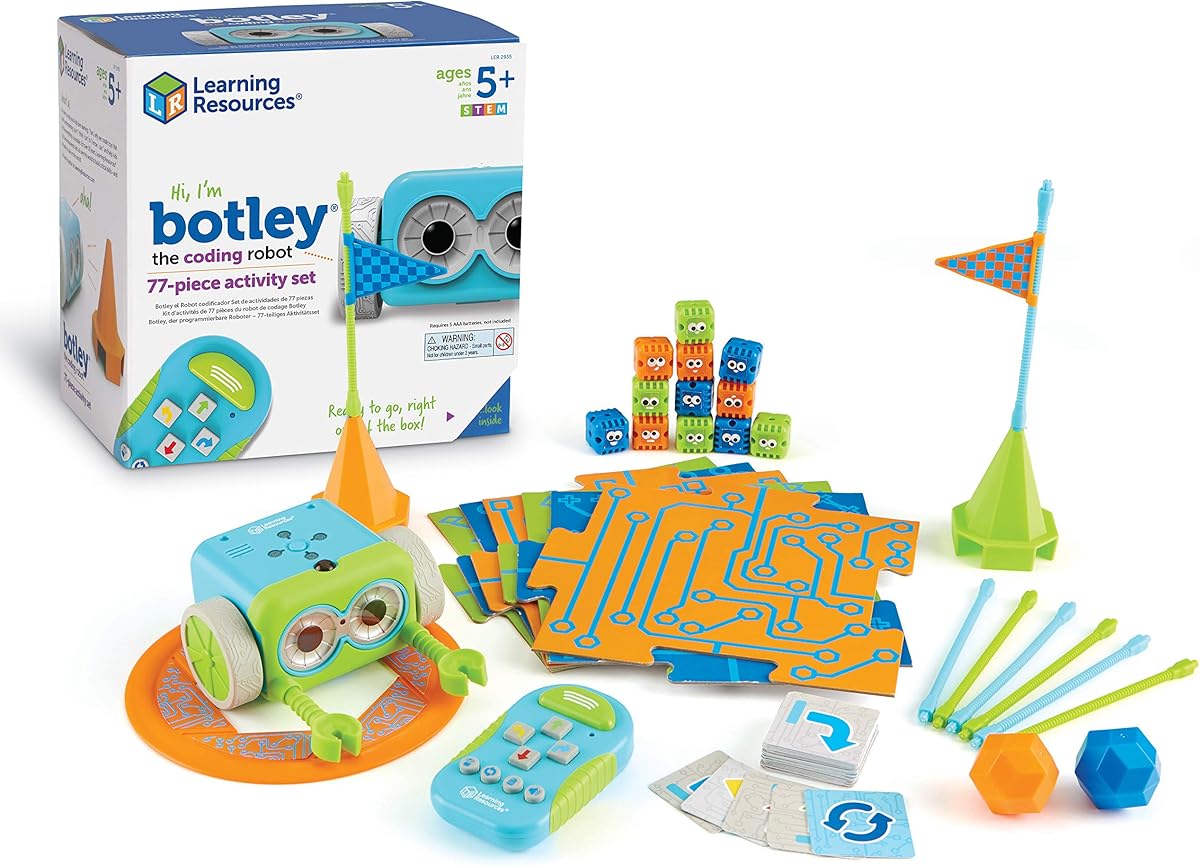
Learning Resources Botley The Coding Robot helps children learn early STEM skills through active, screen-free play. With a 4.6 rating, it features completely screen-free coding using a remote programmer that sends commands without needing a phone or tablet.
We may earn a commission when you buy through this link, at no additional cost to you.
Botley comes ready to code right out of the box with 77 pieces including detachable arms and coding cards. He has the ability to detect objects in front of him and avoid them, follow looping commands, and take on obstacle courses.
While you need to have AAA batteries and a Phillips screwdriver nearby, the setup is quick. The hidden features to unlock keep curiosity alive. This makes coding for kids easier and more accessible for those not ready for app-based learning.
This set is ideal for promoting critical thinking and problem solving skills. The removable arms allow for creative customization, and the 40 coding cards provide structured challenges. It remains a strong choice for classroom or home learning environments.
Robot can sense obstacles and adjust its path automatically for safety.
Remote programmer allows coding without any digital screens or apps.
We may earn a commission when you buy through this link, at no additional cost to you.
The Ozobot Evo Coding Robot Kit introduces children grades K-12 to coding in a fun and interactive way. With a 4.6 rating, it offers both online coding with Ozobot Blockly and screen-free learning with Color Codes, catering to various learning styles.
We may earn a commission when you buy through this link, at no additional cost to you.
This kit stands out by offering five skill levels from beginner to master, making it suitable for a wide age range. It includes an Evo robot and 5 dual-tip Color Code Markers in a zip case, ensuring organization for busy educational environments.
The main consideration is the price, but the extensive resource library of over 700 free lessons justifies it. The robot is durable enough for classroom use. This ensures it grows with the child's abilities over several years.
It is a superior choice for educators and parents seeking a comprehensive educational tool. The ability to switch between drawing codes on paper and using apps ensures flexibility. This makes it a practical investment for long-term STEAM education.
Mix paper-based coding with app-based coding to suit different learners.
Access hundreds of free lessons to support structured learning paths.
We may earn a commission when you buy through this link, at no additional cost to you.
The Learning Resources Botley 2.0 uses a simple remote to introduce early coding ideas through playful cause-and-effect actions. With a 4.5 rating, it strengthens planning and logic skills as kids design command sequences for their robot.
We may earn a commission when you buy through this link, at no additional cost to you.
As kids advance, this robot adds depth with multi-step coding paths and object-sensing reactions. It includes 78 pieces, allowing for custom mazes and imaginative stories. The 16 secret code combinations offer open-ended play for curious young creators.
The trade-off is the need for batteries, but the mult sensory fun with lights and music keeps it engaging. It builds confidence for future coders at home or in the classroom. The stacking pieces allow for creative vertical challenges.
This is a great upgrade for those who want more depth in their coding play. The ability to code 45 degree turns and react to objects provides advanced learning. It remains a screen-free option that simplifies early coding education.
New object sensors and turns allow for more complex route planning.
Secret codes and music add surprise elements to keep play fresh.
We may earn a commission when you buy through this link, at no additional cost to you.
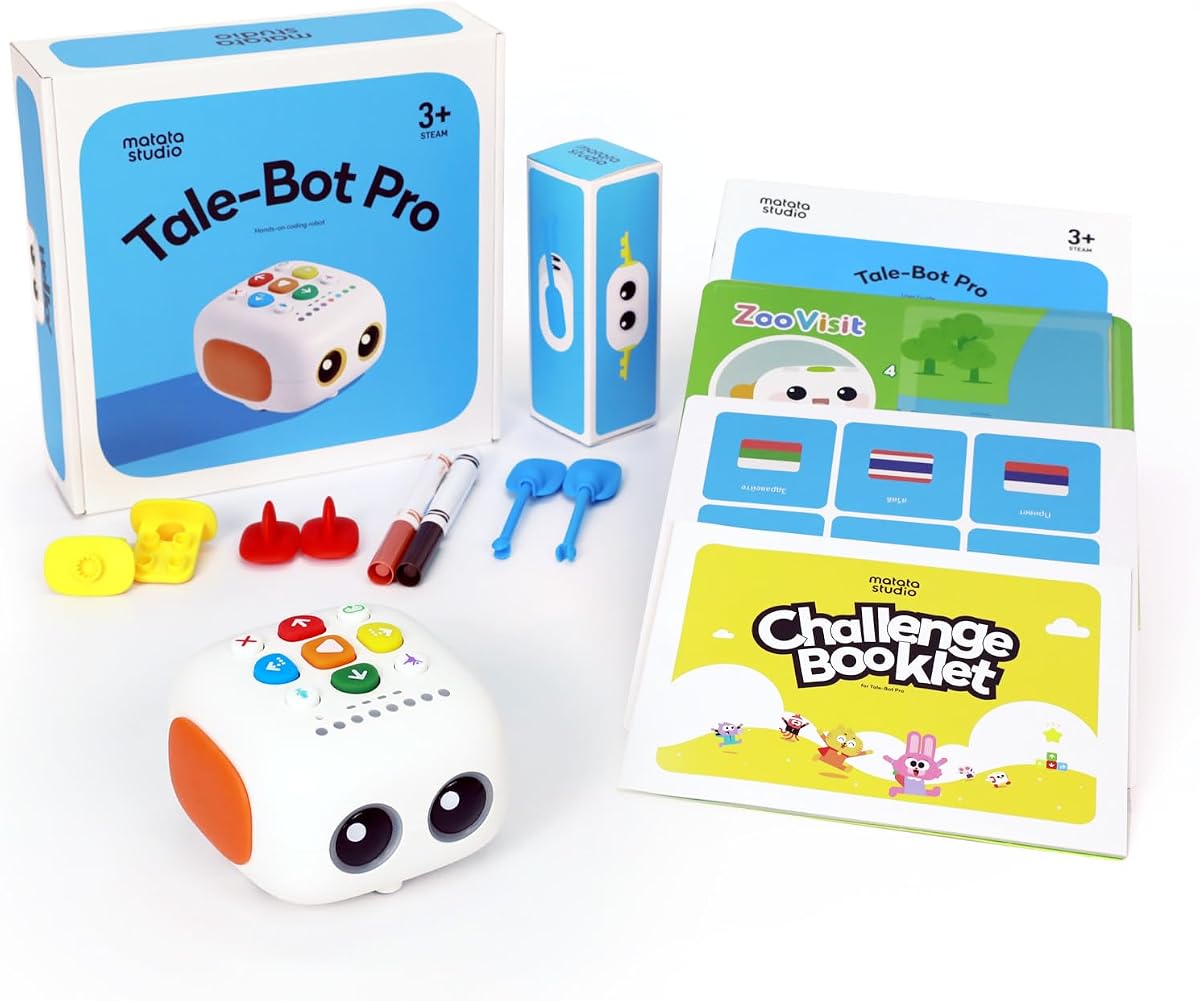
The TaleBot Pro offers interactive learning for toddlers aged three to five with instant voice feedback and storytelling features. With a 4.7 rating, kids can learn while engaging with rich stories that expand their imagination and language skills.
We may earn a commission when you buy through this link, at no additional cost to you.
Children can record their voice commands and imaginative tales, bringing them to life through the interactive map. It supports up to 256 commands and includes a double-sided interactive map with 14 missions to guide play and learning.
The main limitation is the age range, but the inclusion of 10 languages makes it versatile. It is also an autism toy for kids, offering touch-based controls without complex language. This creates a safe and educational tool for diverse learners.
This robot is ideal for early learners ready to explore sequencing. The compatibility with Lego blocks improves creativity and building skills. It fosters creativity, enhances storytelling, and teaches basic coding concepts through multi-sensory play.
Record voice commands to make the robot act out personal stories.
Touch controls and visuals support children with varying developmental needs.
We may earn a commission when you buy through this link, at no additional cost to you.
Selecting the right coding toy requires evaluating age appropriateness, screen dependency, and the specific skills you wish your child to develop. This guide breaks down the key factors to consider for informed choices.
Always check the recommended age range on the packaging. Toddlers need simple button-based interfaces while older kids can handle complex assembly and app integration. Mismatched difficulty can lead to frustration or boredom.
Choose a toy that matches your child's developmental stage to ensure engagement without overwhelming them.
Decide if you want to limit screen time. Screen-free toys use physical cards or buttons to teach logic without tablets. App-based toys offer more complex features but require devices.
Opt for screen-free if you want to reduce digital exposure, or app-based for deeper programming features.
Some kits require hours of building to learn engineering principles. Others come pre-assembled for instant play. Consider how much time you and your child can spend on construction.
Select high-complexity builds for engineering learning or low-complexity kits for immediate coding fun.
Look for toys that teach fundamental concepts like sequencing, loops, and variables. Some offer physical cards while others use drag-and-drop blocks on screens. Ensure the toy grows with your child's knowledge.
Prioritize toys that introduce core programming logic to build a strong foundation for future learning.
Robots are often dropped or knocked over. Check for metal components or reinforced plastic. Battery compartments should be secure. Durable toys withstand active play and last through multiple children.
Choose durable builds to ensure the toy survives rough handling and long-term educational use.
Always check if batteries are included or need to be purchased separately. Rechargeable options reduce waste and cost. Consider whether your child has the manual dexterity to open battery cases.
Prefer rechargeable or easy-access batteries to avoid interruptions during play or classroom use.
Many premium kits offer free online lessons and activity guides. These resources help parents teach coding concepts they might not know. Look for sets that include books or access to digital content.
Choose options with robust guides to help you support your child's learning journey effectively.
Look for toys that allow add-ons or integration with other building blocks. Modular robots grow with skill levels. Compatibility with systems like LEGO provides endless creative possibilities.
Select expandable toys to extend play value and challenge as your child's skills improve.
Always read the instruction manual carefully before assembling. Keep all small parts organized in a container to prevent loss. For battery-operated toys, remove batteries if the toy will not be used for long periods to prevent leakage.
Clean electronic surfaces with a dry, soft cloth. Avoid using liquids or cleaning sprays that could damage the sensors. Store the robot in a dry place away from direct sunlight to preserve the plastic and battery life.
Encourage your child to try creating their own challenges once they master the basics. Use the included activity cards as a starting point but let them modify the rules. This fosters creativity and reinforces the logical thinking they are learning.
Children as young as four can start with simple button-based toys that teach sequencing. Most advanced kits are designed for ages eight and up due to complexity. Choose age-appropriate options to ensure success.
No, many options like Botley offer screen-free coding using physical remotes. However, some advanced kits use apps for drag-and-drop programming. Check the specific product details before purchasing to know device needs.
Yes, many of these toys are used in over 40,000 schools. They come with teacher guides and group activity ideas. They are durable enough for classroom rotations and STEM labs.
Most introduce logic, sequencing, and debugging. Advanced models teach loops, variables, and even JavaScript. These skills form the foundation for real-world programming languages later in life.
Many kits like Makeblock allow you to buy add-on modules. This increases creative possibilities and keeps learning fresh. Check the manufacturer website for available expansions and compatibility details.
Playtime varies but generally ranges from one to five hours. Rechargeable units are more sustainable. Always check the specific battery life before purchasing to avoid interruptions during play.
We highlighted top picks like the Thames & Kosmos Robotic Pet for budget and the Wonder Workshop Dash Robot for premium needs. Each toy offers unique benefits for learning and play depending on age and interest.
Prioritize screen-free options if you want to limit device time, or choose app-based for deeper programming features. The right choice depends on whether you want quick play or deep engineering learning experiences.
Always check current listings before purchasing as pricing changes frequently. These toys provide a strong foundation for technical literacy. Investing in the right tool ensures your child stays curious and engaged.