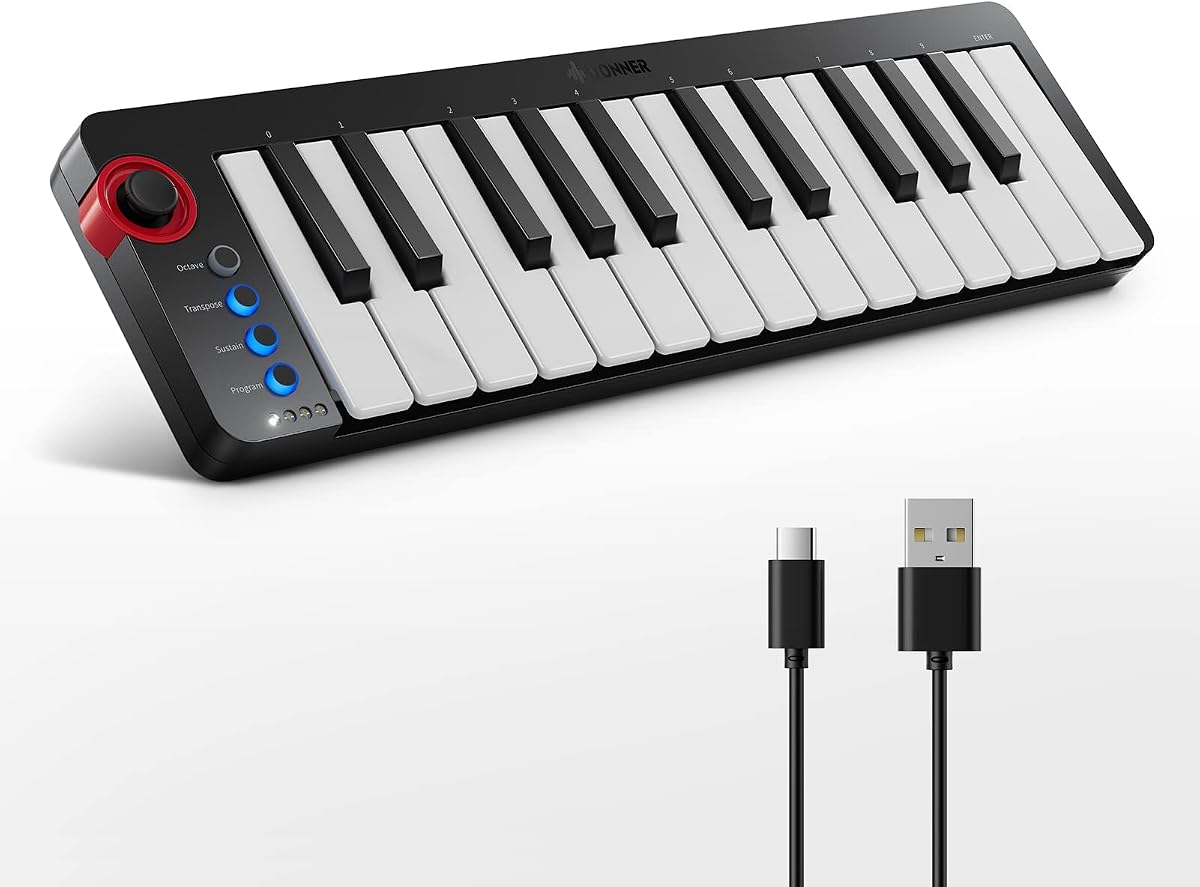
Donner Mini MIDI Keyboard N-25
4.1Editor score
40 teaching courses included
Light-up rocker buttons
USB-MIDI plug and play
This guide compares the top 25 key MIDI controllers for musicians and producers, evaluating features, compatibility, and performance to help you choose the
Finding the right 25 key MIDI controller can transform your music production workflow. These compact devices offer portability without sacrificing essential controls like keys, pads, and knobs. Whether you are a beginner or a seasoned pro, the right controller helps you capture ideas quickly.
We compared ten top-rated models based on build quality, software integration, and unique features. Our analysis covers everything from velocity-sensitive keys to DAW-specific mappings. This list ensures you find a controller that fits your specific creative needs and budget constraints effectively.
Each pick highlights key strengths and potential limitations to guide your decision. Look for compatibility with your favorite software and physical features that match your playing style. Remember that product specifications and availability can change, so verify details before purchasing.
4.1Editor score

4.6Editor score

4.7Editor score
This side-by-side comparison highlights the core specifications and features of each selected controller. Use this table to quickly identify which model offers the specific controls you need for your music production setup.


The Akai Professional MPK Mini MK3 stands out as a top choice for producers seeking versatility. With a solid rating of 4.6 stars, it delivers reliable performance for both studio and live use.
We may earn a commission when you buy through this link, at no additional cost to you.
Its standout features include the 4-way thumbstick for pitch and modulation, which offers precise control over sound shaping. The 8 backlit velocity-sensitive MPC-style pads are excellent for beat programming and sample triggering.
While the keys are compact, they provide sufficient velocity sensitivity for expressive playing. Some users may find the keybed smaller than full-size keyboards, but this is expected for a portable controller.
This controller is ideal for anyone needing a comprehensive tool that integrates seamlessly with major DAWs and Native Instruments software. Its included software bundle adds significant value for new and experienced producers.
The thumbstick provides dynamic pitch and modulation, allowing for expressive performances without reaching for extra knobs.
NKS support ensures you can browse and control Native Instruments presets directly from the controller for streamlined workflows.
We may earn a commission when you buy through this link, at no additional cost to you.
The Donner N-25 is an excellent entry-level option for beginners exploring music production. It offers essential features at a very accessible price point, making it easy to start creating music immediately.
We may earn a commission when you buy through this link, at no additional cost to you.
A unique selling point is the inclusion of 40 engaging keyboard-teaching courses. This educational component helps users learn music theory and production basics while using the hardware to apply what they learn.
The light-up rocker buttons add a fun visual element to performances, though the build is more basic compared to premium models. It lacks the extensive control knobs found on higher-end units.
For students or hobbyists wanting a simple way to connect to their computer or mobile device, this controller is a practical choice. It supports Mac and Windows systems without requiring extra drivers.
The 40 courses cover arrangement essentials, helping novices unlock creativity through structured learning alongside practical use.
Light-up buttons provide visual feedback during playing, adding an interactive element to your music production session.
We may earn a commission when you buy through this link, at no additional cost to you.
Arturia MiniLab 3 delivers a premium experience with high-quality keys and an adaptable workflow. Users appreciate its fluid design that minimizes reliance on a mouse, keeping you focused on creation.
We may earn a commission when you buy through this link, at no additional cost to you.
The inclusion of 4 faders and 8 pads offers extensive control over mixing and triggering clips. The velocity-sensitive keys are highly responsive, allowing for nuanced dynamic expression during live performance.
Although it carries a higher price tag than entry-level models, the build quality and tactile feedback justify the cost. The software included is robust but not as extensive as some competitor bundles.
For producers who prioritize touch and feel over sheer feature count, the MiniLab 3 is a standout choice. It is perfect for those seeking a refined tool that supports creative flow.
The layout adapts to your style, allowing quick access to tracks and controls without breaking your creative momentum.
Premium materials ensure durability and a satisfying tactile experience, essential for daily studio use.
We may earn a commission when you buy through this link, at no additional cost to you.
The Akai Professional LPK25 is a sleek and simple controller perfect for songwriting and traveling. It prioritizes ease of use, allowing you to spend less time configuring and more time creating music.
We may earn a commission when you buy through this link, at no additional cost to you.
With a built-in arpeggiator and clock, you can quickly generate melodic patterns for synthesizers or modular gear. The dedicated octave buttons let you play every note with ease across your software instruments.
Its USB-powered setup ensures you do not need extra adapters, making it ideal for mobile use. However, it lacks the extensive knobs and pads found on more complex production controllers.
If you need a reliable, minimal tool for inputting melodies and chords, the LPK25 fits perfectly. It is highly compatible with popular applications and requires no additional configuration to start working.
The arpeggiator helps create complex patterns quickly, adding creative flair to your compositions without manual input.
Designed for both beat-making and songwriting, this controller adapts to various musical styles and studio needs.
We may earn a commission when you buy through this link, at no additional cost to you.
The Novation Launchkey Mini 25 MK4 excels in integrating with major DAWs, offering intuitive workflows for various software. It provides 16 responsive FSR pads for detailed control over drums and clips.
We may earn a commission when you buy through this link, at no additional cost to you.
Scale Mode allows you to trigger lush chords from a single key, ensuring you never hit a wrong note. The FSR pads also serve as step sequencers and clip launchers, expanding creative possibilities significantly.
While it offers a powerful feature set, the price is higher than basic models. Users may need time to fully explore its advanced capabilities like polyphonic aftertouch and chord triggers.
This controller is perfect for users deeply invested in a specific DAW ecosystem like Ableton or Logic. Its robust software bundle ensures you have everything needed for professional production immediately.
Scale Mode ensures correct notes are played, helping beginners and pros alike create harmonically rich music effortlessly.
Advanced pressure sensitivity on pads allows for expressive control over sound parameters while playing.
We may earn a commission when you buy through this link, at no additional cost to you.
The Rhymo 25-key portable MIDI keyboard is designed for true hassle-free, on-the-go music production. Its slim and compact build ensures it can fit easily into bags for travel.
We may earn a commission when you buy through this link, at no additional cost to you.
It features an X-Y joystick for pitch bend and modulation along with an arpeggiator with latch and multiple modes. These controls allow for dynamic performances without needing extra hardware connections.
Bluetooth MIDI support makes it compatible with iOS devices and tablets directly, offering flexibility for mobile producers. The 6.35mm sustain pedal interface adds expressiveness that some controllers in this range lack.
For users seeking a versatile tool that connects via USB-C or Bluetooth, this is a strong option. It supports major DAWs without drivers, ensuring quick setup for spontaneous creativity.
Powered directly via USB-C, this controller eliminates the need for batteries or adapters during mobile sessions.
Joystick and sustain pedal support provide rich timbre and dynamic expression for professional sounding performances.
We may earn a commission when you buy through this link, at no additional cost to you.
The M-VAVE controller stands out with its wireless Bluetooth connectivity and impressive battery life. It allows you to connect wirelessly to your device for about 16 hours of continuous use.
We may earn a commission when you buy through this link, at no additional cost to you.
Its 8 RGB backlit velocity-sensitive pads and touch stripes offer robust control for mixing and sound tweaking. The smart chord and smart sound functions help set up performances quickly without deep music theory knowledge.
The semi-weighted dynamic keybed provides a better feel than typical mini keys, enhancing playability during extended sessions. However, wireless use may introduce slight latency compared to wired connections for precise timing.
For mobile users wanting freedom from cables while maintaining professional controls, this is a great choice. It works with most digital audio workstations across Windows, Mac, and mobile platforms.
Bluetooth connection lets you compose in cafes or hotels without being tethered to your computer.
Smart chord features let users choose keys quickly during performance, simplifying live play.
We may earn a commission when you buy through this link, at no additional cost to you.
The MPK Mini Play MK3 offers a unique standalone capability with a built-in speaker and internal sounds. This allows you to create beats and melodies without needing a computer connected.
We may earn a commission when you buy through this link, at no additional cost to you.
It features an OLED display and 8 backlit MPC-style pads, providing visual feedback and control for your music. The 100+ internal instrument sounds include pianos, synth leads, and pads for immediate creativity.
While the speaker is convenient for travel, its quality is basic compared to studio monitors. Battery power requires separate batteries, adding to the setup requirements when used without USB mains.
For users wanting a self-contained tool for idea sketching or travel, this model excels. It supports battery operation or USB mains power, offering flexibility depending on your environment.
Internal sounds and built-in speaker allow you to create music anywhere without needing a laptop.
Includes Melodics software with lessons to help improve your pad and keyboard skills systematically.
We may earn a commission when you buy through this link, at no additional cost to you.
This black variant of the MPK Mini MK3 offers the same robust features as the standard version with a sleek look. It retains the innovative thumbstick and MPC pads that define the series performance.
We may earn a commission when you buy through this link, at no additional cost to you.
Users can download the Editor to map knobs and joystick manually, adjusting the keyboard to their specific workflow preferences. The included NKS bundle provides over 1500+ sounds for pro production readiness.
While functionally identical to the standard model, the black finish offers a distinct aesthetic for studio setups. It supports the same comprehensive control over virtual instruments and effects mapping.
For those who prefer a darker studio look or specific bundle access, this version is a strong choice. It is ideal for producers needing customizable mappings and high-quality sound content.
Editor software allows manual mapping of controls, giving you full ownership of your workflow setup.
Access to over 1500 sounds ensures you have plenty of content for production without additional purchases.
We may earn a commission when you buy through this link, at no additional cost to you.
The APC Key 25 MK2 is specifically designed for deep integration with Ableton Live. It offers a 5×8 RGB pad matrix for launching clips with visual color feedback.
We may earn a commission when you buy through this link, at no additional cost to you.
25 responsive mini keys allow for melodic input while 8 assignable rotary knobs let you control device macros easily. The directional arrow buttons help scroll through tracks or scenes instantly during live performances.
Its pre-mapped integration means setup is minimal for Ableton users. However, those using other DAWs may find the dedicated functions less useful without reconfiguration.
For Ableton users, this controller is a top choice for seamless control and creativity. It includes a comprehensive virtual instrument pack to get you started immediately with powerful sounds.
RGB pads provide visual feedback when launching clips, essential for organizing live performance sets.
Device mode allows direct control of Ableton macros, giving instant manipulation of sound parameters.
We may earn a commission when you buy through this link, at no additional cost to you.
Choosing the right MIDI controller involves evaluating several factors that impact your workflow and creative capabilities.
Keys that respond to velocity allow for expressive dynamics, which is critical for realistic performances. Look for controllers that offer velocity sensitivity to ensure your playing translates well into digital instruments.
Prioritize controllers with good key feel to avoid fatigue during long sessions.
A well-designed layout allows you to reach all controls easily without disrupting your flow. Check if faders, knobs, and buttons are positioned logically for your typical use case.
Ergonomic design supports long-term comfort and efficiency in your production workflow.
Seamless integration with your preferred DAW saves time on mapping and configuration. Check if the controller supports major software like Ableton, Logic, or FL Studio out of the box.
Good software integration ensures you spend more time making music and less time setting up.
Modern controllers should support both USB-C and Bluetooth to accommodate various devices. Ensure it works with your computer, tablet, or mobile phone without requiring complex drivers.
Versatile connectivity expands where and how you can create music effectively.
If you travel often, a lightweight and USB-powered controller is essential for convenience. Some models offer battery power for completely cordless use in cafes or on stage.
Choose a power option that matches your typical environment and lifestyle.
Many controllers come with software suites that add value to the purchase. These often include virtual instruments and effects that can jumpstart your productions immediately.
Evaluate the included software to see if it meets your current production needs.
Durable materials ensure the controller withstands regular use and transport. A sturdy build protects your investment and maintains performance over time.
Look for robust construction to avoid repairs or replacements down the line.
Your budget should guide the feature set you can realistically afford without compromise. Higher-priced models often include better build quality and more comprehensive software bundles.
Balance cost against necessary features to get the best value for your needs.
Connect your controller via USB or Bluetooth to your computer or mobile device. Install any required drivers or software suites to ensure full functionality and control mapping.
Keep the controller clean by dusting it regularly with a soft cloth. Avoid placing it in direct sunlight or humid environments to protect internal electronics.
If using batteries, check them periodically to avoid corrosion. Store the controller in a case or bag when traveling to prevent accidental damage or scratches.
Most controllers connect to a computer to function fully, but some models offer standalone capabilities. Standalone units come with built-in sounds and speakers allowing you to create without a PC or Mac.
Yes, many controllers support mobile devices via USB-C or Bluetooth MIDI. You will need an appropriate OTG adapter to connect USB-powered devices to your mobile device.
Yes, velocity-sensitive keys allow dynamic expression based on how hard you press them. This feature is essential for realistic instrument performance and nuanced creative control.
An arpeggiator automatically plays a sequence of notes based on a chord you press. This feature helps quickly create melodic patterns without having to input each note manually.
Most modern controllers are class-compliant, meaning they work plug and play without drivers. However, some brands offer optional software to unlock advanced features or customization.
Yes, many are designed specifically for live use with features like transport controls and clip launching. Their portability makes them ideal for gigs where space and weight are concerns.
Most controllers work with major DAWs like Ableton Live, Logic Pro, FL Studio, and Cubase. Always check the specific mapping support for your preferred software before purchasing.
Most controllers come with mapping software that lets you assign physical controls to software parameters. You can usually map knobs, faders, and buttons through the manufacturer's editor tool.
We have reviewed the top 25 key MIDI controllers available in November 2026. Whether you prioritize budget, build quality, or software integration, there is an option for everyone.
Consider your primary workflow needs and how much portability matters to you. Selecting a controller that supports your specific software and creative style will enhance your productivity.
Prices and availability change frequently, so verify current specs before purchasing. Use this guide as a starting point to make an informed decision tailored to your goals.