
Thrustmaster T-Flight Hotas X
4.4Editor score
Detachable throttle design
Programmable buttons
Plug and play setup
Discover the top airplane controllers for PC flight simulation in October 2026. We compare ten premium and budget options for realism, features, and compatibili
Flight simulation has evolved into a highly immersive hobby that demands realistic input devices for true piloting experiences. Choosing the right airplane controller for PC can transform a static screen into a dynamic cockpit environment where every lever and switch matters.
We analyzed ten top-rated flight sticks and yokes based on build quality, sensor precision, programmability, and user feedback from sim enthusiasts. Our list covers everything from compact handheld joysticks to full-scale yoke systems designed for serious virtual aviators.
Each pick highlights unique strengths like magnetic sensors, detachable throttles, or Boeing licensing to help you match hardware to your preferred flight style. Keep in mind that availability and pricing fluctuate frequently, so verify current details before making your final purchase decision today.
4.4Editor score

4.0Editor score
4.6Editor score
This side-by-side comparison highlights key specifications and standout features across all ten flight controllers to help you identify the best fit for your setup.





The Logitech G X56 H.O.T.A.S offers military-grade precision tailored for serious flight simulation enthusiasts who demand high levels of control fidelity in their virtual cockpits.
We may earn a commission when you buy through this link, at no additional cost to you.
Its advanced four-spring system allows you to adjust stick resistance, while hall-effect sensors ensure accurate axis movement without wear. RGB backlighting helps you distinguish buttons quickly during complex scenarios.
While the price is steep and setup requires two USB 2.0 ports, the tactile feedback and extensive programmability justify the investment for users focusing on combat sims or detailed flight training.
Buyers seeking a premium, highly configurable HOTAS setup will appreciate how this controller bridges the gap between casual gaming and professional simulator hardware over long sessions.
Adjustable spring tension lets you match control feel to your specific piloting style, reducing fatigue during extended mission scenarios.
RGB lighting zones can be programmed to indicate modes or warnings, enhancing situational awareness without needing to check screens.
We may earn a commission when you buy through this link, at no additional cost to you.
The Logitech G PRO Flight Yoke System delivers a realistic simulation experience ideal for pilots learning aircraft systems through authentic control layouts and feedback mechanisms.
We may earn a commission when you buy through this link, at no additional cost to you.
Its stainless steel shaft provides smooth resistance, and the included throttle quadrant grants access to over 50 programmable functions, enabling full aircraft control without switching peripherals.
Although it requires significant desk space and external software for full features, the stability and ergonomic design make it a top choice for dedicated home cockpit builds.
Pilots focusing on commercial airliner sims should choose this set for its faithful replication of real-world handling characteristics and professional-grade durability standards.
The realistic yoke mechanics help experienced pilots build muscle memory essential for transitioning between virtual and real flight environments seamlessly.
A separate throttle quadrant ensures you have direct access to engine controls without overloading the yoke interface with redundant functions.
We may earn a commission when you buy through this link, at no additional cost to you.
The Thrustmaster T-Flight Hotas X offers a comfortable and affordable entry into flight simulation with essential ergonomic features designed to keep hands natural during flight.
We may earn a commission when you buy through this link, at no additional cost to you.
Its detachable throttle and adjustable resistance dial provide flexibility for different setups, while built-in memory saves profiles without needing constant driver interaction or software management.
While sensors lack the premium feel of higher-end units, the plug-and-play convenience and solid stability make it a reliable starter choice for hobbyists or budget-conscious gamers.
Those wanting a functional HOTAS without high costs will find this controller meets basic needs well and supports a wide range of civilian and military flight titles easily.
The wide hand rest and real-size throttle keep your hands in a natural position, reducing fatigue during long simulation sessions.
Plug-and-play compatibility ensures you can start flying immediately without complex configuration or installation steps after connecting to your PC.
We may earn a commission when you buy through this link, at no additional cost to you.
The Logitech G Saitek X52 Pro Flight Control System stands out with its intuitive LCD multi-function display that lets you view commands directly on the device.
We may earn a commission when you buy through this link, at no additional cost to you.
No contact technology on axes improves longevity, while the progressive throttle with detents offers precise control for managing speed or afterburners in tactical scenarios.
Despite a dated aesthetic and complex software requirements, the robust construction and handle adjustments make it suitable for users who prefer detailed on-board feedback.
Pilots seeking a middle-ground HOTAS with visible data readouts will appreciate the balance of features and durability this older model still provides effectively today.
An illuminated LCD display helps you check programmed commands without needing to look at a secondary screen or reference external manuals.
Contactless axis sensors reduce wear over time, ensuring that your movements remain consistent and accurate throughout years of regular use.
We may earn a commission when you buy through this link, at no additional cost to you.
The PXN 2113PRO PC Joystick provides an immersive flying experience with vibration feedback designed to simulate aircraft movement and environmental forces realistically.
We may earn a commission when you buy through this link, at no additional cost to you.
Its rapid fire trigger and multi-directional hat switch allow quick commands during combat, while four-axis control and 12 programmable buttons offer flexible mapping for various games.
Limitations include Windows-only compatibility and basic materials that may not withstand heavy usage, but its low cost makes it an accessible option for casual flight gaming.
Newcomers looking to test flight sims without a large financial commitment will find this controller delivers sufficient basic functionality to start their journey.
The vibration function adds tactile feedback during flight maneuvers, helping you feel turbulence or engine vibrations through the stick.
Support for titles like War Thunder and World of Warplanes ensures broad usage across both civil and military flight simulation genres.
We may earn a commission when you buy through this link, at no additional cost to you.
The Logitech G X52 Flight Control System uses magnetic non-contact sensors to provide pinpoint accuracy and enhanced longevity for serious simulation pilots.
We may earn a commission when you buy through this link, at no additional cost to you.
A built-in LCD display tracks your commands, and a 3D twist rudder lock prevents accidental activation, ensuring precise control during critical flight phases.
While the initial cost is higher and software setup demands time, the robust build and detailed feedback justify the investment for dedicated enthusiasts.
Pilots needing high-precision axes and extensive button mapping should choose this controller to maximize their control over complex flight scenarios effectively.
Magnetic sensors eliminate physical contact on axes, which prevents wear and maintains calibration accuracy over many hours of use.
A 3D twist mechanism with lock function allows you to disable rudder input when not needed, reducing accidental axis movements.
We may earn a commission when you buy through this link, at no additional cost to you.
The Thrustmaster TCA Yoke & Quadrant Boeing Edition brings authentic airliner controls to your PC with a 1:1 scale replica of the Boeing 787 cockpit.
We may earn a commission when you buy through this link, at no additional cost to you.
Its pendulum mechanism mimics real flight motion, and metal internal structures ensure balance, while the quadrant handles speed and altitude with precise feedback.
Though expensive and space-consuming, this pack transforms your setup into a professional cockpit, offering unmatched realism for commercial flight enthusiasts.
Pilots focused on Boeing airliners will value the licensed design and realistic feel that closely mirrors actual aircraft control dynamics in simulation environments.
The pendulum mechanism replicates realistic aircraft movement, adding an extra layer of immersion to your takeoff and landing phases.
A dedicated throttle quadrant provides dedicated levers for speed and altitude, mirroring the layout found in modern airliner cockpits.
We may earn a commission when you buy through this link, at no additional cost to you.
The Thrustmaster TCA Sidestick Airbus Edition offers an authentic Airbus A320 cockpit experience with contactless magnetic sensors that prevent drift over time.
We may earn a commission when you buy through this link, at no additional cost to you.
Its integrated throttle axis and rudder twist handle give a complete solution in a compact form, while braille-style buttons aid identification during night flights.
Although designed specifically for Airbus layouts, the precision and customization make it ideal for pilots who prefer side-stick control over traditional yoke systems.
Pilots focusing on commercial Airbus flight should choose this controller for its licensed accuracy and smooth magnetic control that mirrors real-world systems.
Magnetic sensors eliminate wear, ensuring your inputs stay calibrated and accurate for thousands of flight hours without drifting.
A built-in throttle axis with reverser functionality removes the need for an extra peripheral, saving space on your desk.
We may earn a commission when you buy through this link, at no additional cost to you.
The Turtle Beach VelocityOne Flightstick combines flight control with cursor navigation via a built-in touchpad, making it versatile for both simulation and general PC use.
We may earn a commission when you buy through this link, at no additional cost to you.
Non-contact axes ensure precision, while the OLED display shows flight data, and 27 programmable buttons cover a wide range of functions for various flight modes.
Although the touchpad can add complexity to setup, the ability to map controls for jets or airliners appeals to users who want one controller for many tasks.
Pilots who need a flexible, all-in-one solution for both gaming and general desktop interaction will find this universal controller offers unique practical benefits.
An integrated touchpad sensor allows full cursor control, helping you navigate menus without reaching for a separate mouse device.
An OLED flight management display keeps key flight data visible directly on the controller, reducing eye strain on your main monitor.
We may earn a commission when you buy through this link, at no additional cost to you.
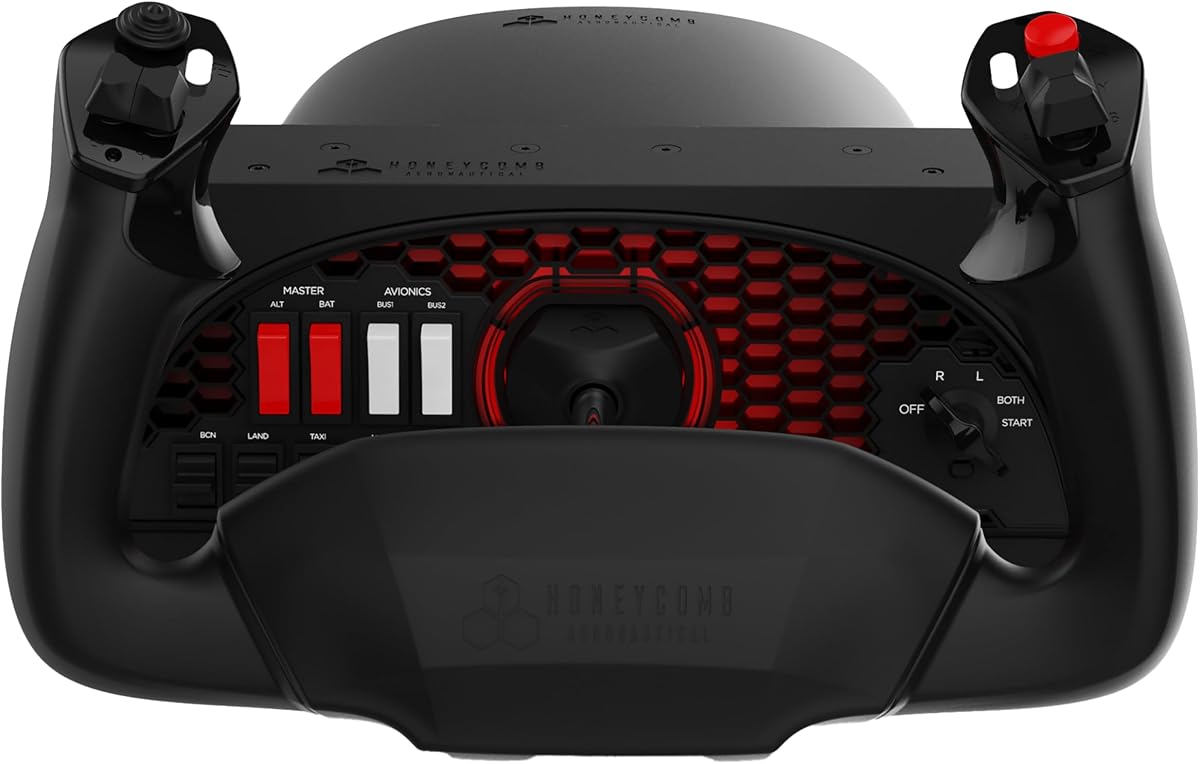
The Honeycomb Alpha Flight Controls Yoke & Switch Panel delivers true-to-life simulation with a 180-degree rotation and a solid steel shaft for smooth movement.
We may earn a commission when you buy through this link, at no additional cost to you.
A dedicated switch panel adds avionics control, and red LED backlighting improves visibility at night, while the dampened centering mechanism ensures accurate flight inputs.
Though it comes at a premium price, the durable materials and engineering-backed design justify the cost for serious aviators seeking professional-grade realism.
Pilots who value robust hardware and precise controls will find this yoke offers the reliability and detail needed for high-fidelity virtual flight experiences.
An integrated switch panel provides dedicated controls for avionics and lights, mirroring the layout of real cockpit switchboards.
A self-centering mechanism with minimal deadzone ensures your controls return to neutral smoothly and accurately after every maneuver.
We may earn a commission when you buy through this link, at no additional cost to you.
Selecting the right flight controller requires understanding different hardware types and key features that impact your simulation experience.
Flight controllers range from simple handheld joysticks to full yoke systems and HOTAS setups. Handheld sticks are compact but lack realism, while yokes mimic commercial airliners. HOTAS units balance both worlds by combining a joystick and throttle in one system, making them versatile for general flight and combat sims.
Choose a type that matches your preferred aircraft; yokes suit commercial pilots, while HOTAS or sticks work better for fighters or general aviation.
Materials matter significantly for durability and realism. Metal components or high-quality plastics reduce flex and wear over time. A solid base with clamps ensures the controller stays stable during aggressive maneuvers.
Prioritize units with sturdy internal frames to prevent wobbling, which enhances control precision and long-term reliability.
Modern controllers use Hall-effect or magnetic sensors instead of potentiometers. These non-contact sensors eliminate wear, preventing drift and ensuring consistent accuracy over thousands of hours of use.
Always look for magnetic or Hall-effect sensor specs to avoid gradual loss of calibration in older models.
The number of programmable buttons and axes determines how many in-game functions you can map. Higher-end models offer over 50 buttons, enabling full aircraft control without keyboard switching.
Check software support to ensure you can map complex sequences easily and save profiles for different aircraft.
Some controllers include a detachable or fixed throttle lever, while others are stick-only. A dedicated throttle offers better control over engine management and is essential for accurate flight modeling.
Decide if you need a built-in throttle or prefer to buy a separate quadrant based on your available desk space.
Comfort is critical for long sessions. Ergonomic grips, adjustable stick tension, and proper button placement prevent fatigue. Some units offer multiple grip positions to suit different hand sizes.
Test the controller feel if possible, or read reviews about comfort to ensure it fits your hands well.
Good controller software allows advanced mapping and LED control. Compatibility with flight sim software like Microsoft Flight Simulator or X-Plane ensures you get all features without workarounds.
Verify the software requirements and system specs before buying to avoid compatibility issues with your PC setup.
Prices range from under $100 to over $500 for premium kits. Entry-level units provide basic functionality, while high-end options offer professional realism and durability. Set a budget that matches your commitment level to flight sims.
Consider that investing slightly more often yields better long-term value due to improved build quality and features.
Begin by connecting your controller via USB and installing any required drivers or calibration software. Ensure the device is recognized in Windows settings before launching your flight simulator.
Map key flight controls to the most accessible buttons on your stick or yoke. Group functions by frequency of use to reduce hand movement and improve reaction time during flight.
Maintain your controller by keeping it clean and free of dust. Periodically check mounting clamps and tighten screws to ensure stability and prolong the lifespan of your hardware.
Most modern flight sticks support major simulators like Microsoft Flight Simulator and X-Plane. However, some specific features may require additional software or configuration within the game to fully utilize all buttons and axes.
Not necessarily. Many controllers come as a combined HOTAS system including a throttle lever. Separate throttles are useful if you want more specialized control or have limited desk space.
Calibration is usually handled via Windows Game Controller settings or manufacturer software. Follow the on-screen prompts to ensure axes are centered and buttons register correctly.
A yoke mimics real airplane control wheels and is best for commercial aircraft. A stick resembles a fighter jet control stick and suits combat or general aviation flight simulation.
While optimized for flight sims, many flight sticks can map inputs to other genres like driving games. However, the controls may not feel as intuitive without extensive mapping.
Drift often occurs due to worn potentiometers. Controllers with magnetic or Hall-effect sensors avoid this issue. Calibrating the device can temporarily fix minor drift in older models.
Yokes require significant desk space and usually clamp to a sturdy surface. Measure your desk area and ensure it can support the width and depth of the yoke and throttle before buying.
Our top recommendations include the Logitech G X56 for customization, the Thrustmaster T-Flight Hotas X for budget value, and the Honeycomb Alpha Yoke for premium realism.
Prioritize build quality and sensor technology to ensure accuracy and longevity. Choose a controller type that aligns with the aircraft you fly most often for the best experience.
Remember to check current pricing and availability before purchasing, as deals and stock levels change frequently across online retailers and stores.