
Qanba N3 Drone 2 Wired Joystick
4.5Editor score
Authentic Qanba components
Full control panel included
Officially licensed Sony peripheral
This guide compares the best arcade stick for PS5 options including licensed fightsticks and wireless controllers for tournament play and casual gaming.
Finding the right arcade stick for PS5 transforms your fighting game experience from basic to professional. A high-quality fightstick offers precise inputs and durability that standard controllers cannot match for competitive play sessions.
We analyzed ten top-rated models based on build quality, component reliability, and platform compatibility. Each product was evaluated for its official licensing status and suitability for modern fighting titles like Street Fighter six and Tekken eight.
Each pick highlights specific strengths such as customization options wireless connectivity or premium parts. Please note that prices fluctuate frequently so check current listings before making your final decision for the best value.
4.5Editor score

4.6Editor score
4.5Editor score
The following table provides a side-by-side comparison of all ten reviewed arcade sticks for PS5. Each entry highlights key specifications and official licensing status to help you quickly identify the model that best fits your specific gaming needs and budget requirements.


The HORI PlayStation 5 Fighting Stick Alpha stands out as the top choice for serious fighting game enthusiasts. With a strong 4.6 rating this tournament grade fightstick delivers the precision and reliability needed for competitive play on PS5 PS4 and PC.
We may earn a commission when you buy through this link, at no additional cost to you.
Its standout quality lies in the proprietary Hayabusa buttons and joystick which offer incredibly fast response times. The stick opens easily for customization and maintenance allowing players to swap parts or replace the top panel artwork to suit their preferences.
While the price is higher than budget alternatives the official licensing and durability justify the investment. Players should expect a premium feel that reduces input lag and enhances performance during intense matches against opponents online or locally.
This stick is ideal for both aspiring competitors and casual players who want a console experience. The official license ensures seamless integration with the PS5 ecosystem making it the safest and most reliable choice for dedicated fighting game fans.
The inclusion of proprietary Hayabusa buttons and joystick ensures rapid response times crucial for competitive fighting games.
The open chassis design allows for easy maintenance and swapping of parts like top panel artwork.
We may earn a commission when you buy through this link, at no additional cost to you.
The Nacon Daija Arcade Fight Stick is a top contender for players seeking official licensing without breaking the bank. Developed with professional gamers it offers robust features like Sanwa joystick and action buttons that guarantee durability and precision.
We may earn a commission when you buy through this link, at no additional cost to you.
Its strengths include full button mapping capabilities using dedicated software on PC and Mac. The textured palm rest provides sturdy support for long sessions and the ability to switch between two joystick heads ensures you find the perfect control solution.
While the audio jack and chat features are useful they may not match standalone headsets. The software setup requires some patience but once configured the stick delivers the competitive edge needed for titles like Street Fighter and Tekken.
This model is perfect for budget conscious gamers who still want high quality components. The inclusion of tools and extra joystick heads makes it a versatile choice that grows with your skills and preferences over time.
The Sanwa joystick and action buttons are a leading brand among professional fighting game players ensuring premium quality and durability.
Full button mapping allows players to configure profiles easily using the intuitive and user-friendly software provided.
We may earn a commission when you buy through this link, at no additional cost to you.
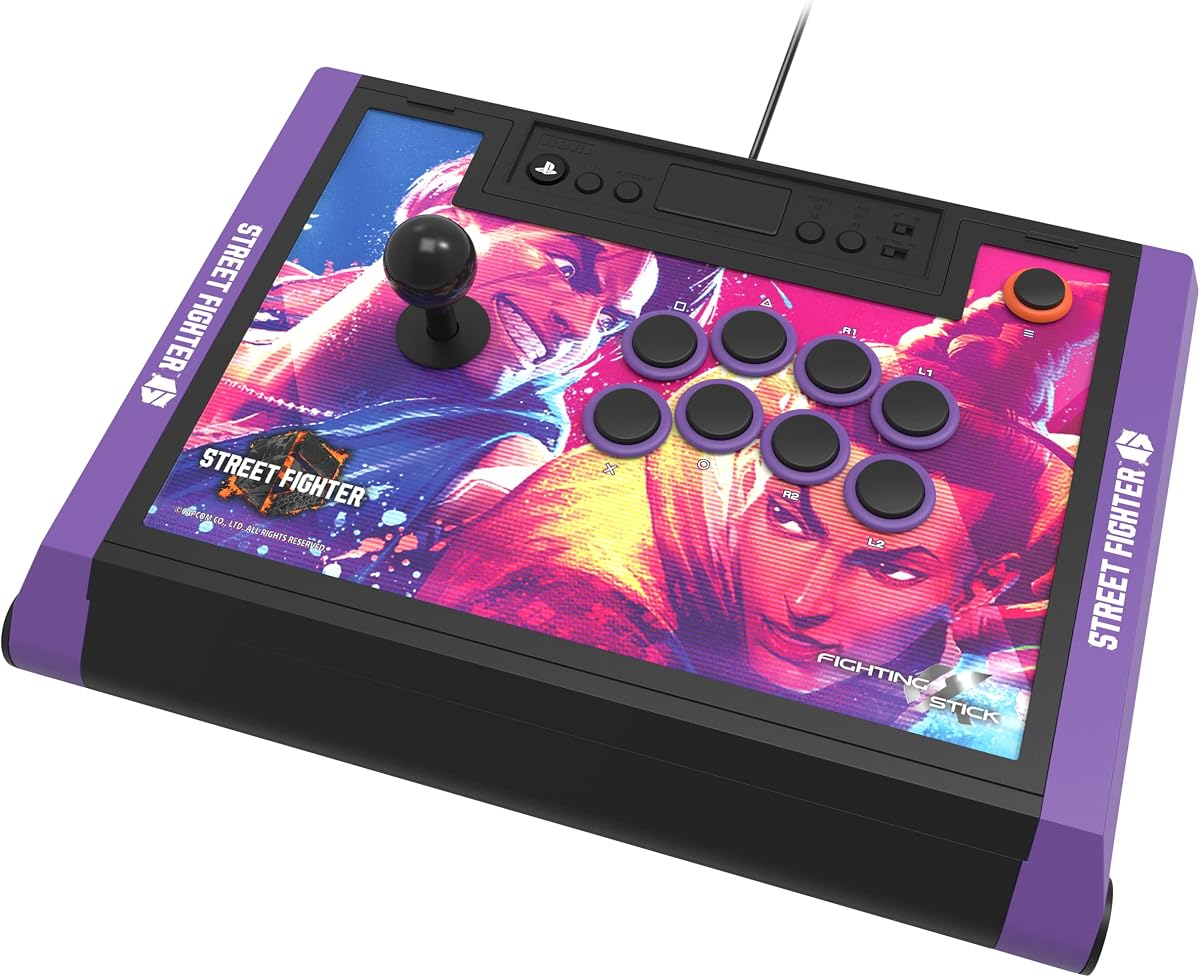
The HORI Street Fighter 6 Edition brings exclusive licensed art to the highly rated base model. This tournament grade stick maintains the premium Hayabusa components while featuring a unique design that appeals to dedicated fans of the series.
We may earn a commission when you buy through this link, at no additional cost to you.
Its main strength is the thematic appeal without compromising performance. The included link to downloadable hi-res images lets you personalize the top panel further. It opens easily for maintenance just like the standard version ensuring longevity.
The price reflects the premium branding and exclusive content which some users may find steep. However for collectors and fans the unique design offers a level of immersion and satisfaction that generic sticks simply cannot provide.
This stick is ideal for fans who want to show off their allegiance while competing. It combines the reliability of the standard Alpha with the visual flair needed to stand out at local tournaments or streaming setups.
Includes a link to 18 downloadable hi-res images of your favorite Street Fighter 6 characters for top-panel customization.
High-end tournament ready fight stick compatible with PlayStation 5 PlayStation 4 and PC with official licensing.
We may earn a commission when you buy through this link, at no additional cost to you.
The MAYFLASH F700 offers versatile connectivity that bridges the gap between multiple gaming platforms. With support for PS5 PS4 Switch and PC it is an excellent choice for players who use more than one console.
We may earn a commission when you buy through this link, at no additional cost to you.
Its key strengths include three connection methods including Bluetooth and 2.4G which reduces cable clutter. The ability to update firmware for Switch 2 compatibility ensures long term relevance for Nintendo users and the turbo functions add tactical depth.
The main limitation is that it only supports fighting games on PS5 which restricts some utility. However for dedicated fighting game fans the multi-platform flexibility makes it a highly valuable investment across various gaming systems.
This stick is best for cross-platform gamers who want one device for multiple systems. The included hidden compartment keeps the receiver safe and the support for Sanwa components allows for future upgrades to suit your playstyle.
Compatible with PS5 PS4 PS3 Switch Switch 2 Windows Apple macOS iOS and Android for broad utility.
Three ways to connect via Bluetooth 2.4g and wired USB for different usage scenarios.
We may earn a commission when you buy through this link, at no additional cost to you.
The Qanba N3 Drone 2 is a compact wired option that delivers professional performance in a smaller form factor. Officially licensed by Sony it ensures seamless integration with PS5 and PS4 systems for consistent gameplay.
We may earn a commission when you buy through this link, at no additional cost to you.
Its strengths lie in the authentic Qanba buttons and lever which provide reliable tactile feedback. The full control panel adds extra functionality that is rare at this price point making it great for custom configurations.
The stick lacks wireless options which may inconvenience some users but the wired connection ensures zero latency. The mic input is a handy feature for communication which adds value for online multiplayer sessions.
This stick is ideal for players who prefer a smaller footprint on their desk. It balances build quality and features well making it a strong contender for those seeking official licensing without the premium price tag.
Officially licensed Sony peripheral ensuring full compatibility with PlayStation 5 PlayStation 4 and PC systems.
Authentic Qanba buttons and lever provide reliable feedback consistent with professional arcade machines.
We may earn a commission when you buy through this link, at no additional cost to you.
The MAYFLASH F700 Elite improves on the standard model with premium Sanwa components and an anti-slip rubber mat. It offers the same versatile multi-platform compatibility as the base version but with a focus on high-end tactile performance.
We may earn a commission when you buy through this link, at no additional cost to you.
Its key strength is the use of eight highly responsive buttons and a precision 4-way joystick. These components ensure reliability strike instantly and surely which is crucial for competitive play. The mat ensures the stick stays firmly in place on any surface.
The lack of Xbox wireless support limits some use cases but the included features for PS5 and Switch are robust. The turbo functions and anti-slip mat add practical value that enhances the overall gaming experience significantly.
This stick is ideal for competitive players who want premium components at a reasonable price. The anti-slip mat is a standout feature that prevents movement during intense matches ensuring consistent input registration.
Using premium quality Sanwa components including eight highly responsive buttons and a precision 4-way joystick.
Full size anti-slip rubber mat works to hold the fighting stick firmly in place on any surfaces.
We may earn a commission when you buy through this link, at no additional cost to you.
The MAYFLASH F500 Bundle offers an affordable solution for PS5 and Xbox players using Magic Boots. This compatibility kit allows you to plug and play without needing the original controller plugged in which simplifies the setup process.
We may earn a commission when you buy through this link, at no additional cost to you.
Its strengths include support for a wide range of consoles including Xbox Series X S and PC. The ability to use D input and X input on PC makes it a versatile tool for emulation and gaming across different environments.
However the need for a wired controller on Xbox One and 360 can be a drawback. The lower rating suggests some quality concerns but the value proposition of including Magic Boots makes it accessible for casual fans.
This bundle is best for budget conscious players who need cross-console functionality. It provides a practical entry point for fighting games on PS5 and Xbox without requiring a significant upfront investment.
Plug and Play by using the Magic Boots for PS5 and PS4. No need the original PS4 or PS5 controller plugged in.
Compatible with PlayStation 5 Xbox Series X S PS3 Switch and Windows for broad utility.
We may earn a commission when you buy through this link, at no additional cost to you.
The HORI TEKKEN 8 Edition delivers the same tournament grade quality as the base Alpha with exclusive licensed art. It is officially approved by Sony and Bandai Namco ensuring full compatibility and a premium experience for fans of the series.
We may earn a commission when you buy through this link, at no additional cost to you.
Its strengths are identical to the standard Alpha with Hayabusa buttons and joystick. The downloadable alternate artwork lets you change the look easily so you are not stuck with one design forever.
The main limitation is the cost which includes the licensed art. However for dedicated TEKKEN fans the visual appeal combined with reliable performance makes it a worthwhile investment for collectors and competitors alike.
This stick is ideal for TEKKEN players who want a personalized setup. It combines the proven reliability of HORI with the exclusive thematic elements that make your setup feel more immersive during intense matches.
Officially Licensed by Sony and Bandai Namco Entertainment for full compliance and compatibility.
Features HORI’s proprietary HAYABUSA buttons and HAYABUSA joystick for tournament ready performance.
We may earn a commission when you buy through this link, at no additional cost to you.
The Qanba Q7 Obsidian 2 combines official licensing with a user friendly design that supports multiple platforms. It features a switch to easily change between PS5 PS4 and PC which streamlines the setup for multi-console households.
We may earn a commission when you buy through this link, at no additional cost to you.
Its key strength is the swappable Sanwa JLF joystick tops which allow you to adjust stick height and feel. This customization option adds significant value over other models in the same price range.
The stick is fully licensed which ensures consistent performance on Sony systems. The touch pad adds extra functionality but the price is slightly higher than some rivals which may impact budget conscious buyers.
This stick is ideal for players who want a mix of official safety and customization. The ability to swap joystick tops is a standout feature that sets it apart in the crowded market of licensed fightsticks.
Has switch to change between PS5 PS4 and PC quickly without unplugging the device.
Swappable Sanwa JLF joystick tops allow for precise adjustment of stick height and feel.
We may earn a commission when you buy through this link, at no additional cost to you.
The GuileKeys GK-18 offers a distinct leverless design that replaces the joystick with directional buttons. This all-button layout is designed to reduce input errors and improve speed for players who prefer a keyboard-like experience.
We may earn a commission when you buy through this link, at no additional cost to you.
Its strengths include hot-swappable switches which allow easy modification without soldering. The integrated OLED screen and RGB lighting add a modern aesthetic that helps keep you informed of input modes at a glance.
The main trade off is that it requires an additional converter for PS5 use which adds complexity. The learning curve to master the layout is significant but those who adapt will appreciate the precision and speed it offers.
This stick is best for players looking to try something different than traditional fightsticks. The hot-swap feature and customization options make it a unique choice for tinkerers and competitive gamers seeking an edge.
Using four-direction movement buttons instead of a joystick reduces input errors and offers precise actions.
The integrated OLED screen clearly displays your current input mode and button layout at all times.
We may earn a commission when you buy through this link, at no additional cost to you.
Selecting the right arcade stick for PS5 requires understanding key features that impact performance and durability. This section breaks down the most important factors to consider before making your purchase.
Officially licensed products ensure full compatibility with the PS5 operating system. Unlicensed sticks may work but can suffer from input lag or disconnect issues during matches. Always verify the product packaging states it is licensed by Sony for the safest experience.
Prioritize officially licensed sticks to avoid compatibility problems and ensure reliable performance.
High-quality components like Sanwa or Hayabusa buttons and joysticks provide consistent feedback and durability. Cheap alternatives may wear out quickly under heavy use. Check the product description for specific part names to gauge quality.
Look for branded components like Sanwa or Hayabusa to ensure long-term reliability.
Wired sticks offer the lowest latency but wireless options provide flexibility for clean setups. Consider if your gaming environment benefits from wireless freedom or if wired precision is more important. Some models offer both options for the best of both worlds.
Choose wired for competitive play and wireless for a clean and flexible setup.
The ability to swap parts like panels and buttons allows you to tailor the stick to your needs. Models that open easily for maintenance are easier to repair or upgrade later. This feature adds significant value to the overall ownership experience.
Select a stick with an open chassis for easier maintenance and upgrades.
If you play on multiple consoles choose a model that supports PS5 and other systems like Switch or PC. Multi-platform sticks save money and space by serving as your primary controller for various games. Ensure the mode switching is seamless.
Prioritize multi-platform support if you use more than one gaming console.
Materials like aluminum or high-density plastic affect weight and durability. A heavier stick stays in place during intense matches. Check product specs for weight and build material to ensure it feels substantial enough for your needs.
Look for solid materials like aluminum to ensure durability and stability.
Budget sticks may compromise on parts while premium ones offer better longevity and features. Determine your budget range and compare it with the components included. Sometimes spending a little more gets you significantly better parts.
Balance your budget with the component quality to find the best value.
Some sticks require software for button mapping which can enhance functionality. Ensure the software is easy to use and supports your PC or Mac. Good software support can turn a basic stick into a highly customizable tool.
Check for software support that allows for easy button mapping.
Begin by connecting your stick to the PS5 via USB or Bluetooth. For PS5 fighting games ensure the device is detected in the controller settings. Follow the manual to configure any button mapping preferences specific to your playstyle.
Clean the joystick and buttons regularly to prevent dust buildup. Use a soft cloth to wipe the surface and compressed air to remove debris from under the caps. This routine maintenance extends the life of the components significantly.
If your stick allows open the housing carefully to tighten loose screws. Check for worn out parts and replace them using compatible components. Keeping your stick in good condition ensures consistent performance during intense matches.
Not all arcade sticks work with every PS5 title. Some sticks only support fighting games on PS5 and not other genres. Always check the product description for specific game compatibility before purchasing to ensure it meets your needs.
Most official PS4 sticks work on PS5 for backward compatible games. However you may need adapters for non-compatible titles. Check the packaging for explicit PS5 support to avoid confusion about compatibility.
High-quality components like Sanwa JLF joysticks and buttons are the industry standard. These parts provide consistent performance and durability. Always check the product details for these specific component names.
Most sticks use a standard USB-A to USB-C cable. If your stick uses an older connector you may need an adapter. Check the included accessories to confirm cable types and connectivity options.
Wired sticks generally have lower latency which is crucial for competitive play. Wireless options offer convenience but may introduce slight input delays. For tournaments wired is usually preferred over wireless options.
Most high-end sticks open easily with screws accessible from the top. You can replace buttons or joysticks without soldering. Check the manual for instructions on disassembly and reassembly to avoid damage.
The top picks for the best arcade stick for PS5 include the HORI Alpha for reliability and the Nacon Daija for value. Each model offers unique strengths depending on whether you prioritize premium components or budget accessibility.
When selecting a stick consider your preferred games and how often you play. Durability and licensing are critical for long-term satisfaction. A well-chosen stick will serve you well for years of competitive and casual play.
Always check current prices before purchasing as deals change frequently. Use our comparison table to find the best fit for your specific gaming setup. Investing in the right equipment can significantly enhance your fighting game experience.