
Amazon Basics Condenser Microphone
4.4Editor score
Large 14mm diaphragm
Cardioid pickup pattern
One tap silent mode
Finding the right equipment is essential for starting a podcast without breaking the bank. A cheap podcast microphone can deliver professional sound if it has the right features like noise cancellation and a cardioid pattern. This guide helps you navigate the options available today.
We have evaluated ten highly rated microphones based on audio quality, build durability, and ease of use. Our selection includes models with USB connectivity for plug and play simplicity and dynamic options for louder environments. Each product offers unique strengths for different creator needs.
Every pick in this list showcases specific benefits like real time monitoring or RGB lighting for gaming setups. You will see detailed reviews and a comparison table to make an informed decision. Please note that product availability and pricing can change over time.
4.4Editor score

4.4Editor score

4.6Editor score
As an Amazon Associate we earn from qualifying purchases.
The following table provides a side by side overview of all ten microphones reviewed in this guide. Compare key specifications like connectivity type and included accessories to find the perfect fit for your studio setup.




The ZealSound Podcast Microphone stands out as a top contender for creators seeking studio quality sound at an affordable price point. With a rating of 4.4 stars it is praised for its clear audio capture and versatile features like noise reduction and echo control. This model delivers broadcast level audio using a high performance condenser capsule that focuses on your voice.
We may earn a commission when you buy through this link, at no additional cost to you.
Its intelligent noise reduction mode effectively filters out keyboard clicks and background chatter when activated by holding the mute button. The real time zero latency monitoring through a 3.5mm jack ensures you hear exactly what is being recorded without delay. Precision audio adjustment knobs allow for hands on control over mic gain and monitoring volume without needing software.
While the echo control is useful for adding depth during streaming it may need to be turned off for clean podcasting. The mic requires a USB port and includes adapters for iPhone and iPad making it compatible across many devices. The solid metal construction provides stability on any desk setup for long recording sessions.
Creators who need a reliable all in one solution for podcasting streaming or voice overs should consider this microphone. It balances performance and ease of use well making it an excellent choice for beginners and intermediate users. For consistent high quality audio across platforms this model offers significant value.
Press and hold the mute button to enable noise reduction that filters out fan noise and background chatter.
The built in 3.5mm headphone jack allows you to listen to your audio live with zero latency.
We may earn a commission when you buy through this link, at no additional cost to you.
Amazon Basics brings a no fuss solution for podcasters looking for high sensitivity audio without extra cost. This condenser microphone features a large 14mm diaphragm that captures clear sound with low distortion. It is designed for streaming recording and broadcasting with a cardioid pickup pattern that isolates your voice.
We may earn a commission when you buy through this link, at no additional cost to you.
The one tap silent mode allows you to quickly mute yourself without software which is handy during live sessions. Its 360 degree rotation adjustable stand makes it easy to track your voice in real time from any angle. The unit includes a built in shock absorber and silicone boot to reduce vibration noise.
While it lacks a physical gain knob the USB connection ensures it works directly with computers without drivers. The standard 5/8 inch thread lets you mount it on tripods or boom arms for flexible positioning. This simplicity makes it great for users who want plug and play functionality immediately.
This microphone is ideal for beginners who want reliable audio quality without complex setup. The sturdy build and clear sound make it a strong budget choice for home recording. If you need basic functionality with clear sound this model is a top pick.
Effectively isolates background noise ensuring clear sound for recording and broadcasting in noisy rooms.
Built in convenient mute function syncs with your laptop or PC for quick privacy protection.
We may earn a commission when you buy through this link, at no additional cost to you.
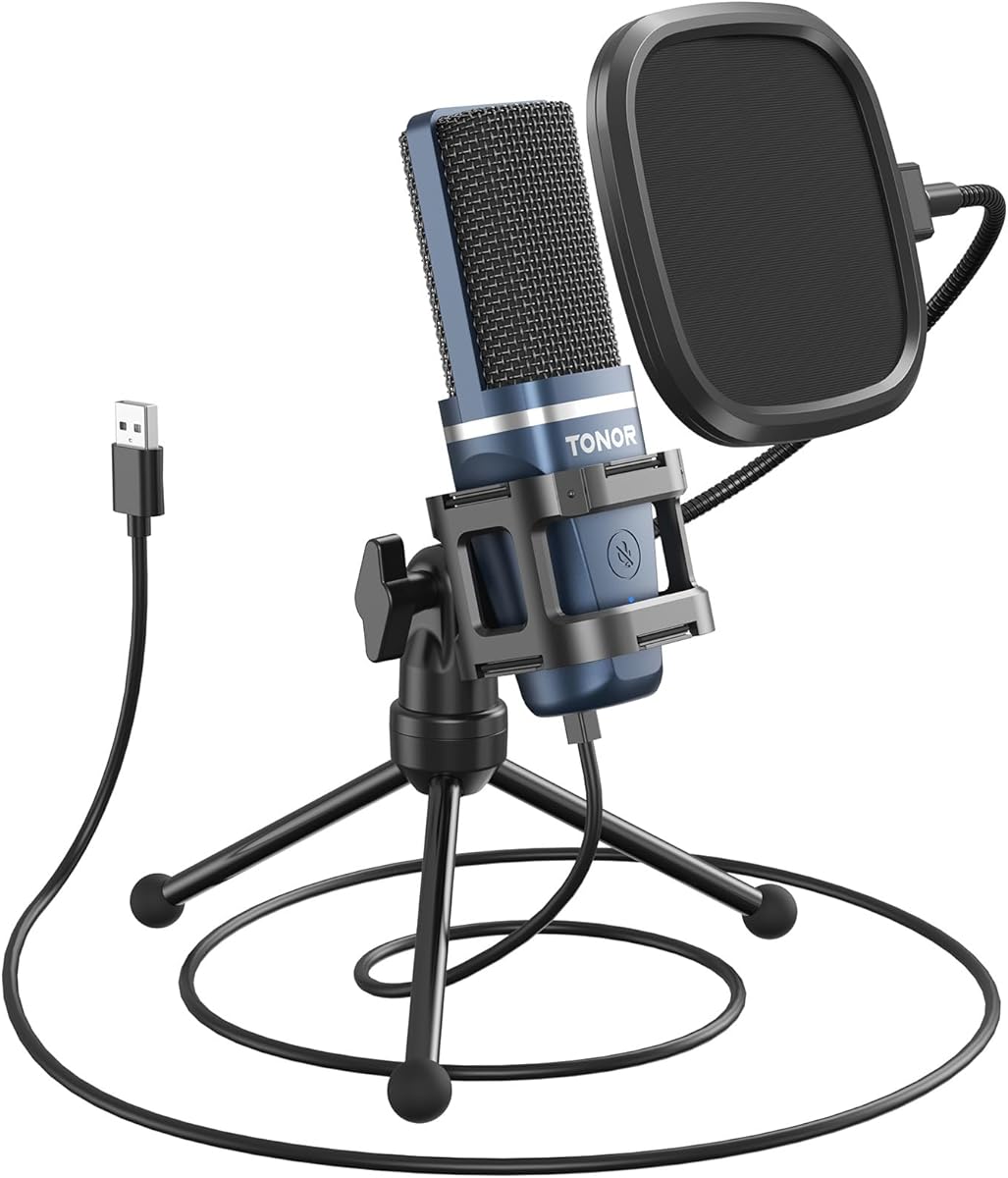
The TONOR Podcast Microphone delivers crisp voice capture with its cardioid pickup pattern that focuses on sound in front. It comes equipped with a non-slip stand and accessories that reduce vibration and plosive noise. The shock mount and pop filter help keep recordings clean without needing extra software or hardware.
We may earn a commission when you buy through this link, at no additional cost to you.
This model supports Windows Mac and PlayStation systems making it versatile for gamers and podcasters. You can use it on Zoom Skype and Discord without driver installation. The angle of both the mic and pop filter is adjustable to achieve the best audio effect for your desk.
While the mute button is functional it may not offer as much control as dedicated knobs. The unit is plug and play with a USB 2.0 data port for instant setup. It is a solid choice for those who need a complete kit with filters included.
If you want a microphone that works well out of the box with essential accessories this is a great option. The included stand and pop filter save you from buying extra gear. For basic recording needs this mic offers strong performance.
Captures clear voice in front of the mic and suppresses unwanted background noise for better clarity.
Includes shock mount pop filter and foldable tripod for immediate professional setup without extra purchases.
We may earn a commission when you buy through this link, at no additional cost to you.
FIFINE K669B features solid sturdy metal construction that extends its service life for long term use. It includes a mic volume knob for quick adjustments during gaming or voice recording sessions. The cardioid condenser design captures your voice properly while reducing background noise effectively.
We may earn a commission when you buy through this link, at no additional cost to you.
The USB powered design means no phantom power supply is needed making it easy to use with laptops. You can adjust your volume to zero to protect your privacy during calls or meetings. The included tripod stand ensures stability during intense recording or streaming sessions.
Note that this model is not compatible with phones which limits mobile use cases. The 5.9 foot USB cable is decent but may not reach across large desks. However for PC based creators it offers reliable performance and clear sound.
For users who need a durable mic with physical controls for volume this is a strong option. The metal build gives it a premium feel at a budget price. If you prioritize longevity and ease of use this fits well.
Solid sturdy metal construction extends the service life of the microphone for long term recording.
Adjust your voice level directly on the mic for quick control without software access.
We may earn a commission when you buy through this link, at no additional cost to you.
The AM8 dynamic microphone offers natural audio clarity with a frequency response that resonates with audiences. It supports both USB and XLR connections giving you future proof options for audio interfaces. The directional cardioid pattern rejects unwanted off-axis noise for vocal originality.
We may earn a commission when you buy through this link, at no additional cost to you.
You can quickly control the mic with a tap to mute feature that keeps privacy during streams. The RGB ring matches your PC gear for gaming synergy even in dim rooms. A handy gain knob allows you to boost or reduce presence without post production.
While RGB features are inactive when using XLR they remain available for USB connections. The recommended recording range is 2 to 6 inches which requires close positioning for best results. This mic is a one stop shop for both play and work duties.
Gamers and streamers who want a dynamic mic with modern features will appreciate this model. The dual connectivity makes it flexible for growth as your setup improves. For immersive audio with style this is a top choice.
Use XLR connection with an audio interface to improve audio flexibility for music recording or singing.
RGB ring on the mic matches your PC accessories for gaming synergy even in a dim room.
We may earn a commission when you buy through this link, at no additional cost to you.
The Logitech Blue Yeti is a professional USB mic known for its powerful broadcast-quality sound. It features a custom three-capsule array that delivers clear audio for YouTube streaming and meetings. With Blue VOICE software you can enhance your stream with advanced modulation and HD samples.
We may earn a commission when you buy through this link, at no additional cost to you.
Four pickup patterns allow you to record in ways that normally require multiple mics. Onboard audio controls include mic gain and instant mute giving you full control during recording. The adjustable desktop stand lets you pivot the mic to optimize sound quality.
While this model sits at a higher price point its versatility justifies the cost for serious creators. You may need extra desk space due to its sturdy build and included stand. The lack of XLR support means it relies solely on USB connectivity.
Streamers and YouTubers seeking professional quality and flexibility should consider this premium option. Its ability to adapt to different recording scenarios makes it a standout. For broadcast quality sound at home this mic is a trusted choice.
Produces clear powerful broadcast-quality sound for videos streaming and music recording on one mic.
Elevate your recordings with clear broadcast vocal sound and enhance effects for your audience.
We may earn a commission when you buy through this link, at no additional cost to you.
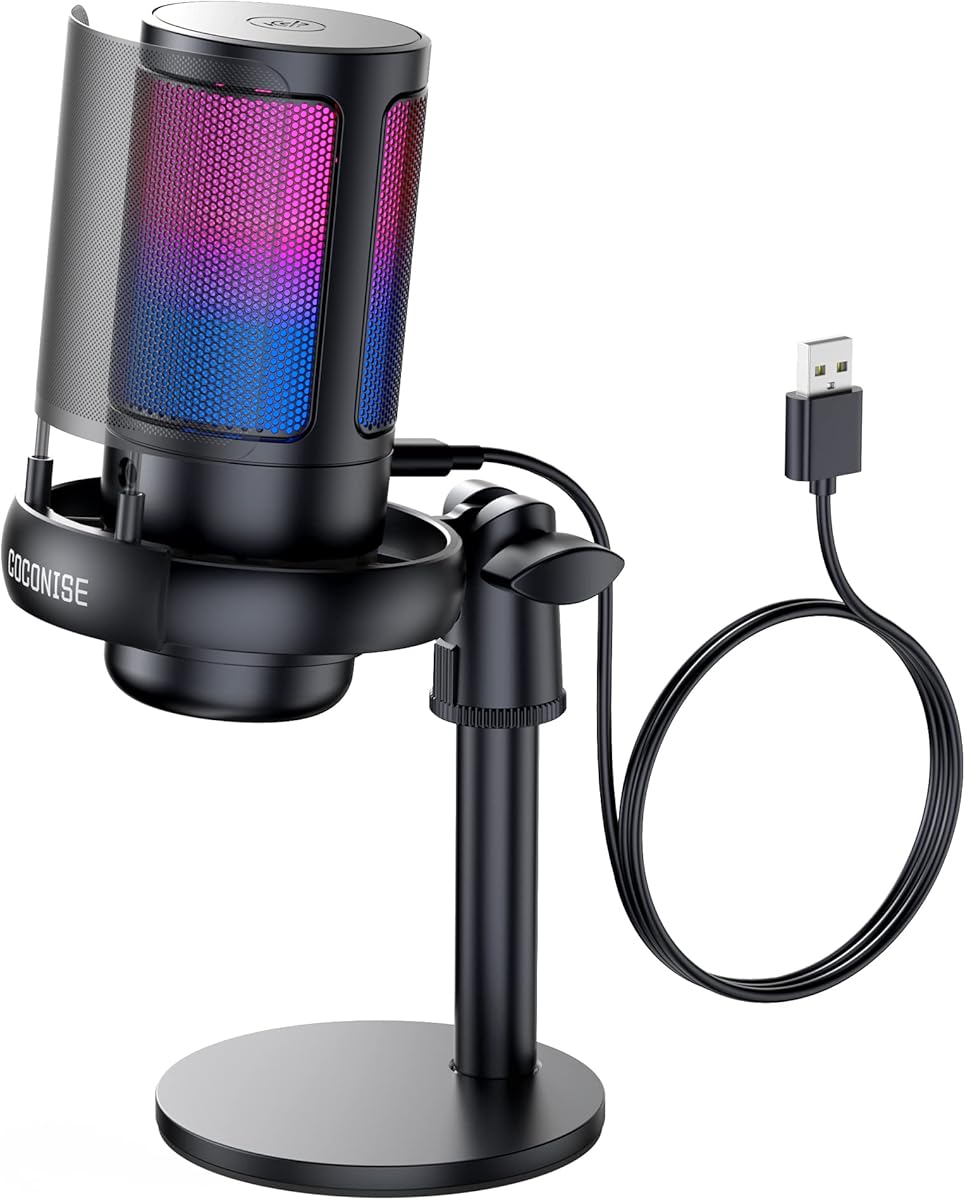
The COCONISE Gaming Microphone features gradient RGB lights that bring an immersive gaming experience to your setup. It includes a one button mute touch sensor that turns off RGB when muted to prevent accidents. The 25mm ultra-large capacitor diaphragm captures a wider range of audio.
We may earn a commission when you buy through this link, at no additional cost to you.
Its weighted carbon steel base ensures the mic stays stable even during intense gaming sessions. The detachable metal anti-splash screen filters plosive sound more effectively than a standard sponge. A 3.5MM headphone jack allows real time monitoring for adjustments while recording.
While the RGB adds visual appeal it may consume more power or distract if brightness is too high. The cardioid polar pattern reduces side pickup to focus on your voice clearly. This model is a great gift for gamers who want style and function.
If you want a mic that matches a gaming rig with solid performance this is a good choice. The touch mute and metal screen are practical features for daily use. For visual appeal combined with clear audio this stands out.
Cyclic and gradient RGB lights bring an immersive experience and turn off when muted to prevent accidents.
The detachable metal screen filters plosive sound more effectively than standard sponge filters for cleaner audio.
We may earn a commission when you buy through this link, at no additional cost to you.
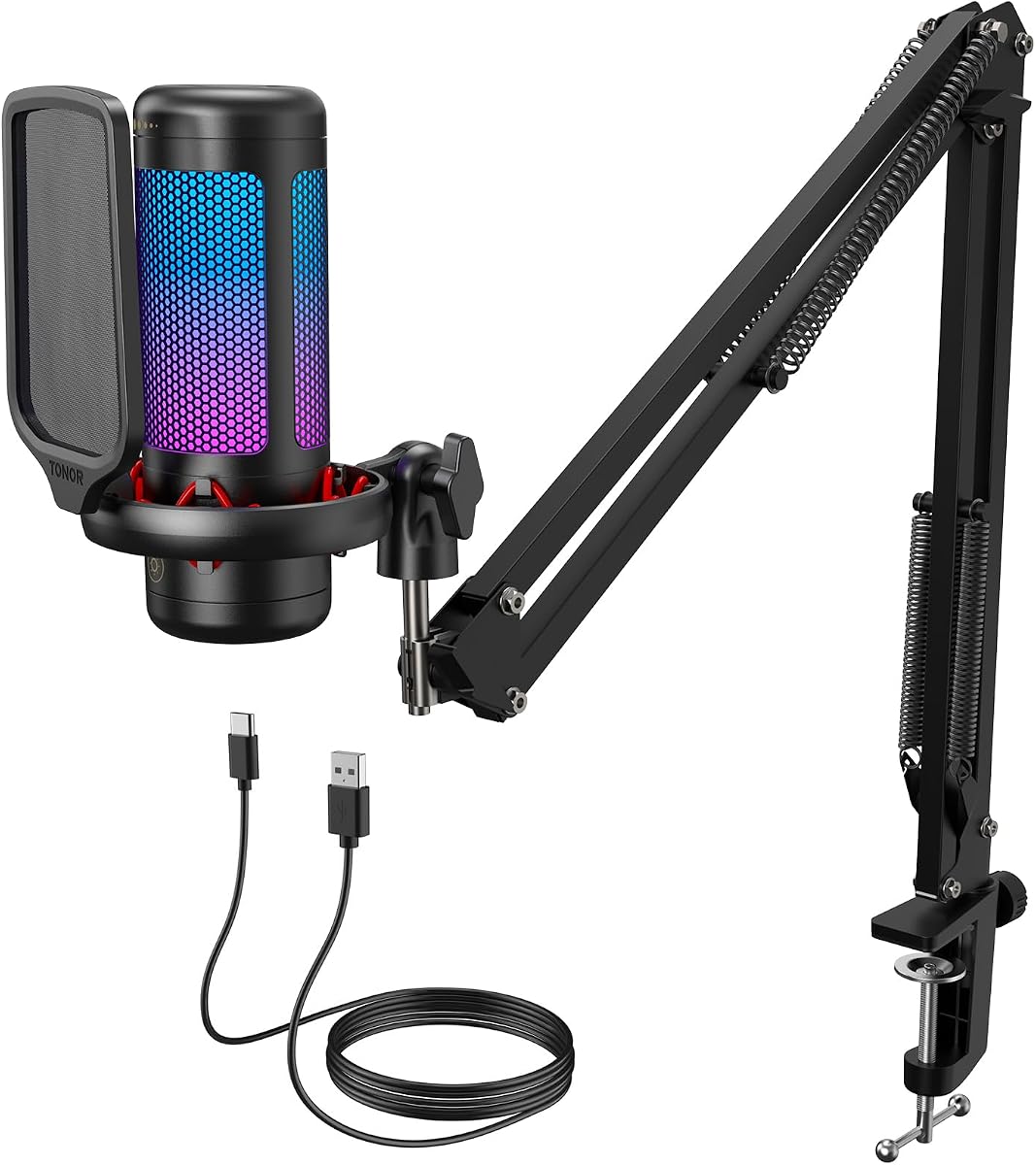
TONOR TC310+ offers premium chips and expert tuning for a pure clean sound that ensures smooth communication. It comes with a metal made boom arm and sturdy clamp that fits most desks under 2.36 inches thick. Four RGB modes allow you to transform your gaming vibe with a tap.
We may earn a commission when you buy through this link, at no additional cost to you.
You can easily mute the mic by tapping the top which helps during live streams and gaming. Rotating the top adjusts the gain so you maintain appropriate volume levels. The kit includes adjustable joints to find the perfect angle for you.
The boom arm clamp has a specific thickness limit which might not work with all desks. However the all-in-one nature means you get everything needed for a professional setup. This makes it a great value for new streamers.
Content creators who need a complete mic and arm kit without buying pieces separately will love this. The sound quality and easy controls make it versatile for Twitch or YouTube. For a full setup out of the box this is a top pick.
Equipped with a metal-made boom arm and sturdy clamp for immediate professional setup without extra purchases.
Tap the top to mute or rotate to adjust gain for flexible volume control during recording.
We may earn a commission when you buy through this link, at no additional cost to you.
The MAONO A04 features a professional sound chipset that holds high resolution 192kHz/24Bit sampling rate. This ensures smooth flat frequency response excellent for studio speech and voice-over work. It comes with an adjustable scissor arm stand and shock mount for stability.
We may earn a commission when you buy through this link, at no additional cost to you.
Plug and play functionality means no extra drivers are needed for laptops PC or PS5. The magnet ring on the cable has a strong anti-interference function to protect signal quality. You get a complete set with pop filter and foam windscreen for crystal clear recordings.
The desk clamp works for desktops less than 2.1 inches thick which is a key limitation to check. While it does not support Xbox it covers most other platforms well. The extended frequency response makes it excellent for detailed vocal production.
Podcasters looking for high resolution audio without complex setup should consider this model. The included accessories ensure you are ready to record immediately. For high fidelity sound on a budget this kit stands out.
Professional sound chipset allows high resolution sampling rate ensuring smooth flat frequency response for studio use.
Includes shock mount pop filter and windscreen to record clear voice without needing extra accessories.
We may earn a commission when you buy through this link, at no additional cost to you.
FIFINE A6V has earned the globally recognized iF Design Award for its quality build and performance. The 192kHz sampling rate delivers naturally detailed audio that makes your team sound like they are beside you. Cardioid polar pattern and 70dB SNR offer dual support for pure voice.
We may earn a commission when you buy through this link, at no additional cost to you.
A quick mute button allows you to silence the mic with a tap to prevent emotional outbursts. RGB cycles through gradient colors to enhance your rig for a carnival atmosphere. The mic volume control is conveniently located on the condenser microphone for intuitive use.
The anti-vibration shock mount absorbs tremor from keyboard taps and mouse clicks effectively. While the tripod stand is stable it may be light for large setups. The detachable pop filter reduces plosives caused by excited speech during gaming.
Creators who value design awards and smooth audio will appreciate this mic. The practical accessories and plug and play nature make it easy to use. For stylish gaming setup with clear audio this is a strong option.
Earned the globally recognized iF Design Award for quality build and performance in streaming.
Silence the mic with a tap to prevent outbursts and maintain a positive team atmosphere during games.
We may earn a commission when you buy through this link, at no additional cost to you.
Selecting the right microphone involves understanding several key factors that affect your audio quality and setup.
Most affordable microphones use USB connectivity which allows for plug and play use without needing an audio interface. This is ideal for beginners who want to start recording immediately on a computer. Some higher end models offer XLR ports which require additional cables and interfaces but provide more control and upgrade potential.
Always ensure the port type matches your computer or console capabilities. USB microphones are generally cheaper and easier to set up for podcasting and streaming.
The polar pattern determines how the microphone picks up sound from different directions. Cardioid is the most common for podcasting as it captures sound from the front and rejects noise from the sides and back. Omnidirectional captures sound from all around and is better for recording multiple people in a room.
For solo podcasting or gaming streaming a cardioid pattern is usually the best choice. It helps isolate your voice and minimizes background noise like keyboard clicks or room echoes.
A sturdy build ensures your microphone withstands daily use without bending or breaking. Metal construction is generally more durable than plastic and resists wear over time. Look for weighted bases or shock mounts that reduce vibration noise from tapping on the desk.
Investing in a well built mic means you will not need to replace it often. A stable mic stand also helps keep your recording consistent by preventing accidental movement.
Many budget microphones include features like mute buttons gain knobs and monitoring jacks that enhance usability. A physical mute button allows you to silence the mic quickly without stopping software. Monitoring jacks let you hear your voice in real time to detect issues immediately.
Advanced models might offer RGB lighting or software effects to customize your audio. Decide which features matter most to your workflow before purchasing to avoid paying for extras you do not need.
Some bundles come with essential items like pop filters shock mounts or boom arms which save you money. A pop filter reduces harsh plosive sounds from P and B words. Shock mounts help isolate the mic from vibrations transmitted through the desk or stand.
Check what is included in the box before you buy so you know if you need to purchase accessories separately. A complete kit makes setup faster and more professional right out of the box.
Verify that the microphone works with your operating system and any devices you plan to use. Most USB mics support Windows and Mac but some may have issues with mobile devices or gaming consoles. Adapters for iPhone or Android may be necessary if you plan to record on the go.
Reading user reviews can reveal any compatibility issues specific to certain setups. Ensuring broad compatibility prevents frustration and ensures smooth operation across your tech stack.
Built in noise reduction helps filter out ambient sounds like fans or traffic during recording. Look for microphones with intelligent modes that can be toggled on or off depending on your environment. Digital processing can clean up audio before it reaches your computer reducing post-production time.
While no mic can eliminate all background noise advanced features significantly improve clarity. Prioritize this feature if you record in a non-soundproofed room or noisy area.
Affordable microphones often provide excellent value compared to their higher priced counterparts. Compare features like frequency response and build material to find the best balance. Sometimes spending a little more gets you a model with better durability or more useful features.
Decide on a price range but stay open to models that offer better specs within that range. A cheap podcast microphone should still meet your core recording needs without constant adjustments.
To start recording connect the USB cable directly to your computer and select the mic as the input device in settings. Adjust the gain knob if available to ensure your voice is clear without distorting. Use headphones to monitor your audio level for real time feedback during recording sessions.
Place the microphone about six inches away from your mouth for optimal sound capture and reduced plosives. Use a pop filter or windscreen to protect the capsule from sudden bursts of air while speaking. Keep the mic on a stable surface to avoid vibrations that cause low frequency noise.
Clean the exterior regularly with a dry cloth to remove dust and oils that build up over time. Store the cable neatly to prevent kinks and ensure long term connectivity. Avoid exposing the microphone to direct sunlight or extreme temperatures to preserve its internal components and finish.
Yes, many affordable microphones offer studio-quality sound suitable for professional podcasts and streams. Models with cardioid patterns and high sample rates can deliver broadcast-level audio. Proper setup and a quiet room enhance the performance even on budget gear.
No, USB microphones connect directly to your computer without needing an external audio interface. They are designed for plug-and-play use which simplifies the setup process. An interface is only required if you are using XLR microphones.
Condenser mics are more sensitive and capture detailed audio which is great for controlled studio environments. Dynamic mics are durable and handle high sound pressure levels making them ideal for live streaming. Most cheap podcast microphones are condenser types for better clarity.
Use a microphone with a cardioid polar pattern to focus on your voice and reject side noise. Enable built-in noise reduction features if available and close windows or turn off fans. Proper mic placement and acoustic treatment also help minimize unwanted ambient sounds.
Most USB microphones work with PS4 and PS5 via USB ports but may not work with Xbox. Check the product description for specific console compatibility before buying. Some models offer adapters for mobile devices as well for broader use.
A basic setup usually requires a desk mount or boom arm and a pop filter. A shock mount helps reduce vibrations from the desk surface. Ensure you have enough USB cable length to reach your computer comfortably.
With proper care a budget microphone can last for several years of regular use. Avoid dropping the unit and keep it away from moisture and extreme heat. The metal construction of many models ensures better durability against daily wear and tear.
Yes, most of these microphones support vocals and voice overs effectively. Their frequency response is tuned to capture clear mid and high frequencies. Use software to add effects or compression if you want a polished professional sound.
We have reviewed ten top microphones ranging from budget condenser options to dynamic gaming models. The ZealSound and Amazon Basics models offer excellent value with strong noise reduction and clear audio. The Logitech Blue Yeti remains a standout for those needing professional versatility and high sound quality.
Prioritize features like a cardioid pattern USB connectivity and build durability when making your choice. Ensure the mic includes essential accessories like pop filters or stands to save money and setup time. Your specific recording environment and needs should dictate whether you choose a condenser or dynamic mic.
Remember to check current availability and user reviews before purchasing to confirm ongoing performance. Prices and stock may change but these models consistently offer reliable performance for creators. With the right choice you can achieve high-quality audio without breaking your budget.