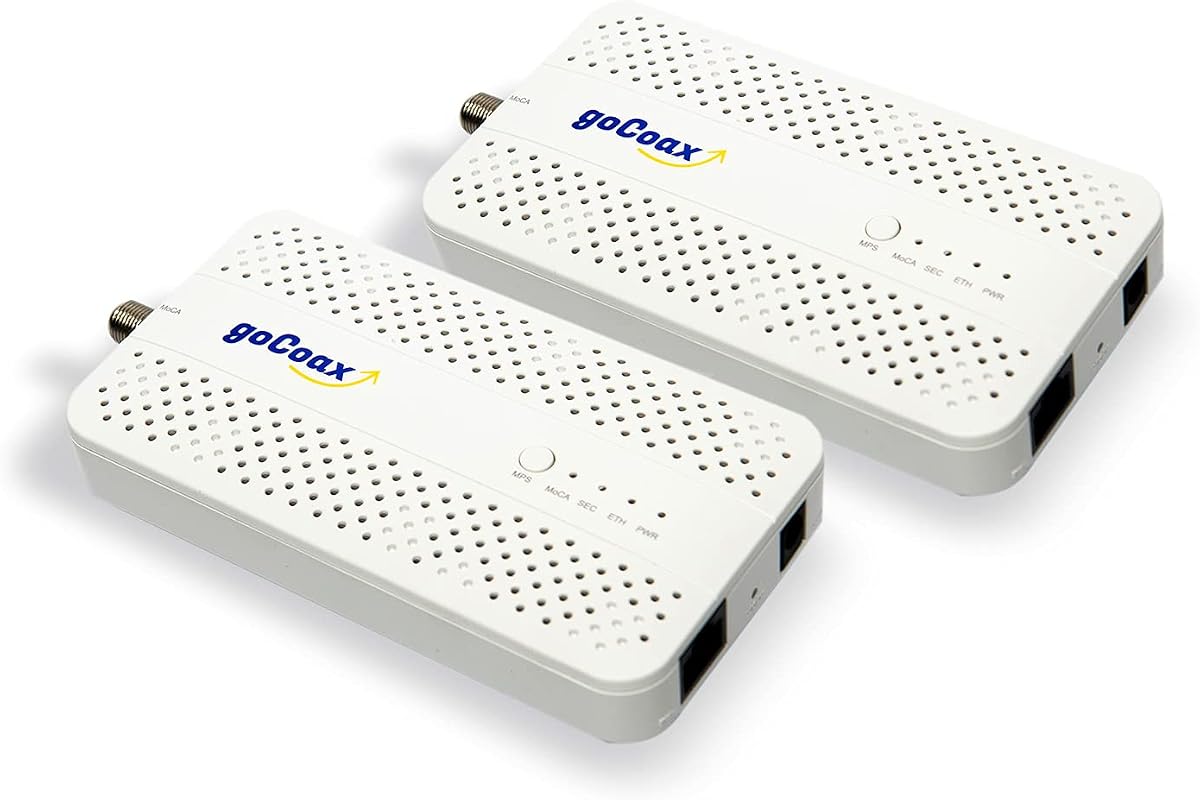
goCoax MoCA 2.5 Adapter (2-Pack) with 2.5GbE Ethernet Port
4.6Editor score
Under 3ms Latency
Plug and Play Setup
Compatible with Major ISPs
This guide compares the top ten coax to Ethernet adapters for home networking, highlighting speed, compatibility, and reliability for modern internet setups.
Finding a reliable coax to Ethernet adapter can transform your home network without new wiring. These devices leverage existing coaxial cables to deliver fast, stable internet connections throughout your house.
We evaluated ten top-rated adapters based on speed, ease of setup, and compatibility with major ISPs. Our analysis covers MoCA 2.5 models and alternative technologies to help you choose wisely.
Each pick below highlights specific strengths and ideal use cases for different households. Keep in mind that prices and availability can change, so verify details before purchasing your next adapter.
4.6Editor score

4.8Editor score

4.4Editor score
The following table provides a side-by-side comparison of all ten adapters, highlighting key specifications and unique features to assist your selection process.


The TRENDnet TMO-313C2K stands out as a top choice for users seeking high-speed networking over existing coaxial cabling. With a stellar rating and robust features, it offers a seamless upgrade path for modern homes.
We may earn a commission when you buy through this link, at no additional cost to you.
Its MoCA 2.5 technology ensures consistent performance with lowered latency, ideal for streaming and gaming. The inclusion of NDAA and TAA compliance adds a layer of trust for secure installations.
While it does not work with satellite systems, its compatibility with major cable and fiber providers makes it versatile. Users should ensure their coax wiring is interconnected for optimal results.
This adapter is perfect for households needing reliable wired connections without running new Ethernet cables. It balances performance and ease of use effectively for most users.
The 2.5Gbps port provides ample bandwidth for 4K streaming and large file transfers without lag.
Works seamlessly with major ISPs and backwards compatible with older MoCA standards for flexibility.
We may earn a commission when you buy through this link, at no additional cost to you.
goCoax offers a compelling budget option with the MA2500D kit, delivering impressive performance at a competitive price point. It is designed for gamers and streamers who demand reliability without breaking the bank.
We may earn a commission when you buy through this link, at no additional cost to you.
The under 3ms latency ensures smooth gameplay, while the 2.5Gbps speed supports high-resolution content. Its compatibility with Comcast, Spectrum, and others makes it a versatile choice for many households.
Installation is straightforward, requiring minimal configuration. Users should verify their coax wiring is intact, as satellite systems may have disconnected lines.
This kit is ideal for anyone looking to upgrade their network affordably. It provides a strong balance of features and cost, making it a top contender for value.
Low latency ensures responsive gameplay, critical for competitive online gaming sessions.
Plug and play functionality allows users to get online quickly without technical expertise.
We may earn a commission when you buy through this link, at no additional cost to you.
The ScreenBeam ECB7250K02 Starter Kit is a premium choice for those prioritizing top-tier performance. Its bonded MoCA 2.5 technology delivers speeds that often surpass Wi-Fi, ensuring a stable connection.
We may earn a commission when you buy through this link, at no additional cost to you.
With a comprehensive kit including splitters and cables, setup is simplified for new users. It supports remote Wi-Fi access points, extending coverage throughout the home seamlessly.
Compatibility is broad, but users with AT&T or satellite services should check limitations. The investment is justified for households needing maximum bandwidth for multiple users.
This adapter is perfect for tech-savvy users or large families. It offers a complete solution for high-speed wired networking without the hassle of new cabling.
Everything needed for setup is included, from adapters to coax cables and splitters.
Supports connecting remote access points to expand Wi-Fi range effectively.
We may earn a commission when you buy through this link, at no additional cost to you.
Kiwee introduces a distinctive option with dual 2.5GbE ports, allowing multiple high-speed connections in one room. This is ideal for devices needing dedicated bandwidth without additional switches.
We may earn a commission when you buy through this link, at no additional cost to you.
Its MoCA 2.5 technology ensures ultra-fast speeds, suitable for 4K streaming and gaming. The kit includes all necessary cables, simplifying the initial setup process significantly.
Reliability is key here, offering a stable connection even during peak usage hours. Users should ensure their home coax wiring is interconnected to avoid connectivity issues.
This adapter is perfect for tech enthusiasts needing multiple wired connections. It provides a unique solution for high-demand networking environments.
Dual Ethernet ports allow connecting multiple devices at full speed without extra hardware.
Designed with high-grade components for years of reliable high-speed networking performance.
We may earn a commission when you buy through this link, at no additional cost to you.
Hitron offers a straightforward adapter designed to extend existing networks efficiently. It supports 2.5 Gbps speeds, making it suitable for high-bandwidth applications across multiple rooms.
We may earn a commission when you buy through this link, at no additional cost to you.
The kit includes all cables needed for immediate setup, and technical support is available for troubleshooting. Compatibility with cable and most fiber providers ensures broad usability.
Users with AT&T or satellite services may face issues, so verifying wiring is crucial. The provided guide helps navigate potential compatibility hurdles effectively.
This adapter is ideal for households seeking reliable network expansion. It balances performance with practical features like support and included cables.
Perfect for connecting devices in rooms far from the router without new cables.
Free technical support helps resolve connectivity issues related to home wiring.
We may earn a commission when you buy through this link, at no additional cost to you.
LNOVISION targets industrial and surveillance needs with a specialized PoE over coax converter. It allows upgrading analog systems to IP while reusing existing coaxial cabling effectively.
We may earn a commission when you buy through this link, at no additional cost to you.
The built-in heat sink ensures reliable transmission, even under heavy loads. It supports multiple PoE standards, making it versatile for powering IP cameras or VoIP phones.
Bandwidth is limited to 100Mbps, which suits surveillance but not high-speed home internet. Users should ensure their wiring matches the required cable types.
This converter is perfect for commercial or security installations. It offers a cost-effective way to modernize legacy systems without rewiring.
Delivers power and data to devices like IP cameras over a single coax cable.
Transmits data effectively over long distances suitable for large installations.
We may earn a commission when you buy through this link, at no additional cost to you.
Nexuslink offers a unique solution for homes with unused dark coax cables. The G.hn adapter kit converts these lines into a powerful gigabit network without interfering with existing services.
We may earn a commission when you buy through this link, at no additional cost to you.
It delivers up to 1.2Gbps speeds, perfect for gaming and streaming. The ease of installation makes it accessible even for non-technical users looking to expand their network.
Compatibility is strictly for unused coax, so shared lines will not work. Verification of wiring is essential before purchase to avoid compatibility issues.
This adapter is ideal for households with spare coax wiring. It provides an affordable way to create dedicated wired connections.
Transforms unused coax into a network, avoiding interference with active TV lines.
Provides a stable wired link ideal for high-bandwidth applications.
We may earn a commission when you buy through this link, at no additional cost to you.
This kit combines high-speed data with PoE+ power, making it ideal for modern Wi-Fi access points. It delivers 2.5Gbps speeds while powering devices up to 30W through Ethernet.
We may earn a commission when you buy through this link, at no additional cost to you.
Perfect for Wi-Fi 6E/7 access points, it simplifies installations by eliminating separate power outlets. The stable signal ensures reliable connectivity even over long coax runs.
While more expensive, the convenience of integrated power justifies the cost for specific setups. Users should ensure their devices support PoE+ to utilize this feature fully.
This adapter is perfect for advanced home or office setups needing power and data. It offers a streamlined solution for high-demand devices.
Powers devices like access points and cameras without separate electrical outlets.
Supports ultra-fast data transfer for seamless streaming and gaming.
We may earn a commission when you buy through this link, at no additional cost to you.
TRENDnet offers a cost-effective single-unit option for those needing basic MoCA connectivity. The TMO-312C supports Gigabit speeds, sufficient for most general internet usage.
We may earn a commission when you buy through this link, at no additional cost to you.
Its compact design makes it easy to hide in entertainment centers, and the 3-year protection adds peace of mind. It is ideal for extending wired connections to specific devices.
While speeds are capped at 1Gbps, it remains a reliable choice for everyday tasks. Users should ensure their wiring meets the necessary requirements for stable operation.
This adapter is perfect for budget-conscious buyers seeking reliability. It delivers solid performance without the extra cost of higher-end models.
Small footprint allows easy placement in tight spaces like home theaters.
3-year manufacturer protection ensures long-term support and reliability.
We may earn a commission when you buy through this link, at no additional cost to you.
ScreenBeam provides an add-on adapter for expanding existing MoCA 2.0 networks. It delivers 1Gbps speeds and is ideal for households needing extra wired connections without a full kit.
We may earn a commission when you buy through this link, at no additional cost to you.
As an add-on, it requires compatibility with a starter kit. Its support for up to 16 nodes allows scalable network expansion effectively.
While older than 2.5 models, it remains effective for standard internet usage. Users should verify their network setup supports this model before purchasing.
This adapter is perfect for expanding existing networks affordably. It offers a practical solution for adding more wired connections.
Ideal for adding more wired connections without a new full kit purchase.
Budget-friendly option for expanding existing MoCA networks easily.
We may earn a commission when you buy through this link, at no additional cost to you.
Selecting the right adapter depends on your network needs, existing wiring, and ISP compatibility. Understanding key factors ensures a smooth upgrade.
MoCA 2.5 adapters offer up to 2.5Gbps speeds, ideal for modern high-bandwidth needs. Older MoCA 2.0 models cap at 1Gbps but work well for general internet usage.
Choose 2.5 if you have high-speed internet or need to support multiple 4K streams simultaneously.
Most cable providers support MoCA, but AT&T U-verse and satellite services often do not. Always check with your ISP to confirm compatibility before buying.
Verify your current network setup to avoid purchasing an incompatible adapter.
Your coax outlets must be interconnected via splitters for the adapter to function. If wiring was cut for satellite TV, it may need professional repair.
Ensure all outlets connect back to a main splitter for seamless networking.
Kits include both adapters needed to bridge two points, saving time and money. Single units are useful for expanding existing networks with an already functional starter kit.
Opt for kits if you need two connections; single units only if expanding further.
Look for 2.5GbE ports to future-proof your network against faster internet plans. Gigabit ports work but may bottleneck connections exceeding 1Gbps.
Prioritize 2.5Gbps for maximum speed potential and longevity.
Low latency is critical for gaming and real-time applications. MoCA generally offers lower latency than Wi-Fi, but choose models with quality components.
Select adapters known for stable connections to prevent drops during peak usage.
Most kits include power adapters, Ethernet, and coax cables, simplifying setup. Missing cables can add hidden costs and delay installation.
Confirm the package includes all necessary cables to avoid extra purchases.
Some adapters offer Power over Ethernet to power Wi-Fi access points or cameras. This reduces the need for separate electrical outlets in hard-to-reach areas.
Choose PoE-enabled adapters if you plan to power networking gear remotely.
Install one adapter near your router and the other near your device, connecting them via coaxial cabling. Use Ethernet cables to link your devices to the adapter ports.
Ensure all connections are secure and that power adapters are properly plugged in. Most adapters configure automatically, requiring no manual settings adjustments.
Keep the adapters cool and dust-free for optimal performance. Periodically check coax wiring for signs of wear or loose connections to maintain reliability.
Most MoCA adapters work alongside cable TV signals provided your home coax is interconnected. Ensure you do not use satellite services, as these often disconnect the necessary lines.
MoCA 2.5 adapters can deliver up to 2.5Gbps of throughput. Actual speeds depend on cable quality, distance, and network traffic, but they usually surpass standard Wi-Fi.
No, these adapters work alongside your existing modem and router. They extend wired connectivity without replacing your core internet equipment or changing your plan.
A PoE filter is recommended for optimal security and performance to prevent signal leakage. It is often sold separately but helps protect your network from external interference.
No, these adapters are generally incompatible with AT&T U-verse or fiber services due to signal conflicts. You will need a different networking solution from your provider.
MoCA networks typically support up to 16 nodes. Each adapter connects one device or point to the network, allowing multiple connections across different rooms easily.
Most starter kits include power adapters, Ethernet cables, and coax cables. Always check product details to confirm which items are included before purchasing to avoid extras.
Look for adapters with low latency and 2.5Gbps ports, like the goCoax or TRENDnet models. These ensure stable, fast connections for competitive gaming without lag.
The TRENDnet, goCoax, and ScreenBeam adapters offer top-tier performance for different needs. Whether you prioritize speed, budget, or premium features, there is a strong option available.
Focus on your specific requirements, such as port speed and ISP compatibility, to find the perfect fit. Investing in quality ensures stable connectivity for all your devices.
Always check current availability and pricing before purchasing. Networks evolve, so selecting the right adapter today can support your future internet needs seamlessly.