
reMarkable Paper Pro with Marker Plus
4.2Editor score
11.8 inch Canvas Color display
Marker Plus pen with eraser
Low-glare paper-like writing
Color e ink tablets offer a unique blend of paper-like readability and digital versatility. They reduce eye strain while providing color for comics and diagrams. Choosing the right device depends on your specific needs for portability and features.
We evaluated ten leading models based on screen technology, performance, and user experience. Our analysis covers refresh rates, battery longevity, and stylus responsiveness. Each product was reviewed for its ability to handle various document formats and apps.
Every pick includes detailed specs and real-world performance notes. Prices and availability can change frequently so check current listings before buying. We aim to help you find the perfect match for your reading and writing workflow today.
4.2Editor score

4.3Editor score

4.0Editor score
As an Amazon Associate we earn from qualifying purchases.
This side-by-side comparison highlights key specifications across all ten color e ink tablet models. We focus on screen size, resolution, battery capacity, and operating system features to help you differentiate between similar options quickly.



The Amazon Kindle Scribe Colorsoft stands out as the premier choice for professionals seeking a large color e ink tablet. With a 11 inch display and built-in notebook features it balances reading and writing seamlessly. Its high rating reflects strong user satisfaction regarding performance and usability.
We may earn a commission when you buy through this link, at no additional cost to you.
This device shines with its custom-built Colorsoft display offering high-contrast paper-like color that is easy on the eyes. The included pen provides a smooth tactile experience with a built-in eraser for convenience. AI tools allow you to find information in notes and generate summaries efficiently.
While it lacks extensive third-party app support this limitation ensures a focused environment free from distracting notifications. The battery life is exceptional offering weeks of use on a single charge. This trade-off is acceptable for those prioritizing deep work over general media consumption.
If you need a dedicated device for reading books and taking detailed notes the Kindle Scribe is highly recommended. It is ideal for students and professionals who want to organize thoughts without screen glare. Invest in this model for a premium distraction-free workflow experience.
Use AI tools to find information ask questions about your writing and generate summaries instantly.
Purpose-built for reading and writing the glare-free display keeps you focused without apps pulling you away.
We may earn a commission when you buy through this link, at no additional cost to you.
The reMarkable Paper Pro with Marker Plus is the ultimate paper tablet for those who value authenticity in digital writing. Its 11.8 inch Canvas Color display brings a new dimension to sketching and note-taking. Users praise its paper-like feel and robust organizational features.
We may earn a commission when you buy through this link, at no additional cost to you.
Designed to work exclusively with the groundbreaking color display this device offers realistic friction and natural writing feel. The included Marker Plus pen provides precise control and an all-day comfortable grip. You can sort notes with folders and tags for easy retrieval.
Although it comes at a premium price the quality of the writing experience justifies the cost for serious users. The low-glare display reflects natural light reducing eye strain even when outdoors. This limitation supports focused creativity rather than multimedia consumption.
Buy this model if you need a high-end tool for writing and sketching without digital distractions. It suits artists and writers who demand a genuine paper feel in a portable device. The ecosystem is designed to keep your work organized and accessible.
Experience writing sketching and reading in color with an ultra-slim portable design.
Sort notes with folders and tags and convert handwriting to typed text instantly.
We may earn a commission when you buy through this link, at no additional cost to you.
The BOOX Tablet Go Color 7 Gen II offers exceptional value for those seeking a portable color e ink tablet. Its 7 inch display makes it easy to carry while maintaining good resolution for reading. The Android 13 OS allows for extensive app compatibility and customization.
We may earn a commission when you buy through this link, at no additional cost to you.
This device supports various document formats and includes active stylus compatibility though the pen is sold separately. The screen uses Kaleido 3 technology which may appear darker than LCD but is standard for e ink. Adjustable warm and cold light helps optimize reading in different conditions.
While the stylus is not included in the box it remains a budget-friendly option for note-taking. The screen may look grayer than traditional tablets but this is inherent to the technology and not a defect. Users seeking affordability will appreciate the feature set.
Choose this model if you want a lightweight and affordable device for reading and light writing. It fits well into a pocket or bag for travel. Ensure you purchase a compatible stylus separately to unlock full writing capabilities.
Run popular apps and support third-party software with Android 13 ROM.
Weighing only 195 grams this tablet fits easily in a bag or jacket pocket.
We may earn a commission when you buy through this link, at no additional cost to you.
The Ocean C 64GB+4GB 7 inch Color is a powerful choice for readers who also need writing capabilities. With a 4.5 rating users appreciate its fast page turns and eye-comfort paper-like screen. The Android system ensures smooth multitasking for various tasks.
We may earn a commission when you buy through this link, at no additional cost to you.
Its stylus pen syncs perfectly with the flexible screen mimicking paper texture for natural control. The 2.2GHz processor ensures responsiveness when navigating menus or switching apps. Brightness and color temperature adjustments allow for comfortable reading in any environment.
Note that the Musnap Stylus Pen is sold separately which adds to the initial cost. The screen is optimized for static content so video playback is not supported. This limitation ensures better battery life and focus on reading and writing tasks.
This model suits those who want a balanced device for books and notes with strong performance. If you value speed and brightness control it is a top contender. Pair it with a quality stylus for the best writing experience.
Run Android OS with 4GB RAM for seamless switching between reading and writing apps.
Adjust brightness and color temperature to reduce strain during long reading sessions.
We may earn a commission when you buy through this link, at no additional cost to you.
The reMarkable Paper Pro with Basalt Book Folio bundle offers a complete package for those investing in the reMarkable ecosystem. It includes the premium tablet plus a stylish protective cover to keep your device safe. The writing experience remains unmatched with paper-like friction.
We may earn a commission when you buy through this link, at no additional cost to you.
You get the Marker Plus pen with a built-in eraser and 6 spare tips for longevity. The Book Folio cover features a premium Mosaic weave design that adds protection and style. All your work stays organized with folders and tags for easy access.
Although the bundle costs more than the tablet alone it saves on separate accessory purchases. The device focuses on distraction-free productivity rather than entertainment apps. This makes it ideal for professionals who prioritize clean workflow over media consumption.
Buy this set if you need immediate protection and all essential accessories in one purchase. It suits creative professionals who value design and durability. The included cover ensures your device looks good and stays protected from scratches.
Get the tablet pen and protective cover together to save time and money on accessories.
Sort notes with folders and tags and write directly on PDFs for efficient document review.
We may earn a commission when you buy through this link, at no additional cost to you.
The BOOX Tablet 10.3 Note Air 5 C is designed for users who need a larger workspace for notes. With 6GB RAM it handles multitasking better than many competitors. The Android 15 OS ensures access to the latest features and security updates.
We may earn a commission when you buy through this link, at no additional cost to you.
Its 10.3 inch screen offers ample space for side-by-side document viewing. The fingerprint recognition button adds convenience for quick unlocking. Users can install third-party apps to customize their experience beyond standard reading.
Some users note that the refresh rate can be slower for dynamic content. This is common to e ink technology but may affect navigation speed. The device is best suited for static document review rather than scrolling-heavy tasks.
Choose this if you want a large screen and high RAM for professional document work. It suits engineers or designers who need to view complex charts. Ensure you are comfortable with e ink limitations before purchasing.
6GB RAM allows for smoother multitasking when running multiple apps simultaneously.
Use the fingerprint recognition button for quick and secure access to your device.
We may earn a commission when you buy through this link, at no additional cost to you.
The Penstar eNote Pro C brings advanced AI features to the color e ink market. It includes 8192 levels of pressure sensitivity for precise handwriting control. Users can enjoy split-screen multitasking to read and take notes at the same time.
We may earn a commission when you buy through this link, at no additional cost to you.
AI tools like real-time voice-to-text and note summarization boost productivity significantly. The tablet includes a high-precision digital stylus with customizable buttons for quick access to tools. Storage is generous with 128GB for files and documents.
Note that e ink is not optimized for video playback or fast scrolling apps. This is a natural limitation of the technology to preserve battery and clarity. It remains a strong choice for focused note-taking and writing tasks.
Select this model if you need AI integration and high precision writing. It suits students and writers who want tools to process notes efficiently. The included pen and nibs make it ready to use out of the box.
Boost productivity with real-time voice-to-text handwriting recognition and note summarization.
Enjoy 8192 levels of pressure sensitivity for incredibly responsive and precise control.
We may earn a commission when you buy through this link, at no additional cost to you.
The BOOX Tablet Go Color 7 Gen II 4G is designed for travelers who need a compact device. Its small 7 inch screen fits easily in a bag while offering color support for diagrams. The page-turn buttons provide a tactile experience similar to physical books.
We may earn a commission when you buy through this link, at no additional cost to you.
It runs on Android 13 and supports various document formats for easy access to files. The built-in speaker and microphone allow for basic audio tasks if needed. Connectivity options include Wi-Fi and Bluetooth 5.1 for accessories.
While the stylus is sold separately the device supports InkSense for accurate writing. Users should note that screen refresh can be slower than LCD tablets. This is expected for e ink and helps maintain battery life and eye comfort.
This model fits those who want a light device for reading and writing on the go. It is great for flights or commutes where screen glare is a concern. Ensure you have compatible accessories before traveling.
Weighing only 195 grams this tablet slips into your bag or jacket pocket easily.
Use physical buttons to flip pages quickly without touching the screen.
We may earn a commission when you buy through this link, at no additional cost to you.
The reMarkable Paper Pro Move is an ultraportable digital paper tablet ideal for travel. Its 7.3 inch Canvas Color display lets you capture inspiration anywhere without bulk. The device is distraction-free by design to help maintain focus during work.
We may earn a commission when you buy through this link, at no additional cost to you.
It syncs to the cloud so your notes are ready on mobile and desktop apps. You can convert handwriting to typed text and search through notes easily. The included Marker Plus pen offers a satisfying paper-like sound and feel.
Connectivity requires a subscription for advanced search features on some devices. The smaller screen size means less space for complex layouts but remains great for lists. Battery life and lightweight build make it perfect for frequent travelers.
Choose this if you want a pocket-sized notebook for travel and meetings. It suits professionals who need to capture ideas without carrying laptops. The cloud sync ensures your thoughts are safe and accessible anywhere.
Carry all your ideas in a digital notebook that is smaller than a paperback book.
Your notes sync to the cloud and ready in mobile and desktop apps when needed.
We may earn a commission when you buy through this link, at no additional cost to you.
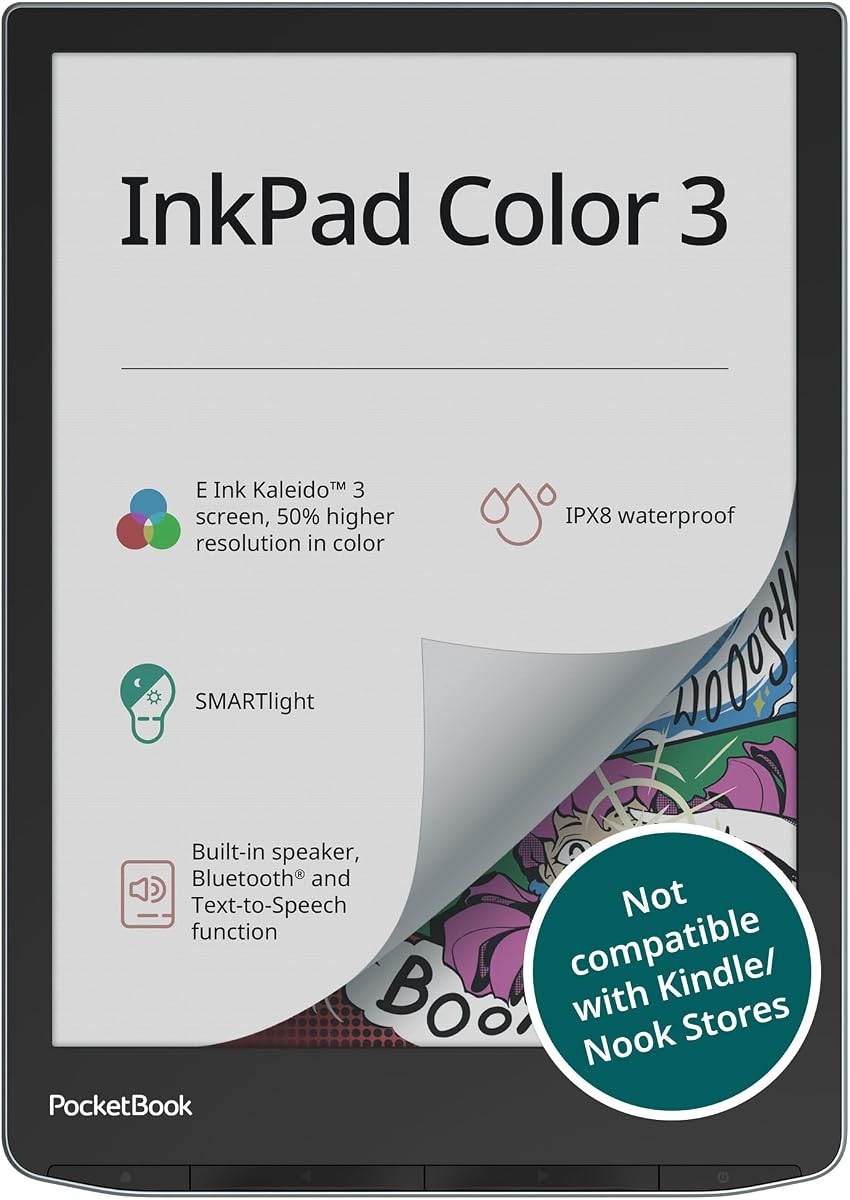
The PocketBook InkPad Color 3 focuses on reading and audio features for audiobook lovers. It has a 7.8 inch color display with SMARTlight to reduce eye strain. The built-in speaker allows you to listen to stories or have text read aloud.
We may earn a commission when you buy through this link, at no additional cost to you.
Its waterproof IPX8 design makes it safe for reading near water or outdoors. Storage is generous and expandable via external memory to hold thousands of books. Connectivity includes Bluetooth and dual band wireless for seamless syncing.
While it supports some note-taking it is optimized for reading rather than full writing. Text to speech adds versatility for consuming content without looking. This makes it a unique option for those who consume audio and books equally.
Buy this if you want a dedicated reader with robust audio capabilities. It is ideal for travelers who want to listen and read. The waterproof feature ensures durability in various environments and conditions.
Listen to audiobooks or use text-to-speech through a built-in speaker or headphones.
Water resistant design protects against splashes for outdoor or bath reading.
We may earn a commission when you buy through this link, at no additional cost to you.
Selecting the right color e ink tablet requires understanding your specific needs for reading writing and apps.
Color e ink displays use Kaleido 3 technology which offers 4096 colors but typically has a lower resolution than monochrome screens. This means color images appear slightly less crisp but still vibrant enough for comics and diagrams. Look for devices with adjustable front light for comfortable viewing in any lighting condition.
Prioritize screen size based on whether you plan to read books or write notes. Larger screens provide more space for documents but add weight to the device.
Android-based tablets allow you to install third-party apps which expands functionality beyond reading. This flexibility is great for syncing documents via cloud services or using specific productivity tools. However ensure the app supports e ink screens to avoid performance issues or slow refresh rates.
Proprietary systems like reMarkable focus on distraction-free workflows but limit external apps. Choose based on whether you need versatility or focus.
Pen quality determines how natural writing feels. Look for pressure sensitivity and latency specs if you take detailed notes. Some models include the pen while others require separate purchase which affects total cost. Ensure the stylus supports gestures like erasing or tool switching.
Test the pen feel if possible since friction impacts comfort during long sessions.
E ink tablets are known for long battery life often lasting weeks on a single charge. This is because the screen only consumes power when changing pages. Consider usage frequency to ensure the battery capacity meets your travel or daily needs.
Check if the device uses USB-C for charging to maintain compatibility with modern chargers.
Internal storage varies between 32GB and 128GB which affects how many books or documents you can keep offline. Larger storage is beneficial for heavy readers who download many files. Models with microSD slots allow for expansion if you need more space.
Evaluate if you rely on cloud syncing to save local storage.
Weight and dimensions matter if you carry the tablet daily. Smaller 7 inch models are lighter and fit in pockets while 11 inch devices are better for desk work. A sturdy build and protective case help prevent damage during transit.
Consider if you need a cover that doubles as a stand for viewing.
Wi-Fi and Bluetooth are essential for syncing files and connecting accessories like headphones. Some models offer 4G LTE for internet access without Wi-Fi. Ensure the ports include USB-C for versatile charging and data transfer capabilities.
Verify if the device supports OTG for connecting external drives directly.
Cost ranges significantly between budget and premium models. Evaluate features like AI tools or waterproofing against the price tag. Higher prices often reflect better build quality and exclusive software features.
Look for bundles that include accessories like pens or cases to increase value.
Start by charging the device fully and downloading necessary apps. Familiarize yourself with the interface to maximize productivity. Use the stylus gently to maintain screen integrity and reduce wear over time.
Regularly update software to ensure optimal performance and security. Clean the screen with a soft dry cloth to remove fingerprints. Avoid harsh chemicals that could damage the e-ink display layer.
Store the tablet in a cool dry place to protect the battery. Use a protective case to prevent scratches when transporting. Monitor battery usage settings to extend life during long trips.
Yes they are excellent for reading with less eye strain than traditional screens. The paper-like display reduces glare even in bright sunlight. While colors are less vibrant than LCD they are sufficient for comics and diagrams.
Android models support many apps but may not run smoothly due to refresh rate limitations. Proprietary systems focus on built-in tools. Check if the device allows app installation before buying for compatibility needs.
It varies by model. Some include the pen while others sell it separately. Always check the product details to see what comes in the box before purchasing to avoid extra costs.
Most models last weeks on a single charge depending on usage. Reading and note-taking consume less power than video. Ensure you choose a capacity that suits your travel or daily routine.
Some models like the PocketBook support text-to-speech and built-in speakers. This lets you listen to content while resting your eyes. Bluetooth connectivity also allows connection to external headphones.
Few models offer waterproofing like the PocketBook with IPX8 rating. This protects against splashes but not all devices are designed for water exposure. Verify specs if you plan to read near water.
We reviewed ten top models including the Amazon Kindle Scribe and reMarkable Paper Pro. Each offers unique strengths in display quality and writing feel. Your best choice depends on whether you prioritize size budget or AI tools.
Focus on screen size and stylus quality for daily productivity. If you need a distraction-free environment consider premium options like reMarkable. For app flexibility Android models provide a better balance of features.
Always check current prices and availability as they change frequently. Investing in a device with solid battery life ensures long-term satisfaction. Select the one that fits your workflow best today.