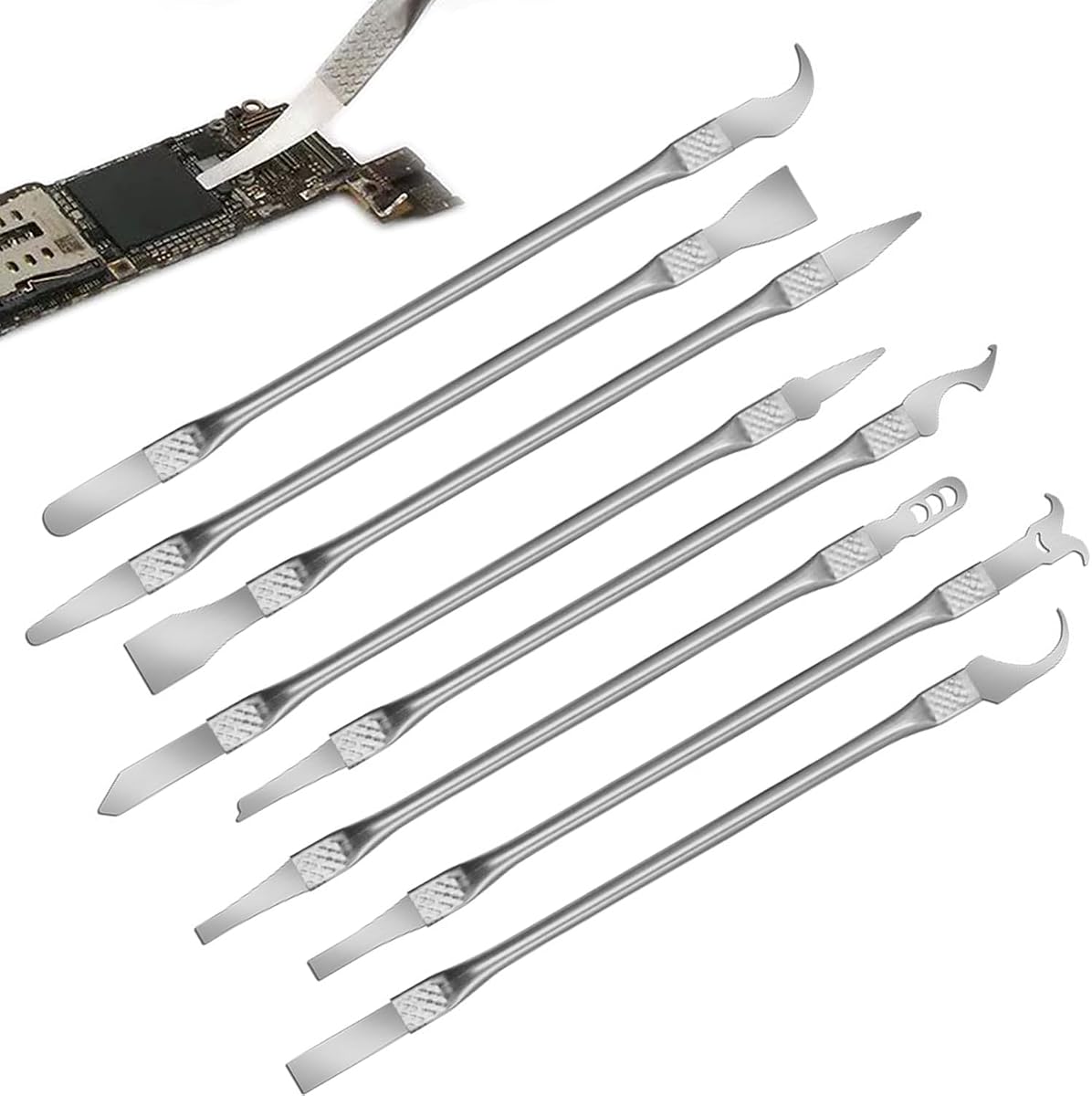
8 Piece Set Multi-Function CPU Removal Tool Set
4.0Editor score
Versatile smartphone and computer repair
Ultra-thin tools for safety
Integrated blade and handle design
This expert guide compares the top delidding kits for CPUs and GPUs, evaluating precision, durability, and compatibility to help you choose the best tool for
Delidding kits are essential tools for enthusiasts seeking to improve thermal performance by removing integrated heat spreaders. These kits enable direct die cooling, which can significantly lower operating temperatures and boost overclocking potential for demanding workloads.
We evaluated ten top-rated products based on precision engineering, blade durability, and compatibility with various processor generations. Our analysis focuses on tools designed for specific CPUs and GPUs, ensuring users find reliable solutions for their unique hardware configurations and repair needs.
Each pick highlights key features, pros, and cons to guide your decision-making process. While prices may fluctuate over time, the quality and functionality of these kits remain consistent, offering long-term value for professionals and DIY hobbyists alike.
4.0Editor score

4.5Editor score

4.1Editor score
This side-by-side comparison evaluates all ten delidding kits based on compatibility, build quality, and intended use cases. Whether you need a tool for a specific console or a general-purpose CPU opener, this table helps you identify the right fit for your repair projects.


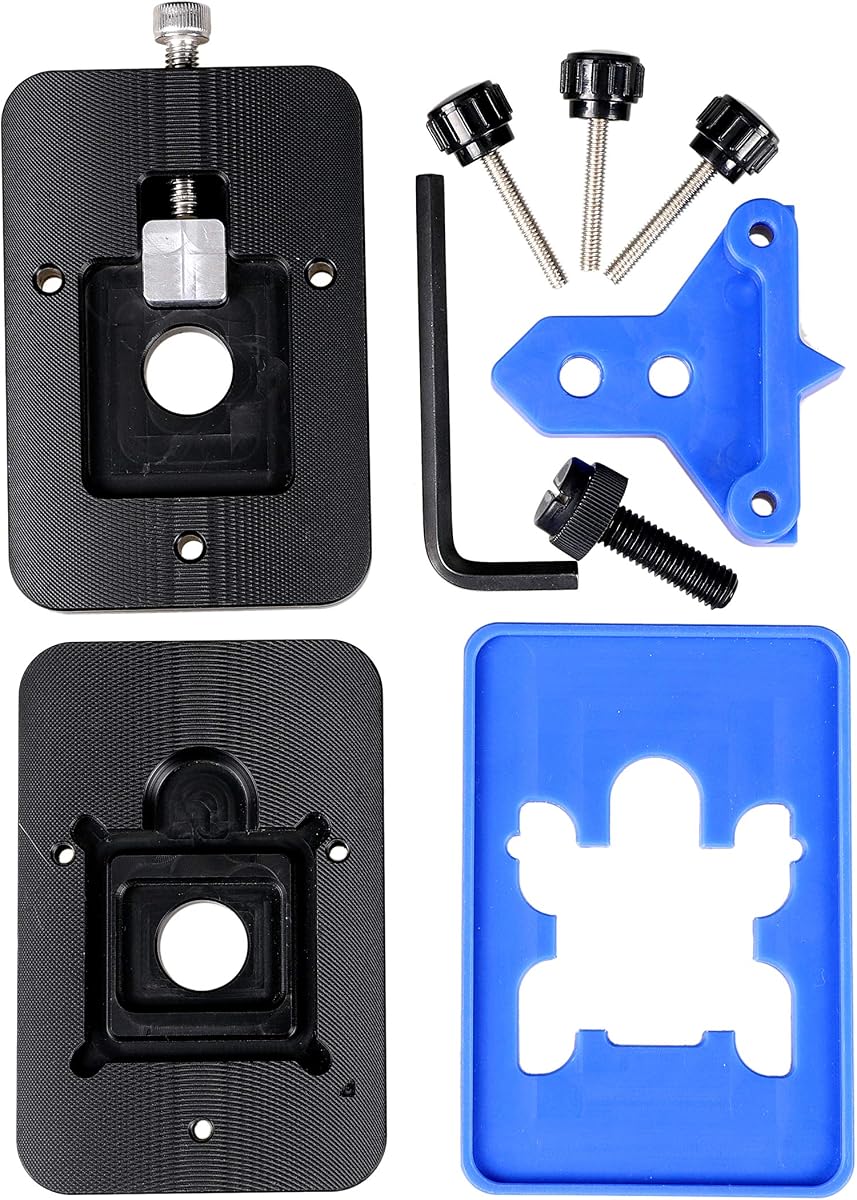


The Thermal Grizzly Delid-Die-Mate is a top-tier tool designed for removing heatspreaders from Intel 12th and 13th generation CPUs. With a 4.5 rating, it stands out for its German craftsmanship and ability to enable direct die cooling.
We may earn a commission when you buy through this link, at no additional cost to you.
Its key strength lies in the precision engineering that facilitates efficient heat dissipation. Users can expect temperature reductions between 10 and 20 degrees Celsius, making it ideal for high-performance gaming and workstation tasks where thermal throttling is a concern.
While the tool is highly effective, it is specifically tuned for certain Intel sockets. Additionally, ensure your CPU cooler supports the reduced mounting height after delidding. These trade-offs are acceptable given the performance gains for compatible systems.
Enthusiasts looking to maximize their Intel CPU potential should consider this kit. It offers a straightforward, hassle-free operation that balances professional-grade quality with user-friendly design for confident delidding outcomes.
By removing the integrated heatspreader, this tool allows for direct contact between the die and cooler, significantly improving thermal transfer efficiency.
Manufactured in Germany, the tool features black and red anodized aluminum that ensures durability and a professional appearance in your repair kit.
We may earn a commission when you buy through this link, at no additional cost to you.
The der8auer Delid-Die-Mate X is a specialized tool designed for Intel Skylake-X and Kaby Lake-X processors using socket 2066. It transforms the risky act of removing heat spreaders into a routine procedure, ensuring processor survival.
We may earn a commission when you buy through this link, at no additional cost to you.
Its primary benefit is the protection it offers against damage during cooler mounting. By providing a reliable method to remove the metal heat spreader, it allows access to the CPU die for advanced cooling solutions without breaking the core.
Users must note that this process invalidates the manufacturer's warranty and requires checking cooler mounting height compatibility. These factors are standard for delidding but should be considered before proceeding with high-end workstation hardware.
This tool is essential for owners of specific high-end Intel processors who want to optimize cooling. It provides the necessary precision and safety to handle delicate CPU components effectively.
The tool ensures that CPU dies survive unscathed during the removal process, offering peace of mind for expensive processor investments.
Constructed from aluminum and stainless steel with an anodised black colour, this tool is built to last through multiple repair sessions.
We may earn a commission when you buy through this link, at no additional cost to you.
This Knife Repair Kit is designed for removing power supply units and scraping CPU adhesive with surgical precision. It features ultra-thin blades that are smaller than solder points, making it suitable for detailed motherboard maintenance.
We may earn a commission when you buy through this link, at no additional cost to you.
The blades are made from SK5 steel, which offers high heat tolerance and oxidation resistance. This ensures they remain sharp during extended repair sessions, providing reliability for professionals working on intricate circuit board tasks.
While the tool is highly functional, its rating suggests users should handle it with care. Proper cleaning with alcohol wipes is recommended to maintain performance. These minor inconveniences are outweighed by the tool's versatility in electronics repair.
Tech enthusiasts and repair technicians will find this kit valuable for delicate operations. It offers a safe and efficient way to disassemble components without damaging the underlying PCB structures.
The 0.015-inch blades enable seamless movement between chips and baseplates, enhancing efficiency in BGA chip restoration tasks.
Special quenching processed SK5 steel maintains sharpness and resists heat, ensuring the tool remains effective over time.
We may earn a commission when you buy through this link, at no additional cost to you.
The Thermal Grizzly TG Scraper set offers a reliable way to clean off adhesive and solder from delidded processors. With a high 4.8 rating, it is favored for its premium acrylic construction that prevents damage to delicate components.
We may earn a commission when you buy through this link, at no additional cost to you.
The narrow tip is specifically designed to remove silicone adhesive and indium solder residue. This precision helps prepare the surface for new thermal compound, ensuring a smooth and efficient reinstallation process for advanced cooling setups.
Users should handle the scraper carefully to avoid scratching the CPU package. However, the ergonomic design allows for significant control even on very small electronic parts, making the process manageable for experienced DIYers.
Anyone performing delidding will benefit from including this scraper in their toolkit. It ensures a clean surface ready for high-performance thermal paste application, supporting overall system stability.
Acrylic construction ensures safe scraping of delicate CPU components without damaging the silicon die or surrounding PCB areas.
The comfortable grip lets you maintain control and precision even when working with very small electronic components like CPU packages.
We may earn a commission when you buy through this link, at no additional cost to you.
The EG Starts Kaby Intel CPU Delid & Relid tool is designed to simplify the process of opening and closing Intel CPUs. It is compatible with a wide range of processors, including Kaby and Coffee Lake series, supporting various LGA sockets.
We may earn a commission when you buy through this link, at no additional cost to you.
Its key strength is the inclusion of a square aluminum block that ensures safety during the operation. When placed correctly below the plastic plane, it protects the CPU board from damage, making it a reliable choice for enthusiasts.
Users must ensure the square aluminum block is positioned correctly to avoid board damage. While this requires attention, the tool provides a structured method that reduces risks compared to improvised techniques used in the past.
This kit is perfect for those looking to delid and relid their CPU for maximum overclocking potential. It offers a comprehensive solution for maintaining processor integrity while improving thermal performance.
100% compatible with Kaby Lake and Coffee Lake processors, it supports multiple LGA sockets for broad utility in Intel setups.
The design includes a specific aluminum block to ensure the CPU board remains protected during the delicate delidding process.
We may earn a commission when you buy through this link, at no additional cost to you.
The QianLi ToolPlus 009 BGA Scraper Kit is a comprehensive set designed for professionals tackling delicate repair tasks. It includes 12-in-1 metal craft knives that can handle removing adhesive, lifting chips, and cleaning solder pads efficiently.
We may earn a commission when you buy through this link, at no additional cost to you.
Its surgical precision makes it suitable for advanced micro-soldering tasks, including those on Apple devices. The blades are crafted from high-grade steel, ensuring they remain sharp and effective for intricate work without damaging sensitive components.
The metal handle provides a non-slip grip, reducing hand fatigue during detailed operations. While new to the market, its design promises durability and control for serious repair technicians working on complex electronics like motherboards or CPUs.
Repair technicians seeking a versatile toolset will find this kit valuable. It streamlines workflows by combining multiple functions into one set, enhancing productivity in professional repair environments.
Constructed with high-grade steel and a sturdy metal handle, this kit is built to withstand the demands of intensive repair workflows.
From iPhone CPU maintenance to general motherboard repairs, the 12-in-1 set offers the right blade for every challenge.
We may earn a commission when you buy through this link, at no additional cost to you.
The RSX GPU Delid Tool is specifically designed for repairing PlayStation 3 Fat and Slim models. It targets the RSX chip to allow removal of the integrated heat spreader for thermal paste replacement and maintenance.
We may earn a commission when you buy through this link, at no additional cost to you.
Users can access the thermal interface material between the RSX chip and IHS using this tool. It is engineered to keep the working edge away from the main board, minimizing the risk of accidental contact during the delicate process.
Compatibility is key here, as this tool does not work on Super Slim models or for the CELL CPU. While it is a niche product, it offers a focused solution for console repair enthusiasts looking to extend the life of their hardware.
This tool is essential for anyone repairing a PS3 with a fat or slim RSX chip. It provides the necessary precision to perform maintenance without compromising the integrity of the console's motherboard.
Designed specifically for the RSX chip, this tool helps users perform maintenance or replace aged thermal paste effectively.
The tool assists with IHS removal while helping keep the working edge positioned away from the main board during the process.
We may earn a commission when you buy through this link, at no additional cost to you.
This 8 Piece Set Multi-Function CPU Removal Tool Set offers a versatile and budget-friendly solution for repairing smartphones and computers. It allows for the safe removal of BGA chips and other small components with precision ultra-thin tools.
We may earn a commission when you buy through this link, at no additional cost to you.
The tools are made from high-quality alloy, which ensures they resist corrosion and bending over time. This durability, combined with an ergonomic design, reduces hand fatigue during extended use, making it accessible for hobbyists.
While it may lack the specialized features of dedicated CPU delidding tools, its integrated design eliminates the need for assembly. This convenience makes it a solid choice for general repair tasks where speed and simplicity are priorities.
DIYers looking for an affordable starting point in electronics repair will find this kit useful. It provides a functional set of tools to handle basic removal tasks safely and efficiently.
Perfect for safely removing BGA chips, CPUs, and other small components from smartphones and motherboards with ease.
Made from high-quality alloy alloy the set is resistant to corrosion and bending, ensuring longevity for frequent use.
We may earn a commission when you buy through this link, at no additional cost to you.
The Delid Tool V3 is specifically designed for delidding the PlayStation 3 to address overheating and performance issues. With a 4.6 rating, it offers a purpose-built solution that reduces risks compared to improvised alternatives.
We may earn a commission when you buy through this link, at no additional cost to you.
Its version 3 features a sharper, more flexible blade for improved durability. The replaceable blade ensures long-term usability, making it a consistent tool for PS3 repair needs without frequent replacements.
This tool is tailored for PS3 users, so it may not serve other hardware platforms. While this limits its versatility, it provides a safe and efficient path for console enthusiasts seeking to improve thermal performance.
Anyone owning a PS3 with thermal problems should consider this kit. It offers a user-friendly design suitable for both professionals and DIY enthusiasts to achieve reliable results.
Version 3 of the Delid Tool features a sharper, more flexible blade for improved durability and longevity during use.
The user-friendly design is suitable for both professionals and DIY enthusiasts, making the process straightforward.
We may earn a commission when you buy through this link, at no additional cost to you.
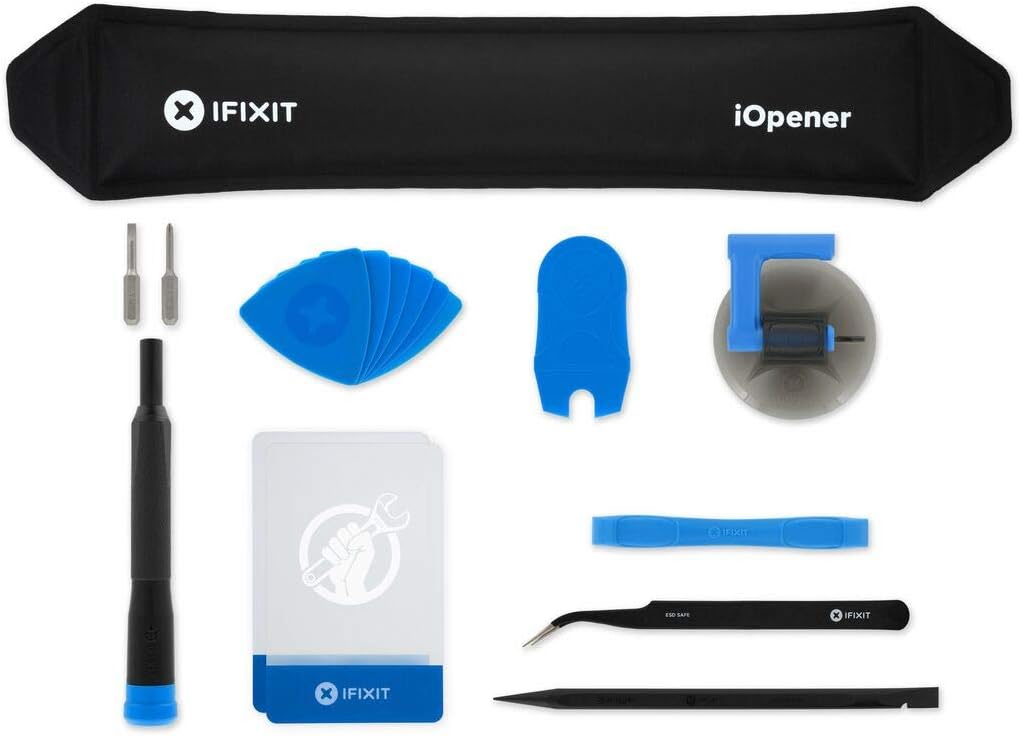
The iFixit iOpener is a heat pad adhesive opening tool designed for phone and laptop repair. It loosens adhesive evenly, making it a useful companion for any repair process that requires careful disassembly and heat application.
We may earn a commission when you buy through this link, at no additional cost to you.
Its non-toxic and food-safe materials ensure safety during use. This makes it ideal for users who want to avoid harsh chemicals when opening devices, including those performing maintenance on electronics with adhesive seals.
While not a direct delidding knife, it supports the broader context of disassembly. Users should note that it requires an external heat source to function, which may add steps to the workflow compared to standalone thermal tools.
This tool is recommended for those prioritizing safety in their repair kit. It provides a reliable way to soften adhesives, protecting components during the opening process for a range of electronic devices.
Made for iPad but also works with many tablets, iPhones, and laptops, offering universal heat temperature application for disassembly.
This separator applies heat directly and evenly to screens to loosen the adhesive for removal during DIY repair.
We may earn a commission when you buy through this link, at no additional cost to you.
Selecting the right delidding kit depends on your specific hardware, skill level, and repair goals. This guide outlines the key factors to consider to ensure you choose a safe and effective tool.
Check that the tool supports your CPU socket or console model. Many kits are designed for specific generations like Intel 13th Gen or PS3 RSX, so verify compatibility before purchasing.
Always confirm the tool is listed for your exact device to avoid damage during the process.
Look for blades made from high-quality steel like SK5 or durable materials like acrylic. The material impacts how well the tool cuts through adhesive and resists wear over time.
High-quality materials ensure the blade remains sharp and safe for delicate components.
Precision is critical for avoiding damage to the die or motherboard. Tools with ergonomic handles and ultra-thin blades offer better control during the removal process.
A good grip and precise tip reduce the risk of slipping and accidental damage.
Ensure the tool has features that minimize risks, such as guards or specific designs that keep edges away from the motherboard. Safety is paramount when working with expensive electronics.
Prioritize tools that include clear instructions or built-in safety mechanisms.
Beginners should opt for kits with straightforward designs that simplify the delidding process. Look for integrated components that reduce the need for assembly or complex setup.
Easy-to-use tools save time and reduce the learning curve for new users.
Choose brands known for quality and reliability in the repair community. Customer reviews provide insights into real-world performance and potential issues.
Well-reviewed products often deliver better consistency and support.
Consider if you need a tool for multiple tasks, such as both CPUs and GPUs. Multi-function kits can save money and storage space compared to single-purpose items.
Versatile tools offer better value if you work on various devices regularly.
Check if the product includes detailed instructions or video guides. Good documentation helps you perform the procedure correctly and safely.
Clear steps are essential for avoiding mistakes during complex repairs.
Begin by ensuring your workspace is clean and static-free to protect sensitive components. Position the tool correctly on the processor according to the manufacturer's instructions to avoid misalignment during the process.
Apply steady and gentle pressure to separate the heat spreader from the die. If resistance is encountered, recheck the alignment rather than forcing the tool to prevent cracking the silicon or damaging surrounding parts.
After use, clean the blades with alcohol wipes to remove adhesive residue and maintain sharpness. Store the kit in a protective case to keep the tools organized and safe from damage when not in use.
Delidding carries risks such as damaging the die or voiding warranties. Always use a purpose-built tool and follow instructions carefully to minimize these risks. Proceed only if you understand the potential consequences.
No, only specific CPU generations with integrated heat spreaders can be delidded safely. Check your processor's generation and socket type to ensure compatibility with available tools.
The primary benefit is improved cooling performance by allowing direct contact between the die and cooler. This can reduce temperatures by 10-20 degrees Celsius under load.
Yes, relidding restores the original protection and ensures proper mounting with your cooler. Use a suitable thermal interface material to maintain stability and performance.
Using a regular knife is not recommended as it increases the risk of damaging the CPU or board. Purpose-built tools offer precision and safety that makeshift alternatives lack.
Yes, removing the integrated heat spreader typically invalidates the manufacturer's warranty. Only proceed if you are comfortable with the risk of losing warranty coverage.
You will need a heat gun or iOpener to soften adhesive, high-quality thermal paste, and a reliable CPU cooler. Cleaning supplies like alcohol and wipes are also essential for maintenance.
Replace blades when they become dull or show signs of wear. Regular cleaning after each use helps maintain sharpness and prolongs the tool's lifespan.
We reviewed ten top delidding kits ranging from specialized CPU tools to multi-purpose repair sets. Our picks highlight options for enthusiasts, professionals, and budget-conscious users seeking reliable thermal improvements.
Prioritize compatibility and precision when selecting a kit to ensure safety and effectiveness. A well-chosen tool can transform your repair capabilities and enhance hardware performance significantly.
Remember to check current prices and availability before purchasing as they may fluctuate over time. Investing in a quality delidding kit is a smart move for any serious PC or console enthusiast.