
Anker Laptop Docking Station Dual Monitor
4.5Editor score
8-in-1 connectivity
Dual 4K HDMI output
85W Power Delivery pass-through
Discover the top docking station for Dell laptop models reviewed for connectivity, power delivery, and display options to maximize your productivity in any
Choosing the right docking station for Dell laptop models is essential for transforming your portable device into a full desktop workstation. Modern docks offer versatile connectivity options that allow you to connect multiple monitors, peripherals, and networks through a single cable connection for streamlined efficiency.
We compared ten real products based on compatibility, port selection, power delivery capabilities, and display support. Our analysis focuses on models that work seamlessly with Dell XPS, Latitude, and Inspiron series while also supporting other USB-C enabled laptops for broader utility.
Each pick highlights specific strengths like budget-friendly options, premium features, or specific port configurations. Prices and availability change frequently so check current listings before purchasing to ensure you get the best deal for your specific workspace needs today.
4.5Editor score

4.5Editor score

4.3Editor score
This side-by-side comparison highlights the key specifications of all ten selected docking stations to help you identify the best match for your Dell laptop and workspace requirements.




The Dell Pro Laptop Docking Station WD25 stands out as a top choice for users seeking a premium docking experience designed specifically for modern Dell PCs. With a 4.5 rating from verified buyers it delivers reliable connectivity and power for demanding workflows.
We may earn a commission when you buy through this link, at no additional cost to you.
Its standout feature is the ability to drive up to four high-resolution displays which is rare at this tier. The robust USB-C connector ensures durability while the ambidextrous cable routing allows for flexible desk arrangements without clutter.
While the price is higher than third-party options the built quality and management features justify the cost for enterprise users. The reduced power consumption on standby and recycled materials also align with corporate sustainability goals.
Buy this dock if you own a Dell AI PC or need multiple monitors in a managed environment. It offers the most seamless integration for Dell users seeking a reliable long-term solution.
This dock supports up to 100W power delivery ensuring your Dell laptop charges fully while connected to multiple peripherals.
Built with at least 65% postconsumer recycled materials it reduces environmental impact without sacrificing performance.
We may earn a commission when you buy through this link, at no additional cost to you.
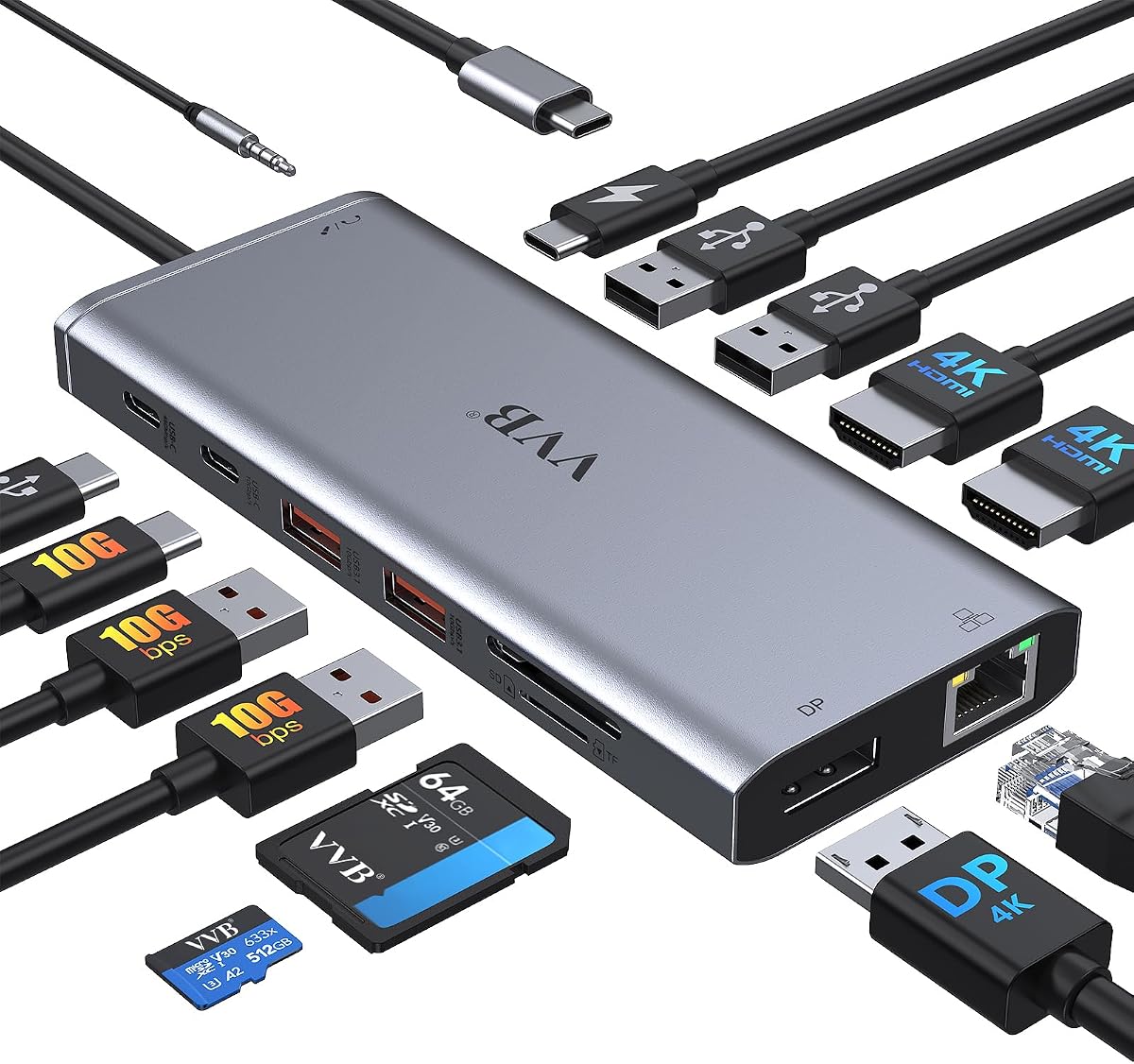
The Anker Laptop Docking Station Dual Monitor offers exceptional value for users needing dual displays without breaking the bank. With a 4.5 rating it remains a popular choice for budget-conscious professionals.
We may earn a commission when you buy through this link, at no additional cost to you.
It features dual HDMI ports supporting 4K at 30Hz for dual setups or 60Hz for single screens. The included Ethernet port ensures stable network connectivity while the 85W pass-through charging keeps your laptop powered.
While it lacks the high-end features of premium docks it covers all essential needs like USB-A data transfer and SD card reading. Anker's reputation for reliability and the 18-month warranty add confidence.
This dock is ideal for home office setups where cost efficiency matters most. It provides the core functionality required to turn your Dell laptop into a productive dual-monitor workstation.
Transform a single USB-C port into multiple HDMI USB and SD slots for a complete workspace upgrade.
Supports high-speed pass-through charging up to 85W so you can power your laptop while working.
We may earn a commission when you buy through this link, at no additional cost to you.
The Anker Prime Docking Station is a powerhouse for power users requiring extensive connectivity and fast data transfer. With a 4.3 rating it delivers premium features that justify the investment for demanding setups.
We may earn a commission when you buy through this link, at no additional cost to you.
Its 160W total output allows you to charge multiple devices simultaneously while maintaining high-speed data transfer up to 10Gbps. The dual HDMI ports support crisp 4K visuals for creative professionals needing screen real estate.
While it carries a premium price the sheer number of ports eliminates the need for additional hubs. This all-in-one solution streamlines your desk by connecting everything from drives to monitors through one cable.
Choose this dock if you need to charge four devices and transfer large files frequently. It is a top-tier choice for those who prioritize performance and versatility in their workspace.
Deliver powerful charge with 160W of total output to handle multiple devices at once.
Manage data across multiple devices with versatile ports offering speeds up to 10Gbps.
We may earn a commission when you buy through this link, at no additional cost to you.
The USB C Docking Station Dual Monitor for HP offers a unique triple display solution at a competitive price point. With a 4.3 rating it appeals to users needing more screen space without high-end costs.
We may earn a commission when you buy through this link, at no additional cost to you.
It supports up to three monitors via HDMI DP and VGA ports though mixing VGA lowers resolution to 1080P. The 100W PD input ensures fast charging for supported laptops while the USB ports handle peripherals.
Compatibility requires DP1.4 support on your laptop so check your model before buying. For users with older monitors the VGA port provides a useful fallback for legacy display connections.
This dock suits budget-focused users needing three screens. It is a practical choice for traders or analysts who prioritize screen count over premium build quality.
Supports up to 4K Dual Triple Display videos via 2 HDMI DP and VGA ports.
Supports up to 100W input for fast charging on compatible Dell and HP laptops.
We may earn a commission when you buy through this link, at no additional cost to you.
The Anker Nano Laptop Docking Station bridges the gap between a desktop dock and a travel hub with its detachable design. With a 4.2 rating it offers unique flexibility for hybrid workers.
We may earn a commission when you buy through this link, at no additional cost to you.
The base station supports up to three monitors via HDMI and DisplayPort while the detachable 6-in-1 hub can be used on the go. This eliminates the need to carry multiple devices for travel.
Included is a robust 140W adapter ensuring stable performance under heavy loads. The 10Gbps USB-C port allows rapid file transfers which is crucial for content creators moving large data sets.
Buy this if you frequently move between office and home. The two-in-one design saves space and ensures you have the right ports wherever you work without extra clutter.
Features a 13-in-1 desktop docking station with a detachable 6-in-1 portable hub that snaps off.
Delivers up to 100W Power Delivery to charge your laptop while running all connected peripherals.
We may earn a commission when you buy through this link, at no additional cost to you.
This USB C Laptop Docking Station provides extensive connectivity with 14 ports including dual HDMI and DisplayPort. With a 4.3 rating it is a versatile option for users with many peripherals.
We may earn a commission when you buy through this link, at no additional cost to you.
It supports triple displays on Windows allowing for expanded multitasking. The Gigabit Ethernet port ensures stable network connectivity which is vital for reliable remote work environments.
USB-A 3.1 ports allow for fast data transfer up to 10Gbps while USB 2.0 ports are dedicated to peripherals like mice. This separation prevents interference during high-speed file transfers.
Ideal for users with mixed peripherals needing robust connectivity. It is a solid choice for workstations requiring both high-speed data and reliable network connections.
Supports dual and triple displays for Windows with up to 4K@60Hz on single ports.
Supports power input up to 100W for efficient charging on compatible laptops.
We may earn a commission when you buy through this link, at no additional cost to you.
The Dell WD19S is a well-established dock offering 130W Power Delivery for high-performance laptops. With a 3.8 rating it remains a reliable option for legacy Dell systems needing significant power.
We may earn a commission when you buy through this link, at no additional cost to you.
It features Dual DisplayPort outputs for professional workflows requiring multiple screens. The 180W adapter ensures that even power-hungry mobile workstations stay charged during heavy use.
As an official Dell product it guarantees firmware updates and driver support. While newer models exist this one still serves users with existing hardware who need consistent performance.
Buy if you require high power delivery for older Dell Precision or Latitude models. It is a steady choice for users who prioritize official support over modern features.
Built to power high-demand connections with up to 130W Power Delivery to your laptop.
Simplifies your setup with multiple video outputs and USB connectivity.
We may earn a commission when you buy through this link, at no additional cost to you.
This Anker Laptop Docking Station offers triple display support in a compact vertical form factor. With a 4.0 rating it provides reliable performance for users needing multiple screens without desk clutter.
We may earn a commission when you buy through this link, at no additional cost to you.
It includes a 135W adapter to support host charging up to 85W along with simultaneous phone charging. The vertical design saves space while accommodating three external monitors for expanded multitasking.
USB-C 3.1 ports allow fast file transfers at 10Gbps while USB 2.0 ports handle peripherals. The SD card reader adds utility for photographers or data-intensive users.
Ideal for home offices where space is limited. It is a strong choice for users needing multiple monitors without sacrificing a full footprint on their desk.
Features 13 ports to connect multiple displays and peripherals through a single cable.
Supports extended triple displays on Windows 10 and 11 with MST.
We may earn a commission when you buy through this link, at no additional cost to you.
The Dell WD19 is a standard docking solution for business environments requiring reliable connectivity. With a 4.0 rating it delivers consistent performance for daily office tasks.
We may earn a commission when you buy through this link, at no additional cost to you.
It provides 90W Power Delivery sufficient for most Dell Latitude models. Dual DisplayPort and HDMI outputs allow flexible monitor setups while the audio jack supports headsets or speakers.
Multiple USB-A ports support a range of peripherals without needing additional adapters. Its design prioritizes function over form making it suitable for permanent desk setups.
Choose this dock for standard office deployments. It offers the balance of features and reliability expected from Dell official hardware.
Provides 1x USB-C 3.1 3x USB-A 3.1 and multiple video outputs.
Designed for various Dell Latitude and Precision models with USB-C support.
We may earn a commission when you buy through this link, at no additional cost to you.
This renewed WD19 dock offers certified refurbished performance at a lower price point. With a 4.1 rating it proves that refurbished models can deliver reliable connectivity for Dell laptops.
We may earn a commission when you buy through this link, at no additional cost to you.
It includes the 180W adapter and cables necessary for immediate setup. The dual monitor support and USB-C connectivity match new units for daily productivity needs.
Refurbished units go through testing to ensure functionality. For users on a budget this provides a cost-effective way to access enterprise-grade hardware without the premium cost.
Buy if you are comfortable with refurbished gear. It is a smart choice for budget-conscious users needing official Dell hardware quality.
Effortlessly connect your peripherals monitors and devices with this certified dock.
Supports various devices including select models from Inspiron Venue Precision XPS and Latitude series.
We may earn a commission when you buy through this link, at no additional cost to you.
Choosing the right docking station involves evaluating power delivery video output and port selection to match your Dell model and workflow needs.
Ensure the dock supports at least 65W power delivery to charge your Dell laptop effectively. Higher wattage like 100W is crucial for performance laptops to avoid battery drain while working.
Check your Dell model's requirements and choose a dock that matches or exceeds its needs for consistent performance.
Determine how many monitors you need and the resolution required. Docks supporting HDMI DisplayPort and USB-C video output provide flexibility for 4K or dual setups.
Verify that your laptop's USB-C port supports video output like DP Alt Mode or Thunderbolt for proper display functionality.
Look for a mix of USB-A and USB-C ports for your peripherals and transfer speeds. USB 3.1 ports with 10Gbps speeds are essential for external drives while USB 2.0 works for mice and keyboards.
Prioritize docks with enough ports to avoid needing additional adapters which can clutter your workspace.
A Gigabit Ethernet port ensures stable wired internet connections which is critical for remote work. Wireless connections can be unstable and slow compared to direct ethernet.
Choose a dock with an included RJ45 port if reliability is a priority for your daily tasks.
Docks with robust connectors and durable materials last longer under frequent plugging and unplugging. Brands like Dell and Anker often offer better reliability and support for their products.
Invest in a well-constructed dock to prevent connection issues and ensure long-term usability.
Docks range from affordable hubs to premium enterprise solutions. Define your budget and compare features like power delivery and port counts to find the best value.
Avoid overly cheap models that lack essential features like power delivery or reliable video output.
Check that the dock is compatible with your specific Dell model to avoid connectivity issues. Some docks require firmware updates to work correctly with newer laptops.
Regular firmware updates from the manufacturer ensure security and feature support for your setup.
Consider whether you need a desktop dock or a portable hub. Compact docks save space while larger ones may offer more ports and better cooling for high-performance setups.
Choose a design that fits your desk layout and mobility requirements.
Connect the power adapter to the dock first to ensure stable power delivery before plugging in your laptop. This prevents issues with initial device detection.
Plug your peripherals like monitors and drives into the dock before connecting the USB-C cable to your laptop. This ensures all devices are recognized immediately after connection.
Avoid frequent plugging and unplugging of the USB-C cable as it may wear out over time. Use a cable management solution to keep your desk organized and reduce strain on the connector.
The Dell Pro Laptop Docking Station WD25 is highly recommended for XPS 13 due to its 100W power delivery and robust USB-C connector. Alternatively the Anker Nano Docking Station offers a compact portable option with triple display support for mobile users.
Yes most modern Dell docks like the WD19S support dual 4K monitors at 60Hz via HDMI or DisplayPort. Ensure your laptop supports DP Alt Mode or Thunderbolt for full resolution capabilities.
Most Dell laptops require at least 65W power delivery to charge while working. High-performance models like the XPS 15 may require 100W to maintain full performance without battery drain.
Yes many third-party docks like Anker work with any laptop that has a USB-C port supporting Power Delivery and DP Alt Mode. Always check specific model compatibility before purchasing.
Ensure your laptop supports DisplayPort Alternate Mode on its USB-C port. Update your laptop drivers and dock firmware to resolve potential compatibility issues with video output.
Yes certified refurbished models like the WD19 provide significant savings with similar performance to new units. Just verify the warranty and condition before purchasing to ensure reliability.
The Dell Pro Laptop Docking Station WD25 leads as the best overall choice for its seamless integration and high power delivery. Budget users will appreciate the Anker Dual Monitor Docking Station for its affordability and essential features.
Prioritize power delivery and display capabilities based on your specific laptop model. For travelers consider portable options with detachable hubs to ensure connectivity on the go.
Check current prices and compatibility details before purchasing to ensure you get the best value. Availability changes frequently so verify the latest specs from the manufacturer.