
GE BigEZ OneTouch Big Button Universal TV Remote for Seniors, Easy to Use
4.3Editor score
Fully backlit button design
Preset for five major brands
U.S. technical support included
This guide compares the top 10 easy to use TV remote for seniors models based on button size, simplicity, and compatibility to help you choose the best device.
Finding the right control for your television can be a challenge for older adults who struggle with small buttons or complex menus. A simplified remote designed specifically for seniors offers large keys, clear labels, and intuitive layouts that reduce frustration during daily use.
We evaluated ten top-rated universal and brand-specific remotes to identify models that prioritize accessibility and ease of operation. Our analysis focuses on button tactile feel, setup requirements, battery life, and compatibility with major television brands and basic functions.
Each product listed below highlights unique features that cater to different needs such as low vision, dementia care, or budget constraints. Please note that product availability and pricing may change frequently, so verify details before making your final purchase decision.
4.3Editor score
4.2Editor score

4.4Editor score
The following table provides a side-by-side comparison of all ten selected remotes highlighting their key specifications, compatibility limits, and unique features to help you quickly identify the best match for your specific viewing setup and user needs.


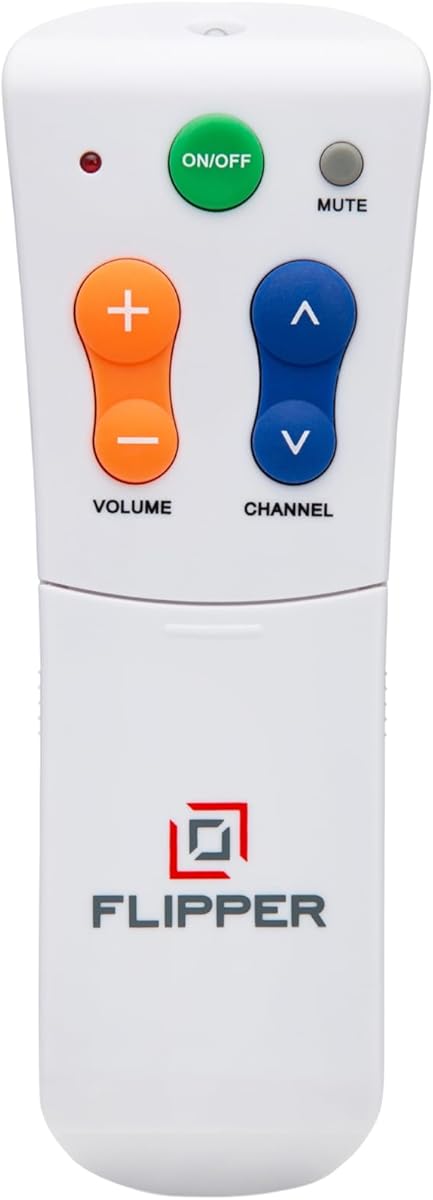
The Flipper remote stands out as a top choice for caregivers managing dementia or Alzheimer's patients due to its highly simplified interface. With a 4.2 star rating it delivers reliability while removing the confusion caused by standard remotes filled with unnecessary buttons.
We may earn a commission when you buy through this link, at no additional cost to you.
Its face features only four oversized color-coded buttons for power, volume, channel, and mute ensuring that daily tasks remain stress-free. The ability to program up to twenty five favorite channels lets users cycle through preferred content without needing to type numbers or navigate menus.
While the lack of streaming app navigation is a tradeoff it ensures the device focuses purely on traditional broadcast viewing which suits many seniors perfectly. This limitation prevents accidental clicks into complex smart TV interfaces that often frustrate users with cognitive decline.
Caregivers seeking independence for their loved ones will find this remote provides the peace of mind that comes from simplicity and control. It remains an excellent investment for households relying on cable or satellite broadcasts rather than internet-based streaming services.
The four button design eliminates confusion and ensures users can access essential functions instantly without learning complex sequences.
Pre-programming favorite channels allows users to bypass hundreds of unwanted options and access preferred shows with a single press.
We may earn a commission when you buy through this link, at no additional cost to you.
The GE BigEZ OneTouch offers exceptional value for seniors needing a reliable remote that works with most major television brands. Its 4.3 star rating reflects strong performance in simplicity and visibility making it a favorite for budget-conscious buyers.
We may earn a commission when you buy through this link, at no additional cost to you.
Backlit buttons ensure visibility in dark living rooms while the white body makes it easy to locate if dropped. The color coding with blue volume and orange channel buttons helps users with color blindness distinguish functions quickly without squinting.
Setup involves pressing a brand button followed by power which streamlines the process for non technical users. The inclusion of US-based technical support provides an extra layer of reassurance for families who might need help with initial configuration.
This model is ideal for households seeking a low-cost solution that still delivers on accessibility features like large text and tactile feedback. It balances affordability with functionality effectively meeting the core needs of elderly users across various TV setups.
Fully backlit buttons allow users to operate the remote comfortably even in low light conditions without straining their eyes.
Dedicated preset buttons for common brands reduce setup time and ensure quick activation of the correct device code.
We may earn a commission when you buy through this link, at no additional cost to you.
Designed specifically for Samsung owners this remote delivers a premium experience with its no-setup requirement and durable build quality. Its 4.4 star rating highlights satisfaction among users who need reliable performance for low vision and Parkinson's patients.
We may earn a commission when you buy through this link, at no additional cost to you.
The backlight stays lit for thirty seconds allowing users to find buttons easily in the dark without needing additional light sources. A protective silicone cover prevents damage from drops and spills which is essential for homes with busy or unsteady hands.
Setup is nonexistent since the remote pairs instantly with Samsung TVs removing frustration from the initial experience. The included mounting hook keeps the device off the couch floor which reduces time wasted searching for misplaced remotes.
This model is perfect for families looking to simplify the experience for someone who exclusively uses a Samsung television without needing universal compatibility. The combination of tactile soft buttons and bright lighting makes it a top tier choice for dedicated Samsung households.
No programming or pairing steps are required meaning the remote starts working immediately after battery insertion.
Included cover and hook provide physical protection and organization ensuring the remote stays safe and accessible.
We may earn a commission when you buy through this link, at no additional cost to you.
The EZclicker Universal remote provides a straightforward experience tailored for seniors who need clear tactile feedback and simple operation. With a 4.2 star rating it performs well as a general purpose replacement for older standard TV remotes.
We may earn a commission when you buy through this link, at no additional cost to you.
Its large enter button and tactile design help users confirm inputs without accidentally pressing wrong keys during daily viewing. The one hand programming process involving volume and mute buttons makes setup accessible even for those with limited dexterity.
While it does not support streaming devices or cable boxes this limitation ensures focus remains on core TV functions which simplifies the user experience. The compact dimensions make it easy to store in a bedside table or living room drawer.
Families looking for an affordable accessible option for traditional TV viewing will find this model offers solid performance and ease of use. It is a reliable choice for households that prioritize basic volume and channel control over complex smart features.
Physical feedback on buttons helps users feel when a key is pressed reducing accidental clicks and increasing confidence.
Programming requires holding two buttons together which is an easy step to remember for most elderly users.
We may earn a commission when you buy through this link, at no additional cost to you.
This Big Button Universal remote stands out by eliminating setup entirely which is a significant advantage for users who struggle with technology. Its 4.4 star rating indicates high satisfaction among owners who value plug and play functionality above all else.
We may earn a commission when you buy through this link, at no additional cost to you.
The ability to work straight out of the box without pairing or code entry makes it one of the easiest options available. It covers a wide range of brands including Samsung LG Sony and Hisense ensuring broad utility across different households.
An extra large enter button provides clear navigation feedback while the simple layout prevents confusion during channel changes. The company also offers a ninety day warranty replacement policy adding extra security for buyers concerned about product durability.
For seniors who find technical setup stressful this model offers a calm and immediate solution that prioritizes viewing time over configuration time. It is an ideal pick for those who want a reliable remote that works instantly without needing assistance.
Users simply insert batteries and begin using the remote immediately without any programming steps or manual guidance.
Compatibility with multiple major manufacturers ensures the remote fits most common household television setups.
We may earn a commission when you buy through this link, at no additional cost to you.
This remote focuses on delivering a clean and comfortable experience for elderly users who prioritize clear labels and reliable operation. With a 4.4 star rating it appeals to those seeking a straightforward replacement that avoids modern digital complications.
We may earn a commission when you buy through this link, at no additional cost to you.
Extra-large buttons reduce misclicks significantly helping users adjust volume or channel without frustration. The ergonomic body ensures a comfortable grip which is helpful for those with arthritis or weak hand strength.
While it lacks voice commands or app navigation this limitation supports a distraction free viewing environment that benefits seniors with limited tech experience. The simple layout ensures that every button has a clear purpose and function.
Households needing a basic tool that encourages independence will find this model supports confidence and ease of use during daily routines. It is a dependable choice for anyone valuing physical comfort and clarity over advanced smart features.
Large button spacing and size minimize the chance of pressing the wrong key during daily use.
Ergonomic shaping ensures the remote stays stable in the hand preventing slips and strain during operation.
We may earn a commission when you buy through this link, at no additional cost to you.
The Philips BigEZ OneTouch offers a solid entry into accessible remotes with its distinct OneTouch setup and clear keypad. While its 3.8 star rating is lower than competitors it still provides useful features for those needing backlighting and brand coverage.
We may earn a commission when you buy through this link, at no additional cost to you.
Its backlit keypad ensures visibility in dark rooms and the blue and orange color coding aids users with color blindness. The OneTouch setup attempts to simplify programming by using a single button press for selected major TV brands.
Multi-device control allows it to manage soundbars or set-top boxes alongside the television which is helpful for complex living room layouts. However some users may find the setup process varies slightly by brand requiring occasional manual adjustments.
This model is suitable for households willing to spend time on initial setup in exchange for backlighting and broad brand utility. It remains a viable choice for families prioritizing visibility and color coding over absolute simplicity.
The keypad illumination allows users to see controls clearly without needing external lighting sources in the room.
Distinct colors on volume and channel buttons help users distinguish functions quickly and accurately.
We may earn a commission when you buy through this link, at no additional cost to you.
This remote targets dementia and elderly users with a design focused on clarity and ease of use. While its 3.0 star rating suggests mixed experiences it still offers essential features like large buttons and tactile feedback for basic control.
We may earn a commission when you buy through this link, at no additional cost to you.
The extra-large buttons reduce misclicks and make adjustments easier to see and press for users with limited dexterity. A clear layout with marked labels supports stress-free viewing without overwhelming the user with unnecessary options.
It supports traditional TV functions but excludes streaming which helps maintain simplicity and reduces confusion for those with cognitive decline. This focus on core features ensures that daily viewing remains uncomplicated and direct.
For caregivers seeking a very basic tool that avoids complex smart TV features this model offers a straightforward path to entertainment. It is best suited for households that prioritize essential volume and channel control over advanced capabilities.
Removing complex menus helps users focus on core TV functions without cognitive overload or frustration.
Physical feedback on buttons confirms inputs and helps users feel confident during use.
We may earn a commission when you buy through this link, at no additional cost to you.
The EZclicker Extra Simple remote provides a streamlined experience focusing on essential functions without added complexity. With a 4.2 star rating it performs well for those seeking a no-frills solution for everyday TV control.
We may earn a commission when you buy through this link, at no additional cost to you.
Its big button design and tactile feedback ensure users can press keys confidently without worrying about accidental inputs. The compact lightweight form factor makes it easy to hold for long periods and store when not in use.
Programming is straightforward involving a simple volume and mute combination which is easy to teach to seniors. This model excludes streaming and box support to maintain simplicity and ensure the focus remains on primary television operation.
Families looking for a budget friendly and effective tool for basic viewing needs will find this remote meets expectations. It offers reliability and ease of use for households that do not require advanced smart device management.
A simple button combination allows quick setup without navigating complex code lists or manuals.
Compact size reduces hand strain and makes the remote easy to carry or store around the home.
We may earn a commission when you buy through this link, at no additional cost to you.
The Anderic RR1004 offers a unique feature with glow-in-the-dark keys that assist users in finding controls in total darkness. Its 4.0 star rating reflects a balance of practicality and specific features useful for low-light environments.
We may earn a commission when you buy through this link, at no additional cost to you.
The learning function allows copying commands from existing remotes which can help integrate input or specific brand features without complex coding. This feature provides some flexibility for those who need custom controls without advanced programming.
Minimalist design ensures only essential buttons are present reducing confusion for assisted living facilities or elderly users. However it does not support Bluetooth or RF systems limiting its use to standard infrared TVs.
This model is ideal for homes where darkness is a challenge and a basic learning feature is desired without full smart capabilities. It remains a solid choice for caregivers needing a low-tech solution with some customization options.
Glowing keys ensure visibility without requiring extra light sources making night viewing easier.
Copying signals from existing remotes adds flexibility for custom needs without complex programming.
We may earn a commission when you buy through this link, at no additional cost to you.
Selecting the right remote requires considering factors like button size, programming difficulty, and device compatibility to ensure it meets the specific needs of the user.
Large buttons are essential for seniors with limited vision or dexterity as they reduce accidental clicks and make pressing easier. Tactile feedback ensures users feel when a key is pressed which builds confidence and prevents frustration during use.
Look for models with oversized keys and distinct physical feedback to ensure reliable operation in various lighting conditions.
Some remotes require complex code entry while others offer one-touch pairing or zero setup out of the box. For users with cognitive decline choosing a model that requires minimal configuration prevents early frustration and abandonment.
Prioritize remotes with simple setup instructions or instant pairing to ensure the device is usable immediately upon receipt.
Not all universal remotes work with every television manufacturer so checking compatibility is critical before purchase. Some models support only specific brands like Samsung or LG while others cover a wider range of options for flexible use.
Verify that the remote supports your specific TV brand to avoid compatibility issues that would render the device useless.
Lighting conditions in living rooms can vary drastically so backlit buttons help users see keys clearly in the dark. This feature is especially important for elderly individuals who may struggle to read labels without external light sources.
Choose models with backlit or glowing keys to ensure the remote remains usable during nighttime viewing sessions.
Many seniors only need basic power volume and channel controls while others may require access to streaming apps. Remotes that focus solely on traditional functions eliminate the complexity of navigating smart TV menus which can confuse users.
Decide if streaming navigation is necessary as simpler traditional remotes often provide a more stress-free experience.
Battery replacement can be difficult for those with limited mobility so models with long battery life are preferable. Standard AA batteries are easier to find and replace than AAA batteries which may be harder to handle for some users.
Consider the battery type and expected lifespan to minimize frequent changes that could strain the user physically.
Accessories like protective covers or mounting hooks add value by preventing damage and keeping the remote accessible. A durable build ensures the device withstands accidental drops which is common in homes with elderly residents.
Look for remotes that include covers or mounts to protect the device and keep it within easy reach at all times.
Technical support can be crucial if setup issues arise or if the remote stops working unexpectedly. A strong warranty policy protects your investment and provides peace of mind for caregivers managing household tech.
Select brands that offer responsive customer support and reliable warranties to ensure assistance is available when needed.
Start by inserting fresh batteries according to the polarity markings inside the battery compartment to ensure the remote powers on. If the device requires setup follow the manufacturer's instructions carefully often involving a simple button combination or brand selection.
Clean the remote regularly with a dry cloth to remove dust or sticky residue from the keys which can hinder button press accuracy. Avoid using harsh chemicals or excessive moisture that could damage the internal electronics or backlighting.
Store the remote in a consistent location like a holder on the sofa to prevent losing it in cushions or under items. Regularly check battery levels and replace them promptly to avoid sudden shutdowns that interrupt viewing time.
Most models support basic power volume and channel functions for Smart TVs but lack navigation buttons for streaming apps like Netflix. If app access is needed you may still require the original remote or a specialized alternative designed for smart interfaces.
Setup usually involves inserting batteries pressing a specific brand button then holding power until the TV turns off. Refer to the product manual for exact steps as methods vary by model and brand.
Some models support both TV and cable boxes while others focus solely on television functions. Check the product description carefully to confirm compatibility with your specific satellite or cable provider setup.
Limited models like Flipper allow favorite channel customization while others stick to standard volume and channel controls. Review the features of each product to see if programmable channels are available for your needs.
First try replacing the batteries and ensuring the IR sensor is clean. If issues persist contact the manufacturer's support team which many brands offer to help troubleshoot common setup or function problems.
While some advanced remotes offer voice features many senior-friendly options omit this to reduce complexity and confusion. Simple physical buttons are often preferred for reliability and ease of use over voice commands.
Most remotes do not include batteries so you will need to purchase AA or AAA batteries separately. Check the product details to confirm which battery type is required before ordering the device.
Yes caregivers can handle the initial setup and configuration so the senior can use it easily. Many models are designed to be set up once by a helper before being handed over for daily independent use.
The top picks highlighted in this guide offer a range of options from the simplicity of Flipper to the brightness of the GE BigEZ and the premium features of the Samsung backlit model. Each serves distinct needs ensuring there is a solution for most households regardless of budget or specific requirements.
Prioritize features like button size setup ease and compatibility with your existing devices to ensure the remote integrates smoothly into daily routines. A well-matched remote can significantly reduce frustration and improve the overall viewing experience for elderly family members.
Remember that product availability and pricing change frequently so verify current stock and rates before finalizing your purchase decision. Taking the time to choose the right model now can provide long-term convenience and peace of mind for your loved ones.