
10Gb/s SFP+ Fiber Port Ethernet Adapter
4.3Editor score
Intel 82599ES Controller
10GbE SFP+ Support
Compatible with NAS Systems
This comprehensive guide compares the top Fiber Optic Network Interface Card options for 2026, evaluating performance, compatibility, and features to help you
Selecting the right Fiber Optic Network Interface Card is crucial for modern high-speed networking needs. Whether you manage a data center or upgrade a home lab, the right card ensures stable connectivity and low latency.
Our team analyzed ten leading models based on chipset quality, port configurations, and system compatibility. We evaluated real-world performance metrics and user feedback to create this reliable ranking for your next purchase.
Each entry below highlights key specifications and ideal use cases for every product listed. Please note that prices and availability change frequently, so verify current details before finalizing your order online today.
4.3Editor score

5.0Editor score

4.9Editor score
This side-by-side comparison outlines the critical specifications for each of the ten selected Fiber Optic Network Interface Card models. Review these details carefully to match your server requirements with the correct hardware capabilities and interface types.


The StarTech 2-Port GbE SFP Network Card stands out as the top choice for reliable gigabit fiber connectivity. Boasting a perfect 5.0 rating from users, this card delivers consistent performance in both desktop and server environments.
We may earn a commission when you buy through this link, at no additional cost to you.
Its Intel I350 series chipset provides robust network offloading features including IPv4 and IPv6 support. The unlocked SFP slots allow you to mix and match modules for flexible fiber or copper connections as needed.
While it caps at 1Gbps per port, this limit is acceptable for most general networking tasks. The included low-profile bracket ensures it fits in smaller chassis without compromising airflow or cooling.
This card is ideal for system administrators needing stable uplinks without breaking the bank. We recommend it for small businesses and home servers requiring reliable fiber optic networking capabilities today.
The unlocked slots accept any MSA-compliant transceiver giving you freedom to choose optics based on distance or budget.
Features like PXE boot and VLAN tagging enable advanced network configurations for centralized OS deployment and security.
We may earn a commission when you buy through this link, at no additional cost to you.
This LinksTek adapter offers exceptional value for users seeking 10GbE speeds without premium pricing. With a solid 4.3 rating, it handles LAN and SAN connectivity efficiently for data centers and personal NAS setups.
We may earn a commission when you buy through this link, at no additional cost to you.
Powered by the Intel 82599ES controller it supports advanced features like SR-IOV and traffic management. These capabilities ensure smooth operation during virtualization or heavy file transfers across the network.
Installation is straightforward on most systems though Windows 11 users may need to manually install drivers. Ensure your case has adequate airflow since the passive heatsink relies on case fans to stay cool.
Buyers looking for high-speed storage connections will find this adapter highly versatile. It strikes a great balance between cost and functionality for upgrading older systems to 10GbE standards.
Compatible with various OS including Windows Server and Linux offering broad utility across different IT environments.
Built-in QoS and VM device queues help manage traffic efficiently when running multiple virtual machines simultaneously.
We may earn a commission when you buy through this link, at no additional cost to you.
The Asus XG-C100F combines high performance with an attractive design featuring a sophisticated aluminum heatsink. It earns its place by delivering blazing fast 10Gbps speeds for demanding online tasks and streaming.
We may earn a commission when you buy through this link, at no additional cost to you.
Fiber optics support allows for longer cable runs than copper making it ideal for connecting distant devices. The built-in QoS technology automatically prioritizes bandwidth ensuring gaming or video streams remain lag-free.
While effective the heatsink design requires good case ventilation to prevent throttling during sustained transfers. Ensure your PC case has sufficient airflow to maintain optimal operating temperatures consistently.
This adapter is perfect for gamers and power users needing reliable high-speed access. Its robust build quality and intelligent traffic management make it a strong contender in the 10GbE category.
The aluminum heatsink keeps the card cool ensuring sustained performance even during heavy data processing tasks.
Automatic QoS boosts bandwidth to critical streams preventing network congestion during intense usage sessions.
We may earn a commission when you buy through this link, at no additional cost to you.
Equipped with a high-quality original Intel 82599EN controller this card ensures stable server performance. Its 4.4 rating reflects consistent operation in professional environments like Windows Server and VMware setups.
We may earn a commission when you buy through this link, at no additional cost to you.
It supports critical storage protocols such as iSCSI and NFS making it suitable for network storage applications. The single SFP+ port connects to modules or DAC cables meeting data center demands effectively.
Users should note that it does not support intermediate speeds like 2.5G or 5G. Additionally Windows 11 users must follow specific driver instructions to ensure the card functions correctly after installation.
Ideal for system administrators prioritizing stability the included warranty and support add peace of mind. This card delivers reliable connectivity for servers needing dedicated 10GbE capabilities efficiently.
Built-in support for iSCSI and NFS allows seamless integration with network storage systems and servers.
A comprehensive three-year warranty plus lifetime tech support ensures long-term reliability for business deployments.
We may earn a commission when you buy through this link, at no additional cost to you.
Featuring the Realtek RTL8127 controller this card leverages PCIe Gen4 technology for enhanced stability. It achieves a 4.5 rating through reliable performance on modern Windows and Linux systems with minimal friction.
We may earn a commission when you buy through this link, at no additional cost to you.
The exclusive RealWoW technology improves wake-up and diagnostics functions making network management easier. This makes it a robust choice for daily professional network requirements and specialized setups.
Compatibility is broad but limited to Linux kernels up to 6.15 excluding FreeBSD or ESX systems. Ensure your environment meets these requirements before purchasing to avoid driver issues later.
This adapter suits users needing a compact yet powerful solution for 10GbE networking. Its easy installation process and modern interface make it an excellent upgrade path for newer hardware.
PCIe Gen4 x1 design ensures compatibility with newer motherboard slots while maintaining high bandwidth efficiency.
RealWoW technology provides reliable wake-on-LAN features useful for remote management and power-saving tasks.
We may earn a commission when you buy through this link, at no additional cost to you.
This card offers genuine Intel 82599EN silicon ensuring sustained 10 Gigabit throughput for demanding tasks. With a 4.5 rating it is particularly popular for NAS transfers and virtual machine migrations in home labs.
We may earn a commission when you buy through this link, at no additional cost to you.
Unlike branded Intel cards it does not vendor lock the SFP+ cage allowing use of third-party optics. This flexibility saves money by letting you choose optics based on price and compatibility freely.
While it works on Linux servers like Proxmox Windows users still need the Intel driver pack installed manually. Be aware the passive heatsink gets warm so airflow management is essential for silence.
Buyers seeking maximum flexibility on a budget will appreciate this unlocked design. It delivers professional-grade performance without the extra cost of branded proprietary restrictions or support.
No vendor lock allows any third-party DAC or optic to work without rejection errors in the system.
Seamless plug and play support on popular NAS and virtualization platforms simplifies setup significantly.
We may earn a commission when you buy through this link, at no additional cost to you.
The Mellanox CX4121A delivers incredible 25GbE performance ideal for high-throughput cloud and storage platforms. Its 4.9 rating reflects top-tier reliability and speed for virtualization environments needing maximum bandwidth.
We may earn a commission when you buy through this link, at no additional cost to you.
RDMA over RoCE capability offloads processing to the NIC freeing CPU resources for heavy computing tasks. Advanced overlay networks like VXLAN and NVGRE help manage complex cloud infrastructure efficiently.
This card is powerful but requires significant PCIe bandwidth and proper thermal management during use. Ensure your server supports Gen 3.0 x8 slots and has adequate cooling for stable performance.
Data center operators and heavy storage users will find this adapter unmatched in speed. The premium features justify the investment for those scaling enterprise networks to 25GbE standards.
RDMA RoCE support reduces latency by enabling direct memory access across the network efficiently.
VXLAN and NVGRE support allow flexible network segmentation ideal for modern cloud environments.
We may earn a commission when you buy through this link, at no additional cost to you.
This adapter comes bundled with a multimode optical module making it a convenient starter kit for fiber connections. While currently unrated its technical specs suggest solid performance for industrial and workstation use cases.
We may earn a commission when you buy through this link, at no additional cost to you.
The gold-plate contact fingers ensure reliable connectivity and reduce hardware faults over time. This durability is vital for environments where frequent disconnections could disrupt critical data flow.
Since it is relatively new user feedback is limited regarding long-term stability or compatibility issues. Buyers should check driver support carefully for their specific operating system before finalizing the purchase.
If you need an all-in-one fiber solution this card offers immediate usability. The inclusion of a transceiver saves time and ensures a quick start to your 10GbE fiber networking.
Included optical module means you can install and test the card immediately without extra purchases.
Gold-plated fingers resist oxidation and maintain strong electrical contact for longer service life.
We may earn a commission when you buy through this link, at no additional cost to you.
The TP-Link TX401 delivers 10GBase-T speeds using copper cabling which simplifies infrastructure for many users. With a 4.2 rating it offers ultra-low latency and automatic speed negotiation for diverse network speeds.
We may earn a commission when you buy through this link, at no additional cost to you.
Including a CAT6A cable ensures you have the correct media to reach full 10 Gbps potential. This thoughtful addition saves buyers from searching for compatible cabling separately before installation.
Though efficient on copper it generates more heat than fiber cards due to electrical transmission physics. Ensure your system has adequate airflow to maintain stable performance during sustained high-speed transfers.
Gamers and standard home users often prefer this copper solution for its simplicity. It provides extreme speeds without requiring optical transceivers or switch ports making it widely accessible.
Supports speeds from 100 Mbps to 10 Gbps ensuring connections to older switches work seamlessly.
Built-in QoS prioritizes gaming traffic preventing congestion and lag during online gameplay sessions.
We may earn a commission when you buy through this link, at no additional cost to you.
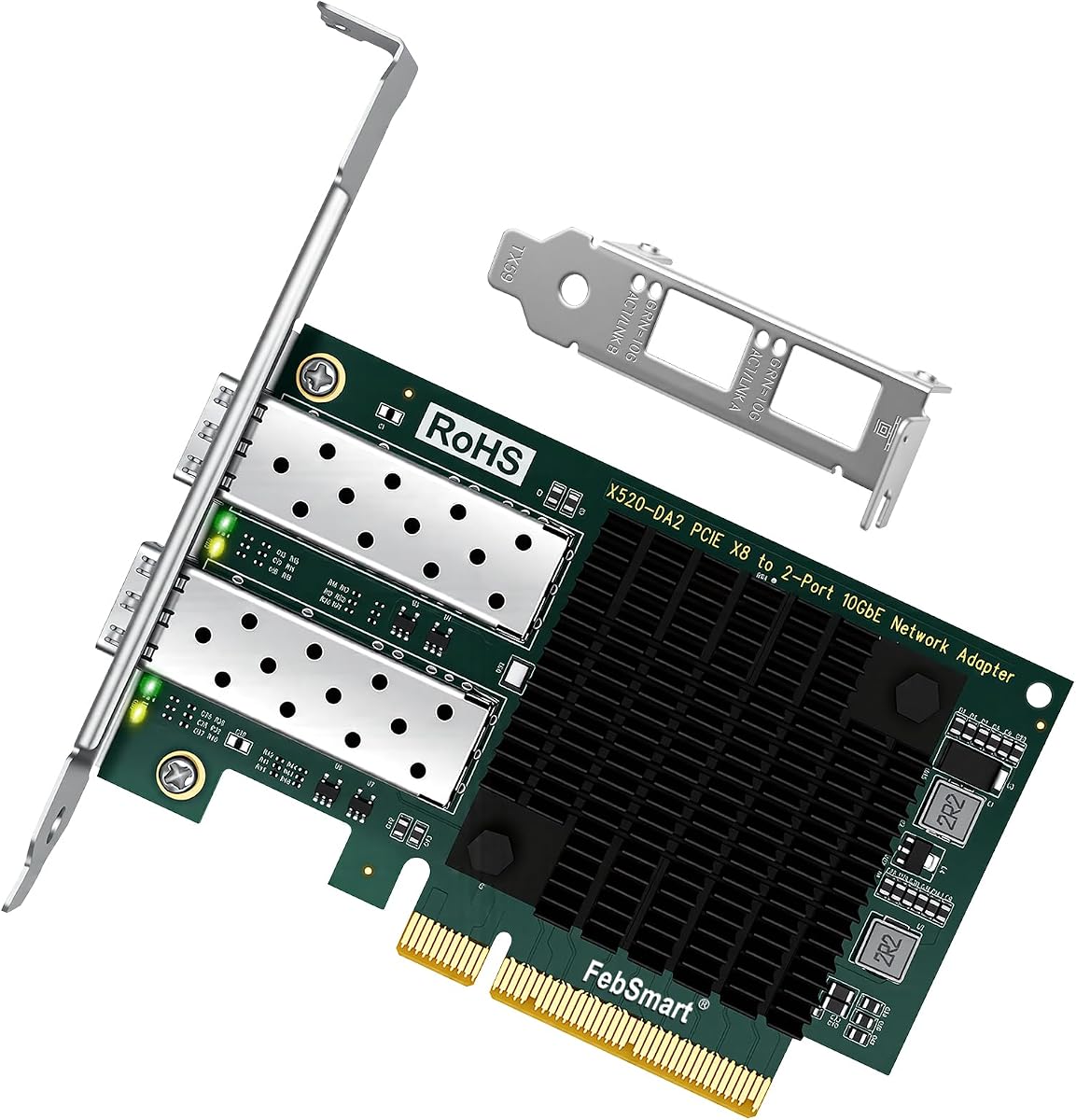
This dual-port adapter provides robust connectivity for demanding virtualization and storage environments. Its 4.8 rating confirms reliable performance for NAS and servers needing multiple 10GbE connections.
We may earn a commission when you buy through this link, at no additional cost to you.
Powered by the Intel 82599ES controller it delivers stable LAN and SAN connectivity with 40Gbps total bandwidth. This design allows for link aggregation or separate VLANs to optimize network traffic flow.
The card consumes eight PCIe lanes which leaves fewer slots available for expansion in some systems. Ensure your motherboard has a suitable x8 or x16 slot before installing to avoid conflicts.
Ideal for heavy virtualization users needing multiple high-speed links this card is a powerhouse. Its broad OS compatibility makes it versatile for both Windows and Linux server deployments today.
Two dedicated 10GbE ports enable higher total throughput or redundancy for critical server tasks.
Virtualization technologies like VMDq help manage traffic efficiently across multiple running virtual machines.
We may earn a commission when you buy through this link, at no additional cost to you.
Choosing the right Fiber Optic Network Interface Card requires understanding your specific speed needs and compatibility requirements.
Determine whether you need 1Gbps 10GbE or 25GbE speeds based on your switch capabilities and internet plan. Most modern NAS systems require 10GbE for efficient data transfers.
Match the card speed to your existing switch to avoid bottlenecks and wasted investment.
Check your motherboard for available PCIe slots. Ensure the card fits physically and that you have enough lanes for full bandwidth performance.
Verify that the slot size x1 x4 x8 or x16 matches the card requirements.
Decide between single mode or multimode fiber based on the distance needed. Multimode is usually cheaper for short distances.
Ensure the card supports the module type you plan to purchase.
Confirm driver availability for your specific version of Windows or Linux kernel. Some cards require manual driver installation for newer systems.
Check community forums for stability reports on your OS version.
If running virtual machines look for support for SR-IOV and VMDq to reduce CPU overhead during network traffic.
These features significantly improve performance in virtualized environments.
High-speed cards generate heat and may need case airflow to prevent throttling. Ensure your case has sufficient cooling capacity.
Passive heatsinks rely on fans to maintain safe temperatures.
Choose brands with proven support records to ensure reliability. A good warranty protects your investment against hardware failures.
Look for lifetime or multi-year warranty options.
Balance the cost of the card with the features you actually need. Sometimes a cheaper model with fewer ports is sufficient for your needs.
Avoid paying for enterprise features you do not utilize.
Install the card in an available PCIe slot and secure it with a screw. Insert the fiber optic module into the SFP slot ensuring it clicks firmly.
Connect your fiber cable to the module and link it to your switch. Verify link lights on the card indicate a stable connection.
Keep the area around the card clean to prevent dust buildup on the heatsink and ensure consistent performance.
SFP slots support speeds up to 1Gbps while SFP+ slots support up to 10Gbps. They are physically similar but not always compatible across speeds. Check your card manual before inserting modules to avoid damage.
Most modern Linux distributions have built-in drivers for common chipsets like Intel. Windows Server versions often detect the card automatically but desktop Windows may need manual driver installation.
Yes many SFP cards work with copper direct attach cables DAC. However you still need an SFP to copper adapter module for the connection to work properly.
This usually happens if the connected switch port is set to 1Gbps or the module is not recognized. Ensure both ends are configured for 10Gbps and the module is supported.
Check your motherboard manual or manufacturer website for specifications. PCIe Gen4 cards are backward compatible with Gen3 but will run at slower speeds.
RDMA allows direct memory access reducing CPU usage during data transfers. This is crucial for high-performance storage and virtualization tasks.
Yes most multi-port cards support link aggregation to combine bandwidth. Check your switch capabilities to ensure it supports 802.3ad bonding.
With proper cooling and use fiber cards can last many years. Avoid physical damage to connectors and keep the system dust free for longevity.
We reviewed ten top models ranging from budget 10GbE cards to premium 25GbE solutions. Each option offers distinct advantages for specific networking needs and budgets.
Prioritize speed compatibility and thermal management when making your final decision. Ensure your existing hardware supports the new card to avoid installation issues.
Prices fluctuate often so verify current details before buying. We hope this guide helps you find the perfect Fiber Optic Network Interface Card for your setup.