
PXN X8 Arcade Stick
4.7Editor score
Mechanical blue switches
Turbo function support
Cross-platform compatibility
This guide compares the top fight sticks for console fighting games to help you choose the best arcade controller for your setup and budget today.
Finding the right fight stick for console fighting games transforms your experience by offering precise controls and authentic arcade feel. Whether you compete online or enjoy local matches, the right controller ensures every input registers accurately during intense battles.
We evaluated ten top-rated arcade sticks based on build quality, compatibility, and customization options. Our analysis covers wireless capabilities, button layouts, and platform support to ensure you find a model that fits your specific gaming needs and console ecosystem perfectly.
Each pick highlights unique strengths like moddability, official licensing, or budget-friendly designs. Note that availability and stock levels fluctuate frequently so checking current listings helps you secure the best deal before making your final purchasing decision online.
4.7Editor score

4.6Editor score

4.2Editor score
Here is a side-by-side comparison of all ten products to help you quickly identify key specifications and compatibility details for your preferred gaming platform.




The HORI PlayStation 5 Fighting Stick Alpha stands out as a premium choice for serious players seeking tournament-grade performance. It holds an impressive rating among users who value reliability and official licensing for their console setups.
We may earn a commission when you buy through this link, at no additional cost to you.
Its standout quality lies in the proprietary Hayabusa joystick and buttons which deliver crisp tactile feedback essential for executing complex combos accurately. The open lid design allows quick swapping of components without specialized tools ensuring longevity.
While the price reflects its high-end status it is justified by the durability and precision it offers over time. The exclusive focus on Sony platforms might limit versatility for multi-system gamers but suits dedicated PlayStation fans perfectly.
Competitive players using PlayStation consoles should prioritize this model for its official certification and pro-level components. It delivers a consistent experience that enhances performance during high-stakes matches and local tournaments alike.
Being officially licensed ensures seamless compatibility with system firmware updates and official tournament requirements for PS5 games.
The Hayabusa parts are rated for millions of presses reducing wear and tear during intense daily gaming sessions.
We may earn a commission when you buy through this link, at no additional cost to you.
The Nacon Daija Arcade Fight Stick targets players who want extensive control over their setup through software tools. It is designed with professional gamers to ensure it meets competitive standards for top fighting titles.
We may earn a commission when you buy through this link, at no additional cost to you.
Its key strength is the full button mapping software which lets you create and save multiple game profiles for different titles easily. The textured palm rest provides sturdy support during long sessions reducing fatigue significantly.
Users might find the initial setup requires time to configure settings properly for optimal performance. The reliance on PC software for some features could be a hurdle for console-only users seeking simplicity.
Serious players looking for a customizable premium stick should consider this model for its comfort and feature set. It excels in environments where specific button layouts and audio integration are priorities for tournament play.
The included 3.5mm jack allows direct connection of competition-grade headsets for clear voice chat during online matches.
The structured layout and rest ensure your hands stay positioned correctly reducing strain during extended competitive runs.
We may earn a commission when you buy through this link, at no additional cost to you.
The PXN X8 Arcade Stick offers an accessible entry point into arcade-style gaming without breaking the bank. It features mechanical switches that provide a distinct clicking sensation familiar to keyboard users.
We may earn a commission when you buy through this link, at no additional cost to you.
Its unique directional buttons mimic a keyboard layout allowing precise input execution without the physical effort of a traditional lever. This design helps new players transition from standard controllers to arcade controls more intuitively.
The lack of a traditional joystick might confuse veterans used to analog movements or specific fighting game mechanics. Customization options are limited compared to higher-end models so advanced modders may find it restrictive.
Newcomers or casual gamers seeking an affordable and functional option will appreciate its value and ease of use. It serves well as a secondary controller or a first step into competitive gaming on multiple consoles.
The blue-switch mechanical buttons are rated for over fifty million presses ensuring long-term reliability for daily use.
Customizable turbo functions allow rapid repeated inputs making combo execution easier for beginners learning complex sequences.
We may earn a commission when you buy through this link, at no additional cost to you.
The 8Bitdo Arcade Stick excels in versatility with three connection methods including Bluetooth and 2.4G wireless for seamless play. It targets Switch and Windows users who want a modern setup without cable clutter.
We may earn a commission when you buy through this link, at no additional cost to you.
Its standout feature is the ultimate software which allows deep customization of button mapping and macro creation with visual feedback. The hidden compartment for the receiver keeps your desk tidy and prevents loss.
Wireless usage requires battery management which can interrupt sessions if not monitored. The dynamic button layout might confuse users who prefer static labels for specific game modes.
Switch owners and those valuing a clutter-free desk will find this stick highly convenient and adaptable. It balances performance with modern connectivity needs effectively for hybrid gaming setups.
Using Bluetooth or the 2.4G receiver eliminates cable drag during intense motion making gameplay smoother and less restricted.
Mapping changes visually based on mode ensuring you always know your inputs without guessing or memorizing layouts.
We may earn a commission when you buy through this link, at no additional cost to you.
The MAYFLASH F300 is renowned for supporting nearly every major console from legacy Xbox to modern Switch and Windows systems. It offers a budget-friendly entry into arcade stick territory with broad reach.
We may earn a commission when you buy through this link, at no additional cost to you.
Its primary strength is compatibility allowing it to work with Sanwa Denshi components for easy upgrades. Turbo functions with speed settings add utility for players learning combos or needing rapid inputs.
PS5 users require an external adapter which adds cost and complexity compared to native options. Build quality can feel less robust than premium models so handling may be more delicate.
Casual players owning multiple consoles will appreciate the flexibility and cost-effectiveness of this versatile stick. It serves as a reliable all-rounder for those prioritizing platform reach over premium features.
Since it accepts standard Sanwa parts you can upgrade components later to improve feel without buying a new unit.
Support for older consoles like Xbox 360 ensures this stick remains useful even as systems evolve.
We may earn a commission when you buy through this link, at no additional cost to you.
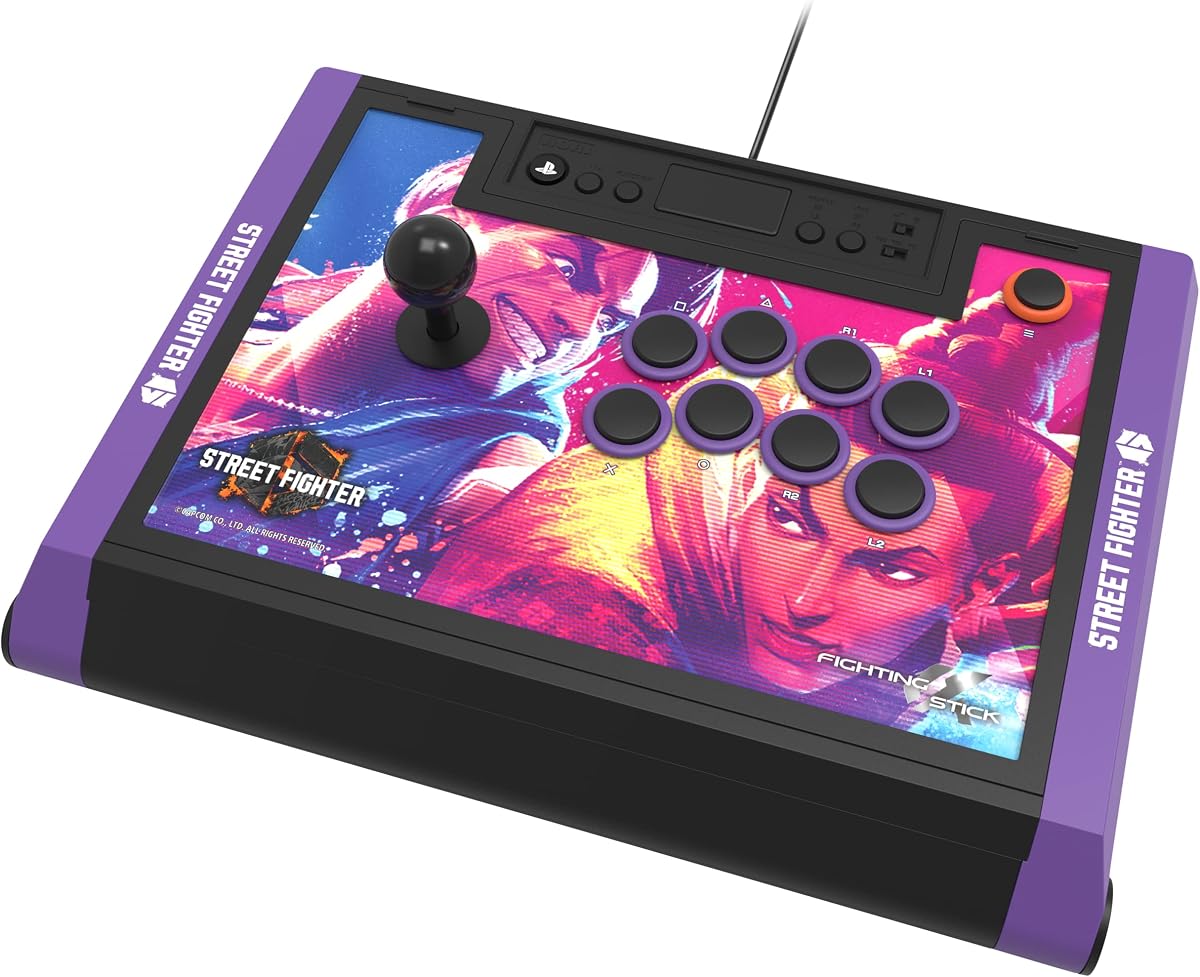
The HORI Street Fighter 6 Edition builds on the standard Alpha model with exclusive artwork and downloadable character designs. It appeals directly to fans of the franchise seeking a thematic tournament-ready controller.
We may earn a commission when you buy through this link, at no additional cost to you.
Its strengths mirror the base Alpha including Hayabusa parts and official licensing ensuring consistent pro-level performance. The downloadable images let you customize the panel further adding personal flair to your setup.
Collectors might pay a premium for the theme which offers no functional advantage over the standard version. The design is specific to SF6 which might limit appeal for those preferring neutral aesthetics.
Street Fighter enthusiasts who want a display-worthy controller should choose this edition for its visual appeal and power. It combines fan service with high-end functionality perfectly for dedicated players.
The link to hi-res images allows you to swap top panels to match different characters easily.
Internal components remain identical to the standard Alpha ensuring reliability is not sacrificed for style.
We may earn a commission when you buy through this link, at no additional cost to you.
The HORI TEKKEN 8 Edition delivers high-end performance tailored specifically for fans of the iconic fighting series. It shares the robust internals of the standard Alpha but with branded artwork and Bandai Namco licensing.
We may earn a commission when you buy through this link, at no additional cost to you.
Its quality lies in the official partnership which ensures the design respects the game's visual identity. The top panel can be customized with downloadable art allowing further personalization beyond the default look.
Those not invested in TEKKEN may find the theme less relevant than a neutral option. The functional specs remain identical to the standard model so value depends on aesthetic preference.
TEKKEN enthusiasts seeking a tournament-grade controller will love this edition for its tailored design. It supports competitive play with style and reliability for dedicated players of the series.
Official licensing ensures authentic character representation and support for TEKKEN 8 features specifically.
Downloadable alternate panels let you switch themes to match your favorite fighters or tournament events.
We may earn a commission when you buy through this link, at no additional cost to you.
The Qanba Sapphire S1 introduces a leverless design with eighteen adjustable buttons allowing highly customized throw distances for unique control. It is officially licensed for Street Fighter 6 with a bold Juri themed appearance.
We may earn a commission when you buy through this link, at no additional cost to you.
Its strengths include the ability to save multiple button profiles for different games or playstyles quickly. The detachable wrist rest and storage compartment enhance portability making it ideal for LAN events.
Switching to a leverless controller requires significant retraining for players accustomed to traditional joysticks. The button configuration may feel cramped for larger hands compared to standard layouts.
Advanced players seeking an unconventional edge should consider this model for its adaptability. It offers a competitive advantage for those willing to invest time in mastering its unique interface.
Each button throw distance can be tuned to match your finger movement speed for precise inputs.
The included strap and storage make transporting this stick easier for competitive players on the go.
We may earn a commission when you buy through this link, at no additional cost to you.
The MAYFLASH F700 provides wireless freedom across many consoles including PS5 Switch and Windows while maintaining compatibility with Sanwa components. It focuses strictly on fighting games to ensure optimized performance.
We may earn a commission when you buy through this link, at no additional cost to you.
Its key benefit is the triple connection modes allowing users to switch between Bluetooth 2.4G and wired USB as needed. The headset jack supports background music and chat output for a richer gaming experience.
It does not support Xbox consoles limiting reach for those in the Xbox ecosystem. Firmware updates are sometimes required to maintain compatibility with newer console releases like Switch 2.
Players prioritizing a wireless setup without cables should find this stick convenient and powerful. It balances cost and functionality well for those who do not require Xbox support.
The audio jack sends console sound directly to your headset keeping your setup tidy during matches.
Updating firmware ensures ongoing compatibility with new console firmware and system updates.
We may earn a commission when you buy through this link, at no additional cost to you.
The MAYFLASH F500 comes bundled with a Magic Boots adapter making it a complete package for PS5 users without needing extra purchases. It supports a vast range of systems including Xbox and Switch.
We may earn a commission when you buy through this link, at no additional cost to you.
Its advantage is the all-in-one nature which simplifies setup for those buying their first stick. The turbo functions and headset support add value for competitive gaming and communication needs.
User feedback suggests build quality is less consistent than top-tier models affecting long-term reliability. The bundle is great for entry but serious players might outgrow it quickly.
Casual gamers or those needing a broad compatibility kit will appreciate this cost-effective bundle. It serves as a practical solution for multi-console households without high costs.
The included adapter allows native PS5 recognition eliminating the need for separate controller purchases.
Support extends from modern Xbox to older 360 units ensuring this stick ages well with your collection.
We may earn a commission when you buy through this link, at no additional cost to you.
Selecting the right fight stick involves evaluating compatibility build quality and customization options to match your specific gaming needs.
Ensure the stick supports your primary console whether it is PlayStation Xbox or Switch. Officially licensed products often provide better integration and avoid firmware issues that can disrupt gameplay.
Choose a model that aligns with your system to prevent extra adapter costs or connectivity errors.
Decide between traditional layouts and leverless options based on your playing style. Traditional sticks offer a classic arcade feel while leverless provide unique speed and accuracy for advanced players.
Select a layout that feels natural to your hands to reduce fatigue during long gaming sessions.
Look for models with accessible panels if you plan to upgrade parts like joysticks or buttons over time. Modular designs save money by allowing component swaps rather than buying a new unit.
Prioritize sticks with standard screw access or magnetic covers for easy maintenance and customization.
Wireless options provide convenience while wired connections ensure zero latency for competitive play. Some sticks offer both so check if your use case demands cable-free play or strict input speed.
Choose a connection type that balances comfort with performance requirements for your favorite games.
Materials like wood or high-density plastic affect durability and stability during intense matches. Solid construction prevents the unit from sliding around on your desk and ensures long-term reliability.
Invest in sturdy materials that can withstand heavy daily use without compromising performance.
Balance your budget against the features you truly need to avoid overspending on unnecessary extras. Entry-level sticks work well for casual play while premium models offer long-term benefits for competitors.
Determine your priorities to find a stick that offers the best balance of cost and functionality.
Software allows for remapping buttons and saving profiles for different games which is vital for versatility. Ensure the tool is intuitive and regularly updated to maintain compatibility with system changes.
Opt for models with reliable software to maximize customization and ease of use.
A built-in audio jack can simplify your setup by connecting your headset directly to the stick. This feature keeps cables organized and ensures audio sync during online matches.
Include audio support in your criteria if you play online regularly.
Properly connect your fight stick to the console or PC via USB or wireless receiver ensuring the system recognizes the input device. Verify the mapping in game settings to confirm every button responds correctly.
Regularly clean the joystick and buttons to prevent dust buildup that can cause sticking or reduced sensitivity. Use a soft cloth and mild cleaner to maintain surface texture without damaging components.
Store the stick in a cool dry place away from direct sunlight to preserve material integrity. Using a carrying case if available helps protect the unit during transport to tournaments or friends homes.
Most modern fight sticks support PC via XINPUT or DINPUT modes making them compatible with Windows games. Check the product details to confirm if specific drivers or software are required for full functionality.
High-quality wireless sticks with 2.4G receivers offer low latency comparable to wired options. However dedicated tournament players often prefer wired models to eliminate any risk of connection interference.
Use a microfiber cloth to wipe down surfaces and a soft brush to remove debris from buttons. Avoid spraying liquids directly on the unit and always unplug it before cleaning.
Sanwa Denshi components are industry-standard joystick and buttons known for precision and durability. Many sticks support these parts allowing you to upgrade your controller for better performance.
Some sticks require specific adapters to work with Xbox consoles due to encryption protocols. Always verify compatibility before purchasing to avoid needing extra hardware later.
Leverless sticks offer unique input speed advantages favored by some high-level players. They require a significant learning curve but can provide a competitive edge once mastered.
Choosing the best fight stick depends on your specific console preferences and willingness to customize your setup. The top picks offer a range of features from budget-friendly designs to tournament-grade licensed models.
Prioritize compatibility and build quality to ensure your investment lasts through intense gaming sessions. Consider how important wireless connectivity and audio features are to your personal setup.
Always verify current availability and pricing as stock levels change frequently for these products. Take the time to read detailed reviews to make an informed decision for your fighting game journey.