
Thermaltake Commander F6 RGB LCD
4.2Editor score
RGB LCD Screen
6 Voltage Control Knobs
6 Temperature Sensors
Short Circuit Protection
This guide compares the top ten front panel fan controllers for precise thermal management, featuring detailed reviews of budget and premium options with LCD
Modern PC builds require efficient cooling to maintain performance and longevity. A front panel fan controller offers direct access to manage fan speeds and monitor temperatures without relying on software. This ensures your system stays cool under load while minimizing unnecessary noise levels during idle tasks.
We evaluated ten leading fan controllers based on display quality, channel capacity, and sensor accuracy. Each unit was assessed for build quality, ease of installation, and compatibility with various fan types. Our selection covers a wide range of users from budget builders to enthusiasts seeking advanced thermal control.
Each pick highlights specific strengths like LCD clarity, PWM support, or robust alarms. You will find detailed breakdowns of features, pros, and cons to help you decide. Remember that product availability and pricing fluctuate frequently so verify current details before purchasing.
4.2Editor score

4.8Editor score

4.9Editor score
This comparison table summarizes the key specifications of each front panel fan controller to help you make a quick decision based on your specific cooling needs and installation requirements.

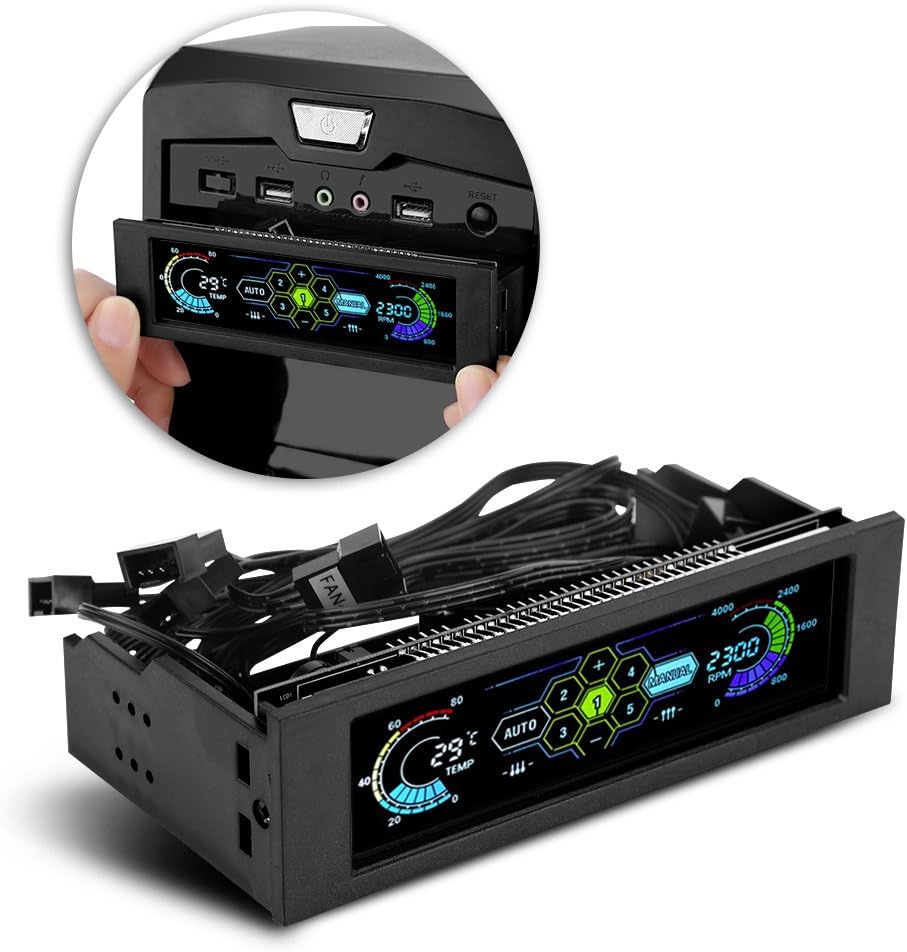


The Thermaltake Commander F6 RGB LCD stands out as a premium choice for enthusiasts seeking extensive control. With a high-quality RGB LCD screen and six voltage control knobs, it offers unparalleled customization. Its inclusion of six temperature sensors ensures precise monitoring across all critical areas of your system.
We may earn a commission when you buy through this link, at no additional cost to you.
This controller shines in its ability to integrate visually with your build. The compatibility with two Lumi LED strips allows for cohesive lighting. The robust warning alarm system provides peace of mind by detecting short circuits and overheating conditions automatically.
While the price is higher than standard options, the feature set justifies the investment for serious builders. The complex wiring may challenge novice users but results in a highly customized cooling setup. The build quality is solid and withstands long-term use within the chassis.
This unit is ideal for users who prioritize aesthetics alongside performance. If you want to manage multiple fans with visual feedback and advanced safety features, this is the top choice. It transforms a standard 5.25 inch bay into a control center for your PC.
The RGB LCD screen adds aesthetic value while displaying real-time data clearly.
Six dedicated sensors allow for accurate temperature mapping of your entire system.
We may earn a commission when you buy through this link, at no additional cost to you.
The Noctua NA-FC1 is widely recognized for its reliability and simplicity. It serves as a compact manual speed reducer for 4-pin PWM fans. Its standout feature is the no-stop mode which prevents fans from falling below 300rpm to avoid BIOS errors.
We may earn a commission when you buy through this link, at no additional cost to you.
Users appreciate the included 3-way splitter cable which allows control of up to three fans simultaneously. The build quality is exceptional and fits easily in small spaces. The manual control works independently or in tandem with motherboard automation for maximum flexibility.
While it lacks a digital display, the physical knob offers precise adjustments. The six-year warranty reflects Noctua's confidence in the product durability. This unit is perfect for those who want silence without the clutter of an LCD panel.
We recommend this controller for users prioritizing silent operation and durability. It is especially suited for high-speed fans that require a minimum threshold. For a straightforward and robust solution, this controller remains a top standard in the industry.
The no-stop mode ensures BIOS stability by maintaining a minimum fan speed threshold.
A six year warranty highlights the durable construction and reliable performance.
We may earn a commission when you buy through this link, at no additional cost to you.
The Delinx 12V controller offers impressive value with extensive features. It includes a 5-channel hub allowing control of up to five fans simultaneously. The digital display provides clear readings of temperature and RPM for easy monitoring at a glance.
We may earn a commission when you buy through this link, at no additional cost to you.
Its dual mode capability allows automatic speed control based on temperature or manual adjustment. The unit supports a wide voltage range and includes power-off memory for settings. Safety features like over-voltage protection ensure stable operation over long periods.
Installation is straightforward thanks to the included adhesive and cables. While the display is basic it is functional enough for most users. The automatic switch to manual mode when the probe is disconnected is a clever feature for flexibility.
This is the best choice for budget-conscious users needing multi-fan control. It bridges the gap between basic hubs and expensive controllers. For those needing a versatile cooling solution without a high price tag, this unit is highly recommended.
The dual mode allows you to switch between automated safety and manual precision easily.
Built-in protection against over-voltage and reverse polarity ensures long-term reliability.
We may earn a commission when you buy through this link, at no additional cost to you.
The STW-6041 Multi Fan controller features a sturdy aluminum alloy panel with a wide LCD screen. It provides control for four independent channels with clear visual feedback of speeds and temperatures. This model is well suited for users needing basic but effective monitoring.
We may earn a commission when you buy through this link, at no additional cost to you.
It includes a safety system that triggers an alarm when temperatures exceed sixty degrees. The PWM circuit helps reduce high frequency noise making the system quieter during operation. High spec capacitors ensure longevity and resistance to electrical leakage over time.
The design fits standard 5.25 inch bays with a matte finish that looks professional. While it lacks automatic features the manual adjustments are precise enough for most cases. The LCD display is responsive and easy to read from a distance.
This controller is ideal for users seeking a reliable visual overview. It balances cost and functionality effectively. If you need a simple 4 channel solution with a large screen this unit offers solid performance.
PWM technology adjusts speed to minimize noise while maintaining adequate cooling performance.
High quality capacitors extend service life and prevent common electrical issues.
We may earn a commission when you buy through this link, at no additional cost to you.
The V BESTLIFE Fan Speed Controller manages up to five fans with a big LCD screen. It displays temperature, fan speed, and even hard disk state for a holistic system view. The ability to switch between automatic and manual modes adds significant flexibility for diverse needs.
We may earn a commission when you buy through this link, at no additional cost to you.
Users can set alarm temperatures ranging from forty to ninety degrees to prevent damage. The system alerts immediately if a fan breaks down or cannot cool the computer effectively. This early warning system is critical for maintaining hardware health during heavy loads.
The unit offers comprehensive monitoring without complex software dependencies. It works as a standalone control center in your drive bay. The display remains readable in various lighting conditions which is a practical benefit.
This controller suits users wanting more than just fan management. The inclusion of disk status monitoring sets it apart from generic models. For a balance of channel capacity and informative feedback this unit is a strong contender.
Beyond fan speed the display tracks hard disk status for total system health awareness.
Immediate alerts on fan failure ensure you are notified before overheating occurs.
We may earn a commission when you buy through this link, at no additional cost to you.
The SaiDian controller features a large screen displaying temperature fan speed and date time. It controls three groups of fans and includes a fan jam alarm for safety. Users can manually set alarm temperatures to prevent hardware damage from overheating effectively.
We may earn a commission when you buy through this link, at no additional cost to you.
This unit offers essential control functions without unnecessary complexity. The adjustable alarm range provides flexibility for different system tolerances. It allows manual speed adjustment to regulate temperature based on specific workload requirements.
While the build is standard it performs its core tasks reliably. The inclusion of date and time on the display is a nice touch for organization. It fits standard optical drive bays for straightforward integration into most cases.
This controller is best for basic cooling needs where cost is a factor. It provides necessary safety alerts and monitoring. For users needing three channels with standard features this model is a practical selection.
Fan jam alarms ensure that sudden failures are detected immediately by the user.
Clear large screen displays provide easy access to critical system status data.
We may earn a commission when you buy through this link, at no additional cost to you.
The Ejoyous Computer Fan Controller provides control for up to four case fans independently. It features a wide LCD display for monitoring RPM and temperature values conveniently. The four separate controllers allow for quick manual adjustments without navigating complex menus.
We may earn a commission when you buy through this link, at no additional cost to you.
Automatic temperature control supports demand-oriented cooling to maintain stable conditions. If temperature exceeds sixty degrees an acoustic alarm alerts you immediately. The PWM circuitry reduces annoying high-frequency noises for a more comfortable operating environment.
Construction includes an aluminum alloy panel with multiple matte finishes for durability. High temperature capacitors ensure reliable function and support a long lifespan inside the PC case. This build quality helps withstand heat variations better than plastic alternatives.
This unit is suitable for users seeking a balance of manual and automatic control. The independent channels allow for fine-tuning of different cooling zones. For a reliable mid-range option with strong construction this controller delivers value.
Four separate controllers enable precise management of each fan without affecting others.
Acoustic alarms and double safety functions protect hardware from sudden overheating issues.
We may earn a commission when you buy through this link, at no additional cost to you.
The ARCTIC Fan Controller supports ten ports with individual PWM control for large setups. It delivers up to 2 amps per port and 4.5 amps total ensuring sufficient power for high-performance fans. This eliminates the need for Y-splitter cables reducing clutter inside the chassis.
We may earn a commission when you buy through this link, at no additional cost to you.
It offers native driver support for Windows and Linux kernel 7.2 or higher. This broad compatibility enables integration with a wide range of monitoring software. Users can centralize cable management easily without relying on motherboard headers for every fan.
Magnetic or adhesive mounting provides flexibility for placement within the case. While it lacks a physical display the software control is robust for enthusiasts. It optimizes airflow management by providing precise control over every fan in your system.
This controller is ideal for complex builds with many cooling points. It simplifies wiring and improves power stability compared to standard headers. For those needing extensive ports with solid software support this unit is highly effective.
Each port delivers 2 amps ensuring even high-speed industrial fans receive sufficient power.
Native support across major operating systems simplifies setup and ongoing management.
We may earn a commission when you buy through this link, at no additional cost to you.
The 4 Fans Computer Fan Controller features an alloy panel with an LCD display for monitoring. It shows date time and four sets of temperatures for real-time system insights. The alarm system flashes and sounds when temperatures exceed safe operating limits.
We may earn a commission when you buy through this link, at no additional cost to you.
Using a PWM circuit it adjusts speed to reduce noise effectively during operation. The design fits standard optical drive bays and provides a professional look. It offers a solid solution for basic temperature monitoring and fan speed adjustment.
High spec capacitors are included to support a longer service life. This helps prevent common electrical issues like leakage over time. While the rating is lower it meets the basic needs of many standard builds.
This controller is suitable for users wanting a straightforward visual interface. It handles four channels with essential safety features. If you need a simple front panel without advanced automation this model is a viable option.
Displays essential data like temperature and time for quick status checks at a glance.
Robust construction helps the unit withstand heat and resist electrical degradation.
We may earn a commission when you buy through this link, at no additional cost to you.
The 5-Fans Speed Computer Fan Controller manages five groups of fans via a big LCD screen. It displays temperature fan speed and hard disk state for comprehensive oversight. The unit includes a switch for auto and manual modes to suit different preferences.
We may earn a commission when you buy through this link, at no additional cost to you.
Alarm temperature ranges can be set between forty and ninety degrees for customization. If a fan breaks down it alerts immediately to prevent overheating damage. This ensures constant awareness of the working condition of your cooling system.
Control is straightforward through the front panel drive bay installation. It allows you to adjust wind speed manually or via temperature settings. This level of control helps manage heat during intensive tasks effectively.
This option is best for those needing five channels without complex software. The immediate alerts offer essential safety for budget builds. For a simple five fan solution with visual feedback this unit is practical.
Switching between auto and manual modes allows for different cooling strategies.
Immediate alerts ensure hardware protection when fans fail to cool the system.
We may earn a commission when you buy through this link, at no additional cost to you.
Selecting the right controller requires considering channel count, display type, and safety features to match your specific build needs and budget constraints.
Channel capacity determines how many fans you can connect independently. If you have multiple case fans, a controller with at least 4 channels offers flexibility. Enthusiasts may need 5 to 10 ports for complex cooling setups without splitting cables.
Choose a channel count that matches your fan count to avoid needing splitters.
Controllers offer LCD, RGB, or digital displays for monitoring temperatures. LCD screens show precise numeric values while RGB panels add visual flair. Some basic models may lack screens entirely relying on manual knobs for adjustment.
Prioritize a display that provides clear temperature and RPM data at a glance.
Pulse Width Modulation support allows for precise speed control via software or hardware. PWM fans provide smoother speed transitions and lower noise at reduced speeds. Ensure the controller supports 4-pin connections for modern fan compatibility.
Always verify PWM compatibility to ensure effective noise reduction.
Front panel controllers typically fit 5.25-inch optical drive bays. Verify your case has an available bay before purchasing a large unit. Some compact models may not require a specific bay and use adhesive mounting instead.
Check your case specifications to confirm the available drive bay space.
Safety features include high-temperature alarms and short-circuit protection. These alerts help prevent hardware damage when cooling fails. Look for units with adjustable alarm thresholds to suit your thermal targets.
Always select a unit with over-temperature warnings for hardware safety.
Materials like aluminum alloy panels offer better heat dissipation and durability. High-spec capacitors extend service life and prevent electrical leakage. Solid construction ensures the controller remains reliable under constant operation.
Opt for metal panels and quality capacitors for long-term reliability.
Most controllers draw power from the motherboard or a dedicated Molex cable. Ensure the unit supports your case voltage requirements such as 12V. Check total current ratings to ensure it can handle your fan load.
Verify voltage and current ratings match your system power capabilities.
Some units allow switching between auto and manual modes for flexibility. Auto mode adjusts speed based on real-time sensor readings. Manual mode gives direct control via physical knobs or software settings.
Choose dual modes to balance automated safety with manual precision.
Begin by identifying an available 5.25-inch bay in your computer case. Connect the power supply from the controller to a Molex connector or motherboard header. Secure the unit firmly to prevent movement inside the chassis.
Route fan cables to the controller ports ensuring they are firmly seated. Install the temperature probes near heat sources like the CPU or VRMs. Configure alarm thresholds in the settings to protect against overheating.
Regularly clean the LCD screen and vents to prevent dust buildup. Check connections annually to ensure they remain tight and secure. Update firmware if available to maintain compatibility with modern fans.
Most controllers support standard 4-pin PWM fans and 3-pin DC fans. However, you should check the voltage range to ensure it matches your specific fan model. Some older 3-pin fans may require a DC controller rather than PWM support.
Yes, many controllers feature physical knobs or switches for manual adjustment. This allows you to change speeds directly from the front panel without opening your computer. This is useful for users who prefer hardware controls over software apps.
An alarm is highly recommended to alert you when temperatures rise too high. This early warning can prevent permanent hardware damage during critical failures. It adds a layer of protection that software monitoring alone might miss.
Place probes near heat-generating components like the CPU or VRMs for accuracy. Secure them with adhesive clips to ensure good contact with the surface. Ensure the probe wire reaches the controller without blocking airflow inside.
Use a splitter cable to connect multiple fans to a single channel. Ensure the total amperage does not exceed the port limit. This allows you to manage more fans without purchasing a larger controller.
Yes, they are designed to work with standard ATX cases and headers. They often bypass the motherboard for control, reducing dependency on onboard ports. This ensures compatibility even with boards that have limited fan headers.
We explored ten distinct front panel fan controllers ranging from basic hubs to advanced RGB systems. The Thermaltake Commander F6 stands out for premium needs while the Noctua NA-FC1 offers robust reliability. The Delinx model provides excellent value for budget builders seeking multi-channel support.
Prioritize safety features and channel capacity to match your specific cooling requirements. A unit with clear temperature monitoring ensures your system remains stable under load. Consider the physical size to guarantee it fits your available drive bay.
Verify current product details and pricing before making your final purchase. Inventory and offers fluctuate regularly so checking current listings is essential. We hope this guide simplifies your search for the perfect cooling management solution.