
Redragon K585
4.4Editor score
Swap switches without soldering
USB pass-through port
Macro keys included
Discover the top gaming keypads for 2026. We compare features, ergonomics, and performance to help you find the perfect one-handed controller for your setup.
Gaming keypads have revolutionized how players interact with their favorite titles by offering specialized controls for one hand. These devices free up the mouse hand for precise aiming while keeping essential abilities within easy reach. Choosing the right model depends heavily on your preferred game genres and comfort needs.
We evaluated ten standout models based on build quality, switch technology, and programmability. Our analysis includes wired and wireless options ranging from budget-friendly picks to high-end analog devices. Each product was assessed for ergonomic design and software capabilities to ensure a comprehensive overview.
This guide highlights specific strengths and weaknesses for every entry to help you make an informed decision. You will find detailed reviews and comparison tables to streamline your search process. Remember that prices and availability can fluctuate so check current listings before purchasing.
4.4Editor score

4.3Editor score

4.3Editor score
This table provides a side-by-side look at the key specifications and features of each keypad to help you quickly identify which model fits your specific gaming needs and budget constraints.




The Razer Tartarus V2 stands out as the top choice for gamers seeking a balance of performance and comfort. With a strong rating of 4.3 stars it has earned trust among users for its reliable build quality and intuitive layout. This device is designed to enhance your gaming experience by providing quick access to essential commands without cluttering your desk.
We may earn a commission when you buy through this link, at no additional cost to you.
Its standout feature is the 32 programmable keys which allow you to map complex commands and macros with ease. The mecha-membrane switches offer a tactile feel that bridges the gap between mechanical and membrane keyboards ensuring comfort during long sessions. Additionally the integrated eight-way directional thumbpad provides precise movement control that mimics console controllers making it ideal for FPS and MMO titles.
While it requires Razer Synapse software for full customization this is a minor trade-off given the depth of options available. The USB wired connection ensures stable performance without latency concerns which is crucial for competitive gaming. The device is slightly bulky but the ergonomic design compensates by reducing wrist strain significantly.
This keypad is perfect for dedicated gamers who want to optimize their setup for maximum efficiency. It is particularly recommended for players who spend hours daily gaming and need reliable macro execution. The Razer Tartarus V2 delivers professional-grade performance that justifies its position as our top pick.
The analog thumbpad offers natural movement that feels more like a controller than a keyboard key.
Razer Chroma RGB sync allows you to match lighting effects across your entire gaming ecosystem for total immersion.
We may earn a commission when you buy through this link, at no additional cost to you.
The Redragon K585 proves that you do not need to spend a fortune to get a reliable gaming keypad. Rated at 4.4 stars it offers exceptional value for gamers on a budget who still want customization and style. This wired device features a tactical layout that prioritizes functionality without unnecessary bulk.
We may earn a commission when you buy through this link, at no additional cost to you.
One of its most impressive features is the ability to swap switches without soldering which allows you to tailor the feel to your preference. The 42-key layout provides ample space for macros while the USB pass-through port keeps your desk organized by allowing you to plug peripherals directly into the keypad. RGB lighting effects add a vibrant touch to your setup.
The build quality is decent for the price though it may feel less substantial than premium models. The detachable wrist rest is a nice inclusion that helps maintain comfort during extended use. While the software is functional it lacks the polish of more expensive brands but it gets the job done effectively.
We recommend this keypad for students or casual gamers who want to try one-handed setups without a large investment. It is a versatile tool that can handle MMO skills and media shortcuts with ease. The Redragon K585 is the definitive choice for budget-conscious buyers.
The hot-swap sockets let you experiment with different switch types to find your perfect tactile feel.
The USB pass-through port reduces cable clutter by centralizing connections at your gaming station.
We may earn a commission when you buy through this link, at no additional cost to you.
The Redragon K585 PRO takes the budget-friendly formula of its wired sibling and adds true wireless connectivity. With a rating of 4.2 stars it appeals to users who prioritize desk cleanliness and portability. This device allows you to place the keypad anywhere without worrying about cable length or tension.
We may earn a commission when you buy through this link, at no additional cost to you.
It retains the hot-swappable switch feature which is rare at this price point and supports 2.4GHz Bluetooth for stable connections. The battery life ranges from 15 to 20 hours on a single charge which is sufficient for most gaming sessions. The RGB lighting is vibrant and can be customized via the provided software.
The wireless convenience comes with the trade-off of battery maintenance which is a standard consideration for any wireless device. There is no analog thumbpad so movement controls remain on traditional keys which might feel less intuitive for console players. However the overall build is sturdy enough to withstand regular travel and daily use.
This keypad is ideal for gamers who want flexibility in their setup without breaking the bank. It works well for both gaming and productivity tasks like video editing. The Redragon K585 PRO delivers solid performance for those seeking a wireless entry into one-handed gaming.
Wireless connectivity lets you position the keypad at the perfect distance for your wrist comfort.
The detachable wrist rest and compact size make it easy to transport to LAN parties or offices.
We may earn a commission when you buy through this link, at no additional cost to you.
The AZERON Cyborg II is a true innovator in the gaming keypad space offering a level of customization that stands unmatched. Rated at 4.3 stars it caters to enthusiasts who want a controller that feels like a natural extension of their hand. The device is designed for right-handed users leaving the mouse free for precision work.
We may earn a commission when you buy through this link, at no additional cost to you.
Its Hall Effect analog thumbstick is a standout feature that eliminates stick drift and allows for 360-degree movement in compatible games. This provides a competitive edge in shooters by enabling smooth analog aiming alongside key presses. The 30 mappable inputs can be configured as keyboard or mouse inputs allowing for a hybrid control scheme.
The high price reflects the premium technology and craftsmanship that goes into this device. Setup can take some time as you customize the layout and sensitivity to your exact needs. Once configured it offers a unique experience that traditional keyboards cannot match for specific genres like RPGs or MMOs.
We suggest this keypad for serious gamers who are willing to invest in a dedicated control surface. It is excellent for those who prefer a gamepad feel but need keyboard macros for complex commands. The AZERON Cyborg II represents the pinnacle of one-handed gaming hardware.
Adjustable parts ensure a perfect fit for various hand sizes reducing fatigue during long sessions.
Hall Effect technology provides digital accuracy with analog feel allowing for nuanced movement control.
We may earn a commission when you buy through this link, at no additional cost to you.
The RedThunder One Handed keypad is designed for gamers who prioritize portability and simplicity in their setup. With a strong 4.4 star rating it is praised for its fast response time and straightforward operation. The device is small enough to fit in a laptop bag making it ideal for travel or small desks.
We may earn a commission when you buy through this link, at no additional cost to you.
Its 35 keys feature anti-ghosting technology ensuring that every keystroke is registered accurately during intense gameplay. The macro recording function allows you to save complex sequences without needing external software which simplifies the user experience. The RGB lighting offers seven color options adding a stylish element to the device.
The build is solid enough for daily use but it lacks advanced features like switch swapping or wrist rests. The plug and play nature means no drivers are required making it compatible with various operating systems. This is a practical choice for users who want immediate functionality without learning curves.
This keypad is best suited for casual gamers or students who need a secondary controller for quick access. It handles basic macros and movement well enough for competitive play on a budget. The RedThunder One Handed delivers reliable performance in a compact package.
No drivers are needed so you can plug it in and start gaming immediately on any system.
The small footprint and lightweight design make it easy to transport to different gaming locations.
We may earn a commission when you buy through this link, at no additional cost to you.
The Keychron C0 HE is a high-performance device built specifically for competitive FPS players seeking maximum speed. Rated at 4.2 stars it features Hall Effect magnetic switches that enable rapid trigger technology for instant key resets. This means keys respond instantly when lifted allowing for faster movement and strafing in games.
We may earn a commission when you buy through this link, at no additional cost to you.
Its web-based configurator is a unique advantage that allows customization directly through a browser without installing heavy software. The 8K polling rate ensures minimal latency which is critical in high-level play. The per-key RGB lighting adds customization while the 35-key layout keeps commands within reach.
The device does not come with a traditional software suite which might limit advanced users seeking deep customization. It is also priced higher than standard options but the performance benefits justify the cost for serious competitors. The build quality is excellent with a focus on precision and stability.
We recommend this keypad for Valorant or CS2 players who want every advantage in movement speed. It is also useful for streamers who need reliable shortcuts for scene changes. The Keychron C0 HE offers a modern approach to competitive gaming controls.
The rapid trigger feature resets keys immediately upon lift allowing for double-tapping and quick movement.
Configure your settings via a web browser so you never have to deal with bulky driver installations.
We may earn a commission when you buy through this link, at no additional cost to you.
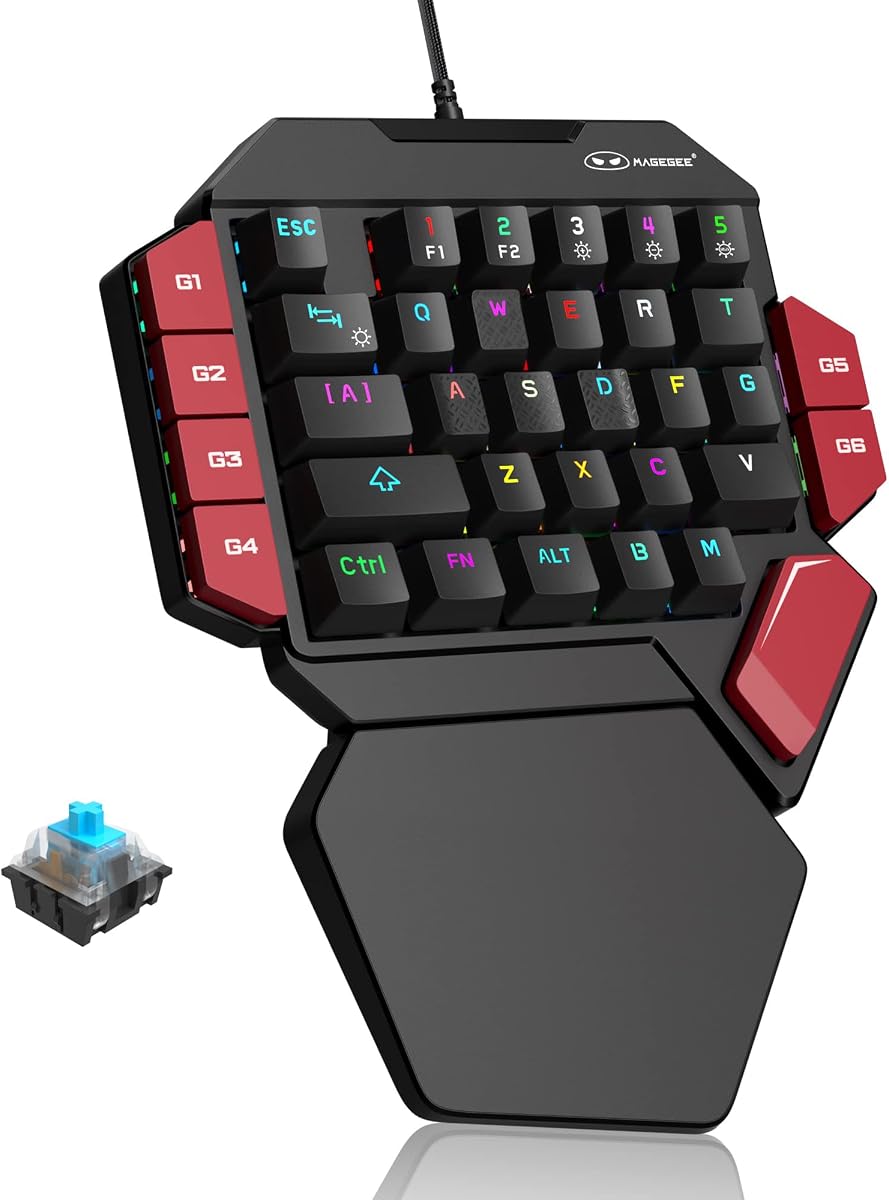
The MageGee One Handed keypad brings the mechanical keyboard experience to a compact one-handed layout. With a 4.3 star rating it is appreciated for its crisp tactile feedback and satisfying click sound. The blue switches provide a distinct feel that appeals to users who enjoy typing and gaming alike.
We may earn a commission when you buy through this link, at no additional cost to you.
It includes six macro recording keys that allow for simple command bindings without complex software. The RGB lighting modes can be customized to create a dynamic atmosphere on your desk. The ergonomic design includes a large palm rest that supports your wrist during extended gaming sessions.
The clicky nature of blue switches might be too loud for shared spaces but it ensures every keystroke is felt. The macro programming is straightforward making it accessible for users who are new to custom keybinds. The device is durable and designed to withstand frequent use over time.
This keypad is perfect for gamers who love the mechanical switch feel but need more macro keys. It works well for typing heavy tasks alongside gaming. The MageGee One Handed delivers a satisfying tactile experience at an affordable price.
The blue switches offer a tactile bump that confirms every key press for confident input.
The included palm rest helps maintain a neutral wrist position reducing the risk of strain.
We may earn a commission when you buy through this link, at no additional cost to you.
The AJAZZ AK029 is a compact powerhouse designed to save desk space while delivering high-end magnetic switch technology. Rated at 4.5 stars it stands out for its efficient 29-key layout and rigid aluminum build plate. This model is ideal for users with limited space who still want premium performance.
We may earn a commission when you buy through this link, at no additional cost to you.
Its Hall Effect magnetic switches offer zero dead zones and adjustable actuation for precise control. The web-based driver allows you to remap keys and adjust settings directly in your browser without admin rights. This makes it easy to switch between computers while keeping your profiles on the device.
The compact size means fewer keys than other models so you must plan your macros carefully. However the build quality is impressive with a gasket mount that provides a stable yet cushioned feel. The RGB lighting is vibrant with many modes to choose from for visual flair.
We recommend this keypad for FPS players who want a clean desk and fast response times. It is also great for travelers who need a portable control device. The AJAZZ AK029 balances size and performance exceptionally well.
The 29-key layout saves significant desk space allowing for larger mouse movements.
A reinforced aluminum internal plate ensures durability and a premium tactile feel during use.
We may earn a commission when you buy through this link, at no additional cost to you.
The Razer Tartarus V2 remains a reliable option for gamers who value brand consistency and feature integration. With a rating of 4.2 stars it offers a solid experience backed by years of refinement in the gaming industry. The mecha-membrane switches provide a comfortable feel that reduces fatigue during long sessions.
We may earn a commission when you buy through this link, at no additional cost to you.
The keypad features 32 programmable keys that allow for extensive macro creation through Razer Synapse. It integrates seamlessly with other Razer gear via Chroma RGB lighting for a unified visual experience. The ergonomic thumbpad is a key feature that enhances movement precision for specific game genres.
Reliance on proprietary software means you must install drivers to unlock full functionality which might be a downside for some users. The switch technology is specific to Razer making third-party modifications impossible. However the overall reliability and comfort make it a strong contender in the market.
This model is best for those already invested in the Razer ecosystem who want consistent performance. It handles both gaming and productivity tasks well with its versatile layout. The Razer Tartarus V2 continues to be a trusted choice for many gamers.
Chroma sync allows you to coordinate lighting across all your devices for a cohesive setup look.
The ergonomic design has been refined over time to fit the natural shape of your hand.
We may earn a commission when you buy through this link, at no additional cost to you.
The Redragon RM104 offers a unique take on the gaming keypad by integrating a multifunction control knob. Rated at 4.4 stars it is praised for its versatile connectivity and stylish design. The device supports Bluetooth 2.4GHz and USB-C ensuring it works across various devices and setups.
We may earn a commission when you buy through this link, at no additional cost to you.
The knob allows for smooth volume and lighting adjustments without switching modes manually which enhances usability. With a 4000mAh battery it provides extended wireless usage before needing a recharge. The RGB lighting can be synced with other devices to create a dynamic environment on your desk.
It functions more like a compact keyboard than a traditional gaming keypad which might affect macro density. The pink and white color scheme limits it to specific aesthetic preferences but the build quality remains robust. Software support allows for macro programming to maximize its utility.
We recommend this device for users who want a compact wireless solution with media controls. It is excellent for streamers needing quick volume and lighting adjustments during broadcasts. The Redragon RM104 blends gaming and productivity features effectively.
The dedicated knob makes adjusting volume and lighting effortless during intense gaming sessions.
A large 4000mAh battery ensures you can game for days on a single charge without interruption.
We may earn a commission when you buy through this link, at no additional cost to you.
Selecting the right gaming keypad requires considering several factors including switch type, connectivity, and layout design to match your gaming style.
Switch type determines the tactile feedback and durability of your keypad. Mechanical switches offer distinct clicks and longevity while membrane switches provide a softer feel. Magnetic switches are emerging as a premium option for rapid trigger response in competitive gaming.
Choose mechanical for longevity and membrane for quiet operation to ensure you find the right fit for your environment.
Connectivity options include wired USB for zero latency and wireless for desk freedom. Wired connections are ideal for competitive play while wireless offers convenience for casual setups. Ensure wireless models have a stable connection and sufficient battery life.
Decide between wired stability and wireless freedom based on your desk layout and gaming priorities.
Layout size ranges from 29 to 42 keys depending on the model. A smaller footprint saves desk space while more keys allow for complex macro mapping. Consider your hand size and the complexity of games you play.
Select a layout size that balances your need for macros with your available desk space for comfort.
Macro capabilities allow you to bind complex sequences to single keys for efficiency. Some models support onboard memory for profiles while others require software installation. This feature is crucial for MMO and MOBA gamers needing quick ability access.
Look for models with robust macro recording to streamline your gameplay and reduce key fatigue.
Ergonomics include wrist rests and adjustable angles to prevent strain during long sessions. A comfortable design ensures you can play longer without discomfort or fatigue. Check if the keypad includes detachable rests for flexibility.
Prioritize ergonomic designs to maintain healthy wrist positions during extended gaming marathons.
Lighting features like RGB enhance the visual appeal of your setup and offer practical visibility. Some models support color customization while others offer static lighting options. Brightness control is helpful for gaming in low-light conditions.
Choose a keypad with customizable lighting to match your aesthetic and improve visibility at night.
Software support allows for deeper customization of key bindings and lighting profiles. Some brands use proprietary software while others offer web-based configuration. Ensure the software is user-friendly and compatible with your operating system.
Verify software compatibility and ease of use to ensure you can fully customize your keypad.
Budget considerations range from affordable entry-level models to high-end professional devices. Price often reflects build quality and advanced features like magnetic switches. Determine your spending limit before shopping to find the best value.
Set a clear budget to find a keypad that offers the necessary features without overspending.
To begin using your gaming keypad plug it into an available USB port or pair it via Bluetooth if wireless. Install the required software to customize key bindings and lighting effects to your preference. Familiarize yourself with the layout before starting your first gaming session to ensure efficiency.
Maintain your device by keeping the keys clean from dust and debris using a soft brush or air blower. Store the keypad in a dry place when not in use to protect internal components from humidity. Avoid spills and harsh chemicals that could damage the switches or surface finish.
Regularly update the firmware through the provided software to ensure optimal performance and bug fixes. Re-calibrate any analog sticks or magnetic switches periodically to maintain precision. Treat your keypad with care to extend its lifespan and maintain consistent performance over time.
Gaming keypads are better for specific genres like MMOs where you need many macros but lack media keys. Full keyboards are better for general typing and games requiring standard WASD keys. The choice depends on your primary game types and workflow needs.
Wireless keypads using 2.4GHz dongles have negligible input lag comparable to wired models. Bluetooth models might have slight latency but are fine for casual play. Always choose 2.4GHz for competitive gaming to ensure real-time response.
Many modern keypads support macOS but you must verify driver compatibility before buying. Some models work plug and play while others require specific software. Always check system requirements on the manufacturer page before purchasing for Mac use.
Most models use proprietary software to record key sequences and assign them to macro keys. You typically press a record button then enter your sequence before saving it to a key. Follow the user guide for step-by-step instructions specific to your model.
Mecha-membrane switches offer a hybrid feel but are generally less durable than true mechanical switches. They are suitable for casual gaming but may wear faster under heavy use. If longevity is a priority consider a model with mechanical or magnetic switches.
Hall Effect switches use magnets to detect keypresses allowing for adjustable actuation points. This technology eliminates physical wear and provides rapid trigger capabilities for faster gaming. They are ideal for competitive titles where reaction time is critical.
Most gaming keypads support RGB lighting but customization levels vary by model. High-end models allow per-key customization while budget options offer static or preset patterns. Check the product specs to ensure you get the desired lighting control.
Yes gaming keypads reduce hand fatigue by keeping essential keys within easy reach. The ergonomic design and wrist rests support natural hand positioning during long sessions. Proper setup and posture further help minimize strain on your wrists and arms.
We have reviewed ten excellent gaming keypads suitable for various needs from budget to premium. The Razer Tartarus V2 leads as the overall best while Redragon offers affordable options for new users. Azeron stands out for those seeking high-end analog thumbstick control.
Prioritize ergonomics and switch type when selecting your device to ensure long-term comfort and performance. If you play competitive FPS games consider magnetic switches for speed but if you play MMOs prioritize macro count. Your choice should reflect your specific gameplay style and budget.
Prices and availability change frequently so check current listings before making your final purchase decision. Verify that the model supports your operating system and meets your connectivity needs. With the right keypad you can significantly enhance your gaming efficiency and experience.