
MXZ Intel Core i7 13700F Gaming PC
4.5Editor score
Powerful i7 13700F processor
RTX 4070 graphics card
16GB DDR4 RAM included
This guide compares the top Gaming Pcs with Rtx 4070 for performance and value to help you find the perfect desktop for your setup needs.
Finding the right gaming computer requires careful consideration of components like processors and graphics cards to ensure smooth gameplay at high resolutions and frame rates.
We evaluated ten distinct systems based on their specifications, build quality, and overall value to provide a comprehensive overview of the current market offerings available today.
Each selection highlights unique strengths and trade-offs so you can make an informed decision while keeping in mind that pricing and availability may shift over time.
4.5Editor score

4.6Editor score

5.0Editor score
The following table provides a side by side look at the key specifications for each desktop to help you quickly identify the system that matches your requirements.



This desktop offers a solid foundation for gamers seeking high performance without breaking the bank. It features a recent Core i7 processor paired with a capable graphics card to handle modern titles effectively.
We may earn a commission when you buy through this link, at no additional cost to you.
The inclusion of DDR5 memory ensures that system responsiveness remains high even when running multiple applications at once. This makes it suitable for streaming while gaming or editing video content during free time.
While the specs are impressive, the lack of detailed warranty information might be a concern for some buyers. Users should verify support terms with the retailer before making a final purchase decision.
Overall this system is a strong contender for those needing a reliable machine for both work and play. It delivers consistent performance across various tasks while maintaining a competitive edge in the market.
The Core i7 14700KF processor handles heavy workloads with ease ensuring smooth gameplay and quick rendering times for creative projects.
Built-in WiFi 6 provides fast wireless connections that are essential for online gaming and large file downloads without lag.
We may earn a commission when you buy through this link, at no additional cost to you.
This system stands out for its balance of performance and affordability making it an excellent choice for budget conscious gamers. The combination of a high core count processor and a dedicated graphics card ensures smooth gameplay.
We may earn a commission when you buy through this link, at no additional cost to you.
The inclusion of lifetime tech support adds significant value for users who might need assistance with setup or troubleshooting. This level of service is often missing in similarly priced prebuilt systems.
While DDR4 memory is not the newest standard it still provides ample speed for most current games and applications. Users looking to upgrade in the future may find the platform limits their options slightly.
For anyone looking to step into PC gaming without spending a fortune this desktop offers a reliable starting point. It handles modern titles well and provides enough headroom for everyday productivity tasks.
The price to performance ratio is hard to beat in this segment offering top tier gaming components at an accessible price point.
Free lifetime technical support gives buyers peace of mind knowing help is available whenever issues arise with their system.
We may earn a commission when you buy through this link, at no additional cost to you.
This unit represents a strong middle ground for gamers who want high performance without entering the premium price bracket. The use of the Super variant graphics card provides a noticeable boost in ray tracing and overall frame rates.
We may earn a commission when you buy through this link, at no additional cost to you.
The system is assembled with care and includes essential accessories like a keyboard and mouse which simplifies the setup process for new users. This all in one approach saves time and additional costs.
While the cooling solution is standard air it manages thermals effectively for most gaming sessions. However noise levels might increase under heavy load compared to liquid cooled systems.
We recommend this desktop for those seeking a reliable machine that can handle AAA titles at high settings. The balance of components ensures no single part becomes a bottleneck during intensive gaming scenarios.
The RTX 4070 Super delivers excellent performance in modern games offering smooth visuals even at demanding resolutions like 1440p.
With DDR5 running at 6000MHz the system benefits from quick data access which helps maintain high frame rates in CPU heavy games.
We may earn a commission when you buy through this link, at no additional cost to you.
This desktop brings the latest AMD architecture to the table offering efficiency and performance that rivals Intel counterparts. The pairing with a Super graphics card creates a balanced system for high resolution gaming.
We may earn a commission when you buy through this link, at no additional cost to you.
Users appreciate the inclusion of DDR5 memory which future proofs the system for upcoming software demands. The platform supports upgrades allowing owners to enhance storage or memory over time.
Some feedback suggests that assembly quality or software setup could be improved to match the component potential. Prospective buyers should be prepared to perform some initial optimization upon receiving the unit.
For those who prefer AMD platforms this system offers a solid entry into high end gaming. It provides the core power needed for competitive play while maintaining reasonable energy consumption.
The Ryzen 7 9700X offers improved IPC and efficiency which translates to better performance per watt during long gaming sessions.
Standard components make it easy to add more storage or RAM later without needing a complete system replacement or complex rebuild.
We may earn a commission when you buy through this link, at no additional cost to you.
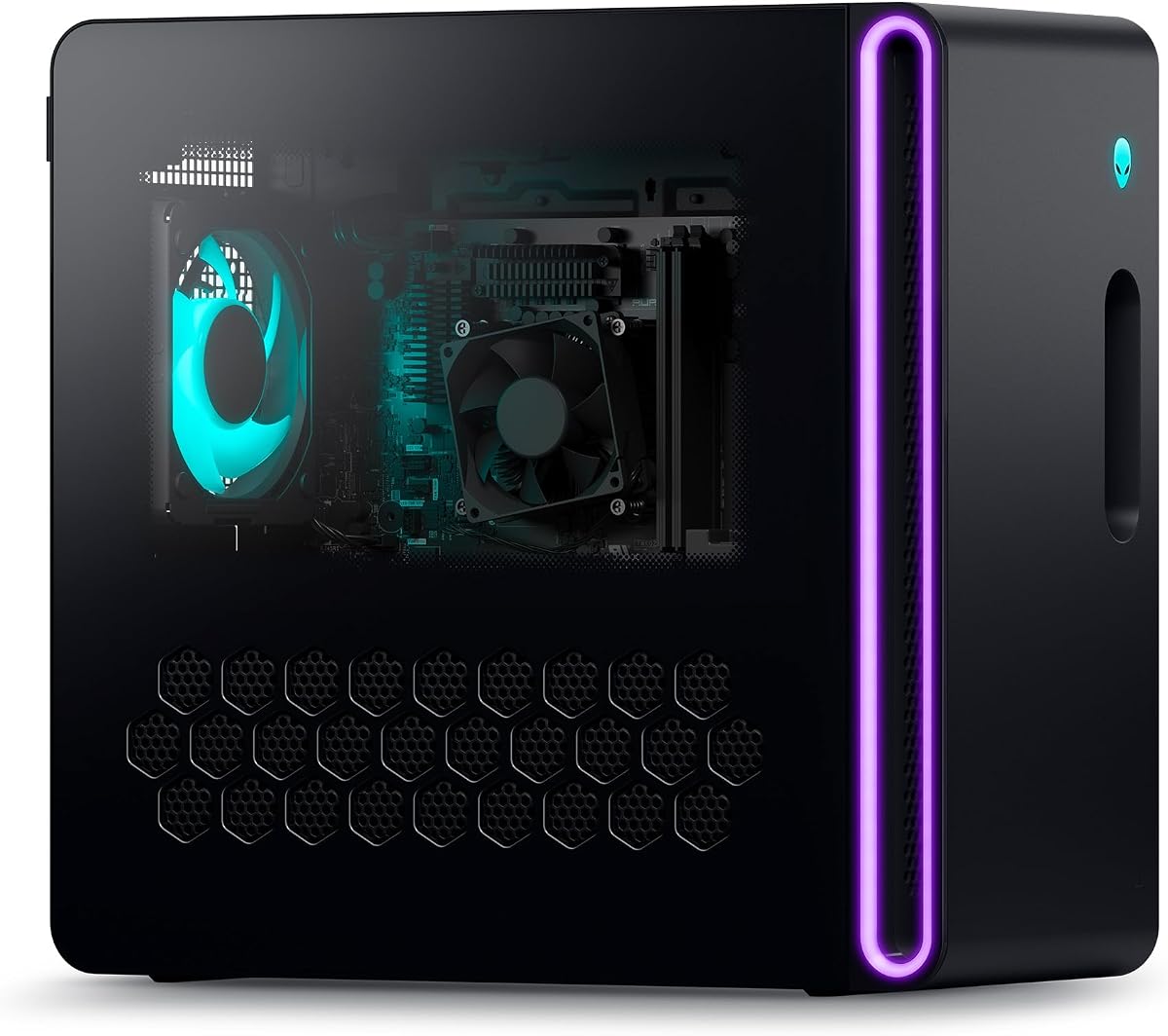
Alienware continues to push boundaries with a design that looks and performs like a flagship system. The integration of new generation hardware ensures that users are ready for the latest games and creative applications.
We may earn a commission when you buy through this link, at no additional cost to you.
The chassis is designed for efficient airflow which helps maintain lower temperatures during intense sessions. This attention to thermal management contributes to the longevity of the internal components.
While the system uses proprietary parts which can make repairs more complex the onsite service option mitigates this risk significantly. Users receive direct support from Dell technicians at their location.
This desktop is ideal for enthusiasts who value brand reliability and premium features. It offers a polished experience that extends beyond raw performance into aesthetics and user support.
The matte basalt finish and customizable lighting create a distinctive look that fits well in any modern gaming setup or office.
Having onsite support means technical issues can be resolved quickly without shipping the entire system away for repairs or testing.
We may earn a commission when you buy through this link, at no additional cost to you.
This model prioritizes storage and memory capacity which are critical for users with large game libraries or heavy creative workloads. Having 32GB of RAM ensures smooth multitasking even with many applications open.
We may earn a commission when you buy through this link, at no additional cost to you.
The compact form factor helps save desk space while still housing powerful components. Cooling is managed through multiple fans to maintain stability during extended use without excessive noise.
While the chassis is small it does limit the number of additional drives or cards that can be added later. Users should consider their long term storage needs before committing to this specific model.
For those needing immediate space for data and high performance without extra upgrades this system is well equipped. It balances power and size effectively for modern desktop environments.
With 2TB of SSD space users can store dozens of large games and projects without worrying about running out of room quickly.
32GB of DDR5 allows for seamless transitions between gaming editing software and communication tools without slowdowns or lag.
We may earn a commission when you buy through this link, at no additional cost to you.
Designed to handle virtual reality headsets this system provides enough graphical power for immersive experiences. The inclusion of modern connectivity ensures low latency during wireless gaming or streaming sessions.
We may earn a commission when you buy through this link, at no additional cost to you.
The combination of a mid range processor and high end graphics creates a specific balance suited for gaming first. This makes it a practical choice for those focused on gameplay rather than heavy production work.
Users have noted that upgrading storage or memory is straightforward thanks to the use of standard components. This flexibility adds value as needs change over time without requiring a new system.
Overall this desktop is a strong candidate for VR enthusiasts and gamers who want a future proof machine. It offers solid performance in key areas while allowing room for future improvements.
The graphics card meets the demands of modern VR headsets providing smooth frame rates and high fidelity visuals in immersive environments.
Wi-Fi 6E utilizes the 6GHz band for faster speeds and less interference which is crucial for online gaming and cloud streaming.
We may earn a commission when you buy through this link, at no additional cost to you.
This system represents the top tier of performance and build quality offering features that are often reserved for custom built machines. The liquid cooling ensures that the processor remains cool even under heavy loads.
We may earn a commission when you buy through this link, at no additional cost to you.
The inclusion of AI features and advanced graphics technologies makes this a future proof investment for creators and gamers alike. It delivers smooth performance across a wide range of demanding applications.
While the cost is higher than average systems the quality of components and assembly justifies the expense. Users who need reliability and power will find that this system meets their expectations.
We recommend this desktop for professionals and enthusiasts who demand the best available performance. It combines premium features with a design that supports longevity and easy maintenance.
A dedicated 360mm liquid cooler keeps CPU temperatures low which is essential for maintaining peak performance during long work sessions.
Built in AI capabilities enhance graphics performance and video editing workflows through intelligent frame generation and quality improvement.
We may earn a commission when you buy through this link, at no additional cost to you.
The design of this chassis focuses on maximizing airflow to keep components cool and quiet. This results in a more pleasant user experience especially in small rooms or office environments.
We may earn a commission when you buy through this link, at no additional cost to you.
Power delivery is robust with a 12 phase design that ensures stable performance even when the system is pushed to its limits. This stability is crucial for long gaming sessions or renders.
While the motherboard is proprietary which limits future GPU options the onsite service helps mitigate concerns about potential hardware failures. Users can rely on direct support from Dell technicians.
For those prioritizing noise and stability over maximum customization this desktop is a strong choice. It delivers a polished and reliable experience that fits well into daily workflows.
Larger passageways and optimized management reduce noise levels allowing for a quieter environment during intense gaming or work sessions.
The high quality voltage regulation ensures the processor runs smoothly without fluctuation which extends the life of the internal components.
We may earn a commission when you buy through this link, at no additional cost to you.
This system offers a high amount of storage and memory out of the box making it ready for heavy usage immediately. The RGB lighting adds a customizable aesthetic that appeals to many gamers.
We may earn a commission when you buy through this link, at no additional cost to you.
The inclusion of a keyboard and mouse provides a complete solution for users who do not have existing peripherals. This simplifies the setup process and reduces the total cost of ownership.
While the case is functional it may lack the premium feel of more expensive units. However for performance focused buyers the internal specs are what matter most.
We recommend this desktop for those who want a complete setup with high capacity storage and memory. It offers excellent value for the specifications provided in the current market.
Receiving a keyboard and mouse with the desktop saves money and ensures compatibility from the moment the box is opened.
With 32GB of RAM and 2TB of SSD storage users can keep everything they need on the system without running into limits.
We may earn a commission when you buy through this link, at no additional cost to you.
Selecting the right desktop involves understanding how different components work together to deliver the performance you need for gaming and productivity.
The processor is the brain of your computer and determines how well it handles calculations for games and applications. Look for recent generations from Intel or AMD to ensure you have enough power for modern titles.
Prioritize models with high core counts if you plan to stream or edit video alongside gaming to avoid slowdowns.
The graphics card is crucial for rendering images and effects in games. A RTX 4070 offers strong performance at 1440p resolution and supports features like ray tracing for realistic visuals.
Ensure the model is a Super variant if possible for a noticeable boost in frame rates and image quality.
Memory affects how many programs you can run simultaneously without lag. DDR5 is the newer standard and provides faster speeds than DDR4 which helps with overall system responsiveness.
Aim for at least 16GB for gaming but 32GB is better for heavy multitasking or future proofing your setup.
Solid state drives are essential for fast load times in games and applications. NVMe drives are the fastest type and ensure your system feels responsive during daily use.
Choose a capacity that fits your game library with 1TB being a minimum and 2TB providing more flexibility for large files.
Cooling keeps your components from overheating during intense sessions. Air cooling is common and effective while liquid cooling can offer lower temperatures and quieter operation.
Look for cases with good airflow to maintain consistent performance over long periods of use.
The quality of the case and internal assembly impacts longevity. A sturdy chassis protects components and helps manage cables for better airflow.
Check warranty terms and support options to ensure you have help if hardware issues arise after purchase.
Modern PCs need reliable connections for monitors and peripherals. Ensure there are enough USB ports and the right video outputs for your display setup.
WiFi 6 or 6E support is useful for wireless connections without the need for Ethernet cables in many setups.
Some prebuilt systems use proprietary parts that limit future upgrades. Standard components make it easier to add more storage or replace the graphics card later.
Consider how easy it is to open the case and access internal slots before finalizing your purchase decision.
Place your desktop in a well ventilated area to ensure air can flow freely through the vents. Avoid enclosed spaces like cabinets where heat can build up quickly and cause performance issues.
Keep the system free of dust by using compressed air to clean the filters and fans every few months. This helps maintain optimal cooling and extends the life of the internal components.
Install all necessary drivers and updates from the manufacturer to ensure stability. Regular software maintenance keeps your system running smoothly and protects against potential vulnerabilities.
Most systems with an RTX 4070 are optimized for 1440p gaming where they deliver excellent performance. While 4K is possible with settings adjustments it may not maintain high frame rates in all titles.
Yes the Super variant generally offers more cores and higher clock speeds which results in better performance in games and creative applications. It also supports advanced features like DLSS more effectively.
Most of the prebuilt systems come with Windows 11 pre installed and activated. This allows you to start using the PC immediately without needing to purchase a separate license.
It depends on the model as some use standard parts while others are proprietary. Always check the product specifications for upgrade options before purchasing if you plan to add components later.
These systems generally plug into a standard wall outlet using the included power supply. Ensure you have a stable power source and consider using a surge protector for safety.
Absolutely these desktops have powerful processors and ample memory which make them suitable for video editing and 3D modeling. The graphics card also helps with rendering tasks efficiently.
We have reviewed a range of options from budget friendly choices to premium systems with advanced features. Each picks offers a unique combination of performance and value to suit different needs.
Consider your priorities whether it is raw power or budget efficiency when making your final decision. The right system should support your gaming goals and daily tasks without compromise.
Prices and availability may change so please check current listings for the most accurate information before purchasing your new desktop computer today.