
GIGABYTE B550 Gaming X V2
4.5Editor score
AMD AM4 Socket Support
PCIe 4.0 M.2 Slots
Q-Flash Plus BIOS Update
This guide compares the top 10 Gigabyte Motherboard models for performance, connectivity, and value across AMD and Intel platforms in October 2026.
Choosing the right Gigabyte Motherboard is essential for building a stable and high-performance computer system that meets your specific computing needs effectively.
We evaluated ten top-rated models based on power delivery, thermal design, connectivity options, and user feedback to help you find the perfect match.
Each pick highlights key strengths and trade-offs so you can make an informed decision while keeping in mind that availability and pricing may shift over time.
4.5Editor score

4.4Editor score

4.2Editor score
This side-by-side comparison highlights the key specifications and features of all ten selected Gigabyte Motherboard models to help you identify the best fit for your build requirements.


The GIGABYTE B650 AORUS Elite AX stands out as a premier choice for AMD builders seeking balance between power delivery and modern connectivity features in its class.
We may earn a commission when you buy through this link, at no additional cost to you.
Its 14+2+1 power phase design paired with 70A digital VRM ensures stable operation even under heavy loads with Ryzen 9000 series processors while maintaining excellent thermal headroom.
While it lacks the maximum number of M.2 slots found on higher-end boards, the inclusion of PCIe 5.0 support for storage and Wi-Fi 6E keeps it future-ready for emerging standards.
This board is ideal for gamers and creators who need reliable performance and fast networking without paying premium prices for unnecessary enterprise-grade features.
The twin 14+2+1 phases with 70A power stages provide consistent voltage regulation essential for high-frequency Ryzen CPU operation.
Fully covered MOSFET heatsinks and a 6mm heatpipe work together to dissipate heat efficiently during extended gaming sessions.
We may earn a commission when you buy through this link, at no additional cost to you.
The GIGABYTE X870 AORUS Elite WIFI7 targets enthusiasts who demand the latest wireless and storage technologies for their next-generation AMD AM5 builds.
We may earn a commission when you buy through this link, at no additional cost to you.
With WIFI7 support and USB4 connectivity, this board offers significantly faster data transfer rates and network speeds compared to previous generation motherboards.
The power design ensures stability for high-end Ryzen processors while the four M.2 slots accommodate extensive storage expansion needs without compromise.
Ideal for users who want cutting-edge features and long-term support, this model justifies its cost through future-proofing and reliable build quality.
WIFI7 provides lower latency and higher throughput, enhancing online gaming and large file transfers over wireless networks.
Four M.2 slots with PCIe 5.0 support allow multiple high-speed NVMe drives for RAID configurations or massive media libraries.
We may earn a commission when you buy through this link, at no additional cost to you.
The GIGABYTE X870E AORUS PRO ICE combines high-end technical specifications with a striking white finish designed for builders prioritizing visual consistency.
We may earn a commission when you buy through this link, at no additional cost to you.
Equipped with 80A smart power stages, it delivers exceptional electrical efficiency and stability for overclocking and sustained multi-threaded workloads.
Features like WIFI7, USB4, and four M.2 slots ensure maximum connectivity options while the thermal guard protects storage performance under load.
This board is perfect for enthusiasts building a clean, cohesive system where aesthetics and top-tier performance are equally important priorities.
The 80A smart power stages improve efficiency and reduce heat output compared to standard VRM solutions for better overclocking potential.
The white color scheme and specialized heatsink design create a uniform look when paired with white components and cases.
We may earn a commission when you buy through this link, at no additional cost to you.
The GIGABYTE Z890 AORUS Master represents the pinnacle of Intel motherboard engineering with enterprise-grade networking and extensive storage expansion capabilities.
We may earn a commission when you buy through this link, at no additional cost to you.
It supports Intel Core Ultra processors and features five M.2 slots alongside Thunderbolt 4 and 10GbE LAN for professional workstations and high-performance gaming.
The 18+1+2 power phase design ensures robust voltage regulation for demanding applications while EZ-Latch mechanisms simplify component installation significantly.
This board suits professionals and power users who need maximum bandwidth and connectivity options without compromising on stability or performance.
10GbE LAN enables ultra-fast local network transfers ideal for 4K video editing and large data backups.
Five M.2 slots allow for multiple NVMe drives in RAID setups for incredible read and write speeds.
We may earn a commission when you buy through this link, at no additional cost to you.
The GIGABYTE B650 Eagle AX delivers impressive performance and features at a price point that appeals to budget-conscious builders seeking reliability.
We may earn a commission when you buy through this link, at no additional cost to you.
It includes three M.2 slots for storage flexibility and supports DDR5 memory ensuring compatibility with current and future Ryzen processors effectively.
The digital VRM solution provides enough headroom for mid-range CPUs while the integrated Wi-Fi 6E ensures stable wireless connectivity without extra cost.
Best for general users and gamers who want essential modern features without paying for unused premium extras on higher-end models.
Triple M.2 slots provide ample space for boot drives and secondary storage without needing extra PCIe adapters.
USB 3.2 Gen2x2 Type-C offers fast external storage support for modern peripherals and devices.
We may earn a commission when you buy through this link, at no additional cost to you.
The GIGABYTE B550 AORUS Elite AX V2 remains a strong choice for users upgrading existing AM4 systems without needing DDR5 memory upgrades.
We may earn a commission when you buy through this link, at no additional cost to you.
Its 12+2 power phase design supports Ryzen 5000 series processors effectively while the integrated WIFI6 ensures fast wireless connectivity out of the box.
Front USB-C support simplifies cable management for cases with front panel ports and Q-Flash Plus allows BIOS updates without a CPU installed.
Recommended for budget upgrades or specific build requirements where DDR4 memory is preferred for cost efficiency over DDR5 adoption.
Supports Ryzen 5000, 4000, and 3000 series ensuring a wide range of processor options for upgrades.
Integrated I/O shield and Q-Flash Plus make assembly and maintenance significantly easier for DIY builders.
We may earn a commission when you buy through this link, at no additional cost to you.
The GIGABYTE Z790 Eagle AX offers a balanced feature set for Intel Core 14th, 13th, and 12th gen processors without excessive costs.
We may earn a commission when you buy through this link, at no additional cost to you.
It supports DDR5 memory and PCIe 5.0 ensuring future readiness while the 12+1+1 power phase maintains stability for standard workloads.
WIFI6E and 2.5GbE LAN provide robust networking options and EZ-Latch mechanisms simplify GPU and M.2 installation significantly.
This board is suitable for gamers who want modern connectivity and DDR5 benefits without needing extreme overclocking capabilities.
Dual channel DDR5 support improves memory bandwidth and overall system responsiveness for modern applications.
EZ-Latch and Q-Flash tools streamline the build process reducing frustration for first-time builders.
We may earn a commission when you buy through this link, at no additional cost to you.
The GIGABYTE Z790 AORUS Elite AX provides a significant step up in power delivery and storage options for Intel enthusiasts.
We may earn a commission when you buy through this link, at no additional cost to you.
Its 16+1+2 phase design with 70A power stages delivers excellent stability for overclocking and heavy multi-threaded workloads.
Four M.2 slots and PCIe 5.0 support ensure maximum storage performance and flexibility for demanding users with extensive data needs.
Ideal for high-performance gaming and creative workflows where power stability and fast storage are critical requirements for system longevity.
70A power stages improve electrical efficiency and heat management compared to lower-rated VRM components.
RGB Fusion software allows synchronized lighting effects across compatible components for enhanced aesthetics.
We may earn a commission when you buy through this link, at no additional cost to you.
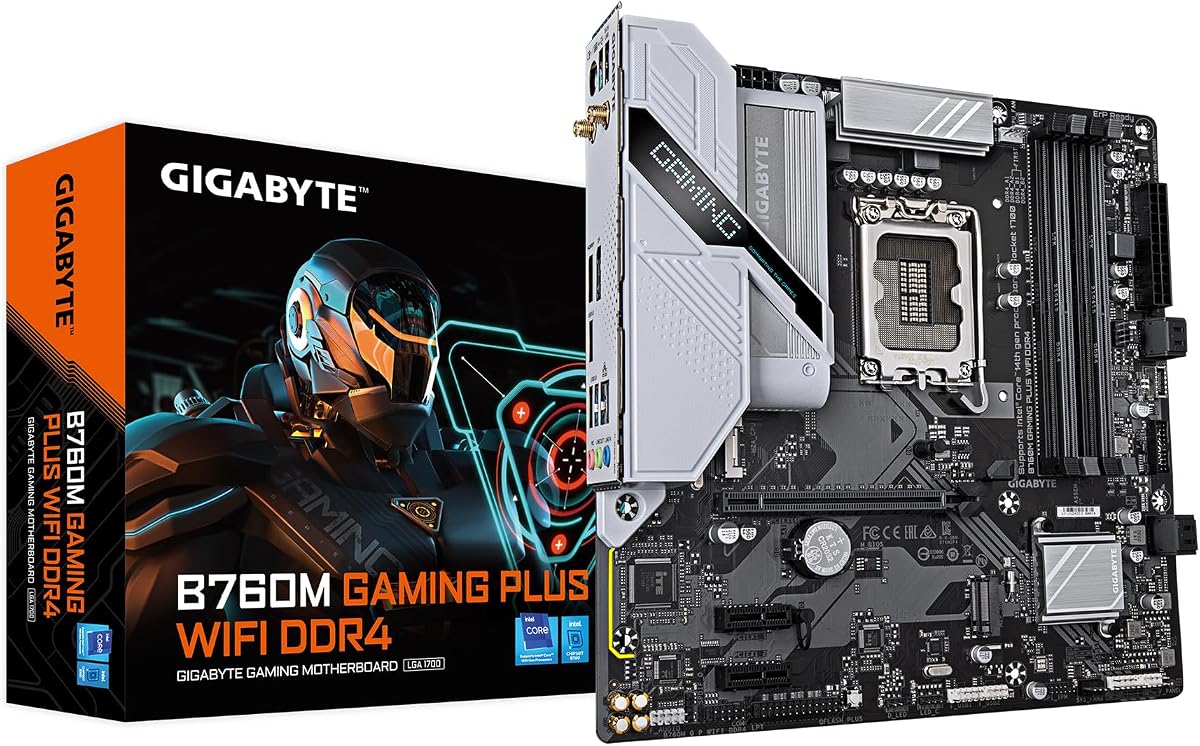
The GIGABYTE B760M Gaming Plus WiFi fits smaller cases while offering essential features for Intel Core 12th to 14th gen processors.
We may earn a commission when you buy through this link, at no additional cost to you.
DDR4 memory support keeps overall system costs lower while the M-ATX form factor allows for compact builds without sacrificing key connectivity options.
Features like Q-Flash Plus and EZ-Latch ensure easy maintenance and component changes which is valuable for budget-conscious builders.
This board is perfect for office PCs or entry-level gaming builds where space savings and cost efficiency take priority over maximum performance.
M-ATX form factor fits in small form factor cases enabling desktop builds without large tower requirements.
DDR4 compatibility lowers memory costs allowing budget allocation to other components like GPU or storage.
We may earn a commission when you buy through this link, at no additional cost to you.
The GIGABYTE B550 Gaming X V2 is an excellent entry-level board delivering essential features for AMD users without unnecessary premium costs.
We may earn a commission when you buy through this link, at no additional cost to you.
It supports Ryzen 5000 series processors and includes PCIe 4.0 M.2 slots providing modern performance at a fraction of the cost of newer boards.
Q-Flash Plus allows BIOS updates without a CPU installation which adds valuable convenience during troubleshooting and system upgrades effectively.
Ideal for budget builds, student PCs, or casual gaming systems where reliability and compatibility matter more than high-end features.
The 10+3 power phase provides stable power delivery for mid-range Ryzen processors and daily computing tasks.
Integrated I/O shield and Q-Flash Plus simplify assembly making it accessible for first-time PC builders.
We may earn a commission when you buy through this link, at no additional cost to you.
Selecting the right Gigabyte Motherboard requires careful consideration of several technical factors that directly impact system performance and upgrade paths over time.
The CPU socket type must match your processor exactly so verify whether your processor uses AMD AM4, AM5, or Intel LGA 1700 or LGA 1851 sockets before purchasing.
Mismatching sockets will prevent the processor from installing or functioning correctly regardless of how powerful the rest of your system is.
Check whether the motherboard supports DDR4 or DDR5 memory as these generations are not interchangeable and DDR5 offers higher bandwidth at higher costs.
Ensure the RAM speed supported matches your processor capabilities to avoid throttling performance or wasting money on incompatible hardware.
VRM quality determines how stable your system remains under load so look for boards with higher phase counts and better cooling for high-end processors.
Adequate power delivery ensures your CPU reaches its potential without thermal throttling during extended gaming or creative workloads.
Count the number of M.2 slots and check whether they support PCIe 4.0 or 5.0 speeds depending on your storage and performance requirements.
Sufficient M.2 capacity prevents the need for expansion cards and allows multiple high-speed drives for different system functions.
Integrated Wi-Fi and Bluetooth modules save money compared to adding separate adapters so verify standards like Wi-Fi 6E or 7 match your needs.
Built-in wireless solutions also reduce cable clutter and improve overall system aesthetics while providing consistent network access.
Confirm the number of PCIe slots available for graphics cards and expansion hardware to avoid bottlenecks when upgrading components later.
Multiple slots allow for multi-GPU setups or add-in cards like capture cards or high-end network adapters.
Effective heatsinks on VRMs and M.2 slots prevent overheating and ensure stable performance during long periods of sustained usage.
Poor thermal solutions can lead to reduced performance and lower component lifespan especially in compact or warm cases.
Look for features like Q-Flash Plus that allow BIOS updates without a CPU installed which simplifies compatibility and troubleshooting tasks.
An intuitive BIOS interface makes system configuration easier for beginners and advanced users alike.
Always install the motherboard on anti-static mats and handle it by the edges to prevent electrostatic discharge from damaging sensitive components.
Regularly update the BIOS through Gigabyte tools to ensure compatibility with new processors and security patches are applied promptly.
Keep your system dust free with periodic cleaning to prevent overheating and ensure all thermal pads remain effective over time.
The GIGABYTE B650 AORUS Elite AX is recommended for its strong VRM design and AM5 socket support. It handles the latest processors efficiently without excessive heat.
No. Newer AM5 and Intel 600/700 series boards support DDR5, but older B550 or Z790 DDR4 models only work with DDR4 modules. Check compatibility carefully.
Q-Flash Plus lets you update the BIOS using a USB drive without installing a CPU or RAM. This is useful for ensuring processor compatibility before full assembly.
Three to four M.2 slots are ideal for most users wanting multiple high-speed drives. Ensure they support PCIe 5.0 or 4.0 for future storage upgrades.
Wi-Fi 6E adds access to the 6GHz band reducing interference and increasing speed. It is valuable if your router supports it and you need fast wireless.
No. AM5 motherboards exclusively support DDR5 memory. You must purchase DDR5 RAM when building with Ryzen 7000 or 9000 series processors.
The ten Gigabyte Motherboard models covered here range from budget entry-level options to premium workstation builds ensuring there is a fit for every user.
Prioritize socket compatibility, memory type, and VRM quality to ensure your system remains stable and upgradeable for years to come effectively.
Always check current availability and pricing as these factors can change quickly impacting your final purchasing decision and budget.