
NVIDIA RTX PRO 6000 Blackwell
4.3Editor score
96GB ECC memory
Professional workstation grade
Multi-GPU scaling
Discover the top GPU for Davinci Resolve to accelerate rendering and grading. We compare performance, memory, and value across ten leading graphics cards for
Choosing the right GPU for Davinci Resolve is critical for smooth playback and fast rendering. Modern workflows demand high VRAM and efficient compute power to handle 8K footage and complex effects without lag.
We analyzed performance benchmarks, memory capacity, and professional features across the latest graphics cards. Our list covers NVIDIA and AMD options tailored for color grading, visual effects, and AI-enhanced editing tasks.
Each pick highlights key strengths and ideal use cases for different budgets. Please note that prices change frequently so verify current listings before purchasing to ensure you get the best value available today.
4.3Editor score
4.9Editor score

4.7Editor score
This side-by-side comparison evaluates ten top graphics cards for DaVinci Resolve. We assess memory size, architecture features, and cooling solutions to help you find the perfect card for your workflow.




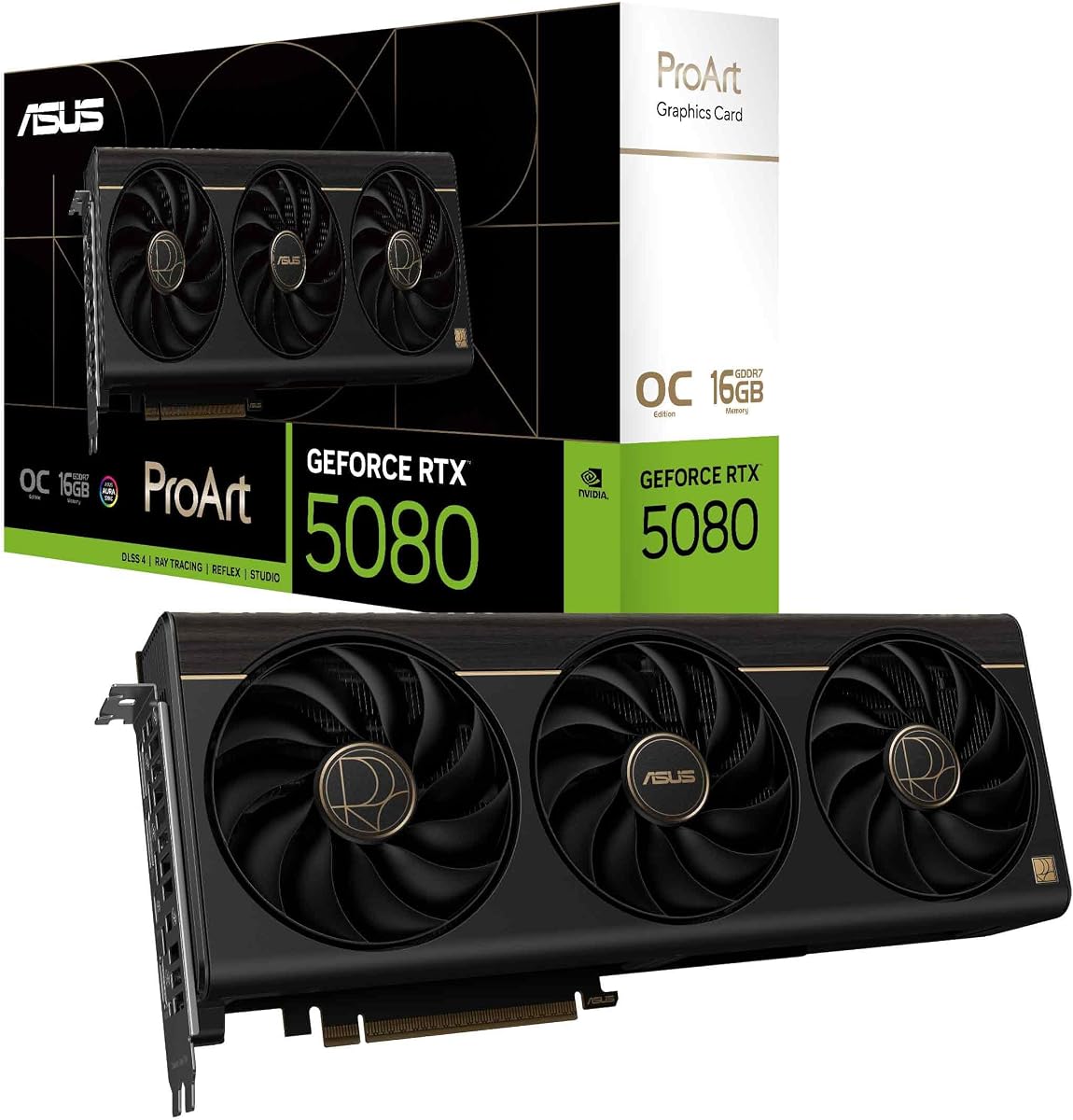
The ASUS ProArt RTX 5080 stands out as the top recommendation for professional editors. With a 4.9 rating and robust Blackwell architecture, it delivers seamless 8K playback and rapid timeline rendering.
We may earn a commission when you buy through this link, at no additional cost to you.
Its MaxContact heatsink and vapor chamber ensure sustained performance during long grading sessions. The integrated USB Type-C port adds versatility for connecting capture cards or external drives directly.
While the price is premium, the efficiency and reliability justify the investment. Trade-offs like size are minor compared to the stability it offers for complex Fusion and Color pages.
Editors needing the best balance of speed and precision should choose this card. It is ideal for studios or freelancers who demand flawless performance daily.
The MaxContact heatsink design ensures heat is transferred quickly, keeping clocks high during heavy effects rendering.
Minimalist aesthetics and ProArt branding align with professional studio environments while supporting high-end workflows.
We may earn a commission when you buy through this link, at no additional cost to you.
The GIGABYTE RTX 5080 Gaming OC offers powerful performance at a competitive price. Rated 4.6, it handles 8K timelines and complex node trees with ease.
We may earn a commission when you buy through this link, at no additional cost to you.
Powered by Blackwell architecture and DLSS 4, this card accelerates playback and reduces export times significantly. The WINDFORCE cooling system keeps noise levels low under load.
Gaming aesthetics might not suit all studio setups but performance remains top tier. The 16GB VRAM ensures smooth transitions even with multiple effects applied.
Users seeking high performance without the ProArt premium will appreciate this model. It is perfect for hybrid gamers and editors needing reliable power.
The WINDFORCE system uses multiple fans to dissipate heat efficiently, maintaining stable boost clocks.
PCIe 5.0 ensures maximum bandwidth for data transfer between GPU and system memory.
We may earn a commission when you buy through this link, at no additional cost to you.
The NVIDIA RTX PRO 6000 Blackwell is engineered for enterprise workloads. With 96GB ECC memory it handles massive scenes without dropping frames or errors.
We may earn a commission when you buy through this link, at no additional cost to you.
Support for Universal MIG allows partitioning the card for multiple users or tasks. This flexibility is ideal for render farms or multi-user editing environments.
The price reflects its professional targeting but performance is unmatched. Trade-offs like cooling requirements are necessary for sustaining such high power delivery.
Studios handling the most demanding projects should consider this flagship. It sets a new standard for workstation GPU capabilities.
ECC memory corrects errors automatically ensuring data integrity during long rendering jobs.
MIG technology allows dividing GPU resources for simultaneous independent workloads.
We may earn a commission when you buy through this link, at no additional cost to you.
The ASUS TUF Gaming RTX 5080 emphasizes durability. Its military-grade components and phase-change thermal pad ensure longevity under heavy editing loads.
We may earn a commission when you buy through this link, at no additional cost to you.
Boost clocks reach high levels for fast playback and rendering. The 3.6-slot design accommodates large heatsinks for better heat dissipation.
Large physical size may require a spacious case. However the reliability makes it a solid choice for 24/7 workstation use.
Users prioritizing build quality and performance will find it ideal. It balances gaming strength with creative workstation needs effectively.
Phase-change pads outperform traditional paste ensuring consistent temperatures over years of use.
Military-grade capacitors ensure stable power for consistent performance during long exports.
We may earn a commission when you buy through this link, at no additional cost to you.
The ASRock Radeon AI PRO R9700 offers 32GB VRAM for heavy workloads. Its RDNA 4 architecture provides strong AI acceleration for modern editing tasks.
We may earn a commission when you buy through this link, at no additional cost to you.
DisplayPort 2.1a supports multiple high-res displays which is useful for dual-screen editing. The blower cooler is compact for server racks but can be loud.
CUDA may limit some OpenFX plugins compared to NVIDIA. However basic editing and color grading run smoothly on AMD GPUs.
AMD users or those needing high VRAM should consider this card. It is great for multi-monitor setups requiring bandwidth.
32GB of VRAM handles 8K timelines and complex node graphs without bottlenecks.
Four DP 2.1a outputs allow connecting multiple 8K monitors for reference monitoring.
We may earn a commission when you buy through this link, at no additional cost to you.
The GIGABYTE RX 9070 XT delivers strong performance for the price. It handles 4K editing well with WINDFORCE cooling keeping thermals in check.
We may earn a commission when you buy through this link, at no additional cost to you.
WINDFORCE fans and thermal gel ensure quiet operation during grading. The 16GB VRAM supports most current projects comfortably.
For 8K users it may struggle compared to higher-end cards. The gaming look fits home studios but lacks professional styling.
Budget-conscious editors needing solid speed will enjoy this card. It is ideal for 4K work on a budget.
Server-grade thermal gel ensures optimal contact between GPU and heatsink for better cooling.
High frame rates and fast renders at a price point accessible to many creators.
We may earn a commission when you buy through this link, at no additional cost to you.
The ASRock Intel Arc Pro B60 offers 24GB VRAM and AV1 encoding. Its Xe2-HPG architecture supports next-gen workflows with efficient dual-encode engines.
We may earn a commission when you buy through this link, at no additional cost to you.
ISV certification ensures stability in professional apps. Four DP 2.1 outputs support large multi-monitor setups for grading and monitoring.
Driver maturity varies compared to established brands but Intel is improving rapidly. The blower design aids multi-GPU builds but may run warmer.
Early adopters needing AV1 encoding and VRAM may find it useful. Check Resolve compatibility before purchase for best results.
Dual AV1 encoders allow faster export of modern video formats without quality loss.
ISV certification ensures validated performance for supported creative software.
We may earn a commission when you buy through this link, at no additional cost to you.
The ASUS Dual RTX 5060 Ti provides 16GB VRAM at an affordable price. Blackwell architecture brings modern features to lower budgets.
We may earn a commission when you buy through this link, at no additional cost to you.
0dB technology allows silent playback for light workloads. The compact 2.5-slot design fits small cases easily.
Raw power is less than higher-end models but sufficient for 4K. Dual BIOS lets you toggle performance profiles as needed.
Entry-level editors needing VRAM should consider this model. It balances features and cost effectively.
Small size enables installation in smaller workstation cases without sacrificing cooling.
Toggle between quiet and performance modes to match current workflow needs.
We may earn a commission when you buy through this link, at no additional cost to you.
The PNY NVIDIA Quadro RTX 4000 remains a reliable professional choice. Turing architecture still supports essential Resolve features efficiently.
We may earn a commission when you buy through this link, at no additional cost to you.
Professional drivers ensure stability for production environments. RTX technology enables real-time effects and ray-traced previews.
VRAM is limited compared to newer cards but adequate for HD projects. Its compact size fits into most workstations easily.
Professionals needing certified stability on a budget may choose this. It is good for established studio workflows.
Professional drivers minimize crashes during critical project deliveries.
RT cores accelerate ray-traced effects for faster previews in Fusion.
We may earn a commission when you buy through this link, at no additional cost to you.
The NVIDIA Titan RTX provides massive compute power. Its core count helps with heavy CUDA-based rendering tasks.
We may earn a commission when you buy through this link, at no additional cost to you.
RT and Tensor cores assist with AI effects and ray tracing. This card is built for sustained high-performance workloads.
Power draw is high so a robust PSU is essential. It lacks newer architectural benefits but remains a powerful option.
Users with specific legacy needs may prefer this. It offers raw power for demanding workflows.
Thousands of CUDA cores enable complex parallel processing for rendering.
Certified for workstation tasks ensuring stability during long operations.
We may earn a commission when you buy through this link, at no additional cost to you.
Selecting the right GPU requires balancing budget, workflow needs, and specific features. We highlight key factors to consider for optimal performance.
VRAM is crucial for resolving high-resolution footage. 16GB or more is recommended for 4K and 8K editing to prevent playback issues.
Always prioritize higher VRAM to ensure smooth timelines and reduced crashes.
Newer architectures like Blackwell and RDNA 4 provide better efficiency and support for AI features.
Check compatibility with Resolve updates for best long-term performance.
Resolve favors CUDA cores found on NVIDIA cards for speed and compatibility.
AMD cards work but may lack support for certain plugins or effects.
High-performance GPUs require sufficient power supply. Verify PSU wattage before purchasing.
Efficient cards reduce heat and electricity costs over time.
Thermal performance affects sustained speeds. Look for robust cooling systems.
Quiet cooling is important for studio environments to reduce noise.
Ensure the card supports your display inputs. Multiple ports help multi-monitor setups.
Modern displays require DP 2.1 or HDMI 2.1 for high bandwidth.
Balance cost with necessary features. High-end options are not always needed.
Entry-level cards can handle lighter tasks effectively.
Pro cards offer certified drivers and stability. Gaming cards provide better price-performance ratios.
Choose based on workflow stability needs versus pure speed.
Update drivers regularly to ensure Resolve recognizes new features. Check official manufacturer sites for latest releases.
Clean dust from fans monthly to prevent overheating. Use compressed air carefully to avoid damage.
Adjust Resolve settings to match GPU capabilities. Enable GPU acceleration for optimal playback performance.
NVIDIA GPUs are preferred due to CUDA optimization which speeds up rendering. AMD cards work but may have limited effect support. Choosing NVIDIA ensures best compatibility.
At least 16GB of VRAM is recommended for smooth 8K editing. More VRAM helps with complex effects and color grading without crashes.
Yes gaming GPUs work well for Resolve editing. They offer strong performance but lack certified drivers found on workstation cards.
The ASUS ProArt RTX 5080 offers top performance. It balances speed and features for most professional needs in 2026.
GPUs can degrade due to heat and dust. Proper cooling and maintenance extend their lifespan significantly.
Yes Resolve supports multi-GPU setups for increased power. Ensure drivers and software support scaling correctly.
We reviewed ten top GPUs offering power from budget-friendly options to premium workstations.
Prioritize VRAM and architecture generation to meet your editing demands effectively.
Always check current listings for pricing as deals change frequently.