
TP-Link Ethernet Splitter 1 to 2
4.6Editor score
Compact aluminum housing
USB powered setup
Gigabit data speeds
This guide compares the top rated internet splitters for home and office networks, highlighting speed, durability, and port options for reliable connectivity.
Finding the right internet splitter can transform your network setup by allowing multiple devices to share a single connection efficiently. Whether you need to expand ports in a home office or a small business, choosing a reliable splitter ensures stable and fast data transmission across all connected devices without signal loss.
We evaluated ten top-rated internet splitters based on their build quality, speed capabilities, and ease of use. Our analysis focuses on gigabit performance, power requirements, and compatibility with various Ethernet cables to help you identify the best solution for your specific networking needs and environment.
Each pick in this list showcases unique features tailored to different scenarios, from compact travel units to robust desktop models. Please note that product availability and pricing can change frequently, so we recommend verifying current stock and deals before making your final purchase decision online.
4.6Editor score

4.7Editor score

4.5Editor score
Below is a detailed side-by-side comparison of the ten best internet splitters available today. This table highlights key specifications like port count, speed, and design to help you quickly identify the model that fits your network expansion needs.



The TP-Link TL-SG105 stands out as a robust solution for expanding network ports with five gigabit connections. It earns a high rating for its reliability and energy-efficient design which makes it ideal for office or home use.
We may earn a commission when you buy through this link, at no additional cost to you.
Its standout feature is the fanless metal casing that ensures silent operation while maintaining durability. The device supports auto negotiation and traffic optimization to guarantee smooth data flow even during heavy usage periods.
While it requires a power source and is physically larger than compact splitters, these trade-offs are acceptable given the stability and performance it delivers. The included warranty adds further confidence for long-term users.
This switch is best for anyone needing multiple wired connections without sacrificing speed. We recommend it for users prioritizing reliability and silent operation in a professional or home office environment.
The fanless design ensures the device runs quietly without generating noise, which is perfect for bedrooms or offices where silence matters.
Advanced QoS features help prioritize voice and video traffic, ensuring consistent quality during calls or streaming sessions.
We may earn a commission when you buy through this link, at no additional cost to you.
This TP-Link splitter offers an affordable way to expand a single port into two active connections. It is highly rated for its compact design and ease of setup making it a favorite among budget conscious users.
We may earn a commission when you buy through this link, at no additional cost to you.
Key strengths include its aluminum housing which helps with heat dissipation and durability. It comes with a USB power cable and Ethernet cable so setup is straightforward without extra purchases.
The main trade-off is that bandwidth is shared between devices which might limit speed during simultaneous heavy use. However for general browsing and streaming this remains a reliable and efficient choice.
Buyers looking for a cheap yet reliable port expansion will appreciate this unit. It is especially suitable for travel or small spaces where portability and cost are top priorities.
Its lightweight build fits easily into laptop bags making it a convenient tool for travelers needing quick network expansion on the go.
TP-Link follows Secure-by-Design principles ensuring that the device is built with security features to protect your data transmission.
We may earn a commission when you buy through this link, at no additional cost to you.
The UGREEN splitter combines high performance with a sleek space grey finish that appeals to design conscious users. It is rated well for its ability to maintain signal integrity across two devices simultaneously without interference.
We may earn a commission when you buy through this link, at no additional cost to you.
Its standout qualities include full metal protection and gold plated pins which ensure long-lasting connectivity and resistance to wear. The aluminum alloy construction also aids in cooling during extended operation.
The primary drawback is the higher price compared to basic models. However for users who value aesthetics and premium materials this cost is justified by the durability and reliability it offers.
This unit is ideal for home setups where visual appeal matters alongside functionality. We recommend it for those seeking a premium upgrade for their home network infrastructure.
The full metal protection and gold pins ensure that connections remain stable and resistant to corrosion over many years of use.
Engineered to prevent signal crosstalk it ensures that data transmission remains fast and reliable even when both ports are in use.
We may earn a commission when you buy through this link, at no additional cost to you.
This LIEZHUA splitter provides a straightforward way to turn one network port into two high speed connections. It receives solid ratings for its clear LED indicators that show which devices are actively running on the network.
We may earn a commission when you buy through this link, at no additional cost to you.
Its key strengths lie in the robust construction using a PCB circuit board and aluminum casing to ensure stability. The six LED indicators help users quickly identify active connections reducing setup confusion.
The device does need a power source which adds a slight layer of complexity to installation. However the stability it provides makes it worth the extra step for reliable daily use.
Buyers needing visible status indicators will find this model particularly useful. It is well suited for environments where monitoring active connections is important for network management.
The six LED indicators allow you to see exactly which connected devices are active helping you troubleshoot issues quickly.
Works with Cat5 through Cat8 cables ensuring that it fits into almost any existing network setup without needing new wiring.
We may earn a commission when you buy through this link, at no additional cost to you.
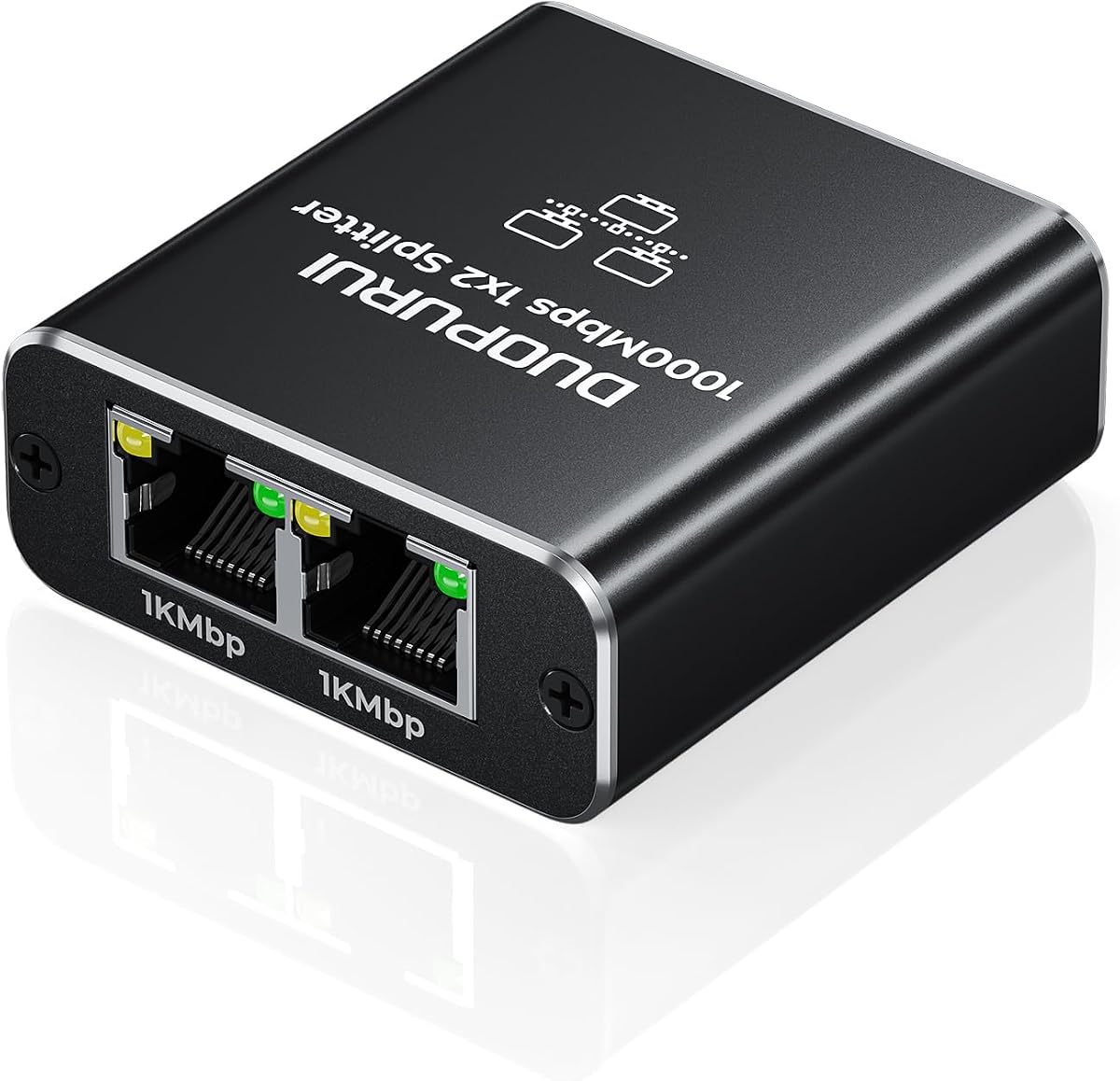
This DUOPURUI splitter focuses on providing stable and reliable connectivity for two devices sharing a single line. It is recognized for its high performance internal circuit and anti-jamming capabilities which protect data integrity.
We may earn a commission when you buy through this link, at no additional cost to you.
Key strengths include the rugged alloy shell that ensures durability in various environments. The adaptive matching feature allows it to work seamlessly with different network speeds for flexible usage.
The USB power cable included is standard length which might limit placement options without an extension. For most users this remains a minor issue given the overall performance.
Those seeking a reliable splitter for gaming or large file transfers will appreciate this model. It is recommended for users who prioritize connection stability over extra features.
Designed to resist interference in complex scenarios it ensures that your data transmission stays smooth and uninterrupted.
The device automatically adjusts to available speeds ensuring optimal performance whether connected to older or newer networks.
We may earn a commission when you buy through this link, at no additional cost to you.
This LIEZHUA unit expands one port into four offering significant flexibility for connecting multiple devices. It is well rated for its portability and the included LAN cable which simplifies immediate setup.
We may earn a commission when you buy through this link, at no additional cost to you.
Its standout feature is the four gigabit ports allowing simultaneous connections without running new cables. The lightweight design makes it easy to carry and reposition as needed.
The main limitation is that bandwidth is shared among four devices which may reduce speed per device during heavy load. This is an acceptable trade-off for casual usage.
Buyers needing four wired connections will find this model very practical. It is recommended for home offices or small workgroups needing quick network access.
Its lightweight form factor lets you create network connections anytime and anywhere without heavy equipment.
The included Cat 6 cable means you can start using the splitter immediately without purchasing extra components.
We may earn a commission when you buy through this link, at no additional cost to you.
This splitter offers a budget friendly way to connect four devices to a single network port. It receives solid reviews for its ease of use and flexible compatibility with various cable types.
We may earn a commission when you buy through this link, at no additional cost to you.
Key strengths include the four RJ45 output ports and USB-C power support for modern setups. The gigabit data speed ensures that transfers remain quick even with multiple devices.
The basic design might feel less durable than metal models. However for the price point it offers excellent value for users needing extra ports quickly.
Those needing multiple wired connections without breaking the bank should consider this option. It is a practical choice for guest setups or temporary network extensions.
Using a USB-C cable makes it easy to power the device with modern adapters reducing cable clutter.
It works with Cat5 through Cat8 cables ensuring it fits into a wide range of network environments without issues.
We may earn a commission when you buy through this link, at no additional cost to you.
This splitter comes ready to use with an included Cat 6 Ethernet cable simplifying the setup process. It is rated well for its advanced transmission chip which helps maintain high speeds.
We may earn a commission when you buy through this link, at no additional cost to you.
Its standout feature is the included cable and clear LED indicators that show working status. This reduces guesswork during installation and ensures users know devices are connected correctly.
The plastic build is lightweight but might not match metal durability. However for standard home use this trade-off is often acceptable given the convenience.
Buyers wanting a plug and play solution will appreciate the included cable. It is recommended for those who want to get online quickly without buying extra accessories.
The included Cat 6 cable means you can start using the splitter immediately without needing to buy a cable separately.
Upgraded transmission chips ensure that data flows smoothly without compromising performance even under load.
We may earn a commission when you buy through this link, at no additional cost to you.
This mini splitter allows three devices to share a single Ethernet line efficiently. It is highly rated for its compact size that fits easily into laptop bags or small desks.
We may earn a commission when you buy through this link, at no additional cost to you.
Key strengths include the aluminum construction and USB-C power support which ensure stability and modern compatibility. The LED indicators help track which devices are active on the network.
The bandwidth is shared among three devices which is an acceptable trade-off for its size and versatility. Users should ensure their internet speed supports multiple simultaneous users.
Those needing a travel friendly or space saving option will find this ideal. It is a solid choice for small offices or gaming setups needing extra ports.
The lightweight and compact build allows you to carry the splitter in a laptop bag for on-the-go network expansion.
Designed for reliability it ensures that connections remain stable even when multiple devices are active simultaneously.
We may earn a commission when you buy through this link, at no additional cost to you.
The Dockteck splitter offers a reliable way to share a network connection across three devices. It is well rated for its aluminum build and compact design making it a favorite for travelers.
We may earn a commission when you buy through this link, at no additional cost to you.
Its standout qualities include the aluminum material which ensures stability and efficient heat dissipation. The plug and play nature means no configuration is required to start using it.
The bandwidth is shared among devices which may limit speed during heavy use. However for typical home or travel usage this remains a practical and effective solution.
Buyers needing a simple three-port solution will appreciate its ease of use. It is recommended for users seeking a portable network expansion tool.
Crafted from high-quality aluminum metal it provides durability and efficiency in heat dissipation.
No configuration is needed simply plug in the cables and power to access the internet immediately.
We may earn a commission when you buy through this link, at no additional cost to you.
Selecting the right internet splitter involves considering factors like port count, speed, and build quality to ensure it meets your specific networking needs.
The number of ports you need determines which splitter fits your setup. Two port splitters are ideal for doubling a single connection while three or four port models offer more flexibility for multiple devices.
Choose a port count that matches your current and future device needs to avoid needing another upgrade soon.
Gigabit splitters support speeds up to 1000Mbps which is essential for high bandwidth tasks like streaming or gaming. Ensure the splitter supports the speeds your internet plan provides.
Look for models that maintain stability even when multiple devices are active to prevent lag during heavy usage.
Some splitters require external power via USB while others may be passive. Powered models often offer better stability and performance especially under heavy loads.
Consider whether you have access to a USB power source before selecting a powered splitter.
Metal casings provide better heat dissipation and durability compared to plastic. Aluminum or alloy materials often ensure longer lifespan and reliable operation.
Opt for models with robust materials if you plan to use the splitter in demanding environments.
Ensure the splitter supports your existing cable types such as Cat5e Cat6 or Cat8. Broad compatibility reduces the need to replace existing wiring.
Check that the RJ45 ports fit your cables securely for consistent signal transmission.
Plug and play models are easiest to use requiring no configuration or driver installation. This feature saves time and simplifies the process for non-technical users.
Look for devices that work out of the box to avoid unnecessary setup headaches.
Splitters with shielding or anti-jamming features protect against signal interference and ensure consistent data flow. This is especially important in areas with high electromagnetic noise.
Choose models with features like gold plated pins or PCB designs to minimize crosstalk.
If you travel often a compact and lightweight splitter is ideal to fit in a laptop bag. Desktop models are larger and better suited for stationary setups.
Consider your usage environment when deciding on the physical size of the splitter.
To begin using your internet splitter connect one end of an Ethernet cable to your router or modem and the other end to the input port on the splitter. Ensure the splitter is powered if it requires external power.
Connect your devices to the output ports on the splitter using separate Ethernet cables. Verify that all connections are secure to maintain stable data transmission between devices.
Regularly inspect cables and ports for dust or damage to prevent signal issues. Keep the splitter in a well-ventilated area to avoid overheating during extended use.
Yes internet splitters often share bandwidth among connected devices which may reduce individual speeds. To maintain optimal performance choose a gigabit splitter and limit heavy downloads on multiple devices.
Powered splitters generally offer better stability and signal quality especially under heavy usage. They are recommended for environments where consistent performance is critical.
Most splitters are designed for routers or switches not directly with modems. Always check product specifications or contact support before connecting to a modem.
Yes internet splitters work with any router that has Ethernet ports regardless of wireless capability. They allow more wired devices to connect to your existing router network.
Switches are more versatile and often provide better performance but may be larger. Splitters are simpler and compact for basic port expansion needs.
Most splitters support Cat5 Cat5e Cat6 Cat7 and Cat8 cables. Ensure your cables match the splitter's supported types for best performance.
We have reviewed ten top-rated internet splitters that offer reliable solutions for expanding your network connections. Our top picks include the TP-Link TL-SG105 for overall quality and the TP-Link Ethernet Splitter 1 to 2 for budget buyers.
When selecting a splitter prioritize speed capabilities build durability and power requirements that match your environment. Consider how many ports you need and whether you prefer a portable or desktop model.
Remember that prices and availability can change so verify current details before purchasing. We hope this guide helps you find the perfect internet splitter for your needs.