
Wacom MovinkPad 11
4.4Editor score
Paper-like matte display surface
Battery-free Pro Pen 3 included
Android 14 with 128GB storage
Finding the right device for digital art can be challenging when you want portability without sacrificing performance. Many artists seek alternatives to expensive tablets that offer standalone capabilities and professional-grade drawing features. This guide explores the best options available today for creators who need versatility.
We have carefully compared ten standout products based on screen quality, pen performance, battery life, and software compatibility. Each device offers unique strengths whether you need a portable standalone unit or a connected display for desktop work. Our analysis focuses on real-world usability for artists and students alike.
Every selection in this list showcases specific benefits like high resolution, pressure sensitivity, and app ecosystems tailored for creative work. Prices and availability may change frequently so always verify current details before purchasing. Use this guide to find the perfect tool that matches your artistic workflow and budget requirements effectively.
4.4Editor score

4.4Editor score
4.4Editor score
As an Amazon Associate we earn from qualifying purchases.
This side-by-side comparison highlights key specifications across all ten selected devices to help you make an informed decision based on your specific creative needs and budget constraints.


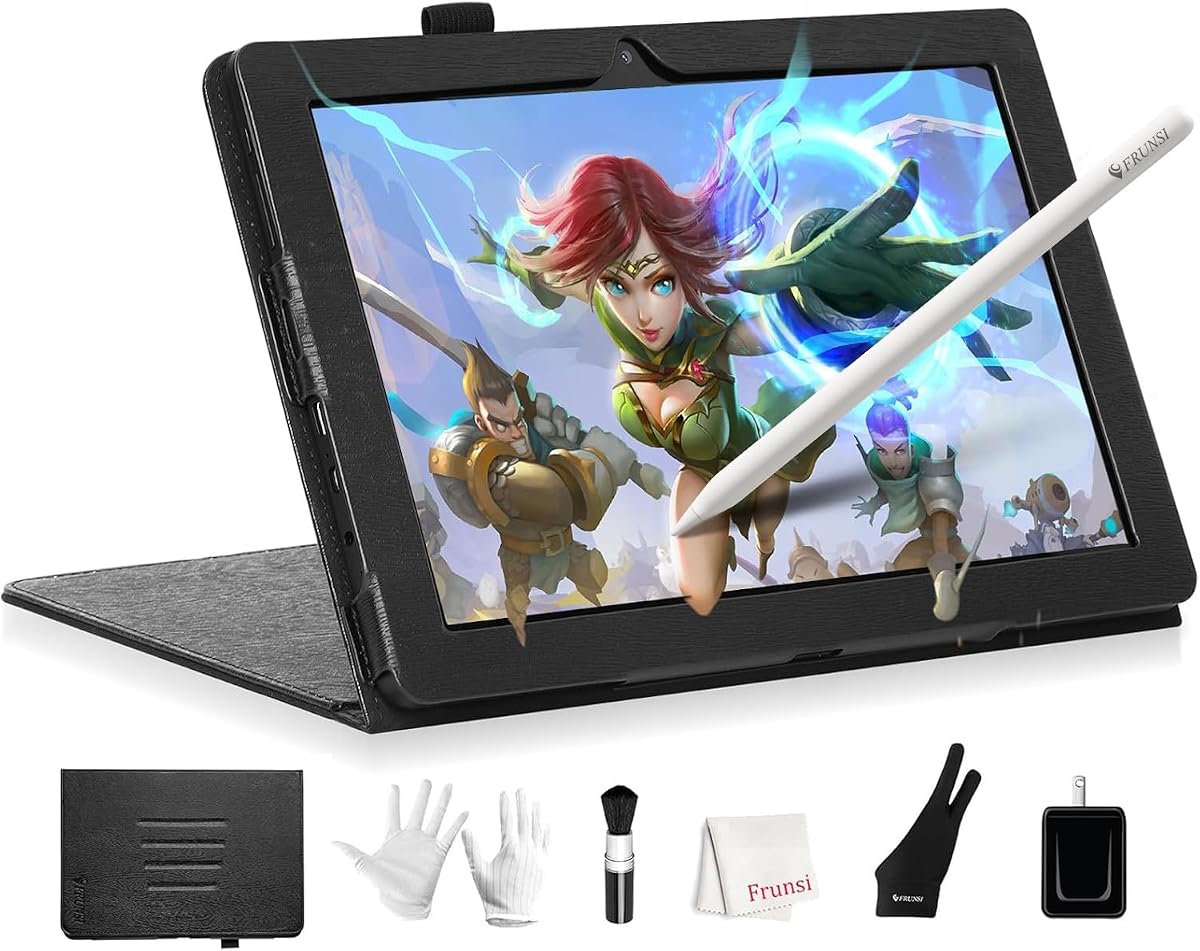
The RubensTab T11 Pro stands out as a top choice for artists needing a portable standalone device. Rated 4.4 stars it delivers a vibrant 10.1-inch Full HD IPS screen with sharp details ideal for digital art. The high-sensitivity pressure pen works without a battery ensuring natural strokes.
We may earn a commission when you buy through this link, at no additional cost to you.
Its standalone nature means you can sketch anywhere without connecting to a laptop. The pre-installed suite of professional apps helps beginners start immediately. Multi-touch functionality allows intuitive zooming and panning. The adjustable stand case supports comfortable viewing angles during sessions.
While the battery life is around 5 hours which may require charging for long trips it supports USB-C charging and power banks. The screen resolution is high but not 4K which fits the price range. Overall it offers significant freedom for mobile creators.
This tablet is perfect for students and professionals who need a reliable portable art station. Its independent design removes the hassle of cables and dongles. If you value mobility and ease of use this device provides a strong foundation for digital creativity.
No computer connection is needed since all apps run directly on the device.
The pressure-sensitive pen mimics traditional tools for fluid and precise strokes.
We may earn a commission when you buy through this link, at no additional cost to you.
The HUION Kamvas Pro 16 excels as a high-performance pen display for serious illustrators. Its 15.6-inch full-laminated screen offers stunning clarity with 120% sRGB color volume ensuring accurate representation of your work. The anti-glare glass provides a natural texture for comfortable drawing.
We may earn a commission when you buy through this link, at no additional cost to you.
Workflow optimization is achieved through 6 customized express keys and a touch bar for quick access to shortcuts. The advanced pen supports 60-degree tilt recognition and has two programmable side buttons. An adjustable stand helps reduce neck strain during long sessions.
While it must be connected to a computer limiting mobility it pairs seamlessly with creative software like Photoshop and Clip Studio Paint. The included 3-in-1 USB-C cable simplifies connections reducing cable clutter. This setup is ideal for fixed workstations.
Artists who need professional color accuracy and a large canvas will appreciate this device. The combination of visual quality and customizable controls enhances productivity significantly. It serves as a robust tool for illustration and design projects requiring precision.
The high color gamut volume ensures your artwork looks true to life on screen.
Express keys and an adjustable stand help reduce physical strain during use.
We may earn a commission when you buy through this link, at no additional cost to you.
The RubensTab T14 offers a spacious 14.1-inch screen for artists who need more room to create. Rated 4.4 stars it operates completely independently without requiring a computer connection. The Full HD IPS display delivers vibrant colors and sharp details for immersive digital art.
We may earn a commission when you buy through this link, at no additional cost to you.
Its built-in 10000mAh battery supports up to 5 hours of continuous use which is solid for portable sessions. The Octa-Core CPU ensures smooth performance when running multiple drawing apps or multitasking. Pre-installed tutorials help beginners learn quickly.
While the device is slightly heavier due to the larger screen it remains travel-friendly. The adjustable stand case protects the tablet and allows ergonomic viewing. USB-C charging and power bank compatibility extend usage time during travel or long events.
This model is ideal for students and professionals seeking a balance of size and portability. The standalone design fosters creativity anywhere without relying on external hardware. It provides a comprehensive solution for digital drawing and note-taking needs effectively.
The larger screen gives you more room to sketch detailed illustrations comfortably.
A high-capacity battery supports longer creative sessions without frequent charging.
We may earn a commission when you buy through this link, at no additional cost to you.
The Wacom MovinkPad 11 delivers a premium standalone experience with its unique paper-like surface. Rated 4.4 stars it combines an Android tablet with professional drawing tools. The matte etched glass reduces glare and mimics paper texture for a natural drawing feel.
We may earn a commission when you buy through this link, at no additional cost to you.
Its battery-free Pro Pen 3 offers 8192 pressure levels and three programmable buttons for efficient control. The device weighs just 1.3 lbs making it lighter than most laptops. Tap and hold gestures launch the Canvas app instantly for quick idea capture.
While the price is higher it includes two years of Clip Studio Paint Debut which adds significant value. The 128GB storage allows for many artwork files. It supports popular styluses but the Pro Pen 3 is optimized for the best experience.
This device is perfect for professionals who demand a high-quality surface and portable power. The lightweight design ensures you can take your sketchbook anywhere. If you value authentic tactile feedback and top-tier pen performance this is a strong investment.
The etched glass surface provides friction similar to real paper for better control.
Gestures allow you to start sketching immediately without navigating menus.
We may earn a commission when you buy through this link, at no additional cost to you.
The PicassoTab 10 provides an accessible entry point for digital art without computer needs. Rated 4.2 stars it comes with lifetime PRO upgrades for apps like Concepts. The laminated 10-inch screen reduces parallax for a natural drawing experience.
We may earn a commission when you buy through this link, at no additional cost to you.
Its 4096-level pressure-sensitive stylus allows expressive strokes suitable for sketching and illustration. An octa-core processor with 6GB RAM handles multitasking smoothly. Lifetime VIP tutorials offer step-by-step lessons ideal for beginners starting their creative journey.
While the screen is compact and storage is standard it supports expansion up to 1TB for more files. The included accessories like glove and case add value. This model balances cost and functionality well for students.
This tablet is an excellent choice for those new to digital art seeking guidance. The preloaded tutorials and guided practice help build confidence quickly. If you want a complete package with support and affordability this device fits perfectly.
Lifetime tutorials provide structured learning paths for mastering digital techniques.
The 10-inch form factor fits easily in bags for art on the go.
We may earn a commission when you buy through this link, at no additional cost to you.
The XPPen Artist 13.3 Pro V2 stands out with its innovative Red Dial wheel for smooth adjustments. Rated 4.5 stars it features a fully-laminated screen with rich colors and 16K pressure levels. The 13.3-inch display balances portability and workspace.
We may earn a commission when you buy through this link, at no additional cost to you.
Its 60-degree tilt function and customizable keys streamline your workflow significantly. The battery-free stylus includes replacement nibs and a multifunctional case. It supports Windows Mac Chrome OS and Linux making it versatile for any user.
While it requires a computer connection limiting standalone use the 3-in-1 cable simplifies setup. The Red Dial allows effortless brush size changes without menu diving. This design focus enhances creative efficiency for illustrators.
This display is ideal for digital artists seeking a compact yet powerful drawing monitor. The high color accuracy ensures professional results. If you want unique controls like the Red Dial this tablet adds a creative edge to your setup.
The wheel allows quick zooming and brush sizing without interrupting your flow.
Works with major operating systems ensuring flexibility across different workstations.
We may earn a commission when you buy through this link, at no additional cost to you.
The PicassoTab X14 offers the largest portable canvas in its lineup for expansive creativity. Rated 4.2 stars it is fully standalone with no computer required. The laminated 14-inch screen reduces glare and parallax for smooth drawing feel.
We may earn a commission when you buy through this link, at no additional cost to you.
Its Octa-Core CPU with 6GB RAM handles multiple apps smoothly without lag. The 4096-level pressure pen delivers precise natural strokes. Bonus accessories like case and glove add value for users. GMS and CE certification ensure quality safety.
While it is slightly heavier than smaller tablets it remains travel-friendly for its size. Storage is expandable to 1TB for large files. The preloaded apps cover drawing and animation needs effectively. It balances screen real estate with portability.
This device suits artists who want more space without connecting to a desktop. The large display supports detailed work while staying mobile. If you prioritize screen size and standalone freedom this model is a robust choice for professionals.
The larger screen allows complex compositions without feeling cramped.
Certifications provide peace of mind regarding safety and reliability standards.
We may earn a commission when you buy through this link, at no additional cost to you.
The HUION KAMVAS Pad 12 blends high-end display tech with standalone Android flexibility. Rated 4.5 stars its 2K+ 3:2 screen offers sharp visuals ideal for detail work. The 90Hz refresh rate ensures fluid strokes without lag during use.
We may earn a commission when you buy through this link, at no additional cost to you.
Its Canvas Glass 3.0 etched surface reduces glare and provides a paper-like texture for control. The 8-core processor with 8GB RAM supports smooth multitasking and many apps. A full day of battery life allows extended sessions without charging.
While it carries a premium price the accuracy and features justify it for serious creators. Preloaded apps include Clip Studio Paint and ibisPaint X. Parental controls make it a safe device for younger users learning art.
This tablet is perfect for professionals needing a large standalone canvas. The accurate colors and high resolution ensure work looks professional. If you value top-tier display specs and battery endurance this model is a standout choice.
The high refresh rate ensures your strokes appear instantly for accurate drawing.
Large battery capacity supports full day usage for work or travel.
We may earn a commission when you buy through this link, at no additional cost to you.
The T8 Standalone Drawing Tablet offers incredible battery life in a compact form factor. Rated 4.4 stars it runs on Android 13 allowing you to install various apps. The 8-inch display is perfect for quick sketches and travel work.
We may earn a commission when you buy through this link, at no additional cost to you.
Its Quad-Core CPU handles drawing programs smoothly. The 4000mAh battery provides up to 20 hours of use which is exceptional. It integrates well with Android ecosystem for seamless file management and cloud storage access.
While the screen is smaller it suits those with limited space or budget. Pre-installed tutorials help beginners start immediately. The expandable storage ensures you can save more projects without cloud dependency issues.
This tablet is ideal for artists on the move who prioritize portability. The long battery life reduces anxiety during trips. If you want an affordable and reliable portable tool this model delivers excellent value for money.
Up to 20 hours of use keeps you creating without frequent interruptions.
Full Android OS allows access to wide range of creative apps.
We may earn a commission when you buy through this link, at no additional cost to you.
The Callsky-Tab 12 offers high specs like 16GB RAM and 256GB storage for power users. Rated 4.2 stars it features a 12-inch 2K IPS display with anti-glare technology. This setup suits online teaching and digital art creation effectively.
We may earn a commission when you buy through this link, at no additional cost to you.
Its rechargeable pen provides 4096 pressure levels and tilt support for precise strokes. The protective case includes multiple viewing angles and folding modes. An 8000mAh battery provides up to 6 hours of creative work per charge.
While the pen requires charging it is magnetically attached for convenience. The device is heavier due to the large battery and RAM but remains portable. It balances productivity with creativity through high performance.
This tablet is ideal for professionals needing both drawing and general computing tasks. The high RAM ensures smooth performance with multiple apps. If you want a multi-purpose device for art and work this option is robust.
16GB RAM ensures fast operation when running multiple apps.
Great for both creative work and business meetings or teaching.
We may earn a commission when you buy through this link, at no additional cost to you.
Selecting the right tablet depends on balancing screen size, performance, and connectivity needs to match your specific artistic workflow and budget.
Decide if you need a device that works independently like the RubensTab or one that connects to a PC like the HUION Kamvas. Standalone tablets offer true portability while connected displays often offer more power and better color accuracy for studio use.
Choose standalone if you work on the move and choose connected if you have a fixed workstation.
Screen size affects how much space you have for drawing. 10-inch models are great for portability while 14-inch screens allow more detailed work. Resolution impacts clarity with Full HD or 2K+ ensuring your lines look sharp.
Pick a size that fits your bag and workspace comfortably.
Pressure sensitivity controls line thickness and tilt allows natural shading. Look for at least 4096 levels or higher for realistic drawing. Battery-free pens reduce maintenance and ensure continuous use without charging interruptions.
Higher pressure levels and tilt support improve artistic expression.
Battery life determines how long you can work away from an outlet. Some models offer 5 hours while others like the T8 offer up to 20 hours. USB-C charging and support for power banks add convenience for travel.
Prioritize long battery life if you draw for extended periods.
Check if the device supports your preferred apps like Clip Studio Paint or Photoshop. Android tablets offer access to mobile apps while PC-connected displays run full desktop software. Pre-installed apps can help beginners get started quickly.
Ensure your workflow tools are available on the chosen platform.
Durability matters for long-term use. Look for certification like FCC or CE and included accessories like cases and stands. Protective covers and gloves improve the experience and prevent screen damage or smudges during drawing.
Good accessories add value and protect your investment.
Artists need accurate colors to match their vision. Displays with high sRGB or AdobeRGB coverage like the HUION Kamvas show true-to-life colors. Factory calibration helps ensure consistency across your work.
Look for color gamut specs if color is critical.
Large files require ample RAM and storage. 6GB to 16GB RAM ensures smooth multitasking. Internal storage should be sufficient for your projects with expandable SD card options for extra space.
Choose higher specs if you work with large images.
Start by calibrating the pen and screen using the device settings to ensure precise tracking. Install the necessary drivers if using a connected display or download apps from the store if standalone. Adjust the drawing sensitivity to match your hand pressure and style.
Clean the screen regularly with a soft microfiber cloth to remove fingerprints and smudges. Keep the pen nibs clean and replace them when they feel too rough on the glass. Use a screen protector if available to add texture and protect the surface.
Store the tablet in a protective case to prevent scratches and drops. Charge the device fully before long sessions to avoid interruptions. Adjust brightness and blue light settings to reduce eye strain during extended creative work.
Yes many tablets like the RubensTab T11 Pro and PicassoTab X14 are standalone and do not require a computer. You can draw and save directly on the device using installed apps. Check the product details to confirm standalone capabilities before purchasing.
For professional work aim for at least 4096 pressure levels but 8000 to 16384 levels offer finer control over line weight. Higher levels allow for more subtle variations in stroke thickness. Most models in this list meet or exceed professional standards.
Most tablets include a stylus or active pen in the box. Models like the Wacom MovinkPad and HUION Kamvas come with a battery-free pen that works out of the box. Always verify what is included in the product listing.
Yes models like PicassoTab and RubensTab come with pre-installed tutorials and beginner-friendly apps. The standalone nature allows learning without extra equipment. These devices are designed to be intuitive for those new to digital art.
Battery life varies from 5 hours on smaller models to up to 20 hours on others like the T8. Connected displays do not rely on battery for operation as they draw power from your computer. Check specific battery specs for your preferred model.
Absolutely most standalone tablets support note-taking apps and have styluses designed for writing. Features like multi-touch and adjustable stands make them ideal for lectures. The T8 and RubensTab models are particularly portable for students.
Many devices come with pre-installed apps and free trials. For professional work you may want to subscribe to paid apps like Clip Studio Paint or Procreate. Check the included software list to see what you get for free.
The RubensTab T11 Pro and Wacom MovinkPad offer excellent choices for standalone creators seeking quality and portability. For desktop artists the HUION Kamvas Pro 16 provides professional color accuracy and workflow tools that enhance precision.
Prioritize features like battery life, screen resolution, and pen sensitivity based on your daily creative needs. Beginners may prefer the included tutorials and lower costs while professionals should look for high color accuracy and RAM.
Remember that prices and availability can change so always check current listings before buying. Use this guide to narrow down your options and find the perfect tool for your next artistic project.