
LeapFrog 2-in-1 LeapTop Touch
4.7Editor score
Flip screen tablet mode
Five learning modes included
Customize child name avatar
This guide compares the top laptop for 5 year old options focusing on educational features, durability, and ease of use for young children seeking learning
Finding the right laptop for a five year old requires balancing educational value with durability and ease of use. These devices help children develop early computer skills while keeping them engaged through interactive activities and colorful displays that capture their attention effectively.
We evaluated ten top rated models based on features like bilingual support, keyboard realism, screen quality, and battery life. Each product was assessed for its ability to teach math, reading, and logic without needing internet access or complex setup procedures for parents.
Every pick highlights key strengths and potential trade-offs to help you decide which model fits your child needs best. Please note that prices and availability can change frequently so check current listings before making your final purchase decision today.
4.7Editor score

4.5Editor score

4.2Editor score
The following table provides a side-by-side comparison of all ten selected models highlighting their core specifications learning modes and design features to help you quickly identify the right fit for your child.





The VTech Genio Bilingual JuniorBook stands out as the top choice for introducing five year olds to computer skills. With a 4.5 star rating it delivers over 80 activities that cover math science and language arts without needing an internet connection.
We may earn a commission when you buy through this link, at no additional cost to you.
Its full size QWERTY keyboard and cursor controller mimic real laptops helping children build familiarity with standard input methods. The bilingual feature allows switching between English and Spanish which supports early language development effectively.
While it requires four AA batteries the offline nature ensures uninterrupted play anywhere. The trade off is no touch screen but the realistic design keeps kids engaged through tactile interaction instead.
Ideal for families seeking a sturdy educational tool that grows with the child this model balances fun and learning perfectly. We recommend it for parents prioritizing keyboard skills and bilingual exposure.
The QWERTY layout and mouse help kids transition smoothly to real computers later.
Switching languages instantly reinforces vocabulary without extra setup or subscriptions.
We may earn a commission when you buy through this link, at no additional cost to you.
The Lexibook Unicorn Educational Laptop appeals to children who enjoy creative themes while learning core subjects. Its slim ergonomic design fits small hands comfortably and includes music activities that let kids compose simple melodies.
We may earn a commission when you buy through this link, at no additional cost to you.
Activities span English Spanish math and logic with different levels to test knowledge. The realistic mouse and keyboard encourage proper posture and interaction habits during play sessions.
It lacks advanced features like cameras but focuses on fundamental skills which is appropriate for the age group. Battery performance depends on usage but batteries are included for demo to let you test immediately.
Best for kids drawn to animals or music this laptop offers a balanced mix of education and entertainment. It is a solid choice for families wanting a portable device with a fun aesthetic.
Kids can learn notes and play melodies fostering early musical appreciation.
The lightweight design makes it easy to carry in a backpack or bag.
We may earn a commission when you buy through this link, at no additional cost to you.
This Kids Laptop offers a colorful display and 48 learning modes at a budget friendly price. The 4.3 inch TFT screen provides clear visuals that keep children engaged during lessons on animals numbers and logic.
We may earn a commission when you buy through this link, at no additional cost to you.
Its design mirrors real laptops with a realistic keyboard and mouse. A protective film on the screen must be removed before use to ensure the best view and clarity for young eyes.
While the audio is basic it supports the educational activities well. The compact size makes it easy for kids to handle without strain during extended play.
For families on a budget this model delivers solid educational value without unnecessary extras. It is an excellent starter laptop for children new to computer interfaces.
The color screen enhances engagement compared to monochrome alternatives.
Slim dimensions allow comfortable gripping for little hands.
We may earn a commission when you buy through this link, at no additional cost to you.
The LeapFrog 2-in-1 LeapTop Touch excels as a versatile toy with a screen that flips to convert from keyboard to tablet mode. Rated 4.7 stars it is one of the most trusted options for preschoolers.
We may earn a commission when you buy through this link, at no additional cost to you.
Features include letters numbers games and music plus role play activities like emailing Scout. Parents can customize it to help children spell their own name which adds a personal touch.
It uses three AA batteries and is meant for ages 2 to 5. While not a full size laptop it covers essential early learning skills in an interactive way.
Best for younger children transitioning into kindergarten this model offers flexibility and fun. It is a reliable choice for families seeking a proven educational tool.
Switch between typing and touch modes to keep play sessions fresh.
Custom names and avatars make the experience more engaging.
We may earn a commission when you buy through this link, at no additional cost to you.
The VTech Play Smart Preschool Laptop features a sleek design with 30 activities covering letters numbers and Spanish words. It includes sound personalization options for a child avatar to make learning feel unique.
We may earn a commission when you buy through this link, at no additional cost to you.
Children can identify letters explore sounds and categorize foods while listening to instrument sounds. The leveled approach ensures the content remains challenging as skills improve.
It requires only two AA batteries which simplifies power needs. However the subject range is narrower than larger models focusing primarily on core basics.
Ideal for preschoolers and kindergartners this laptop builds foundational skills with fun elements. It is a strong pick for families prioritizing customization and simplicity.
Adding a child name and avatar makes the toy feel special.
Early exposure to Spanish words supports bilingual development.
We may earn a commission when you buy through this link, at no additional cost to you.
The LEXiBOOK LAPTAB 10 inch offers a real computer experience with a 10.1 inch HD touchscreen and Google Play access. It features robust parental controls and a custom browser to ensure safe web usage.
We may earn a commission when you buy through this link, at no additional cost to you.
With 128GB storage and fast WiFi it can host many apps and books. Power Academy and ReadEra provide educational content while Google Suite enables family connectivity.
The price is higher but it serves as a long term device that grows with the child. It requires internet which may not suit all households.
Best for tech savvy families wanting a bridge to real computing this model provides extensive features. It is a premium choice for those needing storage and app flexibility.
Qwant Junior browser keeps content kid friendly and secure.
Access thousands of apps via Google Play for endless learning.
We may earn a commission when you buy through this link, at no additional cost to you.
This Kids Laptop includes a camera that lets children take photos with cute frames and filters. With 64 activities it combines math logic and games to keep playtime educational and fun.
We may earn a commission when you buy through this link, at no additional cost to you.
The vibrant color display and ergonomic design ensure comfort during use. Kids can record memories and express creativity beyond standard lessons.
Camera quality is basic but sufficient for young children. It does not store video so photos are for viewing on the device only.
Perfect for kids interested in photography this laptop adds a creative dimension. It is a great gift for holidays or birthdays to inspire artistic play.
Photo frames and filters encourage artistic expression and fun.
64 modes ensure variety and prevent boredom.
We may earn a commission when you buy through this link, at no additional cost to you.
The LeapFrog LeapPad Academy is a tablet with educational apps that grow with children. It includes a stylus and bumper and offers a rechargeable battery for convenience.
We may earn a commission when you buy through this link, at no additional cost to you.
Features a 7 inch shatter safe screen and time limits via parental controls. It includes a trial for LeapFrog Academy but subscription may be needed for full access.
While it is a tablet not a laptop it covers similar skills. The durability makes it suitable for daily use by active kids.
Best for parents wanting a rugged alternative this model is a reliable pick. It balances entertainment and learning effectively with strong parent features.
Shatter safe screen and bumper protect against drops.
Apps expand as child grows for long term use.
We may earn a commission when you buy through this link, at no additional cost to you.
The Lexibook Barbie Educational Laptop combines a popular theme with 124 activities in English and Spanish. Its slim design makes it compact and easy to carry for learning on the go.
We may earn a commission when you buy through this link, at no additional cost to you.
Activities cover logic music and clock reading. Games like Snake and Memory add fun after educational tasks. The theme appeals to children who enjoy character based toys.
It uses standard batteries but they may not be included. The screen is smaller than some models but effective for basic lessons.
Best for kids attracted to Barbie this laptop provides strong learning value. It is a fun and educational gift for themed play.
124 activities offer plenty of content to explore.
Familiar characters make learning engaging.
We may earn a commission when you buy through this link, at no additional cost to you.
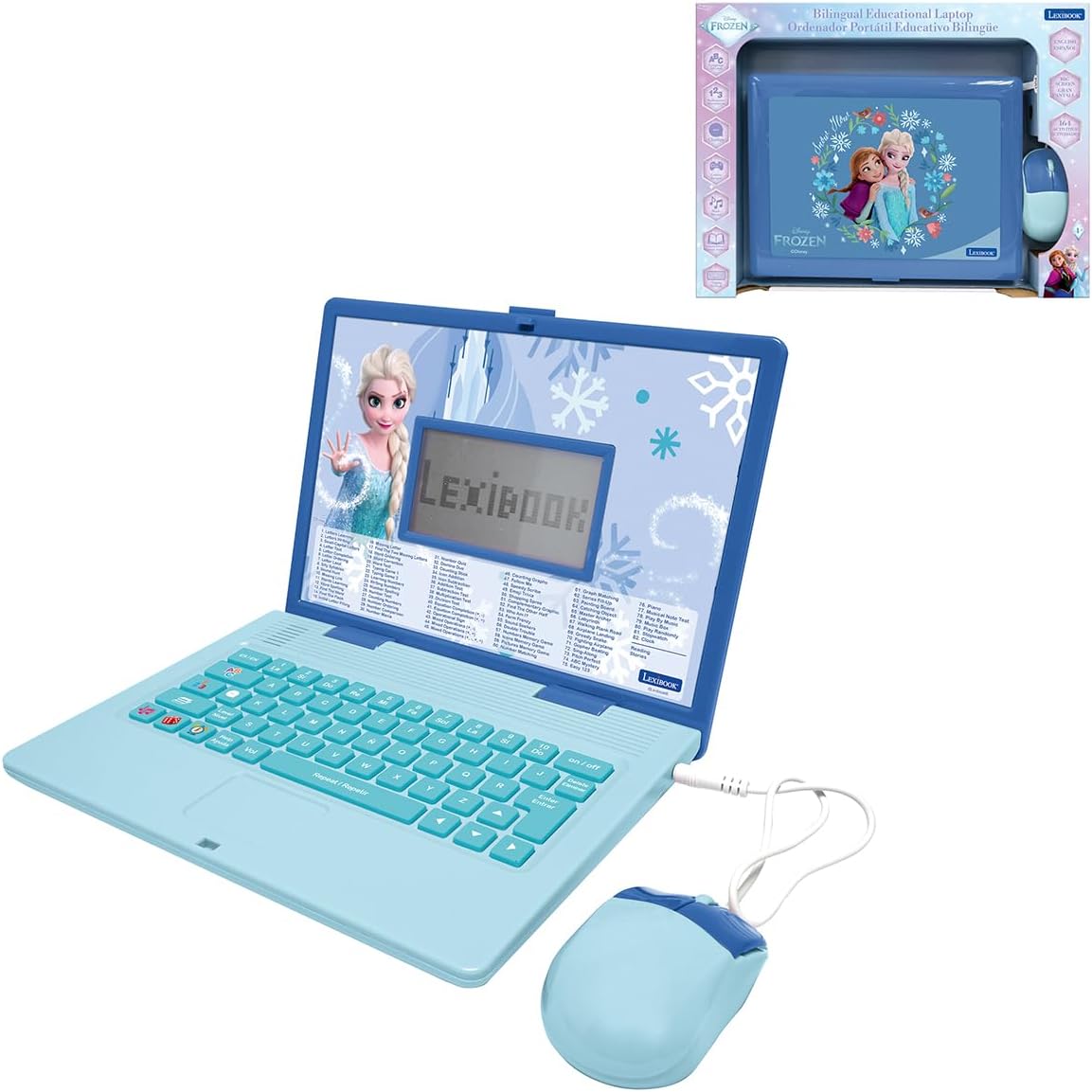
The LEXiBOOK Frozen Educational Laptop offers 164 activities with English and Spanish exercises. It features voice guidance and a clear LCD screen to support learning without confusion.
We may earn a commission when you buy through this link, at no additional cost to you.
Lightweight and portable it is ideal for travel or car trips. The theme engages fans while teaching vocabulary and math skills.
It relies on batteries and lacks complex functions. However the activity count provides good value for themed education.
Best for Frozen fans this model combines beloved characters with learning. It is a solid choice for themed gifts.
Helpful voice guidance aids navigation.
164 activities ensure long term engagement.
We may earn a commission when you buy through this link, at no additional cost to you.
Selecting a laptop for a five year old involves considering educational content, durability, and power needs.
Look for models with activities that cover math reading and logic. Bilingual options add value for language development and subject variety keeps learning engaging.
Prioritize content that adapts to skill levels.
Kids use devices roughly so durable plastic and ergonomic shapes are important. Realistic keyboards help build familiarity for future computer use.
Choose compact sizes for easy carrying.
Battery powered models offer portability but require frequent replacements. Rechargeable options save money long term but may have limited runtime.
Check battery type requirements before buying.
Color screens are more engaging than monochrome. Touchscreens offer interaction but physical keyboards help typing skills.
Balance screen size with portability needs.
Offline models reduce screen time and setup. Connected models allow updates but require parental supervision.
Decide based on your family internet policy.
Budget models provide core features while premium ones add storage or app access. Consider how long the device will be used before choosing.
Higher price does not always mean better fit.
Controls help manage usage time and content access. Customizable profiles let parents tailor the experience.
Look for easy to use settings.
Themes like Frozen or Barbie increase initial interest. Ensure educational value is not sacrificed for style.
Pick themes that match child preferences.
Start by inserting fresh batteries or charging the device as needed. Follow setup instructions to personalize names or avatars if available.
Keep the screen clean with a soft cloth and store it in a cool dry place to avoid damage. Remove any protective films before first use.
Set regular play times to encourage balance. Supervise initial sessions to guide navigation and reinforce learning goals.
These laptops are generally designed for children aged 3 to 6. They focus on foundational skills that align with preschool and early elementary curricula. Some models work well for younger or older kids depending on settings.
Most educational toy laptops do not require internet because activities are preloaded. However some premium models with apps may need WiFi for full features. Check specs before purchasing to ensure offline capability.
Battery life varies by model and usage intensity. Standard AA batteries may last several hours per session but frequent use demands replacements. Rechargeable units offer convenience but need charging breaks.
Yes most models use non toxic materials and rounded edges for safety. They lack internet access to reduce exposure risks. Parental controls on connected devices add extra layers of protection.
Yes realistic keyboards help children develop basic typing skills. Using a QWERTY layout prepares them for future computer use. It builds hand eye coordination while having fun.
Many top models include English Spanish switching features. This helps children learn vocabulary and pronunciation in two languages simultaneously. It is a valuable tool for diverse households.
Look for durable plastic and reinforced corners to withstand drops. Some models come with bumpers or protective cases. Check warranty options for coverage on accidental damage.
Toys focus on specific skills with limited apps whereas tablets offer more flexibility. Toy laptops avoid distractions and simplify interfaces. Choose based on your child needs and your goals.
The VTech Genio Bilingual JuniorBook LeapFrog LeapTop Touch and LEXiBOOK LAPTAB lead this list by offering strong educational value and durability.
Prioritize models with offline capabilities and ergonomic designs to ensure safe comfortable use. Bilingual support and realistic keyboards provide added benefits for early development.
Always verify current prices and availability before buying as stock changes frequently. Choose the device that best fits your child learning style.