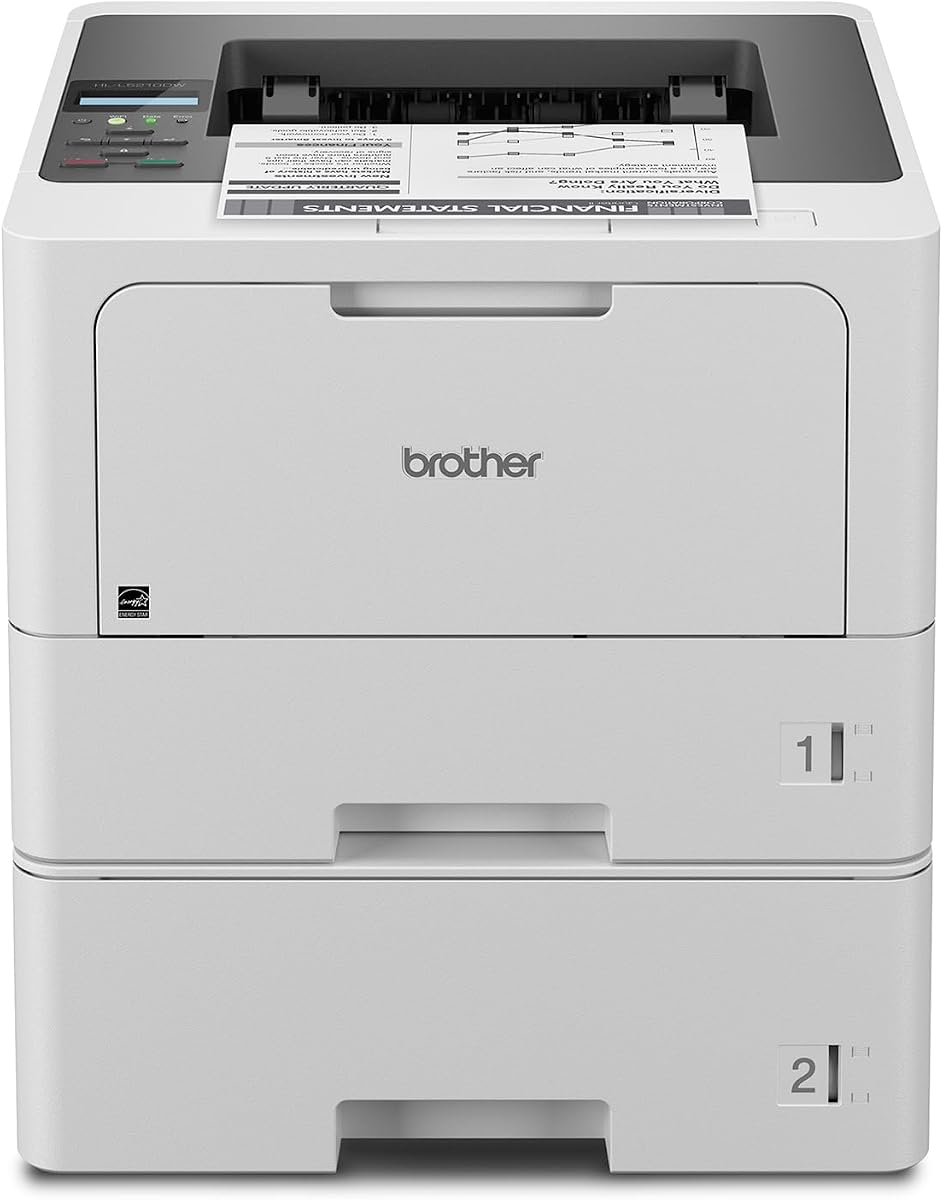
Brother HL-L5210DWT
4.3Editor score
Up to 48ppm speed
Dual paper trays
Low operating costs
This guide compares the top laser printers for large workgroups based on speed, security, capacity, and total cost of ownership to help you choose the right
Selecting the right laser printer for large workgroups requires careful consideration of speed, capacity, and security. Businesses need devices that can handle high-volume tasks without compromising on quality or reliability.
We evaluated ten top models based on print speeds, paper handling, connectivity options, and advanced security features. Our analysis focuses on enterprise-grade performance suitable for busy office environments.
Each pick highlights key strengths and trade-offs to help you find the best fit. Prices and availability change frequently, so check current listings before making your final purchasing decision.
4.3Editor score

4.4Editor score

4.0Editor score
Compare the top ten laser printers side by side to evaluate performance metrics, connectivity, and total cost of ownership for your specific office needs.


The Brother MFC-L8930CDW stands out as a top-tier color laser all-in-one printer designed for demanding office environments. With a rating of 4.4 stars, it offers a balanced combination of speed, reliability, and advanced security features that make it ideal for large workgroups.
We may earn a commission when you buy through this link, at no additional cost to you.
Its standout qualities include high-quality output with sharp color and black printing, alongside fast print and copy speeds up to 33ppm. The advanced scanning capabilities allow for high-speed, two-sided scanning up to 104ipm with an 80-page auto document feeder, enabling efficient document digitization. Connectivity is flexible, featuring built-in dual-band wireless networking and Gigabit Ethernet, while the 7-inch color touchscreen provides intuitive navigation and up to 64 customized shortcuts.
Trade-offs include the potential for color toner costs to accumulate over time if standard yield cartridges are used exclusively. However, this is mitigated by the availability of super high yield replacement toner cartridges that significantly lower the cost per page. The touchscreen interface may require a brief learning curve for some users, but the customization options enhance long-term productivity.
This printer is best suited for medium to large workgroups that require vibrant color output for client-facing documents and robust security features to protect sensitive information. The Triple Layer Security and NFC card reader ensure that devices remain secure, making it a comprehensive solution for modern offices.
The device supports high-speed, two-sided scanning up to 104ipm with an 80-page auto document feeder and legal-size glass, allowing teams to digitize large batches of documents efficiently.
Advanced security features help keep devices secure, protect documents in transit to and from print devices, and safeguard networks, with an integrated NFC card reader for easy badge authentication.
We may earn a commission when you buy through this link, at no additional cost to you.
The Brother HL-L5210DWT is a powerful business monochrome laser printer that delivers exceptional efficiency for busy offices. Rated at 4.3 stars, it focuses on high print speeds and large paper capacity to minimize downtime and maximize workflow.
We may earn a commission when you buy through this link, at no additional cost to you.
Key strengths include a print speed of up to 48ppm, which ensures fast, professional-quality documents. The dual paper trays offer a total capacity of up to 1,390 sheets with optional trays, reducing the frequency of refills. Cost efficiency is enhanced by the Brother Genuine TN920XXL super high-yield toner cartridge, which supports up to 11,000 pages. Connectivity is robust with built-in Gigabit Ethernet and dual-band wireless networking, facilitating seamless integration into wired or wireless environments.
The primary trade-off is that it is monochrome only, so it is not suitable for color printing needs. Additionally, the included standard toner cartridge has a lower yield than the super high-yield replacements, but this is easily managed by upgrading. These factors are acceptable for organizations prioritizing speed and document volume over color output.
This printer is ideal for large workgroups that primarily produce text-based documents and require reliable, high-speed performance. Its advanced security features help safeguard networks and keep devices secure, making it a smart choice for cost-conscious businesses.
Delivers high-quality output and a print speed of up to 48ppm to help boost productivity and ensure fast, professional quality documents for busy offices.
Dual 250-sheet and 520-sheet capacity paper trays plus a 100-sheet multipurpose tray allow for flexible media handling, with total capacity expandable up to 1,390 sheets.
We may earn a commission when you buy through this link, at no additional cost to you.
The HP LaserJet Enterprise MFP M634z is a premium all-in-one monochrome printer engineered for high-volume enterprise environments. With a rating of 4.0 stars, it emphasizes security, speed, and massive paper handling capabilities to meet the demands of large organizations.
We may earn a commission when you buy through this link, at no additional cost to you.
Key strengths include print speeds of up to 55ppm and the world's deepest security features with embedded layers to protect sensitive data and thwart malware. The paper handling features include three additional 550-sheet paper trays and a 1,000-sheet 3-bin stapler/stacker for a total of 2,300 sheets input capacity. The 150-page auto-document feeder supports single-pass, 2-sided scanning, accelerating workflow efficiency. The 9-inch color touchscreen provides intuitive navigation and error detection.
Trade-offs include a higher initial investment and a large physical footprint, which may be challenging for smaller offices. However, these are acceptable for enterprises where throughput, security, and reduced maintenance calls are top priorities. The energy-efficient design also contributes to lower operational costs over time.
This printer is best for large workgroups and enterprise settings that require consistent high-quality output, robust security, and minimal intervention. Its JetIntelligence technology combines performance and energy efficiency, making it a top-tier investment for critical printing needs.
Your monochrome laser printer has the industry's deepest security with embedded features that help protect your sensitive data, thwart malware, and continually detect and stop attacks.
Paper handling features include 3 additional 550-sheet paper trays and a 1,000-sheet 3-bin stapler/stacker for a total 2,300-sheet input tray capacity.
We may earn a commission when you buy through this link, at no additional cost to you.
The HP LaserJet Enterprise M406dn is an entry-level enterprise printer that offers quick setup and easy management for workgroups. Rated 4.4 stars, it provides a solid foundation for businesses seeking reliable monochrome performance without unnecessary complexity.
We may earn a commission when you buy through this link, at no additional cost to you.
Key strengths include print speeds up to 42ppm, which empowers work teams to succeed with fast document turnaround. The HP FutureSmart firmware allows updates with the latest features, optimizing the investment for years to come. HP Wolf Enterprise Security protects data and business with defensive layers to detect and self-heal from malware. Automatic two-sided printing saves paper and helps build business efficiency.
The main trade-off is the lack of built-in wireless connectivity, which limits flexibility for mobile devices unless additional hardware is added. However, this is acceptable for wired office environments where security and stability are prioritized. The simple interface and card reader support further enhance usability.
This printer is suitable for small to medium workgroups needing dependable monochrome printing with robust security. Its ability to print directly from a 2.7-inch color display and support for third-party solutions make it a practical choice for focused printing tasks.
HP FutureSmart firmware can be updated with the latest features to optimize your investment for years to come, ensuring the device remains relevant and efficient.
HP Wolf Enterprise Security provides defensive layers to detect and self-heal from malware, protecting your data and business with world-class security.
We may earn a commission when you buy through this link, at no additional cost to you.
The Brother MFC-L6810DW is an enterprise monochrome laser all-in-one printer designed to boost productivity in mid to large-sized workgroups. Rated 4.1 stars, it combines high-speed performance with exceptional paper handling and security features.
We may earn a commission when you buy through this link, at no additional cost to you.
Key strengths include print and copy speeds up to 52ppm and an 80-page auto document feeder offering single-pass, two-sided scanning up to 200ipm. The included Brother Genuine 8,000-page toner cartridge offers built-in value, with options for ultra high-yield replacements for 18,000 pages. The large, expandable paper capacity supports up to 1,660 sheets with optional trays, ensuring uninterrupted printing. Triple Layer Security and NFC card reader support safeguard networks and devices.
The primary trade-off is the monochrome limitation, which restricts color output, but this is acceptable for businesses prioritizing speed and volume. The higher initial cost is offset by the long-term savings from high-yield toner options. These factors make it a strong candidate for high-volume environments.
This printer is best suited for organizations requiring rapid document processing and secure scanning capabilities. The 7-inch touchscreen allows for direct scanning to cloud services, streamlining workflow and reducing manual steps in document management.
Spend less time refilling paper trays with the 520-sheet capacity paper tray and 100-sheet capacity multipurpose tray, with total capacity expandable up to 1,660 sheets.
The 80-page capacity auto document feeder offers single-pass, two-sided scanning up to 200ipm, accelerating the digitization process for busy offices.
We may earn a commission when you buy through this link, at no additional cost to you.
The Brother HL-6210DW is a monochrome duplex wireless printer that dominates office printing tasks with impressive speed. Rated 4.1 stars, it is designed for efficiency and precision in high-volume printing jobs.
We may earn a commission when you buy through this link, at no additional cost to you.
Key strengths include an output speed of 50ppm, ensuring jobs are completed with exceptional efficiency. The robust 520-sheet main tray and 100-sheet multipurpose tray allow for expandable capacity up to 1,660 sheets with optional trays. Advanced connectivity features built-in Gigabit Ethernet and dual-band wireless networking for seamless device integration. Security Excellence provides comprehensive protection for networks and documents during transmission.
The main trade-off is the absence of scanning features, making it a pure printer solution. However, this simplifies setup and operation, and the cost-efficient printing with ultra high-yield toner cartridges significantly reduces operational costs. These factors are acceptable for environments prioritizing speed over multifunction capabilities.
This printer is best for workgroups needing reliable, fast, and secure monochrome printing. Its professional performance and mobile printing capabilities make it a versatile tool for modern offices.
Built-in Gigabit Ethernet and dual-band wireless networking capabilities enable efficient printer sharing and mobile device printing across your business network.
Brother Genuine ultra high-yield replacement toner cartridges deliver up to 18,000 pages, significantly reducing operational costs for monochrome document printing.
We may earn a commission when you buy through this link, at no additional cost to you.
The Brother MFC-L5915DW is a business monochrome laser all-in-one printer that delivers high-quality output and fast speeds. Rated 4.3 stars, it is designed to boost productivity for busy offices requiring comprehensive document handling.
We may earn a commission when you buy through this link, at no additional cost to you.
Key strengths include print and copy speeds up to 50ppm and low-cost output enabled by the TN920UXXL ultra high-yield 18,000-page replacement toner cartridge. The 70-page capacity auto document feeder offers single-pass, two-sided scanning up to 56ipm for efficient workflow. Flexible connectivity options include built-in Gigabit Ethernet and dual-band wireless networking for seamless setup. The device includes a 3,000-page toner cartridge to get started immediately.
The trade-off is that it is monochrome only, limiting color output, but this is acceptable for text-heavy environments. The ADF capacity is smaller than some competitors, but still effective for daily needs. These factors ensure a balanced combination of speed and cost-efficiency.
This printer is best suited for mid-sized workgroups needing reliable printing, scanning, and copying. Its ability to handle legal-sized documents and support for wireless printing makes it a practical all-in-one solution.
Reduce operating costs by using the Brother Genuine TN920UXXL ultra high-yield 18,000-page replacement toner cartridge for maximum value.
The 70-page capacity auto document feeder offers single-pass, two-sided scanning up to 56ipm to accelerate document digitization.
We may earn a commission when you buy through this link, at no additional cost to you.
The HP LaserJet Enterprise M507n is a monochrome laser printer designed to redefine long-term business expectations. Rated 4.0 stars, it emphasizes security and efficiency to keep up with growing business demands.
We may earn a commission when you buy through this link, at no additional cost to you.
Key strengths include the industry's strongest security with over 200 embedded security features that protect information and thwart malware. Centralize printing control with HP Web JetAdmin to easily add new devices and apply corporate policies. Optional mobile printing allows easy printing from smartphones and tablets. Trusted Original HP 89A/89X toner cartridges ensure consistent high-quality output without reprints.
The trade-off is that connectivity is Ethernet-only, requiring mobile printing to use optional setup or apps, which may limit flexibility for some users. However, this is acceptable for enterprises prioritizing network security. The security configuration policies and self-heal capabilities make it a robust choice.
This printer is best for businesses needing consistent high-quality documents with centralized control. Its focus on long-term business expectations and security makes it ideal for regulated industries.
The world's most secure printing includes over 200 embedded security features that help protect your printer's information, thwart malware, and continually detect and stop attacks.
Help build business efficiency with HP Web JetAdmin by easily adding new devices and solutions, updating features, and applying corporate policies.
We may earn a commission when you buy through this link, at no additional cost to you.
The Brother HL-L8430CDWT is a business color laser printer optimized for dependable performance and professional results. Rated a high 4.6 stars, it delivers vibrant color and sharp black output for busy offices.
We may earn a commission when you buy through this link, at no additional cost to you.
Key strengths include print speeds up to 33ppm and flexible connectivity with a 2.7-inch color touchscreen enabling seamless menu navigation and direct printing from cloud services. Maximize printing budgets with built-in value including Brother Genuine 3,000-page black and 1,800-page color toner cartridges. The dual paper trays offer 770 sheets total capacity, expandable to 1,340 sheets. Sustainability features include EPEAT Gold rating and 14% post-consumer recycled material.
The trade-off is that the standard color toner yield may require frequent replacements compared to super high-yield options. However, the super high yield replacement toner cartridges provide significant savings for color printing. This makes it a balanced option for color needs.
This printer is best for workgroups requiring vibrant color output with reliable performance. Its focus on sustainability and cost-efficiency makes it an excellent choice for environmentally conscious businesses.
EPEAT Gold rated and ENERGY STAR certified with 14% Post Consumer Recycled material to reduce environmental impact.
Built for dependable performance and professional results with print speeds up to 33ppm and vibrant color for busy offices.
We may earn a commission when you buy through this link, at no additional cost to you.
The Brother HL-L6310DW is an enterprise monochrome laser printer designed for high efficiency and large workgroups. Rated 4.2 stars, it delivers high-quality output and print speeds up to 52ppm for fast professional quality documents.
We may earn a commission when you buy through this link, at no additional cost to you.
Key strengths include the built-in value of an included Brother Genuine 6,000-page toner cartridge and options for 18,000-page ultra high-yield replacements. Large, expandable paper capacity supports up to 1,660 sheets with optional trays to reduce refill frequency. Device management solutions enable mass distribution of configurations and firmware updates. Triple Layer Security helps safeguard your network and keep devices secure.
The trade-off is that it is monochrome only, which limits color output, but this is acceptable for text-focused printing. While it lacks built-in NFC for badge authentication, the NFC card reader support is present for easy authentication. This ensures security without extra cost.
This printer is best for mid to large-sized workgroups needing dependable monochrome performance. Its focus on easy deployment and manage makes it a practical choice for IT administrators.
Spend less time refilling paper trays with the 520-sheet capacity paper tray and expandable capacity up to 1,660 sheets.
Equipped with device management solutions to enable mass distribution of device configurations, security settings, and firmware updates.
We may earn a commission when you buy through this link, at no additional cost to you.
Selecting the right printer requires evaluating speed, paper handling, security, and connectivity to match your workgroup's specific needs.
For large workgroups, print speed measured in pages per minute (ppm) is critical to avoid bottlenecks. Look for models offering at least 40ppm for monochrome and 30ppm for color to ensure documents are delivered quickly to multiple users.
Large teams require significant paper capacity to minimize refills. Evaluate standard tray sizes and optional expansion options to ensure the printer can handle 1,000 sheets or more for uninterrupted operation during peak hours.
Protecting sensitive documents is essential in any business environment. Prioritize printers with Triple Layer Security, NFC card readers for badge authentication, and embedded defenses against malware to safeguard networks and data in transit.
Versatile connectivity ensures all team members can print easily. Look for built-in dual-band Wi-Fi, Gigabit Ethernet, and support for mobile printing apps to facilitate seamless integration with both wired and wireless devices.
Operating costs are minimized by choosing models compatible with high-yield toner cartridges. Check the pages-per-page yield of included cartridges and the cost of super high-yield replacements to calculate total cost of ownership over the device's lifespan.
If scanning is a priority, evaluate auto document feeder (ADF) capacity and scanning speed in images per minute (ipm). Single-pass duplex scanning accelerates digitization, and large document glass sizes support legal-sized documents for diverse needs.
An intuitive interface reduces training time and errors. Look for color touchscreens that support customized shortcuts, scan preview, and easy navigation through menus to streamline daily tasks for non-technical users.
Environmentally friendly features reduce energy consumption and waste. Prioritize models with ENERGY STAR certification, EPEAT Gold ratings, and packaging made from recycled materials to align with corporate sustainability goals.
Install the printer on a stable, level surface with adequate ventilation to prevent overheating. Connect it to your network via Ethernet or Wi-Fi during the initial setup and follow the on-screen instructions to calibrate print and scanning settings.
For large workgroups, a print speed of at least 40ppm for monochrome and 30ppm for color is ideal. This ensures documents are delivered quickly to multiple users without causing bottlenecks during peak office hours.
High paper capacity minimizes interruptions caused by frequent refills. A printer that supports 1,000 sheets or more ensures uninterrupted operation, which is crucial for maintaining productivity in a busy office environment.
Triple Layer Security helps keep devices secure, protect documents in transit, and safeguard networks. It often includes features like NFC card readers for badge authentication and defenses against malware threats.
Look for built-in dual-band Wi-Fi, Gigabit Ethernet, and mobile printing support. These options facilitate seamless integration with both wired and wireless devices, allowing all team members to print easily.
Reduce toner costs by choosing models compatible with super high-yield replacement cartridges. Check the pages-per-cartridge yield and compare the cost of standard vs. high-yield options to lower total cost of ownership.
For efficient document digitization, look for an auto document feeder with scanning speeds of at least 50ipm. Single-pass duplex scanning is especially helpful for quickly processing double-sided documents.
Yes, color touchscreens with customized shortcuts and scan preview features streamline daily tasks. They reduce training time and minimize errors for non-technical users in large teams.
ENERGY STAR certification and EPEAT Gold ratings are key indicators of energy efficiency and environmental friendliness. They also ensure the device uses recycled materials in packaging.
The Brother MFC-L8930CDW, HL-L5210DWT, and HP LaserJet Enterprise MFP M634z stand out as top picks for their speed, cost-efficiency, and robust enterprise features respectively.
When selecting a printer, prioritize print speed, paper capacity, and security features to ensure your investment supports your workgroup's productivity and safety requirements effectively.
Remember to check current prices and availability before purchasing, as these details may fluctuate to ensure you get the best value for your specific office needs.