
Redragon K618 PRO Wireless Ultra-Thin Gaming Keyboard, Macro & Media Scroll
4.1Editor score
Tri-mode connectivity options
Macro zone without software
Slim low profile design
This guide compares the top low profile mechanical keyboards for typing and gaming, evaluating switch feel, connectivity, build quality, and ergonomics.
Low profile mechanical keyboards offer a unique blend of tactile feedback and sleek design. They reduce hand strain during long sessions while maintaining the precision gamers and typists love.
We evaluated ten top models based on switch quality, connectivity options, build durability, and user comfort. Each entry was scrutinized for real-world performance across work and play scenarios.
Every pick highlights specific strengths like wireless flexibility or compact layouts. Note that prices and availability change frequently, so check current listings before buying to ensure the best deal.
4.1Editor score

4.3Editor score

4.7Editor score
Here is a side-by-side look at all ten models to help you decide which fits your setup best based on layout, connectivity, and key features.



The Redragon K618 PRO delivers impressive value for budget-conscious users seeking a low profile mechanical experience. With a solid 4.1 rating, it combines speed and convenience through unique macro controls and flexible connectivity that eliminates software needs.
We may earn a commission when you buy through this link, at no additional cost to you.
Its standout features include a dedicated macro zone allowing you to record complex key combos on-the-fly. Tri-mode connectivity ensures you switch between PC, laptop, and tablet seamlessly without re-pairing. The slim design reduces travel distance for faster inputs ideal for gaming.
While the build relies heavily on plastic which may feel less premium than aluminum alternatives, it remains durable for daily use. Lighting customization requires proprietary software but the on-the-fly controls make most users happy without it.
This model is perfect for students or casual gamers wanting low-profile speed without spending premium prices. If you prioritize function over form and need quick macro access, this keyboard offers a compelling entry point into the category.
The dedicated 4×5 macro zone lets you bind commands instantly without installing drivers. This saves time and keeps your desktop clean while ensuring quick access to complex actions during tasks or games.
Tri-mode connectivity allows instant swaps between USB-C, Bluetooth, and 2.4GHz wireless. You can move from desktop to tablet effortlessly, maintaining productivity across multiple devices without manual re-pairing each time.
We may earn a commission when you buy through this link, at no additional cost to you.
The Keychron K3 Version 2 earns its Editor's Choice spot by balancing professional utility with enthusiast flexibility. Rated 4.3, it caters to Mac users specifically while offering QMK support for deep customization that appeals to power users across platforms.
We may earn a commission when you buy through this link, at no additional cost to you.
Its compact 75% layout retains essential keys while saving space, making it ideal for productivity setups. The reinforced aluminum top gives a premium feel despite a plastic bottom frame. Bluetooth 5.1 ensures stable multi-device switching for seamless workflows between phone and laptop.
Customization can be tricky initially as firmware updates might be needed for perfect OS compatibility. While the body is lightweight it might lack the heft some prefer for stability. However the tradeoff suits mobile professionals who value portability.
If you want a low-profile keyboard that respects Mac key mappings but still offers Linux or Windows compatibility this is the one. It excels for writers and multitaskers who need reliable wireless performance and room to tweak every function.
QMK firmware opens endless possibilities for key remapping and shortcuts. Use the Keychron Launcher web app to customize layouts without technical hurdles. An AI assistant even helps simplify complex configurations for beginners.
Designed with a unique Mac layout the K3 includes all necessary multimedia keys. Extra keycaps ensure compatibility with Windows too. This dual support makes it versatile for mixed device environments without sacrificing native functionality.
We may earn a commission when you buy through this link, at no additional cost to you.
The Keychron K1 Ultra stands out as the highest rated option with a 4.7 score, offering top-tier performance for both work and gaming. Its 8K polling rate ensures ultra-low latency that serious users demand while hot-swappable sockets provide unmatched long-term flexibility.
We may earn a commission when you buy through this link, at no additional cost to you.
Every detail screams premium from the north-facing RGB to the aluminum and hardwood materials. A programmable knob adds intuitive control over volume or layers. The compact 80% layout keeps desk space efficient without sacrificing common keys.
The higher cost might deter casual buyers but the durability and customization justify it for enthusiasts. ZMK firmware offers immense power though it may require a learning curve compared to simpler setups. Sound dampening layers also refine typing acoustics.
Choose this if you want a no-compromise low-profile experience with future-proofing built in. It delivers speed and tactile precision that rivals mechanical full-size boards while maintaining the sleekness and wireless freedom you expect.
Supporting up to 8K wired polling along with 2.4GHz wireless ensures your inputs register instantly. This responsiveness makes it ideal for fast-paced games or tight deadlines where even milliseconds matter for performance.
Hot-swappable sockets let you replace low-profile POM switches without soldering. This flexibility means you can tweak typing feel over time or fix a single faulty switch without replacing the entire keyboard body.
We may earn a commission when you buy through this link, at no additional cost to you.
Cherry MX brings legendary switch quality to low-profile designs with the 10.0N model. Rated 4.3, it delivers linear quiet feedback that appeals to gamers wanting speed. The aluminum housing adds durability and a premium sleek look unmatched by plastic rivals.
We may earn a commission when you buy through this link, at no additional cost to you.
Key features include MX Low Profile Speed switches that offer fast actuation for rapid inputs. RGB backlighting lets you personalize illumination easily. A fold-out aluminum stand improves ergonomics by tilting the keyboard to a more comfortable typing angle.
The travel distance is significantly shorter than standard switches which some typists may find challenging initially. Connectivity is mostly wired reducing wireless flexibility. However the build quality and reliable mechanics make it a solid choice for dedicated workstations.
This is ideal for users who prioritize brand reliability and feel over wireless convenience. If you want a durable desk centerpiece with quick precise keystrokes and a professional aesthetic this model delivers consistent performance year after year.
Cherry MX Low Profile Speed switches are linear and quiet, optimized for fast actuation. This design reduces input lag for gamers who need rapid response times while maintaining a smooth and consistent typing experience.
The aluminum housing provides sturdiness and a sleek look that resists wear. It also helps dampen noise and enhances stability during intense sessions. A fold-out support bar adds ergonomic value without extra accessories.
We may earn a commission when you buy through this link, at no additional cost to you.
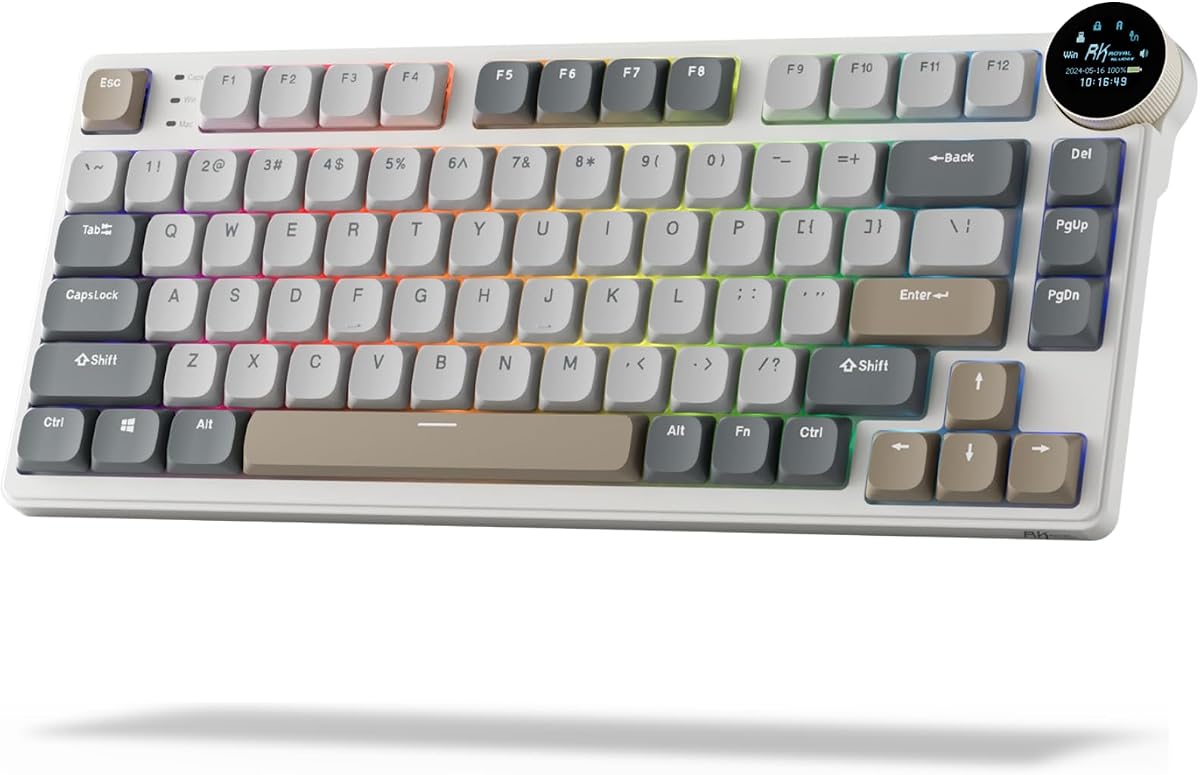
The RK N80 stands out with a built-in smart display showing GIFs battery status and connection modes. Rated 4.1, it brings visual flair to low-profile mechanical typing. Tri-mode connectivity ensures you stay connected across devices with minimal lag or hassle.
We may earn a commission when you buy through this link, at no additional cost to you.
A top-mounted structure offers a firmer keystroke and increased feedback compared to standard boards. Three sound-absorbing layers minimize hollow noises delivering a smooth quiet feel. The heavy-duty base solves wobbling issues common in slim keyboards.
The screen adds novelty but might distract if you prefer minimalism. Battery life depends on screen usage which could shorten uptime. Yet the customization options via the knob and app are robust enough to satisfy tech enthusiasts who love visuals.
Pick this if you want to express style while typing without sacrificing performance. It works well for both work and gaming sessions where feedback and quiet operation matter. The knob makes volume and lighting adjustments effortless during use.
The compact dynamic screen showcases custom GIFs dates and battery status. You can control volume and brightness with a simple twist of the knob, adding a layer of convenience that few other low-profile keyboards currently offer.
Triple sound-absorbing layers including foam and silicone padding significantly reduce hollow sounds. This results in a super smooth and quiet typing experience. It enhances focus and reduces distraction especially in shared or office environments.
We may earn a commission when you buy through this link, at no additional cost to you.
The Flow Lite 84 focuses on physical comfort with a lower front height that promotes natural wrist relaxation. Rated 4.3, it uses Specter POM switches with reduced force to lower joint fatigue during long typing sessions. PBT double-shot keycaps add texture and durability.
We may earn a commission when you buy through this link, at no additional cost to you.
Its gasket mount design cushions keystrokes and provides a soft satisfying tone. The battery lasts up to 80 hours which is impressive for wireless use. Flexible 3-mode connectivity ensures seamless switching across devices without interruption.
The body transition to ABS reduces cost but might feel less premium than aluminum. While typing is smooth the 40g force may feel light for some. However the ergonomic design makes it a top choice for those with wrist pain concerns.
This keyboard suits users prioritizing long-term comfort and tactile softness over raw speed. If you type for hours daily and want minimal strain without sacrificing wireless freedom this model delivers exceptional daily quality.
Designed with a lower front height than typical models the Flow Lite encourages a more natural wrist position. This reduces strain significantly during long sessions making it ideal for users who experience discomfort with standard keyboards.
Specter Full POM switches reduce operating force to 40gf minimizing finger strain. Combined with a Gasket Mount sound-dampening layer every keystroke feels cushioned and satisfying without hollow resonance or harsh bottoming noise.
We may earn a commission when you buy through this link, at no additional cost to you.
The Keychron K17 Max offers a full function set in a compact 96% layout. Rated 4.4, it supports Gateron low-profile Brown switches that provide satisfying tactile feedback. QMK firmware ensures you can tailor every key to suit your specific workflow needs perfectly.
We may earn a commission when you buy through this link, at no additional cost to you.
An aluminum frame gives it an ultra-slim appearance while maintaining structural integrity. It supports 2.4GHz wireless and Bluetooth for high-performance gaming and easy device switching. Double-shot PBT keycaps resist shine and feel premium to the touch.
The layout might feel crowded for those used to full TKL boards due to the compact spacing. Software customization is powerful but requires setup time. Yet the tactile response and space efficiency make it a strong contender for professionals.
Choose this if you need a near-full keyboard without taking up extra desk real estate. It bridges the gap between compact design and functional completeness making it ideal for multitasking environments where screen space is limited.
The 96% layout includes arrow keys and a number pad while saving significant desk space. This makes it perfect for users who need numerical input but want a tighter footprint than a standard full-size keyboard offers.
Low-profile Gateron Brown switches deliver a satisfying bump without loud clicking. Their slim design reduces thickness by 31% compared to standard switches making the keyboard ultra-thin while still offering premium tactile typing feedback.
We may earn a commission when you buy through this link, at no additional cost to you.
The Flow Lite 100 Keys expands on the 84 key version to include a full numpad and media cluster. Rated 4.4, it retains the comfortable ergonomics and linear switches. The 3000mAh battery supports up to 100 hours of use which is exceptional for productivity tasks.
We may earn a commission when you buy through this link, at no additional cost to you.
Gasket mounting ensures every keystroke feels soft and cushioned rather than rigid. The adjustable stand provides multiple height options to suit your desk. A textured ABS surface maintains a soothing touch despite not using aluminum.
This model takes up more desk space which might frustrate compact desk users. The linear switches might lack the feedback some typists prefer for accuracy. But for those needing numerical precision and comfort it is a top-tier option.
Opt for this if you rely on a numpad for work but still want low-profile speed. The long battery life and smooth typing experience make it perfect for long shifts where fatigue and interruptions are unacceptable factors.
With a 3000mAh battery the Flow Lite 100 offers up to 100 hours of working time. Charging via USB-C takes just 3 hours to full. This ensures you work uninterrupted for days without needing to plug in often.
The Gasket Design brings a soft and cushioned feel to every key press. It accommodates different switch preferences and enhances the sound profile. Each stroke is richer and more satisfying than rigid board alternatives.
We may earn a commission when you buy through this link, at no additional cost to you.
The Keychron K3 Max SE delivers high performance through open-source QMK and wireless versatility. Rated 4.6, it features hot-swappable switches and acoustic foam for a refined typing sound. A 75% layout keeps essential keys while maintaining a compact footprint.
We may earn a commission when you buy through this link, at no additional cost to you.
Its Milk POM switches are 31% slimmer than standard ones. Stabilizers are redesigned to minimize wobble on larger keys. Bluetooth 5.2 connects to three devices effortlessly making it ideal for multitaskers switching between laptop and phone.
Setup via the web app is straightforward but does require time to configure fully. The premium price reflects the build and customization capabilities. Yet those invested in tweaking every keystroke find the investment worthwhile.
Choose this if you value sound quality and switch flexibility alongside wireless freedom. It bridges the gap between a standard office keyboard and a custom enthusiast build making it perfect for both casual and advanced users.
Advanced EPDM and bottom case acoustic foam elevate every keystroke with a cushioned quieter sound. This reduces typing fatigue and makes the keyboard suitable for quiet office environments without sacrificing responsive performance.
Hot-swappable support lets you change switches in seconds without soldering. This allows you to experiment with different profiles or fix issues easily. You get a personalized typing experience that adapts as your preferences change over time.
We may earn a commission when you buy through this link, at no additional cost to you.
The Razer Ornata V3 blends membrane quietness with mechanical feedback using unique Mecha-Membrane switches. Rated 4.5, it offers natural hand positioning for long sessions. UV-coated keycaps provide lasting durability against wear and tear from frequent use.
We may earn a commission when you buy through this link, at no additional cost to you.
Key features include dedicated media keys and a magnetic soft-touch wrist rest for immediate comfort. The low-profile keys reduce strain and improve speed. This hybrid design appeals to gamers wanting mechanical feel without loud click noise.
Those seeking full mechanical consistency might find the feel slightly inconsistent. Lighting options are basic compared to enthusiast boards. However the price and comfort features make it a strong daily driver for casual to intermediate gaming needs.
Pick this if you need a reliable gaming keyboard that balances performance and comfort. The wrist rest and compact layout reduce fatigue during long sessions. It is an excellent choice for those wanting quick responsive action without noise.
Mecha-Membrane switches fuse mechanical feedback with quiet membrane feel. Each keystroke is precise and satisfying. This reduces noise while maintaining the snappy response gamers expect during intense gameplay or competitive matches.
A magnetic soft-touch wrist rest snaps securely to the keyboard. It provides ample support for long periods of use. Combined with low-profile keys the design ensures natural hand positioning that reduces strain during extended gaming.
We may earn a commission when you buy through this link, at no additional cost to you.
Selecting the ideal low profile mechanical keyboard requires balancing ergonomics features and budget. Understanding key factors ensures you find a model that fits your typing style and workspace needs.
Switches define typing feel. Linear switches offer smooth quiet presses ideal for gaming. Tactile switches provide feedback bumps for precise typing. Choose based on whether you prefer speed or feedback during work.
For long sessions prioritize switches with light operating force to reduce fatigue.
Consider how you connect devices. Wireless Bluetooth or 2.4GHz provides flexibility for clean desks. Wired ensures zero lag but limits movement. Multi-mode support lets you switch between phones and PCs seamlessly.
Gamers often prefer wired or 2.4GHz for speed while typists value Bluetooth versatility.
Layout affects desk space. Full-size includes numpads but takes up room. TKL or 75% saves space while keeping essential keys. Match the layout to your workflow needs and available desk real estate.
Smaller layouts suit multitasking setups while full size suits data entry tasks.
Build materials determine durability. Aluminum frames feel premium and reduce wobble. Plastic is lighter and cheaper but may flex. Check if the keyboard has stabilizers that prevent larger keys from rattling.
Premium materials justify cost for daily heavy use.
Open-source firmware like QMK offers endless key remapping and macros. Proprietary software may be simpler but less flexible. Decide if you want deep control over every key or simple out-of-the-box functionality.
Customization appeals to power users wanting tailored shortcuts.
Wireless models vary in battery life. Look for 50+ hours for multi-day use. USB-C charging is standard. Some offer replaceable batteries. Check power saving features like auto sleep to extend uptime.
Long battery life is crucial for mobile professionals.
Ergonomics prevent wrist strain. Low profile reduces height but check angles. Adjustable stands help find the right tilt. Wrist rests add comfort if not integrated. Prioritize models that keep wrists neutral.
Comfort is key for long typing sessions to prevent injury.
Sound dampening layers reduce hollow noise. Acoustic foam inside the case makes typing quieter. This matters in shared offices. Test sound profiles if possible as materials affect the noise significantly.
Quiet operation improves focus and reduces distraction.
Start by connecting your keyboard to your device via Bluetooth or cable. For wireless models charge fully before first use. Install any required software or firmware updates to enable advanced features.
Keep the keyboard clean by gently brushing dust from keycaps. Use compressed air to clear debris between switches. Avoid spills since low-profile electronics are less water resistant than traditional boards.
Store the keyboard in a dry place when not in use. Regularly check for firmware updates to improve performance. Adjust settings like lighting or polling rate to suit your needs over time.
Yes low profile mechanical keyboards are excellent for gaming. They offer faster actuation due to shorter travel distance. This reduces input lag and allows quicker key presses during intense gameplay sessions.
They feel similar but slightly lighter and quieter. Switches are designed to maintain tactile feedback while reducing height. Most users adapt quickly and find the typing experience just as satisfying.
Many modern low profile keyboards support both Mac and Windows. Look for models that offer Mac layouts and extra keycaps. Firmware can often be updated to ensure full compatibility.
Use compressed air to blow out debris from switch gaps. A soft brush can remove surface dust. Avoid water on exposed electronics. For deep cleaning remove keycaps gently to wipe underneath.
Hot-swappable models allow you to change switches without soldering. Check if your specific model supports hot-swapping. This lets you customize feel or replace switches easily as needed.
TKL or 75% layouts offer the best balance. They keep essential keys while saving desk space. Full layouts with numpads suit data entry but take up more room.
Low profile keyboards are often quieter due to dampening layers and short travel. However clicky switches still produce noise. Linear switches provide a quieter experience.
Some models include magnetic or integrated wrist rests. Others may require separate purchases. Check product descriptions if ergonomics are a priority for your setup.
The Redragon K618 PRO Keychron K3 V2 and Keychron K1 Ultra lead our rankings. Each offers distinct advantages from budget pricing to premium performance.
Prioritize ergonomics connectivity and switch feel based on your primary use case. Gamers value speed while writers need comfort. Decide what matters most to you.
Prices change frequently so verify listings before purchasing. These keyboards represent the best options available for low profile mechanical typing.