
Cooler Master Q300L V1
4.5Editor score
Transparent Side Panel
Modular I/O Panel
Open Thermal Design
Discover the top rated Matx Case options for 2026. This guide compares airflow, build quality, and features to help you choose the perfect micro ATX chassis.
Finding the right Matx Case can transform your build experience. A good case balances airflow, aesthetics, and component clearance. You want something that fits your hardware while keeping temperatures low.
We compared ten top models based on airflow design, material quality, and compatibility. Our analysis focuses on real-world performance metrics and user feedback to ensure reliability.
Each pick highlights specific strengths like modular design or premium finishes. Prices fluctuate often so check current listings before you buy to get the best value available today.
4.5Editor score

4.8Editor score

4.8Editor score
This side-by-side comparison highlights key specifications across all ten models to help you quickly identify which chassis matches your specific build requirements and space constraints.




The Lian Li A3-mATX stands out as a top contender in the Matx Case market. With a rating of 4.8 it delivers exceptional performance for users seeking compact power.
We may earn a commission when you buy through this link, at no additional cost to you.
Its high airflow steel mesh panels ensure optimal cooling for high TDP GPUs. The walnut wood front adds a touch of elegance that complements modern home offices perfectly.
While the price is higher than budget options the build quality justifies the cost. You get premium materials and thoughtful design choices that enhance long term usability.
Buy this if you need a stylish yet functional case. It offers the best balance of size hardware support and aesthetics for serious builders.
The mesh panels allow cool air to reach components directly reducing thermal throttling during intense gaming or rendering sessions.
The modular wood front panel provides a unique look that separates this case from standard steel or plastic alternatives.
We may earn a commission when you buy through this link, at no additional cost to you.
The Cooler Master Q300L V1 offers incredible value for builders on a budget. It maintains strong ratings while providing essential features for a solid PC build.
We may earn a commission when you buy through this link, at no additional cost to you.
Its open thermal design and perforated sides promote excellent heat dissipation. The transparent panel lets you showcase your hardware without spending a fortune on premium glass.
You might notice some material costs compared to high end cases. However for entry level builders this case delivers everything you need to start your journey.
This is the ideal pick for those prioritizing function over form. It proves you do not need to break the bank for a reliable Matx Case.
Adjustable I/O positions allow you to customize the front interface based on your desk setup preference.
The edge-to-edge panel provides a full view of internal components making it easy to admire your custom wiring.
We may earn a commission when you buy through this link, at no additional cost to you.
The Vector V100 MINI brings a premium experience to the Micro-ATX form factor. Its 270 degree view offers unmatched aesthetics for users who love visible hardware.
We may earn a commission when you buy through this link, at no additional cost to you.
Built with tempered glass and robust metal it ensures your components are safe and secure. The included ARGB fans sync seamlessly for dynamic lighting effects across the case.
While it does not support full ATX boards it maximizes space for smaller form factors. The anti-sag bracket adds stability for long graphics cards which is a thoughtful touch.
Choose this if you want luxury in a compact package. It is perfect for high-end builds where style and performance are equally important priorities.
The 4mm tempered glass panels create a unified look that showcases your internal hardware from multiple angles clearly.
The horizontal GPU anti-sag bracket prevents drooping ensuring your card remains stable over long periods of use.
We may earn a commission when you buy through this link, at no additional cost to you.
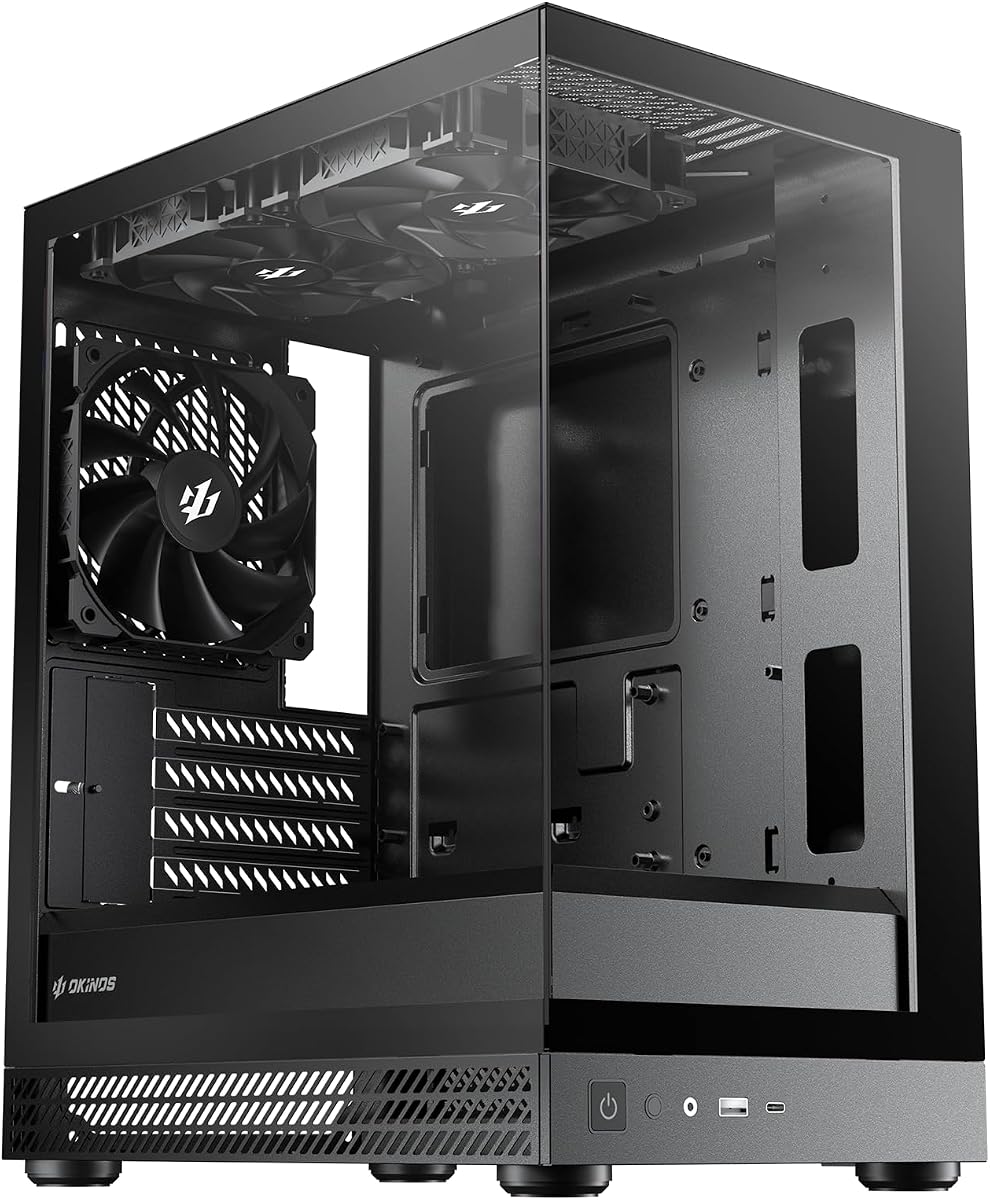
Okinos introduces a unique aesthetic with genuine walnut wood panels that stand out in a sea of plastic. This case brings a natural feel to modern PC builds effectively.
We may earn a commission when you buy through this link, at no additional cost to you.
It supports modern connectivity with a Type-C 3.2 Gen 2 port ensuring fast data transfer. The pre-installed fans provide immediate cooling without extra costs for new buyers.
The non-PWM fans limit speed control but still offer decent performance. Most users will appreciate the distinct look over minor tuning limitations in fan operation.
Ideal for those wanting a home-friendly aesthetic. This Matx Case blends technology with interior design to create a visually distinct setup for your desk.
The Type-C port allows for quick device charging and data transfers without hunting for adapters or older ports.
Walnut wood decoration adds warmth to your setup making your computer feel less like an electronic box and more like furniture.
We may earn a commission when you buy through this link, at no additional cost to you.
The Aqua 3 offers a stunning panoramic view with 270 degrees of glass coverage. It allows builders to display their components with unmatched clarity and style.
We may earn a commission when you buy through this link, at no additional cost to you.
Vertical airflow design ensures heat rises efficiently away from the motherboard. The ARGB controller syncs lighting without extra purchases making setup easier for beginners.
Fingerprints on glass can be a minor annoyance requiring regular cleaning. But the visual payoff is worth the effort for those who prioritize aesthetics above all.
Buy this if you want a showstopper build. It delivers a modern high-end look that fits well in gaming setups or visible workstations.
Fans placed at top and rear create a direct path for hot air to escape keeping components cool under load.
The panoramic design turns the side into a display window highlighting every cable and component inside the chassis.
We may earn a commission when you buy through this link, at no additional cost to you.
The Zalman CUBIX is perfect for those with tight desk space. Its 17.1 liter volume keeps your footprint small while maintaining a sturdy build quality.
We may earn a commission when you buy through this link, at no additional cost to you.
Steel construction ensures longevity even at a low price point. It supports standard ATX power supplies which is rare for cases this small and adds flexibility.
Graphics cards are limited to 260mm which might fit older or smaller models. For budget builds where space is the priority this trade-off is acceptable and practical.
Choose this for tight spaces or travel rigs. It proves small cases can still offer durability and compatibility for basic gaming needs.
The compact footprint allows placement under monitors or on crowded desks without sacrificing essential functionality.
Sturdy steel construction keeps costs down while ensuring your components remain protected from accidental bumps.
We may earn a commission when you buy through this link, at no additional cost to you.
TGDGAMER offers a slim solution for users needing minimal height. Its perforated front design allows direct airflow to components helping them run cooler.
We may earn a commission when you buy through this link, at no additional cost to you.
With a low price point it is a budget friendly option for secondary machines. It fits standard power supplies making upgrades simpler for future planning needs.
The slim design restricts larger GPUs and cooling options. This makes it better for low-power builds than high-end gaming setups needing extensive space.
Select this for office PCs or simple home servers. It keeps costs low while providing enough cooling for standard components effectively.
The slim form factor blends into office environments without drawing unnecessary attention to the hardware.
Perforations on the front allow air to hit the CPU and GPU directly reducing heat buildup quickly.
We may earn a commission when you buy through this link, at no additional cost to you.
The Aqua UNO simplifies maintenance with tool-free glass removal and full coverage dust filters. This design makes cleaning easy and keeps internal components dust free longer.
We may earn a commission when you buy through this link, at no additional cost to you.
It supports air cooling only which reduces complexity for users avoiding liquid cooling. The Type-C 5Gbps ensures modern connectivity speeds for peripherals and external drives.
Lack of radiator support is a trade-off for simpler airflow design. But for standard builds this limitation does not impact performance significantly in most scenarios.
Pick this for hassle-free ownership. Its design prioritizes convenience and airflow making it excellent for those who value simplicity and cleanliness.
Quick release panels mean you can clean filters and internals in minutes without fighting stubborn screws.
Full dust coverage prevents buildup ensuring consistent cooling efficiency over years of use without degradation.
We may earn a commission when you buy through this link, at no additional cost to you.
This Vector model delivers a premium experience with panoramic glass and high GPU clearance. It stands out for its polished look and robust build quality.
We may earn a commission when you buy through this link, at no additional cost to you.
It supports up to nine fans allowing flexible cooling paths for complex setups. The integrated RGB strip enhances aesthetics without needing extra hardware or cables.
The compact footprint means careful planning for component selection. But for users with space it offers superior value and visual appeal.
Recommended for high-end compact builds. It balances style and function better than most competitors in this price range.
Multiple fan mounts allow custom airflow paths tailored to your specific hardware needs and preferences.
The built-in RGB strip provides illumination that syncs with your other peripherals for a cohesive look.
We may earn a commission when you buy through this link, at no additional cost to you.
The Mirage 4 focuses on airflow and cable organization. Its vertical design and dedicated space ensure neat builds and efficient cooling for your components.
We may earn a commission when you buy through this link, at no additional cost to you.
Supporting a 240mm radiator top offers liquid cooling options in a compact space. The ARGB controller adds lighting control without needing extra motherboard headers.
Cable space is generous allowing for tidy routing behind the motherboard. This makes assembly easier and improves airflow by removing clutter.
Ideal for builders who value neat setups. This case makes managing cables simple while supporting modern cooling configurations.
Generous rear space allows ample room for routing wires away from critical components easily.
Vertical airflow draws cool air from the bottom and exhausts it upwards keeping heat away from CPU.
We may earn a commission when you buy through this link, at no additional cost to you.
The B4-mATX offers dual positioning for versatile placement on desks or floors. Its wood finish adds elegance while maintaining strong internal space for high-end parts.
We may earn a commission when you buy through this link, at no additional cost to you.
It supports up to a 360mm AIO radiator ensuring thermal efficiency even in a small case. This flexibility allows cooling choices that fit your performance needs.
Premium finishes increase cost significantly compared to metal alternatives. But the aesthetic upgrade is worth it for those seeking a unique and stylish case.
Choose this for a stylish high-end build. Its layout allows customization in both positioning and cooling for a tailored experience.
Horizontal or vertical use lets you adapt the case to your desk layout or space constraints.
Real wood veneer provides a look that stands out from standard factory painted metal cases.
We may earn a commission when you buy through this link, at no additional cost to you.
Selecting the right case requires balancing space cooling and aesthetics. This guide covers the most important factors to consider before you buy.
Airflow determines how well your components stay cool during operation. Look for mesh panels and perforated designs that allow cool air to enter freely.
Prioritize cases with clear intake and exhaust paths to reduce heat buildup over time.
Check GPU length and cooler height limits before buying. Many Matx cases are compact and might not fit massive graphics cards.
Ensure the case supports your motherboard size and power supply type for hassle-free installation.
Steel offers durability but can be heavier and more prone to scratches. Plastic is lighter but less robust against impacts or long term wear.
Choose materials that match your durability needs and aesthetic preferences for your workspace.
Good cable management keeps the interior tidy and improves airflow. Look for ample space behind the motherboard tray.
Include options for routing cables cleanly to avoid clutter that restricts air circulation.
Modern cases offer glass panels wood finishes or unique shapes. Select a style that matches your room decor or personal taste.
Remember that appearance is subjective so choose what looks best to you.
If you plan to use liquid cooling ensure the case supports radiators. Check size limits like 240mm or 360mm before purchase.
Even air cooling cases should support enough fans for effective thermal control.
Front ports should match your devices. Type-C is becoming standard for faster data transfer.
Ensure the panel has enough USB ports for your peripherals without needing hubs.
Higher prices often mean better materials and features. But budget cases can still offer great performance.
Balance your budget with the features you actually need for your specific build.
Install your motherboard first ensuring standoffs match the PCB holes properly. Connect all internal cables before placing the case on the desk.
Clean dust filters regularly using a soft brush or vacuum to maintain airflow. This prevents dust buildup from restricting performance.
Avoid placing the case directly on carpet where debris accumulates. Keep it elevated on a desk to ensure optimal ventilation around the base.
Most Matx cases support standard GPUs but check the maximum length limit. Compact models might restrict longer cards so verify compatibility before purchasing.
Not necessarily. Noise depends on airflow design and fan quality. Some compact cases run fans faster to cool components making them louder.
Some Matx cases support standard ATX PSUs. But smaller models may require SFX or SFX-L power supplies for proper fit.
Yes many Matx cases support 240mm or even 360mm radiators. Always check the top or rear mounting limits before buying.
At least 20mm to 30mm of clearance behind the tray helps with tidy routing. More space makes complex builds easier to manage.
Wood panels on the front do not affect internal temps if mesh is used elsewhere. Ensure ventilation is not blocked by decorative panels.
A compact case around 20 liters saves desk space without sacrificing hardware support. It fits well under most monitors or on small surfaces.
Tempered glass is strong but can break on impact. Look for cases with secure mounting and dust filters to prevent accidental damage.
We reviewed ten top Matx cases from budget to premium options. The Lian Li A3-mATX leads as our top pick for its blend of size and performance.
Prioritize airflow and component compatibility to ensure long term stability. A case that fits your parts is more important than extra features.
Check current prices before buying as deals fluctuate often. You can find value in these models with a quick search today.