
TP-Link Nano AC600 USB WiFi Adapter
4.5Editor score
Nano Compact Design
Dual Band Connectivity
2-Year Warranty Support
This expert guide compares the top 5GHz WiFi Dongle options for desktops and laptops in 2026, analyzing performance, range, and features to help you choose the
Finding the right wireless adapter can transform your desktop computer into a versatile mobile workstation. A quality 5GHz WiFi Dongle provides faster speeds and reduced latency compared to older wireless standards. This guide helps you select the best adapter for your specific networking needs and budget constraints.
We evaluated ten top-rated USB WiFi adapters based on real-world performance data and user feedback. Our comparison focuses on critical factors like dual-band support, antenna gain, and compatibility with modern operating systems. Each product offers unique advantages for streaming, gaming, and general productivity tasks.
Every selection below highlights key specifications and practical use cases to streamline your decision process. We include detailed pros and cons to ensure you understand potential limitations before purchasing. Please note that product availability and pricing may vary over time based on market conditions.
4.5Editor score

4.4Editor score

4.1Editor score
The following table presents a side-by-side overview of ten leading 5GHz WiFi Dongle models available in the current market. We highlight key technical specifications and compatibility details to help you quickly identify the adapter that best fits your hardware setup and performance requirements.


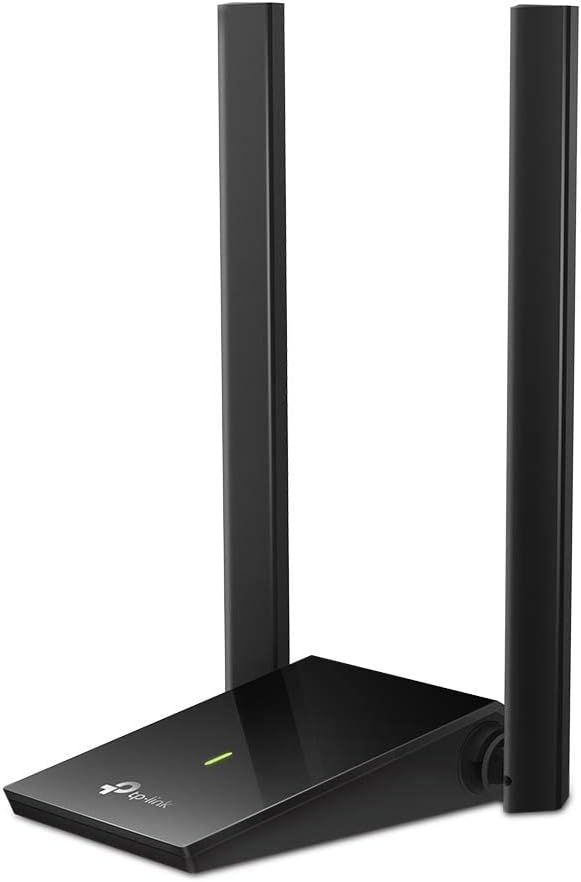


This TP-Link AC1300 USB WiFi Adapter stands out as a top performer in the 5GHz WiFi Dongle category. With a solid 4.4 star rating from users, it delivers reliable high-speed connections suitable for modern computing needs. The adapter supports both 2.4GHz and 5GHz bands, offering flexibility for various network environments.
We may earn a commission when you buy through this link, at no additional cost to you.
The standout feature is its MU-MIMO technology which provides beamforming capabilities. This ensures that your device gets a stronger signal even when other devices are competing for bandwidth. Combined with USB 3.0 support, data transfer speeds are significantly faster than older USB 2.0 adapters, enabling smooth streaming and gaming experiences.
One trade-off is that some users may need to manually install drivers depending on their operating system version. Additionally, the external antenna design while beneficial for range, means it is slightly less compact than nano adapters. However, the performance gains usually outweigh these minor inconveniences for desktop users.
If you need a balanced adapter that offers high speeds and good range without breaking the bank, this model is an excellent choice. It is particularly recommended for desktop PC users who require stable connections for work or entertainment. The dual-band support ensures you can switch between bands as needed for optimal performance.
MU-MIMO technology allows multiple devices to communicate simultaneously with the router, reducing congestion and latency during peak usage times.
USB 3.0 support means the adapter can handle higher bandwidth demands, ensuring that your internet connection is not bottlenecked by the USB port.
We may earn a commission when you buy through this link, at no additional cost to you.
The TP-Link Nano AC600 USB WiFi Adapter is the perfect choice for users seeking a budget-friendly solution without sacrificing essential features. Its nano design allows it to remain plugged in without obstructing other ports on your laptop or desktop. With a high user rating, it proves reliable for everyday internet browsing and streaming tasks.
We may earn a commission when you buy through this link, at no additional cost to you.
Despite its small size, this adapter supports both 2.4G and 5G bands. This dual-band capability ensures you can connect to less congested 5GHz networks for faster speeds when available. The strong 2.4G and 5G connection provides a lag-free experience for most casual users and light gamers.
One limitation is the AC600 speed rating which is lower than AC1300 adapters. This means it may struggle with very high-bandwidth activities like 4K streaming on multiple devices simultaneously. However, for single device usage it performs admirably. You may also need to download drivers from the website for installation.
If you value portability and price, this adapter is an outstanding option. It is ideal for laptops that need a permanent wireless boost or desktops where space is limited. The included 2-year warranty and free 24/7 technical support add significant value to this budget-friendly purchase.
The sleek miniature design means you can plug it into a laptop and leave it there without worrying about it breaking off when you move the device.
Even though it is affordable, it still delivers a strong connection that supports standard streaming and browsing needs without frustrating drops or slowdowns.
We may earn a commission when you buy through this link, at no additional cost to you.
This TP-Link AC600 USB WiFi Adapter is designed to deliver long-range connections wherever you are. Its standout feature is the 5dBi high gain antenna which enhances signal strength significantly compared to internal adapters. This makes it a solid choice for desktop computers located far from the wireless router.
We may earn a commission when you buy through this link, at no additional cost to you.
The adjustable multi-directional antenna allows you to rotate it to face your router for improved performance. This physical flexibility helps optimize the connection based on your room layout and obstacles like walls. Users can expect lag-free connections on the 5GHz band for web surfing and streaming.
However, this adapter is compatible with Windows versions only and does not support Mac or Linux systems. You will need to install drivers from the TP-Link website to get started. While this limits its usability for Mac users, it remains a strong option for Windows-based desktops needing better range.
For those who struggle with weak signals in their home office, this adapter offers a practical solution. The combination of a high gain antenna and dual-band support ensures you get reliable speeds. Just ensure you check your operating system compatibility before making your purchase decision.
The ability to rotate the antenna means you can physically aim it towards your router to capture the strongest possible signal for your desktop PC.
Access to both 2.4GHz and 5GHz bands lets you choose the best network for your needs, balancing range and speed effectively.
We may earn a commission when you buy through this link, at no additional cost to you.
The Nineplus Wireless USB WiFi Adapter offers high speed dual band connectivity with 1300Mbps theoretical speeds. It features two 5dBi high gain antennas that enhance signal stability and range. This makes it a great upgrade for desktop PCs that need reliable connections for gaming or video conferencing without interruptions.
We may earn a commission when you buy through this link, at no additional cost to you.
Its Super Speed USB 3.0 port ensures data transfer is up to 10x faster than USB 2.0. This helps fully utilize the AC1300 wireless adapter potential. The dual high-gain antennas provide accurate capture of WiFi signals ensuring a stable connection even at greater distances or through walls.
One thing to note is that it supports Windows systems but not Mac OS or Linux. You may need to manually install drivers for older Windows versions like Windows 7. However, most Windows 10 and 11 systems will detect it automatically. The company also provides online setup support for added convenience.
If you need a robust adapter for heavy internet usage, this model delivers strong performance. The high-speed capabilities and antenna design make it suitable for challenging signal environments. Just ensure your system is Windows-based before purchasing to avoid compatibility issues during setup.
Having dual antennas allows the adapter to better filter out interference and maintain a consistent connection even when other devices are using the network.
USB 3.0 ports are essential for high-speed adapters to prevent bottlenecks ensuring your internet speeds are not limited by the connection port.
We may earn a commission when you buy through this link, at no additional cost to you.
The UGREEN WiFi Adapter AX900 brings modern WiFi 6 technology to your desktop PC at a reasonable price. It supports transmission speeds of up to 600 Mbps on the 5 GHz band ensuring lightning-fast data transfer. This adapter is ideal for users looking to future-proof their setup with next-gen connectivity.
We may earn a commission when you buy through this link, at no additional cost to you.
A major convenience feature is the built-in drivers for Windows 10 and 11. This allows for CD-free installation and saves time during setup. The adapter also supports AP mode allowing you to share your internet connection with other devices easily. Security is maintained with WPA encryption modes.
To get the full AX900 speed you will need a WiFi 6 router which might be an additional cost if you do not have one. It also does not support older Windows versions or Linux which limits its compatibility. Ensure your network meets the requirements before buying.
If you have a modern router and want low latency connections, this adapter is a great fit. It handles video streaming and online gaming well. The ability to share connections via AP mode adds versatility for mobile devices on your network.
WiFi 6 technology offers improved efficiency in crowded networks, ensuring you maintain speeds even when multiple devices are connected to your router.
AP mode lets you turn your PC into a wireless hotspot, which is useful for sharing internet with tablets or phones that lack wired connectivity.
We may earn a commission when you buy through this link, at no additional cost to you.
The Tenda AX900 WiFi Adapter combines WiFi 6 technology with a powerful external 6dBi antenna. This ensures multi-dimensional rotation and improved weak signal reception compared to built-in antennas. Users can expect faster connections on both 5GHz and 2.4GHz bands which reduces lag and buffering.
We may earn a commission when you buy through this link, at no additional cost to you.
Setup is incredibly easy due to preloaded drivers that enable instant connection on supported Windows versions. The intelligent algorithm assists in stable signal transmission making it wider than standard adapters. AP mode support allows the adapter to act as a hotspot for up to eight devices.
However, the external antenna adds size which might not be ideal for portable laptop use. It is also designed for Windows systems only so Mac users should look elsewhere. If you are using it on a desktop or stationary laptop the antenna benefits outweigh the size drawback.
For users needing a strong range boost without compromising on speed, this adapter is highly recommended. It is perfect for environments with significant interference. The combination of WiFi 6 and high gain antenna makes it a solid performer for demanding tasks.
The external antenna can be rotated to find the best angle for your router ensuring you get the maximum possible signal strength for your location.
No need to search for drivers manually as they come preloaded allowing you to get online within seconds of plugging the device in.
We may earn a commission when you buy through this link, at no additional cost to you.
The BrosTrend AX1800 USB WiFi 6 Adapter delivers top-tier performance with speeds up to 38% faster than AC1300 models. It features dual 5dBi high gain antennas and includes a 3.3-foot USB 3.0 extension cable for flexible placement. This premium choice is ideal for users needing long range and stable connections.
We may earn a commission when you buy through this link, at no additional cost to you.
OFDMA and MU-MIMO technologies enable efficient connections even on crowded networks. Beamforming delivers targeted signals ensuring reliability wherever your PC is located. The desktop design with extension cable allows you to place the adapter in a spot with optimal signal reception avoiding obstructions.
One limitation is that it does not support macOS which limits its usability for Apple desktop users. It also comes at a higher price point than standard AC adapters. However, the speed and range benefits are significant for power users who need maximum performance.
If you are a gaming enthusiast or power user looking for the best possible WiFi performance, this adapter is worth the investment. It ensures smooth streaming and video calls without buffering. The included extension cable adds practical value for optimizing placement in large rooms.
The USB 3.0 extension cable lets you move the adapter away from the computer case to find a clear line of sight to your router.
OFDMA technology breaks data into smaller units allowing multiple devices to share a channel efficiently which reduces latency in busy networks.
We may earn a commission when you buy through this link, at no additional cost to you.
This TP-Link USB WiFi Adapter features a desktop design with dual high gain antennas for improved range and signal quality. The adjustable multi-directional antennas allow flexible deployment for the best reception. It supports AC1300 wireless speeds making it ideal for gaming downloading and streaming needs on desktops.
We may earn a commission when you buy through this link, at no additional cost to you.
Super speed USB 3.0 ensures transfer speeds are up to 10x faster than USB 2.0. The adapter is compatible with both Windows and macOS systems which adds versatility. Its design focuses on stable performance rather than portability making it a solid stationary solution.
The main trade-off is that its size makes it less suitable for travel compared to nano adapters. It is best used on a desktop where you can position it optimally. The dual antennas provide good signal quality but require some desk space to function at their best.
For users who need a reliable desktop adapter with Mac support this model is excellent. It offers a balance of speed and range without needing complex setups. The adjustable antennas give you the control to tune your connection for specific room layouts easily.
Having two high gain antennas helps ensure that your signal remains strong and consistent even when there are walls or furniture nearby.
Compatibility with both Windows and macOS means you can use this adapter across different systems without needing separate solutions.
We may earn a commission when you buy through this link, at no additional cost to you.
The UGREEN AX1800 WiFi Adapter offers blazing-fast dual-band performance with speeds up to 1201 Mbps on 5GHz. It supports USB 3.0 ensuring rapid data transfers and smooth streaming. The advanced WiFi 6 technology reduces latency and boosts network stability in crowded environments effectively.
We may earn a commission when you buy through this link, at no additional cost to you.
Security is enhanced with WPA3-SAE encryption providing secure browsing for your desktop. The back ventilation holes offer superior heat dissipation maintaining reliable performance during long sessions. You can use it as an adapter or switch to AP mode to share internet seamlessly.
It is compatible with Windows 10 and 11 systems but not older versions or Linux. Drivers are built-in for quick installation saving time during setup. However, this limits compatibility if you use other operating systems regularly on your machines.
If you want modern WiFi speeds with enhanced security features this adapter is a great option. It handles multiple devices well and keeps temperatures low. Just verify your system meets the OS requirements to ensure a smooth setup process.
WPA3 encryption provides stronger protection against cyber threats ensuring your data is secure while using the wireless connection.
Ventilation holes keep the adapter cool during heavy usage which prevents overheating and performance drops over time.
We may earn a commission when you buy through this link, at no additional cost to you.
The BrosTrend AX900 Mini USB WiFi 6 Adapter combines modern WiFi 6 tech with a tiny form factor. It offers up to 600Mbps on the 5GHz band with faster speeds than AC600 adapters. Its compact design integrates seamlessly with desktop or laptop computers ensuring a clutter-free workspace.
We may earn a commission when you buy through this link, at no additional cost to you.
Advanced WiFi technologies like OFDMA and MU-MIMO enable fast reliable performance. Preloaded drivers eliminate the need for CD installation allowing you to simply plug and play. This convenience is paired with flexible connection options as you can switch between 5GHz and 2.4GHz bands easily.
Since it uses a USB 2.0 port it may not be as fast as USB 3.0 models in terms of data transfer. It also supports Windows only which might be a limitation for Mac users. However for its size and WiFi 6 capabilities it is an excellent portable solution.
If you need an adapter you can carry everywhere without bulk this is a top choice. It is perfect for laptops where portability matters more than raw maximum bandwidth. The ease of setup makes it accessible even for non-technical users seeking improved connectivity.
Measuring just 1.4 by 0.7 inches this adapter is small enough to leave plugged into your laptop for travel without taking up space.
WiFi 6 ensures that even though the physical size is small, the internal technology is advanced enough to handle modern networking demands.
We may earn a commission when you buy through this link, at no additional cost to you.
Selecting the right 5GHz WiFi Dongle involves considering several technical factors that impact performance and compatibility. This section breaks down the key elements you should evaluate before making your purchase decision.
Look for adapters supporting AC1200 AC1300 or AX WiFi 6 standards for higher throughput. Faster standards ensure smoother streaming and gaming with reduced latency and higher bandwidth availability for multiple devices.
Dual-band adapters supporting both 2.4GHz and 5GHz bands provide the most flexibility. The 5GHz band offers faster speeds for short distances while 2.4GHz provides better range through obstacles.
External antennas with higher dBi gain improve signal range and stability. Adjustable antennas allow you to optimize reception by facing them toward your router which helps overcome weak signal areas in large homes.
USB 3.0 ports provide faster data transfer rates compared to USB 2.0 ensuring your adapter can handle high bandwidth speeds. Check your computer ports before purchasing to ensure you have the right connection available.
Most adapters support Windows but some also include macOS or Linux drivers. Always verify compatibility with your specific OS version to avoid driver installation issues or limited functionality after purchase.
Look for support for WPA2 and WPA3 encryption to ensure secure browsing sessions. Newer adapters with WiFi 6 often include enhanced security protocols that protect your data from potential wireless threats.
Nano adapters are portable and ideal for laptops while desktop designs with external antennas offer better performance for stationary PCs. Consider how you will use the adapter when choosing between compact and bulkier models.
Some adapters come with built-in drivers for instant setup while others require downloading software. If you need quick connectivity prioritize models that offer preloaded drivers or easy online setup tools for faster installation.
Start by inserting the USB adapter into an available port on your computer ensuring it is fully seated. If drivers are required install them from the manufacturer website using the provided instructions before connecting to any wireless network.
Once installed open your network settings and select your WiFi network from the list of available connections. If your router supports both 2.4GHz and 5GHz bands choose the 5GHz option for faster speeds if you are close to the router.
To maintain optimal performance keep the adapter and cables away from heat sources and physical damage. Periodically check for firmware updates from the manufacturer to ensure security patches and performance improvements are applied to your device.
AX adapters use WiFi 6 technology which offers better efficiency and speed in crowded networks compared to older AC adapters. AX standards support higher data rates and improved latency making them ideal for future-proofing your setup.
You need a router that supports dual-band or 5GHz networks to utilize the full benefits of the adapter. However most adapters will still connect to 2.4GHz networks if your router does not support 5GHz frequencies.
Some models support macOS but many are designed primarily for Windows. Always check the product specifications to confirm OS compatibility before purchasing to ensure you get drivers for your specific system.
5GHz signals travel shorter distances and have more difficulty passing through walls compared to 2.4GHz. This is normal so try positioning the adapter closer to your router or use an external antenna to improve signal strength.
Insert the USB adapter and download the latest drivers from the manufacturer website. Run the installer and restart your computer if required. Some models include built-in drivers so you can connect directly without installing additional software.
USB 3.0 offers higher bandwidth allowing the adapter to handle faster data transfers without bottlenecks. This is important for AC1300 or AX adapters to achieve their full speed potential compared to USB 2.0 which may limit performance.
Some adapters support AP mode allowing you to create a hotspot that multiple devices can connect to. However this feature depends on the specific model so check the product description to confirm if AP mode is included.
Try plugging the adapter into a different USB port and restart your computer. If the issue persists ensure you have installed the correct drivers for your OS version. Contact technical support if the problem continues after these steps.
Selecting the right 5GHz WiFi Dongle depends on your specific needs for speed range and compatibility. Whether you choose a budget-friendly AC600 model or a premium AX1800 adapter there is a solution for every desktop or laptop setup.
Consider your environment and usage patterns when making a decision. If you need maximum range look for adapters with external antennas and high dBi ratings. For portability nano designs offer convenience without sacrificing essential connectivity.
Always verify your router capabilities and operating system requirements before purchasing to ensure seamless integration. Keep an eye on current deals and availability to get the best value for your networking upgrade today.