
G650 Coral M.2 Accelerator
5.0Editor score
4 TOPS Peak Performance
Debian Linux Compatible
TensorFlow Lite Support
This guide compares the top M2 Accelerator Cards for edge AI and machine learning workloads across performance power efficiency and software support features.
M2 Accelerator Cards are essential for modern computing tasks requiring intense parallel processing power. They enable devices to run machine learning models locally without relying on cloud servers for every inference request.
We evaluated ten leading products based on their architecture software compatibility and power efficiency. Each card offers unique advantages for specific use cases ranging from embedded systems to enterprise servers.
Our detailed reviews highlight real world capabilities and potential limitations for each model. Keep in mind that product availability and pricing may fluctuate based on market demand and regional factors.
5.0Editor score

4.3Editor score

4.6Editor score
This table provides a side by side overview of key specifications for all ten M2 Accelerator Cards. Use this to quickly identify form factors interface types and primary use cases.


The MX3 M.2 AI Accelerator stands out as a powerful solution for edge computing tasks requiring high throughput. It delivers exceptional performance while maintaining energy efficiency making it ideal for various embedded systems.
We may earn a commission when you buy through this link, at no additional cost to you.
Its design focuses on flexibility allowing easy integration into existing hardware via the standard M.2 M-key form factor. Developers benefit from a comprehensive SDK that simplifies the deployment of complex AI models.
While the card excels in performance potential users should note its reliance on Linux operating systems for full functionality. This may require additional setup if you are used to Windows based development environments.
Buyers looking for a robust AI accelerator for computer vision projects will find this card highly capable. It balances raw processing power with practical software support for seamless deployment.
The MX3 is engineered to handle demanding AI workloads with minimal power consumption ensuring sustainable operations.
A comprehensive SDK provides tools that simplify the development and deployment process for software engineers.
We may earn a commission when you buy through this link, at no additional cost to you.
This module offers a unique advantage by housing two Google Edge TPU units on a single compact board. It is designed to maximize machine learning capabilities within small form factor constraints.
We may earn a commission when you buy through this link, at no additional cost to you.
With a total peak performance of 8 TOPS it provides significant computational power for inference tasks. The dual TPU setup allows for parallel processing which can speed up complex model executions.
The card uses an E-key interface which is standard for many computing platforms but limits compatibility to specific slots. Additionally the PCIe Gen2 interface may bottleneck very high bandwidth SSD connections.
Users needing dual accelerator performance in a small package will appreciate this design. It is well suited for projects requiring high throughput inference without large physical footprints.
The dual Edge TPU design enables simultaneous task handling improving overall system throughput significantly.
Its 2230 size makes it easy to fit into space constrained embedded development boards and systems.
We may earn a commission when you buy through this link, at no additional cost to you.
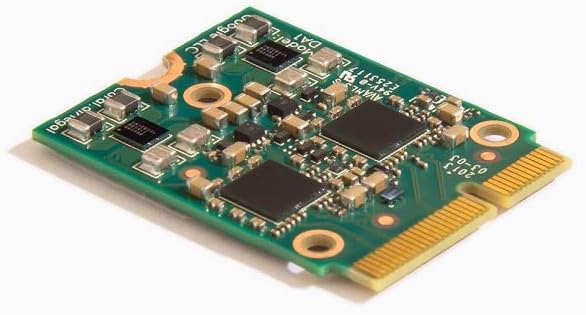
The G650 Coral M.2 Accelerator delivers impressive capabilities at a very accessible price point making it a top choice for budget conscious developers. It integrates seamlessly with Debian based systems for easy setup.
We may earn a commission when you buy through this link, at no additional cost to you.
Its on board Edge TPU coprocessor handles machine learning inferencing efficiently capable of running models like MobileNet v2 at high frame rates. This ensures real time performance without excessive power draw.
While it excels in efficiency users should note that it is optimized for TensorFlow Lite models rather than custom trained models from scratch. This simplifies deployment but may limit flexibility for unique architectures.
For those starting with edge AI projects this accelerator offers a reliable and cost effective entry point. Its strong compatibility with common Linux distributions makes it a versatile choice for many applications.
The Edge TPU processes operations at high speed while consuming minimal energy per operation.
It works effortlessly with Debian based systems allowing quick deployment of AI tasks.
We may earn a commission when you buy through this link, at no additional cost to you.
This expansion card is designed for users needing to boost both storage and network capabilities on their systems. It provides slots for high speed NVMe drives alongside a dedicated 10GbE port.
We may earn a commission when you buy through this link, at no additional cost to you.
The inclusion of a Marvell Ethernet controller ensures robust connectivity options for data heavy applications. It supports various operating systems including Windows and Linux offering broad utility.
While primarily for storage and networking it can facilitate faster data access for AI workloads requiring massive datasets. However it lacks dedicated AI processing silicon found in other accelerator cards.
Buyers looking to enhance server or workstation I/O will find this card highly functional. It addresses bottlenecks in data transfer which indirectly supports smoother overall system performance.
Connecting high speed NVMe SSDs reduces load times and improves data access for processing.
The 10GbE port allows rapid data transfer over local networks for efficient backups.
We may earn a commission when you buy through this link, at no additional cost to you.
The Rocket 1604L brings next generation storage speeds to systems equipped with PCIe 5.0 slots. It supports four M.2 NVMe drives with dedicated lanes for each ensuring no bandwidth sharing bottlenecks.
We may earn a commission when you buy through this link, at no additional cost to you.
Its design ensures compatibility with mainstream operating systems and various platforms including Intel and AMD. This makes it a flexible choice for expanding storage capacity without sacrificing performance.
Users must ensure their motherboard supports PCIe 5.0 to fully utilize this card's capabilities. Without this support the speeds will revert to lower generations which might not justify the investment.
For users building high performance workstations this card offers a robust way to expand storage. It is ideal for handling large datasets quickly which is essential for intensive computing tasks.
Supporting PCIe 5.0 allows for ultra fast data transfers matching the latest SSD speeds.
Each M.2 slot gets its own dedicated lanes preventing bandwidth contention between drives.
We may earn a commission when you buy through this link, at no additional cost to you.
This adapter transforms a single PCIe slot into a dual accelerator workstation allowing two Edge TPU cards to operate simultaneously. It is designed for developers needing scalable machine learning power.
We may earn a commission when you buy through this link, at no additional cost to you.
The lane splitter enables dual TPU performance without taking up multiple physical slots in your chassis. A built in heatsink ensures both cards stay cool during sustained inference workloads.
Users should be aware that splitting lanes may reduce per card bandwidth but is acceptable for most AI inference tasks. It is a practical way to scale performance without buying a new system.
For those already invested in Coral TPU hardware this adapter maximizes the return on existing devices. It offers a straightforward path to doubling your local AI capabilities.
Running two TPUs allows for processing more complex or multiple models at the same time.
The included heatsink helps maintain optimal temperatures for consistent performance.
We may earn a commission when you buy through this link, at no additional cost to you.
This card delivers server grade performance for high volume data storage with support for up to four NVMe drives. It utilizes PCIe 5.0 technology to provide incredibly fast throughput rates.
We may earn a commission when you buy through this link, at no additional cost to you.
Thermal management is handled by a large heatsink and active fan ensuring that SSDs do not throttle during heavy loads. It supports RAID functions across different platforms creating bootable arrays easily.
The high bandwidth capability is beneficial for applications requiring rapid access to large datasets like video editing or AI. However it requires a robust power supply and full size PCIe slot.
Users seeking to build a high performance storage array will find this adapter extremely capable. It balances speed and reliability making it a strong choice for demanding professional workloads.
Active cooling with thermal pads keeps drive temperatures low for uninterrupted high speed transfers.
Support for RAID functions allows combining multiple drives for speed or redundancy.
We may earn a commission when you buy through this link, at no additional cost to you.
The waveshare Hailo-8 Module offers exceptional raw processing power capable of handling complex AI inference at 26 TOPS. It is designed for scalable processing of multiple streams simultaneously.
We may earn a commission when you buy through this link, at no additional cost to you.
Its support for various frameworks like TensorFlow and PyTorch allows developers flexibility in model deployment. The module operates across a wide temperature range making it suitable for industrial environments.
While the high performance comes at a premium price it justifies itself for professional applications requiring speed and reliability. It may be more than what a casual hobbyist needs.
This module is ideal for professionals requiring high throughput and versatility in their AI projects. Its robust design ensures stable performance even in challenging conditions.
The 26 TOPS capability ensures rapid processing of advanced vision models for real-time needs.
Compatibility with major frameworks simplifies integrating existing models into your workflows.
We may earn a commission when you buy through this link, at no additional cost to you.
This accelerator integrates the Edge TPU for delivering reliable machine learning inference in a compact form factor. It is optimized for embedded systems and projects with specific power constraints.
We may earn a commission when you buy through this link, at no additional cost to you.
The A+E key interface allows easy integration into many existing systems ensuring broad compatibility across platforms. Its industrial grade design ensures reliable operation in challenging environmental conditions.
While it delivers solid performance for typical vision models users should ensure their system supports the specific key type. The low power design makes it suitable for battery powered applications.
For embedded developers needing robust AI capabilities this card provides a balanced solution. It combines performance with reliability making it a trusted choice for field deployments.
Designed to integrate smoothly into existing embedded systems for streamlined deployment.
Built to withstand harsh environments ensuring long term reliability in various settings.
We may earn a commission when you buy through this link, at no additional cost to you.
This adapter is designed to maximize the AI inference performance of dual Coral TPU modules. It provides a stable interface for connecting these specific accelerator cards to your system.
We may earn a commission when you buy through this link, at no additional cost to you.
It includes a mounting screw for vibration resistant fixation ensuring secure connections even in moving environments. The bidirectional bandwidth supports efficient data transfer between the host and the TPUs.
Users must note that this adapter is exclusively for dual TPU modules and not compatible with Raspberry Pi CM4 which prevents potential setup errors. It is a specific solution for specific hardware.
Those building custom AI workstations will find this adapter essential for stable TPU operation. Its focused design ensures compatibility and reliability for dedicated machine learning tasks.
Includes mounting hardware to ensure secure connections during operation in various environments.
Bidirectional bandwidth ensures data moves smoothly between the system and accelerator.
We may earn a commission when you buy through this link, at no additional cost to you.
Choosing the right accelerator requires balancing performance needs with physical constraints and software requirements.
Determine the complexity of models you need to run locally. Some cards offer 4 TOPS while others reach 26 TOPS or more for heavier workloads.
Higher processing power ensures faster inference times for complex models and multiple streams.
Check your motherboard for available M.2 slots and their key type such as M key or A+E key. Some cards are designed for standard 2280 while others are 2230.
Ensuring physical fit prevents installation issues and guarantees proper connection to your system.
Verify that the card supports your preferred operating system like Linux or Windows. Some accelerators are Linux only while others offer cross platform support.
Matching OS support simplifies driver installation and model deployment for your specific environment.
Look for cards that offer high operations per watt if you are building embedded or battery powered systems. Low power designs help maintain system thermal stability.
Energy efficient cards reduce the load on your power supply and cooling requirements.
A comprehensive SDK simplifies the development process and model deployment. Check if the manufacturer provides clear documentation and tools for your framework of choice.
Good software support reduces development time and helps resolve potential integration issues faster.
Consider whether you need a single accelerator or a setup that supports multiple units via adapters. Some PCIe adapters allow running two TPUs simultaneously for more power.
Planning for scalability ensures your hardware remains useful as your project complexity grows.
Cards used in continuous operations may require active cooling or large heatsinks to prevent throttling. Check if the card includes thermal pads or fans.
Proper cooling maintains consistent performance speeds during sustained inference workloads over long periods.
Compare the performance per dollar of each card to find the best fit for your budget. Higher priced cards often offer specific premium features like higher TOPS or better software support.
Balancing cost with actual needs ensures you get the necessary capabilities without overspending on unused features.
Install the card into the correct M.2 slot on your motherboard securing it with the appropriate screw. Ensure the key orientation matches the slot to avoid connection issues.
Install the necessary drivers and SDK tools provided by the manufacturer to enable communication with the hardware. Restart your system to ensure the OS detects the new device.
Keep the card clean from dust and ensure adequate airflow around the heatsink if no active fan is included. Periodically check for firmware updates to maintain optimal performance.
These cards are designed to offload intensive AI and machine learning tasks from the main CPU. They enable faster local inference and reduce reliance on cloud computing resources.
While some models support Windows specifically others are optimized for Linux operating systems. Always check the compatibility details before purchasing to match your environment.
Yes most accelerators require specific software development kits to compile and run models. These tools translate your models to formats optimized for the hardware.
Refer to your motherboard manual to identify the supported key types such as M key or A+E key. Physical mismatch will prevent the card from fitting into the slot.
These cards are primarily designed for inference rather than training. Training typically requires GPUs with higher memory and floating point capabilities.
Using adapters or PCIe slots you can run multiple accelerators to increase processing power. This setup requires compatible lane splits and sufficient system resources.
Selecting the right M2 Accelerator Card depends on balancing your specific performance needs with hardware constraints. Whether you need high throughput or compact integration there is a model that fits.
Prioritize compatibility with your operating system and physical hardware to avoid setup complications. Ensuring software support aligns with your development workflow is equally important.
Keep in mind that availability and pricing can change so verify current details before purchasing. Investing in the right accelerator ensures your projects run efficiently for years to come.